
Instagram affiliate links are trackable URLs placed in Reels, Stories, bio, or DMs that earn the creator a commission when a follower clicks through and buys. As of April 2026, Instagram supports native affiliate product tagging in Reels (up to 30 products per Reel), link stickers in Stories (available to all accounts), up to 5 direct links in bio, and automated DM delivery through tools like CreatorFlow ($15/month). Meta takes no commission cut from affiliate sales through Reels product tags.
You post a Reel showing your favorite skincare products. 200 people comment “link please.” You’re asleep. By morning, most of them have moved on to the next creator. The buying intent that could have been $500+ in affiliate commissions evaporated overnight because you weren’t there to reply.
Instagram now gives you four places to put affiliate links, and each one captures a different type of buyer. This guide covers every placement with step-by-step setup, the FTC disclosure rules that keep you compliant, and how DM automation turns comment sections into conversion machines while you sleep.
Key Takeaways
- Four placements available: Reels (native product tags, new in 2026), Stories (link stickers), bio (up to 5 links), and DMs (via automation tools)
- Reels product tagging is new: Creators with 1,000+ followers can tag up to 30 affiliate products per Reel directly on the share screen. Meta takes no commission cut (Retail Brew, March 2026)
- Stories link stickers have no follower minimum: Instagram removed the 10K requirement in 2021. Every account can use them
- Feed posts still have no clickable links: Captions render URLs as plain text. Comment-to-DM automation solves this by delivering the link directly
- FTC disclosure is mandatory: “#ad” or clear affiliate language required on all formats. Penalties up to $53,088 per violation (16 CFR 1.98, 2026)
- DM automation captures missed clicks: Bio links get 0.5-2% CTR. DM-delivered links get 30%+ click rates. The gap is 15x (Tapmy.store, InstantDM benchmarks, April 2026)

Every Place You Can Put Affiliate Links on Instagram
Instagram has four placements where affiliate links work. Each one serves a different part of the buying journey and captures a different type of buyer.
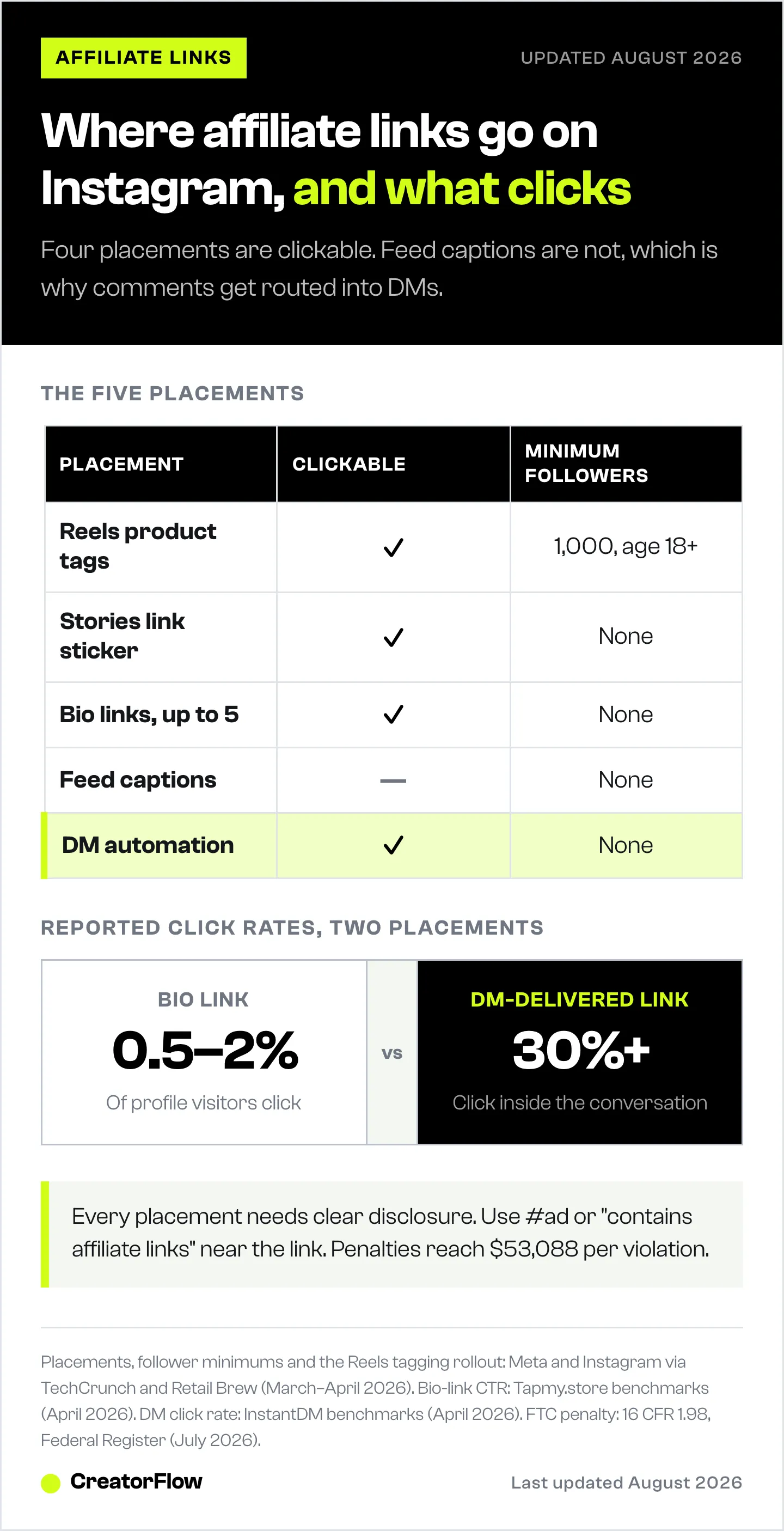
| Placement | Clickable? | Who Sees It | Best For | Follower Requirement |
|---|---|---|---|---|
| Reels (product tags) | Yes | Anyone who sees the Reel | Reaching new audiences | 1,000+ followers, 18+ |
| Stories (link sticker) | Yes | Followers + shared views | Converting warm audiences | None |
| Bio (direct links) | Yes | Profile visitors | Passive, always-on traffic | None |
| Feed posts (caption) | No | Followers + Explore | Pair with DM automation | None |
| DMs (automation) | Yes | Anyone who triggers it | Highest conversion rate | None |
The smart play: use them as a system. Reels reach people who’ve never heard of you. Stories convert followers who already trust you. Bio catches anyone who visits your profile. DM automation handles everyone who comments asking for the link.
How to Add Affiliate Links to Instagram Reels (New in 2026)
Native affiliate tagging in Reels is Instagram’s biggest commerce update since Shopping tags launched in 2022. Creators can embed product links directly inside a Reel at upload. Viewers tap the tag and land on the product page. No bio redirect. No extra steps.
Adam Mosseri announced the feature in April 2026: “You can now use affiliate links to tag products in your reels and earn a commission when people shop your content” (instagram.com/@mosseri, April 2026). Meta first revealed the feature at Shoptalk on March 24-25, 2026 (Retail Brew, March 24, 2026).
Who can use it: Creators aged 18 or older with at least 1,000 followers. The feature is rolling out in phases through spring 2026 in the US, Brazil, India, Indonesia, Thailand, and expanding to 22 commerce markets (TechCrunch, March 25, 2026). If the option isn’t visible on your account yet, it hasn’t rolled out to you.
Step-by-step setup:
- Record or import your Reel as normal in the Instagram app
- Edit your Reel and proceed to the share screen (where you write your caption)
- Tap “Add Products” below the caption field. No button = feature not active on your account yet
- Choose your method: paste your affiliate product URL directly, or tap “Search brand” and type the brand’s Instagram handle to browse their catalog
- Select the specific product. It must be listed in a verified Meta commerce catalog with an active price
- Repeat for additional products. You can tag up to 30 products per Reel
- Share the Reel. Product tags appear as floating labels viewers can tap
What viewers see: Tappable product labels on the Reel, similar to Shopping tags on feed posts. One tap goes straight to the product page.
Bonus visibility: Reels with affiliate product tags appear in Instagram’s Partnership Ads Hub. Brands can run your tagged Reel as a paid ad, reaching audiences far beyond your followers, without you doing anything extra (Hello Partner, April 8, 2026).
Key limitation: Products must exist in a verified Meta commerce catalog. If a brand hasn’t uploaded their inventory to Meta’s catalog system, you can’t tag their products even if you have an affiliate link. This matters for smaller brands or niche products not yet in Meta’s system.
Meta takes no commission. Your full affiliate commission comes from the brand’s program (Amazon Associates, LTK, ShareASale, etc.). Meta collects shopping behavior data instead of taking a cut (Engadget, March 2026).
How to Add Affiliate Links to Instagram Stories
Stories link stickers convert better than any other organic placement for warm audiences. The format is personal, the tap-to-link action is natural, and every account can use them.
Instagram removed the 10,000-follower requirement in late 2021 when it replaced swipe-up with link stickers (Buffer, Hootsuite, April 2026). Whether you have 500 followers or 500,000, link stickers work.
Step-by-step setup:
- Open Instagram Stories (tap the camera icon or swipe right from feed)
- Take a photo, record a video, or upload from your gallery
- Tap the sticker icon (square smiley face at the top)
- Select “Link” from the sticker tray
- Paste your affiliate URL. Add custom display text like “Shop here” or the product name
- Position the sticker on your Story. Tap it to cycle through style variations
- Add a clear CTA as text overlay telling viewers to tap the link
- Share the Story
Stories disappear after 24 hours. Save any affiliate Story to a Highlight so it stays on your profile permanently. Group Highlights by product category (Skincare Picks, Kitchen Must-Haves, Workout Gear) so visitors can browse your recommendations without you reposting.
Performance benchmarks: Stories with interactive stickers (polls, countdowns) before the link sticker see 30-50% higher tap rates than Stories with the link sticker alone (Tapmy.store, April 2026). Lead with engagement, then deliver the link.
Pro tip: Post a Story poll first (“Would you try this product?”), then follow up with the affiliate link Story. The poll primes engagement and the algorithm shows your next Story to more people.
How to Add Affiliate Links to Your Instagram Bio
Your bio is the one placement that’s always visible, regardless of what you’re posting. Anyone who visits your profile after seeing a Reel, Story, or feed post lands here.
Instagram now supports up to 5 direct links in the bio (Linktree, April 2026). No follower requirement. If you need more than 5, a link-in-bio tool like Linktree, Beacons, or Later creates a single URL that opens a mini-page with unlimited links.
Step-by-step setup:
- Go to your profile and tap “Edit Profile”
- Tap “Links” (replaced the old single Website field)
- Tap “Add external link” and paste your affiliate URL
- Add a title for the link. Make it descriptive: “My Skincare Routine (Amazon)” not a raw URL
- Repeat for up to 4 more links
- Save your changes
Make bio links work harder: Rotate your top link to match your current best-performing content. Mention in captions and Stories which link is currently relevant (“the link in my bio is the exact product I used”). A rotating top link consistently outperforms a static set of 5 that nobody updates.
Reality check: Bio links get 0.5-2% CTR (Tapmy.store benchmarks, April 2026). That means for every 1,000 profile visitors, 5-20 people click. It’s passive income, not a conversion engine. For higher conversion, pair bio links with DM automation.
Affiliate Links in Feed Posts and Carousels
Feed posts and carousels can’t contain clickable affiliate links. Typing a URL into a caption produces plain text. This hasn’t changed in 2026.
Two workarounds that don’t require automation:
Promo codes. If your affiliate program provides a unique discount code, put it directly in the caption. Codes are readable, memorable, and trackable without a clickable link. They work across every format and survive screenshots and reposts.
Pinned post with bio redirect. Pin the post to your profile and direct viewers to the bio link in the caption. Profile visitors see it immediately alongside your bio links.
But the highest-converting option? DM automation. Instead of hoping people navigate to your bio, you bring the link to them.
How DM Automation Turns Every Post into an Affiliate Link Machine
This is where the math changes. Bio links get 0.5-2% CTR. Story stickers get 0.5-3%. DM-delivered affiliate links get 30%+ click rates within the conversation (InstantDM benchmarks, April 2026). The gap exists because DMs land directly in someone’s inbox after they asked for the link. Zero friction.
How it works with CreatorFlow:
- Before posting, set up a comment-to-DM automation in CreatorFlow
- Choose your trigger keywords: “link,” “shop,” “price,” “send,” or anything relevant
- Write your DM with the affiliate link and any context (discount codes, product details)
- Post your content with a CTA: “Comment LINK and I’ll send it to your DMs”
- CreatorFlow delivers the affiliate link to every commenter within seconds, 24/7
Someone comments “link” at 3am? They get your affiliate URL in 8 seconds. You wake up to a comment section full of buyers who already received the link and clicked through.
Why this converts better than every other placement:
- Bio links: Require 6 steps (see post > read caption > go to profile > find link > tap > buy). Each step loses 40-60% of people
- Story stickers: Only reach existing followers. Gone in 24 hours
- Reels tags: Only work for products in Meta’s catalog
- DM automation: 2 steps (comment trigger word > receive link in DM). Works on every post type, forever
For a detailed breakdown of how DM-delivered links outperform bio links for affiliate creators, see our bio link vs DM automation comparison.
CreatorFlow setup takes under 5 minutes. Connect your Instagram account through Meta’s official API (no password sharing), set your trigger words, write your message, activate. The complete DM automation guide walks through every step.
Email Capture Before the Link
The advanced move: ask for the commenter’s email before sending the affiliate link. CreatorFlow’s Email Gate feature collects email addresses within the DM conversation, then delivers the link.
Why this matters: Instagram owns your audience. If your account gets restricted tomorrow, your follower list is gone. An email list is yours forever. Creators using email gates through DM automation capture emails at rates well above typical landing page opt-in rates (CreatorFlow user data, April 2026).
For the full email capture strategy, see how to collect emails from Instagram DMs.
Best Affiliate Programs for Instagram Creators
Not all affiliate programs pay the same. Here’s what’s available as of May 2026:
| Program | Commission | Cookie Duration | Best For |
|---|---|---|---|
| Amazon Associates | 1-20% (most categories 1-10%) | 24 hours | Beginners, general products |
| LTK (RewardStyle) | 10-25% (varies by brand) | Varies by retailer | Fashion, beauty, lifestyle |
| ShareASale (now AWIN) | Varies across 30,000+ merchants | Varies | Multi-niche creators |
| CJ Affiliate | Varies by brand | Varies | Established audiences |
| Mavely | Up to 30% (some brands higher) | Varies by brand | Nano/micro-influencers |
(Amazon Associates rates from Shopify, LTK estimates from industry sources, Mavely from joinmavely.com. All accessed April 12, 2026.)
Retailer-run programs are structured differently again. Walmart Creator uses a 14-day window that pays on the shopper’s whole basket, and Target runs three separate creator programs with different follower minimums.
Notable 2026 changes:
- ShareASale was acquired by AWIN in late 2025 and is being consolidated under the AWIN brand (UpPromote, April 2026)
- Later acquired Mavely for $250M in January 2025 and launched “Mavely Boosts” with 3x commission potential and no follower requirements (Netinfluencer, April 2026)
For Amazon-specific automation strategies, see our guide on Instagram DM automation for Amazon influencers. If you’re scaling past $3K/month in commissions, the affiliate marketing scaling guide covers the 5-stage framework. Travel creators monetizing hotel recommendations should read the Booking.com affiliate playbook for Instagram DMs, and fashion creators can map their full setup with the fashion creator tool stack. For the cross-platform version of this playbook, see how to create affiliate links across every social platform.
FTC Disclosure Rules for Instagram Affiliate Links
The FTC requires clear disclosure whenever you earn a commission from a recommendation. This applies to every format: Reels, Stories, bio, feed posts, and DMs (FTC.gov, Disclosures 101 for Social Media Influencers, accessed April 12, 2026).
Working with affiliate creators? We keep a dedicated setup page for exactly that: CreatorFlow for affiliate creators.
What’s required:
- Disclosure must be “clear and conspicuous” and difficult to miss
- Must appear within the content itself, near the affiliate link
- Feed posts: above the “Read more” fold
- Stories/Reels: superimposed on the image/video with enough display time to read
- Video content: verbal disclosure in addition to text
Acceptable disclosure language:
- #ad
- #sponsored
- “This post contains affiliate links”
- “I earn a commission if you buy through my link”
Not acceptable (too vague):
- #sp, #spon, #collab, #ambassador
- Burying disclosure at the end of 30 hashtags
- Only using Instagram’s “Paid partnership” label without your own disclosure
Penalties: Up to $53,088 per violation as of 2026, with no inflation adjustment applied for the year (16 CFR 1.98; Federal Register, July 2026).
Practical approach: Add “affiliate link” or “#ad” to every caption, Story, and DM template that includes an affiliate URL. It takes 2 seconds and protects your income. When using DM automation, include disclosure language in your automated message template.
Which Placement Strategy Works Best?
The right strategy depends on your audience size and content format:
Under 1,000 followers (can’t use Reels tags yet):
- Stories link stickers for warm audience conversion
- Bio links for passive traffic
- DM automation for every post with a “comment LINK” CTA
1,000-10,000 followers:
- Reels product tags for discovery and reaching new audiences
- Stories for time-sensitive promotions and launches
- DM automation to capture everyone who comments but doesn’t tap
10,000+ followers:
- All four placements working together as a system
- Reels tags handle the impulse tap
- DM automation handles the “where is this from?” comments
- Stories convert warm followers on launches
- Bio catches profile visitors
The combination matters more than any single placement. Reels tags capture impulse buyers. DM automation captures everyone who engaged but didn’t tap. Stories convert existing followers. Bio catches profile visitors. Together, they cover every buying behavior. To decide which programs are worth the placements in the first place, weigh Instagram affiliate marketing programs by delivery and payout duration.
FAQ
Is it free to add affiliate links on Instagram?
Yes. Link stickers in Stories, bio links, and native product tagging in Reels all cost nothing. Meta confirmed it is not taking a commission from affiliate sales through Reels product tags (Engadget, March 2026). Your commission comes entirely from the brand’s affiliate program. DM automation tools like CreatorFlow start at $0/month (500 free DMs) with paid plans at $15/month.
How many followers do you need for affiliate links on Instagram?
Story link stickers and bio links have no follower requirement. Native affiliate product tagging in Reels requires at least 1,000 followers and age 18+ (Instagram, April 2026). DM automation through tools like CreatorFlow works with any account size connected through Meta’s official API.
Can you put affiliate links in Instagram captions?
No. URLs typed in feed post captions render as plain text and aren’t clickable. This hasn’t changed in 2026. Your options: use a promo code in the caption, direct viewers to a bio link, or use comment-to-DM automation to deliver the link when someone comments a trigger word. This delivery method is the backbone of shoppable content for creators on Instagram.
Do you need to disclose affiliate links on Instagram?
Yes. FTC guidelines require clear disclosure whenever you earn a commission. Use “#ad” or “This post contains affiliate links” in every format. Disclosure must be visible and near the affiliate link, not buried at the end of hashtags. Penalties can reach $53,088 per violation (16 CFR 1.98, 2026).
Why is the “Add Products” option not showing on my Reel?
The native affiliate tagging feature is rolling out in phases through spring 2026. If you don’t see it on your share screen, your account isn’t included yet. Confirm you meet eligibility (1,000+ followers, age 18+) and check back as the rollout expands to more markets.
What’s the best affiliate program for Instagram beginners?
Amazon Associates is the easiest starting point: massive product catalog, trusted brand, and 1-20% commissions depending on category. The 24-hour cookie is short, but the conversion rate is high because people already trust Amazon checkout. Mavely is another beginner-friendly option with no follower requirements and commissions up to 30% (joinmavely.com, April 2026).
How does DM automation work with affiliate links?
You set a trigger keyword (like “link” or “shop”) in a tool like CreatorFlow. When someone comments that word on your post, they automatically receive a DM with your affiliate link within seconds. This works 24/7 through Meta’s official Instagram Graph API. The complete setup guide covers the process in 5 minutes.
Does Meta take a cut from Instagram affiliate sales?
No. As of April 2026, Meta does not take a commission from affiliate sales generated through Reels product tags or any other Instagram placement (Retail Brew, March 2026). Meta benefits from the shopping behavior data, which feeds its ad business. This could change in the future, but no commission structure has been announced.


