
To create affiliate links for social media, join an affiliate program or network, find the product you want to promote, and paste its URL into the program’s link generator to get a trackable link tied to your account. Add a SubID or UTM tag so you know which post earned, then place the link where the platform allows a clickable one. On Instagram, that means delivering it by DM.
Here is the part nobody tells you: making the link takes five minutes. Getting it in front of a buyer the second they want it is where the money lives or dies. You post a Reel, 200 people comment “link please,” and by the time you copy-paste your way through the first 20 replies, the rest have scrolled on. The link was never the hard part.
This guide walks through the four steps to create an affiliate link, where a clickable link actually works on Instagram, TikTok, Pinterest, and YouTube, the mistakes that quietly kill your commissions, and how to deliver the link automatically so no request goes unanswered. It is written for creators starting from zero.
Key Takeaways
- Four steps to create a link: join a program or network, generate a trackable URL, add a SubID or UTM tag, then place it where the platform allows a click.
- Creating the link is free: Amazon Associates, LTK, ShareASale (now AWIN), Impact, ShopMy, and Mavely all cost nothing to join and generate links.
- Placement rules differ by platform: Instagram and TikTok captions are not clickable, Pinterest lets every pin carry a direct link, and YouTube allows links in the description.
- Delivery beats placement: bio links convert about 0.5-2% of profile visitors, while a link sent by DM the moment someone asks converts far higher within that conversation (Tapmy.store, InstantDM benchmarks, 2026).
- Disclosure is mandatory: the FTC requires clear language like “#ad” near the link. Penalties reach $53,088 per violation (federalregister.gov, 2026).
- Skip the link cloakers: Pinterest forbids cloaked or shortened affiliate URLs and can remove pins or suspend accounts for using them (policy.pinterest.com, 2026).

What Is an Affiliate Link?
An affiliate link is a normal product URL with a unique tracking ID attached to it. That ID tells the merchant which creator sent the visitor, so any resulting sale is credited to you. The buyer sees the same product at the same price. The only difference is the invisible label that says the visit came from you, which is what earns the commission.
The tracking runs on a cookie and an attribution window. When a follower clicks, a small file is stored on their device recording that you sent them. If they buy inside the window, you get paid. Amazon’s window is 24 hours, while other programs run 7, 30, or even 90 days. For the full mechanics of how tracking, cookies, and returns work, see what affiliate links are and how they pay creators.
How to Create Affiliate Links for Social Media in 4 Steps
Creating the link is the simple part. Four steps take you from “no link” to “trackable URL ready to share,” and most creators do the whole thing from their phone.
Step 1: Join an affiliate program or network
You cannot generate a link until you have access to a brand’s program. There are three routes, and most creators use more than one.
- Individual brand programs. You apply to one company and pull links from their dashboard. Amazon Associates is the usual starting point because almost everything is on Amazon.
- Affiliate networks. One login connects you to hundreds of merchants with a single payout. ShareASale (now part of AWIN), Impact, and CJ Affiliate work this way.
- Creator-first platforms. Built for social, mobile-friendly, and often no follower minimum. LTK, ShopMy, and Mavely fit here.
- SaaS and creator-tool programs. Software you already use often runs its own recurring program; promoting a tool like CreatorFlow pays a share of every payment the referral makes, not a one-time fee.
Here is what the main options pay, verified from public program pages:
| Program | Commission | Cookie window | Best for |
|---|---|---|---|
| Amazon Associates | 1-20% (most categories 1-10%) | 24 hours | Beginners, huge catalog |
| LTK (RewardStyle) | Varies by brand, often 10-25% | Varies by retailer | Fashion, beauty, lifestyle |
| ShareASale (AWIN) | Varies across thousands of merchants | Varies | Multi-niche creators |
| Impact | Varies by brand | Varies | Established brand programs |
| Mavely | Base commission plus monthly bonuses | Varies by brand | Nano and micro creators, no follower minimum |
(Amazon rates from affiliate-program.amazon.com, 2026. Mavely connects creators with more than 1,400 brands and has paid millions in creator commissions since Later acquired it for $250M in January 2025, per Later, 2026. All accessed July 2026.)
Not sure which to pick? The affiliate platform payouts compared breakdown lines up LTK, ShopMy, Mavely, and Amazon on commission and payout speed so you can choose before you generate a single link.
Step 2: Generate your trackable link
Once you are approved, find the exact product on the brand’s website and copy the standard page URL from your browser. Paste that URL into your program’s link generator. The tool returns a trackable version that credits sales back to you, often shortened so it looks cleaner in a caption or DM.
Most networks also offer a browser extension or mobile app that builds the link without leaving the product page. Before you share it, click your own link once and confirm it lands on the right product. A broken or expired link sends buyers to a dead page and you earn nothing.
Step 3: Add a SubID or UTM tag
This is the step most beginners skip, and it is the one that tells you which post actually made money. Two different tags do two different jobs, so it helps to know which is which.
- SubID. A custom label you attach inside the affiliate network’s own link, like “ig-stories-july.” It shows up in the network’s earnings report so you can see which placement drove each sale.
- UTM tag. A parameter like utm_source=instagram that your own analytics or link-tracking tool reads. Use it when you route clicks through a landing page or a tool that reports geography and click counts.
Keep the naming simple and consistent. “tiktok-bio” and “pin-summer” are enough. When commissions land weeks later, those tags are the difference between knowing what worked and guessing.
Step 4: Place or deliver the link
A link buried in a caption nobody can tap earns nothing. The final step is putting the link somewhere a follower can actually click, and each platform has its own rules for where that is. The next two sections cover placement and the delivery method that outperforms all of them.
Choosing which program to generate links from in the first place is a separate decision: see affiliate programs for Instagram compared on commission, follower minimum, and payout threshold.
Where Clickable Affiliate Links Work on Each Platform
Every platform handles external links differently, and the rule that catches creators out is that most in-feed captions are not clickable. Instagram and TikTok both block tappable links in post and video captions. Pinterest is the exception, where every pin carries a direct link. Knowing the map before you post saves you from sending buyers nowhere.
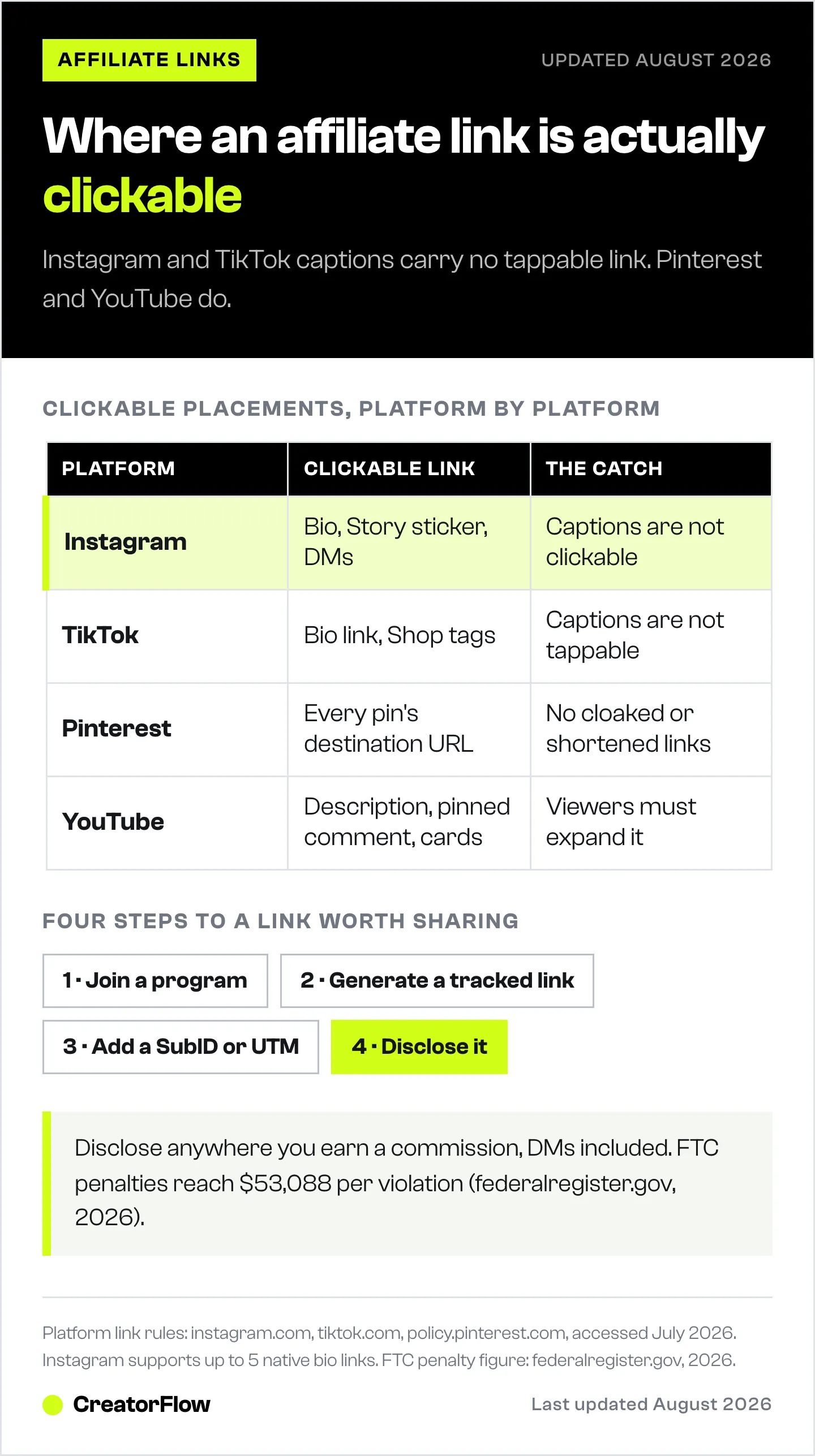
| Platform | Where a clickable link works | The catch |
|---|---|---|
| Bio (up to 5 links), Story link sticker, Highlights, DMs | Feed and Reel captions are not clickable | |
| TikTok | Bio link (Business account, one link), TikTok Shop tags | Captions and comments are not tappable links |
| Every pin’s destination URL | No cloaked or shortened links allowed | |
| YouTube | Video description, pinned comment, cards | Viewers must expand or scroll to reach it |
Instagram now supports up to 5 native bio links, added through Edit Profile then Links (instagram.com, 2026). Only the first shows by default and the rest collapse behind a dropdown. Story link stickers have no follower minimum, and native affiliate product tags in Reels rolled out through spring 2026 for accounts with 1,000-plus followers. For a placement-by-placement walkthrough, see how to add affiliate links on Instagram.
TikTok gives you a clickable bio link the moment you switch to a free Business account, with no follower threshold, but you only get one link (tiktok.com, 2026). Direct viewers to it verbally and with on-screen text, since the app will not make a caption link tappable.
Pinterest is the friendliest surface for direct links because the destination URL on every pin is clickable. The trade-off: Pinterest bans cloaked and shortened affiliate URLs and treats them as deceptive, which can get pins removed or an account suspended (policy.pinterest.com, 2026). Paste the raw tracked link and disclose it in the description.
Why Affiliate Links Die in the Instagram Caption
The reason your links underperform is rarely the product. It is the number of taps between seeing your content and reaching checkout. A bio link asks a follower to leave the post, open your profile, find the right link, tap it, then buy. Each step loses people. A DM lands the link in their inbox the second they ask, so the buying impulse and the link arrive together.
The gap between placements is large, and it shows up in the click-through data:
| Placement | Typical click-through | Why |
|---|---|---|
| Bio link | 0.5-2% of profile visitors | Six taps between the post and the buy |
| Story link sticker | 0.5-3% of viewers | Gone in 24 hours, followers only |
| Link sent by DM on request | Far higher within the conversation | Arrives the instant they ask |
Those benchmarks come from published creator-tool data (Tapmy.store, InstantDM, 2026). The takeaway is simple: placement is passive and delivery is active. If you want more on the split, the bio link versus DM delivery breakdown runs the numbers for affiliate creators.
How to Deliver Affiliate Links by DM Automatically
Delivery only works if it happens the moment someone asks, and no one can DM 200 commenters by hand fast enough. A comment-to-DM tool watches your posts for a trigger word and sends the link automatically, in seconds, day or night. CreatorFlow does this through Meta’s official Instagram API, so there is no password sharing and minimal ban risk.
Here is the setup, which takes under five minutes:
- Connect your Instagram Business or Creator account to CreatorFlow through Meta’s official API.
- Pick a trigger word buyers will type, like “link,” “shop,” or the product name.
- Write the DM with your affiliate link and a one-line disclosure such as “affiliate link.”
- Post your content with a clear call to action: “Comment LINK and I’ll send it to your DMs.”
- Activate. Every commenter now gets the link within seconds, and you wake up to a comment section that already received it.
The advanced move is to collect the follower’s email before the link lands. CreatorFlow’s Email Gate captures the address inside the DM, which builds a list you own even if your account is ever restricted. You can also gate the link behind a follow and watch which posts drive the most clicks by country. For the full build, see the Instagram DM automation setup guide, and for the copy that triggers those requests, the comment-to-DM automation walkthrough.
Affiliate Link Mistakes That Quietly Cost You Commissions
Most lost affiliate income does not come from bad products. It comes from small setup mistakes that leak clicks and break tracking. These are the ones worth fixing first.
- Sending buyers to a logged-out browser. Instagram and TikTok open links in their own in-app browser, where shoppers are often logged out of the store. A logged-out Amazon shopper is far more likely to abandon. An Amazon deep link that opens the native app keeps them logged in and cuts the friction.
- Cloaking or shortening links where it is banned. Pinterest forbids cloaked and shortened affiliate URLs (policy.pinterest.com, 2026). Use the raw tracked link on pins.
- One link everywhere with no SubID. If you paste the same untagged link on every platform, you never learn which one sells. Tag by placement.
- Distributing by bio only. Bio links are passive income, not a conversion engine. Pair them with DM delivery so the followers who ask actually get the link.
- Skipping disclosure. No “#ad” or “affiliate link” near the URL puts your income and the brand relationship at risk. It is a two-second fix.
FTC Disclosure Rules for Affiliate Links
The FTC requires clear disclosure any time you earn a commission from a recommendation, on every platform and in every format including DMs. The disclosure has to be easy to see and placed near the link, not buried under a wall of hashtags. Acceptable language includes “#ad,” “#affiliate,” or “I earn a commission if you buy through my link.” An affiliate link on its own does not count as disclosure.
Vague tags like “#sp,” “#collab,” or “#ambassador” are not enough, and hiding the disclosure behind a “more” fold fails the standard. Penalties run up to $53,088 per violation, a figure the FTC adjusts for inflation (federalregister.gov, 2026). When you automate delivery, put the disclosure right in the DM template so every message ships compliant. The deeper rules live in the Instagram affiliate disclosure and FTC guide.
Making the link is step one. Getting it to a buyer the instant they ask is what turns an affiliate link into income.
FAQ
How do I create an affiliate link for free?
Every major program is free to join and generate links. Sign up for Amazon Associates, LTK, ShareASale (AWIN), Impact, ShopMy, or Mavely, get approved, then paste a product URL into the program’s link generator to get your tracked link. There is no cost to create or share affiliate links. You only ever earn a percentage of sales you drive.
Can you put affiliate links in Instagram or TikTok captions?
No. URLs typed into Instagram feed captions, Reel captions, or TikTok video captions render as plain text and are not clickable. Use your bio link, a Story link sticker, or DM delivery on Instagram, and your bio link or TikTok Shop on TikTok. On Instagram, sending the link by DM when someone comments a trigger word converts best.
How do I create an affiliate link without a website?
You do not need a website. Most affiliate programs and creator platforms approve social-only creators and generate links from a phone app or browser extension. Join a program, grab a product URL, and generate your tracked link. Then share it through your bio, Stories, pins, or automated DMs rather than a blog.
What is the best way to share affiliate links on social media?
It depends on where your audience acts. Pinterest and YouTube let you post a direct link, so use it. On Instagram and TikTok, captions are not clickable, so route people to a bio link or, for the highest conversion, deliver the link by DM the moment they comment asking for it. Delivery beats passive placement.
Do I need to disclose affiliate links on social media?
Yes. The FTC requires clear disclosure whenever you earn a commission, on every platform and format. Use “#ad” or “affiliate link” near the link where it is easy to see, not buried in hashtags. Penalties reach $53,088 per violation (federalregister.gov, 2026). Add the disclosure to any automated DM template so every message stays compliant.
How do I track which post my affiliate sales came from?
Add a SubID inside the network link or a UTM tag your analytics tool reads, labeled by placement like “ig-stories” or “tiktok-bio.” When commissions post, the tag shows which content drove each sale. A link-tracking tool that reports clicks and geography adds another layer so you can double down on what converts.
Do affiliate links work the same on every platform?
The link itself is identical everywhere, but where you can place a clickable one is not. Pinterest allows a direct link on every pin, YouTube allows links in descriptions, and Instagram and TikTok block clickable captions and push you to bio links or DM delivery. Match the placement to each platform’s rules so buyers can actually tap through.
Platform link rules, FTC penalty amounts, and affiliate program terms verified from policy.pinterest.com, tiktok.com, instagram.com, federalregister.gov, affiliate-program.amazon.com, and Later as of July 2026. Individual results vary.


