

Key Takeaways
- Best for solo creators: CreatorFlow ($15/mo flat) - Instagram-only, template-first, 5-minute setup
- Best for multi-platform brands and agencies: ManyChat ($17-$199/mo billed monthly across four paid tiers) - Multi-platform, advanced workflows
- Algorithm insight: Instagram’s head Adam Mosseri names watch time, likes and sends (shares in DMs) as the top three ranking signals
- What it automates: link delivery, call booking and email capture from comments, story replies and keyword DMs
- Key objection answered: Automation doesn’t have to sound robotic if you write the messages in your own voice
Instagram engagement automation sends direct messages automatically when followers comment on posts, reply to stories, or send specific keywords. Using Meta’s official Instagram Graph API, tools like CreatorFlow ($15/month) and ManyChat ($17-$199/month billed monthly) respond within 1-3 seconds, sending product links, booking calendars, or lead magnets without manual work. The replies go out 24/7, even while you sleep.
Solo creators lose hours to repetitive DMs. “What’s the price?” “Where’s the link?” “How do I work with you?” Manual DM management gets harder with every post that takes off. Automated replies can feel robotic, but they don’t have to.
In this guide, you’ll learn how to automate follower engagement without losing authenticity, revenue-focused strategies that drive affiliate earnings and call bookings, tool comparisons (CreatorFlow vs ManyChat vs competitors), and 2026 algorithm-aligned tactics for conversation automation.
Learn more about Instagram DM automation to understand the technical foundation.
What is Instagram Engagement Automation?
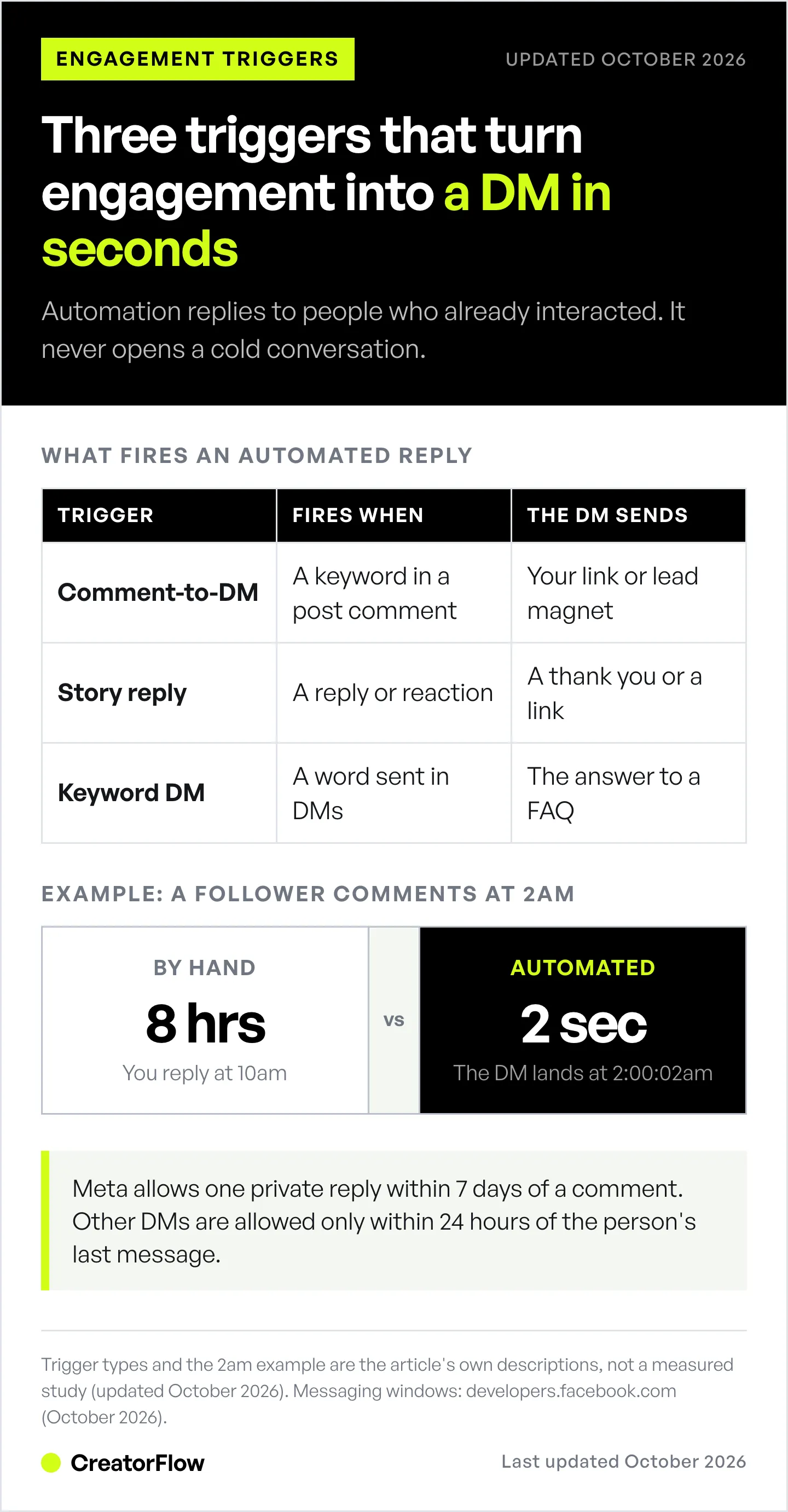
Instagram engagement automation is DM automation triggered by specific follower actions. When someone comments with a keyword, replies to your story, or sends a specific message, the automation responds instantly.
This isn’t broadcast messaging. You’re not spamming cold DMs. You’re responding to engagement signals, people who already showed interest by interacting with your content.
Three main types:
- Comment-to-DM automation - Most common. Follower comments “LINK” on your post, automation sends your affiliate link in DMs within 2 seconds.
- Story reply automation - Follower reacts or replies to your story, automation sends a thank you message or content link.
- Keyword triggers - Follower sends specific words in DMs (“PRICE”, “BOOK”, “INFO”), automation responds with relevant information.
Automation responds in about 2 seconds. A manual reply often comes hours later, after the person has moved on.
The difference between manual and automated engagement:
- Manual: Follower comments at 2am. You wake up at 8am. Respond at 10am. 8-hour delay. Follower already moved on.
- Automated: Follower comments at 2am. Automation responds at 2:00:02am. Follower gets link while still interested. Sale made while you sleep.
Learn how Instagram DM automation works for a technical walkthrough of the API and mechanics.
What the Instagram Algorithm Rewards in 2026
Instagram’s head Adam Mosseri said in January 2025 that the top three ranking signals are watch time, likes and sends. Sends, people sharing your post in DMs, matter slightly more for reaching people who don’t follow you yet (Adam Mosseri on Instagram, January 2025).
Where automation fits: A “comment LINK” call to action gives people a reason to comment. The automated DM gives them what they asked for while they are still on your post. You can’t manually answer 50 comments within minutes. Automation can.
The micro-creator advantage: Smaller accounts (10K-50K followers) gain the most, because a fast, helpful reply is something a solo creator can offer at any size.
Manual engagement gets harder with every post that takes off. You physically can’t respond to everyone fast enough. Automation removes that ceiling.
5 Ways Creators Use Engagement Automation (Without Sounding Robotic)
The objection everyone has: “Won’t my followers know it’s automated?”
Only if you make it sound generic. Here’s how to automate engagement while maintaining authenticity.
1. Send Affiliate Links Automatically
Use case: Follower comments “LINK” on your outfit post. Automation sends your LTK or Amazon affiliate link in DMs within 2 seconds.
Example math: 150 link requests a week is about 650 a month. At a 15% click rate and a 5% purchase rate, that is about 5 sales a month. Your commission per sale decides what that is worth.
Personalization tactics:
- Thank them: “Thanks for asking!”
- Reference the product: “Here’s the link to the denim jacket from today’s post”
- Ask a question: “Are you looking for size small or medium?”
Copy-pasting affiliate links by hand eats hours every week. Automation cuts that to zero. Every saved hour is an hour you can spend creating content or closing sales.
Learn more: Instagram DM automation for affiliate marketers
2. Book Discovery Calls on Autopilot
Use case: Follower comments “BOOK” on your coaching post. Automation sends your Calendly link with one line on who the call is for.
Example math: if 12 discovery calls are booked in a month and you close 30% of them, that is about 4 new clients.
Personalization tactics:
- Opening message: “I’m excited you’re interested in working together!”
- Who it is for: “This call is for coaches who want their first 10 clients.”
- Calendar link: “Here’s my calendar, pick a time that works for you”
- Question to invite a reply: “What do you most want to fix before our call?”
Scheduling calls by hand in DMs eats into coaching time. Automation handles scheduling while you deliver paid sessions.
Learn more: Instagram DM automation for coaches
3. Capture Emails for Lead Magnets
Use case: Follower replies “GUIDE” to your story. Automation asks for email, sends PDF automatically.
Example math: if 500 people a month give their email, that is a 6,000-person list in one year.
Personalization tactics:
- Thank them first: “Thanks for your interest in the guide!”
- Explain value: “This PDF has the exact framework I used to…”
- Ask for email: “What’s your email? I’ll send it right over”
- Deliver instantly: PDF link in next message (no waiting)
Email lists are assets you own. Automation builds your list while you create content. On CreatorFlow, email collection is part of Pro and Growth.
4. Answer FAQs Before You Wake Up
Use case: Follower comments “PRICE?” on your service post. Automation sends pricing breakdown plus booking link.
Time saved: No more copy-pasting the same answer 50 times.
Personalization tactics:
- Acknowledge their interest: “Great question! Here’s my pricing…”
- Provide context: “Most clients start with [package] because…”
- Offer next step: “Want to chat about which option fits your goals?”
Repetitive questions kill productivity. “Where’s the link?” “How much?” “Do you ship to [country]?” Automation handles FAQs while you work on high-value tasks like content creation and strategy.
5. Thank Story Reactors (Build Relationships)
Use case: Follower sends ❤️ reaction to your story. Automation sends appreciation DM: “Thanks for supporting! Means a lot.”
Engagement outcome: A thank-you that ends with a question gives people an easy reason to reply.
Personalization tactics:
- Reference the story: “Glad you enjoyed the behind-the-scenes!”
- Start conversation: “What was your favorite part?”
- Share exclusive content: “I have more tips if you’re interested”
Story reactions are signals. Someone cared enough to tap that heart button. Most creators ignore this. Automation turns reactions into conversations. To raise the volume of replies coming in, try these 9 strategies for getting more Instagram Story replies.
Instagram Engagement Automation Tools Compared
Here’s how three widely used Instagram engagement automation tools compare (creatorflow.so, manychat.com/pricing and linkdm.com/pricing, October 2026).
| Feature | CreatorFlow | ManyChat | LinkDM |
|---|---|---|---|
| Pricing | Free; Pro $15/mo flat ($12/mo billed annually) | Free; $17-$199/mo billed monthly across four paid tiers ($14-$139 annually) | Free; Pro $19/mo |
| Platforms | Instagram + Facebook Messenger + WhatsApp + TikTok + Telegram + SMS + Email | Instagram-first | |
| Best For | Solo creators (10K-100K) | Agencies, multi-channel brands | Established creators (50K+) |
| DM or contact allowance | 500 DMs/mo free; 5,000 Pro; 10,000 Growth (per workspace) | 25 to 25,000 contacts, by tier | 1,000 DMs/mo free; 25,000 Pro; 300,000 Platinum+ |
| Comment-to-DM | Yes | Yes | Yes |
| Story Reply Automation | Yes | Yes | Yes |
| Email Collection | Yes (Pro and Growth) | Yes | Yes |
| Link Tracking | Yes (Pro and Growth) | Yes | Yes |
| Multi-Account Management | 2 accounts (Pro), 5 (Growth) | Varies by plan | 3 accounts (Pro), 10 (Platinum+) |
When to Choose CreatorFlow
Choose CreatorFlow if you’re a solo creator or small team (1-3 people) who only needs Instagram automation. You want flat-rate pricing with no surprises as your audience grows. You prefer templates over building workflows from scratch.
CreatorFlow’s revenue focus: Affiliate link distribution, call booking, email capture. The interface is designed for creators who want results fast, not agencies managing 20 client accounts.
Setup takes 5 minutes. Pick a template, add your link, set your keyword trigger, activate. The whole flow is four steps, and there is nothing to assemble first.
Free plan includes 500 DMs per month. Pro plan ($15/mo) includes 5,000 DMs. Flat rate, no per-contact fees.
When to Choose ManyChat
Choose ManyChat if you need multi-platform automation (Instagram + Facebook + WhatsApp + SMS + TikTok + Email). You’re an agency managing 10+ client accounts. You need advanced conditional logic with complex branching workflows.
ManyChat’s multi-channel positioning: Their pricing scales with contact count across 5 tiers: Free (25 active contacts), Essential $17/mo (250), Pro $39/mo (2,500), Business $99/mo (7,500), Advanced $199/mo (25,000) billed monthly, with annual billing at $14/$29/$69/$139 (manychat.com/pricing, October 2026). Their workflow builder is built for branching, multi-step automations, and that depth is what the setup time goes into.
If you have the time to build automation flows, ManyChat offers a lot of flexibility. The depth fits agencies and multi-channel teams more than solo creators sending one link.
When to Choose LinkDM
Choose LinkDM if you’re an established creator who needs higher DM volume: Pro includes 25,000 DMs a month across up to 3 accounts. LinkDM reports 60,000+ creators, brands, and agencies on their platform (linkdm.com, October 2026).
LinkDM’s pricing is flat: a free plan with 1,000 DMs a month, Pro at $19/mo and Platinum+ at $99/mo (linkdm.com/pricing, October 2026).
Honest positioning: ManyChat covers enterprises and multi-channel. LinkDM is established with a large creator base. CreatorFlow is built for solo creators growing from 10K to 100K followers on Instagram only.
Compare all tools: Best Instagram chatbot tools compared
How to Automate Instagram Engagement in 5 Minutes
Setting up your first automation takes 5 minutes. Here’s the step-by-step process.
Step 1: Connect Your Instagram Account (30 seconds)
Use Meta’s official Instagram Graph API. No password sharing. OAuth authentication requires two clicks: “Connect Instagram” → “Authorize.”
CreatorFlow uses the official API, so ban risk is minimal when used inside Meta’s documented limits. Tools that ask for your password or use third-party scrapers violate Meta’s terms and can get your account banned.
Step 2: Choose Your First Automation (1 minute)
Pick a template based on your revenue model:
- Affiliate marketers: “Send affiliate link on keyword”
- Coaches/consultants: “Book calls with Calendly link”
- Course creators: “Deliver lead magnet via email gate”
- E-commerce: “Send product link on comment”
Start with one automation. Master it. Then add more.
Step 3: Customize Your Message (2 minutes)
Add your link (affiliate, Calendly, landing page, Shopify product). Write the greeting the way you talk, and name the thing they asked for. Preview the conversation in the iPhone mockup to see exactly how it looks.
Example message: “Hey! Here’s the link to the jacket from today’s post: [your-link.com]. Let me know if you have any questions!”
Step 4: Set Your Trigger (1 minute)
Choose your keyword trigger. Most common: LINK, SHOP, ORDER, BUY, BOOK, PRICE, INFO.
You can add up to 20 keywords per automation. CreatorFlow matches whole words and ignores capitals, so “link” catches “send link” and “drop the link”, but not “links”. Add “LINKS” as its own keyword if your audience types it.
Choose trigger location:
- Specific post - Only trigger on your latest product post
- Next post - Trigger on whatever you post next
- Any post - Trigger on all future posts
Step 5: Activate & Monitor (30 seconds)
Turn the automation ON. Check your activity log to see DMs being sent in real-time.
Last 50 DMs show success/failure status. Green = sent successfully. Red = failed (common reason: user doesn’t follow you). Adjust your automation based on reply rates and feedback.
Total time: 5 minutes from account connection to first automated DM sent.
Full setup guide: Comment-to-DM automation setup
3 Mistakes That Make Automation Feel Robotic (And How to Avoid Them)
Most creators make these mistakes. Here’s how to fix them.
Mistake 1: Generic Greeting (“Hey there!”)
Why it fails: No personal connection. Sounds like spam. Feels like talking to a call center bot.
Fix: Name what they asked for and write like you talk. “Here’s the denim jacket from today’s post!” signals this message is for them, not a mass blast.
CreatorFlow feature: You can set an automation on a specific post or Reel, so each DM can mention the exact product the person commented on.
Mistake 2: Instant Link Drop (No Context)
Why it fails: Feels transactional, not conversational. “Here’s your link” with no warmth = robotic.
Fix: Add an opening message before the link. “I’m so glad you’re interested! I think you’ll love this. Here’s what you asked for…”
Then send the link in a second message, and end it with a question: “Let me know if you have any questions!”
CreatorFlow feature: An optional opening DM before the main DM with the link. Opening message → Link with a question. Mimics natural conversation flow.
Before (robotic): “Here’s the link: amazon.com/xyz”
After (authentic): “Hey! Thanks for asking about the protein powder. Here’s the link: amazon.com/xyz Have you tried this brand before? Let me know what you think!”
Mistake 3: Never Following Up
Why it fails: Automation sends link, then silence. Follower feels like they were given a transaction, not a relationship.
Fix: End your automated DM with a question. Meta allows a follow-up only after the person replies, inside a 24-hour window (developers.facebook.com, October 2026). When they reply, jump in personally: “Hey! Did you have any questions about [product/service]? I’m here if you need help deciding.”
Follow-up message examples (after they reply):
- “Did the link work for you?”
- “Let me know if you have questions about sizing/pricing/features”
- “I have a discount code if you’re interested!”
Most creators send the link and never check back. That’s leaving money on the table.
Instagram Engagement Automation ROI: Example Scenarios
These are worked examples that show the math for three creator types. They are not customer case studies, and your numbers will differ.
Example 1: Fitness Coach (18K Followers)
Challenge: Spending 3 hours daily answering “How do I work with you?” DMs. Missing overnight messages. Losing potential clients to slow response time.
Solution: Comment-to-DM automation with Calendly link. Keyword trigger: “BOOK”, “CALL”, “COACHING”. Automation sends the calendar link with a short note on who the call is for.
Assumed outcome:
- 12 discovery calls booked in a month
- 3 new clients signed at $2,000 per client
- $6,000 in new client revenue that month
ROI calculation:
- Tool cost: $15/month
- Revenue generated: $6,000/month
- Revenue minus tool cost: $5,985/month
- Return on tool cost: 39,900%
Example 2: Fashion Affiliate (35K Followers)
Challenge: 50+ “LINK?” comments per post. Couldn’t respond fast enough. Followers moved on before getting the link. Lost affiliate commissions.
Solution: Keyword trigger automation. “LINK,” “SHOP,” “OUTFIT” trigger instant Amazon/LTK affiliate link delivery.
Assumed outcome:
- 200+ automated DMs sent per week
- $2,400/month in affiliate commissions
ROI calculation:
- Tool cost: $15/month
- Affiliate earnings: $2,400/month
- Earnings minus tool cost: $2,385/month
- Return on tool cost: 15,900%
Example 3: Course Creator (12K Followers)
Challenge: Growing email list for upcoming course launch. Manual lead magnet delivery was time-consuming. Needed 500+ emails before launch date.
Solution: Story reply automation. Follower replies “GUIDE” to story, automation asks for email, delivers free PDF checklist instantly.
Assumed outcome:
- 680 emails captured in 60 days
- Course launched to that email list
What to measure: Tool cost is $15/month x 2 months = $30. Launch revenue then depends on your price and on how many people on the list buy. Track sales from the list separately, so you know what the automation-built list earned.
More creator revenue strategies: Instagram income roadmap 0-5K/month
Instagram Engagement Automation Best Practices (2026)
Follow these best practices to maximize results and stay algorithm-friendly.
Respond Within Minutes, Not Hours
Reply while the person is still on your post. Interest fades fast, and a link that arrives hours later often goes unopened.
Automation enables a 2-second response time. A manual reply often comes hours later.
Use Conversation Starters (Not Just Links)
Don’t just drop links. Start conversations. Ask questions before sending links: “What niche are you in?” or “What’s your biggest challenge with [topic]?”
A question invites a reply. A reply opens Meta’s 24-hour messaging window, so you can keep the conversation going in person.
Personal touches to use:
- What they asked for (always)
- Recent post reference (“Love the photo from today!”)
- Story content (“Thanks for sharing behind-the-scenes!”)
Test Multiple Message Variations
A/B test greeting styles. Try casual (“Hey!”) vs professional (“Hello”). Try questions (“What brings you here?”) vs statements (“Here’s what you asked for”).
Track results per automation. Adjust based on audience response. What works for fitness creators might not work for B2B consultants.
CreatorFlow’s analytics show DMs sent, link clicks and click-through rate per automation (link click tracking is on Pro and Growth). Use this data to improve your messaging.
Stay Within Instagram’s Rate Limits
Meta’s official Instagram API publishes per-second rate limits on the Instagram Login path (100/sec for text and links, 10/sec for audio and video, 750/hour for private replies to comments on posts and Reels; developers.facebook.com, October 2026). Tools like CreatorFlow pace sends at around 200 DMs/hour as a conservative behavioral cap to stay well below those limits and avoid spam triggers.
CreatorFlow queues excess messages automatically. If you hit the pacing cap in one hour, the rest queue for the next hour. No manual intervention needed.
Never use tools that bypass rate limits with third-party scrapers. Those tools violate Meta’s terms and risk permanent account bans.
Monitor Your Activity Log
Check your last 50 DMs sent. Look for patterns in success/failure rates.
Common failure reasons:
- User doesn’t follow you - Solution: turn on Public Reply (Pro and Growth), which posts a comment telling the person to check their DMs.
- Messaging window expired - Meta allows one private reply within 7 days of a comment, and other DMs only within 24 hours of the person’s last message. Solution: Re-engage faster.
- Rate limit hit - Too many DMs in one hour. Solution: Messages automatically queue.
Adjust automation triggers based on performance. If many DMs fail, troubleshoot with the activity log.
Compliance guide: Avoid Instagram bans with DM automation
Frequently Asked Questions
Is Instagram engagement automation against the rules?
Using Meta’s official Instagram Graph API is compliant. CreatorFlow uses the official API (not third-party scraping), so ban risk is minimal when used inside Meta’s documented limits. Avoid tools that require your password or use unofficial methods, those violate Meta’s terms and can get your account banned.
Will followers know I’m using automation?
Only if your messages sound generic. Personalization is key: write in your own voice, reference what they asked for, ask questions. When done right, automation feels like a fast response from you. Most followers appreciate instant replies more than they care about whether it’s automated.
How much does Instagram engagement automation cost?
CreatorFlow has a free plan with 500 DMs/month, and Pro costs $15/month flat rate, or $12/month billed annually, with 5,000 DMs included. ManyChat ranges from Free (25 active contacts) to Advanced $199/month billed monthly (25,000 contacts, $139 billed annually) across four paid tiers. LinkDM Pro costs $19/month, with a free plan of 1,000 DMs/month (manychat.com/pricing and linkdm.com, October 2026). All three let you test on a free plan before committing.
Can I automate Instagram without losing authenticity?
Yes. Automation handles repetitive tasks (sending links, answering FAQs), freeing you for genuine conversations. Write in your own voice, mention what they asked for, and end with a question. The goal is to automate the boring stuff, not replace human connection.
What’s the difference between chatbots and DM automation?
Chatbot platforms (ManyChat, Chatfuel) support multi-platform workflows across channels such as Facebook Messenger and WhatsApp as well as Instagram. DM automation (CreatorFlow) focuses exclusively on Instagram with simpler, template-based setup. Chatbots are for agencies managing multiple platforms. DM automation is for solo creators who only need Instagram.
How many DMs can I send per day?
Meta’s API publishes per-second limits on the Instagram Login path (100/sec for text and links, 750/hour for post-comment private replies). Tools pace sends at around 200/hour as a behavioral safety cap. Exceeding this queues messages for later. CreatorFlow’s free plan includes 500 DMs/month, Pro plan includes 5,000 DMs/month and Growth 10,000 per workspace.
Does engagement automation work for small accounts?
Yes. Automation is most valuable for creators with 10K-100K followers who can’t manually respond to every DM. Even at 5K followers, a post that takes off can bring more comments than you can answer by hand. You don’t need a massive audience to benefit from automation, you need consistent engagement that’s hard to manage manually.
Can I use automation for story replies?
Yes. Story reply automation triggers when followers react or reply to your stories. Use cases: Thank reactors, send content links, capture emails for lead magnets. A story reply opens Meta’s 24-hour messaging window, so you can keep the conversation going.
Start Automating Your Instagram Engagement
Likes and sends are among the top signals Instagram ranks on, and automation answers every comment while the post is fresh. Automation doesn’t mean robotic: your own voice, questions, and personal follow-ups keep interactions authentic.
Engagement automation handles link delivery, call booking and email capture. CreatorFlow ($15/mo flat) is built for solo creators. ManyChat ($17-$199/mo billed monthly across four paid tiers) is built for multi-platform and larger team needs. Choose based on your needs.
Setup takes 5 minutes: Connect account, choose template, customize message, set trigger, activate. You can start automating today with 500 free DMs.
Ready to automate your Instagram engagement without sounding robotic? Start on the CreatorFlow Free plan and send 500 DMs this month.
Use the free Instagram engagement calculator to see how your rate compares before you change anything.


