

Instagram hacks are small, repeatable tactics that make the app work harder for you: keyword-optimizing your bio so people find you, testing Reels on non-followers before you post wide, filtering spam comments, and automating the DMs that turn reach into an audience you own. The best ones share one trait. They compound. Most viral “hacks” lists are interface trivia that changes nothing about your results.
You bookmark another “20 Instagram hacks” post, turn on post notifications, add line breaks to your bio, and a month later the follower count is flat and the DMs are still a mess. The tricks were real. None of them touched the thing that grows an account: turning attention into an audience you can reach again.
This guide sorts 20 Instagram hacks by what they do for you. Get your content found, convert a profile visit into a follow, protect your account and your focus, and turn reach into leads and revenue. Platform limits below are checked against Instagram’s and Meta’s own documentation, and most carry the month they were checked. Where a free feature hits a wall, I say so.
Key Takeaways
- Sort hacks by job, not novelty: The tactics that move results get you found, convert a visit into a follow, protect your account, or turn reach into revenue. Tricks that do none of those are noise.
- Instagram SEO is underused: Keywords in your name field and bio help the app match your profile to searches and suggestions. Write them for humans and the algorithm at once.
- Test before you commit: Trial Reels show a new Reel to non-followers first, then decide within 72 hours whether to push it wider (creators.instagram.com, July 2026).
- Speed is the conversion lever: 73% of consumers say they will buy from a competitor if a brand does not respond on social (Sprout Social Index, 2025).
- Native automation has a ceiling: Meta’s built-in keyword replies are desktop-only, exact-match, and wait 15 minutes, with no follow gate, email capture, or click analytics (facebook.com/business/help, September 2026).
- You can log in to 10 accounts: Instagram supports up to 10 accounts logged in on one device, not 5 (help.instagram.com, September 2026).
- Owned audience beats rented reach: Comments and DMs are where a follower becomes a lead. Capture emails and deliver links there, not only in your bio.
What Counts as an Instagram Hack Worth Using
An Instagram hack worth your time changes one of four outcomes: how many new people see you, how many visitors follow, how safe and focused your account stays, or how much of your reach becomes leads and sales. A hack that only rearranges your interface, like muting an account or hiding your activity dot, is housekeeping. Useful, but it will not grow anything.
Keep that filter in mind as you read. The 20 below are grouped by the job they do, strongest levers first.
Instagram Hacks to Get Your Content Found
Reach is the top of everything. If the right people never see you, nothing downstream matters. These hacks widen the mouth of the funnel.
1. Put keywords in your name field and bio. Instagram says its search matches what people type against “usernames, bios, captions, hashtags and places” (about.instagram.com), so a photographer in Austin ranks better for “Austin photographer” when those words appear there, not just in captions. Write the name field as “Maria | Austin Photographer” rather than a bare handle, and describe what you do in plain terms. This is the cheapest form of Instagram SEO and most creators skip it.
2. Test Reels risk-free with Trial Reels. Trial Reels publish a Reel to non-followers first, so your existing audience does not see a format that flops. Instagram gives you roughly 24 hours of view, like, and comment data, then either you share it to everyone or Instagram auto-shares it based on how it performs in the first 72 hours (creators.instagram.com, July 2026). Use it to test hooks and topics before you commit your main feed. Our breakdown of how Trial Reels work covers the full setup.
3. Schedule posts for timing, not convenience. Posting when you happen to be free is not a strategy. Instagram’s built-in scheduler lives under Advanced Settings when you create a post. You can schedule up to 25 posts a day, up to 30 days ahead (help.instagram.com, October 2026), so you can line content up for the hours your audience is active or for a seasonal moment when the topic peaks. Plan a week at a time so timing becomes a decision, not an accident.
4. Turn on notifications to study competitors. Tap the bell on a few accounts you compete with and choose alerts for posts, Stories, or Reels. You are not stalking. You are watching which topics they cover and when, so you can spot patterns and gaps before they saturate. Treat it as free market research that arrives in your notifications.
5. Make content people send to a friend. Sends are one of the three ranking signals Instagram’s head Adam Mosseri names, and they count slightly more than likes for reaching people who don’t follow you (Adam Mosseri, January 2025). Build posts that are worth forwarding: a genuinely useful tip, a relatable moment, a save-worthy list. More on this in our guide to how the Instagram algorithm ranks content.
Profile Hacks That Turn a Visit Into a Follow
Reach brings people to your profile. The next few seconds decide whether they follow. Your bio, grid, and account type do that work.
6. Add line breaks so your bio is readable. A bio jammed into one block is hard to scan. Tap the “123” key to reach the return key and break your bio into clear lines: who you help, what you offer, and the next step. If the breaks disappear when you save, format the text in our free Instagram line breaker and paste it back. A visitor who can read your bio in two seconds knows why to follow.
7. Curate your grid and highlight covers. Your grid is the first impression most visitors get. Consistent cover frames, a color palette, and deliberate post order make the account feel intentional. Update highlight covers to match by holding a highlight, tapping Edit, then Edit cover. Cohesion signals that you are worth following, and since June 2026 you can drag posts into any order you like, which our guide to turning profile visits into follows puts to work.
8. Hide tagged photos that break your brand. Everything you are tagged in lands under “Photos of You” by default. Prune it. Open the tagged tab, pick a post, tap the three dots, and choose to remove yourself or hide it from your profile. A clean tagged section keeps your profile on message. The opposite move is new: Instagram now lets you add a post you are tagged in to your main grid, and the original poster gets a notification (help.instagram.com, September 2026).
9. Pick the right account type. A Creator or Business profile gives you analytics, scheduling, and monetization that a personal account does not have. The two professional types differ in ways that matter for DM tools and shopping, so read our Creator vs Business account comparison before you switch. You can move back if it does not fit.
Instagram Hacks That Protect Your Account and Your Focus
Instagram’s protection settings do not grow anything on their own. They remove friction and noise so the growth hacks can work. Fast to set up, worth the two minutes.
10. Filter comments with Hidden Words. Under Settings, “Hidden Words” lets you build a custom list of words, phrases, numbers, and emojis to keep out of your comments and message requests. Hidden comments still count toward your total, and the person who left one is never told (help.instagram.com, July 2026). Turn it on before a post goes big, not after the pile-on.
11. Mute accounts without unfollowing. When someone’s content clutters your feed but unfollowing would be awkward, mute them from the three-dot menu on any post. Your feed clears and they never know. A calmer feed makes you a sharper creator.
12. Hide your activity status and quiet threads. Turn off your activity status in Settings so you are not broadcasting when you are online, and swipe left on a conversation to hide it without deleting or notifying the other person. Both keep your inbox on your terms, and the same Settings menu is where you turn off Instagram Instants if the disappearing-photo stack in your DMs is more noise than signal.
13. Set an app time limit. Most phones have a screen-time limit you can set per app. A boundary between creating and doom-scrolling protects the hours you need for content. Consuming Instagram and building on Instagram are different jobs, and the timer keeps them from bleeding together.
The Hack Most Lists Skip: Turn Reach Into an Owned Audience
Turning reach into an owned audience is the step most Instagram hacks lists leave out. Likes do not pay. A follower who watches and scrolls past is rented attention that the algorithm can take away tomorrow. The comment and the DM are where a follower becomes a lead you can reach on purpose. These four hacks do the most work of anything on this page.
14. Answer fast, because speed is the whole game. 73% of consumers say they will buy from a competitor when a brand does not respond on social, according to Sprout Social’s 2025 Index. Older sales research points the same way: companies that answered web leads within an hour were nearly 7 times as likely to qualify the lead as companies that waited longer (Harvard Business Review, 2011). That study measured phone follow-up on web forms, not DMs, but the lesson about speed carries over. You cannot hit those windows by hand at scale, which is what the next three hacks fix.
15. Send the reply automatically with comment-to-DM. When someone comments your trigger word on a Reel, an automation tool sends them the link in seconds instead of hours. A beauty creator posts “comment ROUTINE for my product list,” and everyone who does gets the DM instantly. The link arrives in the inbox of the person who asked, instead of sending them to hunt for your bio link. Our comment-to-DM setup guide walks through it with templates.
16. Greet new conversations with an automatic reply. A first message sets the relationship. You can pre-write a greeting and let it fire the moment someone opens a conversation, so no one waits on you to say hello. See our guide to automatic replies for comments and DMs for the flows that work.
17. Capture emails inside the DM. Reach you rent from Instagram becomes reach you own the moment you collect an email. Ask for it in the DM before you send the link, then export those contacts to your email platform. Since 5 October 2026, Meta no longer offers the one-tap email quick reply in Instagram DMs, so the person types their address into the chat (developers.facebook.com, October 2026). That list keeps working even when a post underperforms. Here is how to build an email list from Instagram without a separate landing page.
CreatorFlow is an Instagram DM automation tool that runs hacks 15 and 17 together through Instagram’s official API. When someone comments your keyword, CreatorFlow sends the link by DM within seconds, even while you sleep. On the Pro and Growth plans, it can also ask for an email or a follow before the link goes out. See how Instagram DM automation works inside CreatorFlow.
Where Instagram’s Free Tools Hit a Ceiling
Instagram does ship native automation, and for a solo account it is a fine start. Meta’s Inbox automations in Business Suite include an Instant reply greeting, Custom keywords, and a Comment to message template (facebook.com/business/help, September 2026). Lead with that. It is free and it covers the basics.
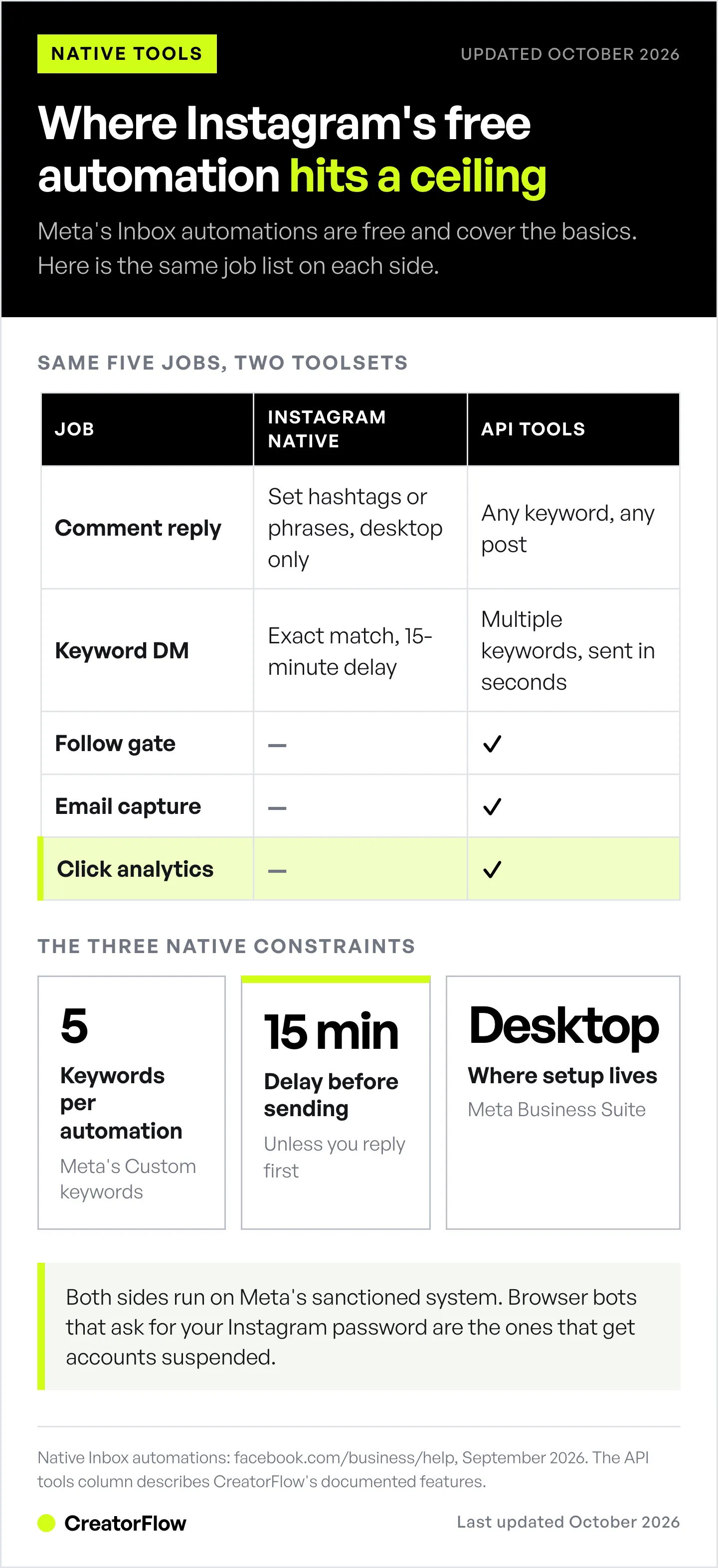
The ceiling shows up fast once you try to run it like a funnel. Custom keyword and comment automations are Meta Business Suite desktop only. Keyword matching is case-sensitive and exact, so “recipe” and “Recipe” are two different triggers. Comment automation fires only on the specific hashtags or phrases you set (Meta’s two help pages describe it differently). Keyword replies wait 15 minutes before sending unless you reply first, and turning on Meta Business Agent pauses your existing automations (facebook.com/business/help, September 2026). None of it offers a follow gate, email capture, or link-click analytics.
Meta is also testing a comment tool for ads. In August 2026 it began testing “Reply to Keywords” on Instagram ad comments, which sends a DM to anyone who comments one of up to 5 keywords. For now it covers ads only, not your organic posts (Social Media Today, August 2026).
That gap is the reason third-party API tools exist. The table maps the same jobs to each side.
| Job | Instagram’s built-in tools | Third-party API tools (e.g. CreatorFlow) |
|---|---|---|
| Reply to a comment | ”Comment to message,” triggers on the hashtags or phrases you set, desktop only | Any keyword on any post or Reel, replies in seconds |
| Keyword DM replies | Custom keywords: up to 5 per automation, exact match, 15-minute delay | Multiple keywords and spelling variations, sent in seconds |
| Ask for a follow first | Not available | Follow gate that asks for a follow before the link |
| Collect emails | Not available | Email gate inside the DM |
| Track link clicks | Not available | Click and geographic analytics, CSV export |
| Where it runs | Business Suite desktop for keyword and comment automations | Web dashboard, running 24/7 |
Both sides use Meta’s sanctioned system, so neither carries the ban risk of a browser bot that logs in with your password. Meta’s messaging API paces at per-second limits (100 calls per second for text and links on the Instagram API with Instagram Login, 750 private replies per hour on post comments). It allows one private reply per comment within 7 days, and follow-up messages only inside a 24-hour window after the person writes back (developers.facebook.com, October 2026). The often-quoted “200 DMs per hour” is a tool-side pacing convention, not a Meta-published limit. Reputable tools respect all of it. If a tool promises unlimited automation with no restrictions, it is either lying or using unsafe bots.
Instagram Monetization Hacks Worth Your Time
Once you have an audience you can reach, turning it into income is the last job. Native tools handle tips. Your own funnel handles the rest.
18. Turn on Instagram’s built-in earning tools. Gifts let viewers buy Stars and send them on eligible Reels, and you earn $0.01 per Star once you have 500 followers. Subscriptions charge a monthly fee for subscriber-only content and need 10,000 followers (help.instagram.com, September 2026). Live badges let viewers tip during a Live at $0.99, $1.99 or $4.99 (creators.instagram.com). In the US, Instagram pays out once your balance reaches $5; elsewhere the minimum is $25, or $100 by wire transfer (help.instagram.com, September 2026). Availability is region-limited, so check what is live in your country. These reward an existing audience rather than build one, so treat them as a floor, not a plan.
19. Deliver affiliate and product links through the DM, not only the bio. A single link in your bio makes every follower hunt for the thing you mentioned. Caption links are clickable only on a paid plan: since September 15, 2026, Meta One Advanced ($49.99 a month) adds native links to 4 posts and 4 Reels a month (creators.instagram.com, October 2026). A DM carries the exact link the moment someone asks, on every post, at no extra cost from Instagram. Pair it with the comment-to-DM hack above and you have a repeatable sales motion. Our guide to turning followers into customers lays out the full playbook.
20. Run more than one account from one place. Instagram lets you keep up to 10 accounts logged in at once, which helps if you split a personal brand and a business, or test a niche account (help.instagram.com, September 2026). If you manage several brands seriously, a workspace-based tool keeps their automations and analytics separate. Here is how creators structure multiple Instagram accounts without mixing audiences.
How to Roll These Out Without Burning Out
Do not run all 20 at once. Pick one hack from each group this week: keyword-optimize your bio, clean your grid, switch on Hidden Words, and set up one comment-to-DM trigger. The first three take minutes. The fourth is the one that compounds, because it turns every future post into a way to collect leads as well as likes. Come back for the next four once those are live.
The pattern behind every hack on this page is the same. Widen reach at the top, convert the visit in the middle, and own the audience at the bottom so you are never starting from zero. Interface tricks feel productive. This structure is what moves the account.
FAQ
What is the best Instagram hack for growth?
Keyword-optimizing your name field and bio, then setting up comment-to-DM automation. The first helps the right people find you through search and suggestions. The second converts the reach into leads by sending your link the moment someone comments, instead of hours later when they have moved on.
Are Instagram growth hacks safe?
The interface tweaks, like Hidden Words, Trial Reels, and muting, are all native features and carry no risk. For DM automation, safety depends on the method. Tools built on Meta’s official API with OAuth login are sanctioned. Browser bots that ask for your Instagram password are the ones that get accounts suspended.
Can you automate Instagram DMs and welcome messages?
Yes. Instagram’s native Inbox automations include an Instant reply greeting and keyword replies, though they run on desktop Business Suite with exact-match keywords and a 15-minute delay (facebook.com/business/help, September 2026). Third-party API tools remove those limits and add follow gates, email capture, and click tracking that the native tools do not offer.
How many Instagram accounts can you manage at once?
Instagram lets you keep up to 10 accounts logged in on one device at a time (help.instagram.com, September 2026). Switch between them by tapping the dropdown next to your username or holding the profile icon. If you run several brands with separate automations, a workspace-based tool keeps them cleanly apart.
Does Instagram have a native welcome message?
Meta calls it “Instant reply.” It sends a greeting when someone messages you for the first time, set up through Inbox automations in Business Suite (facebook.com/business/help, September 2026). It fires on first-time DMs, not on comments, and it does not gate a follow or capture an email the way dedicated automation tools do.
What are Trial Reels on Instagram?
Trial Reels publish a Reel to non-followers first, so you can test a format before your main audience sees it. You get about 24 hours of performance data, then share it to everyone or let Instagram auto-share based on the first 72 hours of views (creators.instagram.com, July 2026). It is a low-risk way to test hooks and topics.
Can I put a clickable link in an Instagram post without paying?
Not in the caption of a free account. Since 15 September 2026, native links in posts come with Meta One Advanced at $49.99 a month, and they cover 4 posts and 4 Reels a month (creators.instagram.com, October 2026). The free routes still work: the links in your bio, a link sticker in Stories, and a DM that sends the link when someone comments your keyword.
How do creators make money on Instagram in 2026?
Three routes. Instagram’s native tools (Gifts, Subscriptions, and Live badges) reward an existing audience (help.instagram.com, September 2026). Affiliate and product sales run through DM link delivery. Brand partnerships pay for reach. The native tools are a floor. The DM funnel is where most creators build repeatable income, because it captures leads instead of one-time tips.
Instagram features and platform limits verified from Instagram Help Center, Meta for Business, creators.instagram.com, and Meta developer documentation as of September 2026. Re-checked in October 2026: the in-app scheduler limits, Meta One Advanced post links, the messaging rules and rate limits, the end of email quick replies, grid reordering, and the 73% Sprout Social figure. Statistics from the Sprout Social Index (2025) and Harvard Business Review (2011) as cited. Individual results vary.


