

Key Takeaways
The Follower-Customer Reality: Most Instagram followers never buy without a plan. The followers who comment, reply or ask a question are the ones to sell to, and DM automation answers them while they still care.
7 Conversion Strategies:
- Story poll → DM offer sequence - Qualify interest, send personalized offers
- Comment trigger → sales conversation - Auto-reply with value, book calls in 2 messages
- Email capture → nurture → offer - Build list via DM, convert via email (3% avg conversion)
- Limited-time DM offers - Create urgency, reduce decision time from days to hours
- Follow-first qualification - Ask commenters to follow you before you send the link
- Referral incentives via DM - Turn customers into advocates, send referral links on request
- Post-purchase DM sequences - Increase lifetime value with follow-up emails and keyword DMs
Tools needed: Instagram + DM automation (CreatorFlow $15/mo) + email platform
What to measure: sales per 100 DMs sent, before and after each strategy
Turning Instagram followers into paying customers requires a structured conversion funnel: qualify interest through Story polls and comment triggers, capture emails via DM automation, present targeted offers to engaged followers, and nurture leads with follow-up emails. The key is speed: an automated DM that arrives within seconds reaches the buyer while they still care, and a manual reply hours later often does not.
You have 10,000 Instagram followers. Only 100 have ever bought from you. That’s a 1% conversion rate.
Most creators think more followers = more revenue. Wrong. A creator with 5,000 engaged followers making $5,000/month beats a creator with 50,000 passive followers making $500/month. Every time.
The gap between follower and customer is where most creators lose money. This guide shows you exactly how to close it. If you want the wider set of account tactics that feed this funnel, our Instagram hacks guide sorts them by goal. And if you need a fast engagement spike to work with first, giveaway automation is one of the quickest compliant ways to fill your comments and DM list.
How to Turn Instagram Followers Into Customers
Move followers up one stage at a time. A passive follower converts under 0.5%. An engaged follower who comments or replies converts 3-5%. Someone who asks a question or clicks a link converts 15-25%. Someone who hands you an email or books a call converts 30-50%. Your job is to make each step happen faster: a Story poll to qualify, a comment keyword to open the DM, and a reply that arrives in seconds instead of hours.
The Follower-Customer Gap: Why Most Followers Never Buy
Here’s the uncomfortable truth: 97-99% of your Instagram followers will never buy from you.

Instagram conversion estimates (widely repeated, not from one current study):
- E-commerce brands: 1-3% average
- Leading brands: Up to 3-10% in optimized niches
- Influencer marketing conversion rates:
- Micro-influencers (10K-100K): 1.1%
- Macro-influencers (100K-1M): 0.7%
- Mega-influencers (1M+): 0.3%
Notice the pattern? Bigger isn’t always better. Smaller, engaged audiences convert better. That is why it pays to focus on turning your high-value, most engaged followers into customers before chasing reach.
Why Followers Don’t Buy
1. They don’t know you sell anything
- You post content, but never mention your offer
- Your bio doesn’t clearly state what you sell
- No CTAs in captions or Stories
2. They don’t trust you enough yet
- Following you doesn’t mean they trust you with money
- They need multiple touchpoints before buying
- Trust takes time and strategic nurturing
3. They engaged but you never followed up
- Someone comments “link?” - you reply 6 hours later (or never)
- By then, they’ve moved on
- Speed matters: a reply in 2 minutes catches them while they still care, a reply in 2 hours often does not
4. You’re not asking for the sale
- You create content, build audience, but never pitch
- “Soft selling” often means “not selling at all”
- People need clear next steps
5. Wrong followers (not your ideal customer)
- You optimized for follower count, not buyer intent
- Viral content attracted the wrong audience
- Followers ≠ potential customers
The solution isn’t more followers. It’s better conversion of the followers you already have.
Understanding the Conversion Funnel: From Follower to Customer
Before you can convert followers, understand where they are in the buying journey:
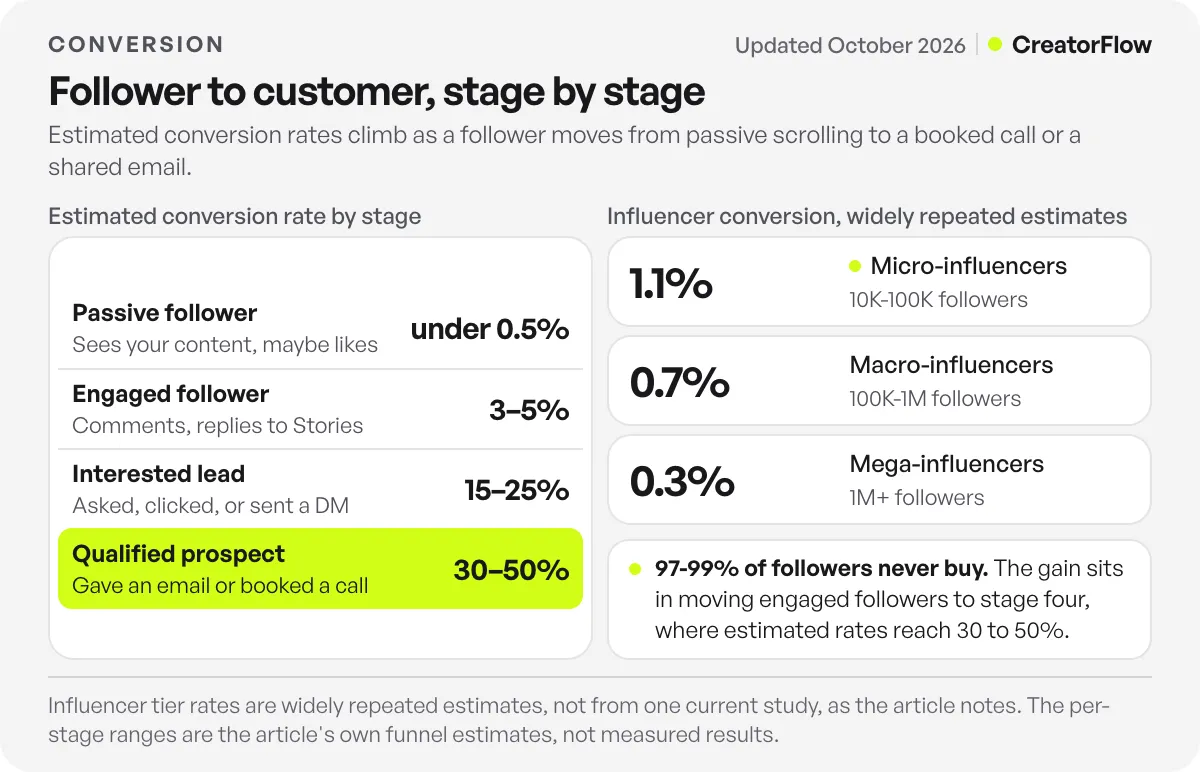
Stage 1: Passive Follower
- Sees your content occasionally
- Maybe likes a post
- Doesn’t engage consistently
- Conversion rate: <0.5%
Stage 2: Engaged Follower
- Comments on posts
- Replies to Stories
- Watches your Reels
- Conversion rate: 3-5%
Stage 3: Interested Lead
- Asked about your product/service
- Clicked a link
- Sent you a DM
- Conversion rate: 15-25%
Stage 4: Qualified Prospect
- Gave you their email
- Booked a call
- Asked about pricing
- Conversion rate: 30-50%
Stage 5: Paying Customer
- Made a purchase
- Active client
- Conversion rate: 100% (achieved)
Most creators focus on Stage 1 (passive followers). Smart creators focus on moving followers from Stage 2 → Stage 4.
That’s where DM automation becomes essential.
Strategy 1: Story Poll → DM Offer Sequence
Instagram reported 500 million daily Stories users back in 2019. Stories are where your most loyal followers check in every day.
Use a Story question to qualify interest, then automatically DM personalized offers.
How It Works
Step 1: Post a qualifying Story
Example (fitness coach):
“Which would help you most right now?” Reply MEALS for meal plans Reply WORKOUT for workout programs
You can run a poll for the vote count too. Poll votes do not start a DM through Meta’s API, so the reply is what triggers the automation.
Step 2: Set up Story reply automation
When someone replies:
- MEALS replies get a DM about your meal planning service
- WORKOUT replies get a DM about your training programs
Step 3: Send personalized offer via DM
Auto-DM for MEALS replies:
I saw you’re interested in meal plans!
Most people struggle with meal planning because they don’t have a simple system.
I’ve helped 200+ clients lose weight with my 30-day meal plan system ($47).
It includes:
- 90 pre-planned meals (breakfast, lunch, dinner)
- Shopping lists for each week
- Macro breakdowns for every meal
- Recipe videos
Want to try it? Reply YES and I’ll send you the details
Step 4: Handle replies with keyword triggers
When they reply “YES”:
Perfect! Here’s what you get:
[Link to sales page]
Launching January special: $47 instead of $97 (48 hours only)
Any questions? Just reply to this DM!
Why This Works
- Pre-qualified: They already expressed interest in their reply
- Personalized: Offer matches their specific need
- Immediate: DM sent within 2 seconds of the Story reply
- Conversational: Feels like 1-on-1 recommendation, not mass broadcast
Expected conversion rate: 15-20% of Story repliers → customers
Tools Needed
- CreatorFlow ($15/mo) - Story reply automation with keyword triggers
- Your sales page (Gumroad, Shopify, Kajabi, etc.)
Setup time: 10 minutes per Story poll automation
Strategy 2: Comment Trigger → Sales Conversation
Someone comments “link please” on your post. You manually reply 4 hours later. They’re already gone.
Automated comment-to-DM responses solve this. Reply in 2 seconds, every time.
How It Works
Step 1: Create content that generates buying intent
Example (digital product creator - see our full guide on selling digital products on Instagram):
[Reel showing your Notion template]
Caption: “This Notion template helped me organize 50+ client projects”
CTA: “Want it? Comment TEMPLATE below”
Step 2: Set up comment-to-DM automation
When someone comments “TEMPLATE”:
Your Notion template is ready!
Quick question: Are you managing client projects or personal tasks?
Reply with:
- TEAM = Client projects (teams of 2-10)
- SOLO = Personal productivity (solo use)
I’ll send you the right version!
Step 3: Qualify and segment
Based on their reply (TEAM or SOLO), send different offers. Use whole words as reply keywords, not single letters: a keyword like “A” would also match the word “a” in any message.
- Reply TEAM (Client projects): Pro version ($97) with team features
- Reply SOLO (Personal productivity): Starter version ($27) for individuals
Step 4: Close the sale
For Reply TEAM:
Perfect! The Pro version is ideal for teams.
It includes:
- Client project tracker
- Team task manager
- Invoice templates
- Time tracking
- Lifetime updates
Normally $147, but launching at $97 for first 100 customers.
Get it here: [link]
30-day money-back guarantee. Questions? Just ask!
Why This Works
- Speed: 2-second response vs 4-hour manual reply
- Qualification: Asks questions to understand their needs
- Segmentation: Different offers for different buyer types
- Scarcity: Limited-time pricing creates urgency
Expected conversion rate: 20-30% of engaged commenters → buyers
Example Scenario: Digital Product Creator
This scenario is illustrative, not a customer result.
Before automation:
- 100 comments saying “link”
- Manually replied to ~40 (4 hours later)
- 2 sales = 2% conversion rate
- Revenue: $54
After automation:
- 100 comments saying “link”
- Auto-replied to 100 (2 seconds each)
- 25 sales = 25% conversion rate
- Revenue: $675
10X revenue increase from same traffic. The only difference? Automated qualification and immediate response. For the wording that carries the conversation from that qualifying question to the buy link, see our guide on closing sales in Instagram DMs.
Strategy 3: Email Capture → Nurture → Offer
Instagram followers are rented land. Instagram could ban your account tomorrow. Email subscribers are owned assets.
Smart creators capture emails via DM, then nurture via email sequences.
How It Works
Step 1: Offer a lead magnet via DM
Post content with clear CTA:
[Carousel: “5 Instagram Growth Mistakes”]
Caption: “Want the full 20-mistake checklist?”
CTA: “Comment CHECKLIST and I’ll DM it to you”
Step 2: Capture email in DM
Auto-DM when someone comments “CHECKLIST”:
Your Instagram Growth Checklist is ready!
Where should I send it?
Reply with your email and you’ll get:
- 20 Instagram mistakes to avoid (PDF)
- Growth tracking template (Notion)
- Weekly Instagram tips (bonus newsletter)
Your email: _______
Step 3: Deliver lead magnet + add to email list
When they reply with email:
Perfect! Here’s your Instagram Growth Checklist (PDF) and the Notion tracking template: [link]
You’ll also get my weekly Instagram tips by email (you can unsubscribe anytime).
Questions? Reply here anytime!
CreatorFlow’s Email Gate (Pro and Growth) collects the email in the DM. Export your contacts as a CSV file and import it into your email platform to start the sequence below.
Step 4: Nurture via email sequence
- Email 1 (Day 1): Deliver lead magnet + introduce yourself
- Email 2 (Day 3): Share case study/success story
- Email 3 (Day 5): Soft pitch your paid product (50% value, 50% pitch)
- Email 4 (Day 7): Hard pitch with urgency (limited-time discount)
- Email 5 (Day 10): Last chance + objection handling
Step 5: Present offer
Email 4 example:
Subject: Ready to 10X your Instagram growth?
You downloaded my free checklist 7 days ago.
That checklist has 20 mistakes to avoid.
My full Instagram Growth System has 47 strategies that WORK (not just what to avoid).
It’s how I grew from 0 to 50K followers in 11 months.
Here’s what’s included:
- Complete growth roadmap (12 weeks)
- Content templates (100+ tested ideas)
- Engagement scripts (DM outreach system)
- Analytics tracker (Notion template)
- Monthly group coaching calls
Normally $297. Launching at $147 (48 hours only).
Get instant access: [link]
Questions? Just reply to this email.
P.S. This price increases to $297 in 48 hours. Lock in $147 now.
Why This Works
- Owned audience: Email list you control (not Instagram’s algorithm)
- More time to sell: Email lets you follow up for days, long after the 24-hour DM window closes
- Nurture time: 7-10 days builds trust before pitching
- Segmentation: Can tag based on interests, send relevant offers
Expected conversion rate: 3-5% of email subscribers → customers (industry average for e-commerce)
Tools Needed
- CreatorFlow Pro ($15/mo) - Email capture via DM automation
- Email platform: Kit (formerly ConvertKit), free up to 10,000 subscribers, with its Creator plan from $33/month billed yearly at 1,000 subscribers (kit.com/pricing, checked October 2026). Mailchimp’s free plan covers 250 contacts and 500 sends a month.
- Lead magnet: PDF, Notion template, checklist, video training
Setup time: 2 hours for first automated email capture + sequence
Learn more about collecting emails via Instagram DMs.
Strategy 4: Limited-Time Offers via DM
Scarcity drives action. Limited-time offers reduce decision time from days to hours.
Use DM automation to deliver time-sensitive offers to engaged followers.
How It Works
Step 1: Identify engaged followers
People who:
- Commented on your last 5 posts
- Replied to your Stories in last 7 days
- Watched your Reels consistently
Step 2: Send exclusive DM offer
Meta only lets you DM people who message you, comment or reply to a Story first. So post a Story to those engaged followers (“Opening 5 coaching spots this week. Reply SPOTS for details”) and let the automation answer each reply.
Example (online coach):
Hey [Name]!
I noticed you’ve been engaging with my content lately. Thank you!
I’m opening 5 spots for my 1-on-1 coaching program this week.
Normally $1,500/month. Offering $997/month to followers who’ve supported me.
This includes:
- 2 coaching calls per week
- Daily Voxer access
- Custom meal & workout plans
- Accountability check-ins
Spots are first-come, first-served. Interested?
Reply YES and I’ll send you the details
Step 3: Create urgency with countdown
Send these follow-ups only to people who replied. Meta allows a message only within 24 hours of the person’s last message to you, so the final notice goes to people who wrote back after the first reminder.
Follow-up DM (24 hours later):
Quick update: 3 of 5 spots already taken.
Still interested in the $997/month coaching program?
Price goes back to $1,500 in 24 hours.
Let me know if you have questions!
Step 4: Close with final notice
Final DM (48 hours later):
Last call: 1 spot left for $997/month coaching.
If you’ve been thinking about it, now’s the time.
Program starts Monday. Reply within next 6 hours to lock in this rate.
After that, it’s back to $1,500/month.
Why This Works
- Exclusivity: Only engaged followers get the offer
- Scarcity: Limited spots create urgency
- Time pressure: Deadline forces decision
- Personal: DM feels like insider access, not public announcement
Expected conversion rate: 10-15% of engaged followers → customers with limited-time DM offers
Automation Setup
Use CreatorFlow’s keyword trigger automation:
- Trigger: “SPOTS” as a Story reply, then “YES” in DMs (two automations, one per keyword)
- Response: Send booking link or payment page
- Reminders: send the 24h and 48h notes yourself, inside the 24-hour window
Strategy 5: Follow-First Qualification Strategy
Not everyone who comments is a potential customer. Some are:
- Bots
- Competitors
- Engagement pods
- Random scrollers who’ll never buy
Smart creators ask commenters to follow first, then send the sales DM.
How It Works
The Problem: You post a Reel. 500 people comment “link.” Only 50 follow you. Most of the other 450 will see your link once and forget you.
The Solution: “Follow-before-DM” logic.
Step 1: Turn on a follow gate
With CreatorFlow’s Follow Gate (Pro and Growth), when someone comments “LINK”, the first DM asks them to follow you and confirm. After they confirm, the second DM sends the link. Write the ask as a friendly favor.
Step 2: Write the two messages
Message 1 (the ask):
Hey! I’d love to send you the link.
Quick favor: follow me so you don’t miss the next one.
Confirm once you follow, and I’ll send it right away!
Message 2 (the link, after they confirm):
Hey! Here’s the link you asked for: [product link]
It’s my [product name] - helps you [specific benefit].
Normally $X, but [special offer for followers].
Questions? Just reply here!
Why This Works
Higher conversion rates:
- Followers already know and trust you
- They see your next posts, so one DM is not your only chance
- More likely to open your DMs
Better deliverability:
- DMs from accounts a person follows land in their main inbox
- DMs from accounts they don’t follow can land in message requests
- Lower risk of being marked as spam
Audience growth:
- The ask turns commenters into followers
- Builds engaged audience organically
- Qualifies serious buyers (people who follow are more invested)
Expected conversion improvement: measure it. Compare sales per 100 link DMs before and after you turn on the follow ask.
Example Scenario: Affiliate Marketer
This scenario is illustrative, not a customer result.
Before the follow ask:
- 1,000 comments saying “link”
- DMed all 1,000 people the link
- 300 were followers, 700 weren’t
- 9 sales (0.9% conversion rate)
After the follow ask:
- 1,000 comments saying “link”
- All 1,000 got the follow ask first
- 300 already followed, 200 more followed to get the link
- Total: 500 link DMs sent to followers
- 25 sales (5% conversion rate)
Result: 2.8X more sales and 200 new followers from the same post.
Strategy 6: Referral Incentives via DM
Your best salespeople are your existing customers. Automate referral rewards via DM.
How It Works
Step 1: Create referral program
Offer:
- 20% discount on next purchase for every referral
- Free product after 3 referrals
- Cash/credit reward
Step 2: Send post-purchase DM
After someone buys (as a DM when the buyer messages you, or in your order email):
Thanks for your purchase!
Love what you got? Share it with friends and earn rewards.
Here’s your unique referral link: [referral.link/yourname]
For every friend who buys:
- They get 10% off
- You get $20 credit
After 3 referrals = Free [product name] ($97 value)
Questions? Reply here anytime!
Step 3: Automate reward delivery
When someone uses a referral link, your referral software sends the reward messages by email:
- Original customer gets: “Someone used your link! You earned $20 credit”
- New customer gets: “Welcome! [Name] referred you. Here’s 10% off: [code]”
Step 4: Celebrate milestones
When customer reaches 3 referrals:
Amazing! You’ve referred 3 people!
Your free [product name] is ready.
Claim it here: [link]
You’re also at $60 in total credits. Keep sharing!
Why This Works
- Social proof: Recommendations from friends convert 5X better than ads
- Automated: The referral software tracks referrals and delivers rewards
- Incentivized: Customers actively promote you
- Repeatable: Each customer becomes a mini affiliate
Expected results: 20-30% of customers will refer at least 1 person
Tools Needed
- Referral software: ReferralCandy, GrowSurf, or Viral Loops (paid plans)
- CreatorFlow ($15/mo) - Sends the referral page link instantly when a customer comments or DMs a keyword like REFER
- Integration: run the referral platform alongside CreatorFlow and move contacts between them with CreatorFlow’s CSV export
Strategy 7: Post-Purchase DM Sequences (Increase Lifetime Value)
The sale isn’t the end. It’s the beginning of the customer relationship.
Automate post-purchase messages to:
- Reduce refunds (deliver amazing onboarding)
- Generate reviews (social proof for future sales)
- Upsell related products (increase average order value)
How It Works
Day 1 (Immediately after purchase):
Welcome! Your [product name] is ready.
Here’s what to do first:
- Download your files: [link]
- Join our private community: [link]
- Watch the quick-start video: [link]
Stuck? Reply to this DM anytime. I’m here to help!
Day 3 (Check-in):
Hey! Quick check-in: How’s [product name] working for you?
Most people have questions around Day 3. Common ones:
- How to customize [feature]
- Best practices for [use case]
- Integrations with [tool]
Got questions? Just reply here
Day 7 (Testimonial request):
It’s been a week! Time flies.
If you’re loving [product name], would you mind sharing a quick review?
Takes 30 seconds: [review link]
As a thank you, I’ll send you my [bonus resource] (usually $29, free for reviewers).
Thanks for being awesome!
Day 14 (Upsell):
You’ve been using [product name] for 2 weeks!
Ready to level up?
I just launched [related product] - pairs perfectly with what you already have.
It adds:
- [Feature 1]
- [Feature 2]
- [Feature 3]
Normally $X, but since you’re already a customer: $Y (30% off).
Get it here: [link]
Limited-time offer (48 hours).
Day 30 (Referral ask):
One month in!
If [product name] has helped you, would you mind sharing it?
Here’s your referral link: [referral.link/yourname]
For every friend who buys:
- They get 10% off
- You get $20 credit
Thanks for being part of our community!
Why This Works
- Reduces refunds: Proactive support = happier customers
- Generates social proof: Reviews help convert future customers
- Increases LTV: Upsells add 30-50% to average customer value
- Creates advocates: Referral program turns customers into promoters
Expected results:
- 30% of customers leave reviews (vs 5% without asking)
- 15-20% buy upsell within 30 days
- 20-30% share referral link
Automation Setup
Meta allows an automated DM only within 24 hours of the customer’s last message to you. A Day 7 or Day 14 DM to a buyer who has gone quiet falls outside that window. So split the work:
- Run the timed steps (Day 1, 3, 7, 14, 30) as an email sequence in your email platform, started by the purchase in Gumroad or Shopify
- In each email, invite a reply on Instagram with a keyword, such as HELP, REVIEW or UPGRADE
- Set a CreatorFlow keyword automation for each word, so every reply gets the right link in seconds
Setup time: about 1 hour for the email sequence and the keyword automations
Building a Sales-Focused DM Funnel
Combining all 7 strategies into one cohesive system:
The Complete Conversion Funnel
Stage 1: Awareness
- Post valuable content (Reels, carousels, Stories)
- Use hashtags and collaborations for reach
- Goal: Get followers to engage
Stage 2: Engagement
- Story polls to qualify interest (Strategy 1)
- Comment triggers on posts (Strategy 2)
- Goal: Start DM conversations
Stage 3: Lead Capture
- Email capture via DM automation (Strategy 3)
- Follow-first qualification (Strategy 5)
- Goal: Build owned audience
Stage 4: Conversion
- Limited-time DM offers (Strategy 4)
- Email nurture sequences (Strategy 3)
- Goal: Convert to paying customers
Stage 5: Retention & Growth
- Post-purchase DM sequences (Strategy 7)
- Referral incentives (Strategy 6)
- Goal: Increase lifetime value and generate referrals
The Tech Stack
Essential:
- Instagram Business/Creator account (free)
- CreatorFlow ($15/mo) - DM automation platform
- Email platform: Kit (formerly ConvertKit), Mailchimp or beehiiv, all with free plans ($0-33/mo)
- Sales platform: Gumroad (10% + $0.50 per sale), Teachable (from $39/mo, or $29/mo billed annually), Kajabi (from $179/mo, or $143/mo billed annually) or Shopify
Optional (Advanced):
- Zapier (free for 100 tasks/month; paid from $19.99/mo billed annually) - Connect your store and email platform
- ReferralCandy (paid plans) - Referral program automation
- Calendly (free; Standard $12/seat monthly or $10 billed annually) - Appointment booking for service businesses
Prices from each vendor’s pricing page: Kit, Gumroad, Teachable, Kajabi, Zapier and Calendly (checked October 2026).
Total monthly cost: $15-250/mo depending on features needed
Measuring Conversion Metrics
Track these numbers weekly:
Top of Funnel:
- Post reach
- Engagement rate (comments, Story replies)
- Follower growth rate
Middle of Funnel:
- DM conversation starts (automated + manual)
- Email capture rate (emails captured / DMs sent)
- Follow-before-DM conversion rate
Bottom of Funnel:
- Sales conversion rate (customers / engaged followers)
- Average order value
- Customer acquisition cost
Retention:
- Refund rate
- Upsell conversion rate
- Referral rate (customers who refer / total customers)
Key Metric to Watch: Engaged Follower → Customer Conversion Rate
Formula:
(Customers in last 30 days / Engaged followers in last 30 days) × 100Benchmark:
- Poor: <5%
- Average: 5-10%
- Good: 10-20%
- Excellent: 20%+
If you’re converting 15-25% of engaged followers → customers, you’re in the top 10% of creators.
Learn more about building Instagram sales funnels.
Example Scenarios: Before & After
These three scenarios are illustrative. They show the math of each strategy, not results from named customers.
Example 1: Fitness Coach (10K followers)
Before automation:
- 10,000 followers
- Posting 5x per week
- ~200 comments per week
- Manually responding to ~50 DMs
- 2 new clients per month
- Revenue: $2,000/month
After implementing strategies:
- Same 10,000 followers
- Same posting frequency
- Automated 200 DM conversations per week
- Story replies qualifying 100 leads per week
- Email list growing by 150/week
- 15 new clients per month
- Revenue: $15,000/month
Result: 7.5X revenue increase in 90 days. No follower growth needed.
Example 2: Digital Product Creator (5K followers)
Before automation:
- 5,000 followers
- Selling $27 Notion template
- 3-5 sales per month
- Revenue: $81-135/month
After implementing strategies:
- Same 5,000 followers
- Automated comment-to-DM on every post
- Email capture + nurture sequence
- Added upsell ($97 bundle)
- 80-100 sales per month ($27 template)
- 15-20 upsells per month ($97 bundle)
- Revenue: $3,615/month
Result: 27X revenue increase in 60 days.
Example 3: Amazon Influencer (25K followers)
Before automation:
- 25,000 followers
- Manually sending affiliate links via DM
- 50-80 link requests per week
- Responding to ~30 (time constraints)
- $800/month affiliate commissions
After implementing strategies:
- Same 25,000 followers
- Automated link delivery (2 seconds per request)
- Follow-before-DM qualification
- Email capture for future promotions
- Responding to 100% of link requests (automated)
- $3,200/month affiliate commissions
Result: 4X commission increase in 30 days by responding to ALL requests.
Learn more about Instagram DM automation for Amazon influencers.
Common Mistakes to Avoid
Mistake 1: Selling Too Early
Bad approach:
[Someone comments “nice post”]
Auto-DM: “Buy my $297 course here: [link]”
Why it fails: No trust, no qualification, no value first
Fix: Provide value first, qualify interest, then offer
Better approach:
[Someone comments “nice post”]
Auto-DM: “Thanks! Are you working on [related goal]? I have a free checklist that helps.”
[They reply YES]
“Perfect! Where should I send it? Reply with your email.”
[After delivering checklist]
“Hope the checklist helps! If you want the full system, check out [course link].”
Mistake 2: Generic Messages
Bad approach:
“Hey! Check out my product: [link]”
Why it fails: Impersonal, no context, feels like spam
Fix: Personalize based on what they engaged
Better approach:
“I saw you commented on my post about [topic].
That’s awesome! Most people struggle with [specific pain point].
I created a [resource] that helps with exactly that.
Want me to send it? Reply YES”
Mistake 3: No Follow-Up
Bad approach:
- Send one DM
- Wait for response
- Never follow up
Why it fails: People forget, get busy, need reminders
Fix: Plan 2-3 follow-ups. Meta allows a DM only within 24 hours of the person’s last message, so later follow-ups go by email.
Better approach:
- Day 1: Initial offer (DM)
- Day 3: “Did you see my last message?” (email)
- Day 7: “Last chance for [limited offer]” (email)
Mistake 4: Ignoring Non-Buyers
Bad approach:
- Send offer via DM
- They don’t buy
- Never contact them again
Why it fails: People need time, multiple touchpoints
Fix: Add non-buyers to nurture sequence
Better approach:
- Didn’t buy via DM? → Add to email list
- Send value-based emails for 30 days
- Re-pitch with different angle
- Result: 10-15% eventually convert
Mistake 5: No Urgency or Scarcity
Bad approach:
“My course is available whenever you’re ready.”
Why it fails: No reason to act now → they never act
Fix: Add time-bound or quantity-limited scarcity
Better approach:
“Opening 10 spots for my coaching program this week.
First-come, first-served. Price increases by $200 next month.
Interested? Reply YES and I’ll send details.”
Mistake 6: DMing Non-Followers
Bad approach:
- Send sales DMs to everyone who comments
- Most aren’t followers
- Low conversion, high spam reports
Why it fails: Non-followers don’t trust you, likely won’t buy
Fix: Ask them to follow first (Strategy 5)
Mistake 7: No Post-Purchase Sequence
Bad approach:
- Customer buys
- You never contact them again
- They forget about you
Why it fails: Miss upsell opportunities, no referrals, no reviews
Fix: Automate post-purchase DMs (Strategy 7)
Getting Started: 30-Day Action Plan
Week 1: Setup & Foundation

Days 1-2:
- Sign up for CreatorFlow ($15/mo)
- Connect your Instagram account
- Choose email platform (Kit, Mailchimp or beehiiv)
Days 3-4:
- Create lead magnet (PDF checklist, Notion template, video training)
- Write 3-5 DM templates for different scenarios
- Set up landing page for your offer
Days 5-7:
- Set up first automation: Comment-to-DM (Strategy 2)
- Test with friends/small audience
- Adjust messaging based on feedback
Week 2: Email Capture
Days 8-10:
- Create email capture DM sequence (Strategy 3)
- Write 5-email nurture sequence
- Set up automation in email platform
Days 11-14:
- Launch email capture via Instagram Stories
- Promote lead magnet in 3-5 posts
- Goal: Capture 50-100 emails this week
Week 3: Conversion Tactics
Days 15-17:
- Create Story poll sequence (Strategy 1)
- Turn on Follow Gate for your link automations (Strategy 5)
- Launch first limited-time offer (Strategy 4)
Days 18-21:
- Monitor conversion rates
- Test different offer angles
- Adjust messaging based on responses
Week 4: Optimization & Scale
Days 22-25:
- Set up post-purchase sequence (Strategy 7)
- Create referral program (Strategy 6)
- Add upsell offers to funnel
Days 26-30:
- Analyze metrics (conversion rates, revenue)
- Identify best-performing sequences
- Scale what works, eliminate what doesn’t
Expected Results After 30 Days
Conservative (minimum):
- 100-200 DM conversations automated
- 50-100 email subscribers captured
- 5-10 new customers
- $500-1,500 additional revenue
Optimistic (with good execution):
- 500+ DM conversations automated
- 200-400 email subscribers captured
- 20-40 new customers
- $2,000-5,000 additional revenue
Reality: Results depend on audience size, offer, and execution quality. Start with conservative expectations.
Learn more about setting up comment-to-DM automation.
Instagram Shopping & Commerce Features (2026 Update)
Instagram continues expanding commerce features in 2026. Here’s what’s new and how to use it:
Instagram Shop Features
Core features:
- Product tagging in posts, Stories, and Reels
- Dedicated Shop tab on business profiles
- Product catalog with collections
- Product detail pages that hand the shopper to your website to pay, since Meta removed native in-app checkout in August 2025
New in 2026:
- Affiliate tags in Reels: Meta announced at Shoptalk in March 2026 that creators can tag affiliate products in Reels, up to 30 per Reel. Brands set the commission, and the purchase still finishes on the brand’s own site.
Product tagging in Instagram Live ended in March 2023, so a comment keyword that sends the link by DM is the way to sell during a Live.
Who it suits:
- Gen Z and Millennials are primary shoppers
- Instagram Shopping works best for visual products (fashion, beauty, home decor)
How to Use Instagram Shop with DM Automation
Integration strategy:
Step 1: Set up Instagram Shop
- Connect product catalog (Shopify, WooCommerce, etc.)
- Tag products in posts
- Create product collections
Step 2: Use DMs to overcome checkout friction
A tap on a product tag does not start a DM. Meta only allows a DM after the person comments, replies to a Story or messages you. So add a line to the caption, such as “Comment SIZE for the size guide and a 10% code”:
[User comments “SIZE”]
Auto-DM: “Here’s the size guide for [product name]: [link]
Any questions? I’m here to help.
Also: Use code INSTA10 for 10% off (expires tonight).”
Step 3: Combine Shop + DM automation
- Tag products in posts
- Prompt comments for more info
- Auto-DM with personalized recommendations
- Capture email for abandoned cart sequences
Why this works: Instagram Shop showcases products, DM automation closes sales with personalized touch. Beyond one-off purchases, your most engaged followers can also become recurring revenue; the Instagram Subscriptions creator launch guide covers pricing tiers and subscriber onboarding.
Instagram DM Sales Policies & Compliance (2026)
Staying compliant with Meta’s policies is essential. Here’s what you need to know (rules checked October 2026):
What’s Allowed
Use Meta’s official Instagram Graph API
- API-based automation tools (like CreatorFlow) operate within Meta’s approved integration
- Minimal account ban risk when used within rate limits and engagement rules
- Tools follow Instagram’s rate limits automatically
Send DMs to engaged users
- Anyone who comments on your posts
- Anyone who replies to your Stories
- Anyone who sends you a DM first
- Restriction: Meta’s private replies documentation allows one private reply per comment, within 7 days of the comment. Other messages must go out within 24 hours of the person’s last message to you. Since September 28, 2026, chats that start from a Click-to-Direct ad get up to 7 days.
Automate responses
- Comment-to-DM automation (approved)
- Story reply automation (approved)
- Keyword trigger automation (approved)
Sell via DMs
- Share product links
- Send affiliate links
- Collect payments (outside Instagram)
- Book appointments
What’s NOT Allowed
Scraping or third-party bots
- Browser automation tools (violate ToS)
- Unofficial APIs (ban risk)
- Mass DM tools not using official API
Spam behavior
- Sending unsolicited DMs to people who didn’t engage
- Copy-pasting identical messages to hundreds of users manually
- Sending DMs to non-followers without engagement trigger
Exceeding rate limits
- Meta’s published API limits are per-second (100/sec text and links on the Instagram API with Instagram Login path, 10/sec audio/video, 750/hour for post-comment private replies)
- Tools (including CreatorFlow) typically pace at around 200 DMs/hour as a conservative behavioral cap, this is a tool-side convention, not a Meta-published hourly limit
- Official API tools enforce these pacing rules automatically
Staying Safe in 2026
Best practices:
- Use API-based tools only (CreatorFlow, ManyChat, LinkDM)
- Follow rate limits (tool-paced ~200/hour)
- Only DM engaged users (commenters, Story repliers)
- Personalize messages (avoid identical copy-paste spam)
- Provide value first (don’t just pitch immediately)
- Honor unsubscribe requests (if someone says stop, stop)
Meta’s commerce eligibility requirements (for Instagram Shopping):
- Comply with Meta’s Terms and Commerce Policies
- Own your domain where products are purchased
- Show trustworthiness and provide accurate information
- Be located in supported market for Instagram Shopping
Source: Meta’s commerce eligibility requirements in the Meta Business Help Center, and Meta’s Platform Terms for API-based tools
Learn more about avoiding Instagram bans with DM automation.
Tools Comparison: CreatorFlow vs Alternatives
When choosing DM automation for sales conversion, here’s how options compare (prices checked October 2026):
CreatorFlow
- Price: $15/mo (Pro)
- DM limit: 5,000/month per workspace
- Workspaces: 2 Instagram accounts on Pro, 5 on Growth ($30/mo)
- Best for: Solo creators, coaches, affiliates
- Pros: Flat-rate pricing (no per-contact fees), fast setup (under 5 min), modern UI
- Scope: Instagram end to end (comment-to-DM, story replies, keyword triggers), with any product or affiliate URL delivered straight into the DM
Generic Alternatives
- Free plans: Sizes vary, from ManyChat’s 25 active contacts to ReplyRush’s 1,500 DMs/month (replyrush.com/pricing, checked October 2026)
- Mid-tier tools: $20-50/mo, often per-contact pricing (scales with audience)
- Enterprise tools (e.g., ManyChat ladder): ManyChat’s pricing page lists four paid tiers at $17-199/month billed monthly, or $14-139/month billed annually (checked October 2026). It covers Instagram, Facebook Messenger, WhatsApp, TikTok, Telegram, SMS and email
For niche-specific comparisons, see our guide to the best automation tools for OnlyFans creators.
Decision Framework
Choose CreatorFlow if:
- You’re a solo creator or small team
- You only need Instagram automation
- You prefer predictable flat-rate pricing
- You want fast, simple setup
Choose enterprise alternative if:
- You need multi-platform (Instagram + Facebook + WhatsApp + SMS)
- You’re an agency managing 10+ client accounts
- You need advanced workflow builders with complex conditional logic
Budget comparison:
Scenario: 10,000 engaged followers, 1,000 DMs/month to about 1,000 different people
- CreatorFlow Pro: $15/mo (flat rate)
- ManyChat (priced by contacts): Pro at $39/mo billed monthly, which covers up to 2,500 contacts
Scenario: 50,000 followers, 5,000 DMs/month to about 5,000 different people
- CreatorFlow Pro: $15/mo (flat rate, included in 5,000/month limit)
- ManyChat (priced by contacts): Business at $99/mo billed monthly, which covers up to 7,500 contacts
For most solo creators, flat-rate pricing wins.
Learn more about Instagram DM automation tools comparison.
FAQ
How long does it take to see results?
Most creators see first conversions within 7-14 days of setting up DM automation. Significant results (10+ sales/month) typically take 30-60 days as you optimize messaging and build email list.
Fastest results come from Strategy 2 (Comment trigger → sales conversation) and Strategy 4 (Limited-time DM offers).
What if I don’t have a large following?
You don’t need a large following. You need an engaged following.
A creator with 2,000 engaged followers can make more money than someone with 50,000 passive followers.
Example math: a fitness coach with 3,000 followers who signs 4 clients a month at $500 makes $2,000 a month. That takes 4 buyers, not 40,000 followers. Conversion rate matters more than follower count.
Learn more about making money on Instagram with a small following.
Is DM automation considered spam?
No, when done correctly. DM automation is spam if:
- You DM people who didn’t engage with you
- You send unsolicited sales pitches
- You exceed rate limits or use unofficial tools
DM automation is NOT spam when:
- You only DM people who commented, replied to Stories, or engaged first
- You provide value before pitching
- You use Meta’s official API (CreatorFlow, ManyChat, etc.)
Meta allows automation built on its official API, under its Platform Terms and developer policies.
What’s the best conversion strategy for beginners?
Start with Strategy 2: Comment trigger → sales conversation.
Why:
- Easiest to set up (10 minutes)
- Fastest results (conversions within days)
- Clear ROI tracking (comments → DMs → sales)
- Low tech requirements (just CreatorFlow + sales page)
Once that’s working, add Strategy 3 (Email capture) to build long-term asset.
How do I avoid sounding robotic?
Write DMs like you talk:
- Robotic: “Greetings! Please find the requested link attached herein.”
- Human: “Hey! Here’s the link you asked for”
Tips:
- Use contractions (you’re, I’m, here’s)
- Add emojis sparingly (1-2 per message)
- Ask questions (creates conversation)
- Use first person (I, not “our team”)
- Keep it short (2-3 sentences max)
Test messages with friends first. If they say “this sounds like a bot,” rewrite it.
Learn more about Instagram DM scripts that convert.
What if my engagement rate is low?
Focus on improving engagement BEFORE focusing on conversion.
Quick fixes:
- Post at optimal times (use Instagram Insights to find when your audience is online)
- Use stronger CTAs (“Comment LINK” vs “let me know”)
- Create engaging content (Story polls and question stickers give people an easy way to respond)
- Ask questions in captions
- Use trending audio in Reels
Even with low engagement, automation still improves conversion. Example: 50 comments/week with 20% conversion = 10 customers vs 50 comments with 2% manual conversion = 1 customer.
Learn more about increasing Instagram engagement in 2026.
Can I use this for service-based businesses?
Yes! Service businesses often see BETTER results than product businesses.
Why: Higher ticket prices mean fewer sales needed for significant revenue.
Best strategies for service businesses:
- Strategy 2: Comment trigger → book discovery call
- Strategy 4: Limited-time offers (5 spots available)
- Strategy 3: Email capture → nurture → pitch high-ticket offer
Example math: a business coach who books 20 discovery calls a month through DM automation and closes half of them at $2,000 each makes $20,000 a month.
Learn more about Instagram DM automation for coaches and consultants.
How do I measure ROI?
Track these metrics:
Revenue generated from automation:
- Sales closed via DM: $______
- Sales closed via email (captured from DM): $______
- Total: $______
Cost:
- CreatorFlow: $15/mo
- Email platform: $0-33/mo (Kit is free up to 10,000 subscribers; its Creator plan is $33/mo billed yearly at 1,000 subscribers)
- Total: $15-48/mo
ROI formula:
ROI = ((Revenue - Cost) / Cost) × 100Example:
- Revenue: $3,000/month
- Cost: $48/month (CreatorFlow Pro $15 + Kit Creator $33 billed yearly)
- ROI: (($3,000 - $48) / $48) × 100 = 6,150%
If you’re making $3,000 from a $48/month investment, that’s a 62X return.
What if Instagram changes their API policies?
Use tools that adapt to policy changes. CreatorFlow is a Meta Tech Provider (since December 2025) and builds on Meta’s official API, so it follows Meta’s API updates.
What’s stable (unlikely to change):
- Comment-to-DM automation through private replies
- Story reply automation
- The 24-hour messaging window for organic DMs
What might change:
- Rate limits (could increase or decrease)
- Messaging windows: since September 28, 2026, chats that start from a Click-to-Direct ad get up to 7 days
- New features added (Instagram continues expanding commerce)
How to stay safe:
- Use official API tools only (not browser bots)
- Follow current rate limits
- Stay updated via tool provider announcements
Learn more about Instagram API rate limits.
Conclusion: From Follower to Customer in 2026
You don’t need more followers. You need better conversion.
A 5,000-follower account converting 20% of engaged followers makes more money than a 50,000-follower account converting 2%.
The 7 strategies:
- Story poll → DM offer sequence
- Comment trigger → sales conversation
- Email capture → nurture → offer
- Limited-time DM offers
- Follow-first qualification
- Referral incentives
- Post-purchase sequences
Implementation timeline:
- Week 1: Set up comment-to-DM automation
- Week 2: Add email capture sequence
- Week 3: Launch Story poll + limited offers
- Week 4: Add post-purchase + referral sequences
Expected results:
- 15-25% conversion rate on engaged followers (vs 1-3% without strategy)
- 3-10X revenue increase in 90 days
- Automated system that runs 24/7
Start with one strategy. Master it. Add the next.
Your followers are already there. The only question: Will you convert them?





