

Chat marketing for ecommerce is selling and supporting customers inside messaging threads instead of on a web page. It covers two different things: website live chat, which catches visitors already on your product page, and social DM automation, which turns Instagram comments, Story replies and keywords into conversations. They differ in reach, cost model and the platform rules they must follow.
Those two things get sold under one name, and that is where store owners lose money. You read a page comparing chat tools, pick the highest-rated one, install it, and three months later you have a widget answering 40 questions a month from people who were already on your checkout page. Your Reels are still filling with “link?” comments that nobody answers.
This guide separates the two categories, gives you a rule for choosing between them, and covers the part that every live chat comparison skips: the platform rules that govern who you are allowed to message on social, when, and with what.
Key Takeaways
- Two categories, one name: website live chat catches existing traffic at the moment of hesitation. Social DM automation reaches your audience whether or not they visit your site. Most comparison articles treat these as interchangeable.
- Reach is the deciding factor: a chat widget cannot start a conversation. A comment trigger can reach everyone who engaged with a post, including people who have never seen your store.
- Cost models differ more than prices: live chat is usually priced per agent seat, social automation per active contact. Per-contact pricing means your bill rises as your audience grows, before revenue does.
- Social chat runs under Meta’s rules: you get a 24-hour window to reply after someone messages you (up to 7 days when the chat starts from a Click-to-Direct or Click-to-Messenger ad), and promotional content is allowed inside that window but restricted outside it, per Meta’s Instagram Platform documentation (checked October 2026).
- Cart abandonment is the shared enemy: 70.22% of carts are abandoned on average across 50 studies (Baymard Institute, updated September 2025). Both categories attack it, from opposite ends of the funnel.
- Start where the demand already is: if people are commenting questions on your posts today, social DM automation pays back faster than a widget.
What Is Chat Marketing?
Chat marketing is the practice of using one-to-one messaging as a sales and support channel rather than a helpdesk of last resort. It covers automated replies, human conversations, and the flows that connect them. The defining trait is that the exchange happens in a thread the customer can scroll back through, not in a form or a checkout funnel they abandon and forget.
The term became popular through messaging automation vendors, which is partly why it now covers such different products. A live chat widget and an Instagram comment trigger are both accurately described as chat marketing. They do close to opposite jobs.
The Two Kinds of Chat Marketing Stores Keep Confusing
Search this topic and page one hands you two different products under one name. Telling them apart is most of the decision.
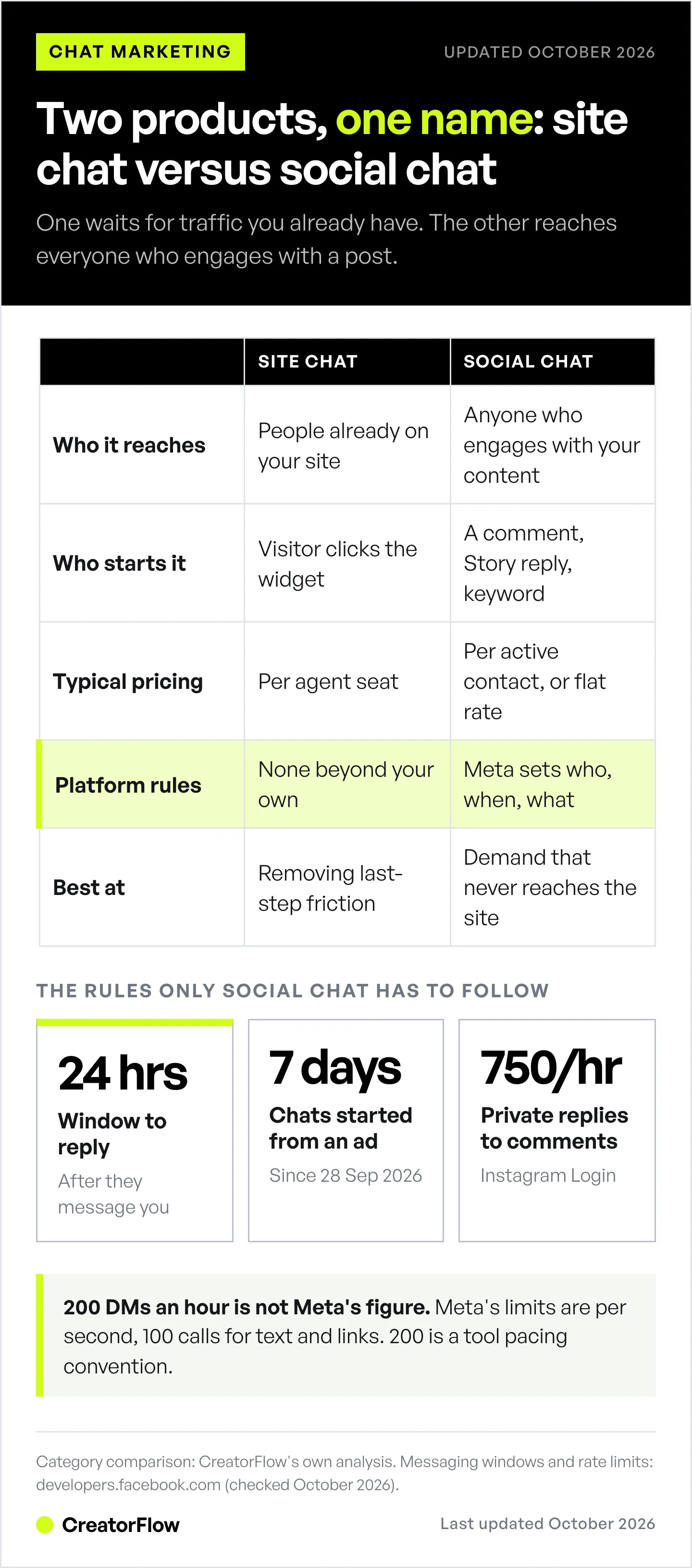
Site chat lives on your website. A widget on the product page catches someone who is already there and already close to buying. It answers sizing, shipping and returns questions at the moment of hesitation. Reach is capped by your website traffic, and the conversation usually ends when the tab closes.
Social chat lives in Instagram, Messenger, WhatsApp and TikTok. It starts from a comment, a Story reply, or a keyword someone sends you. Reach is your audience rather than your traffic, and the thread stays in the person’s inbox after they leave.
| Site chat | Social chat | |
|---|---|---|
| Where it runs | Your website | Instagram, Messenger, WhatsApp, TikTok |
| Who it reaches | People already on your site | Anyone who engages with your content |
| Who starts it | Visitor clicks the widget | A comment, Story reply, or keyword |
| Reach ceiling | Your traffic | Your audience |
| After the session | Conversation ends | Thread stays in their inbox |
| Typical pricing | Per agent seat | Per active contact, or flat rate |
| Platform rules | None beyond your own | Meta sets who, when and what |
| Best at | Removing last-step friction | Capturing demand that never reached the site |
Two differences matter more than any feature list.
Site chat waits. Social chat goes and gets people. A widget cannot open a conversation with someone who never visits, so its ceiling is your existing traffic. A comment trigger reaches every person who engaged with a Reel, including the ones who would never have clicked through to your store.
Site chat is unregulated. Social chat runs on someone else’s platform under rules you do not set. Meta decides who you may message, when, and how often. Every live chat comparison skips this because it does not apply to them. It applies fully to you.
Which Type Does Your Store Need?
Use the source of your unanswered questions. Whichever channel is already generating questions you cannot keep up with is the channel to automate first.
Choose site chat if your product pages get meaningful traffic and your abandonment happens at checkout, your questions are about shipping, returns, sizing or stock, and you have someone available to answer during business hours.
Choose social chat if your posts collect comments asking where to buy, your audience is larger than your site traffic, you sell through Reels or Stories, or you are an affiliate or creator sending people to a storefront you do not own.
Choose both if you are running paid social at volume. Ads create both problems at once.
Most stores under roughly $50k a month have one obvious answer and it is usually social, because that is where the unanswered questions already are. If your Reels fill with “price?” and your live chat sees four conversations a week, the widget is not the bottleneck.
For brands whose comments fill with “where can I buy this” rather than “how much”, the stockist routing setup is covered in our guide for home, candle, and food brands.
What Chat Marketing Costs
The headline price matters less than the pricing model, because the model decides what happens to your bill when things go well.
Live chat is typically sold per agent seat. Cost scales with headcount, so a growing audience does not raise the bill. Social automation is more often sold per active contact, which means the bill rises with audience size, whether or not those contacts bought anything.
ManyChat is the most widely used tool in the social category and shows the per-contact model clearly. Its ladder is Essential at $17 a month for 250 contacts, Pro at $39 for 2,500, Business at $99 for 7,500, and Advanced at $199 for 25,000, with a free plan capped at 25 contacts. Billed annually those become $14, $29, $69 and $139 a month. Every paid tier lists contacts as “included, then pay per contact”, so volume above the cap is billed on top, per ManyChat’s pricing page (checked October 2026).
One detail worth checking on any pricing page in this category: ManyChat’s defaults to the annual view, so the first numbers you see are the discounted ones. The monthly figures are 21% to 43% higher, depending on the tier.
CreatorFlow prices flat instead. Free covers 500 automated DMs a month on one workspace. Pro is $15 a month, or $12 billed annually, for two workspaces and 5,000 DMs per workspace. Growth is $30, or $24 annually, for five workspaces, 10,000 DMs per workspace and priority support. The bill does not move when your audience grows, per CreatorFlow’s pricing page (checked October 2026).
Neither model is universally cheaper. Per-contact pricing suits stores with a small, high-value contact list and a need for many channels at once. Flat pricing suits creators and stores whose audience is much larger than their buyer count. For a fuller breakdown across tools, see what Instagram automation cost looks like at each tier.
The Rules Social Chat Marketing Has to Follow
This is the section the live chat comparisons cannot write, and it is the one that decides whether your flows survive.
Meta requires the customer to start the conversation. A business can message someone after they send a message, tap a call-to-action button, or click a Click-to-Messenger or Click-to-Direct ad. A comment allows one private reply within 7 days of the comment. There is no compliant way to cold-message a follower who has not engaged.
Once they message you, you have 24 hours to respond. Since 28 September 2026, chats that start when someone taps a Click-to-Direct or Click-to-Messenger ad and sends a message get up to 7 days from that first message. Promotional content is allowed inside the window, which is why comment-to-DM works for selling. Outside the window the rules tighten and most message types restrict promotional content, including subscription offers, deals, coupons and discounts. The human_agent tag extends the window to seven days, but Meta scopes it to support cases a business could not resolve within 24 hours, not to marketing follow-ups. Using tags outside their approved cases can restrict your ability to send messages at all (developers.facebook.com, October 2026).
Rate limits sit on top. On the Instagram API with Instagram Login path, an app can make 100 calls per second per professional account for messages containing text, links, reactions and stickers, 10 per second for audio or video, and 750 per hour for private replies to comments on posts and Reels (developers.facebook.com, October 2026).
Worth knowing because it circulates constantly: the widely repeated “200 DMs per hour” figure appears nowhere in Meta’s documentation. Meta publishes per-second limits and the hourly cap on comment replies above. The 200 an hour number is a pacing convention that tools apply themselves to stay well clear of the real ceilings.
The practical consequence for a store is that your flows should be built to answer fast and close inside the first day. A sequence designed to nurture someone over two weeks will run into the window.
Chat Marketing Flows That Earn Their Setup Time
Four flows cover most of the revenue for a store. Each one attacks a point where buyers currently drop.
Comment to product link. Someone comments a keyword on a product post and gets the link in seconds. This is the highest-volume flow for most stores because the demand already exists in your comments and is currently going unanswered. Setup differs a little by platform, and Instagram DM automation for Shopify, Etsy and WooCommerce covers what each one supports.
Question deflection. Sizing, shipping times, materials and stock. These repeat endlessly and each unanswered one is a lost sale. Automating the top five questions usually removes the majority of manual replies.
Cart recovery in the thread. With average abandonment at 70.22% (Baymard Institute, September 2025), a message in an inbox someone already reads beats another email in a promotions tab. This works best when the conversation started before checkout, so the thread already exists. The mechanics of recovering carts through Instagram DMs depend on your checkout setup.
Paid traffic into a thread. Instead of sending ad clicks to a landing page, send them into a conversation that answers the objection the page cannot. This is a real format with its own economics, covered in the guide to paid ads that open a DM instead of a landing page.
Notice what none of these are: a long nurture sequence. The 24-hour window rewards flows that resolve quickly.
How to Launch Your First Flow
- Find the question you answer most. Read your last 200 comments and DMs. One question almost always dominates. That is your first automation, not the one you find most interesting.
- Pick the trigger keyword. Use a word people already type. “Link”, “price” and “size” beat clever branded keywords, because the flow only fires if someone uses the word.
- Write the reply as one message. Answer the question, then give the link. Do not open with a greeting that costs the reader a tap before they get what they asked for.
- Plan the follow-up for people who reply. Meta lets you send more messages only after the person answers, inside the 24-hour window that answer opens. Keep one follow-up ready for those replies.
- Post something that invites the keyword. The automation does nothing until a post tells people what to comment.
- Read the numbers after two weeks. Triggers fired, links clicked, and sales attributed. If clicks are high and sales are low, the problem is your product page, not the flow.
Once the first flow is stable, add the second. Stores that build six flows at once usually ship none of them well. For the conversation structure that turns a triggered reply into a closed sale, there is a four-stage framework for selling in the thread.
Mistakes That Waste Chat Marketing Budget
Buying for the channel you wish you had. A widget bought for a store with no traffic sits idle. Automate the channel where the questions actually arrive today.
Writing flows that need three replies to deliver a link. Every extra step loses people. If someone asked for the price, send the price.
Treating the contact list as free. On per-contact pricing, every person who ever triggered a flow can count toward your tier. Growth in triggers is growth in cost, so check how your tool counts contacts before you scale a giveaway.
Building a two-week nurture sequence. It collides with the 24-hour window. Move the offer forward.
Automating and never reading the replies. People answer these messages. An automation that fires into a thread nobody monitors turns a warm buyer into an ignored one.
Skipping the tool comparison. Feature overlap in this category is wide and pricing models differ more than feature lists do. The roundup of Instagram DM automation tools compares what each one actually includes.
Turn Comments Into Conversations
CreatorFlow connects through Meta’s official Instagram API and turns comments, Story replies and keywords into DMs that deliver your product links automatically. Flat pricing, so the bill stays the same as your audience grows.
FAQ
What is chat marketing for ecommerce?
Chat marketing for ecommerce is using one-to-one messaging to sell and support customers instead of relying only on web pages and email. In practice it means two things: live chat on your website, and automated conversations on Instagram, Messenger, WhatsApp or TikTok triggered by comments, Story replies and keywords.
Is chat marketing the same as live chat?
No. Live chat is one form of chat marketing, limited to visitors already on your website. Chat marketing also covers social messaging automation, which reaches people through comments and Story replies whether or not they ever visit your site. The two have different reach, different pricing models, and different platform rules.
How much does chat marketing for ecommerce cost?
It depends on the pricing model more than the tier. Social tools are commonly priced per active contact: ManyChat runs $17 to $199 a month across four paid tiers, or $14 to $139 billed annually, with a free plan for 25 contacts (manychat.com/pricing, October 2026). Flat-rate options exist, such as CreatorFlow at $15 a month for Pro (creatorflow.so/pricing, October 2026).
Can I message customers who have not contacted me first?
Not on Meta’s platforms. A business can message someone after they send a message, tap a call-to-action button, or click a Click-to-Messenger ad. After that you have 24 hours to reply, or up to 7 days when the chat started from a Click-to-Messenger or Click-to-Direct ad. Promotional content is permitted inside that window but restricted outside it (developers.facebook.com, October 2026).
Does chat marketing help with cart abandonment?
It addresses it from both ends. Site chat answers the objection that causes the abandonment, and social chat gives you a thread the customer already reads for the follow-up. Average documented cart abandonment sits at 70.22% across 50 studies (Baymard Institute, September 2025), so both angles have room to work.
Which chat marketing channel should an ecommerce store start with?
Start with the channel already producing questions you cannot answer fast enough. If your posts fill with comments asking where to buy, social DM automation pays back sooner. If your product pages get real traffic and people stall at checkout, site chat is the better first move.
Will automated DMs get my Instagram account restricted?
Not when the tool connects through Meta’s official API and stays inside the messaging rules. Restrictions come from messaging people who never engaged, using message tags outside their approved cases, or tools that log in with your password rather than through official authorization.
Competitor pricing verified from manychat.com/pricing and platform rules from developers.facebook.com in October 2026. Cart abandonment data from Baymard Institute (page updated September 2025, checked August 2026). Individual results vary.


