
Selling in Instagram DMs uses a 4-stage framework (Trigger, Qualify, Convert, Follow Up) to turn DM conversations into completed purchases at 7-20% conversion rates. DMs achieve 90% open rates compared to 20-25% for email, making them the highest-converting sales channel on Instagram. The key difference between low and high performers: treating each DM as a structured micro sales conversation instead of a link delivery service.
Most e-commerce brands and creators fire off a product link and hope for the best. That approach converts at single digits because it skips qualification, personalization, and follow-up. The brands converting at 15-20% add one qualifying question, remove checkout friction, and follow up within 24 hours.
This playbook breaks down the exact 4-stage DM sales framework for physical products, digital goods, and services, with scripts, automation setup, and follow-up templates you can copy today.
Key Takeaways
- DM open rates vs email: Instagram DMs achieve 90% open rates compared to 20-25% for email, making DMs the highest-converting sales channel on Instagram (LeadResponse, April 2026)
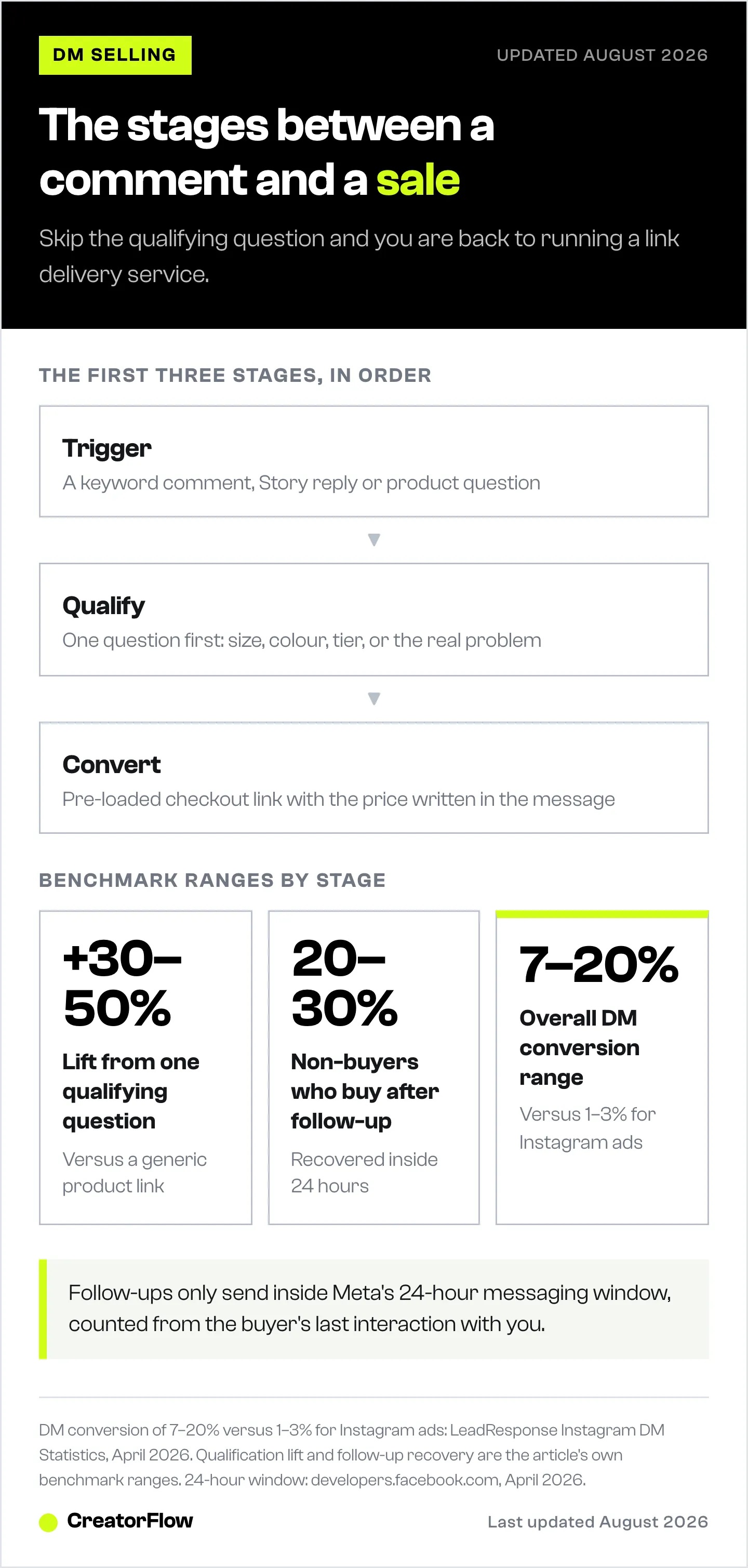
- 4-stage sales framework: Trigger (capture intent) → Qualify (one-question micro-commitment) → Convert (pre-loaded checkout links) → Follow Up (3-message recovery sequence within 24 hours)
- Qualification boosts conversion: Asking one relevant question before sending the checkout link (e.g., “What size are you?”) increases conversion rates by 30-50% compared to sending a generic product page
- Follow-up recovery rate: 20-30% of people who receive a checkout link but don’t buy will purchase after a well-timed follow-up message
- Overall DM conversion benchmark: Well-structured DM sales conversations convert at 7-20%, compared to 1-3% for standard Instagram ads
- Bottom line: Stop treating DMs like a link delivery service and start using the 4-stage framework to turn every conversation into a structured micro sales interaction

Why DMs Convert Better Than Link-in-Bio
The standard Instagram sales flow looks like this: post content → add “link in bio” → hope people navigate there → hope they buy. Every step loses people. By the time someone reaches your product page, you’ve lost 85-95% of interested followers. For how this compares with a website chat widget, see the two types of chat marketing for ecommerce.
DMs flip this. The conversation happens where the buyer already is. No app switching, no hunting for links, no losing context. That matters most in high-consideration categories, where the buyer has several questions to clear before committing; our playbook for jewelry and accessory brands walks through that qualification sequence. Instagram DM automation delivers 90% open rates compared to 20-25% for email (LeadResponse, April 2026). That alone changes the math.
Three reasons DMs outperform every other Instagram sales channel:
- Zero friction. The buyer stays in Instagram. No new tabs, no loading screens, no forgotten carts
- Perceived personal attention. A DM feels like a 1:1 conversation, even when automated. This triggers reciprocity and trust
- Real-time intent capture. When someone comments “PRICE” on your Reel, their buying intent peaks in that moment. A DM arriving 2 seconds later catches them at maximum interest
Instagram Shopping works for discovery. DMs work for conversion. The two aren’t competitors. They’re sequential stages of the same funnel. See How to Set Up Instagram Shop and Sell Products for the discovery side.
This split matters more in 2026 because Instagram has stepped back from being a checkout destination. Meta wound down forced in-app checkout in 2025, and most shops now tag products and route buyers to website checkout instead (valueaddedresource.net, May 2026). Discovery still happens on Instagram, 62.8% of users research brands and products there, the highest of any platform, and roughly 29% buy through it (GWI and the Sprout Social Index, May 2026), but the actual conversion increasingly runs through the DM. That makes the framework below the practical way to close sales on Instagram today.
The 4-Stage DM Sales Framework
Every high-converting DM sales flow follows four stages. Skip one and conversion rates drop. Nail all four and you’re operating at 15-20% DM-to-purchase rates.
Stage 1: Trigger (Capture Intent)
The trigger is the moment a follower signals buying interest. Not all triggers are equal.
High-intent triggers (convert at 10-20%):
- Commenting a specific keyword on a product post (“LINK”, “PRICE”, “SIZE”)
- Replying to a Story showing the product in use
- Sending a DM with a product name or question
Medium-intent triggers (convert at 5-10%):
- Commenting generic engagement (“love this”, fire emoji)
- Replying to a Story with a reaction
- Clicking a Story poll or quiz about products
Low-intent triggers (convert at 1-5%):
- Following your account
- Liking multiple posts
- Viewing a Story without responding
The rule: Match your DM response to the trigger intensity. A high-intent commenter gets a direct product link with checkout info. A medium-intent reactor gets a soft qualifying question. A low-intent follower gets value content, not a sales pitch.
Trigger optimization tips:
- Use clear keyword CTAs in captions: “Comment SHOP to get the link”
- Place CTAs in the first 3 seconds of Reels (before people scroll)
- Rotate keywords weekly to keep engagement fresh (“WANT”, “LINK”, “SHOP”, “YES”)
- Use Story polls as soft triggers: “Want to see the price?” → DM on “Yes” vote
Need help setting up comment triggers? See our Comment-to-DM Automation Setup Guide.
Stage 2: Qualify (Separate Browsers from Buyers)
This is the stage most sellers skip. They get a comment, fire off a link, and wonder why 95% of recipients never click it.
Qualification does two things: it identifies who’s ready to buy right now, and it makes the buyer feel heard. Both increase conversion rates.
The one-question qualification framework:
Instead of sending the product link immediately, ask one relevant question first:
- For apparel/physical products: “What size are you looking for?” (more in our DM automation guide for boutiques)
- For products with variants: “Which color caught your eye?”
- For services/coaching: “What’s your biggest challenge with [topic] right now?”
- For digital products: “Are you looking for the beginner or advanced version?”
- For high-ticket items: “Have you tried [cheaper alternative] before?”
Why this works:
- Micro-commitment. Answering a question creates investment in the conversation. Invested people buy at higher rates
- Personalization signal. The buyer feels like you’re helping them specifically, not blasting links
- Intent filter. Serious buyers answer quickly. Window shoppers ghost. This saves you from wasting checkout links on people who’ll never buy
- Better product match. Sending the right variant/option directly reduces “this isn’t what I wanted” drop-offs
Qualification flow example (physical product):
Trigger: User comments "WANT" on product Reel
↓
DM 1: "Hey! Great taste, that [product name] is one of our
       best sellers. What size works best for you?"
↓
User replies: "Medium"
↓
DM 2: "Perfect. Here's your direct checkout link for the Medium:
       [pre-loaded checkout URL with size selected]

       Free shipping on orders over $50. This link is active
       for 24 hours."
Compare this to the common approach:
Trigger: User comments "WANT"
↓
DM 1: "Here's the link: [generic product page URL]"
↓
User has to find their size, add to cart, enter info...
↓
85% abandon before checkout
The qualified version converts 30-50% better because it removes decisions from the buyer’s plate.
Stage 3: Convert (Remove Checkout Friction)
The checkout link is where most DM sales die. Not because the buyer changed their mind, but because the process has too many steps.
Friction killers for DM checkout:
- Pre-loaded cart links. Send URLs with the product, variant, and quantity already in the cart. On Shopify: yourstore.com/cart/VARIANT_ID:1 skips the product page entirely
- One-click checkout options. If your platform supports Shop Pay, Apple Pay, or Google Pay, mention it: “You can check out in one tap with Apple Pay”
- Price transparency. Include the price in your DM. Surprises at checkout kill conversions: “The Medium is $49 + free shipping = $49 total”
- Time-limited links. Create urgency without being sleazy: “This link stays active for 24 hours” (this is a real operational constraint with Instagram’s 24-hour messaging window)
- Social proof in the DM. One line of proof right before the link: “Over 2,000 sold this month” or “Rated 4.8/5 by 300+ buyers”
Checkout message template:
Here's your direct link to the [Product] in [Variant]:
[Pre-loaded checkout URL]

Price: $49 (free shipping included)
Rated 4.8/5 by 340+ customers

Checkout takes about 30 seconds. Let me know if you have
any questions before ordering!
Platform-specific checkout optimization:
| Platform | Best Checkout Approach |
|---|---|
| Shopify | Pre-loaded cart URL with variant ID, Shop Pay enabled |
| Gumroad | Direct product link with discount code pre-applied |
| WooCommerce | Add-to-cart URL with auto-redirect to checkout |
| Etsy | Direct listing link (no cart pre-loading available) |
| Custom site | UTM-tagged product page with sticky cart |
For Shopify-specific automation setup, see our Shopify Instagram Automation Guide.
Stage 4: Follow Up (Recover Lost Sales)
Most DM sales conversations end at Stage 3. The link gets sent, no purchase happens, and the seller moves on. This is leaving money on the table.
20-30% of people who receive a checkout link but don’t purchase will buy after a follow-up message. Instagram’s API allows messaging within a 24-hour window after the last user interaction, so timing matters.
Follow-up sequence (3-message framework):
Message 1, The Soft Check-In (4-6 hours after checkout link)
"Hey! Just checking in, did you have any questions about
the [Product]? Happy to help with sizing, shipping, or
anything else."
Why it works: Positions you as helpful, not pushy. Opens the door for objections you can address.
Message 2, The Objection Preempt (12-18 hours after checkout link)
"Quick heads up, we offer free returns within 30 days if
the fit isn't perfect. Most customers say it runs true to
size. Your link is still active if you'd like to grab it!"
Why it works: Addresses the two biggest purchase objections (fit uncertainty, return hassle) without the buyer having to ask.
Message 3, The Final Nudge (22-23 hours after checkout link)
"Last note, your checkout link expires soon (Instagram's
24-hour window). No pressure at all, just didn't want you
to lose access if you were still interested!

[Checkout link again]"
Why it works: Creates real urgency (the 24-hour window is a genuine Meta API constraint) without fake scarcity tactics. Re-includes the link so they don’t have to scroll up.
Follow-up rules:
- Never send more than 3 follow-ups per conversation
- Stop immediately if the buyer says “no” or “not interested”
- Space messages across the 24-hour window, don’t cluster them
- Each follow-up must add new information (objection handling, social proof, urgency), not repeat the same pitch
- Track which follow-up message drives the most conversions and optimize from there
For more DM message frameworks, see Instagram DM Scripts That Convert.
DM Sales Scripts That Convert
Here are ready-to-use scripts for the most common e-commerce selling scenarios. Adapt the tone to match your brand.
Script 1: Physical Product (Apparel/Accessories)
Trigger: Comment “SHOP” on product Reel
DM 1 (Immediate):
"Hey [name]! That [product] has been flying off the shelves.
What size are you, S, M, L, or XL?"

DM 2 (After size reply):
"Great choice. Here's your direct checkout for the [size]:
[Pre-loaded cart URL]

$[price] with free shipping over $50.
Most customers say it fits true to size, and
300+ five-star reviews back that up.

Any questions before you order?"

Follow-up (6 hours, no purchase):
"Hey! Just wanted to let you know we do free exchanges
if the size isn't perfect. Your checkout link is still
active, happy to help if you need anything!"
Script 2: Digital Product (Course/Template/Guide)
Trigger: Story reply asking about the product
DM 1 (Immediate):
"Thanks for reaching out! Are you looking for the
[Starter/Pro] version? Quick breakdown:

Starter ($29): [Core benefit 1], [Core benefit 2]
Pro ($79): Everything in Starter + [Premium benefit 1],
[Premium benefit 2]

Which fits what you need right now?"

DM 2 (After choice):
"Smart pick. Here's your link:
[Checkout URL with selected tier]

You get instant access after purchase.
Over [X] creators already using it.

Let me know if you have questions!"
Script 3: Service/Coaching (Booking a Call)
Trigger: Comment “INFO” on a client results post
DM 1 (Immediate):
"Hey! Glad the results caught your eye. Quick question:
what's the #1 thing you're trying to improve with
[your service area] right now?"

DM 2 (After reply):
"That's exactly what we help with. Based on what you shared,
I'd recommend a [15/30]-min discovery call to map out your
specific situation.

Here's my calendar: [Calendly link]

Completely free, no pressure. We'll figure out if it's
a good fit and you'll walk away with 2-3 action items
either way."
For more DM templates across niches, check our Instagram DM Automation Templates.
Manual vs. Automated: When to Use Each
Not every DM needs automation. Not every DM should be manual. Here’s the decision framework.
| Scenario | Manual | Automated | Why |
|---|---|---|---|
| High-volume product posts (50+ comments) | ❌ | ✅ | Impossible to reply manually within the intent window |
| High-ticket sales ($500+) | ✅ | ❌ | Personal touch matters for expensive purchases |
| Simple keyword triggers (LINK, SHOP) | ❌ | ✅ | Repetitive, speed-sensitive, perfect for automation |
| Complex product questions (sizing, compatibility) | ✅ | ❌ | Nuanced answers build trust |
| Follow-up sequences | ❌ | ✅ | Timing precision matters, humans forget |
| Objection handling (price, quality concerns) | ✅ | ❌ | Empathy and flexibility needed |
| Story reply engagement | ❌ | ✅ | High volume, time-sensitive |
| VIP/repeat customers | ✅ | ❌ | Personal relationship drives lifetime value |
The hybrid approach that works best:
- Automate Stage 1 (Trigger): Instant replies to comments and story reactions. Speed wins here
- Automate Stage 2 (Qualify): Qualification questions can be templated. Responses route to the right follow-up
- Automate Stage 3 (Convert): Checkout links with pre-loaded carts. No human needed
- Hybrid Stage 4 (Follow-up): Automated first follow-up, manual intervention for complex objections
This approach handles 10-100x more conversations per day than a fully manual process while keeping the human touch where it matters most.
Tools for DM selling automation:
CreatorFlow automates comment-to-DM triggers, story replies, and keyword-based responses using Meta’s official Instagram Graph API. Setup takes under 5 minutes. Plans start at $0/month (Free) with 500 DMs, scaling to $15/month (Pro) for 5,000 DMs and email capture (creatorflow.so/pricing, April 2026).
ManyChat Essential starts at $17/month for up to 250 active contacts, or $14/month billed annually, scaling with subscriber count. It supports multi-platform automation across Instagram, Facebook, WhatsApp, and SMS (manychat.com/pricing, July 2026). Best for businesses that need cross-platform DM automation beyond Instagram.
For a full tool comparison, see Best Instagram DM Automation Tools.
Metrics That Matter for DM Sales
Stop tracking vanity metrics. These are the numbers that predict revenue from DM selling:
| Metric | What It Measures | Good Benchmark | How to Improve |
|---|---|---|---|
| Trigger-to-DM rate | % of triggers that open a DM conversation | 60-80% | Clearer CTAs, faster response time |
| Qualification response rate | % of DM recipients who answer your qualifying question | 40-60% | Better questions, warmer tone |
| DM-to-checkout click rate | % of people who click your checkout link | 30-50% | Pre-loaded carts, price transparency |
| Checkout-to-purchase rate | % of link clickers who complete purchase | 20-40% | Fewer checkout steps, trust signals |
| Follow-up recovery rate | % of non-buyers who purchase after follow-up | 20-30% | Better objection handling, timing |
| Overall DM conversion rate | Purchases / total DM conversations | 7-20% | Optimize each stage individually |
| Response time | Average seconds from trigger to first DM | Under 60 sec | Automation |
| Revenue per DM | Total revenue / DMs sent | Varies by AOV | Higher AOV products, upsells |
The metric that matters most: Revenue per DM conversation. This single number captures whether your scripts, qualification, checkout, and follow-ups are working together. Track it weekly.
Common DM Selling Mistakes
These are the patterns that kill DM conversion rates:
1. Sending links without context
-
❌ “Here’s the link: [URL]”
-
✅ “Here’s your [Product] in [Size/Variant], $49 with free shipping. 340+ five-star reviews. Checkout takes 30 seconds: [URL]”
2. Writing robotic messages
-
❌ “Thank you for your interest in our product. Please find the purchase link below.”
-
✅ “Hey! Great taste, that’s been our best seller this month. What size works for you?”
3. No follow-up at all
You lose 20-30% of potential sales by not following up. One check-in message 6 hours later recovers a significant chunk.
4. Following up too aggressively
Three follow-ups maximum. Stop if they say no. Never guilt-trip. The relationship matters more than one sale.
5. Same message for every trigger
A comment saying “LINK” and a comment saying “Does this come in blue?” require completely different responses. Segment your triggers.
6. Ignoring the 24-hour window
Instagram’s API enforces a 24-hour messaging window from the last user interaction (developers.facebook.com, April 2026). After that, you can’t send automated messages. Structure your follow-up sequence to fit within this window.
7. No mobile optimization on checkout pages
70%+ of Instagram users are on mobile. If your checkout page isn’t mobile-optimized, you’re losing sales at the last step. Test every checkout link on a phone before deploying.
Compliance and Safety
DM selling on Instagram is safe when you follow Meta’s rules. Using Meta’s official Instagram Graph API (not browser bots or scraping tools) keeps ban risk minimal.
Key compliance rules:
- Tool-side pacing of ~200 DMs per hour. Automation tools cap sends at about 200 per hour per account to stay well under Meta’s per-second limits. Exceeding this pauses automation for one hour, no ban (creatorflow.so/blog/instagram-api-rate-limits-explained, April 2026)
- 24-hour messaging window. You can only send automated messages to users who interacted with your account in the last 24 hours (developers.facebook.com, April 2026)
- One automated message per trigger. Each comment or Story reply triggers one automated DM. Follow-ups require the user to respond first
- No spam. Don’t message users who haven’t interacted with your content. This violates Meta’s policies and damages your engagement rate
- GDPR compliance. If you collect emails via DMs (EU users), you need clear consent. State what you’ll do with their email in the DM
Safe tools use Meta’s official API: CreatorFlow, a Meta Tech Provider, and ManyChat, a Meta Business Partner, both connect through OAuth authentication. No password sharing, no third-party scraping, no account access risk.
For more on staying safe, read How to Avoid Instagram Bans with DM Automation.
FAQ
How many DMs can I send per hour on Instagram?
Automation tools pace sends at about 200 automated DMs per hour per account. This pacing is a tool-side convention to stay under Meta’s per-second limits. If you exceed it, automation pauses for one hour. No account ban occurs when using official API tools (creatorflow.so/blog/instagram-api-rate-limits-explained, April 2026).
Is selling in Instagram DMs legal?
Yes. Selling products through Instagram DMs is legal and permitted by Meta’s platform policies. The key requirements: use Meta’s official API (not scraping tools), respect the 24-hour messaging window, and don’t send unsolicited messages to users who haven’t interacted with your content.
What conversion rate should I expect from DM selling?
DM conversations convert at 7-20% depending on your product, pricing, and how well you qualify buyers. Compare this to 1-3% for standard Instagram ads and 2-4% for e-commerce websites (LeadResponse, April 2026). The 4-stage framework in this guide pushes you toward the higher end.
Do I need automation to sell in DMs?
No. You can sell manually in DMs and many creators start this way. Manual selling works well for high-ticket products ($500+) and low-volume accounts (under 20 DM conversations per day). Automation becomes necessary when you’re handling 50+ conversations daily or want to respond within seconds of a comment.
How do I handle price objections in DMs?
Don’t discount immediately. Instead: acknowledge the concern, restate the value, and offer a low-risk option. Example: “Totally understand, it’s an investment. Here’s what [X] customers said after trying it: [testimonial]. We also offer a 30-day return policy if it’s not the right fit.”
Can I sell on Instagram DMs without a website?
Yes, but it limits your options. Since Meta removed native in-app checkout in August 2025, every sale finishes off Instagram regardless, so you need somewhere to take payment. Payment links (Stripe, PayPal) sent directly in DMs work, as do hosted checkout pages from platforms like Gumroad. A full website gives you more control over the checkout experience and tracking.
What’s the difference between Instagram Shopping and DM selling?
Instagram Shopping is a discovery tool, it lets users browse products on your profile. DM selling is a conversion tool, it turns interest into purchases through conversation. They work best together: Shopping brings products to attention, DMs close the sale. See our full breakdown in How to Set Up Instagram Shop and Sell Products.
How do I track revenue from DM sales?
Use UTM parameters on every checkout link you send via DM. Format: yoursite.com/product?utm_source=instagram&utm_medium=dm&utm_campaign=product_name. This lets Google Analytics (or your analytics tool) attribute revenue specifically to DM conversations. CreatorFlow includes built-in link click tracking.
Sources verified (April 12, 2026):
- LeadResponse: Instagram DM Statistics 2026 (leadresponse.co/blog/instagram-dm-statistics)
- ManyChat pricing (manychat.com/pricing)
- CreatorFlow pricing (creatorflow.so/pricing)
- Meta Instagram Graph API documentation (developers.facebook.com/docs/instagram-api)
- CreatorFlow: Instagram API Rate Limits Explained (creatorflow.so/blog/instagram-api-rate-limits-explained)


