
Instagram giveaway automation uses comment-to-DM triggers to confirm entries, log participants, and notify winners through Meta’s official Instagram Graph API. When a follower comments your giveaway keyword, an automated DM responds within seconds and tracks them as an entry. The system replaces spreadsheet tracking, runs inside the ~200 DMs/hour pacing convention most tools enforce, and complies with FTC disclosure rules when you set it up correctly.
You posted the giveaway. The comments worked. Now you have 600 usernames in a screenshot, a half-finished Google Sheet, and a brand partner asking for the winner by Friday. You DM the winner, they don’t see it for two days, you pick a backup, and the original winner finally replies upset. The next time you run a giveaway, you swear you will use a tool. Then you forget. This guide is the tool plus the workflow.
This is the complete playbook for solo creators and brands running Instagram giveaways with automation. It covers what the trigger flow looks like, the five steps to set one up, what Meta’s API actually allows, the FTC disclosure language you cannot skip, and the mistakes that get giveaway posts hidden from feed. For the product-side overview, see CreatorFlow’s run giveaways use case.
Key Takeaways
- What it is: Comment-to-DM automation that sends entry confirmations instantly, logs participants, and lets you export the entrant list for fair winner selection.
- API limits matter: Most tools pace sends at around 200 DMs/hour per account as a behavioral safety cap. A viral giveaway will queue overflow into the next hour, not send all at once.
- The 7-day window: You can send one private message to a commenter for up to 7 days after they comment. Past that, the trigger expires.
- FTC compliance is non-negotiable: Spell out “sweepstakes” or “giveaway” clearly, link to full official rules, and disclose the sponsor. Hashtags alone do not satisfy FTC clear-and-conspicuous standards (ftc.gov, May 2026).
- Use unique keywords: “WIN” gets false positives from unrelated comments. A campaign-specific term like “MAYWIN” or “SUMMER25” filters noise.
- Best duration: 3-7 days. Longer giveaways lose momentum and shorter ones cap reach before the algorithm picks the post up.
- Bottom line: Set up the comment-to-DM flow once, and every entry confirms in 2 seconds, logs automatically, and exports as CSV for random winner selection.

What Is Instagram Giveaway Automation?
Instagram giveaway automation is software that turns comment activity on a giveaway post into a structured entry list. A follower comments the keyword, the tool sends them a DM through Meta’s Graph API confirming their entry, and that DM event becomes a logged record. You select the winner from the export, not from screenshotted comments.
Three things happen in sequence:
- Trigger: Follower comments your campaign keyword on the giveaway post.
- Action: Automation sends a DM in 2-8 seconds with entry confirmation and any additional rules.
- Log: Each successful DM equals one verified entry, recorded with timestamp and username.
The automation runs through the same official Instagram Graph API used by Instagram DM automation in general. No password sharing, no browser bots, no risk of suspension when configured correctly.
Why Manual Giveaway Tracking Breaks
Manual giveaway management fails at three predictable points.
At entry: You cannot count comments fast enough on a post that is still receiving them. Comments get buried by replies, hidden by Instagram’s filtering, or missed because they came in while you were asleep. By the time you screenshot, the count is already wrong.
At qualification: Half the rules say “follow + tag a friend + comment.” You can verify the comment, but checking 600 follow statuses or 600 tags by hand is hours of work that creators do not do honestly. Most “winner” picks skip verification entirely.
At winner selection: The DM to the winner sits unread for 24-72 hours. Backup winners pile up. Brand partners get frustrated. The next campaign loses your slot.
Automation solves the first and third reliably. Tag/follow verification is partially solved (some tools confirm follow status before sending the entry DM via a follow gate, see when to use follow gates).
Setup in 5 Steps
The setup below assumes you are using a tool built on Meta’s official Instagram API that connects to your Instagram Business or Creator account through OAuth. CreatorFlow’s free plan covers single-creator giveaways; agencies running multiple client campaigns should read the Instagram giveaway automation for agencies playbook instead.
Step 1 — Pick a unique keyword. Avoid generic words. “WIN,” “ENTER,” and “GIVEAWAY” trigger on unrelated comments and inflate your entry count with false positives. Use a campaign-specific term: “MAYWIN,” “SUMMERSWAG,” “OPENJULY.” Six to ten characters works best — short enough to type, distinct enough to filter.
Step 2 — Write the entry confirmation DM. Three things go in the message: confirmation that they are entered, the giveaway end date, and a link to the full official rules. Keep it under 80 words. Do not ask them to comment again, follow your secondary account, or re-share — Instagram’s API rules and FTC requirements both penalize that. The pre-built giveaway automation template covers the compliant default copy if you want a starting point.
Example:
Hey {{first_name}}! You’re entered in the May Giveaway. Winner picked May 31 and notified by DM. Full rules: [yourlink.com/giveaway-rules]. Good luck.
Step 3 — Set the trigger window. Instagram allows one automated DM per commenter for up to 7 days after the comment (per Meta’s messaging policy, May 2026). Set your trigger to expire when the giveaway closes so late comments after winner selection do not get false confirmations.
Step 4 — Publish the post and the rules page. The official rules need to live on a page outside Instagram (your blog, a Notion doc, a free landing page). Caption the giveaway post with: prize, eligibility, end date, sponsor name, and the rules link. Hashtag-only disclosures do not meet FTC clear-and-conspicuous standards.
Step 5 — Export and select. When the giveaway closes, export the DM contact list (CSV). Use a verifiable random selection method — a publicly visible random number generator with the seed shown, a third-party drawing service, or live video draw. Document the method in case anyone disputes.
Meta API Limits You Need to Plan Around
Two limits from Instagram’s Graph API determine how big your giveaway can be before automation starts queueing.
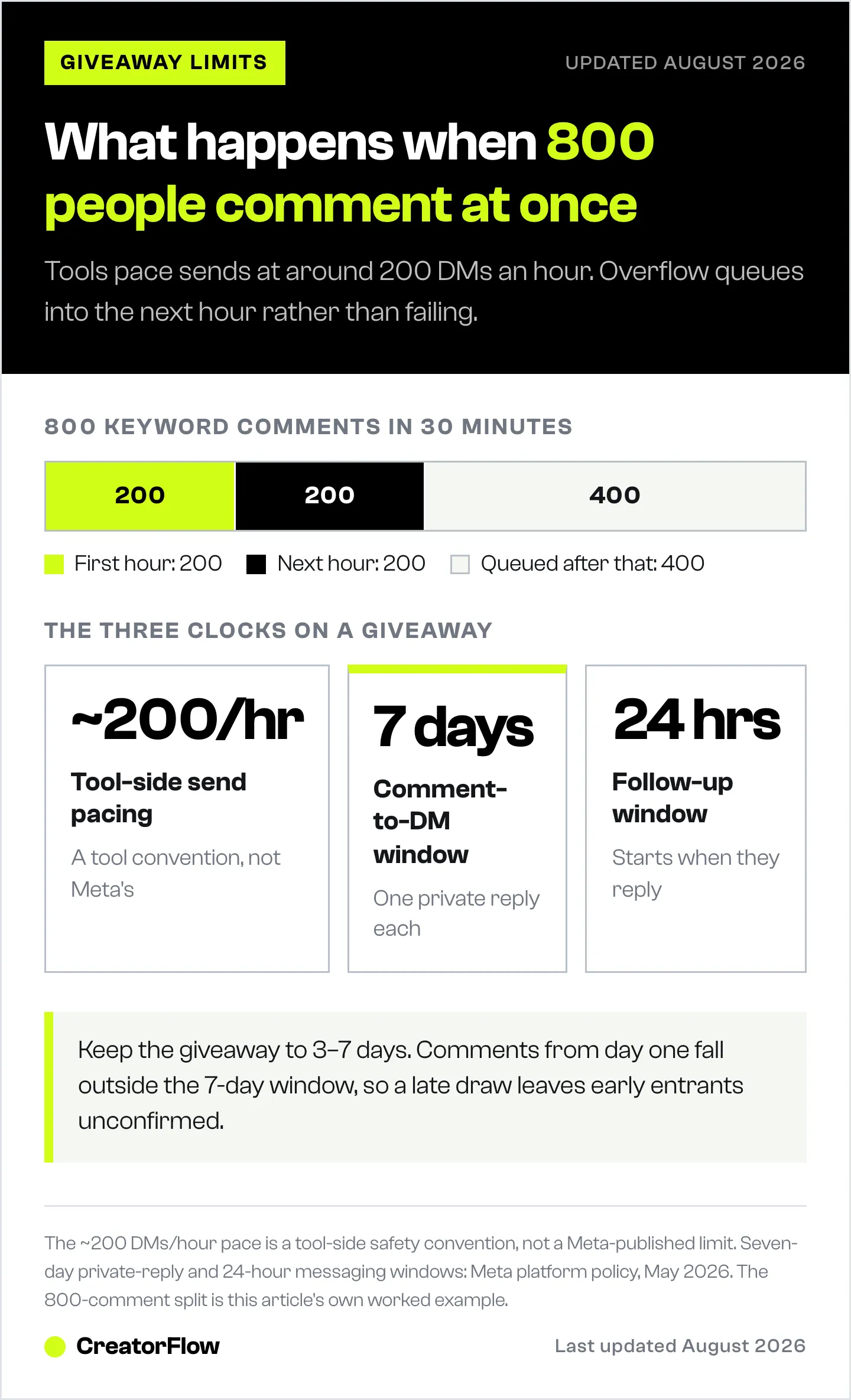
~200 DMs per hour per account. Most tools pace sends at around 200 DMs/hour as a behavioral safety cap to stay well under Meta’s per-second rate limits. If a Reel goes viral and 800 people comment your keyword in 30 minutes, the first 200 get DMs immediately. The next 200 send in the following hour. The remainder queue further. For most creators this is fine. For accounts with 100K+ followers running viral giveaways, plan for staggered confirmation timing.
7-day comment-to-DM window. You have a maximum of 7 days from when someone comments to send the automated DM (Meta platform policy, May 2026). If your giveaway runs longer than 7 days, late commenters from week 1 will not receive the trigger. Either keep giveaways under 7 days or accept that early entrants outside the window need manual follow-up.
24-hour messaging window for unsolicited follow-up. Once someone has replied to your giveaway DM, you have 24 hours to send promotional follow-ups. After that, you cannot send unprompted promotional messages without Meta-approved message tags. See Instagram API rate limits explained for the full set of constraints.
FTC Rules You Cannot Skip
FTC enforcement on social-media sweepstakes shifted in 2024 toward digital transparency, and 2026 enforcement continues that trend (thesocialmedialawfirm.com, May 2026). The four rules with the most teeth:
1. Use the full word. “Sweepstakes” or “giveaway,” not abbreviations. The FTC has explicitly warned that hashtags like “#sweeps” do not communicate the promotion clearly to a typical consumer (ussweeps.com, May 2026).
2. Identify the sponsor. “Sponsored by [Brand Name]” must appear in the caption. If a creator is running a brand-sponsored giveaway, the caption needs both the creator and the sponsoring brand named.
3. Link to full official rules. The post caption can summarize, but the full rules — eligibility, entry methods, prize description, odds, winner selection, dispute resolution — must be accessible at one click from the post. A single rules page on your site is the simplest compliant path.
4. Disclose material connection. If you are an influencer running a brand giveaway, FTC endorsement guides require disclosure of the relationship. “#ad” or “#sponsored” in the first three lines, not buried in hashtags. Read Instagram affiliate disclosure FTC rules for the full breakdown.
The compliance cost is one rules page and clear caption language. The non-compliance cost is FTC investigation, brand-partner termination, and Instagram suppression of the post.
Picking Winners Fairly
Three accepted methods for random selection from an automated entry list.
Random.org list randomizer. Paste the entrant CSV column into random.org’s list randomizer. The first name on the shuffled list is your winner. Screenshot the result with the timestamp visible. CreatorFlow ships its own free Instagram giveaway picker that runs the same logic on the entrant CSV.
Live video draw. Open the entrant CSV on a live stream, paste into a randomizer with the seed shown, pull the winner publicly. Highest trust method, also good content.
Third-party drawing service. Tools like RandomPicker.com or RandomList.com create timestamped, verifiable draw records you can link from your rules page. Useful for high-value prizes where disputes are likely.
What does not count as random:
- Picking the comment that “felt right”
- Selecting based on follower count or engagement history
- Letting the brand partner pick their favorite
These bias the draw and create FTC-actionable disclosure problems if discovered.
Comparison: DM Automation vs Dedicated Giveaway Tools
Dedicated giveaway platforms exist (Gleam, Woobox, Wishpond, Vyper). Their pricing as of May 2026:
| Tool | Entry pricing (May 2026) | Best for |
|---|---|---|
| Gleam | Free + paid from $10/mo (gleam.io, May 2026) | Multi-platform giveaways with extra entry methods |
| Woobox | Free + paid from $37/mo (copywritersnow.com, May 2026) | Brand campaigns with custom landing pages |
| Wishpond | From ~$49/mo annual (kickofflabs.com, May 2026) | Lead-gen-heavy giveaway funnels |
| Vyper | Free + paid from $99/mo (rafflepress.com, May 2026) | Viral referral giveaways with leaderboards |
| CreatorFlow | Free (500 DMs/mo); Pro $15/mo flat (creatorflow.so, May 2026) | Comment-to-DM giveaways inside Instagram |
Dedicated tools win when you need entries from multiple platforms, leaderboards, or referral mechanics. DM automation wins when the giveaway lives entirely on Instagram and the entry mechanic is “comment to enter” — which is the dominant 2026 format because the algorithm rewards comment volume.
If you want the click-by-click version, follow the first automation walkthrough.
Mistakes That Get Giveaway Posts Hidden
Generic keywords that trigger on unrelated comments. “Pick me” or “I want this” generates dozens of false-positive entries from people not actually entering. Use the campaign keyword.
Hard-asks in the entry rules. Instagram’s algorithm down-ranks posts that demand follow-tag-comment combinations because they are textbook engagement bait. Run cleaner mechanics: comment the keyword + follow. Save the tag-a-friend ask for when the giveaway is between brand partners with permission to use that mechanic.
No rules page. A giveaway with rules only in the caption violates FTC clear-and-conspicuous standards and gets the post hidden after enough reports.
Running the giveaway longer than 7 days. Comments from day 1 stop receiving automated entry DMs after day 7 because of the API window. Keep duration to 3-7 days.
Picking the winner privately and announcing later. Without documentation of the draw method, disputes go badly. Document or stream the selection.
FAQ
How does Instagram giveaway automation actually work?
A tool connects to your Instagram Business or Creator account through Meta’s Graph API. You set a trigger keyword on a specific post. When followers comment that keyword, the tool sends them a DM within seconds confirming their entry. Each DM is logged as an entry. At the giveaway close, you export the entrant list and pick a winner randomly.
Is automated giveaway entry against Instagram’s rules?
No, when run through Meta’s official Instagram API with Instagram Login. Tools like CreatorFlow (a Meta Tech Provider since December 2025) operate inside Meta’s per-second rate limits and the 7-day post-comment private reply window. Most tools pace sends at around 200 DMs/hour as a behavioral safety cap. Browser-based bots that scrape comments or log into your account violate Meta’s terms and risk suspension.
What is the best Instagram giveaway duration?
3-7 days is the sweet spot. Shorter loses reach before the algorithm picks up the post. Longer violates the 7-day comment-to-DM window and loses momentum after the initial spike. Five days starting Monday and ending Friday performs well for most creators and brands.
Do I need an FTC disclosure on every giveaway post?
Yes, if a brand sponsored the giveaway or provided the prize, FTC endorsement guides require clear sponsor disclosure in the caption. The disclosure must be visible without “see more” expansion. Use “#ad” or “Sponsored by [Brand]” in the first three lines.
Can I require people to follow me to enter?
Yes, follow-to-enter is a permitted entry condition. Use a follow gate that asks entrants to follow and confirm before the entry counts, otherwise you are operating on the honor system. Just avoid layering too many requirements (follow + tag + share + comment + DM) — Instagram’s algorithm down-ranks engagement-bait combinations.
How many giveaway entries can I handle with automation?
Most tools pace sends at around 200 DMs/hour per Instagram account as a behavioral safety cap. Most creators never hit this. A viral giveaway generating 1,000+ comments in an hour will queue overflow into the next hour. For accounts that regularly produce viral giveaways, plan messaging for staggered delivery.
How do I pick a winner fairly from automated entries?
Export the entrant list to CSV after the giveaway closes. Use random.org’s list randomizer, a live video draw with a public seed, or a third-party drawing service. Screenshot or stream the selection. The Instagram comment that “feels right” is not random and creates FTC disclosure problems.
What’s the cheapest way to run automated Instagram giveaways?
CreatorFlow’s free plan covers 500 DMs per month, which is enough for one giveaway with up to 500 entries. The Pro plan at $15/month flat (May 2026) covers 5,000 DMs and adds geographic analytics, see the CreatorFlow pricing page for the full tier breakdown. Compare against Gleam ($10+/mo), Woobox ($37+/mo), or Wishpond (~$49+/mo) for multi-platform alternatives.
Giveaway tool pricing and Meta API limits verified from spurnow.com, gleam.io, copywritersnow.com, kickofflabs.com, rafflepress.com, ftc.gov, and thesocialmedialawfirm.com as of May 2026. Individual Instagram account performance and rate-limit behavior vary.


