
A Follow Gate asks someone to follow your Instagram account and confirm before your automation delivers the link, code, or download they asked for. Use it on top-of-funnel content where audience growth is the goal: broad-reach Reels, giveaways, free resources. Skip it on product links, affiliate offers, and booking pages, where every extra step costs revenue.
You posted a Reel that hit 200,000 views. The comments are flooding in. Your DM automation kicks on and starts shipping links. Three days later you check Insights: 4,000 link clicks, 12 new followers. The reach was free. The audience growth was zero. Every person who got your link kept scrolling without ever hitting follow.
Follow Gates were built to fix exactly that problem. They also come with constraints most creators do not see until they have already wired one up: no API-level enforcement of the follow itself, a Meta Community Standard that prohibits engagement-gating, and friction that taxes the wrong kinds of conversions. This guide covers the mechanics, the trade-offs, the policy nuance, and a decision framework you can apply on a per-automation basis. If you want the broader feature picture first, read what CreatorFlow does.
Key Takeaways
- A Follow Gate adds one step: the user gets a DM asking them to follow before the link is delivered, with a “Visit Profile” button and an “I’m following” confirmation
- No API-level enforcement: Meta’s Instagram Graph API does not expose a “does user X follow account Y” endpoint, so every Follow Gate on the market is a UX prompt and a self-reported confirmation, not a verified check (developers.facebook.com, May 2026)
- Best use case: top-of-funnel content where reach is high but follower count is the bottleneck (giveaways, free templates, viral Reels, sub-10K accounts)
- Worst use case: product or affiliate links where you have already paid for attention and every extra step costs revenue
- Policy grey area: Meta’s Spam Community Standard explicitly prohibits “requiring users to engage (in the form of likes, shares, follows, or any other public-facing form of engagement) to gain access to specific, exclusive content” — which by literal reading is what a Follow Gate does (transparency.meta.com, May 2026)
- Switch per automation: run Follow Gate on growth Reels and skip it on sales posts; CreatorFlow lets you toggle it automation by automation
- Pro feature: Follow Gate is on CreatorFlow Pro ($15/month) and Growth ($30/month) plans (creatorflow.so/pricing, May 2026)

What a Follow Gate Actually Does
A Follow Gate sits between someone commenting your trigger word and receiving the content they asked for. The flow looks like this:
- Follower comments “TEMPLATE” on your Reel
- CreatorFlow sends an instant DM: “Hey! Follow me first and I’ll send you the template right away.”
- The DM includes two buttons: Visit Profile (opens your account) and I’m following (confirms)
- They tap “I’m following” and CreatorFlow sends the link
- They ignore it and nothing else happens
The mechanic is simple. The strategy is not. A gate is friction. Friction is sometimes useful (filters low-intent traffic, drives a behavior you want) and sometimes destructive (kills conversions on people who would have bought).
For a feature-by-feature breakdown of what comes with each plan, see CreatorFlow Free vs Pro.
What the Tool Cannot See
This is the part most creators get wrong. CreatorFlow, ManyChat, LinkDM, and every other Meta-approved DM automation tool talk to Instagram through the Graph API. The Graph API does not expose follower lists or a “did user X just follow account Y” endpoint. Meta removed that access for privacy reasons years ago and has not added it back (developers.facebook.com/docs/instagram-platform/instagram-graph-api/reference/ig-user, May 2026).
What that means in practice: when a user taps “I’m following,” your automation has no way to verify it. The button is a self-report. The flow then ships the link based on the tap, not based on a real follow check.
Some users will follow before tapping. Some will tap, get the link, and unfollow within minutes. Some will tap without ever opening your profile. The tool does not know which is which. This is not a CreatorFlow limitation. It is a Meta platform limitation that applies to every tool in the category.
If your goal is “every follow must be real and stick for at least 30 days,” a Follow Gate is the wrong tool. You are closer to the right outcome with paid follower-objective ads or organic content that earns follows on its own.
The Meta Policy Question Most Creators Ignore
Before you turn a Follow Gate on, read this section. It is the single most important caveat in the article.
Meta’s Spam Community Standard, which applies across Facebook and Instagram, prohibits the following behavior verbatim:
“Requiring users to engage (in the form of likes, shares, follows, or any other public-facing form of engagement) to gain access to specific, exclusive content.”
Source: transparency.meta.com/policies/community-standards/spam (May 2026).
Read that again. The policy specifically names follows as a prohibited form of engagement-gating. A Follow Gate, by literal reading, is requiring users to follow (engage) to gain access to a link (the exclusive content). The policy text targets the behavior, not the tool.
Now the nuance. Meta-approved DM automation tools (CreatorFlow, ManyChat, LinkDM, others) all build Follow Gates as documented features. These tools remain in good standing with Meta — CreatorFlow as a Meta Tech Provider, ManyChat and LinkDM as Meta Business Partners. Follow Gates are listed openly on their pricing pages. The policy has not, in observable enforcement, been used to suspend accounts that use Follow Gate features in approved tools.
The grey area is real. The tool is sanctioned. The behavior the tool produces is technically against a Community Standard. Enforcement, in practice, has focused on organic content like “follow me to get the link” captions and the kind of obvious engagement-bait Meta flagged as spam years ago, not on Pro features inside vetted partner products.
What this means for your decision:
- Low risk: running Follow Gate inside a Meta-approved tool, on standard creator content, with reasonable volume.
- Higher risk: combining Follow Gate with aggressive engagement-bait language (“follow or you can’t have the link!”), running it across many accounts at scale, or using it on content that already trips spam signals.
- Mitigation: keep gate copy soft and benefit-led (“Follow so I can keep sending you these”), do not stack multiple gating mechanics in a single flow, and watch your account for any reach drops after enabling it.
The article would be incomplete without this section. Every other “Follow Gate guide” you will find online skips it.
When a Follow Gate Wins
Follow Gates work when followers are scarcer than clicks. If your reach is bigger than your audience size, you are handing free attention to people who will never come back. A gate captures some of that attention as follows.
Viral Reels with low follower conversion
You hit a Reel that breaks past your usual reach. 50,000 views, 100,000 views, sometimes more. Most of those viewers are not your followers. They saw your video on the Explore feed or Reels tab. Without a Follow Gate, you ship the link and they leave.
Add a gate and you convert a slice of that traffic into followers. The size of the slice depends on how compelling the offer behind the gate is, how clear your gate copy is, and how often the audience is willing to follow strangers for content. We do not have published industry data on the exact conversion rate, so treat any number you see online as guesswork until you measure your own.
What we can say: on a Reel with reach far above your follower count, even a low single-digit follow-conversion rate produces meaningful audience growth from a single post. The reach was free, the marginal cost of converting attention to follows is zero, and the audience growth compounds across every future post you make.
This is the highest-ROI Follow Gate scenario in the use case set. The bigger the reach-to-followers ratio on a given post, the more a gate earns its keep.
Giveaways and free resources
Free templates, e-books, swipe files, discount codes, exclusive checklists. Anything where the user is getting clear value with no purchase decision involved.
The audience for a giveaway is, by definition, willing to take an extra step to claim it. They commented because they want the thing. Adding “follow first” is not a deal-breaker because the value of the free resource still exceeds the cost of one tap.
The gate copy matters here. A giveaway gate that says “Follow me first and I’ll send you the meal prep template plus next week’s grocery list” frames the follow as relationship-building. A gate that says “Follow or you can’t have the link” is the kind of language Meta’s spam policy was written to target. Same mechanic, different framing, very different risk profile.
Audience-building campaigns with measurable goals
You are trying to hit 10K followers to qualify for LTK, become eligible for Instagram monetization features, or land brand deals where rate cards depend on follower count. Every follow has a dollar value above zero.
In this scenario, Follow Gate is not friction. It is the campaign. You are running automations specifically to grow, and the gate is the conversion mechanism. The gate doing exactly what gates do (trading some click-through for some new followers) is the whole point.
When the goal is growth, design the post around the gate. Pick content that gives non-followers a reason to stay (not just to claim the resource), put the resource behind the gate, then keep posting the kind of content that justified the follow.
New accounts where social proof matters
Sub-1K-follower accounts have a credibility problem. Brands will not partner with you. Affiliate networks reject you. Algorithm boosts feel rare. Getting to 1K, then 5K, then 10K is a structural threshold, not a vanity number.
If you are under 10K followers and your content is reaching new audiences, Follow Gate is doing more work for you than for a 100K creator with the same reach. The same conversion rate produces a bigger percentage gain. A 100-follower week on a 500-follower account is a 20% audience increase. The same week on a 50,000-follower account is invisible.
Small accounts with growing reach are the ideal Follow Gate user. The math is most favorable here.
When a Follow Gate Backfires
Gates work against you when conversions are scarcer than reach. If you have already paid for attention through paid ads, brand-deal posts, or content you spent hours producing for a specific buyer, adding friction loses you money.
Product and affiliate links on buyer-intent posts
Someone watching your skincare review and commenting “PRODUCTS” is closer to a purchase than 95% of your followers will ever be. They are in the buy window. The Reel did its job by creating intent. Your job is to deliver the link before that intent fades.
Adding a Follow Gate here is taxing the conversion. The people who abandon at the gate are mostly the ones who would have clicked through and bought, because high-intent users have already decided what they want and a gate is just an obstacle between them and the thing. You traded commissions for follower count, and Amazon affiliate dollars compound faster than follower count does.
For more on this trade-off, see how to convert Instagram comments into sales.
Booking pages, calendars, and lead magnets for paid offers
A coach posting “comment CALL for a free strategy session” is fishing for high-intent leads. The follower-versus-call math is not even close. One booked call is worth more than a hundred new followers, easily.
Skip the Follow Gate. Use Email Gate instead if you want to capture lead data. An email goes into your CRM. A follow goes into a vanity metric you do not own and that Instagram can throttle in the algorithm any time.
Existing audience nurturing
If your trigger word is on a post that mostly reaches your current followers (carousel posts, Stories, mid-tier Reels under 10K reach), a Follow Gate is asking already-existing followers to follow you again. They tap “I’m following” because they already are. The gate added a step and converted no one new.
On these posts, ship the link directly. Save the Follow Gate for content that actually breaks past your existing audience.
Customer support and FAQ automations
Some creators use DM automation to answer common questions (“comment HELP for shipping info”). A Follow Gate on a support automation tells your existing customer “follow me to get the answer to a question you already had.” That damages relationships in a way the marginal follow does not pay back.
Support automations should ship answers immediately, with no gates.
Brand-deal posts
If a sponsor pays you for clicks or conversions on a deliverable, a Follow Gate eats into the metric the sponsor cares about. They paid for performance. You taxed it for follower growth that does not show up on their dashboard.
Read every contract. Most brand deals do not explicitly forbid gates, but most also tie payment or future deliverables to click-through and conversion metrics. The math almost always favors removing the gate on sponsored content.
The Trade-Off Table
Use this to decide before you flip the toggle on a specific automation:
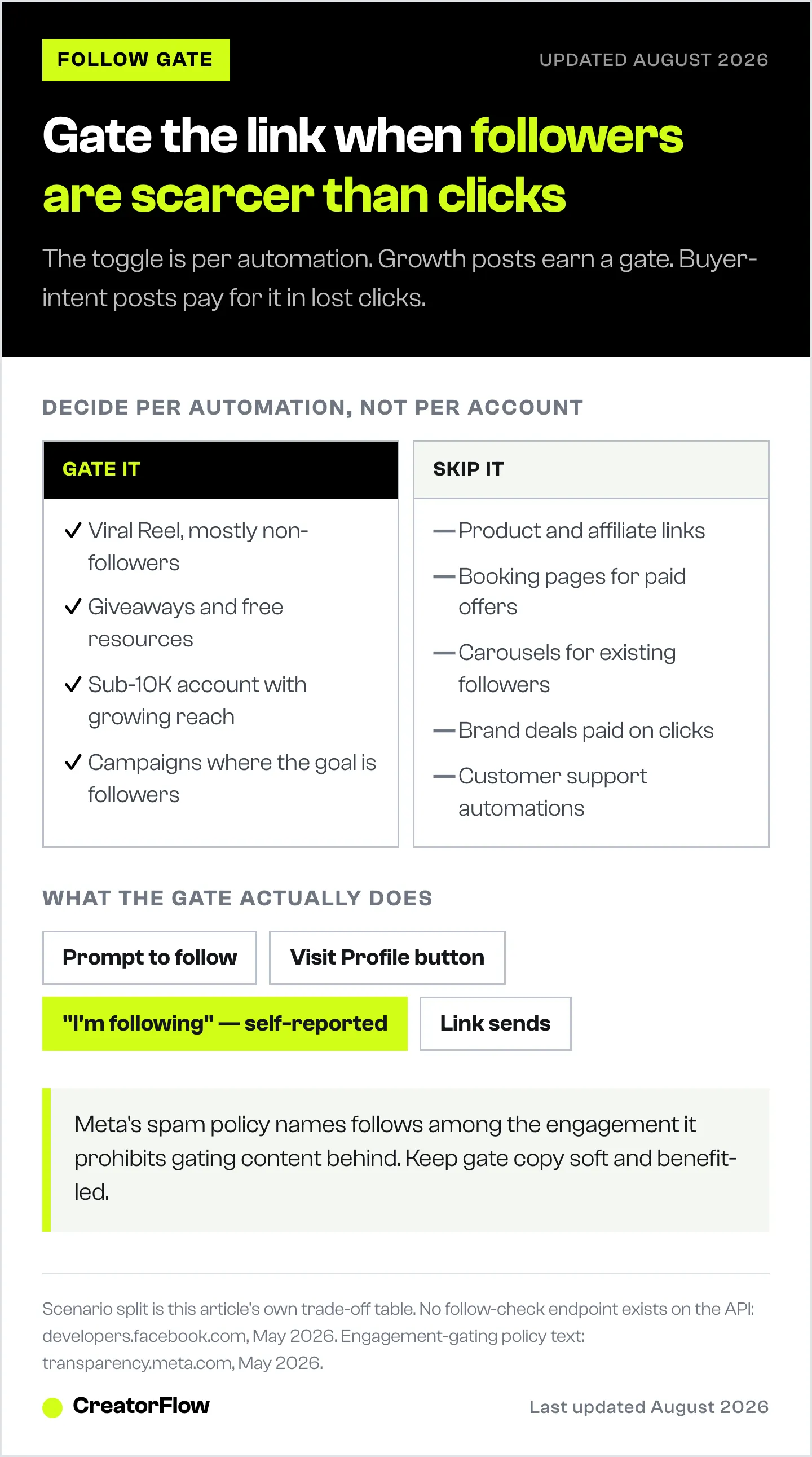
| Scenario | Reach Type | Follow Gate? | Why |
|---|---|---|---|
| Viral Reel, 50K+ views | Mostly non-followers | Yes | Convert free reach into audience |
| Giveaway / free resource | Mixed | Yes | High compliance, value justifies friction |
| Sub-10K account, growing fast | Mostly non-followers | Yes | Follower count gates other opportunities |
| Product or affiliate link | Buyer intent | No | Conversion friction costs revenue |
| Booking page for paid offer | High intent | No | Use Email Gate instead |
| Carousel for existing audience | Mostly followers | No | Adds a step, converts no one new |
| Brand-deal post | Sponsor cares about clicks | No | Friction reduces deliverable performance |
| Customer support automation | Existing customers | No | Damages relationship trust |
Follow Gate vs ManyChat’s Follow-to-DM
These are different mechanics solving overlapping problems. People conflate them constantly.
CreatorFlow Follow Gate: content is gated until the user follows. The follow comes before the payoff. Mechanism: UX prompt with self-reported confirmation (creatorflow.so/use-case/grow-followers, May 2026).
ManyChat Follow-to-DM: a follow event triggers an automated DM. The follow comes before the conversation, but there is no gate. Launched October 22, 2025, with ManyChat as the exclusive Meta launch partner (prnewswire.com, October 2025). Mechanism: a Meta-supported event subscription that fires when a real follow happens. Free on any ManyChat plan, but currently in beta and gradually rolled out — accounts with under 1,000 followers or low engagement are likely ineligible during the beta (help.manychat.com, May 2026).
The mechanism difference is important. Follow-to-DM uses an actual event from Meta confirming a real follow. Follow Gate uses a UX prompt with no Meta-side confirmation.
Pick by intent:
- “Convert reach into follows on existing automations” -> Follow Gate.
- “Start conversations with brand-new followers” -> Follow-to-DM (currently a ManyChat feature in beta). Meta gates eligibility account by account; how to auto-DM new Instagram followers covers who qualifies and the greeting flows that run without it.
- “I want both” -> nothing stops you from running them in different campaigns. They do not conflict.
For the full feature comparison, see CreatorFlow vs ManyChat.
Setting Up a Follow Gate in CreatorFlow
The toggle is per-automation, not per-account, which is the correct design for the strategy in this guide.
- Open the automation you want to gate or create a new one
- In the Pre-DM Options section, enable Follow Gate
- Customize the gate message (“Follow me first and I’ll send your template”)
- Save and activate
The same automation can run on a growth-focused Reel with the gate on, then run on a product-focused post with the gate off. You are not locked in.
CreatorFlow lets you run Follow Gate or Email Gate on any given automation, but not both at once. Pick the one that matches the post’s goal:
- Need followers more than emails? Follow Gate
- Need emails more than followers? Email Gate
- Need conversions more than either? Skip both
Gate copy guidelines, given the policy section earlier in this article:
- Frame the follow as a benefit (“Follow so you don’t miss next week’s drop”), not a demand
- Avoid language that implies the link is being withheld as punishment for not following
- Keep the message short and human; the goal is a soft prompt, not a paywall
- Test gate-on vs gate-off on similar posts to see how much it actually moves the needle for your audience
Measuring Whether Your Follow Gate Is Working
Most creators flip Follow Gate on and never check whether it actually paid back. Two metrics matter:
Follower delta. Look at follower count on the days an automation with a gate runs versus the days only ungated automations run. The growth attributable to the gate is the marginal lift on those days, not the absolute total. If you are gaining 50 followers on gated days and 45 on ungated days with similar reach, the gate is doing very little.
Click-through delta. The whole point of running automation is link clicks. If gated automations are converting comments to clicks at meaningfully lower rates than ungated automations on similar content, you are paying for follower growth in lost clicks. Whether that trade is worth it depends on your monetization model.
CreatorFlow’s link tracking on Pro and Growth plans gives you click data per automation. Cross-reference that with your Insights follower-growth chart on the days the automation ran. Two weeks of data per side is usually enough to spot a real difference. A single Reel is not.
A Decision Rule You Can Apply in 30 Seconds
Before turning on Follow Gate for any automation, answer two questions:
- What is scarcer right now: followers or clicks?
- What is the dollar value of one follow versus one conversion on this specific post?
If followers are scarcer and the per-follow value is meaningful (because of brand deals, monetization thresholds, or audience-building goals), gate it. If clicks are scarcer or the post is designed for a direct conversion, skip it.
That is the entire framework. Most creators flip Follow Gate on globally and leave it. The win comes from running it selectively, on the posts where it does work, and turning it off on the posts where it taxes revenue. Layered on top of that, soft gate copy and modest volume keep you well clear of the spam policy edge.
The Follow Gate walkthrough covers the exact steps inside the app.
FAQ
Can third-party tools verify a real follow happened?
No. Meta’s Instagram Graph API does not expose a “does user X follow account Y” endpoint. Meta removed follower-list access years ago for privacy reasons (developers.facebook.com, May 2026). Every Follow Gate on the market, regardless of vendor, is a UX prompt with a self-reported confirmation. Some users will tap “I’m following” without actually following. There is no way for a tool to detect this.
Is Follow Gate against Instagram’s policy?
It sits in a grey area. Meta’s Spam Community Standard explicitly prohibits “requiring users to engage (in the form of likes, shares, follows, or any other public-facing form of engagement) to gain access to specific, exclusive content” (transparency.meta.com, May 2026). The policy specifically names follows. A Follow Gate is, by literal reading, that exact behavior. In practice, Meta-approved DM automation tools build Follow Gates as documented features and remain in good standing with Meta’s programs (CreatorFlow as a Meta Tech Provider; ManyChat and LinkDM as Meta Business Partners). Enforcement has focused on organic engagement-bait, not Pro features inside vetted tools. Risk is low for normal use, higher for aggressive gate language or scaled abuse.
What is a normal drop-off rate at a Follow Gate?
There is no published industry data isolating Follow Gate drop-off, despite a lot of confident-sounding numbers floating around in vendor blogs. Treat any drop-off percentage you see online as opinion until you measure your own. Run gated and ungated automations on comparable posts for two weeks each, then compare your own click-through rates. Your numbers will be the only honest answer.
Can I use Follow Gate and Email Gate on the same automation?
No. CreatorFlow lets you choose one gate per automation, not both. Stacking gates compounds friction and tanks completion rates. Pick the gate that matches the post’s goal and run the other gate on a different automation. If you need both follower growth and email capture, run two automations on two posts, each with one gate.
What is the actual Instagram API rate limit for automated DMs?
Meta publishes specific limits per endpoint, not a blanket “DMs per hour” cap. For comment-to-DM automation, the relevant limit is private replies on posts and reels: 750 calls per hour per account. The Send API has a separate limit of 100 calls per second for text and link content. The 24-hour messaging window is also enforced (developers.facebook.com/docs/instagram-platform/instagram-api-with-instagram-login/messaging-api, May 2026). Tools throttle below these caps for safety, which is where third-party “200 DMs/hour” figures come from. Those are practical safe-send rates, not Meta’s published cap.
Is Follow Gate worth $15/month?
If you run automations on Reels with reach above 10K, often yes. The follower growth from a single high-reach post can exceed the monthly cost in absolute follower count. If you are using DM automation only on existing-audience content where conversions are the goal, Follow Gate alone may not justify the upgrade, but Email Gate, link tracking, and CSV export probably will. See the free vs Pro breakdown for the full math.
Should agencies use Follow Gates on client accounts?
Depends on the deliverable. If the brand deal pays for follower growth, yes. If it pays for clicks or conversions, no. Brand-deal compensation structure determines the answer, not the tool. On accounts you manage long-term where audience growth is in scope, Follow Gates on growth content can earn their keep. On accounts where you are paid per click or per conversion, gate-off is almost always the right call.
Can I A/B test Follow Gate on vs off?
Not natively. The cleanest test is sequential: run an automation with the gate off for two weeks, then on for two weeks, holding everything else constant. Compare follower delta, link clicks, and conversions across both periods. Sample size matters. A single Reel is not enough to draw conclusions because reach variance between posts is enormous.
Does Follow Gate work on Stories and Live as well as Reels?
Yes, the gate runs on any automation type CreatorFlow supports (comment-to-DM, story reply, keyword DM). The strategic question changes by surface. Stories are mostly seen by existing followers, so a Follow Gate there mostly bothers people who already follow you. Reels and Live posts often reach non-followers, where the gate has more upside. Match the gate decision to the surface, not just the post.
Follow Gate behavior, Meta API capabilities, and policy text verified from developers.facebook.com (May 2026), transparency.meta.com (May 2026), creatorflow.so/pricing (May 2026), manychat.com/use-case/follow-to-dm (May 2026), and the ManyChat launch press release on prnewswire.com (October 2025). Drop-off rate and conversion impact figures intentionally omitted as no published industry data exists. Individual results vary.


