
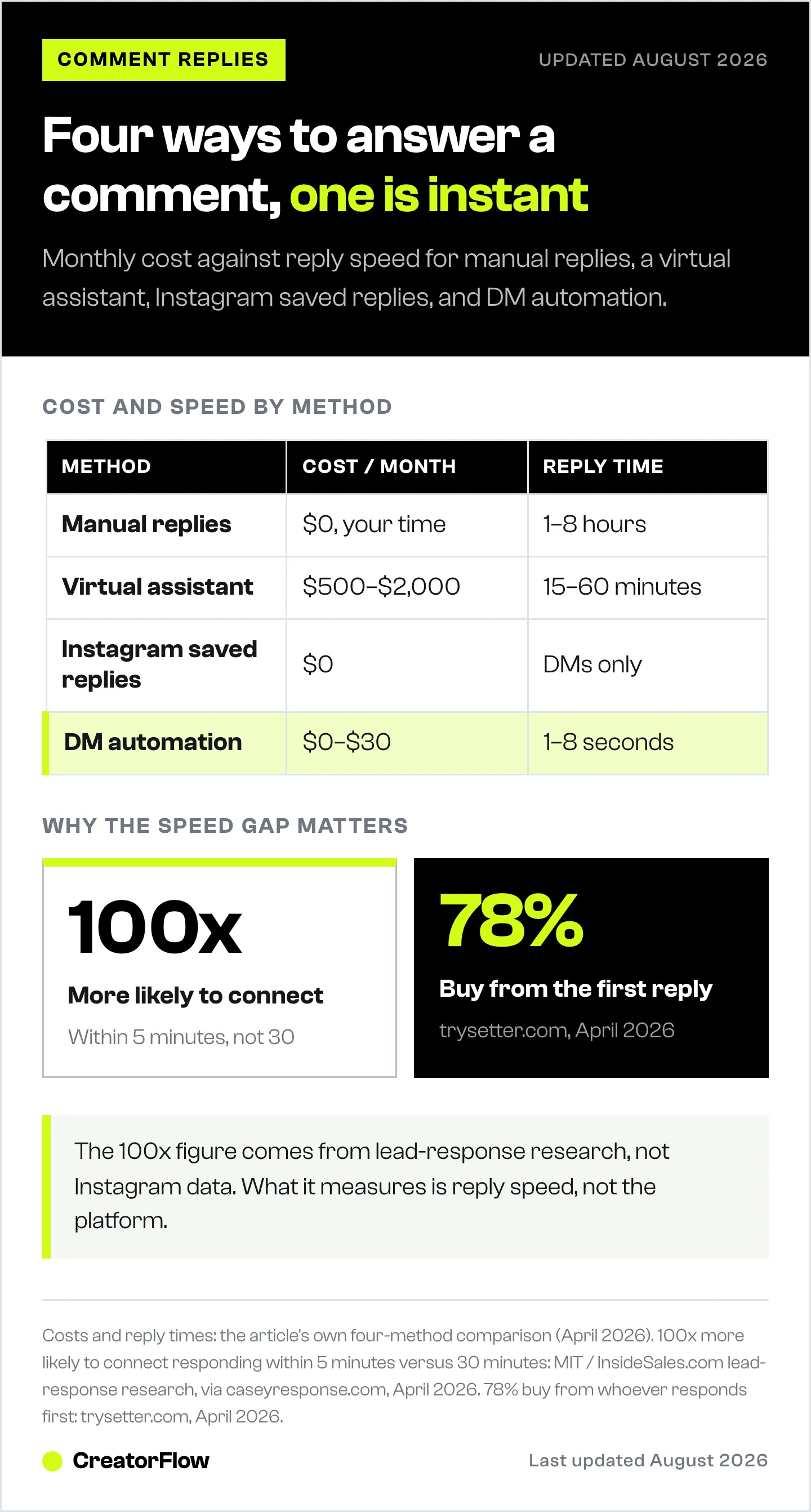
You turn Instagram comments into sales by answering buying-intent comments in seconds rather than hours. Four methods do it: manual replies (free, 3+ hours a day), a virtual assistant ($500-$2,000/month), Instagram’s built-in FAQ replies (free, limited), and DM automation ($15-$30/month, replies in 1-8 seconds, 24/7). Only automation handles unlimited comment volume without adding hours to your day.
Every unanswered Instagram comment is a lost sale. When a follower comments “how much?” on your post and you reply 6 hours later, the buying window has closed. Research from MIT and InsideSales.com shows you’re 100x more likely to connect with a lead when you respond within 5 minutes versus 30 minutes (caseyresponse.com, April 2026). For Instagram creators, that gap between instant and delayed is the gap between revenue and silence.
You post a Reel showing your product. Comments flood in: “Link?” “Price?” “Where do I buy this?” By the time you open Instagram 3 hours later, those 40 people moved on to another creator who responded faster. At a 5% conversion rate and $30 average order, that’s $60 in revenue gone from a single post. Multiply that across a week and you’re looking at $400+ in missed sales from slow replies alone.
This guide breaks down four ways to turn Instagram comments into paying customers, from manual replies to full automation. You’ll see the real costs, time investment, and conversion impact of each method so you can pick the right system for your stage. Replying to comments is one piece of the wider practice of managing your comments, DMs, and mentions.
Key Takeaways
- Speed converts: You’re 100x more likely to connect with a buyer when responding within 5 minutes vs. 30 minutes, and 78% of customers buy from whoever responds first (caseyresponse.com, April 2026)
- Four methods ranked: Manual replies (free, 3+ hours/day), virtual assistants ($500-2,000/month), Instagram’s built-in FAQ (free, limited), DM automation ($15-30/month, instant 24/7)
- The real cost of slow replies: At 50 daily comments with a 5% conversion rate and $30 average order, responding 6 hours late instead of instantly costs you $150-300/week in missed sales
- Automation wins on ROI: DM automation tools respond in 1-8 seconds, cost $15/month, and handle unlimited comment volume while you sleep
- Start here: Identify your top 5 most common comment types, write response templates for each, and automate the repetitive ones first
- Bottom line: Every Instagram comment is a customer raising their hand. The faster you respond, the more of those hands turn into transactions

Why Unanswered Comments Are Killing Your Revenue
Instagram comments are buying signals. When someone writes “How much?” or “Where can I get this?” on your post, they’re telling you they want to spend money. That’s not casual engagement. That’s a customer standing at your checkout counter.
The problem: most creators treat comments like a to-do list they’ll get to eventually. The data says “eventually” kills sales. To find out what those comments are actually worth once you answer them, see how to measure the chain in our guide to Instagram comment tracking.
The speed-to-response data:
| Response Time | Connection Rate | What Happens |
|---|---|---|
| Under 5 minutes | 100x more likely to connect | Buyer is still engaged, still on your post, still in buying mode |
| 5-30 minutes | 21x more likely to qualify | Interest fading but recoverable |
| 30 minutes - 1 hour | 60x less likely than 5 min | Buyer has moved to a competitor or lost interest |
| 1-6 hours | Near zero conversion | Buying impulse is gone, they’ve forgotten about your product |
| 24+ hours | Dead lead | They’ve already bought from someone else or no longer need it |
Source: MIT/InsideSales.com lead response research, validated by Apten 2026 benchmarks (apten.ai, April 2026).
78% of customers buy from the business that responds first (trysetter.com, April 2026). On Instagram, “first” means within minutes, not hours.
Here’s the math that should scare you:
Say you get 50 comments per day asking about your product, service, or affiliate link. With a 5% conversion rate and a $30 average order value:
- Respond instantly: 50 comments x 5% = 2.5 sales x $30 = $75/day = $525/week
- Respond in 6 hours: Conversion drops to ~1% = 0.5 sales x $30 = $15/day = $105/week
- Revenue gap: $420/week, or $1,680/month lost from delayed responses alone
That’s not a rounding error. That’s rent money. And it compounds: followers who get fast replies engage more, comment more, and buy more over time. Step one is making sure no comment slips through unanswered; this Instagram comment auto reply guide covers the 5-minute setup.
Why Most Creators Can’t Keep Up With Comments
If speed is everything, why isn’t everyone responding in seconds? Five reasons:
Volume scales faster than time. At 5,000 followers, you get 10-20 comments per post. At 50,000, it’s 100-500. Your audience grows exponentially, but your hours in a day stay at 24. The gap between incoming comments and your capacity to respond widens every month.
Content creation competes with replies. Most creators spend 2-4 hours per day making content. Add 1-2 hours answering comments and DMs, and you’re at a full-time job before you’ve done anything else. Something gets cut, and it’s usually reply speed.
The same questions repeat endlessly. “How much?” “Link?” “Is this available in the US?” “What size should I get?” After answering the same question 200 times, burnout sets in. You start skipping comments because you physically cannot type “Check my bio link” one more time.
Sleep and time zones work against you. Your audience is global. When you’re sleeping in New York, your followers in London and Sydney are commenting. Those comments sit for 8-12 hours before you wake up. By then, the buying impulse is ancient history.
No system means no consistency. Without a defined process, response quality varies wildly. Some followers get detailed, helpful replies. Others get nothing. There’s no way to track which comments need attention and which have been handled.
The result: creators who are growing their audience are simultaneously losing sales because they can’t physically keep up with the engagement their content generates. Growth creates the very problem that limits revenue.
4 Ways to Turn Instagram Comments Into Sales (Compared)
There are four practical approaches to handling Instagram comments at scale. Each has a specific cost, time investment, and sweet spot.
Method 1: Manual Replies (The Spreadsheet Approach)
Track your common questions in a Google Sheet. Pre-write responses. Copy-paste when the same question comes in. Set 2-3 daily “comment blocks” where you sit down and reply to everything.
How to set it up:
- Open a Google Sheet with columns: Question Type, Response Template, Link to Include
- Audit your last 50 comments. Group them by type (pricing, link requests, shipping, sizing)
- Write a template response for each type
- Set calendar blocks for 9am, 1pm, and 6pm to check and reply
- Copy-paste your templates, personalize the name, and hit send
Best for: Creators under 5,000 followers with fewer than 20 comments per post.
Costs: Free (your time only).
Time investment: 1-3 hours per day depending on volume.
Conversion impact: Moderate. Response time is 1-8 hours depending on when you check. You’ll catch some buyers, but the ones who comment between your check-in blocks slip away.
| Pros | Cons |
|---|---|
| Free, no tools needed | 1-3 hours daily time cost |
| Full control over every reply | Not scalable past 50 comments/day |
| Personal touch on each message | Response time measured in hours, not seconds |
| Simple to start today | Easy to miss comments during busy periods |
Method 2: Hire a Virtual Assistant or Team
Outsource comment replies to a VA or small team. Train them on your brand voice, give them your response templates, and let them handle the volume.
How to set it up:
- Hire a VA through platforms like Belay, Time Etc, or Upwork
- Create a brand voice document with do’s and don’ts
- Write response templates for every common question type
- Give them Instagram access (or use a team management tool)
- Set response time targets (under 30 minutes during business hours)
- Review replies weekly for quality control
Best for: Creators earning $5,000+/month who need faster responses but can’t justify automation tools or want human judgment on complex questions.
Costs: $500-2,000/month for part-time coverage. $3,000-5,000/month for full-time, multi-timezone coverage.
Time investment: 2-3 hours/week for training and quality review.
Conversion impact: Good. Response times drop to 15-60 minutes during covered hours. Still slow during off-hours unless you pay for 24/7 coverage.
| Pros | Cons |
|---|---|
| Human judgment on complex questions | $500-2,000+/month ongoing cost |
| Can handle nuanced conversations | Training takes time and effort |
| Frees your time for content creation | Brand voice consistency is hard to maintain |
| Scales with headcount | Still has gaps during off-hours |
Method 3: Instagram’s Built-In FAQ Tools
Instagram offers basic FAQ features for business accounts. You can set up quick replies and saved responses that followers see when they message your account.
How to set it up:
- Go to your Instagram business profile Settings
- Navigate to Business, then Saved Replies (or Quick Replies)
- Add your most common Q&A pairs
- These show as suggested replies when someone messages you
Best for: Creators who want a free, no-setup solution for basic DM questions. Works for simple FAQ scenarios.
Costs: Free (built into Instagram business accounts).
Time investment: 30 minutes to set up. Minimal maintenance.
Conversion impact: Low. Only works for DMs, not comment replies. Followers still need to initiate a DM conversation. No automation trigger from comments. Limited to basic text responses.
| Pros | Cons |
|---|---|
| Free, no external tools | Only works in DMs, not on post comments |
| Built into Instagram (no setup) | No auto-trigger from comments |
| Simple to configure | Limited customization and analytics |
| No third-party access needed | Can’t collect emails or track clicks |
Method 4: DM Automation (Comment-to-DM Tools)
Connect an automation tool to your Instagram account through Meta’s official API. Set trigger words on your posts. When someone comments a trigger word, they instantly get a DM with your link, pricing, or whatever you want to send.
How to set it up with CreatorFlow:
- Sign up at creatorflow.so (free plan: 500 DMs/month)
- Connect your Instagram Business or Creator account via OAuth (no password sharing)
- Create a new automation: pick the trigger type (comment keyword, story reply, or DM keyword)
- Set your trigger word (e.g., “link”, “price”, “info”)
- Write your DM response with your link, pricing details, or lead magnet
- Activate. Every comment with your trigger word now gets an instant DM response
Best for: Any creator who gets repetitive comments asking for links, pricing, or information. Works from day one whether you have 1,000 or 1,000,000 followers.
Costs: CreatorFlow: Free plan (500 DMs/month) or $15/month Pro (5,000 DMs/month). ManyChat: Free (25 contacts) or from $17/month on Essential ($14 billed annually), scaling with contact count up to $199/month (manychat.com/pricing, July 2026).
Time investment: 5 minutes initial setup. 10 minutes/week to review and optimize.
Conversion impact: Highest of all four methods. Messages arrive in 1-8 seconds. Works 24/7 including while you sleep. Handles high volume within the ~200 DMs/hour pacing convention most tools enforce (a tool-side cap, not a Meta-published limit).
| Pros | Cons |
|---|---|
| Instant replies (1-8 seconds) | Monthly cost ($15-30/month for paid plans) |
| Works 24/7 while you sleep | Limited to trigger-based responses |
| Handles unlimited volume | Complex questions still need manual reply |
| Tracks clicks, emails, conversions | Requires Meta API-approved tool |
| Collects emails and builds your list | Subject to the 200 DM/hour pacing limit |
Side-by-Side Comparison: Which Method Fits Your Stage?
| Factor | Manual Replies | Virtual Assistant | Instagram FAQ | DM Automation |
|---|---|---|---|---|
| Monthly cost | $0 (your time) | $500-2,000+ | $0 | $0-30 |
| Response time | 1-8 hours | 15-60 minutes | N/A (DM only) | 1-8 seconds |
| 24/7 coverage | No | Only if paying for it | Partial | Yes |
| Handles comments | Yes (manual) | Yes (manual) | No (DMs only) | Yes (auto-triggers DM) |
| Scales with growth | No | With cost | No | Yes |
| Email collection | No | Manual | No | Yes (built-in) |
| Click tracking | No | No | No | Yes |
| Setup time | 30 minutes | 1-2 weeks | 30 minutes | 5 minutes |
| Best for | Under 5K followers | $5K+/month earners | Basic DM FAQ | All growth stages |
The hybrid approach works too. Use DM automation for the 80% of comments that are repetitive (link requests, pricing, FAQs) and handle the 20% that need personal attention manually. This gives you instant response speed on volume questions while keeping the human touch for complex conversations, sales negotiations, or customer issues.
How to Set Up Comment-to-Sales Automation in 5 Minutes
Here’s the step-by-step using CreatorFlow. The process is similar across tools.
Step 1: Connect your Instagram account
Sign up at creatorflow.so. Click “Connect Instagram.” You’ll authenticate through Meta’s OAuth system. No passwords shared. Your account connects through Instagram’s official API, which means minimal ban risk when using the official API.
Step 2: Create your first automation
Pick “Comment-to-DM” as your trigger type. This is the most common starting point because it directly turns post comments into DM conversations.
Step 3: Set your trigger keyword
Choose a word your audience will comment. Keep it simple and relevant:
- Selling a product: “LINK” or “PRICE”
- Sharing an affiliate link: “RECIPE” or “ROUTINE”
- Booking calls: “BOOK” or “CALL”
- Lead magnet: “GUIDE” or “FREE”
Step 4: Write your DM response
Keep it short, personal, and action-oriented. Example for an affiliate marketer:
“Hey! Here’s the exact skincare routine I showed in the Reel: [your link]. The moisturizer is the one everyone asks about. Let me know if you have questions!”
Step 5: Activate and test
Turn on the automation. Comment your trigger word on your own post from a different account to verify the DM arrives. Check that the link works and the message reads naturally.
Step 6: Optimize based on data
After a week, check your automation dashboard:
- How many DMs were sent?
- What’s the click-through rate on your link?
- Which trigger words get the most comments?
Adjust your messaging based on what converts. Test different trigger words, DM copy, and call-to-action phrasing.
For a complete walkthrough of all automation types (comment-to-DM, story replies, keyword triggers), read our Instagram DM automation setup guide.
5 High-Converting Comment-to-Sales Automations
These templates work across niches. Customize the product/link for your situation.
1. The Affiliate Link Drop
Trigger word: “LINK” DM: “Here’s the [product] from the Reel: [affiliate link]. I’ve been using it for 6 months and it’s the one I recommend most. DM me if you want my full list!”
Best for: Amazon influencers, affiliate marketers, product reviewers.
2. The Lead Magnet Capture
Trigger word: “FREE” or “GUIDE” DM: “Here’s your free [guide/checklist/template]: [link]. Quick question before you download: what’s your email? I’ll send you the bonus resources too.”
Best for: Coaches, educators, course creators. Uses email gate automation to build your list.
3. The Booking Calendar
Trigger word: “BOOK” or “CALL” DM: “Thanks for your interest! Here’s my calendar to book a free 15-minute discovery call: [Calendly link]. I work with [your niche] and have 3 spots open this week.”
Best for: Coaches, consultants, service providers.
4. The Product Page Driver
Trigger word: “SHOP” or “BUY” DM: “Here’s the link to [product name]: [Shopify/store link]. Use code INSTA10 for 10% off, valid for the next 48 hours. Let me know if you have sizing questions!”
Best for: E-commerce sellers, Shopify store owners. Learn more about Shopify Instagram automation.
5. The Content Upgrade
Trigger word: “WORKOUT” or “RECIPE” (niche-specific) DM: “Here’s the full [workout plan/recipe/template] from today’s post: [link]. I drop new ones every week. Want me to DM you when I post them?”
Best for: Fitness creators, food bloggers, educators. Turns one-time commenters into repeat engagers.
Common Mistakes That Kill Comment-to-Sales Conversion
Mistake 1: Generic trigger words that confuse followers. Don’t use “YES” or “I” as triggers. Every casual comment will trigger your automation and annoy people. Use specific words like “LINK,” “PRICE,” or a product name.
Mistake 2: Robotic DM copy that feels like spam. “Thank you for your inquiry. Please find the requested information at the following URL:” Nobody talks like that. Write like you’re texting a friend who asked about your product.
Mistake 3: No call-to-action in the DM. Sending a link isn’t enough. Tell them what to do: “Click the link, grab the blue one, and DM me a photo when it arrives.” Specific CTAs convert 2-3x better than bare links.
Mistake 4: Ignoring the 24-hour window. Instagram’s API only allows automated messages within 24 hours of the user’s last interaction with your account. If someone comments Monday and you activate your automation Tuesday, they won’t get the DM. Keep automations always-on.
Mistake 5: Not using a follow gate. Bots and non-followers can comment on public posts. A follow gate asks the person to follow you and confirm before receiving the DM, filtering out spam and building your follower count. Learn how in our DM automation guide.
FAQ
Is it safe to automate Instagram comment replies?
Yes, when you use tools that connect through Meta’s official Instagram Graph API. CreatorFlow is a Meta Tech Provider; ManyChat and other API-based tools run inside Meta’s official partner programs. They don’t log into your account or share passwords. The automation runs through Instagram’s sanctioned system. Avoid browser bots or Chrome extensions that access your account directly, as those violate Instagram’s Terms of Service.
How fast do automated DMs arrive after someone comments?
Automated DMs typically arrive within 1-8 seconds of the comment. The exact speed depends on Instagram’s API response time and the automation tool’s processing speed. This is fast enough that most recipients see the DM before they’ve scrolled past your post.
What does Instagram DM automation cost?
Costs range from free to $30/month. CreatorFlow offers a free plan with 500 DMs/month and a Pro plan at $15/month with 5,000 DMs/month. ManyChat offers a free tier for up to 25 contacts, with paid plans starting at $17/month on Essential ($14 billed annually) and scaling to $199/month based on contact count (manychat.com/pricing, July 2026). Most solo creators stay under $15/month.
Can I automate replies to all comments or only specific keywords?
Automation tools use trigger keywords. You choose which words activate the automation. If someone comments “Great post!” (not a trigger word), nothing happens. Only comments containing your specific trigger words (like “LINK” or “PRICE”) generate an automated DM. This prevents spam and keeps responses relevant.
How many automated DMs can I send per hour?
Most tools pace automated messages at around 200 per hour. This is a tool-side pacing convention rather than a Meta-published limit, and it applies across all your automations combined. Most creators never hit this cap. You’d need a viral post generating 200+ trigger-word comments in a single hour to reach it. If you do hit it, messages queue and send in the next hour. See our Instagram API rate limits guide for details.
Does comment-to-DM automation work on Reels?
Yes. Comment-to-DM automation works on all Instagram content types: feed posts, Reels, carousels, and IGTV. Reels tend to generate the highest comment volume, making them the best content type for comment-to-sales automation.
Will followers know the DM is automated?
The DM looks like a regular direct message from your account. There’s no “automated” label or bot indicator. The message appears in their normal DM inbox as if you typed and sent it yourself. This is why writing natural, conversational DM copy matters. If your message sounds robotic, people will assume it’s automated regardless of labels.
Can I collect email addresses through comment automation?
Yes. Tools like CreatorFlow include an email gate feature that asks for the follower’s email address before sending the link. This builds your email list while delivering value. The follower types their email in the DM conversation, and you export collected emails via CSV to your email marketing platform.


