

Instagram community management is the ongoing work of engaging your audience through comments, direct messages, story replies, and mentions to build relationships and turn followers into customers. It sits inside social media management but focuses on the conversation layer, not scheduling posts. Because most brands still answer by hand, replies lag hours behind, which is why automation tools now handle the repetitive responses instantly.
You post a Reel. It takes off. Ninety comments land in an hour, half of them asking the same question. You are at work, or asleep, or already filming the next post. By the time you reply, the moment is gone and so is the buyer. Sprout Social’s 2026 research found the average brand takes four to five hours to answer on social, while 73% of users say they will buy from a competitor if a brand does not respond (sproutsocial.com, 2026).
This guide breaks down what community management on Instagram actually involves, the four layers you have to cover, how to build a workflow that does not burn you out, and where to draw the line between what you handle by hand and what you automate. It is written for creators, coaches, and small teams who run their own Instagram presence.
Key Takeaways
- What it is: Community management is the conversation layer of social media management. Replying to comments, DMs, story replies, and mentions to build relationships, not scheduling posts.
- Why it matters: Roughly 73 to 76% of consumers expect a brand response within 24 hours and 84% say response speed shapes how they see the brand (sproutsocial.com, 2026).
- The four layers: comments, direct messages, story replies, and mentions or tags. Each needs a different response pattern.
- Where manual breaks: one person can hold a few dozen real conversations a day. Past that, replies slip and buyers move on.
- What to automate: the repetitive, predictable replies like link requests, FAQs, and story-reply prompts. Keep the judgment calls human.
- Tool scope matters: schedulers publish content, conversation tools like CreatorFlow handle the reply layer. Most brands need both.
- Measure it: track response time, reply rate, saves and shares, and DMs to link clicks, not just follower count.
What Is Instagram Community Management?
Instagram community management is the practice of engaging your audience across comments, direct messages, story replies, and mentions to build relationships and drive action. It covers replying to questions, welcoming new followers, delivering links people ask for, handling complaints, and joining conversations in your niche. Unlike scheduling, which is about getting content out, community management is about what happens after the post goes live.
Think of it as the difference between broadcasting and talking. Scheduling puts your content on a calendar. Community management is the two-way exchange that turns a passive viewer into someone who trusts you enough to buy. For most creators and small brands, the conversation layer is where the sales actually happen, because a person who gets a fast, human reply is far closer to a purchase than one who watched and scrolled on.
Why Community Management Is the Pillar Brands Get Wrong
Most social media advice obsesses over posting frequency and content quality. The reply layer gets treated as an afterthought, which is exactly where the money leaks out.
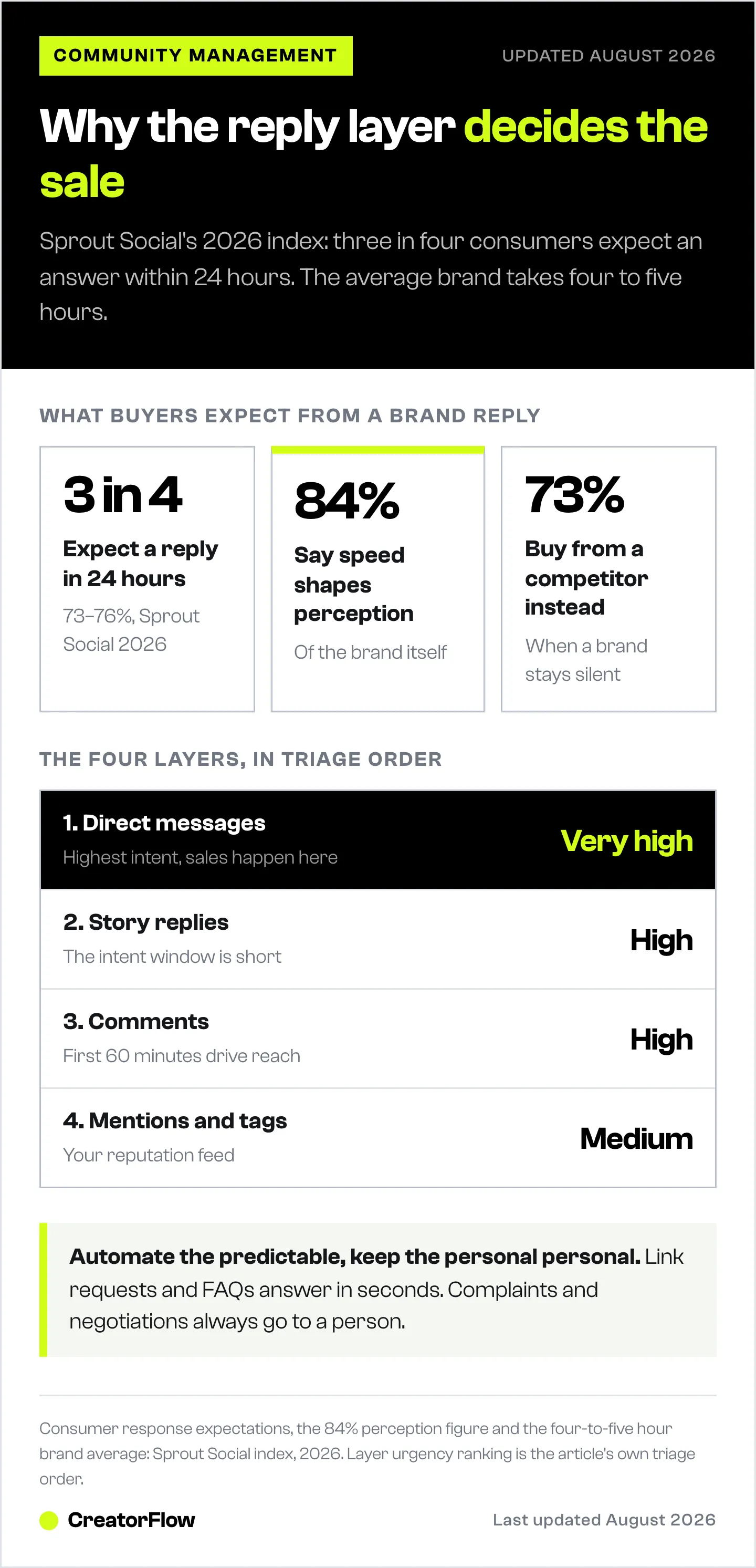
The expectation gap is the problem. Sprout Social’s 2026 index found that around 73 to 76% of consumers expect a response within 24 hours, and 84% say the speed of that response affects how they perceive the brand (sproutsocial.com, 2026). Meanwhile the average brand takes four to five hours to reply, and 73% of users will buy from a competitor when a brand stays silent. Every unanswered comment is a coin flip you are losing.
Scale makes it worse. There are now 5.79 billion social media user identities worldwide, up 294 million in a year (datareportal.com, April 2026). More audience means more inbound, and the volume does not care whether you are online. A single viral post can generate more questions in an hour than you can answer in a day, and the people asking are your warmest leads.
The 4 Layers of Instagram Community Management
Community management is not one job. It is four distinct response patterns, each with its own urgency and its own opportunity.
| Layer | What it is | Response goal | How urgent |
|---|---|---|---|
| Comments | Public replies on your posts and Reels | Show you are present, deliver value publicly, spark more comments | High, first 60 minutes drive reach |
| Direct messages | Private one-to-one conversations | Answer questions, send links, qualify and close | Very high, this is where sales happen |
| Story replies | Reactions and replies to your Stories | Turn a light tap into a conversation | High, the intent window is short |
| Mentions and tags | Being tagged in posts, Stories, and comments | Amplify user content, thank advocates, catch complaints | Medium, but reputation-critical |
Comments are your public shopfront. Answering them, especially in the first hour, signals to the algorithm and to lurkers that a real person runs the account. You can turn comments into sales conversations by moving a public “how much?” into a private DM where you actually close.
Direct messages are the highest-value layer because intent is highest there. Someone who DMs you has raised their hand. Story replies are the same energy in a shorter window, so speed matters even more. Mentions and tags are your reputation feed, part free promotion when someone praises you, part early warning when something goes wrong.
Community Management vs Social Media Management vs Social Media Marketing
These three terms get used interchangeably, which causes people to buy the wrong tools. Here is the clean split.
| Term | Focus | Example tasks |
|---|---|---|
| Social media marketing | Strategy and growth outcomes | Campaigns, paid ads, positioning, funnels |
| Social media management | Day-to-day operations of the accounts | Scheduling, publishing, analytics, community management |
| Community management | The conversation layer specifically | Replying to comments, DMs, story replies, mentions |
Social media marketing is the strategy. Social media management is the engine that runs the accounts day to day, and community management is one pillar inside it, the pillar that handles conversations. A scheduler helps you with the management layer. It does not, on its own, answer the ninety comments on your Reel. That gap is why brands with a scheduling tool still feel underwater in their inbox.
How to Build an Instagram Community Management Workflow
A workflow turns reactive scrambling into a repeatable system. Here is a simple one that scales from solo creator to small team.
- Set response windows. Decide when you handle conversations, for example three 20-minute blocks a day, plus a fast lane for anything time-sensitive. Batching beats checking every notification.
- Triage by layer. Handle DMs first, story replies second, comments third, mentions last. Value and urgency drop in that order.
- Build reply templates. Write saved answers for your ten most common questions, price, shipping, links, booking, and refine them so they still sound like you.
- Automate the predictable. Route the repeatable link and FAQ requests to a tool so they get answered in seconds, and reserve your time for the conversations that need a human.
- Escalate the hard ones. Complaints, refunds, and sensitive situations always get a real person. Never automate an apology.
- Review weekly. Look at response time, which posts drove the most DMs, and which templates converted, then adjust.
If you manage several accounts or clients, keep each one’s automations and inbox separate so voices never cross. Our guide to managing multiple Instagram accounts with workspaces covers that setup.
Where Manual Community Management Hits a Ceiling
This is the part scheduling guides skip. Doing community management by hand works right up until it does not.
The math is simple. A real, thoughtful reply takes one to three minutes once you factor in reading, context, and typing. That caps a focused person at roughly 20 to 40 genuine conversations an hour, and nobody sustains that all day. One viral Reel can blow straight past that in a single evening. When volume beats capacity, replies slip from minutes to hours, and the buyer who commented “link please” has already moved on. We break down the ceiling on manual replies for solo creators in detail.
Hiring a virtual assistant pushes the ceiling up but does not remove it, and it adds cost, training, and brand-voice risk. The pattern that actually scales is to keep humans on the judgment calls and hand the repetitive, identical requests to software.
How to Automate the Repetitive Layer Without Sounding Robotic
Automation gets a bad reputation because people picture a cold bot. Done right, it does the opposite. It gets your real answer to someone in eight seconds instead of four hours, which reads as attentive, not robotic.
The rule is to automate the predictable and keep the personal, personal. Good candidates for automation:
- Link requests. Someone comments your trigger word, they get the link in a DM instantly. This is comment-to-DM automation, and it is the single highest-return piece to set up first.
- Recurring FAQs. Price, shipping, class times, and “how do I start” answered by keyword the moment someone asks.
- Story-reply prompts. When you post a poll or a “reply YES for the guide” Story, you can automate Story replies so nobody waits.
What to keep human: complaints, negotiations, anything emotional, and the back-and-forth that builds a real relationship. Automation handles the front door. You handle the conversation.
CreatorFlow is built for exactly this reply layer. It connects through Meta’s official Instagram API with Instagram Login, so there is no password sharing, and it sends comment-to-DM replies, keyword-triggered messages, and story-reply responses automatically. A follow gate can ask for a follow before the link goes out, and an email gate can collect an address first, so the same automation that answers a question also grows your list. Tools pace sends at around 200 DMs per hour to stay well under Meta’s per-second limits, and the 24-hour messaging window from Meta still applies to new conversations (developers.facebook.com, 2026). For the full setup, see the Instagram DM automation guide.
How to Choose Instagram Community Management Tools
The biggest mistake is buying one tool and expecting it to do everything. Schedulers and conversation tools solve different problems. Here is how the main options compare by scope, with what each does well first.
| Tool | What it does well | Scope | Pricing (2026) |
|---|---|---|---|
| CreatorFlow | Instagram comment-to-DM, keyword triggers, story replies, follow gate, email gate, geo analytics | Instagram conversation layer, flat rate | Free $0 (500 DMs), Pro $15/mo, Growth $30/mo (creatorflow.so) |
| Later | Multi-platform scheduling, visual planning, analytics, link in bio across Instagram, TikTok, Facebook, LinkedIn, Pinterest, Threads, YouTube Shorts, and Snapchat | Scheduling-first, social listening sits on higher tiers and is desktop-only | Starter $25/mo, Growth $50/mo, Scale $110/mo (later.com, June 2026) |
| ManyChat | Deep chat flows and branching logic across Instagram, WhatsApp, Facebook, TikTok, SMS, and email | Multi-channel chat marketing, priced by active contacts | Essential $17/mo (250 contacts), Pro $39/mo (2,500), Business $99/mo (7,500), Advanced $199/mo (25,000); $14/$29/$69/$139 billed annually (manychat.com/pricing, July 2026) |
Read the table by job, not by brand. If you need to plan and publish across many platforms, a scheduler like Later covers the calendar. If you need chat flows across several channels and bill by audience size, ManyChat fits that. If your job is answering Instagram comments and DMs fast at a price that does not climb with your follower count, a flat-rate conversation tool is the closer fit. Most growing brands run a scheduler for the calendar and a conversation tool for the inbox, because neither category fully covers the other.
One note on evaluation: always confirm a tool connects through Meta’s official API rather than logging in as you. API-based access is what keeps automation inside Instagram’s rules.
Metrics That Prove Community Management Works
Follower count is a vanity number for this pillar. The metrics that show community management is doing its job are the ones tied to speed and conversion.
- Response time. Median minutes to first reply on DMs and comments. Aim well under the 24-hour bar most consumers expect.
- Reply rate. The share of comments and DMs that actually got a response. Unanswered messages are lost leads.
- Saves and shares. These signal content worth returning to and are strong reach drivers under the current algorithm.
- DMs to link clicks. How many conversations turned into a click on your offer. This connects the reply layer to revenue.
- Sentiment. Whether mentions and comments trend positive, which tells you if the relationship work is landing.
Track these weekly and you will see which posts drive conversations, not just impressions. If you want to lift the top of this funnel too, pair community management with tactics to increase Instagram engagement so there are more conversations worth having in the first place. Teams that run this at volume can borrow the reporting cadence from our playbook on how social media managers run DM automation at scale.
The publishing side of the same job is covered in our comparison of social media management tools by real cost.
FAQ
What is community management on Instagram?
Community management on Instagram is the ongoing work of engaging your audience through comments, direct messages, story replies, and mentions. The goal is to build relationships, answer questions quickly, and turn followers into customers. It is the conversation half of social media management, separate from scheduling and publishing content.
What does an Instagram community manager do?
An Instagram community manager replies to comments and DMs, welcomes and engages followers, delivers links people request, handles complaints and feedback, monitors mentions of the brand, and joins relevant conversations in the niche. They also track response time and engagement so the account stays responsive as it grows.
How is community management different from social media management?
Social media management is the full day-to-day operation of the accounts, including scheduling, publishing, analytics, and community management. Community management is one pillar inside it, focused specifically on the conversation layer. A social media manager might do both, but a scheduler tool only helps with the publishing side, not the replies.
Can you automate Instagram community management?
You can automate the repetitive parts, like link requests, common FAQs, and story-reply prompts, using a tool that connects through Meta’s official Instagram API. Keep the personal parts human, such as complaints, negotiations, and relationship-building conversations. Automation answers the predictable questions in seconds so you have time for the ones that need judgment.
How fast should you respond to Instagram comments and DMs?
Around 73 to 76% of consumers expect a brand response within 24 hours, and expectations keep tightening, with many now wanting a reply within a few hours (sproutsocial.com, 2026). For comments, the first 60 minutes matter most for reach. Automated replies to common requests can close the gap by responding in seconds.
What tools do you need for Instagram community management?
Most brands use two categories together: a scheduler for planning and publishing content, and a conversation tool for handling comments and DMs at scale. For the Instagram reply layer specifically, a flat-rate tool like CreatorFlow handles comment-to-DM, keyword triggers, and story replies through the official API without password sharing.
How do you measure community management success?
Track response time, reply rate, saves and shares, DMs to link clicks, and sentiment. These show whether you are responding fast enough, whether conversations convert, and whether the relationship work is improving how people feel about the brand. Follower count alone does not measure the conversation layer.
Social media response and usage statistics verified from Sprout Social and DataReportal as of July 2026. Competitor pricing verified from later.com and manychat.com as of 2026. Individual results vary.


