
Instagram DM automation gives social media managers a way to handle high-volume comment replies, capture leads inside the DM thread, and produce ROI numbers a brand or client will pay to keep. SMMs use it to automate launches (comment triggers a DM with the link), drop response time under the 30-minute window most consumers expect, and convert engagement into a CRM-grade contact list. The standard tool stack: CreatorFlow ($15/mo), ManyChat ($17 to $199/mo), or LinkDM ($19/mo).
You’re running Instagram for a brand or a client. You launch a product. The Reel hits. Two thousand comments asking “link?” pour in over six hours while you sleep. By Monday morning, the launch window is closed and you have nothing concrete to show the founder besides “engagement was great.” That gap — between visible activity and defensible numbers — is where the social media manager job actually gets renewed or cut.
This guide is for in-house social media managers and freelance SMMs running 1 to 5 brand accounts. It covers what DM automation does inside the SMM workflow (not the agency workflow), the five plays that make it worth setting up, the reporting layer that turns comment volume into client-facing numbers, the tool stack, the day-one setup, account-safety rules, and where the math changes between an in-house salary and a freelance retainer.
Key Takeaways
- The SMM-specific job-to-be-done: DM automation isn’t an engagement booster for an SMM, it’s a measurement layer. It converts ephemeral comment activity into clicks, emails, and contacts the brand keeps after the campaign ends.
- Five plays that pay back: Launch funnels, Story reply capture, lead-gen giveaways, inbound DM triage, and newsletter handoff. Everything else is theater.
- Response-time pressure is real: Over one-third of UK consumers expect a brand response within 30 minutes on social, and 71% of consumers will switch brands after a poor social experience (sproutsocial.com, May 2026). DM automation is the only way a solo SMM hits that bar.
- Tool stack for SMMs: CreatorFlow $15/mo flat for 1-2 workspaces, ManyChat from $17/mo (Essential) to $199/mo (Advanced), or $14 to $139/mo billed annually, LinkDM $19/mo Pro. All three use Meta’s official Instagram API.
- Reporting is the retention move: A monthly DM-attributed clicks and emails report makes the SMM role measurable. Without it, social spend is the first thing a CFO cuts in a slow quarter.
- In-house vs freelance: In-house SMMs in the US average $74,000 base (sproutsocial.com, May 2026). Freelance SMMs typically charge $1,000 to $3,000 per client per month (solidgigs.com, May 2026). Tool cost per workspace runs $15 to $30, so the margin is real either way.

What Instagram DM Automation Does for Social Media Managers
Instagram DM automation turns comment volume into numbers you can report. A trigger keyword or story reply sends the link, the discount code or the email gate in seconds, so one manager clears thousands of touchpoints instead of the 50 to 80 manual replies a day the rest of the job allows. What lands in the monthly report is DM-attributed clicks, captured emails and a contact list the brand keeps after the campaign ends.
Why DM Automation Sits Inside the SMM Job, Not Beside It
Most SMM job descriptions list “community management” as a single bullet. In practice, community management on Instagram in 2026 means three different jobs:
- Replying to public comments (visible social proof)
- Replying to inbound DMs (private support and sales)
- Following up on story replies, mentions, and tagged posts (relationship maintenance)
A solo in-house SMM at a 50,000-follower brand fields hundreds to thousands of these touchpoints per week during normal posting cadence, plus a 5x to 10x spike during campaigns. Manual work alone caps out around 50 to 80 meaningful replies per day before the rest of the SMM job (planning, content, reporting, meetings) breaks.
DM automation is the only legitimate way to compress jobs 1 and 2 into a system that runs while the SMM is asleep. Comment-to-DM moves the conversation off the public post (cleaner public feed, fewer “link?” comments cluttering the post) and into the DM thread where the link, the email gate, and the actual conversion live.
The reframe most SMMs miss: this is not about saving time. It’s about producing data the brand or client can read. The business case for keeping an SMM on payroll lives or dies on whether the role can show “we drove 1,247 link clicks and captured 312 emails from social this month.” Manual DM work cannot produce that report.
The Five Plays Social Media Managers Run With DM Automation
Five repeatable plays cover the bulk of SMM use. Everything else is variation.
Play 1: The launch funnel
The setup. SMM publishes a Reel, post, or carousel announcing a product, course, drop, or event. Caption tells viewers to comment a keyword. The automation sends the link, the discount code, or the calendar invite to anyone who comments that word.
Why it works. The conversion happens inside Instagram, in a DM, where the viewer is already active. Click-through rates from in-DM links typically run 3x to 5x higher than bio-link clicks because there’s one tap, no menu, no decision. For a brand running a launch with a hard end date (a sale, a webinar, a course open), the launch funnel is the single highest-impact automation in the SMM toolkit.
What the SMM owns. The trigger word, the message copy, the link, the post-click landing page. None of these are tool-specific.
Play 2: Story reply capture
The setup. SMM posts an Instagram Story with a poll, slider, quiz, or open question. Anyone who replies gets a follow-up DM with a resource, a link, or a question.
Why it works. Story replies signal interest with much higher intent than a passive view. Sprout Social’s data on consumer expectations shows 31% of UK consumers expect a brand response within two hours and over a third within 30 minutes (sproutsocial.com, May 2026). A manual SMM cannot hit that window. An automation can hit it in 8 seconds.
What the SMM owns. The Story format that earns replies in the first place. Automation cannot manufacture interest, only respond to it.
Play 3: Lead-gen giveaway
The setup. Brand runs a giveaway tied to a comment. Automation sends entrants a confirmation DM that includes either an entry link, a referral link, or a follow-and-email gate.
Why it works. Giveaways spike comment volume into the thousands. A manual SMM physically cannot DM each entrant individually. Without automation, the SMM either skips the confirmation step (lower conversion to email) or lets entries die unconfirmed (worse). Automation also lets the SMM enforce a follow gate (“you must follow @brand to be entered”) before the entry confirms, which moves the giveaway from a vanity exercise to a measurable follower-growth campaign.
What the SMM owns. Prize selection, entry rules, the email-capture form on the landing page.
Play 4: Inbound DM triage
The setup. The brand inbox gets dozens of inbound DMs per day asking the same five questions: “how much,” “do you ship to X,” “is this still available,” “discount code,” “where’s my order.” Automation detects these keywords and sends the canned answer instantly, then routes the conversation to a human only when no keyword matches.
Why it works. Roughly 70-80% of inbound brand DMs are repeat questions. Automating those frees the SMM to handle the 20-30% that need real judgment, like complaints, partnerships, and high-value sales conversations.
What the SMM owns. The keyword library, the canned responses, the escalation rules.
Play 5: Newsletter and CRM handoff
The setup. Every DM-driven funnel includes an email-capture step. The captured emails sync to the brand’s email tool (Klaviyo, Beehiiv, Flodesk, Mailchimp) on a schedule.
Why it works. This is the play that converts the SMM role from “social media output” to “owned-audience input.” Followers belong to Meta. Emails belong to the brand. An SMM who captures 200 to 500 net-new emails per month from Instagram is producing an asset the brand keeps even after the SMM contract ends — which is exactly the kind of evidence that gets contracts renewed and salaries raised.
What the SMM owns. The list-quality conversation. Bad DM funnels capture junk emails. Good ones capture buyers.
The Reporting Layer: Turning Comment Volume Into Defensible Numbers
Most SMM monthly reports include three things: post count, follower delta, and engagement rate. None of these answer the only question a CFO actually asks: “did social drive money this month?”
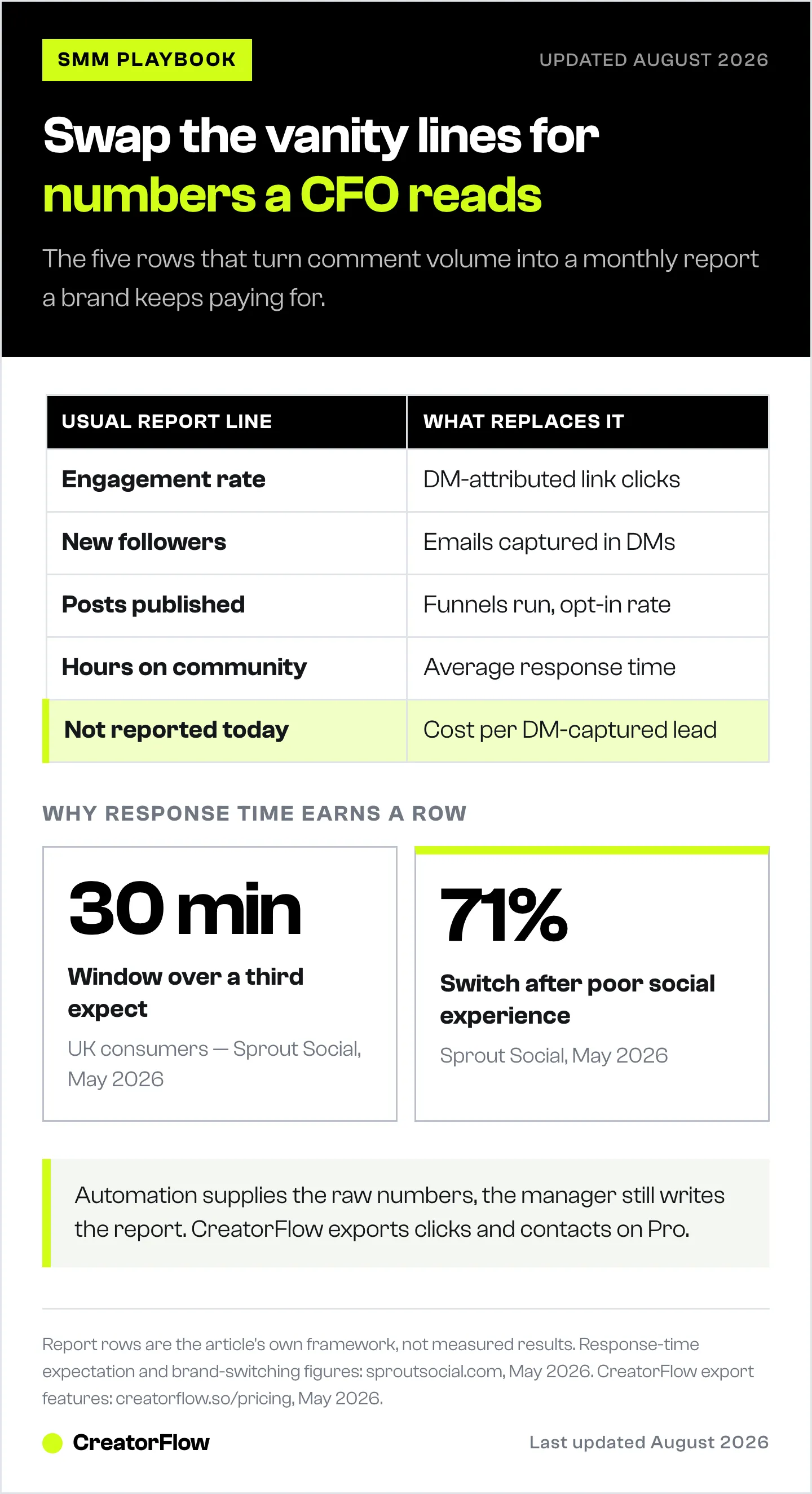
A DM-automation-aware report includes:
| Metric | What It Replaces | Why It Lands |
|---|---|---|
| DM-attributed clicks | ”Engagement rate” | Tracks an action, not a vanity metric |
| Emails captured via DM | ”New followers” | Owned audience, not rented |
| DM funnels run + opt-in rate | ”Posts published” | Outcome over output |
| Average response time | ”Hours spent on community” | Service-level proof |
| Cost per DM-captured lead | (no equivalent) | The number a CFO can compare to paid ads |
The shift in language matters. “We posted 22 Reels and grew 1,400 followers” is replaceable by an intern with a content calendar. “We ran 4 DM funnels, captured 312 emails, attributed 1,247 link clicks, and the cost per email was $0.18” is the work of a measurable role.
CreatorFlow exports clicks, contacts, and country-level analytics on Pro and above, which is enough to build the report inside any spreadsheet (creatorflow.so/pricing, May 2026). ManyChat’s analytics are deeper but live inside the tool’s native dashboard. LinkDM exports lead-form submissions and tracks DM clicks (linkdm.com, July 2026). All three give the SMM enough raw data to build a brand-side report — the labor is in the spreadsheet template, not the data collection.
Tool Stack for Social Media Managers
Three tools dominate the SMM-friendly tier. All three connect through Meta’s official Instagram API, none require sharing the brand’s password, and all three handle the comment-to-DM, story-reply, and keyword automations a working SMM actually uses.
CreatorFlow ($15/mo Pro, $30/mo Growth)
Best for the SMM running 1 or 2 brand accounts who needs a price that stays the same through a follower-growth quarter. Pro covers 2 workspaces and 5,000 DMs per workspace per month with follow gate, email gate, geographic analytics, and CSV export (creatorflow.so/pricing, May 2026). Growth scales to 5 workspaces and 10,000 DMs per workspace at $30/month with priority support and team-member access. Setup is the fastest in the category at under 5 minutes per account. CreatorFlow is a Meta Tech Provider.
Outside scope. CreatorFlow is Instagram-only. SMMs who also run Facebook Messenger, WhatsApp, or SMS for the brand will need a separate tool or a multi-channel platform.
ManyChat ($17 to $199/mo, or $14 to $139 billed annually)
Best for the SMM whose brand operates on multiple Meta surfaces and needs branching workflow logic. Free covers 25 contacts. Essential at $17/mo ($14 billed annually) covers 250 contacts on Instagram and Facebook Messenger. Pro at $39/mo ($29 annually) opens 2,500 contacts and adds WhatsApp or SMS. Business at $99/mo ($69 annually) covers 7,500 contacts across all channels including email. Advanced at $199/mo ($139 annually) covers 25,000 contacts (affmaven.com, May 2026; featurebase.app, May 2026). Multi-channel coverage and conditional logic are the strongest in the SMM-accessible tier.
Outside scope. The flow builder is built for multi-channel automation. Solo SMMs running a single Instagram account may not need the depth, and the contact-tier ladder means a viral campaign that pushes the brand past 2,500 contacts pulls the bill from $39 to $99 in one billing cycle. Plan tiers around expected campaign volume.
LinkDM ($19/mo Pro)
Best for the SMM who wants Pro features at a flat monthly price and likes the white-label DM messaging path for brand-tone delivery. Pro at $19/mo covers 3 Instagram accounts and 25,000 DMs per month with branding removal on outbound messages, lead generation forms, and priority support (linkdm.com, July 2026). The Platinum+ tier at $99/mo expands to 10 accounts and 300,000 DMs/month for higher-volume SMMs. White-label dashboard branding lives inside LinkDM’s separate Partner program rather than the Pro tier.
Outside scope. LinkDM is Instagram-only and the analytics layer is lighter than ManyChat’s flow analytics, so the SMM building deep brand reports may need to do more spreadsheet work.
Quick comparison
| Tool | Entry price | Accounts (entry) | DMs/mo (entry) | Best for SMM use case |
|---|---|---|---|---|
| CreatorFlow | $15/mo | 2 | 5,000 per workspace | Single-brand SMM who needs flat-rate Instagram-only |
| ManyChat | $17/mo Essential, $39/mo Pro | 1 | 250 (Essential), 2,500 (Pro) | Multi-channel SMM (IG + WhatsApp + SMS + email) |
| LinkDM | $19/mo Pro | 3 | 25,000 | SMM running 2-3 brand accounts who wants Pro features at one price |
The honest read for an SMM evaluating: pick the tool that matches the brand’s channel mix, not the cheapest entry tier. A brand selling across Instagram, WhatsApp, and SMS needs a platform built for all three, which is what ManyChat is best for. A single-channel Instagram brand is best served by an Instagram-first tool like CreatorFlow or LinkDM.
Workflow: How to Add DM Automation Without Adding Hours
The wrong setup turns DM automation into another platform to babysit. The right setup runs in the background and surfaces only when the SMM checks the report.
Day 1: Audit the inbox. Pull the last 30 days of inbound brand DMs. Tag the top 5-10 repeat questions. These become the keyword triggers in Play 4 (inbound triage).
Day 1: Draft the canned answers. One paragraph per question. Match the brand’s tone. Include the link or the answer up front, not buried.
Day 2: Connect the tool. Authenticate the brand’s Instagram account through OAuth (the SMM never sees the brand password). Add the SMM to the workspace as a team member. For the multi-account case, see the workflow for managing multiple Instagram accounts from one dashboard.
Day 2: Build the launch funnel template. One reusable template with a placeholder for the trigger keyword, the link, and the email gate. Every campaign pulls from this template instead of building from scratch.
Day 3: Set the email-capture sync. CSV export to Klaviyo, Beehiiv, Flodesk, or whichever the brand uses. CreatorFlow exports CSV on Pro; ManyChat and LinkDM offer integrations.
Day 3: Build the monthly report template. A spreadsheet with five rows: DM clicks, emails captured, funnels run, average response time, cost per lead. Wire the data export to refresh monthly. This is the document that gets sent to the brand stakeholder.
Ongoing: Weekly 30-minute review. Check funnel opt-in rates, prune triggers that misfire, refresh the canned answers. Total ongoing time investment under one hour per week per brand account.
For the deep walk-through on triggers, message copy, and account connection, see the Instagram DM automation setup walkthrough and the dedicated comment-to-DM setup guide.
Compliance and Account Safety
The SMM is operationally responsible when a client account gets flagged or banned. Three rules cover most of the risk:
1. Use API-based tools, never browser bots. Tools that ask for the Instagram password or run as a Chrome extension simulate a human session and violate Meta’s terms. Brand accounts running browser bots get suspended. CreatorFlow, ManyChat, and LinkDM all connect through Meta’s Instagram API with OAuth, which is the sanctioned path. The full breakdown of what crosses the line is in the API-safe automation guide.
2. Respect Meta’s messaging windows. The Instagram API enforces a 24-hour window for outbound messages following a user’s last interaction. The Human Agent tag extends this to 7 days for support contexts. SMMs should not try to message stale leads outside the window through the automation layer — the tool will block it, and repeated attempts can affect the brand’s API standing.
3. Tool-side pacing is conservative for a reason. Most automation tools cap outbound sends at around 200 DMs per hour as a behavioral safety convention. Meta’s published rate limits are per-second (roughly 100 calls per second for text content per professional account at the platform level), not per-hour. The hourly cap is a tool-side convention to keep individual accounts well under the spam-detection threshold. Do not push tools to lift it.
For agency-side setup with multi-client workspaces, dedicated client billing, and partner-program white-label, the agency white-label playbook covers the multi-client tier above the SMM scope.
In-House vs Freelance SMM: Where DM Automation Pays Off Differently
The math changes depending on how the SMM gets paid.
In-house SMM
Average US base salary is $74,000, with mid-level roles around $64,000 and senior roles around $78,000. Total comp can reach $96,000 (sproutsocial.com, May 2026). Tool cost on the company line item ($15 to $30 per month) is invisible.
The math. DM automation produces the metrics that justify the SMM headcount in budget review. An in-house SMM without DM-attributed numbers in their monthly report is the first cost cut in a slow quarter. An in-house SMM who can show 1,000+ DM-attributed clicks and 200+ captured emails per month is producing measurable revenue and rarely loses the seat.
Freelance SMM
Monthly retainers typically run $500 to $5,000 per client, with the bulk falling between $1,000 and $3,000 per client. Senior freelancers running full-strategy retainers can charge $3,000 to $8,000 per client (solidgigs.com, May 2026; webfx.com, May 2026). Tool cost (around $15 to $30 per workspace) comes off the freelancer’s margin, so cheap tools matter more.
The math. DM automation justifies a higher retainer tier. A freelance SMM offering “content + community” at $1,500/mo is interchangeable with five other freelancers in any city. A freelance SMM offering “content + DM funnels + monthly attribution report” at $2,500/mo is selling a different product at a different price point. The tool cost is $15-30, the retainer lift is $1,000.
For freelancers running 5+ clients, the multi-workspace path matters. CreatorFlow Growth covers 5 workspaces at $30/mo, which is 75 cents per client per day for the full tool stack. The ROI math is straightforward.
For the wider view of where AI fits into a social media manager’s workflow, see our breakdown of what actually works.
FAQ
What does Instagram DM automation do for a social media manager?
It compresses three jobs (public comment replies, inbound DM replies, story-reply follow-ups) into a system that responds in 8 seconds instead of 4 hours, and produces measurable data (clicks, emails, conversions) the SMM can put in a monthly report. Without it, an SMM manually answers a few hundred messages a week and produces a vanity-metric report. With it, an SMM answers thousands and reports revenue-attribution numbers.
Is DM automation safe for client Instagram accounts?
Yes, when the tool uses Meta’s official Instagram API. CreatorFlow, ManyChat, and LinkDM all connect through OAuth and follow Meta’s messaging-window and rate-limit rules. Browser bots and password-sharing tools are not safe and routinely get accounts suspended. Verify the tool is API-based before connecting any client account.
Which DM automation tool is best for social media managers?
It depends on the brand’s channel mix. For a single-brand Instagram-only SMM, CreatorFlow at $15/mo flat is the cleanest fit. For an SMM running multi-channel (Instagram + WhatsApp + SMS + email), ManyChat Pro or Business is built for that workflow. For an SMM running 2-3 brand accounts who wants Pro features at one flat price, LinkDM Pro at $19/mo covers 3 accounts. Match the tool to the brand’s channels, not to the cheapest entry tier.
How do social media managers report DM automation ROI to clients?
Build a monthly report with five lines: DM-attributed link clicks, emails captured through DM funnels, number of campaigns run, average response time, and cost per captured lead. Pull the raw numbers from the tool’s analytics or CSV export, then calculate cost per lead using the tool subscription as the input cost. This report converts social media spend from “trust me, engagement was great” to “here’s the captured-lead pipeline.”
Can a social media manager run DM automation across multiple client accounts?
Yes. Multi-account tools support workspaces (one login, isolated automations per account). CreatorFlow Pro covers 2 workspaces at $15/mo, Growth covers 5 workspaces at $30/mo. LinkDM Pro covers 3 accounts at $19/mo. ManyChat handles one account per subscription, so multi-client SMMs typically pay per account or use a higher tier. The full multi-account workflow is covered in the managing multiple Instagram accounts guide.
How much does Instagram DM automation cost for SMM use?
$0 to $30 per workspace per month for the tools an SMM actually uses. Free tiers exist on CreatorFlow (500 DMs/mo, 1 account), ManyChat (25 contacts), and LinkDM (1 account, 1,000 DMs/mo). Paid Pro tiers run $15 to $39/mo per workspace. For agency-scale work above 5 client accounts, custom pricing kicks in on CreatorFlow Agency, ManyChat Business and Advanced, and LinkDM Platinum+.
Should a freelance SMM include DM automation in their retainer?
Yes, as a separate line item that justifies a higher retainer tier. Bundle DM automation with a monthly attribution report and price the tier $500-$1,500 above a content-only retainer. The tool cost is $15-30 per month per client; the retainer lift is significantly higher. Freelancers who don’t include DM automation are competing on content alone, where pricing pressure is heaviest.
Tool pricing and feature claims verified from CreatorFlow, ManyChat, LinkDM, Sprout Social, and freelance industry sources as of May 2026. Individual results vary by brand size, niche, and campaign cadence.


