To increase Instagram engagement in 2026, focus on saves, shares, and DM sends over likes. Instagram’s algorithm now weighs watch time, conversation depth, and private shares as the top ranking signals. The average engagement rate sits at 0.50% across all account sizes, but creators who prioritize Reels, carousels, and direct audience interaction consistently hit 3-6% or higher.
Your like count means less than it did a year ago. Instagram confirmed that “sends per reach” (how often someone DMs your post to a friend) is now the strongest engagement signal. Saves rank second. Comments rank third, but only when they go beyond a single emoji. The creators winning on Instagram in 2026 are designing every post to trigger one of these three actions.
This guide breaks down 10 strategies to increase your Instagram engagement rate, with current benchmarks by follower count, algorithm insights, and practical tactics you can apply to your next post. For a broader set of quick wins across your whole account, see our Instagram hacks guide. Engagement creates conversations, and handling them is Instagram community management, the reply side of the job.
Key Takeaways
- Average engagement rate: The 2026 Instagram average is 0.50% across all accounts, but nano-influencers (under 10K followers) average 5-6% while accounts over 100K average 1.5-3% (Social Insider, April 2026)
- Shares beat likes: Instagram’s algorithm now prioritizes DM sends and saves over likes, meaning content designed for private sharing gets more reach than content designed for public reactions
- Reels still dominate reach: Reels generate 2x the reach of static posts and carousels, though carousels drive deeper engagement per person reached (Social Insider, 2026)
- Reply speed matters: Responding to comments within the first hour triggers the “active post” signal, pushing your content to Explore and suggested feeds
- Consistency over volume: Four high-quality posts per week outperform seven mediocre posts, with 3-5 feed posts plus daily Stories being the current sweet spot
- Bottom line: Pick 3 strategies from this list, test them across 10 posts, track your engagement rate weekly, and double down on what moves the needle for your specific audience
What Is a Good Instagram Engagement Rate in 2026?
Before you try to improve engagement, you need a baseline. The “good” threshold depends entirely on your follower count. Once you have it, turn that baseline into a target with these Instagram goals for creators.
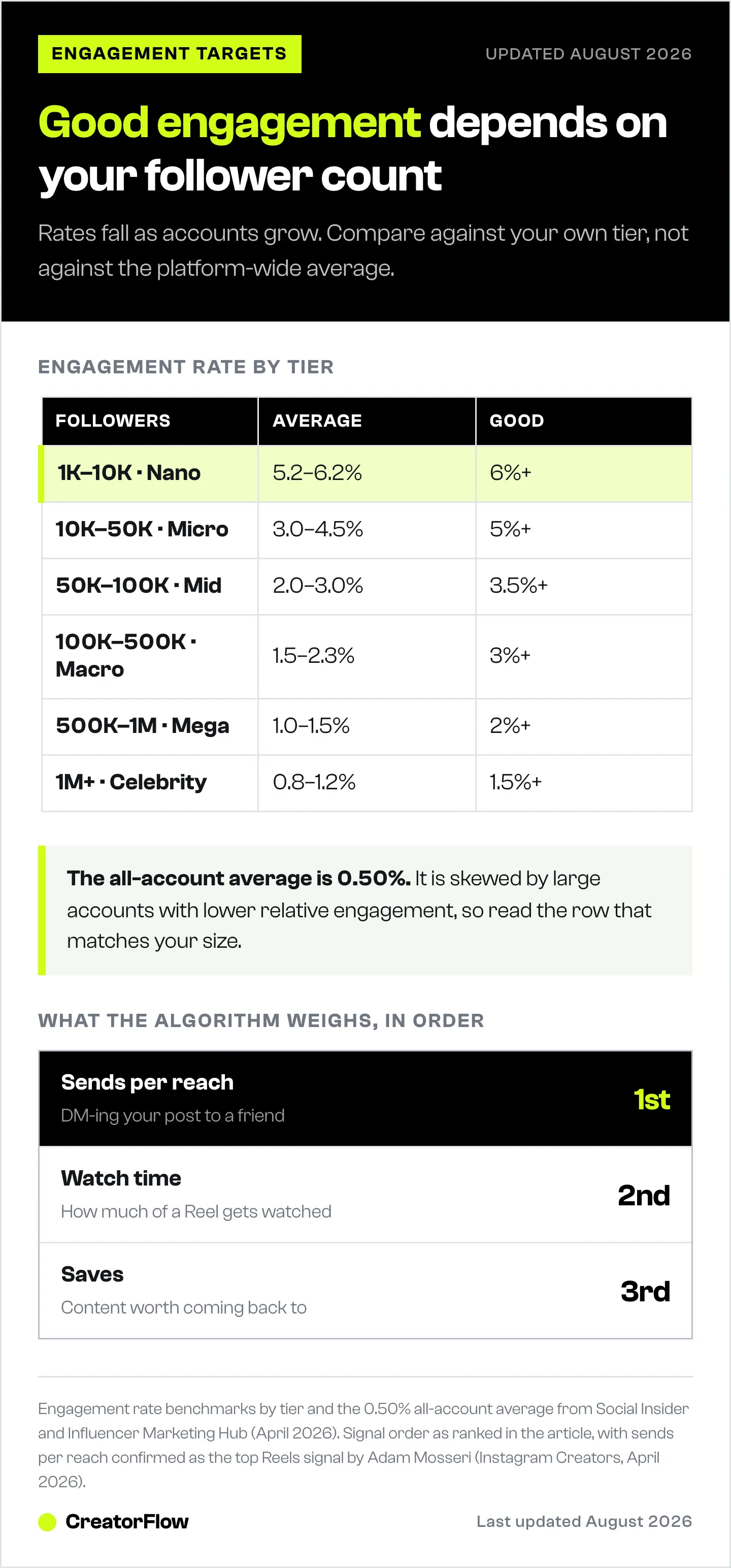
Here are the current benchmarks based on data from Social Insider and Influencer Marketing Hub (April 2026):
| Follower Count | Average Engagement Rate | Good Rate | Excellent Rate |
|---|---|---|---|
| 1K-10K (Nano) | 5.2-6.2% | 6%+ | 8%+ |
| 10K-50K (Micro) | 3.0-4.5% | 5%+ | 7%+ |
| 50K-100K (Mid) | 2.0-3.0% | 3.5%+ | 5%+ |
| 100K-500K (Macro) | 1.5-2.3% | 3%+ | 4%+ |
| 500K-1M (Mega) | 1.0-1.5% | 2%+ | 3%+ |
| 1M+ (Celebrity) | 0.8-1.2% | 1.5%+ | 2.5%+ |
The pattern is consistent across every study: engagement rate drops as follower count grows. A creator with 5,000 followers and 4% engagement is outperforming an influencer with 500K followers and 1.5% engagement on a relative basis. Rates also split hard by niche, so compare yourself against the Instagram engagement rate benchmarks for 2026 in your own category before judging your numbers.
How to calculate your rate: Add your total likes + comments on a post, divide by your follower count, multiply by 100. Check your last 10 posts and average them for a reliable number.
If you’re below the “average” column for your tier, the strategies below will help. If you’re already in the “good” range, these same tactics can push you into “excellent.”
10 Strategies to Increase Instagram Engagement
1. Design Content for Saves and Shares, Not Likes
Saves and shares now carry roughly 3x the algorithmic weight of likes (Hootsuite, 2026 engagement benchmarks). A post that gets 50 saves will outperform a post that gets 500 likes in terms of reach.
What triggers saves:
- Educational carousels with step-by-step instructions
- Reference content people want to revisit (checklists, templates, formulas)
- Data and statistics they can cite later
What triggers shares (DM sends):
- Relatable content (“tag someone who does this”)
- Controversial takes that spark conversation
- Niche humor that feels personal to your audience
Before you publish your next post, ask: “Would someone screenshot this or send it to a friend?” If not, rework the concept.
2. Prioritize Reels for Reach, Carousels for Depth
Reels are Instagram’s primary discovery format. They reach 2x more non-followers than static posts, making them the best tool for growth (Social Insider, 2026).
But carousels drive deeper engagement per impression. Social Insider’s 2026 data shows carousels earn roughly 109% more engagement per person reached than Reels. The reason: people swipe through all slides, increasing time spent.
The winning mix:
- 2-3 Reels per week for reach and new follower discovery
- 1-2 carousels per week for deep engagement with existing followers
- Daily Stories for maintaining connection and visibility
Your content hooks matter more than production quality. A Reel with a strong opening hook that keeps viewers watching for 8+ seconds will outperform a polished Reel that people scroll past in 2 seconds.
3. Post When Your Audience Is Active (Not When Gurus Say)
Generic “best time to post” advice is useless. Your audience’s active hours depend on their timezone, age, and habits.
How to find your best times:
- Open Instagram Insights (Professional account required)
- Go to Audience > Most Active Times
- Note the top 3 windows by day of the week
- Post 15-30 minutes before peak activity so the post is live when they open the app
Consistency in timing matters more than finding the “perfect” hour. If your audience is most active at 7 PM on Tuesdays, post at 7 PM every Tuesday. The algorithm learns your posting pattern and shows your content to followers who engage with it regularly.
4. Write Captions That Invite Conversation
A caption that ends with “thoughts?” gets zero comments. A caption that ends with a specific, low-effort question gets dozens.
High-engagement caption formulas:
- “Which one are you? A or B?” (binary choice)
- “Comment [KEYWORD] and I’ll DM you the link” (action trigger)
- “What’s one thing you’d add to this list?” (contribution prompt)
- “Unpopular opinion: [take]. Agree or disagree?” (debate starter)
The “Comment KEYWORD” approach is particularly effective because it combines engagement with lead generation. When someone comments a trigger word, DM automation can instantly send them a link, resource, or offer. This turns every comment into both an algorithm signal and a conversion. Read more about getting more comments on Instagram for a fuller breakdown of this tactic.
5. Reply to Every Comment Within 60 Minutes
Instagram tracks conversation depth, not just comment count. A “nice!” comment does almost nothing for your reach. A 3-message back-and-forth conversation signals to the algorithm that your post is generating meaningful interaction.
The reply strategy:
- Reply to every comment within the first hour
- Ask a follow-up question in your reply to extend the conversation
- Pin your best 1-2 comments to the top (this encourages longer comments from others)
- Your own replies count toward total comments, effectively doubling your comment count
The first 60 minutes after posting are the most important. Instagram uses early engagement velocity to decide whether to push your post to Explore and suggested feeds. If you post and disappear for 3 hours, you’ve already lost the window.
6. Use Stories as a Daily Engagement Engine
Stories don’t directly boost your feed post engagement, but they keep you top-of-mind with followers. Accounts that post Stories daily maintain higher overall engagement rates because followers see them first in the Stories tray.
High-engagement Story tactics:
- Polls and quizzes (interactive stickers get 15-25% response rates)
- “This or that” comparisons
- Behind-the-scenes content that feels exclusive
- Reply prompts: “DM me your answer” or “Reply with your take”
Story replies feed directly into Instagram’s engagement algorithm. When someone replies to your Story, it signals a strong connection, and Instagram pushes more of your content to that person’s feed.
For creators who get dozens of Story replies daily, auto-reply tools can handle responses instantly without you being glued to your phone.
7. Create Content That Ranks on Google via Instagram
Instagram Reels now appear in Google search results. This means your Reels can drive engagement from outside of Instagram, bringing in new viewers who discover your content through search.
Your Reels can rank on Google when they target specific search queries. The key is using descriptive, keyword-rich captions and on-screen text that matches what people are searching for.
How to optimize:
- Use your target keyword in the first line of the caption
- Add on-screen text with the search query
- Include relevant hashtags (3-5 niche hashtags, not 30 generic ones)
- Write alt text for accessibility and search indexing
This strategy works especially well for how-to content, tutorials, and product reviews where people are actively searching for answers.
8. Lean Into Carousel Posts for Saves
Carousels are the quiet powerhouse of Instagram engagement. While Reels get the attention, carousels drive the highest save rates of any format.
Why carousels work:
- Multiple slides increase time spent on your post (a strong algorithm signal)
- Each swipe counts as additional engagement
- People save carousels to reference later
- The “swipe for more” behavior creates a micro-commitment loop
High-performing carousel formats:
- “X things I wish I knew about [topic]” (listicles)
- Step-by-step tutorials with one step per slide
- Before/after transformations
- Data breakdowns with one stat per slide
- Mini-guides that replace a blog post
Keep the first slide as a hook (a bold statement or question) and the last slide as a CTA (save this, share it, comment your takeaway).
9. Collaborate and Cross-Pollinate Audiences
Instagram’s Collab feature lets two accounts co-author a single post that appears on both profiles. This instantly exposes your content to a new audience that already trusts the collaborator.
Collaboration tactics that drive engagement:
- Joint Reels with creators in adjacent niches
- Co-authored carousels where each creator contributes slides
- Instagram Live sessions (Live content gets priority in the feed)
- Shared giveaways that require engagement to enter
The key is finding collaborators with a similar audience size and niche relevance. A fitness creator collaborating with a meal prep creator makes sense. A fitness creator collaborating with a tech reviewer doesn’t. Commenting on other accounts in your niche also cross-pollinates audiences, but do it carefully: our Instagram commenting strategy playbook covers what works and what gets accounts flagged.
10. Automate DM Responses to Keep Conversations Going
Every unanswered DM is a missed engagement signal. When someone sends you a message and you take 6 hours to reply, the conversation dies. Instagram notices.
DM automation keeps conversations active 24/7. When a follower comments a trigger word or replies to your Story, they get an instant response with whatever you’ve set up: a link, a resource, a qualifying question, or a booking calendar.
CreatorFlow handles this with comment-to-DM automation using Meta’s official Instagram Graph API. Set a trigger keyword like “guide” on a Reel, and every person who comments it gets your lead magnet in their DMs within seconds. No manual work, no missed messages, no 3 AM reply sessions. Plans start at $0/month with 500 free DMs. Compare all the options in our best Instagram DM automation tools guide.
The engagement flywheel: more comments trigger more DM conversations, which signals more engagement to the algorithm, which pushes your post to more people, which generates more comments. It compounds. Make sure your automation setup follows Instagram’s safety rules so you don’t risk your account while scaling.
How Instagram’s Algorithm Works in 2026
Instagram runs separate ranking systems for Feed, Reels, Stories, Explore, and Search. Each one evaluates content differently, but they share common signals.
The top ranking signals in 2026:
- Sends per reach - How often people DM your post to someone else. Adam Mosseri confirmed this is the number one signal for Reels distribution (Instagram Creators, 2026).
- Watch time - For Reels, Instagram measures what percentage of viewers watch to the end. A 15-second Reel watched fully outperforms a 60-second Reel where most people drop off at 10 seconds.
- Saves - Saving a post signals “this is worth revisiting,” which Instagram treats as high-value engagement.
- Comments with depth - Multi-word comments and reply threads carry more weight than single-emoji reactions.
- Profile visits after viewing - If someone watches your Reel and then visits your profile, Instagram reads that as strong interest.
What changed in 2026:
Instagram now penalizes reposted content. Aggregator accounts that repost other creators’ Reels without adding significant value get suppressed in recommendations. The platform actively replaces reposted content with the original creator’s version (Buffer, State of Social Media Engagement 2026).
The “Your Algorithm” feature for Reels gives users direct control over what they see. Users can tell Instagram which topics they want more or less of, making it more important than ever to create content that clearly signals its niche and topic.
How DM Automation Boosts Engagement
The connection between DM automation and engagement isn’t obvious at first. But the data backs it up.
When you add a “Comment [KEYWORD] for the link” CTA to a post, three things happen simultaneously:
- Comment count spikes - Every person who wants your resource adds a comment, boosting the post’s engagement metrics
- DM conversations open - The automated reply starts a conversation thread, which Instagram counts as a relationship signal
- The algorithm sees activity - More comments + more DMs = the post gets flagged as high-engagement and pushed to more feeds
Creators who pair strong content hooks with comment-triggered DM automation consistently report 2-3x higher comment rates than those using passive CTAs like “link in bio.”
The approach works for affiliate links, lead magnets, coaching calendars, product pages, and digital downloads. The engagement benefit is the same regardless of what you’re sending. Just keep in mind the 200 DM/hour pacing cap when planning high-volume campaigns. Our Instagram API rate limits guide covers all the thresholds.
Check where you actually stand with the free Instagram engagement rate calculator.
FAQ
What is a good Instagram engagement rate in 2026?
A good engagement rate depends on your follower count. For accounts under 10K followers, 5-6% is average and 8%+ is excellent. For accounts between 10K-100K, 3-5% is good. For accounts over 100K, anything above 2% is solid. The overall platform average sits at 0.50% when including all account sizes, though this number is skewed by large accounts with lower relative engagement (Social Insider, April 2026).
Does posting Reels increase engagement more than carousels?
Reels generate more reach (especially to non-followers), but carousels drive higher engagement per person reached. Social Insider’s 2026 data shows carousels earn roughly 109% more engagement per impression than Reels. The best strategy is a mix: Reels for discovery and growth, carousels for deep engagement with your existing audience.
How often should I post on Instagram for maximum engagement?
The current sweet spot is 3-5 feed posts per week plus daily Stories. Consistency matters more than volume. Four high-quality posts per week outperform seven low-effort posts. Use Instagram Insights to find your specific audience’s active hours and post during those windows for the best initial engagement velocity.
Does the Instagram algorithm favor certain content types?
In 2026, Instagram’s algorithm prioritizes content based on sends (DM shares), watch time, saves, and conversation depth. Reels get the most algorithmic push for discovery, but the algorithm rewards any format that generates meaningful interaction. Original content is favored over reposts, and the platform actively suppresses aggregator accounts that repost without adding value (Buffer, 2026).
How does DM automation help with Instagram engagement?
DM automation increases engagement by incentivizing comments. When you use a “Comment [KEYWORD] for the link” CTA, followers comment to trigger an automated DM response. This increases your comment count (an algorithm signal), opens DM conversations (a relationship signal), and creates a positive feedback loop where more engagement leads to more reach. Tools like CreatorFlow use Meta’s official API to handle this safely.
Are hashtags still important for Instagram engagement in 2026?
Hashtags still play a role, but their impact has decreased significantly. Instagram now relies more on AI-powered content matching than hashtag categorization. Use 3-5 highly relevant niche hashtags rather than 30 generic ones. The hashtag search feature still exists, but most content discovery now happens through Explore, suggested Reels, and search, all of which prioritize engagement signals over hashtag usage.
Why is my Instagram engagement dropping in 2026?
Instagram’s algorithm shifted toward rewarding saves, shares, and DM sends over likes. If your engagement dropped, your content may still be optimized for the old signals. Focus on creating content that drives conversation (questions, polls, controversial takes) and direct shares. Carousels and Reels with strong hooks tend to recover engagement fastest. If reach and not just engagement has slipped, read why your Instagram reach is dropping.
What is the average Instagram engagement rate in 2026?
The average Instagram engagement rate across all account sizes is 0.50% (as of May 2026). Nano-influencers (1K-10K followers) average 2-3%, micro-influencers (10K-100K) average 1-2%, and accounts over 100K average 0.5-1%. Engagement rates have declined 28% year-over-year due to increased competition and algorithm changes.
Sources
- Social Insider, “2026 Instagram Organic Engagement Benchmarks” (socialinsider.io, accessed April 2026)
- Buffer, “The State of Social Media Engagement in 2026: 52M+ Posts Analyzed” (buffer.com, accessed April 2026)
- Hootsuite, “Engagement Rate Benchmarks and Formulas: 2026 Update” (blog.hootsuite.com, accessed April 2026)
- Influencer Marketing Hub, “Instagram Engagement Rate Benchmarks 2026” (influencermarketinghub.com, accessed April 2026)
- Instagram Creators, “See How Instagram Algorithms Can Work for You” (creators.instagram.com, accessed April 2026)
- Sprout Social, “The Instagram Algorithm: How It Works and Strategies for 2026” (sproutsocial.com, accessed April 2026)
- InfluenceFlow, “Instagram Engagement Rate Benchmark 2026” (influenceflow.io, accessed April 2026)