
Since July 10, 2025, Google indexes public Instagram Reels like regular website content. Your captions, hashtags, alt text, and location tags are crawled and ranked in Google search results alongside blog posts and YouTube videos (evolare.digital, April 2026). This gives every Reel two discovery channels: Instagram’s algorithm for 24-48 hours of reach, and Google search for months of compounding traffic. Most creators don’t know this yet.
Instagram’s algorithm gives your Reel a short window. Google works differently. A properly optimized Reel surfaces in standard organic results, the Short Videos carousel, and AI Overviews for months after publishing.
This guide covers how Google indexes Reels, account settings you need to change, and 7 specific optimizations to get your Reels ranking in search results.
Key Takeaways
- Google indexes Instagram Reels: Since July 10, 2025, public Reels from Business/Creator accounts are crawled and ranked in Google search results like regular web pages.
- Dual discovery channels: Every optimized Reel has both Instagram’s algorithm (24-48 hour window) and Google search (months of compounding traffic) working for it.
- Captions are your top SEO signal: Google indexes caption text, hashtags, alt text, location tags, and on-screen text overlays from each Reel.
- 3-5 hashtags, not 30: Meta recommends 3-5 targeted hashtags per post. The old 30-hashtag strategy is dead and can dilute signals.
- Short Reels win engagement: 15-30 second Reels hit 5.8% engagement rate vs 3.2% for 90+ second Reels, and Reels under 15 seconds get 1.8x more replays than 60+ second content.
- Bottom line: Enable search engine indexing in your settings, write keyword-rich captions with alt text, and pair every Reel with comment-to-DM automation to convert Google traffic into leads.

Do Instagram Reels Show Up in Google Search?
Yes. Since July 10, 2025, Google indexes public Reels from Instagram Business and Creator accounts and ranks them in normal search results, the Short Videos carousel, and AI Overviews (evolare.digital, April 2026). Your account has to be public, professional, and have search engine indexing switched on. Google reads the caption, hashtags, alt text, location tag, on-screen words, and mentions, so every text field decides whether you rank.
Why Your Reels Should Be on Google
Instagram’s algorithm gives your Reel a 24-48 hour window. After that, it’s buried. Google works differently. A properly optimized Reel can surface in search results for months.
The numbers back this up:
| Metric | Data | Source |
|---|---|---|
| Instagram Reels daily views | 140-200 billion across Meta apps | DemandSage, April 2026 |
| Time spent on Reels | 50% of all Instagram time | Loopex Digital, April 2026 |
| Google searches with social results | ~50% include social platform in top 10 | SEO Sherpa, April 2026 |
| Instagram’s Google presence | 2.6% of top 10 search results | SEO Sherpa, April 2026 |
That 2.6% might look small. But Instagram’s indexing is only about a year old. YouTube has had decades. The window to establish Google authority with Reels is wide open right now.
Here’s the real opportunity: people searching on Google have higher intent than casual Instagram scrollers. Someone searching “how to style a capsule wardrobe” is actively looking for answers. If your Reel shows up, you’ve reached someone who’s ready to engage, follow, and buy.
How Reels Appear in Google Results
Google surfaces Instagram Reels in three ways:
- Standard organic results - Your Reel appears as a regular search result with title, description, and thumbnail
- Short Videos carousel - A dedicated mobile carousel that mixes Reels with YouTube Shorts and TikTok content
- AI Overviews - Google’s AI summaries can reference and cite Instagram Reels content
Clicking a Reel in Google opens Instagram’s web version, not the app. Users can watch your content and return to search results easily.
What Google Actually Indexes From Your Reel
Google’s crawler treats your Reel like a webpage. Here’s what it reads (adonis.media, April 2026):
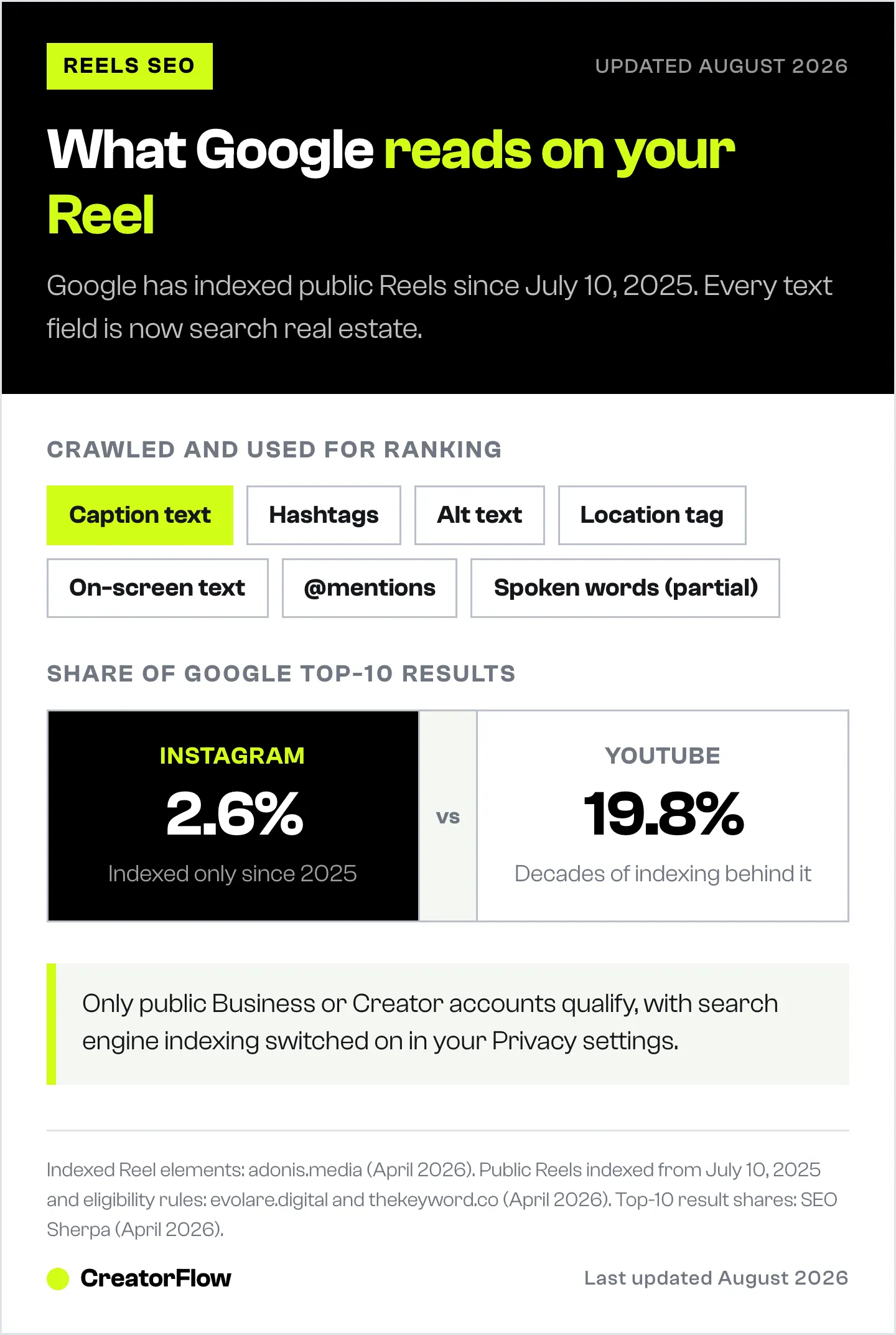
| Element | Indexed? | SEO Impact |
|---|---|---|
| Caption text | Yes | Primary content signal, treated like page copy |
| Hashtags | Yes | Categorization signals |
| Alt text | Yes | Accessibility + keyword signal |
| Location/geotag | Yes | Local search relevance |
| On-screen text overlays | Yes | Additional keyword context |
| @mentions | Yes | Entity connections |
| Audio/spoken words | Partial | Instagram transcribes speech for search |
| Engagement metrics | Indirect | Affects Instagram ranking, which affects visibility |
The takeaway: every text field in your Reel is SEO real estate. If you’re posting Reels with just emoji captions and no alt text, Google has nothing to index.
Account Setup: 3 Prerequisites
Before optimizing individual Reels, your account needs the right foundation.
1. Switch to a Business or Creator Account
Personal accounts are excluded from Google indexing. Only Business and Creator accounts are eligible (thekeyword.co, April 2026).
How to switch:
- Open Instagram Settings
- Tap Account type and tools
- Select “Switch to professional account”
- Choose Creator or Business
- Complete your profile
2. Make Your Account Public
Private accounts cannot be indexed by any search engine. Your profile must be set to public.
Check: Settings > Privacy > Account privacy > Toggle OFF “Private account”
3. Enable Search Engine Indexing
Instagram added a specific toggle for this in July 2025. It’s ON by default for eligible accounts, but verify it.
How to check:
- Go to Instagram Settings
- Navigate to Privacy (or search “Searchability”)
- Find “Allow public photos and videos to appear in search engine results”
- Make sure it’s toggled ON
If you don’t see this option, your account might not be eligible. Requirements: public, professional account, over 18 years old, content posted on or after January 1, 2020 (bemysocial.com, April 2026).
7 Optimizations to Rank Your Reels on Google
1. Write Captions Like Blog Intros
Your caption is the single most powerful SEO element on a Reel. Google indexes the full caption text and uses it to determine what your content is about (flatlineagency.com, April 2026).
The formula:
- First line: Hook + target keyword
- Lines 2-3: Context and detail with secondary keywords
- Last line: CTA (comment trigger, question, or save prompt)
Bad caption:
“New vid! Check it out 🔥”
Good caption:
“How to style a capsule wardrobe with 15 pieces. These are the exact items I rotate every week for work, weekends, and date nights. I’ve been building capsule wardrobes for 3 years and these combinations get the most compliments. Comment STYLE for my full checklist.”
The second caption gives Google clear signals: “capsule wardrobe,” “15 pieces,” “work, weekends, date nights.” Someone searching “capsule wardrobe ideas” can find this Reel.
Rule: Pick ONE target keyword per Reel. Include it naturally in the caption. Don’t keyword-stuff.
2. Add Alt Text to Every Reel
Alt text serves two purposes: accessibility for visually impaired users and an additional keyword signal for both Instagram’s algorithm and Google’s crawler (usevisuals.com, April 2026).
How to add alt text:
- After recording or uploading your Reel, go to the final screen
- Tap “Advanced settings”
- Scroll to “Write alt text”
- Write a descriptive sentence including your target keyword
Bad alt text:
“My video”
Good alt text:
“Creator demonstrating 5 capsule wardrobe outfit combinations using neutral basics”
Most creators skip this field entirely. That’s your competitive advantage.
3. Use 3-5 Targeted Hashtags (Not 30)
Meta officially recommends 3-5 hashtags per post (Sked Social, April 2026). The old strategy of cramming 30 hashtags is dead. More than 5 can dilute your signals and appear spammy.
Instagram shifted from hashtag-based discovery to keyword-based SEO in late 2024. Hashtags now serve as categorization tools, not primary discovery drivers.
Hashtag strategy:
- 1-2 broad hashtags: #CapsuleWardrobe, #MinimalistFashion
- 1-2 niche hashtags: #15PieceWardrobe, #NeutralOutfits
- 1 branded/community hashtag: #StyleWith[YourName]
Where to place them: End of caption or first comment. Both work for indexing.
4. Tag Your Location on Every Reel
Location tags help both Instagram and Google associate your content with local searches. If you’re a fitness coach in Miami, tagging “Miami, Florida” means your Reel can appear when someone searches “Miami fitness tips” on Google.
How to add location:
- On the Reel posting screen, tap “Add location”
- Search for your city, neighborhood, or specific venue
- Select the most relevant option
This is especially valuable for local businesses: real estate agents, restaurants, personal trainers, photographers, event planners. But even non-local creators benefit. A travel creator tagging “Bali” on a Reel about best beaches gets local search traffic from people planning trips.
5. Add On-Screen Text With Keywords
Google can read text overlays in your Reels. This means the words you put on screen function as additional SEO signals (adonis.media, April 2026).
Best practices:
- Include your target keyword in the opening text overlay
- Use clear, readable fonts (not decorative scripts)
- Keep text brief (4-6 words per overlay)
- Front-load the keyword in the first 3 seconds
Example for a Reel about meal prep:
- Screen 1: “5-Day Meal Prep Under $50”
- Screen 2: “Breakfast, lunch, and dinner”
- Screen 3: “Full grocery list in caption”
The text “5-day meal prep under $50” is now indexable by Google. Someone searching that exact phrase could find your Reel.
6. Say Your Keywords Out Loud
Instagram transcribes spoken words in Reels for search purposes. What you say matters for discoverability (inro.social, April 2026).
In your Reel, verbally mention:
- Your topic/niche
- Your location (if relevant)
- Your brand or business name
- The problem you’re solving
This also connects to subtitles. 80% of consumers are more likely to watch an entire video when captions are available, and 69% watch video with sound off in public places (Verizon Media/Publicis Media study, n=5,616 U.S. adults).
Adding subtitles/captions to your Reels:
- Increases watch time (which boosts ranking)
- Makes spoken keywords visible as on-screen text
- Improves accessibility
Use Instagram’s built-in captions feature or tools like CapCut to add accurate subtitles.
7. Cross-Post to Multiply Your Google Surface Area
A single Reel optimized for one platform reaches one audience. The same content distributed across platforms multiplies your chances of appearing in Google results.
Three cross-posting channels:
YouTube Shorts:
- Upload with a keyword-rich title (different from your Instagram caption)
- Add a full description with your target keyword
- YouTube content already dominates Google search (19.8% of top 10 results vs Instagram’s 2.6%)
Pinterest:
- Pin your Reel with keyword-optimized title and description
- Pinterest content is heavily indexed by Google
- Pins can rank for months or years
Your website/blog:
- Embed Reels in relevant blog posts
- Surrounding text gives Google additional context
- Drives traffic back to your Instagram profile
This creates three indexable instances of the same content, each with platform-specific SEO signals.
What Types of Reels Rank Best on Google
Not all Reels have equal Google potential. Based on research into which Instagram content appears in search results, certain content types consistently outperform (coffeecontracts.com, April 2026):
Evergreen How-To Content
Reels that answer specific questions match Google search intent directly.
Examples:
- “How to remove gel nails at home”
- “How to start a capsule wardrobe”
- “How to repot a monstera plant”
These topics have consistent monthly search volume. A Reel answering them can rank for months.
Local and Location-Based Content
City guides, neighborhood tours, and local recommendations perform well because they match high-volume local searches.
Examples:
- “Best coffee shops in [City]”
- “Moving to [City]: what to know”
- “3 hidden gems in [Neighborhood]“
Timely News and Trends
Fresh content about current events or industry changes ranks quickly because there’s limited competition for new topics.
Examples:
- “New Instagram feature just dropped”
- “[Industry] predictions for 2026”
- “Changes coming to [your niche] this month”
Product Reviews and Comparisons
Review-style Reels match commercial search intent. People searching “best budget running shoes” are ready to buy.
Examples:
- “5 budget running shoes ranked”
- “[Product A] vs [Product B] honest review”
- “3 things I wish I knew before buying [product]“
Instagram’s Algorithm Signals That Help Google Ranking
Your Reel’s performance on Instagram indirectly affects its Google ranking. Instagram promotes high-performing content to more users, which increases its visibility and likelihood of being crawled by Google.
Adam Mosseri confirmed three ranking signals in January 2025 (Hootsuite, April 2026):
| Signal | What It Means | How to Optimize |
|---|---|---|
| Watch time | How long people view your Reel | Hook in first 3 seconds, keep under 30 seconds for highest engagement |
| Likes per reach | Engagement quality | Create content that resonates, not just entertains |
| Sends per reach | DM shares | Make content share-worthy (“send this to someone who…”) |
DM shares carry the most weight for reaching new audiences. Instagram prioritizes content that people share in private conversations.
Reel length matters too:
- 15-30 seconds: 5.8% engagement rate
- 31-60 seconds: 4.9% engagement rate
- 90+ seconds: 3.2% engagement rate
(SocialBu, April 2026)
Reels under 15 seconds get 1.8x more replays than Reels over 60 seconds (CreatorsJet, April 2026). High retention signals quality to both Instagram and Google.
Turn Google-Discovered Viewers Into Followers
Getting Reels on Google is the top of the funnel. The next step is converting those viewers into followers and customers.
Here’s the play: someone finds your Reel through Google search. They watch it on Instagram’s web version. Now what?
Optimize your profile for search visitors:
- Bio: Clear value proposition + keyword (e.g., “Capsule wardrobe tips for busy professionals”)
- Display name: Include your niche keyword (e.g., “Sarah | Capsule Wardrobe Coach”)
- Link in bio: Direct to your most relevant offer
- Pinned posts: Your 3 best conversion-focused Reels
Use comment-to-DM automation:
When viewers from Google land on your Reel and comment, comment-to-DM automation can instantly send them your resource, link, or lead magnet via DM. This turns passive Google traffic into active leads.
Example flow:
- Someone searches “morning routine ideas” on Google
- They find your Reel with the CTA “Comment ROUTINE for my full checklist”
- They comment “ROUTINE”
- CreatorFlow automatically sends the checklist via DM
- You’ve captured a lead from Google search without lifting a finger
This is where discovery meets conversion. Google brings the traffic. DM automation captures the value.
Quick Implementation Checklist
Run through this in 15 minutes:
- Account check - Verify you’re on a Business/Creator account (not personal)
- Privacy check - Confirm account is public
- Indexing check - Toggle ON “Allow search engine results” in Privacy settings
- Profile SEO - Add niche keyword to display name and bio
- Next Reel - Write a keyword-rich caption (100+ words), add alt text, tag location, use 3-5 hashtags
- Cross-post - Upload to YouTube Shorts with different keyword-rich title
- Automate - Set up comment-to-DM automation so every commenter gets your link
Consistency matters. High-ranking Reels tend to come from accounts that post regularly. Google prioritizes fresh, recent content from active accounts.
FAQ
Does Google index all Instagram Reels automatically?
No. Only Reels from public Business or Creator accounts with search engine indexing enabled are eligible. Personal accounts, private accounts, and accounts under 18 are excluded. Content must be posted on or after January 1, 2020 (thekeyword.co, April 2026).
How long does it take for a Reel to appear on Google?
Indexing isn’t instant. It typically takes a few days to a few weeks, depending on your account activity, keyword relevance, and how frequently Google crawls Instagram content (flatlineagency.com, April 2026).
Do hashtags still matter for Instagram SEO in 2026?
Yes, but their role changed. Meta recommends 3-5 relevant hashtags per post. They function as categorization signals rather than primary discovery tools. Keyword-rich captions now carry more weight than hashtags for both Instagram’s algorithm and Google indexing (Sked Social, April 2026).
Can I opt out of Google indexing my Reels?
Yes. Go to Instagram Settings > Privacy > Searchability and toggle off “Allow public photos and videos to appear in search engine results.” Your existing indexed content will be gradually removed from search results.
Do Instagram Stories show up on Google?
No. Stories, Highlights, and DMs are not indexed by Google. Only feed posts, Reels, carousels, and videos from eligible accounts are indexed (evolare.digital, April 2026).
Is this different from Instagram’s built-in search?
Yes. Instagram’s internal search uses its own algorithm and works within the app. Google indexing means your content appears in Google.com search results, reaching people who aren’t even on Instagram.
Start Ranking Your Reels on Google
The window is open. Google only started indexing Reels in July 2025. Most creators haven’t optimized for it. Early movers who treat every Reel caption, alt text field, and location tag as SEO real estate will build compounding Google authority while everyone else fights for 48 hours of algorithmic reach.
Pick your highest-performing Reel topic. Rewrite the caption with a target keyword. Add alt text. Tag your location. Cross-post to YouTube Shorts. Set up comment-to-DM automation to capture every viewer who engages.
Two discovery engines are better than one.
Ready to turn Google-discovered viewers into customers? CreatorFlow automates your Instagram DMs so every comment from Google traffic becomes a lead, link click, or email subscriber. 500 free DMs/month.
Related articles:
- How to Get More Comments on Instagram: 12 Strategies
- Instagram Content Hooks: 50 Templates That Stop the Scroll
- Comment-to-DM Automation: Complete Setup Guide
- Instagram Automation Trends 2026: What’s Working
Sources verified as of April 12, 2026. Competitor features and platform policies may change. Visit linked sources for the most current information.


