

Justifying Instagram automation to your boss requires framing it as cost savings, not new spending. Manual DM responses cost companies $930-2,160/month in staff time (30-40 hours/month at $31-54/hour). Instagram DM automation tools cost $15/month, less than 30 minutes of staff time at $31/hour, so the tool pays for itself in the first month. The alternative, hiring a virtual assistant, costs $560-5,200/month for the same work.
The $1,800/Month Problem Your Boss Doesn’t See
You’re spending 2 hours every day answering the same Instagram DMs:
“What’s the price?” “How do I book?” “Do you ship to Canada?” “Can I get a discount code?”
Your boss sees: You’re active on Instagram. Good job.
What they don’t see: Those 2 hours daily cost the company $1,800/month in your time (at $30/hour). And by the time you respond, many people have moved on to competitors who answered faster.
Here’s how to turn that invisible cost into an approved $15/month budget request. If you work at an agency selling automation to clients, our agency pricing guide covers that angle too.

Key Takeaways
Getting budget approval for Instagram automation is easier than you think:
- Cost: $15/month (less than 1 hour of your time)
- ROI: Save 30-40 hours/month at $31-54/hour = $930-2,160/month saved
- Payback period: Under one month at these rates ($15 is less than 30 minutes of a $31/hour employee’s time)
- Alternative costs: VA costs $560-5,200/month vs $15/month automation
- Email template included: Copy-paste business case to send today
- Boss objections handled: Pre-answered concerns about spam, cost, and risk
How to Justify Instagram Automation to Your Boss
Time Saved = Money Saved
The math is simple:
| Your Hourly Rate | Hours Spent on DMs/Week | Annual Cost to Company |
|---|---|---|
| $31/hour (entry-level) | 10 hours | $16,120/year |
| $40/hour (mid-level) | 10 hours | $20,800/year |
| $54/hour (senior) | 10 hours | $28,080/year |
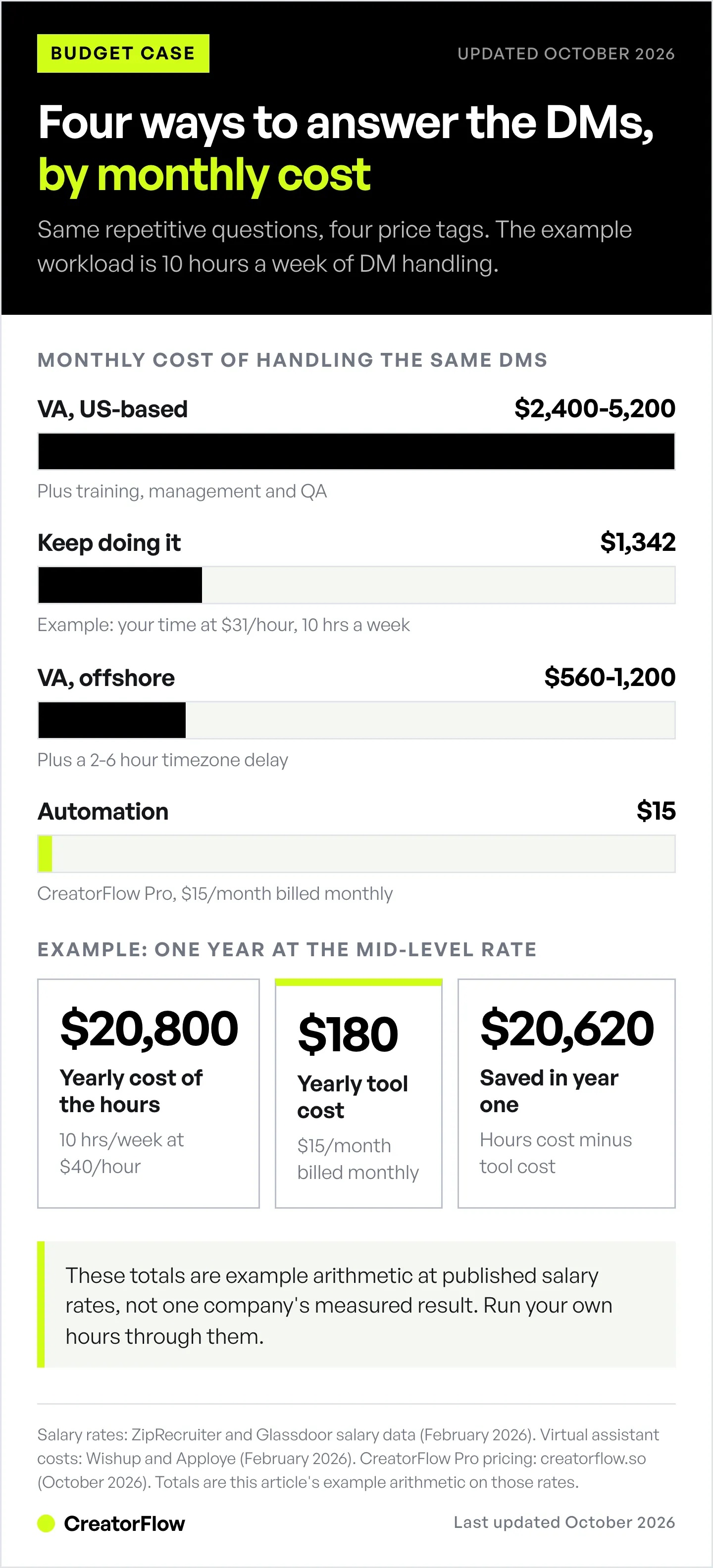
Instagram automation costs: $15/month = $180/year (or $144/year billed annually)
Annual savings at mid-level rate: $20,800 - $180 = $20,620 saved
That’s an 11,456% ROI in the first year ($20,620 ÷ $180).
(Source: ZipRecruiter and Glassdoor salary data, February 2026)
The Real Cost of Manual DM Management
When you’re manually responding to DMs, the company is paying for:
Direct costs:
- Your time: 10-15 hours/week × $31-54/hour = $16,120-$42,120/year
- Opportunity cost: Time NOT spent on strategy, content creation, or campaigns
- Overtime: Late-night DM responses to “catch up”
Hidden costs:
- Slow Instagram DM responses kill sales (76% of customers expect responses within 24 hours)
- Inconsistent messaging = brand confusion
- Mental fatigue = lower quality work on strategic tasks
- Turnover risk = hiring and training costs when you burn out
The breaking point: Most teams hit the wall around 50-100 daily DMs, where problems multiply faster than you can hire.
(Source: CreatorFlow Instagram DM Automation Guide, February 2026; Desk365 Customer Service Statistics, February 2026)
Cost Comparison: Automation vs. Alternatives
Your boss is considering three options:
| Solution | Monthly Cost | Annual Cost | What You Get |
|---|---|---|---|
| Keep doing it manually | $1,342 (your time at $31/hr, 10 hrs/wk) | $16,104 | Burnout, slow responses, opportunity cost |
| Hire a VA (Philippines) | $560-1,200 | $6,720-14,400 | Requires training, management overhead, timezone delays |
| Hire a VA (US-based) | $2,400-5,200 | $28,800-62,400 | Expensive, still requires management |
| Instagram automation | $15 | $180 | Instant responses 24/7, no management needed |
The math is obvious: Automation costs over 99% less than a US VA and over 97% less than an offshore VA, with zero management overhead.
(Source: Wishup and Apploye Virtual Assistant Cost Data, February 2026)
ROI Calculator: Show Your Boss the Numbers
Input Your Current Situation
Step 1: Calculate your hourly rate
If you’re salaried, divide annual salary by 2,080 hours (52 weeks × 40 hours):
- $50,000/year ÷ 2,080 = $24/hour
- $65,000/year ÷ 2,080 = $31/hour
- $80,000/year ÷ 2,080 = $38/hour
Step 2: Track your DM time this week
Log how many hours you spend on Instagram DMs for 5 days. Include:
- Reading and responding to comment replies
- Story reply DMs
- Product/service questions
- Booking requests
Average time: Most social media managers spend 10-15 hours/week on DM management at scale (50-100+ daily DMs).
Step 3: Calculate monthly cost
Weekly DM hours × 4.33 weeks × Your hourly rate = Monthly DM costExample: 10 hours/week × 4.33 × $31/hour = $1,342/month
Step 4: Calculate annual savings
(Monthly DM cost × 12) - (Automation cost × 12) = Annual savingsExample: ($1,342 × 12) - ($15 × 12) = $16,104 - $180 = $15,924 saved/year
ROI calculation:
(Annual savings ÷ Annual automation cost) × 100 = ROI%Example: ($15,924 ÷ $180) × 100 = 8,847% ROI
Real-World ROI Examples
| Company | Industry | Tool | Reported result | What the number measures |
|---|---|---|---|---|
| Dental Art (Peru) | Healthcare | ManyChat | 80% faster response time | Response time, over 60 days |
| Astral Restaurant Systems | Restaurant | ManyChat | $52,000 in extra sales, 7,000 extra visits | Conversion rate up 2,400%, on $600 of spend |
| Retailer (unnamed) | E-commerce | Quidget | 30% sales increase over 3 months | Sales, not return on spend |
| Coding Stella | EdTech | Interakt | 2-3 hours a day saved | Staff time, not revenue |
Average marketing automation ROI: Nucleus Research found $5.44 back for every $1 spent over three years, with payback in under six months. That March 2021 report reviewed 16 case studies from 2016 to 2020 and measured marketing automation platforms, not Instagram DM tools.
Every figure above is the vendor’s own published account of its customer, not an independent audit. The Astral numbers come from ManyChat’s write-up of that account (manychat.com/blog, August 2026), where the 2,400% is a lift in conversion rate rather than a return on spend. Treat all of them as directional and run your own numbers with the calculator above.
Copy-Paste Email Template to Your Boss
Subject: Proposal: Save 10-15 Hours/Week with Instagram Automation ($15/month)

Hi [Boss Name],

I'd like to propose a small investment that could save us $15,000-20,000/year in my time alone.

The Problem:
I'm currently spending 10-15 hours per week manually responding to Instagram DMs. At my hourly rate of $[YOUR HOURLY RATE]/hour, that's costing the company $[MONTHLY COST]/month in my time.

This time could be better spent on:
- Content strategy and planning
- Campaign execution and optimization
- Analytics and performance reporting
- Strategic partnerships and collaborations

The Solution:
Instagram DM automation using CreatorFlow, a Meta Tech Provider (since December 2025) that uses Instagram's official API (minimal ban risk, no password sharing).

What it does:
- Auto-replies to comments with product links, booking calendars, or FAQs
- Responds to story replies instantly (even at 2am)
- Captures email addresses within Instagram DMs (Pro plan)
- Tracks which posts drive the most DMs and link clicks

The Cost:
- $15/month (less than 1 hour of my time)
- No per-contact fees (flat rate regardless of volume)
- 14-day free trial, cancel before the first charge

The ROI:
- Time spent on DMs: 10 hrs/week → 3 hrs/week
- Monthly cost (my time): $[CURRENT] → $15 + $[3 HRS × HOURLY RATE]
- Response time: 2-24 hours → Under 2 seconds
- Annual savings: $[YOUR CALCULATED SAVINGS]

Why This Isn't Spam:
CreatorFlow is a Meta Tech Provider (since December 2025) using Instagram's official API. Every message is sent within Instagram's rate limits, and we only send to people who comment or reply to our content first (explicit engagement = permission).

The Ask:
Can I get approval to start the Pro plan ($15/month) with its 14-day free trial? I'll track the time savings and report back with actual ROI data.

If it doesn't save us at least 5 hours/week, I'll cancel before the trial ends, so nothing is charged.

Thanks for considering this!

[Your Name]
Pro Tip: Attach a screenshot of your DM inbox (blurred if needed) to show the volume you’re handling manually.
Handling Boss Objections (Pre-Answered)
Objection 1: “Isn’t this spam?”
Answer: No. Here’s why:
- Explicit engagement: We only send DMs to people who comment on our posts or reply to our stories first. They initiated contact.
- Meta Tech Provider: CreatorFlow is a Meta Tech Provider (since December 2025) and uses Meta’s official API (not a grey-market bot).
- Rate limits respected: Tools pace sends at conservative behavioral conventions to stay well under Meta’s per-second rate limits.
- Messaging window: Meta’s API only allows DMs within 24 hours of the user’s last message, or one private reply within 7 days of a comment.
What IS spam: Scraping Instagram users and sending unsolicited cold DMs. That will get you banned.
What ISN’T spam: Auto-replying to people who asked you a question. That’s automation, not spam.
(Source: Meta’s messaging policy and private replies documentation, checked October 2026)
Objection 2: “That seems too cheap. What’s the catch?”
Answer: There’s no catch. Here’s why CreatorFlow costs less than competitors:
| Tool | Price | Why the Difference |
|---|---|---|
| ManyChat | $17-199/mo billed monthly across four paid tiers | Priced by contact count (scales with growth), covers many channels |
| LinkDM | $19/mo (Pro), $99/mo (Platinum+) | Priced by DM volume and accounts |
| CreatorFlow | $15/mo flat | Flat rate, built for Instagram |
Prices from ManyChat, LinkDM and CreatorFlow, checked October 2026.
CreatorFlow focuses on Instagram, which keeps costs low. If we need Facebook Messenger, WhatsApp or SMS later, ManyChat covers those channels.
For our use case (Instagram DM automation), CreatorFlow delivers the features we need at a lower price. See our full chatbot pricing comparison for details.
Objection 3: “What if it doesn’t work?”
Answer: The downside is small, capped, and known before we start:
- 14-day free trial: cancel inside the trial and the card is never charged
- No contract: Month-to-month billing, cancel anytime
- No setup fees: We can start today and be live in 5 minutes
Worst case scenario: We waste $15 and 30 minutes of setup time.
Best case scenario: We save $15,000-20,000/year and I can focus on strategic work.
Risk-reward ratio: Spending $15 to potentially save $15,000+ is a 1,000-to-1 bet.
Objection 4: “We need to focus on other priorities right now.”
Answer: I understand. Here’s why this is a priority:
Time I’ll get back:
- 10-15 hours/week on DMs → 3-5 hours/week
- 7-10 hours/week freed up for strategic priorities
What I’ll do with that time:
- [Insert your top 3 strategic priorities here]
- Example: Launch Q1 influencer campaign, optimize paid ads, build email nurture sequence
This isn’t adding to my workload, it’s removing the bottleneck that’s preventing me from doing higher-value work.
If I can automate the repetitive work, I can focus on the projects that move the needle.
Objection 5: “Can’t you just hire a VA to handle DMs?”
Answer: I ran the numbers:
| Option | Monthly Cost | Management Overhead | Response Time |
|---|---|---|---|
| VA (Philippines) | $560-1,200 | Train, manage, QA | 2-6 hour delay (timezone) |
| VA (US-based) | $2,400-5,200 | Train, manage, QA | 30 min - 2 hours |
| Automation | $15 | 5 min setup, zero ongoing | Under 2 seconds |
VAs are great for: Nuanced customer service, community management, content research
VAs are overkill for: “What’s the price?” → Send product link / “How do I book?” → Send calendar link / “Do you ship to [country]?” → Send FAQ link
Best approach: Automation handles the repetitive 80%, VA (or me) handles the nuanced 20%.
(Source: Wishup VA Cost Data, February 2026)
What to Expect After Approval
Week 1: Setup and Testing
Day 1-2: Initial setup
- Connect Instagram account (OAuth, no password sharing)
- Create 3-5 automation templates (use our DM automation templates for inspiration):
- Product link for “How much?” comments
- Booking calendar for “How do I schedule?”
- FAQ link for common questions
- Test with your team: ask a colleague to comment the keyword from their own Instagram account (a comment from the connected account does not trigger a DM)
Day 3-5: Soft launch
- Activate automations on 1-2 posts
- Monitor DM quality and response rates
- Adjust message templates based on feedback
- Track time saved (use a timer)
Day 6-7: Full rollout
- Activate on all new posts
- Set up story reply automation
- Create keyword triggers (“price”, “link”, “book”, etc.)
Week 2-4: Optimization and Reporting
Track these metrics:
| Metric | Week 1 | Week 2 | Week 3 | Week 4 |
|---|---|---|---|---|
| Hours saved | [LOG] | [LOG] | [LOG] | [LOG] |
| DMs automated (%) | [LOG] | [LOG] | [LOG] | [LOG] |
| Response time | [LOG] | [LOG] | [LOG] | [LOG] |
| Clicks on links | [LOG] | [LOG] | [LOG] | [LOG] |
ROI report template:
Instagram Automation - 30-Day Results

Time Savings:
- Before: 10 hrs/week manually responding
- After: 3 hrs/week monitoring automation
- Saved: 7 hrs/week × 4 weeks = 28 hours/month
- Value: 28 hours × $31/hour = $868/month saved

Automation Cost: $15/month
Net Savings: $868 - $15 = $853/month
Monthly ROI: ($853 ÷ $15) × 100 = 5,687%

Additional Benefits:
- Response time: 24 hours → Under 2 seconds
- Conversion rate: [TRACK IF POSSIBLE]
- Email captures: [IF USING PRO FEATURES]
Month 2+: Scale and Expand
Once you’ve documented ROI, expand usage:
Add more automation types (follow our comment-to-DM setup guide for each):
- Keyword DMs for common questions (“PRICE”, “SHIP”, “BOOK”)
- Story reply automations for launches and drops
- Webinar/event registration links
Upgrade to Pro features (if needed):
- Email collection within DMs
- Link click tracking
- Export contacts to email list
Use freed time for strategic work:
- Launch content campaigns
- Test new formats (Reels, carousels)
- Build influencer partnerships
Advanced: Proving ROI Beyond Time Savings
Track Revenue Attribution
If you’re using automation for sales:
| Metric | How to Track | What to Report |
|---|---|---|
| Link clicks | CreatorFlow analytics (Pro) | “Generated 347 product page visits/month” |
| Conversions | UTM parameters + Google Analytics | ”Attributed $2,450 in sales to automated DMs” |
| Email captures | Export from CreatorFlow | ”Built 156-person email list from Instagram in 30 days” |
| Booking rate | Calendar tool analytics | ”Booked 23 discovery calls via automated DMs” |
Example revenue report:
Instagram Automation - Revenue Impact

Product link clicks: 347/month
Conversion rate: 3.5% (example rate; use your store's own)
Average order value: $49
Attributed revenue: 347 × 3.5% × $49 = $595.11/month

Automation cost: $15/month
Net profit: $595.11 - $15 = $580.11/month
Revenue ROI: ($580.11 ÷ $15) × 100 = 3,867%
Track Customer Satisfaction
If you’re using automation for support:
| Metric | Before Automation | After Automation | Improvement |
|---|---|---|---|
| Avg response time | 4-24 hours | Under 2 seconds | 99%+ faster |
| DMs answered/day | [LOG] | [LOG] (your plan’s monthly DM allowance applies) | [% CHANGE] |
| Customer satisfaction | [SURVEY] | [SURVEY] | [% CHANGE] |
Survey question to ask:
“How satisfied were you with the speed of our response?”
- Very satisfied
- Satisfied
- Neutral
- Dissatisfied
- Very dissatisfied
Benchmark: 76% of customers expect responses within 24 hours, 42% expect responses within 60 minutes. Instant automation exceeds both benchmarks.
(Source: Desk365 and Nextiva Customer Service Statistics, February 2026)
FAQ
How long does setup take?
Under 5 minutes for basic automation:
- Connect Instagram account (OAuth, 30 seconds)
- Create your first automation template (2 minutes)
- Test by commenting on your own post (1 minute)
- Activate on live posts (30 seconds)
Most social media managers are fully operational within 30 minutes, including testing and optimization.
Will my Instagram account get banned?
The risk is minimal if you use a tool on Meta’s official API, like CreatorFlow. No tool can promise an account will never be banned.
CreatorFlow uses Instagram’s official API and follows all Instagram API rate limits. Tools pace sends at conservative behavioral conventions to stay well under Meta’s per-second caps.
What WILL get you banned:
- Third-party scraping tools
- Unsolicited cold DMs to non-followers
- Exceeding Instagram’s rate limits
CreatorFlow’s safety basics:
- Meta Tech Provider (since December 2025)
- No password sharing (OAuth authentication)
- Automatic rate limit compliance
- Minimal ban risk when used properly
What if I need help with setup?
CreatorFlow offers:
- Free plan: Email support
- Pro plan: Priority email support
- Setup time: Most users complete setup in under 5 minutes following in-app tutorials
If you need help making the business case, the ROI calculator and email template in this article cover it.
Can I track which posts drive the most DMs?
Yes. CreatorFlow analytics show:
- Which posts generated the most automated DMs
- Which messages get the most link clicks (Pro plan)
- Email capture rates (Pro plan)
- Clicks by country and city (Pro plan)
This helps you optimize content strategy based on what drives engagement and conversions.
What happens if I go over the DM limit?
Free plan: 500 DMs/month included Pro plan: 5,000 DMs/month per workspace Growth plan: 10,000 DMs/month per workspace
If you exceed your limit:
- Automation pauses until next billing cycle
- You can upgrade to a higher tier, or buy a DM top-up pack on Pro and Growth
- Or you handle overflow manually (automation handles the bulk)
Free covers 500 DMs a month. If your account sends more than that, Pro covers 5,000 per workspace.
Can I A/B test different message templates?
Yes, with a simple weekly rotation:
- Write two versions of the message for the same trigger
- Use one version per week to compare performance
- Compare link clicks in CreatorFlow (Pro) or track click rates and conversions in Google Analytics (using UTM parameters)
Example A/B test:
- Week 1 template: “Hey! Here’s the link you asked for: [LINK]”
- Week 2 template: “Thanks for asking! You can check it out here: [LINK]”
Track click-through rates to see which language resonates better.
What if my boss still says no?
Three options:
1. Start with the Free plan:
- Prove ROI with 500 free DMs/month
- Present results after 30 days
- Request Pro upgrade once value is demonstrated
2. Propose the 14-day free trial:
- Use the Pro plan ($15/month once the trial ends)
- Track time saved rigorously
- Show boss the ROI report before day 14
- Cancel before the trial ends if it doesn’t deliver, and nothing is charged
3. Pay for it yourself:
- If you’re confident it will save you hours/week
- $15/month is less than 1 coffee/day
- Pitch it as “professional development” expense
- Bill company back after proving ROI
Truth: If your boss won’t approve $15/month for a tool that saves $15,000/year, you have bigger problems than Instagram DMs.
Your Next Step: Send the Email Today
You have everything you need:
- ✅ ROI calculator showing $15,000-20,000/year savings
- ✅ Copy-paste email template
- ✅ Pre-answered objections
- ✅ 14-day free trial, nothing charged until it ends
- ✅ Meta Tech Provider (since December 2025), minimal ban risk
The longer you wait, the more time (and money) you’re wasting on manual DMs.
Three actions to take right now:
- Calculate your ROI using the formula in this article
- Copy-paste the email template and fill in your numbers
- Send it to your boss today (the worst they can say is “let me think about it”)
If approved: Set up CreatorFlow in under 5 minutes at creatorflow.so
If denied: Start with the Free plan (no approval needed) and prove ROI with 500 free DMs/month.
Either way, you’ll be saving hours every week by this time next month.
Sources:
- ZipRecruiter, Social Media Manager Salary (February 2026)
- Glassdoor, Social Media Manager Salary (February 2026)
- Wishup, Virtual Assistant Cost (February 2026)
- Apploye, Virtual Assistant Pricing (February 2026)
- Nucleus Research, Marketing automation returns $5.44 for every dollar spent (March 2021)
- ManyChat, Case Studies (February 2026)
- Desk365, Customer Service Statistics (February 2026)
- Meta, messaging policy and private replies documentation (checked October 2026)
- ManyChat, LinkDM and CreatorFlow pricing pages (checked October 2026)


