
Instagram automation for beginners is software that handles repetitive Instagram tasks for you, mostly direct messages. The simplest place to start is a comment-to-DM rule: someone comments a word like “LINK” on your post, and they get a DM with your link a few seconds later. You set it up once, and it runs every time you post. No coding, no password sharing, no constant phone-checking.
If you have between 1,000 and 10,000 followers and you’ve ever copy-pasted the same DM 30 times in a row, this guide is for you. We’ll keep it plain, and if a word trips you up, the Instagram DM automation glossary defines every term on one page. By the end, you’ll know what automation actually does, what it does not do, and whether it’s worth your time as someone just starting out.
TL;DR
- What it is: Software that sends Instagram DMs for you when someone comments, replies to a Story, or messages a keyword.
- What it solves: The “I missed 40 ‘link please’ comments while I was at work” problem.
- Easiest first use: Comment-to-DM. Pick a word, write one message, hit activate.
- Time to set up: 10 to 15 minutes for your first automation.
- Free options exist: Most tools have a free tier so you can try it before paying.
- Cost when you outgrow free: Roughly $15 to $30 per month for a solo creator setup.

Key Takeaways
- Start with one rule, not ten. Beginners get stuck trying to map out a whole funnel before sending a single DM. Set up one comment-to-DM, then expand.
- You need a Business or Creator account. Personal accounts cannot connect to automation tools. Switching is free and takes 30 seconds in Instagram Settings.
- Use tools that connect through Meta’s official API. That means Instagram-approved access, no password sharing. Avoid anything that asks for your IG password directly.
- It is not a follower hack. Automation responds to people who already engaged with you. It does not generate new followers out of thin air.
- Setup is faster than you think. First automation in 15 minutes, including the account switch.
What Instagram Automation Actually Does
Instagram automation is a tool that watches your account for specific actions, then performs a response you’ve pre-written. Think of it like an out-of-office reply for email, except smarter and always on. The tool sits between Instagram and you, and it only acts when one of your rules is triggered.
Here’s what that looks like in practice. You post a Reel about your favorite skincare products. In the caption you write, “comment ROUTINE for the link.” Someone comments “ROUTINE.” Within a few seconds, that person gets a DM from you with the link. You did nothing. You were on a walk, in the gym, or asleep.
The four most common things automation handles are comment replies, Story reply replies, welcome messages for new followers, and keyword-triggered DMs (someone messages you “PRICE” and gets your pricing automatically). Most beginners use just one or two of these and ignore the rest until they grow.
Behind the scenes, the tool connects through Meta’s official Instagram API. You never share your password. You authorize the tool through Meta’s standard login screen, the same way you’d connect any other app.
The good tools are listed as Meta Tech Providers, meaning Meta has audited them and confirmed they follow the rules. CreatorFlow has held that status since December 2025. This matters because it minimizes ban risk compared to browser bots, which Meta actively hunts down.
What It Doesn’t Do
Automation gets oversold. Here’s what it cannot do, no matter what an ad promises you.
It does not generate followers. There’s no legitimate tool that gets you more followers without better content. Anything claiming to follow/unfollow thousands of accounts is using a browser bot, violating Instagram’s terms, and risking your account.
It does not send DMs to random people. You can’t upload a list of usernames and mass-message them. Instagram’s API only lets automation respond to people who interacted with you first, within a 24-hour window after they engaged.
It does not replace conversation. The trigger sends one or two messages. After that, if the person replies with something off-script, a real human needs to take over. Tools scale the first touch, not the whole relationship.
It does not send unlimited DMs to your audience. Tools pace sends at around 200 DMs per hour as a behavioral safety convention, well below the per-second limits Meta publishes. This pacing keeps your account from looking spammy.
Is Instagram Automation Worth It for Beginners?
Yes, if you already get comments or Story replies you cannot answer fast enough. There is no minimum follower count. A 1,000-follower account that misses 15 “link please” comments loses a bigger share of its opportunities than a large account missing a few. Your first automation takes about 15 minutes, free tiers let you test before paying, and paid plans for a solo creator run roughly $15 to $30 a month.
The 4 Most Common Beginner Use Cases
Here are the four automation types beginners actually use. Pick one to start. You can add the others later.
Comment-to-DM. Someone comments a trigger word on your post. They get a DM with whatever you set up (a link, a PDF, a discount code). Best for affiliate links, lead magnets, and “where did you get that?” requests.
Story reply auto-response. Someone replies to your Story or votes in a poll. They get a DM continuing the conversation. Best for engaged followers who interact with Stories more than feed posts.
Welcome new followers. Someone follows you. They get a short DM introducing yourself and pointing them at one resource. Use this lightly. Aggressive welcome DMs feel pushy.
Auto-deliver a free PDF or lead magnet. Specific version of comment-to-DM where the response includes a downloadable freebie. Often paired with an email capture step (“reply with your email and I’ll send it”). Builds your email list while you sleep.
For your first automation, start with comment-to-DM. It has the clearest payoff and the fastest feedback loop. You’ll see whether it works within hours of your next post.
Is It Safe?
Short version: yes, when you use the right tool the right way.
Safety comes down to two things. First, the tool must connect through Meta’s official API, not by logging in as you in a hidden browser window. Browser bots that pretend to be you violate Instagram’s Terms of Service.
Second, only use automation for permission-based responses. Message people who took an action that signals interest (commenting, replying, messaging a keyword). Mass-DMing people who never engaged is what gets accounts flagged.
If both are true, your ban risk is minimal. No platform offers an absolute guarantee, but creators using API-based tools and permission-based rules report very few problems. For a deeper breakdown, see is DM automation safe.
What You Need to Get Started
Three things. That’s the whole list.
1. An Instagram Business or Creator account. If you have a Personal account, open Instagram, go to Settings, then Account, then Switch to Professional Account. Pick Creator (good default for individuals) or Business (if you sell products). Free, reversible, takes 30 seconds. Your followers and content stay the same.
2. A Facebook Page connected to your Instagram. Meta’s API runs through their unified system, so you need a linked Facebook Page. If you don’t have one, Instagram prompts you to create one when you switch to Professional. You never have to post on it. It just needs to exist.
3. An automation tool. This is the only paid (or possibly free) piece. We’ll cover how to pick one in the next section.
That’s it. No website, no email platform, no fancy setup. You can be running your first automation in under 20 minutes from a cold start.
Free vs Paid Tools
Most automation tools offer a free tier so you can try the product before paying.
Free tiers typically cap you at a small number of monthly DMs or contacts and lock advanced features. They’re enough to test whether automation fits your workflow. ManyChat’s free plan covers up to 25 contacts. LinkDM and CreatorFlow also offer free tiers. Details on the CreatorFlow pricing page.
Paid plans for solo creators run roughly $15 to $30 per month. ManyChat uses contact-based pricing across four paid tiers (Essential $17, Pro $39, Business $99, Advanced $199 per month, or $14/$29/$69/$139 per month billed annually, as of July 2026). CreatorFlow uses flat-rate pricing. LinkDM (linkdm.com) is $19 per month for Pro. Flat-rate is friendlier as you grow; ManyChat wins if you need multi-platform like WhatsApp.
For a beginner: start free. Upgrade only once you’ve hit the free ceiling and seen real click-through numbers.
Your First Automation: 15-Minute Setup
Here’s the cleanest path from zero to your first automation. Use any tool you like; the steps are nearly identical across all of them.
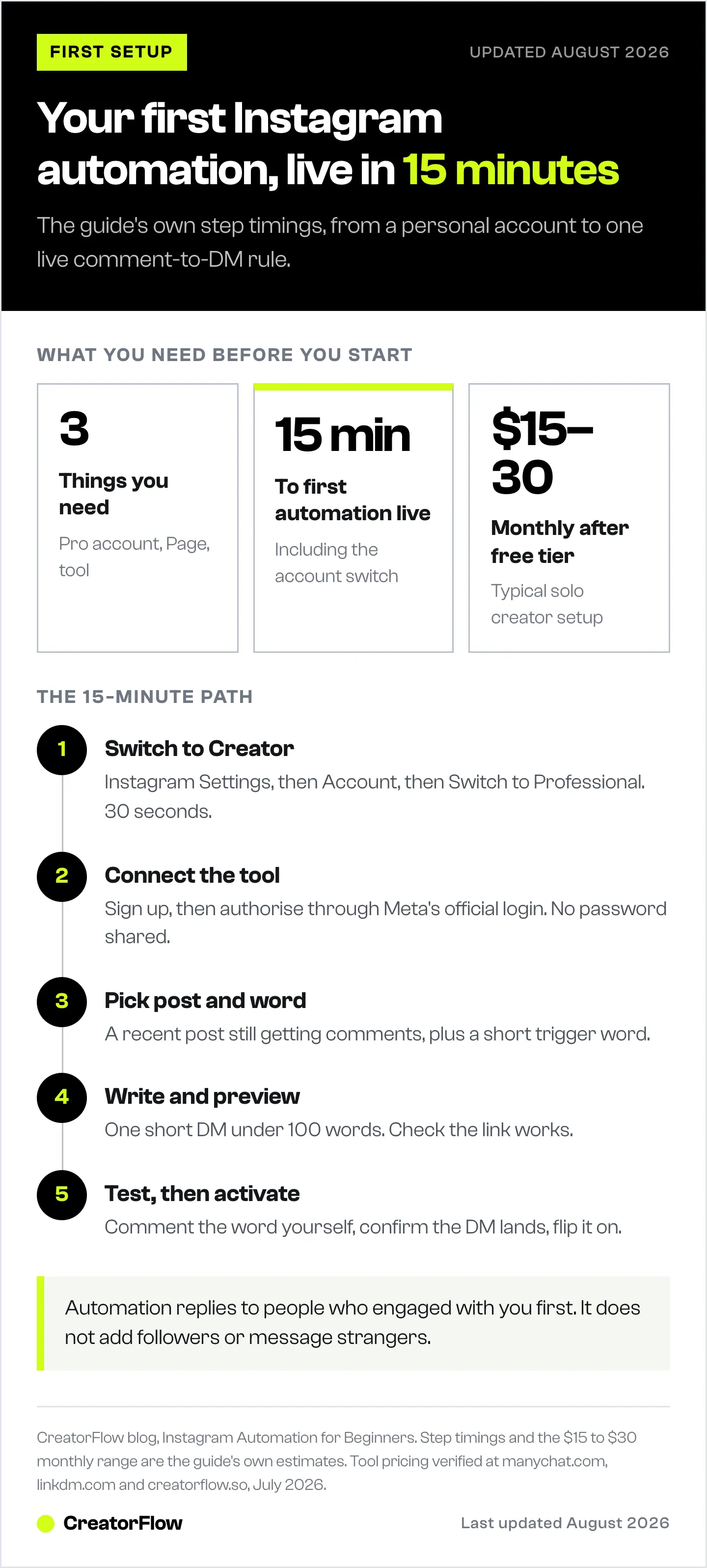
- Switch to a Business or Creator account in Instagram Settings (skip if you already have one). 30 seconds.
- Sign up for an automation tool with a free tier. 2 minutes.
- Connect your Instagram account through the tool’s official Facebook/Instagram login screen. Grant the requested permissions. 1 minute.
- Pick a recent post from your feed that’s still getting comments. 30 seconds.
- Choose a trigger word. Keep it short and simple. “LINK” works better than “SENDMETHEPRODUCTLIST.” 30 seconds.
- Write your DM. One short message. Greet them, deliver what you promised (a link, a PDF, an answer), and invite a reply. Under 100 words. 5 minutes.
- Preview the DM. Most tools show a phone-style preview. Check spelling and that the link works. 1 minute.
- Test it yourself. Comment your trigger word from another account or ask a friend. Confirm the DM arrives. 2 minutes.
- Activate the automation. Flip the toggle to on. 5 seconds.
- Check back in 24 hours and look at how many DMs sent and how many people clicked. Iterate from there. 2 minutes.
That’s the full loop. The hardest part is writing the DM, and even that’s just one short paragraph. Don’t overthink it. You can edit later.
For a screenshot-led version of this same flow, see the comment-to-DM automation setup guide or the getting started guide on the main site.
When You Outgrow the Basics
After a few weeks, you’ll start wanting more: follow-up sequences if someone doesn’t click, email capture before the link, segmenting people by which post triggered them, multiple trigger words for different products. That’s when it’s worth graduating to the Instagram DM automation complete guide, which covers advanced setup, tool comparisons, real use cases, and troubleshooting in much more depth. For now, focus on getting one automation live and seeing how your audience responds. Everything else is optimization.
FAQ
Do I need to be a big creator to use Instagram automation?
No. Automation actually works better for smaller accounts in percentage terms. If you only get 15 comments per post, missing them all costs you a much larger share of opportunities than a big account missing some. There’s no minimum follower count. As long as you have a Business or Creator account, you can use automation from day one.
Do I need to share my Instagram password?
No, and any tool that asks for your password directly is a red flag. Legitimate tools connect through Meta’s official Facebook/Instagram login screen, the same one you’d see when connecting any other app. You authorize specific permissions (read comments, send DMs) and the tool never sees your password. You can revoke access at any time from Instagram Settings.
Is there a free option I can try first?
Yes. ManyChat, LinkDM, and CreatorFlow all offer free tiers with limited monthly DMs or contacts. Free plans are usually enough to test whether automation works for your audience. Once you outgrow the free limits, paid plans for solo creators typically start around $15 per month. See current pricing on the CreatorFlow pricing page.
Will my DMs sound robotic?
Only if you write them robotic. Automation just delivers the words you wrote. If your message says “Hey, here’s the link you asked for, pro tip start with the cleanser,” it reads as friendly. Most tools also support inserting the person’s first name dynamically, which adds personalization for free.
How long does setup actually take?
About 15 minutes for your first automation, including switching to a Creator account if you haven’t yet. The fiddly parts are usually writing your DM message and finding your trigger post. Once you’ve done it once, your second and third automations take 5 minutes each.
Can I use Instagram automation for affiliate links?
Yes. Affiliate use is one of the most common reasons creators start. Comment-to-DM delivers Amazon, LTK, ShopMy, or any other affiliate link to people who actually asked for it. Click-through rates from DM links typically run several times higher than bio links, because the link arrives while interest is fresh. Disclose the affiliate relationship in your DM the same way you would in a caption.
What happens if I stop paying?
Most tools downgrade you to the free tier rather than locking you out completely. Your existing automations may pause or stop accepting new triggers, but you keep access to the dashboard and your contact data. Always check the specific tool’s downgrade policy before you upgrade, just in case.
Pricing and feature details verified from manychat.com, linkdm.com, and creatorflow.so as of May 2026. Individual results vary.
Want the deeper version? Once your first automation is live and you’re ready for follow-up sequences, email capture, and tool comparisons, see the Instagram DM automation complete guide.
Or skip ahead and try CreatorFlow’s free plan: start your first automation in 15 minutes.


