
The Instagram algorithm in 2026 uses separate ranking systems for Feed, Reels, Stories, and Explore. The three most important signals named by Instagram head Adam Mosseri are watch time, sends per reach (DM shares), and likes per reach. Since April 30, 2026, accounts that mostly post other people’s content in Reels, photos or carousels are removed from recommendations. Reels up to 3 minutes can be recommended to non-followers; longer Reels cannot.
Viewers can now edit the topics feeding those systems directly; see Your Algorithm on Instagram for the settings panel and what it changes for creators.
Instagram doesn’t use one algorithm. It uses multiple AI-driven ranking systems, each tailored to a different surface of the app: Feed, Reels, Stories, and Explore. Each system weighs different signals and serves different purposes. Knowing which signals matter on each surface tells you what to change when reach drops. If your numbers are already sliding, start with why your Instagram reach is dropping.
In January 2025, Instagram head Adam Mosseri named the three ranking signals that matter most: watch time, likes per reach, and sends per reach. He added that likes are “slightly more important for connected content, and sends are slightly more important for unconnected content” (Adam Mosseri on Instagram, January 2025, via Social Media Today).
On December 31, 2025, Mosseri posted a year-end memo. His argument: as AI makes polished images cheap, raw and imperfect content becomes proof that a real person made it. One of the priorities he listed for 2026 was “Continue to improve ranking for originality” (Mosseri’s memo on Threads, transcript at om.co).
This guide breaks down each algorithm by surface, the specific ranking signals that matter, and what you should do about it. For practical ways to improve your content for these signals, see our complete Instagram engagement guide.
Key Takeaways
The 3 ranking signals Adam Mosseri names as the ones that matter most:
- Watch time: How long viewers stay with your content. Check average watch time in Insights.
- Sends per reach: How many viewers send your post to a friend in a DM. Sends count slightly more for reaching people who don’t follow you.
- Likes per reach: Likes count slightly more with people who already follow you.
What changed in 2025 and 2026:
- Since April 30, 2026, accounts that mostly post other people’s photos, carousels or Reels are removed from recommendations
- Reels up to 3 minutes can be recommended to non-followers (since January 2025); Reels over 3 minutes are not
- Since August 31, 2026, profiles that show an AI-generated person without Instagram’s label get limited reach
- Viewers can edit the topics in their own recommendations with Your Algorithm, now across Feed, Reels and Explore
- Trial Reels let you test content with non-followers before pushing to your audience
There’s No Single “Instagram Algorithm”
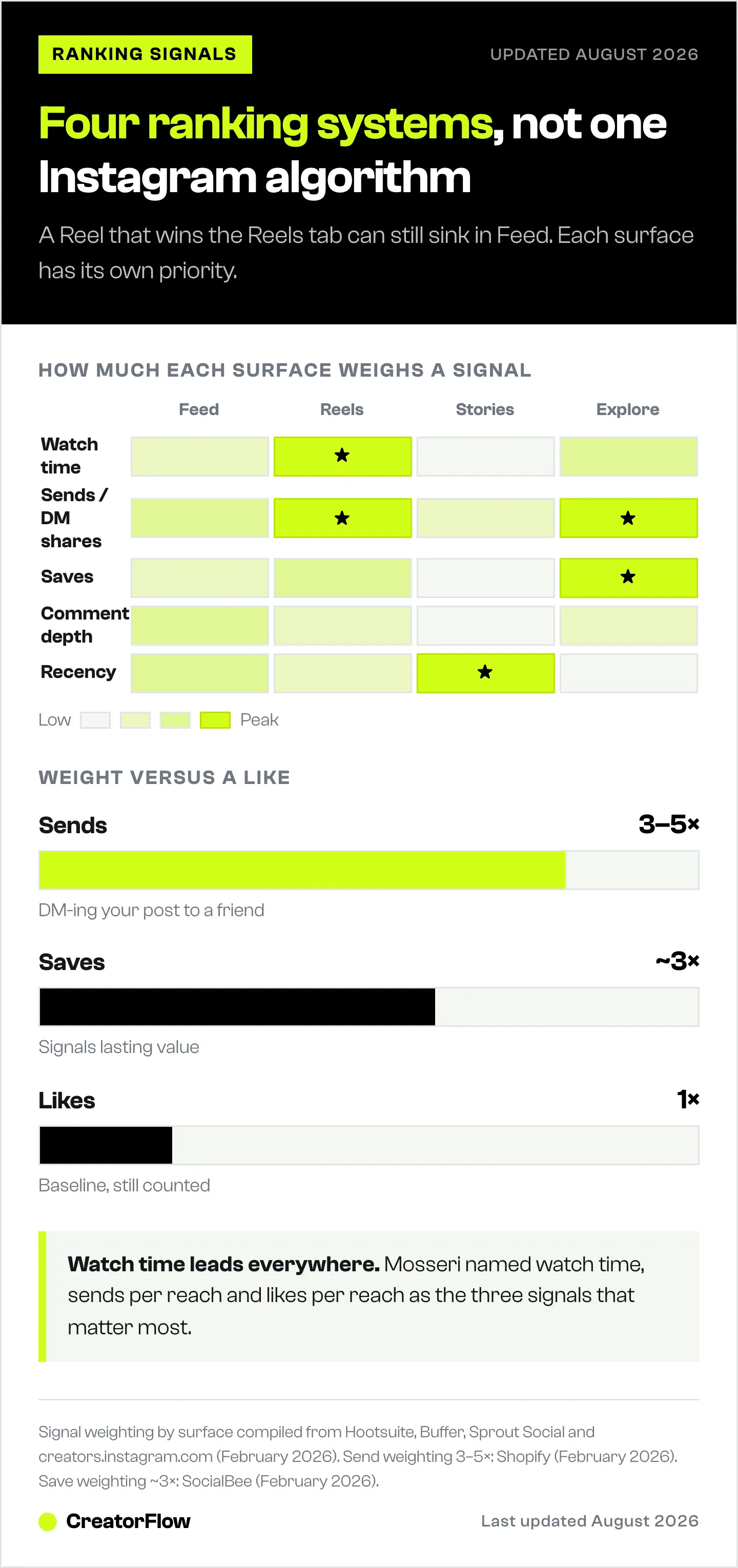
This is the most misunderstood part. Instagram uses separate ranking systems for each surface of the app. Content that performs well in Feed may not rank on Explore. A Reel that goes viral on the Reels tab may barely show up in your followers’ Feed.
Adam Mosseri explained this in Instagram’s own ranking explainer, published in May 2023. Each part of the app, including Feed, Stories, Explore, Reels and Search, “uses its own algorithm tailored to how people use it” (about.instagram.com).
The four main ranking systems:
- Feed: Content from accounts you follow, plus some recommended posts, ranked by what you engage with
- Reels: Discovery-focused, primarily shows content from accounts you don’t follow
- Stories: Ranked by how often you watch and interact with that account
- Explore: Mostly accounts you don’t follow, personalized to your interests
Each one weighs signals differently. Let’s break them down.
How the Feed Algorithm Works
Your Feed shows content from accounts you follow, plus some recommended posts from accounts you don’t. The algorithm decides the order based on how likely you are to engage with each post.
Instagram’s explainer lists four groups of Feed signals, in rough order of importance. First is your activity: the posts you liked, shared, saved or commented on. Then come information about the post, information about the person who posted, and your history of interacting with that person (about.instagram.com). In practice they look like this:
Feed ranking signals:
Relationship strength: How often you interact with the person who posted, for example whether you comment on each other’s posts. Accounts you interact with often tend to appear higher in your Feed.
Interest prediction: Instagram predicts how interested you are in a post based on your past behavior. If you consistently engage with fitness content, fitness posts rank higher.
Timeliness: When a post was published is one of the post signals Instagram lists. Newer posts tend to rank higher, but the Feed is not chronological.
Engagement velocity: How many people like, comment, share and save a post, and how quickly they do it (about.instagram.com). Instagram does not publish a time window. The often-quoted “first 30-60 minutes” is a creator rule of thumb.
What this means for creators:
Build relationships with your followers. Your history with a person is one of the Feed signals, so replying to comments and DMs, and engaging with your followers’ posts, helps your posts appear higher in their Feed.
Posting when your audience is online matters more in Feed than any other surface. Check Instagram Insights for your Most Active Times and post within those windows.
How the Reels Algorithm Works
Reels is Instagram’s primary discovery engine. Instagram says most of what people see in Reels comes from accounts they don’t follow (about.instagram.com). This is where you grow.
Reels ranking signals:
Watch time: One of the three signals Mosseri names, and the one he tells creators to track in Insights as average watch time (January 2025). Creators read a big drop in the first 3 seconds as a weak hook. Instagram does not publish a cutoff.
Sends per reach: How many of the people who saw your Reel sent it to a friend in a DM. Mosseri says sends are “slightly more important” than likes for reaching people who don’t follow you (January 2025). Instagram has never published a numeric weight, so the “sends are worth 3-5x a like” figure you see online has no source.
Completion and rewatches: Instagram names watch time, not completion rate. A Reel that most viewers finish or replay usually has high average watch time, which is why creators track it.
Likes per reach: Likes divided by the number of people who saw the Reel. A Reel seen by 1,000 people with 50 likes outranks one seen by 10,000 with 100 likes.
Saves: Saves signal lasting value. Instagram’s own creator guidance reads them next to shares: “If saves are high but shares are low, the content might be valuable but not shareable enough” (creators.instagram.com, July 2026). Instagram publishes no weight for saves.
Thresholds creators commonly cite (rules of thumb from creator testing, not figures Instagram publishes):
- First 3 seconds: if most viewers watch past the 3-second mark, distribution tends to widen
- First 30-60 minutes: early likes, comments and shares in this window seem to decide whether the Reel reaches non-followers
- Completion rate above 50%: creators treat this as a sign the Reel will keep spreading on Explore and the Reels tab
What this means for creators:
Your hook matters most. The first 1-3 seconds decide whether a viewer stays, and how long viewers stay is what Instagram reads. Use text overlays, pattern interrupts, or visual hooks that stop the scroll.
Keep Reels as short as the idea allows. Instagram can recommend Reels up to 3 minutes to non-followers, but shorter Reels (15-30 seconds) usually get higher completion rates.
Create content worth sharing via DM. Ask yourself before posting: “Would someone send this to a friend?” If yes, you are working with the sends signal.
How the Stories Algorithm Works
Stories appear at the top of the app in a horizontal tray. The order isn’t random. Instagram decides which accounts appear first (and which get buried at the end).
Stories ranking signals:
Instagram names three: viewing history, engagement history and closeness (about.instagram.com).
Viewing history: How often someone watches your Stories. If they consistently tap into yours, you stay near the front of their tray.
Engagement frequency: Story replies, reactions, sticker interactions (polls, quizzes, questions), and DM responses triggered by your Story. Each interaction strengthens the relationship signal.
Timing: Stories disappear after 24 hours, so only accounts that posted in the last day appear in the tray. Recency is not one of the three Stories signals Instagram names, but you have to post to be in the tray at all.
Closeness: How likely you and the viewer are to be connected as friends or family (about.instagram.com). Instagram estimates this from how you interact, such as DMs and comments.
What this means for creators:
Stories mostly reach people who already follow you. Use them to build relationships with those followers. Engagement history is one of the three Stories signals, so Stories that people respond to move you up their tray.
Use interactive stickers (polls, quizzes, question boxes) to drive engagement. Each interaction trains the algorithm to show your Stories earlier in that person’s tray.
Post Stories on most days. For feed posts, Buffer’s study of 2.1 million posts found that 3-5 posts a week more than doubled follower growth compared with 1-2 posts a week (buffer.com, August 2025). Stories last only 24 hours, so posting them on most days keeps you in the tray. Instagram publishes no ideal number of Stories per day.
One overlooked strategy: when followers reply to your Story, respond via DM. That DM conversation strengthens the relationship signal for both Stories and Feed placement.
How the Explore Algorithm Works
Explore shows mostly content from accounts you don’t follow, personalized based on your behavior (about.instagram.com). This is where accounts get discovered by new audiences.
Explore ranking signals:
Post popularity: How many people like, comment, share and save a post, and how quickly they do it. Instagram lists this first for Explore and says popularity matters more here than in Feed (about.instagram.com).
User interest matching: Instagram profiles your interests based on what you’ve liked, saved, commented on, and shared in Explore previously. Your content gets shown to users with matching interest profiles.
Engagement type: Likes, saves and shares all count. Explore shows accounts people don’t follow, which is where Mosseri says sends matter slightly more than likes (January 2025).
Your history with the person who posted: Most Explore posts come from accounts you don’t follow. If you have interacted with an account before, Instagram uses that history too (about.instagram.com).
Account history: Instagram also looks at information about the person who posted, such as how people have engaged with that account recently. Accounts with consistently high engagement across their recent posts are more likely to appear on Explore.
How to get on Explore:
The path to Explore starts with your existing audience. Instagram lists how many people engage with a post, and how quickly, as an Explore signal, so strong engagement from your followers helps. Creators commonly see a post reach a small group of non-followers first and then widen if that group engages too.
No setting or trick puts a post on Explore. What you control is the post itself: make something people like, save and share soon after you publish it.
What gets excluded from Explore:
- Accounts that mostly post content they didn’t create (since April 2026 this covers photos and carousels as well as Reels)
- Profiles that show an AI-generated person without the AI-generated profile label (since August 31, 2026)
- Sensitive content under Instagram’s Recommendation Guidelines, such as violence or regulated products like vaping
- Low-quality content, such as blurry or low-resolution video, or video with visible watermarks
- Accounts that recently or repeatedly broke the Community Guidelines or Recommendation Guidelines
These rules come from Instagram’s recommendation eligibility guide and its 2026 updates (creators.instagram.com). They limit recommendations only: your followers can still see the content. Settings, then Account Status, shows whether your account is affected.
The Original Content Advantage
Instagram has tightened its originality rules twice since 2024. Accounts that repost other people’s work lose recommendations, and the original post gets the reach instead. Recommendations are how non-followers find you, which is also where niching down on Instagram pays off.
What Instagram has published:
- April 2024 (Reels): Accounts that post content from other Instagram users “10 or more times in the last 30 days”, without changing it in a material way, are removed from recommendations. When Instagram finds identical posts, it recommends only the original, and copies get a label that links to the original creator (creators.instagram.com).
- April 30, 2026 (photos and carousels too): “The same protections we introduced to reels in 2024 will now apply to photos and carousels.” Accounts become eligible again “when most of their recently posted photos, carousels, and reels are considered original in a 30-day period.” Instagram recalculates this on a rolling basis (creators.instagram.com).
- The effect so far: Instagram says 75% of recommendations in the US now come from original posts (creators.instagram.com).
These rules affect recommendations. Your followers still see your posts.
You may see claims that original creators gained “40-60% more reach” or that reposters lost “60-80%”. Instagram published neither number, and we could not trace either one to a study. Check Settings, then Account Status, to see whether your own account is affected.
What counts as “original” (Instagram’s own examples from the April 30, 2026 update):
- Photos or videos you took
- Content you designed, such as a photo series, a how-to guide or a visual story
- Someone else’s content that you edited in a meaningful way: your own text on it that adds context, new graphics that add information, or a remix that changes it
What does not count as original:
- Re-uploading someone else’s photo, carousel or Reel
- Adding only a border, a watermark, subtitles or a credit in the caption
- Videos that carry visible watermarks from other apps
- Accounts that mostly repost trending content from elsewhere
To share another creator’s post, Instagram suggests a repost, a Story share or a collab instead of re-uploading it.
If you make your own content, this change helps you. Reach that used to go to reposting accounts now goes to the original post.
Trial Reels: Test Before You Commit
Trial Reels, launched on December 10, 2024, let you publish a Reel shown only to non-followers first. Your existing followers don’t see it unless you choose to share it later.
How Trial Reels work (creators.instagram.com):
- Create a Reel and turn on “Trial” before publishing
- Instagram shows it to non-followers first
- After about 24 hours, you see its views, likes, comments and shares
- You can share it with your followers yourself, or turn on automatic sharing: Instagram then shares it if it gets enough views in the first 72 hours
- If it does not perform, your followers never see it
Why this matters for the algorithm:
Trial Reels let you test hooks, topics and formats before your followers see them. Instagram built the feature because many creators hold back experiments, worried about how their followers will react. For the setup steps and what the trial data tells you, see how Trial Reels work. They are also the cheapest way to find a format on a new account, which our guide to growing an AI influencer account uses as its first-fortnight test.
Best use cases:
- Testing new content formats or topics
- Experimenting with longer Reels (1-3 minutes)
- Trying different hooks on the same content
- Testing controversial or polarizing takes
Longer Reels Get Recommended Now
Until January 2025, only Reels up to 90 seconds were eligible for recommendation. Since then, Reels up to 3 minutes can be recommended to non-followers in the Reels tab and Explore (creators.instagram.com). You can now record and edit Reels up to 20 minutes, but “Reels over 3 minutes won’t be recommended to new audiences” (help.instagram.com, September 2026).
What this means:
- Product tutorials (2-3 minutes) can now reach new audiences
- Behind-the-scenes videos up to 3 minutes can reach non-followers
- Educational content can go deeper and still be recommended
The catch:
Longer Reels still need people to keep watching. Instagram does not say whether it judges watch time in seconds or as a share of the Reel’s length. So make each Reel as long as its content needs, and cut the slow parts.
When to go long vs. short:
- Short (15-30 seconds): Hooks, quick tips, trending audio, entertainment
- Medium (30-90 seconds): Tutorials, storytelling, product demos
- Long (1-3 minutes): In-depth education, multi-step tutorials, behind-the-scenes
”Shadow Bans” and Reduced Distribution
“Shadow ban” is not a term Instagram uses. In its ranking explainer, Instagram says that limiting or hiding an account’s content without a clear explanation is “not our intention” (about.instagram.com). What Instagram does do is stop recommending content or accounts that break its Recommendation Guidelines. Followers can still see that content, but non-followers are not shown it.
What triggers reduced distribution:
- Using banned or flagged hashtags
- Breaking the Community Guidelines or Recommendation Guidelines, recently or repeatedly
- Spammy behavior (mass following/unfollowing, comment spam)
- Using third-party tools that access Instagram through unofficial APIs
- Mostly posting other people’s content, or showing an AI-generated person on your profile without the label
How to check if you’re affected:
Go to Settings, then Account Status. On a professional account, it shows whether your content may be eligible to be recommended. If your account is not eligible, “none of your content will be recommended” (help.instagram.com, September 2026).
How to recover:
- Stop any behavior that might be flagged (third-party bots, banned hashtags)
- Check Account Status again after you fix the cause. Instagram publishes no fixed recovery time; for the originality rule, eligibility is checked on a rolling 30-day basis
- Post high-quality original content consistently
- Engage authentically (real comments, genuine DM conversations)
- Use Instagram’s official tools and APIs only
The best protection against reduced distribution: use tools built on Meta’s official Instagram API. Unofficial automation tools that scrape or use private APIs are a common cause of account restrictions.
Conversation Depth: Comments Aren’t Equal
Comments count, but Instagram has not published how it weighs a one-word comment against a real reply. What creators see in practice is that posts with back-and-forth threads keep getting shown, because every reply brings people back to the post.
What creators watch for:
- Comment length: Longer, thoughtful comments usually mean real interest
- Reply depth: Threads between commenters keep a post active
- Creator replies: Your reply adds to the thread and pulls the commenter back
- Speed of replies: Faster responses start more conversation
How to get deeper conversations:
Ask specific questions in your captions. “What do you think?” generates shallow responses. “What’s the biggest mistake you’ve made with Instagram Reels?” generates stories and genuine answers.
Reply to comments in the first hour. Your replies bring commenters back and invite others to join the thread.
For more strategies to increase your Instagram comments, including specific CTA formulas and keyword triggers, read our full guide on getting more comments.
What Changed Between July and September 2026
We found no announcement of a new ranking signal in this period. Five updates still affect reach:
- AI-generated profile label (August 31): Instagram renamed its “AI creator” label to “AI-generated profile.” The announcement adds: “We will also limit the reach of profiles that feature an AI-generated person and do not add this label.” An unlabeled profile can lose recommendation eligibility, and Account Status shows it (creators.instagram.com, August 2026).
- Saves versus shares (July 30): Instagram’s creator guide to editing says “If saves are high but shares are low, the content might be valuable but not shareable enough” (creators.instagram.com, July 2026). Read your own Insights the same way.
- Captions for search (August): Instagram told creators that its search “uses captions as reference data for discovery” (Social Media Today, August 2026). Put the words people search for in your caption.
- Paid search placement (September 15): Meta One creator plans launched. The Advanced plan, $49.99 a month, lists “Appear ahead in search results with optimized search” (creators.instagram.com, September 2026). This is a paid feature. It does not change how organic posts rank.
- The chronological feed debate (September 10): Australia proposed a law to make a chronological feed easier to choose. Mosseri defended the ranked Feed: “If you go to a chronological feed, it ends up getting overwhelmed with content from companies, brands, and publishers.” He guessed that the share of Australian users on the chronological option is “in the low single-digit percentages” (ABC News, September 2026). If the share is similar elsewhere, almost all of your followers see the ranked Feed.
Ranking Signal Cheat Sheet by Surface
| Signal | Feed | Reels | Stories | Explore |
|---|---|---|---|---|
| Watch time | Medium | Highest | Low | High |
| Sends/DM shares | High | Highest | Medium | Highest |
| Likes per reach | High | High | Medium | High |
| Saves | Medium | High | Low | Highest |
| Comments (depth) | High | Medium | Low | Medium |
| Recency | High | Medium | High | Low |
| Relationship strength | Highest | Low | Highest | Low |
| Completion and rewatches | N/A | High | N/A | High |
This table is our reading of Instagram’s published signals (its 2023 ranking explainer and Adam Mosseri’s January 2025 comments) and of guides from Hootsuite, Buffer and Sprout Social. Instagram does not publish weights for each surface.
7 Strategies to Work With the Algorithm in 2026
1. Make Posts People Send to Friends
Sends are one of the three signals Mosseri names, and they count slightly more for reaching people who don’t follow you. Create content people want to send to friends: relatable takes, useful checklists, surprising data, and “tag someone who needs this” moments. Some creators also hide likes on their Instagram posts to keep viewers focused on the content itself.
2. Hook in the First 3 Seconds
If most viewers swipe away in the first seconds, average watch time falls and the Reel stops traveling. Use text overlays, visual pattern interrupts, or direct-to-camera statements that create curiosity.
3. Post Carousels for Engagement
Carousels have the highest engagement rate of any format in 2026: 0.50% by followers, against 0.48% for Reels and 0.33% for single images (Socialinsider, Q2 2026). Carousels also get a second chance in Feed. In Mosseri’s words: “if someone sees your carousel post but they don’t swipe, we’ll often give that carousel a second chance” (Adam Mosseri, October 2024). See how to make carousels people swipe through for sizes and slide counts.
4. Create Original Content Only
Instagram’s originality rules are real. If most of what you post is other people’s content, your account is removed from recommendations, so non-followers stop seeing you. Film your own Reels, design your own carousels, write your own captions.
5. Respond to Comments and DMs Fast
Every response strengthens your relationship signal. Faster responses trigger more conversation threads. Set up an auto DM for the requests that repeat (affiliate links, booking links, lead magnets) so you never miss a conversation window.
6. Use Trial Reels for Experimentation
Test new ideas before your followers see them. Use Trial Reels to show new formats, topics and hooks to non-followers first. Share a trial with your audience once the numbers look good, or let Instagram share it automatically.
7. Track Engagement Rate Benchmarks
You can’t improve what you don’t measure. Calculate your engagement rate and see where you stand relative to current Instagram engagement rate benchmarks by follower count and industry. Track your metrics monthly.
How DM Automation Connects to the Algorithm
Comments, replies and DMs build the relationship signals that Feed and Stories use. But answering every DM, comment and story reply by hand stops working once a post gets hundreds of comments.
This is where DM automation fits. When someone comments a keyword on your post, an automated DM sends them exactly what they asked for (a link, a PDF, a booking page) within seconds. That instant response:
- Strengthens the relationship signal between you and that follower
- Starts a DM conversation the person can reply to
- Answers every request in seconds, while the person is still looking at your post
- Brings more comments to the post, because people comment the keyword to get what you offered
CreatorFlow does this through Meta’s official Instagram API. CreatorFlow is a Meta Tech Provider (since December 2025), so there is no third-party scraping and minimal ban risk. It covers comment-to-DM automation, story reply triggers and keyword DMs, so the replies go out while you make content. The Free plan includes 500 DMs a month. To compare options first, see our list of free Instagram auto DM tools.
FAQ
How does the Instagram algorithm work in 2026?
Instagram uses multiple AI-driven ranking systems, one for each surface (Feed, Reels, Stories, Explore). The three most important ranking signals across all surfaces are watch time, sends per reach (DM shares), and likes per reach, as named by Instagram head Adam Mosseri in January 2025. Each surface weighs these signals differently: Reels prioritizes watch time and sends, Feed prioritizes your activity and relationship strength, Stories prioritizes viewing history and closeness, and Explore prioritizes engagement velocity and user interest matching.
Does Instagram penalize reposted content?
Yes. Since April 2024, accounts that post other people’s Reels 10 or more times in 30 days, without changing them in a material way, are removed from recommendations. Since April 30, 2026, the rule also covers photos and carousels. Accounts that mostly post unoriginal content are not shown to non-followers on Explore, the Reels tab or suggested posts. They become eligible again when most of their posts from the last 30 days are original (creators.instagram.com). Followers still see their posts. Instagram has not published reach-change percentages for this policy.
What are Instagram’s top 3 ranking signals?
Watch time, sends per reach, and likes per reach (Adam Mosseri, January 2025). Watch time measures how long viewers stay with your content. Sends per reach counts how many viewers DM your post to a friend, and Mosseri says sends are slightly more important for reaching non-followers. Likes per reach is likes divided by the number of people who saw the post, and likes are slightly more important with your followers. Instagram publishes no numeric weights for these signals.
Does Instagram shadow ban accounts?
“Shadow ban” is not a term Instagram uses, and its ranking explainer says hiding creators’ content without a clear explanation is “not our intention” (about.instagram.com). Instagram does stop recommending content and accounts that break its Community Guidelines or Recommendation Guidelines. Followers can still see that content, but non-followers are not shown it. Go to Settings, then Account Status, to see whether your account can be recommended and to appeal a decision (help.instagram.com, September 2026).
How long should Reels be for the algorithm?
Since January 2025, Reels up to 3 minutes can be recommended to non-followers. You can post Reels up to 20 minutes, but Instagram does not recommend Reels over 3 minutes to new audiences (help.instagram.com, September 2026). Length only helps if people keep watching. As a starting point: 15-30 seconds for quick hooks and tips, 30-90 seconds for tutorials and storytelling, 1-3 minutes for in-depth education.
What are Trial Reels?
Trial Reels is a feature, launched in December 2024, that lets you publish a Reel shown only to non-followers first. Your existing followers don’t see it unless you share it later. After about 24 hours you see its views, likes, comments and shares. You can then share it with your followers, or turn on automatic sharing so Instagram shares it if it gets enough views in the first 72 hours (creators.instagram.com).
How do I get on the Instagram Explore page?
Explore distribution starts with your existing audience. Instagram ranks Explore posts partly on how many people like, comment, share and save them, and how quickly (about.instagram.com). Strong engagement from your followers helps a post reach people with similar interests. Original content matters too: accounts that mostly repost other people’s content are not recommended on Explore at all.
Sources checked in September 2026: Instagram Ranking Explained by Adam Mosseri (about.instagram.com, May 2023); Instagram’s originality updates of April 2024 and April 30, 2026, the AI-generated profile label (August 31, 2026), Trial Reels, the January 2025 Reels update, the July 2026 editing guide and Meta One creator plans (creators.instagram.com); Account Status and Reels length rules (help.instagram.com); Mosseri’s January 2025 ranking comments (via Social Media Today); his September 10, 2026 comments on chronological feeds (ABC News); Socialinsider Q2 2026 benchmarks; Buffer’s posting-frequency study. Instagram does not publish numeric weights for its ranking signals, so the surface-by-surface ratings above are our reading.


