

Your Algorithm is Instagram’s topic control panel. It shows the interests its recommendation system has assigned to you, and lets you add topics you want more of or remove ones you do not. Instagram launched it for Reels in December 2025 and extended it to the main feed in June 2026. Changes apply across Feed, Reels, and Explore at once.
For years the only way to steer Instagram was to behave differently in front of it. Watch a video to the end, skip another, tap a profile, and hope the machine drew the right conclusion. There was no way to say what you wanted in words. Adam Mosseri put it plainly: “The system learns from what you tap, watch, and share, but you don’t really get to tell it what you want” (socialmediatoday.com, June 2026).
That changed. This guide covers what Your Algorithm does, the exact steps to change it, the things it will not do no matter how you phrase them, and the part most coverage skips: what happens to your distribution as a creator when your audience can name the topics they want and filter out the ones they do not.
Key Takeaways
- What it is: A settings panel showing the topics Instagram’s recommendation system associates with your account, with controls to add or remove them
- Where to find it: Settings, then Content Preferences, then Your Algorithm. Or tap the slider icon with two hearts at the top right of Reels or Explore
- One system, three surfaces: A topic change updates recommendations across Feed, Reels, and Explore at the same time (about.instagram.com, 2026)
- Topics only: It works on interests like “rescue dogs” or “film photography”. It will not prioritize posts from accounts you follow (engadget.com, June 2026)
- Rollout: Tested on Reels from October 2025, launched to US Reels users December 10, 2025, extended to Explore in April 2026 and the main feed in June 2026
- For creators: Topic controls add a classification step before ranking. Content that cannot be named as a topic gets sorted out before watch time and engagement signals ever apply
- The exception: A post sent person to person in DMs arrives outside the recommendation layer, which is why sends per reach became the strongest signal for reaching people who do not follow you
What Is Your Algorithm on Instagram?
Your Algorithm is a settings panel inside Instagram that makes the recommendation system readable and editable. It lists the topics Instagram believes you are interested in, based on your in-app behavior, and gives you controls to add topics you want more of and remove topics you want less of. Instagram uses large language models to turn its internal content embeddings into named topics a person can read.
Before this, the topics existed but stayed invisible. The system had a mathematical representation of what your feed was about, and no way to show it to you in words. Translating those representations into labels like “skincare,” “AI tools,” or “parenting humor” is what made the panel possible.
Mosseri framed the reasoning as a business argument rather than a favor: “I believe it’s in our best interest as a business to empower people to shape Instagram into something that works for them, and that people should be able to have a meaningful amount of agency over the products they spend so much time in” (engadget.com, June 2026).
For the mechanics behind what gets ranked once a topic match happens, see our breakdown of how each Instagram ranking system works.
How to Change Your Algorithm on Instagram
There are two routes into the panel. The settings route works from anywhere in the app. The in-feed route is faster if you are already scrolling and a topic is bothering you right now.
From settings:
- Open Instagram and go to your profile
- Tap the menu icon, then Settings and privacy
- Open Content Preferences
- Tap Your Algorithm
- Read the summary of topics tied to your account
- Add topics you want more of, or remove topics you want less of
From Reels or Explore:
- Open the Reels tab or the Explore tab
- Tap the slider icon with two hearts at the top right
- Your recent interests appear as a short summary
- Type in topics to see more of, or deprioritize the ones listed
- On Explore, the topic pills across the top adjust the same preferences faster
Changes are not confined to the surface you made them on. Instagram describes it as a single system: “Your Algorithm is one unified system, so when you tell us what topics you want to see more or less of, your recommendations update everywhere: across Feed, Reels, and Explore” (about.instagram.com, 2026).
Which Feeds Your Algorithm Controls
Your Algorithm applies to recommended content across Feed, Reels, and Explore. It reached each surface at a different time. Instagram began testing on Reels in October 2025, launched it to US Reels users on December 10, 2025, extended it to Explore in April 2026, and brought it to the main feed in June 2026. One topic edit now updates all three surfaces at once.
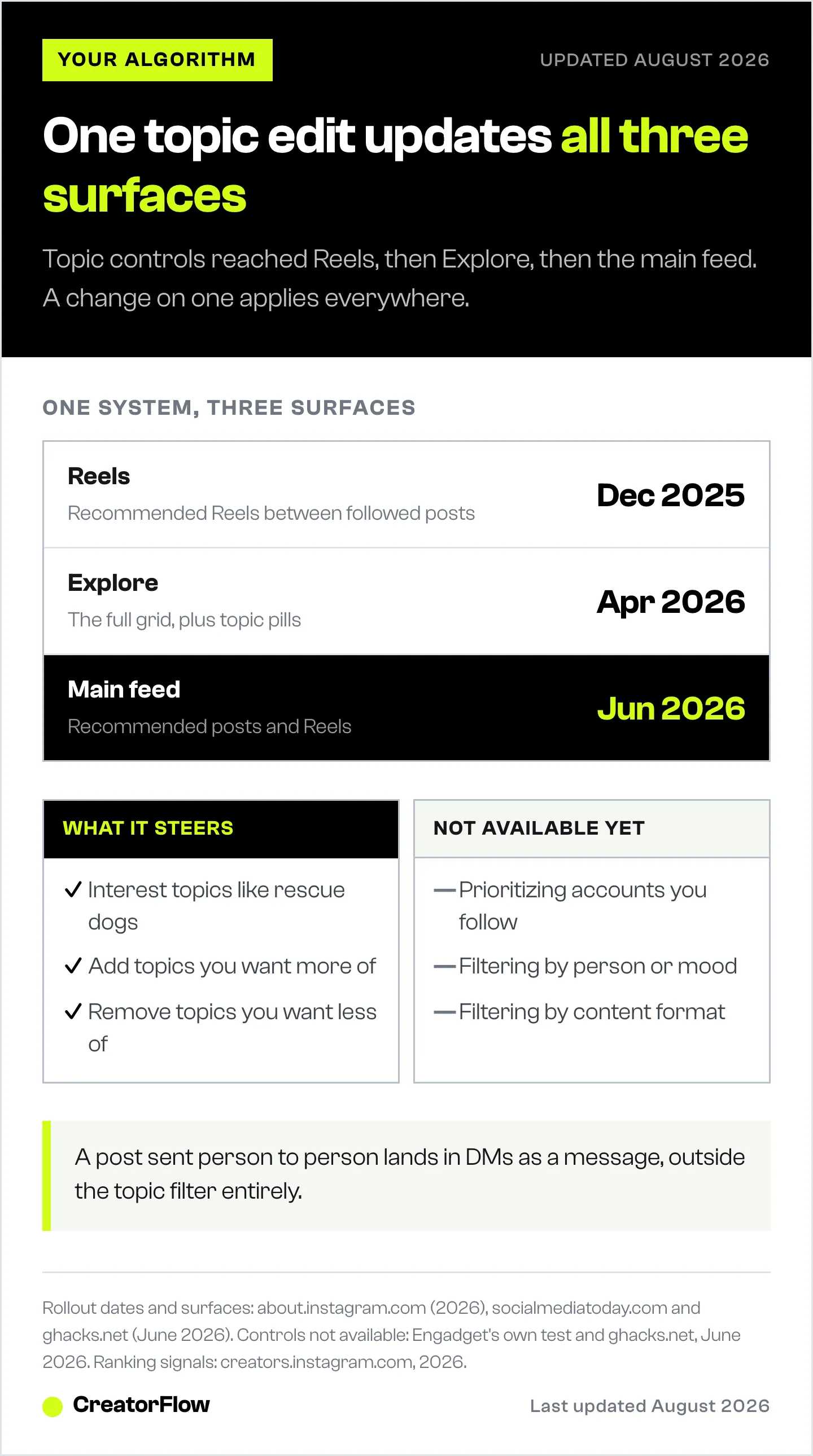
| Surface | Available since | What topic controls affect |
|---|---|---|
| Reels | December 10, 2025 (US launch, tested from October 2025) | Recommended Reels between followed content |
| Explore | April 2026 | The full Explore grid, plus topic pills at the top |
| Main Feed | June 2026 | Recommended posts and Reels mixed into the feed |
Sources: socialmediatoday.com (June 2026), ghacks.net (June 2026), about.instagram.com (2026).
The main feed addition matters most, because that is where the largest share of time is spent. Recommended Reels surface heavily there, so topic preferences now shape far more of what an average user sees than when the control lived only on the Reels tab.
Instagram is also testing ways to pull the panel out of the menus entirely. In June 2026 it began trialing a pull-down gesture on the main feed that opens the controls, a swipe-up on an individual Reel, and preference buttons placed directly under Reels. Mosseri described the direction as making it “central to your experience on Instagram,” while noting that “some of this is testing now, some is coming soon, some might not work” (techcrunch.com, June 2026).
What Your Algorithm Will Not Do
Your Algorithm works on interest topics only. It will not let you prioritize posts from accounts you follow. Engadget tested this directly by entering “posts from people I follow” as a preference and got a “no results found” error in return. It also does not filter by person, mood, or content format. Instagram has said those may come later, but none of them are available now.
That limit is the one people keep asking about. The most upvoted replies to Mosseri’s announcement post asked for exactly this: rank the accounts I chose to follow above the accounts a model chose for me (techcrunch.com, June 2026). Following used to be the real steering wheel, and as recommendations took over the main feed, that control quietly stopped working. Your Algorithm hands back a different dial rather than the original one. Instagram’s answer for now is the separate Following feed, which shows followed accounts in chronological order but sits outside the main feed.
Reported as under consideration but not shipped as of August 2026: control by specific people, by mood or vibe, and by content type (ghacks.net, June 2026). Treat anything beyond topics as unreleased.
How to Reset Your Instagram Algorithm
There is no single reset button. The closest equivalent is to open Your Algorithm and remove every topic you no longer want, then add the topics you do. Instagram rebuilds the list from ongoing behavior, so the panel drifts back toward what you keep watching. Clearing search history and using “Not interested” on individual posts pushes the same signals in the same direction.
Expect this to be gradual. The topics you remove stop being reinforced, but the system keeps reading watch time and taps, so a strong habit rebuilds a topic you deleted. The working version is three steps repeated over about a week: prune the topic list, mark unwanted posts as not interested as they appear, and give real watch time to the topics you do want so the system has something to promote in their place.
What Your Algorithm Changes for Creators
Topic controls insert a classification step ahead of ranking. Before Instagram weighs watch time, saves, or sends on your post, it has to decide which topic your content belongs to and whether the viewer has that topic switched on. An account that does not map cleanly to a nameable topic can be filtered out before any ranking signal applies. Clarity became a distribution input, not a branding preference.
That reorders the usual advice. Make better content and the signals will follow still holds inside a topic. It does nothing if the classifier cannot decide which topic you are in, or files you under one your audience has turned down.
Two failure modes come out of this:
- Unclassifiable accounts. A feed that mixes gym content, travel, business advice, and personal updates gives the classifier a weak signal. It may assign you a broad topic, split you across several, or land on one you did not intend. None of those are good outcomes.
- Correctly classified, actively filtered. You are labeled accurately, and a segment of your audience has removed that topic. Your ranking signals are fine. You are not in the pool being ranked.
Neither shows up in your analytics as a distinct cause. Both read as reach falling for no clear reason, which is why they get misdiagnosed as a penalty. If your numbers have slid without an obvious trigger, our guide to why your Instagram reach is dropping covers the other explanations worth ruling out first.
The Reach Path Topic Controls Do Not Touch
One route into someone’s app is not topic-filtered: a post sent directly to them by a person they know. A send lands in DMs as a message, not as a recommendation, so it does not pass through the topic layer at all. This is the structural reason sends per reach carries so much weight for reaching people who do not follow you, and why it survives a change that reshapes everything else.
Mosseri has confirmed three signals as the ones that matter most across surfaces: watch time, likes per reach, and sends per reach (creators.instagram.com, 2026). Sends is the strongest of the three for reaching non-followers, and it is now the only one of the three that operates outside the recommendation system’s topic gate.
That gives creators a distribution path that does not depend on being classified correctly:
- Someone sees your post through recommendations, following, or a share
- They send it to a friend because it is useful, funny, or specific enough to forward
- The friend receives it in DMs, outside any topic filter they have set
- The conversation continues there, with a person instead of a slot in a ranked feed
Step four is where most creators stop. The post gets shared, the recipient opens it, and nothing follows because there is nowhere for the conversation to go. A keyword trigger on the post turns that moment into a reply: someone comments or DMs a word and gets your link, guide, or booking page straight back. Our comment-to-DM automation setup guide covers the build, and our guide to increasing Instagram organic reach covers the on-feed half of the same problem.
How to Make Your Account Easy to Classify
Being easy to classify is a content decision, not a bio rewrite. The system reads what you post, in words it can name. Four things move that:
- Pick a topic a stranger could say out loud. “Home coffee brewing” classifies. “Lifestyle and inspiration” does not. If you cannot state your topic in three words, the classifier is guessing too.
- Say the topic in the content. Spoken words, on-screen text, and captions all feed the labeling. A Reel that shows a recipe without naming any ingredient gives the system less to work with than one that says what it is.
- Keep formats consistent enough to compare. Recurring series and repeated formats build a stronger topic association than a different concept every post.
- Split genuinely separate topics. Two unrelated subjects on one account weaken both. If both are real businesses, they may deserve separate accounts.
None of this is new advice. The cost of ignoring it is what changed: a blurry topic used to mean slower growth, and can now mean sitting outside the pool a viewer’s preferences allow. If you are still deciding what your account is about, start with our creator niche framework.
Turn Reach Into Conversations
Topic controls decide whether your post gets shown. What happens after it gets shown is still yours to build. CreatorFlow turns Instagram comments, Story replies, and keyword DMs into automatic messages, so the people who do reach you get an answer in seconds instead of hours. It connects through Meta’s official Instagram API, sets up in under five minutes, and runs $15/month flat on the Pro plan.
FAQ
What is Your Algorithm on Instagram?
Your Algorithm is a settings panel that shows the topics Instagram’s recommendation system has associated with your account and lets you edit them. You can add topics you want to see more of and remove ones you want less of. Instagram launched it for Reels in December 2025 and extended it to Explore and the main feed through 2026.
How do I see my algorithm on Instagram?
Go to Settings and privacy, then Content Preferences, then Your Algorithm. You can also open the Reels or Explore tab and tap the slider icon with two hearts at the top right. Either route shows a summary of the interests Instagram currently ties to your account.
Can I reset my Instagram algorithm?
There is no dedicated reset button. Remove the topics you no longer want from Your Algorithm, mark unwanted posts as “Not interested,” and clear your search history. The system rebuilds from behavior, so give real watch time to the topics you do want. Expect the shift to take several days rather than happening instantly.
Can I choose to see only posts from accounts I follow?
Not through Your Algorithm. It handles interest topics only, and requests phrased around followed accounts return no results (engadget.com, June 2026). Instagram’s separate Following feed shows posts from accounts you follow in chronological order, but it sits outside the main feed rather than changing how the main feed ranks.
Why is Your Algorithm not showing on my Instagram?
Instagram rolled the feature out in stages by surface and region, starting with US Reels users in December 2025. Instagram has not published a full regional availability list. If the panel is missing, update the app to the current version and check Content Preferences again in a few weeks.
Does Your Algorithm affect Stories?
No. The controls apply to recommended content in Feed, Reels, and Explore. Stories are ranked separately, largely on your relationship with the accounts posting them, so topic preferences do not reorder your Stories tray.
How can creators get their content into people’s topic picks?
Make your topic nameable and say it in the content. Use spoken words, on-screen text, and captions that state the subject clearly, keep recurring formats so the association strengthens over time, and avoid mixing unrelated subjects on one account. A viewer can only add a topic they can name, so the topic has to be legible first.
Do topic controls change which signals rank my posts?
No. Watch time, likes per reach, and sends per reach still rank content once a topic match happens. Topic preferences decide whether your post enters the pool being ranked. Both stages have to go your way, which is why clarity and engagement now work together rather than as alternatives.
Your Algorithm rollout dates, features, and quotes verified from about.instagram.com, engadget.com, techcrunch.com, socialmediatoday.com, ghacks.net, and metricool.com as of August 2026. Instagram feature availability varies by region and app version. Individual results vary.


