

Instagram stitch is what most people call TikTok’s Stitch when they want it on Instagram, but Instagram has no button with that name. Remix does the same job. Open a public reel, choose Remix, and set your clip to play after the original video. For a green screen, Remix puts the original reel behind you by default, so you can talk in front of it.
Most guides stop at the buttons. The harder question is whether a reaction reel brings you followers who could ever buy from you. A remix of a popular video can reach thousands of people who care about the other creator’s topic and not about yours. Instagram also stops recommending accounts that mostly post other people’s work without adding to it. It has applied that rule to reels since 2024 and extended it to photos and carousels on April 30, 2026.
This guide shows the Remix steps as Instagram’s Help Center describes them, which layout fits which kind of reaction, and how to control who remixes your own reels. It covers what Instagram’s terms say about credit and copyright. Then it gives a two-question test for choosing which videos to react to, and what to do when a reaction reel sends new people to your profile.
Key Takeaways
- No Stitch button: Instagram’s version is Remix. Choose the option that plays your clip after the original video.
- Green screen: Remix places the original reel behind you by default. Tap Layout to move it somewhere else.
- Who can remix: Anyone can remix a public account’s reels unless the creator turns it off. No one can remix a private account’s reels.
- Credit: A shared remix shows “Remix with” and the original creator’s username, and viewers can tap it to watch the original.
- Growth test: React only to videos your buyers already watch, and say something the original did not say.
- Bottom line: Use Remix instead of a downloaded copy, so the credit and the creator’s permission come with your reel.
Does Instagram Have a Stitch Feature?
No. Instagram has no feature called Stitch, and Remix covers the same job. TikTok’s Stitch plays part of another video and then your clip. On Instagram, Remix can put your clip after the original reel, or record you next to it, below it, in a small window or in front of it as a background. Remix works on reels and feed videos, and on photos for some accounts.
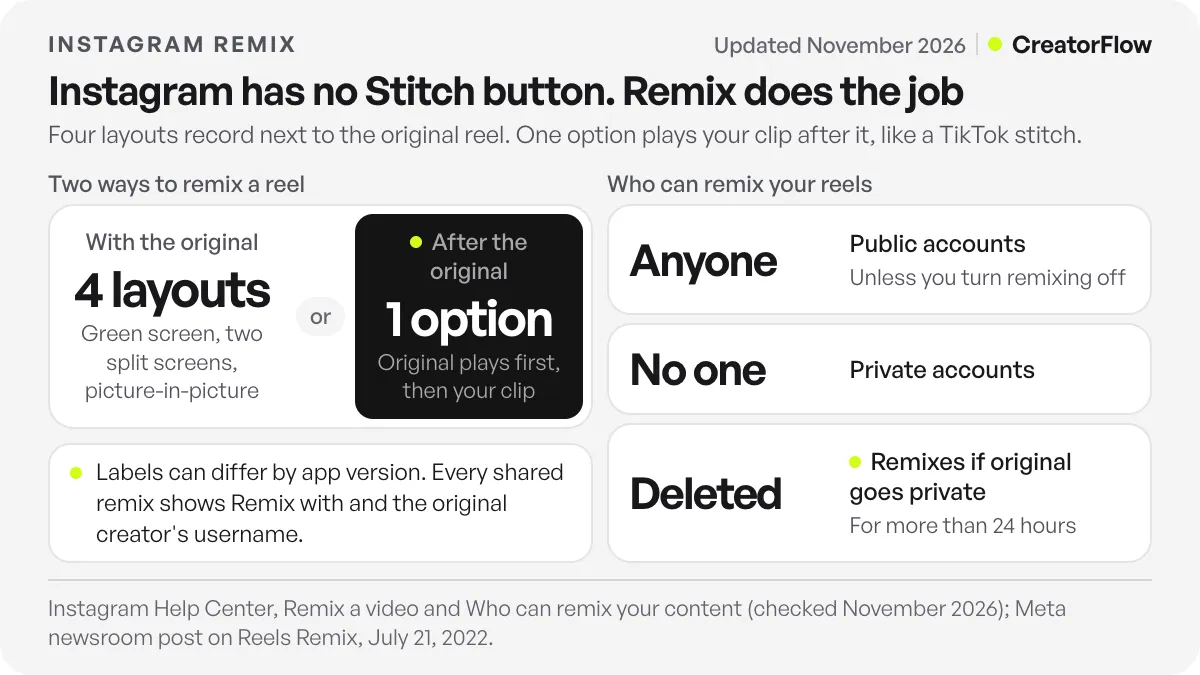
Meta added the after-the-original option in July 2022, in a newsroom post on new Reels features. The same post named four layouts that record at the same time as the original: green screen, horizontal split screen, vertical split screen and a picture-in-picture reaction view. Labels in your app may differ, but the choices work like this.
| Remix option | What viewers see | Use it when |
|---|---|---|
| After the original video | The original reel plays, then your clip | The original asks a question or makes a claim you answer |
| Green screen (background) | You in front of the original reel | You point at details in the original while you talk |
| Split screen | The two videos side by side or one above the other | Your face reacting in real time is the content |
| Picture-in-picture | One video in a small window over the other | One video carries the story and the other is a reference |
How to Stitch on Instagram With Remix
To stitch on Instagram, open the reel, tap its menu and choose Remix. Change the layout so your clip plays after the original video, then record your clip. Add text, stickers or a voiceover, write your caption and share. Instagram adds a “Remix with” credit to the original creator on the finished reel, so you do not need to add one by hand.
These steps follow Instagram’s help article on remixing a video (checked November 2026):
- Open the reel and find Remix. Tap the menu icon on the reel, then tap Remix. On a feed video, the icon sits at the top of the post.
- Choose the layout. By default, the original reel becomes the background of your reel. Tap Layout and pick the option that places your clip after the original video.
- Record your clip. Film your answer, your demonstration or your opinion.
- Add text and audio, then share. You can add stickers and text to both the original and your clip. Write the caption and post it as a reel.
Audio works differently in this mode. With the after-the-original option, you cannot change the original reel’s audio or mix it. You can record sound with your camera, add a voiceover and adjust the volume of all the audio together. Effects apply only to your clip. When your clip plays with the original, as in the side-by-side and background layouts, you can mix the audio and add voiceovers.
A remix of a feed video becomes a reel. You can also remix your own reels.
How to Green Screen on Instagram
The green screen route that Instagram documents is Remix. When you remix a reel, Instagram puts the original behind you as the background by default, and you record yourself in front of it. To use your own photo or video as the background instead, open the Edits app, which lists green screen among its background tools.
For a reaction to someone else’s reel, stay inside Remix and keep the default background layout. Keep your face clear of the detail you want viewers to see.
For your own material, such as a screen recording of your work, a slide or a clip you filmed earlier, use Edits. Its App Store listing says you can change your background with green screen, cutout or a video overlay (checked November 2026). Our guide to the Edits app covers the editor step by step. Many guides also describe a green screen effect in the Instagram camera. Instagram’s Help Center does not document one, so search the effects in your own app instead of looking for a fixed name.
One route to avoid is downloading someone’s reel and putting it behind you in an editor. The finished reel carries no Remix link to the original. The creator’s remix setting no longer protects them, and the rights question becomes yours alone.
Why Can’t I Remix a Reel?
If Remix does not appear, the creator or the video does not allow it. Instagram’s Help Center lists several causes. The creator may have turned remixing off, the account may be private, or the video may already be a remix. Older feed videos and some photos cannot be remixed either. Check which case applies before you try a workaround.
Here are the causes Instagram names across its remix help article, its article on who can remix and its Limits article:
- The creator turned off remixing for all their reels or for that one reel.
- The account is private. No one can remix a private account’s reels, feed videos or photos.
- The video is already a remix. You cannot remix a remix.
- It is a feed video shared before remixing was available.
- It is a photo. Photo remix is not available to everyone yet.
- The creator used Instagram’s Limits setting, and your account is in a limited group. Limited accounts cannot remix their content.
In each case, pick a different video. Downloading the video to get around the setting removes the permission the creator chose to keep.
How to Turn Remixing On or Off for Your Own Reels
Go to your profile, open the menu and tap Sharing and reuse, under “How others can interact with you”. There you can turn remixing on or off for posts and for reels separately. To change a single reel, open it, open its options and choose Remixing. Turning it off stops new remixes, and remixes made before stay live.
The defaults depend on your account type, according to Instagram’s article on who can remix your content (checked November 2026). On a public account, anyone on Instagram can remix your reels, feed videos and photos. On a private account, no one can. For users under 18, the default is people they follow, and they can change it to everyone or no one.
The same article lists what happens after someone remixes you. You get a notification when a public account remixes your content. Remix creators can download your video as part of their remix, but you cannot download the remixes they make. If you delete your reel, Instagram deletes the remixes made with it. If you set your account to private for more than 24 hours, the remixes are deleted too. Turning off remixing does not change who can use your original audio.
For most creators, leaving remixing on is the better choice. Each remix carries your username and a link back to your reel. Turn it off on reels that show clients, children or anything you would not want placed next to a stranger’s commentary.
Is It Legal to Remix Someone’s Reel? Credit and Copyright
Remixing through Instagram’s Remix feature uses a permission the creator controls, and Instagram credits them on your reel automatically. That is the safer route. Posting a downloaded copy is different. Instagram’s Terms of Use say you must own or have the rights to what you post, with room for copyright exceptions under the law where you live.
Instagram’s Terms of Use, effective January 1, 2025, say you cannot post anything that violates someone else’s intellectual property rights. They allow you to use someone else’s work under the exceptions or limitations to copyright in applicable law. Those exceptions, such as fair use in the US or quotation and parody exceptions in the UK and EU, depend on your country and on the facts of each video. This guide is not legal advice. If a reaction reel is part of a paid campaign, ask the creator first.
Credit works differently in Remix. When you share a remix, Instagram shows your username and “Remix with” the original creator’s username at the bottom. Anyone can tap that line to watch the original and make their own remix. A credit you type into a caption on a re-uploaded video gives the creator none of that.
Credit is also not the same as originality in Instagram’s ranking. Instagram’s April 30, 2026 post on rewarding original creators lists a remix that transforms the original as an acceptable edit. It says a border, a watermark, subtitles or a credit alone is not enough. Its test is whether your edits “add real value” beyond restating the third-party content. Our Instagram algorithm guide covers how that rule removes accounts from recommendations.
Your remix can also disappear without warning. If the original creator deletes their reel, or sets their account to private for more than 24 hours, your remix goes with it. When a reaction reel performs well, film your strongest point again as a standalone reel you own.
When Does a Reaction Reel Grow the Right Audience?
A reaction reel grows the right audience when two things are true. The original video already holds the attention of people who could buy from you, and your part says something the original did not. Miss the first and you gain viewers who follow the other creator’s topic. Miss the second and Instagram may treat your reel as unoriginal.
Test 1: Would your buyer watch the original? Views alone do not answer this. A tax adviser who reacts to a celebrity dance video reaches dance fans. The same adviser reacting to a popular video about freelancers setting their first prices reaches people with the problem they solve. The quickest check is the comment section of the original. If the comments ask the questions your clients ask you, the audience overlaps with yours.
Test 2: What does your clip add? Say it in one sentence before you record. If you cannot, skip the video. Agreement alone (“so true”) fails this test, and so does reading the original’s points back to the camera. The table shows kinds of additions that pass. The examples are illustrative.
| What your clip adds | Illustrative example for a freelance designer |
|---|---|
| The step the original skipped | ”This pricing tip works only if you send the quote within a day. Here is how I write it.” |
| A number from your own work | ”I tried this on my last 10 proposals. Here is what changed.” |
| A demonstration | You redo the original’s design advice live on a client file |
| A disagreement with a reason | ”This works for logos. For websites it costs you the project. Here is why.” |
| Who it does not fit | ”Good advice if you have clients already. If you have none yet, do this first.” |
Write that sentence as the first line of your caption too. It tells new viewers why your reel exists next to the original.
What to Do After a Reaction Reel Brings New Viewers
New viewers from a reaction reel come to your profile with the other creator’s video in mind. Your bio, pinned posts and recent reels must show what you do within a few seconds. Then give them one next step, such as a free resource they ask for in the comments or a link in your bio.
Before you post a reaction reel to everyone, you can show it to non-followers first. Our guide to testing reels with Trial Reels explains how that works and how to read the result.
When the reel teaches something, end the caption with one request, for example “Comment PRICING for my quote template”. CreatorFlow sends the template link by DM to each person who comments that word, within Meta’s rules: one private reply within 7 days of the comment, and one message until the person replies. Our list of comment keywords that convert helps you pick the word. You can see how creators set this up on their reels before you add it to a reaction reel.
Keep the reaction reels to a share of your posts and not the whole grid. Your own videos are what a new follower watches next, and they are what Instagram counts as original.
FAQ
Can you stitch on Instagram like on TikTok?
Yes, through Remix. Open the reel, tap the menu, choose Remix and change the layout so your clip plays after the original video. Then record your clip and share it. Instagram has no button named Stitch.
How do I green screen someone’s reel on Instagram?
Open the reel, tap Remix and keep the default layout. Instagram places the original reel behind you as the background. Record yourself in front of it and share the remix. The finished reel credits the original creator.
Why is there no Remix option on a reel?
The creator turned remixing off, the account is private, or the video is already a remix. Feed videos shared before remixing was available cannot be remixed, and photo remix is not available to everyone. If the creator limited your account, you cannot remix their content either.
Does the creator know when I remix their reel?
Yes. Instagram sends the original creator a notification when a public account remixes their content. Your remix also shows “Remix with” their username, and anyone can tap it to watch the original.
What happens to my remix if the original reel is deleted?
Your remix is deleted too. Instagram also deletes remixes if the original creator sets their account to private for more than 24 hours. Film your best reaction points again as standalone reels if you want to keep them.
Do remixes count as original content on Instagram?
They can. Instagram’s April 2026 originality post lists a remix that transforms the original as acceptable. A remix that only repeats the original with a credit does not pass. Add a step, a number, a demonstration or a reasoned disagreement.
Can I remix my own reel?
Yes. Instagram’s Help Center says you can remix your own reel. Use it to answer a question from the comments under an older video, with the original playing first.
Sources and checks
Verified November 3, 2026. Remix steps, layouts and audio rules: Instagram Help Center, Remix a video. Remix defaults, settings, notifications and deletion rules: Instagram Help Center, who can remix. The Limits rule: Instagram Help Center, Limits. Layout names and the after-the-original option: Meta newsroom, July 21, 2022. Copyright terms: Instagram Terms of Use, effective January 1, 2025. Originality rules: Instagram for Creators, April 30, 2026. Edits green screen tool: Edits on the App Store. Instagram changes button labels often, so names in your app may differ.