

Instagram profile optimization means arranging your bio, Highlights, pinned posts and grid so a first-time visitor decides to follow. It has a measurable outcome, because Instagram reports both profile visits and follows inside Insights. Divide one by the other and you get a rate you can move. Four changes move it: a sharper bio, Highlights chosen rather than accumulated, three pinned posts run as a sequence, and a deliberate order for the posts below them.
Most creators whose growth has stalled are looking at the wrong end of the funnel. Reach is fine. Views are fine. People are arriving, landing on the profile, spending two seconds and leaving without following. That is the cheapest problem on Instagram to fix, because fixing it does not require you to post anything new.
It is also a widespread one. Metricool’s 2026 Instagram study, built on 24.4 million posts across 375,118 accounts, found that only 21% of accounts under 10,000 followers grew at all this year (Metricool, June 2026). This guide gives you the number first, then the four fixes, then a 10-minute audit.
Key Takeaways
- Profile optimization has a score: follows divided by profile visits, both reported inside Instagram Insights. Track it weekly and the work stops being a matter of taste
- No public benchmark exists, and that is verifiable. Meta deprecated the profile views API metric on January 8, 2025, so no analytics tool can build one. The figure lives only in your own Insights
- Half your viewers are strangers. Non-follower views rose from 30% to 49% of total Instagram views between 2024 and the end of 2025 (Dash Social, April 2026), so the profile is doing more work than it used to
- Your bio is the fourth thing a visitor reads, after the photo, the Name field and the follower count. The Name field carries the search weight and earns its 30 characters
- Highlights left the profile front page. They now sit in their own tab, so the bio and the top grid rows absorbed the job those circles used to do
- Three pinned posts, one job each rather than three trophies. Instagram Plus subscribers get six
- You can now drag posts into any order. Grid reordering shipped on June 8, 2026, which turns the rows under your pins into a sequence you control
What Instagram Profile Optimization Actually Means
Instagram profile optimization is the work of arranging every element a stranger sees before deciding to follow: profile photo, Name field, bio, links, Story Highlights, pinned posts and grid order. The goal is not a prettier profile. The goal is a higher share of visitors who follow. Because Instagram reports visits and follows separately, that share is a number rather than an opinion.
This matters more than it did three years ago because of who is arriving. Dash Social measured 3,363 Instagram accounts with over 1,000 followers between July and December 2025 and found that views from non-followers rose from 30% of total views in 2024 to 49% by the end of 2025 (Dash Social, April 2026). Close to half of the people seeing your work have no idea who you are. They watched four seconds of one Reel and tapped through. Your profile is the entire pitch.
The four fixes below are ordered by how much attention each element captures, not by how hard it is to change. The bio comes before the grid because more people read it.
How to Work Out Your Instagram Profile Conversion Rate
Divide your follows by your profile visits over the same period. Instagram reports both inside Insights: profile visits under Accounts reached, follows under Accounts engaged. If 2,400 people visited your profile last week and 96 followed, your profile conversion rate was 4%. Log it weekly and act on the trend rather than any single reading.
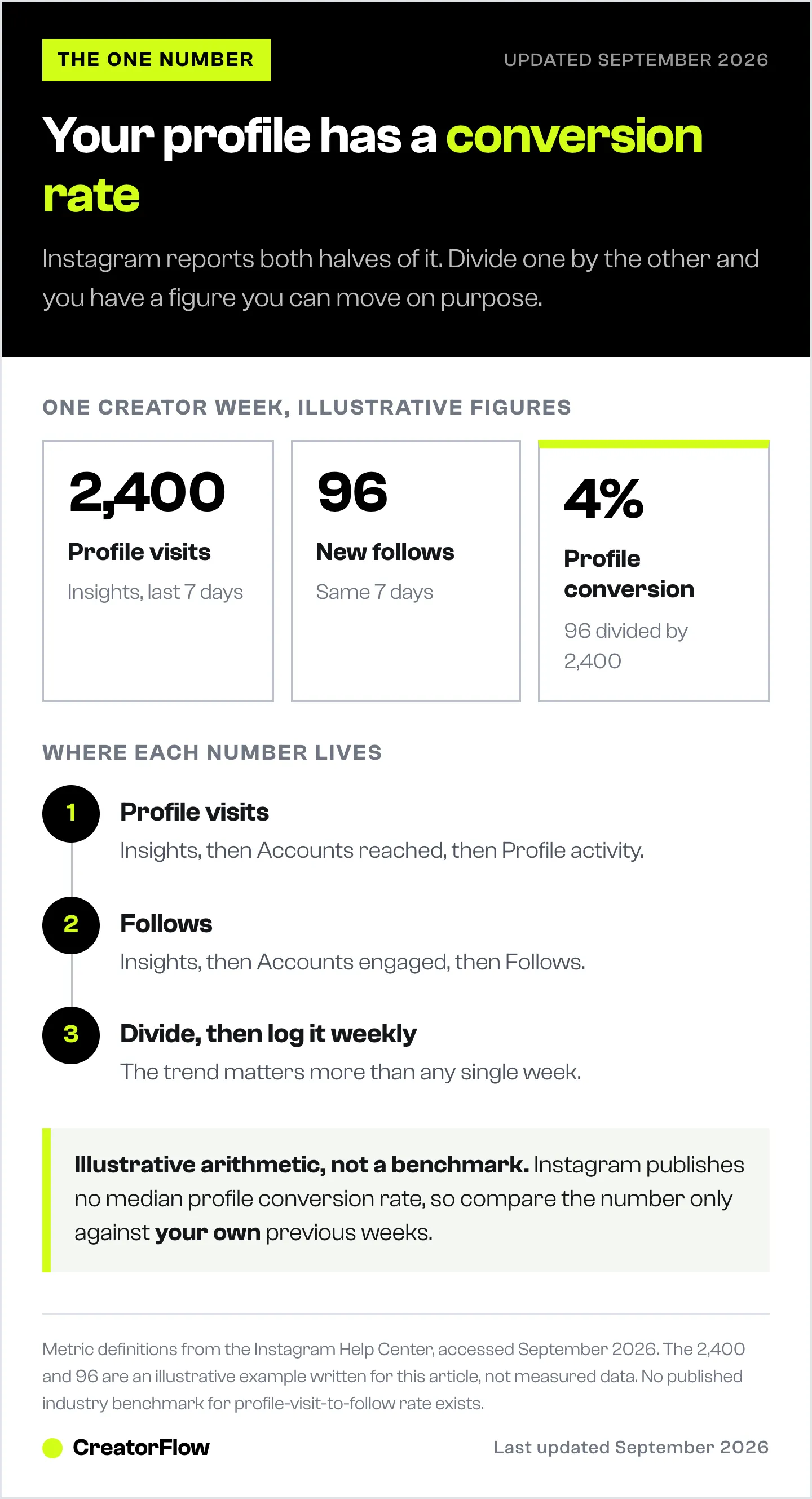
Do not go hunting for an industry average to compare it against, because there is not one, and the reason is worth knowing. Meta deprecated the profile views metric from its Insights API on January 8, 2025 (developers.facebook.com). Third-party analytics platforms lost access to it, which is why no major benchmark study published since then reports a profile-visit-to-follow rate. Any specific percentage you find quoted for this is either pre-2025 data presented without its date, or invented. The number is visible in one place only: your own app.
That sounds like a limitation. In practice it makes the metric more useful, for two reasons.
It separates two problems that look identical from the outside. Flat follower growth with rising profile visits means the profile is losing people who already wanted to like you. Flat follower growth with falling profile visits is a distribution problem, and no amount of bio rewriting will touch it. You cannot tell which one you have without the split.
It also gives you a control. Change your bio and nothing else, wait two weeks, read the rate again. That is a real test. Changing six things and watching your follower count is not.
One caution on the arithmetic. Instagram counts a profile visit from anyone, including people who arrived for reasons unrelated to your content, so the denominator is noisy day to day. Use a 7-day or 28-day window and compare it against your own previous window. For the wider picture of which Instagram metrics repay attention, our guide to Instagram analytics for creators sorts the five worth watching from the four that waste your time.
What a Visitor Reads Before They Read Your Bio
A first-time visitor takes your profile in from the top down, and your bio is the fourth thing they reach. Ahead of it sit the profile photo and username, the Name field, and the follower and post counts. By the time they read a word you wrote deliberately, an impression has already formed from three elements most creators never touch.
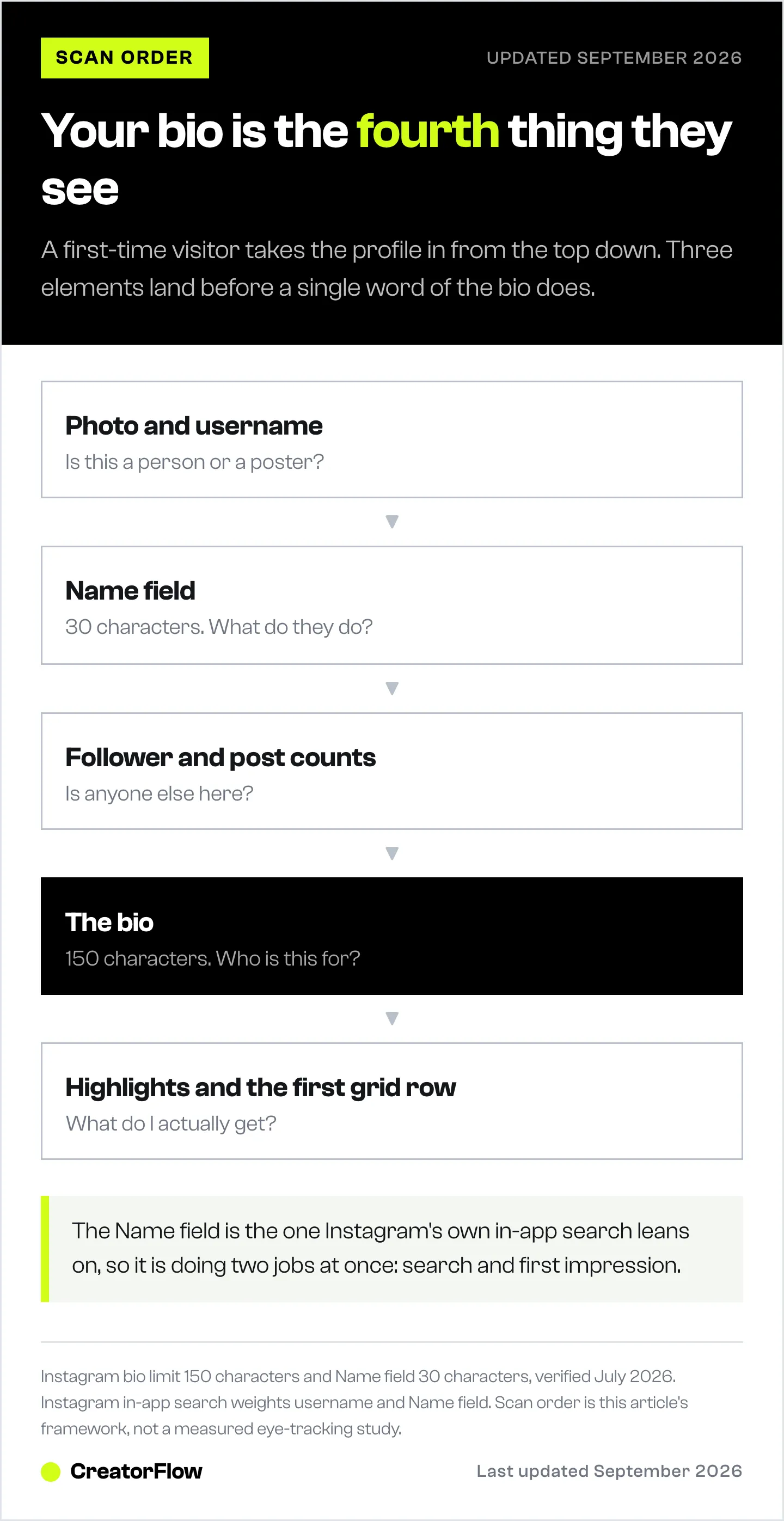
The Name field is the most under-used space on Instagram. You get 30 characters, and it is one of the fields Instagram’s own search reads, alongside your username. Putting your real name there and nothing else spends a search asset on information the username already carried. “Sara” becomes “Sara | Nutrition for busy mums” and the field starts doing two jobs at once.
The bio itself gets 150 characters, counting spaces and emojis, and some emoji consume two to four characters each. You can hold up to five clickable links there, a change Instagram made in April 2023, which makes a link-in-bio tool a convenience rather than a requirement. If you want one anyway, we compared the free link-in-bio tools by what their free plans actually cost you.
Fix 1: Write a Bio That Names One Person and One Problem
The fastest bio diagnostic is the cover test. Read your bio, then ask whether a competing account in your niche could paste it in unchanged and have it still make sense. If the answer is yes, you have written a slogan.
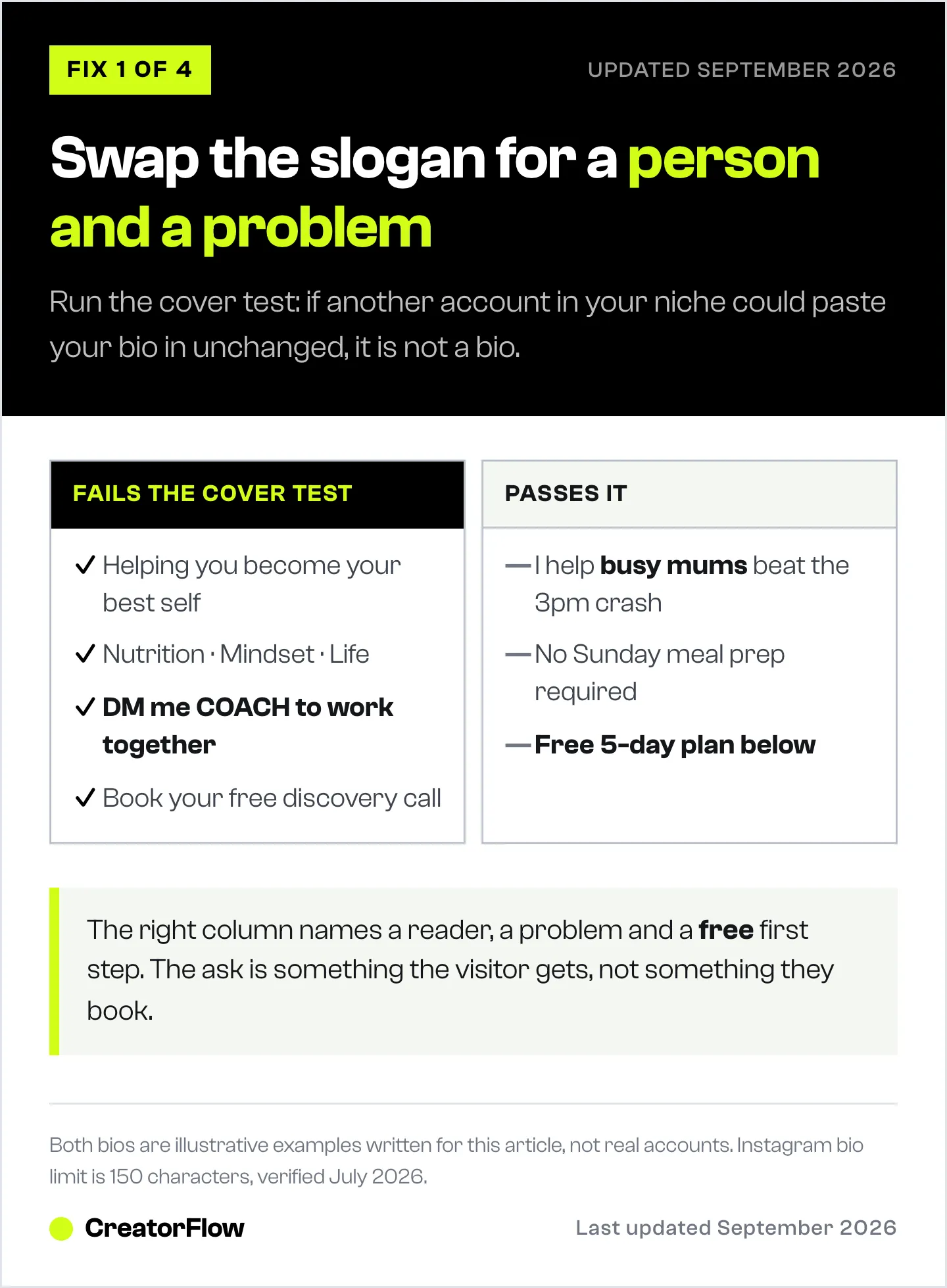
“Helping you become the best version of yourself. Nutrition, mindset, life.” works equally well for a nutritionist, a life coach, a personal trainer and a therapist. It gives a visitor nothing to act on. Compare it against a line that names one reader and one problem: “I help busy mums beat the 3pm energy crash without meal prepping every Sunday.”
The second version is worse branding and far better conversion. It excludes most people who read it, which is the point, because the people it does not exclude now recognize themselves in it.
Then there is the ask. A bio ending in “DM me COACH to work together” or “Book your free discovery call” puts a purchase decision in front of someone who arrived nine seconds ago. Both are reasonable requests of a warm audience and expensive ones for a cold visitor. Swap the ask for something the visitor receives: a five-day plan, a checklist, a swipe file. They still take an action and still enter a conversation, and none of it reads as a sales page.
For the sentence-by-sentence version of this, the 3-line Instagram bio formula covers structure and examples by niche.
Fix 2: Decide Which Highlights Still Earn a Place
Story Highlights are no longer the row of circles under your bio. Instagram moved them into a dedicated tab marked with a heart icon, shown as vertical thumbnails, with the option for many accounts to surface selected Highlights in the main grid. Adam Mosseri gave the reasoning when the change was announced: Instagram wanted to “get more of the content above the fold, and simplify it” and did not need “pogs and squares” pushing everything down (Social Media Today, November 2024).
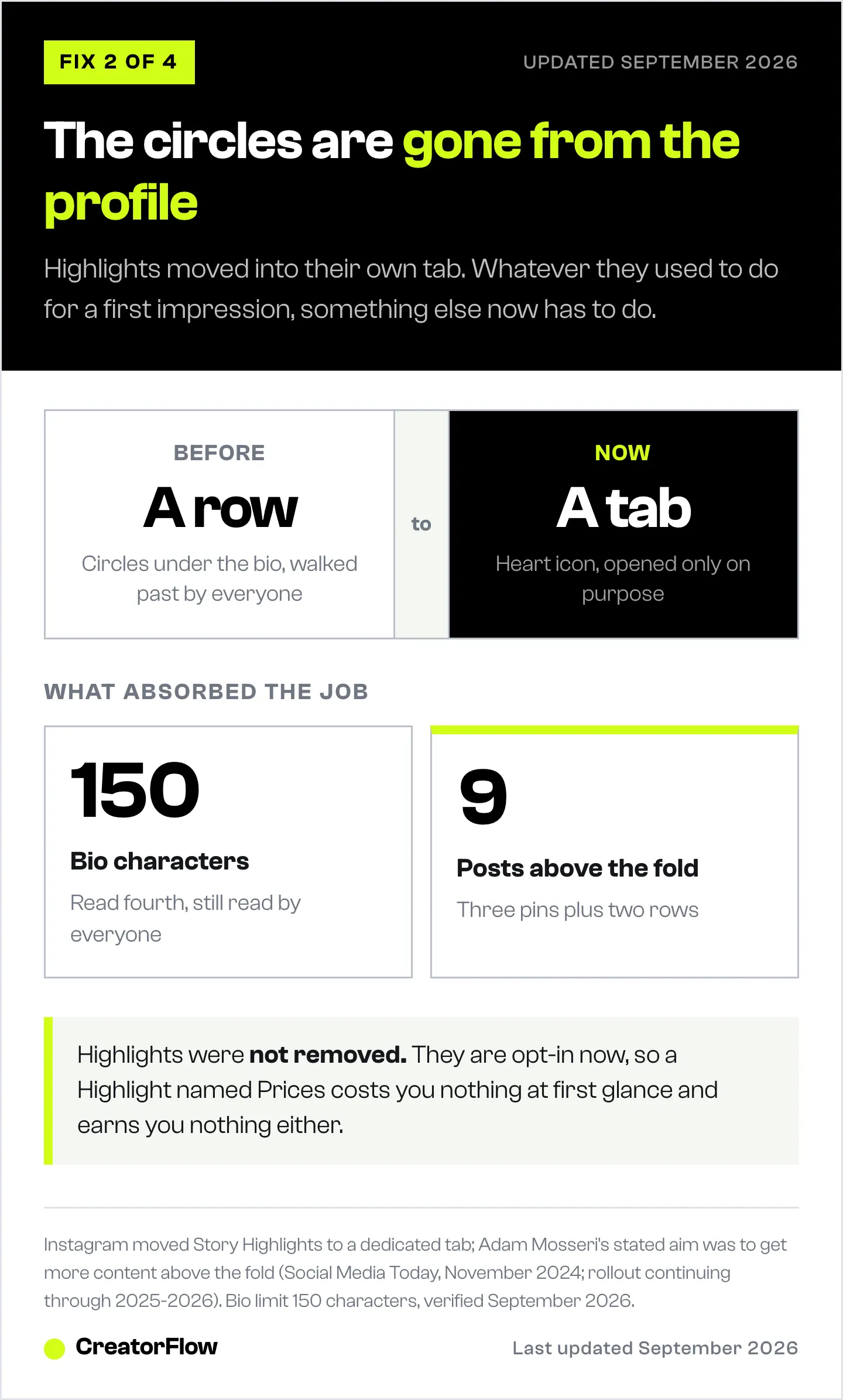
That single change rewrites the advice most guides still give. Highlights are now something a visitor opts into rather than something they walk past, so a Highlight named “Prices” is no longer costing you a first impression. It is also no longer earning one.
Two decisions follow from it.
The first is what you surface into the grid, if your account offers that option. Anything you promote out of the tab is competing for space with your pinned posts, so it has to be worth more than a post would be. An evergreen answer to the question your audience keeps asking usually is. A testimonial reel usually is not, at least not for a cold visitor.
The second is order inside the tab. People who open Highlights are already interested, so the sequence there can be less defensive than a profile row had to be: answer a problem, show the thing working, show the person, then make the offer. Hold a Highlight and drag it to reorder.
The wider consequence is the one to hold on to. With the circles gone, your bio and the first rows of your grid absorbed the job those Highlights used to do. That is exactly why the next two fixes matter more than they did two years ago.
Fix 3: Use Your Three Pinned Posts as a Sequence
Instagram lets you pin up to three posts or Reels to the top of your profile, and Instagram Plus subscribers get six (Instagram, June 2026). Almost everyone uses those slots as a trophy case, pinning the three posts with the best numbers. That wastes them, because the three highest-performing posts on an account usually make the same argument three times.
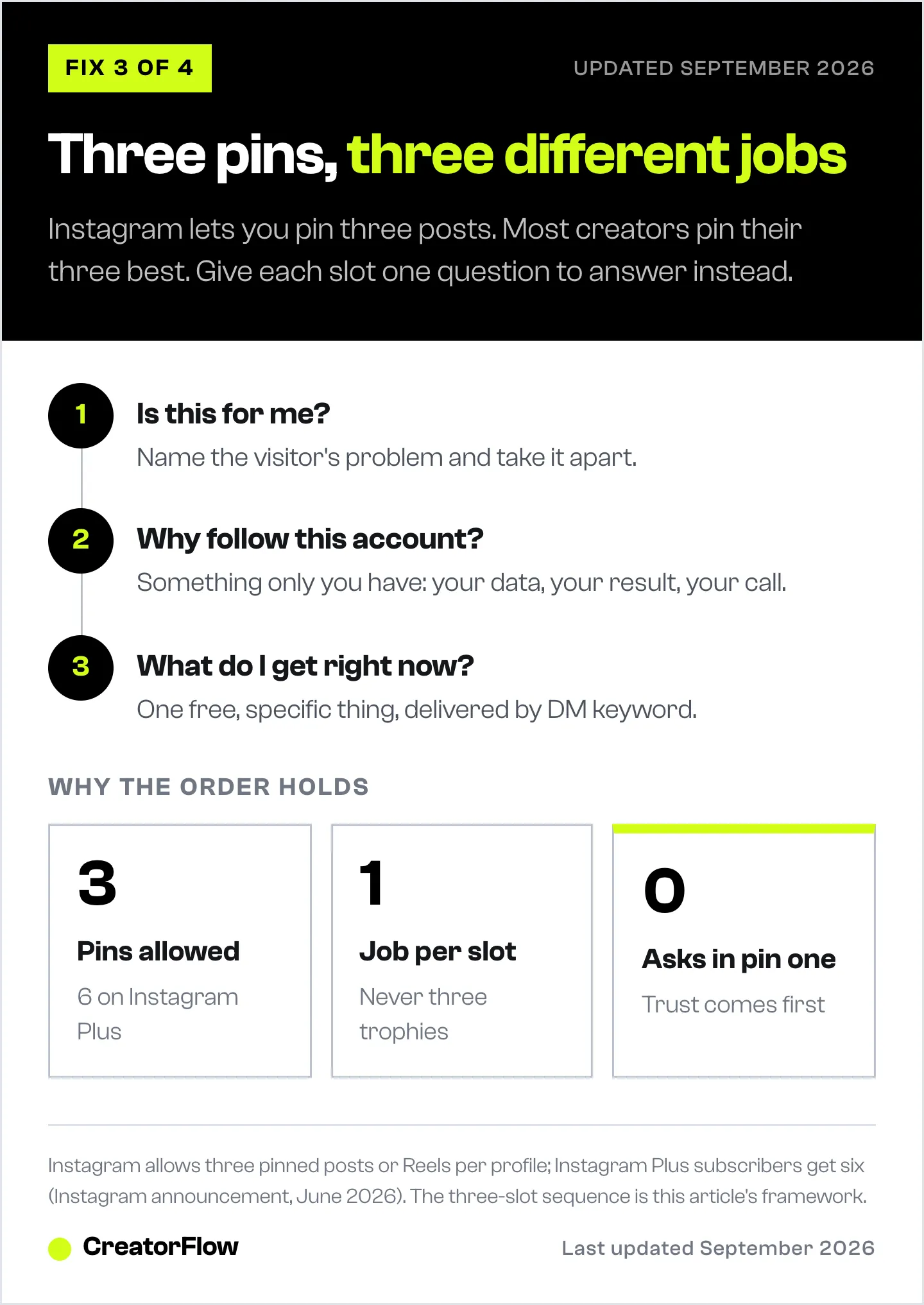
Give each slot a different question to answer.
Pin one answers “is this for me?” Take the single biggest problem your audience has and break it down. Not a tip. The whole problem, explained well enough that a stranger concludes you understand their situation better than they do. Nothing is sold here and nothing is asked for.
Pin two answers “why follow this account rather than another one?” This is the slot that has to be uniquely yours: your own result, your own data, a position you hold that other accounts in your niche do not. Anything a visitor could get from five other profiles belongs elsewhere, because the job of this slot is to make following feel like the only way to get more of it.
Pin three answers “what do I get right now?” One free, specific, immediately useful thing, delivered through a keyword in the comments. This is where a visitor stops being anonymous.
Asking for that comment explicitly is worth the sentence. Metricool’s 2026 study found posts carrying a comment-focused call to action generated 202.78% more comments than posts without one, and posts asking a question generated 36.70% more (Metricool, June 2026).
Note the order. The ask sits third, after two posts that gave something away. Reverse it and pin three still works for people who were already sold, while pins one and two lose the visitors who were not.
Fix 4: Order the Six Posts Under Your Pins
On June 8, 2026, Instagram released grid reordering to iPhone and Android. In Instagram’s own words, “you can now rearrange content on your main profile grid, which is perfect for highlighting your best work or making your profile feel more like you” (Social Media Today, June 2026). Tap and hold any post on your profile, choose “Reorder grid” from the menu, then drag. Changes save immediately, stay visible to every visitor, and leave posting dates and engagement history untouched.
Most coverage framed this as an aesthetic feature, a way to rescue a color palette. The more useful reading is that the rows under your pins stopped being chronological and became a sequence you choose.
Pins one to three answer the entry questions. Positions four to nine are what a visitor scrolls into next, and what belongs there depends on what your account needs right now.
| What you need | What goes in positions 4-9 |
|---|---|
| Followers | Your highest follow-converting posts, whatever their view count |
| Trust | A story, a transformation, work in progress, you on camera |
| Leads | A second and third free offer, each on a different problem |
| A mix | Two of each, alternating so no two adjacent posts do the same job |
One detail worth knowing while you rearrange. The grid crops thumbnails to 3:4, while the feed accepts 4:5. A 1080 by 1350 post is proportionally wider than a 3:4 slot, so the grid trims roughly 34 pixels from each side rather than from the top and bottom. Keep faces and text away from the left and right edges and your grid preview will match what you uploaded.
Do this monthly rather than weekly. You are looking for a difference in your conversion rate, and that needs a stable profile for long enough to read. If you plan your feed in advance anyway, our Instagram feed planner guide covers the layout side of the same decision.
Give a New Follower Somewhere to Go Next
A follow is the start of something. The gap most profiles leave sits between pin three, which offers a free thing, and the moment the visitor actually receives it. If that gap is a manual DM you send when you next pick up your phone, most of it leaks away.
Comment-to-DM automation closes it. Someone comments the keyword on your pinned post and the message arrives in seconds with the plan, the checklist or the link inside it. CreatorFlow does this through Meta’s official Instagram API, so there is no password sharing and no third-party access to your account. CreatorFlow is a Meta Tech Provider (since December 2025).
Two paid features matter specifically for the profile sequence described above. The Follow Gate asks for a follow before the link is sent, which turns pin three into a follow-converting post rather than a giveaway. The Email Gate collects an email address inside the DM, so the free thing you promised also builds a list you own.
CreatorFlow’s free plan covers 500 DMs a month on one Instagram account, with comment-to-DM, Story reply and keyword triggers included. Pro is $15 a month, or $12 a month billed annually, and adds the Follow Gate, Email Gate, CSV export and click analytics by country (creatorflow.so/pricing, September 2026). If you have never built one of these, the comment-to-DM automation setup guide walks through a first automation end to end.
Once those followers arrive reliably, the next question is what you do with them, which is where turning followers into customers picks up.
The 10-Minute Instagram Profile Audit
Run these six checks in one sitting. They are ordered so the measurement comes first, which gives you a baseline to compare against later.
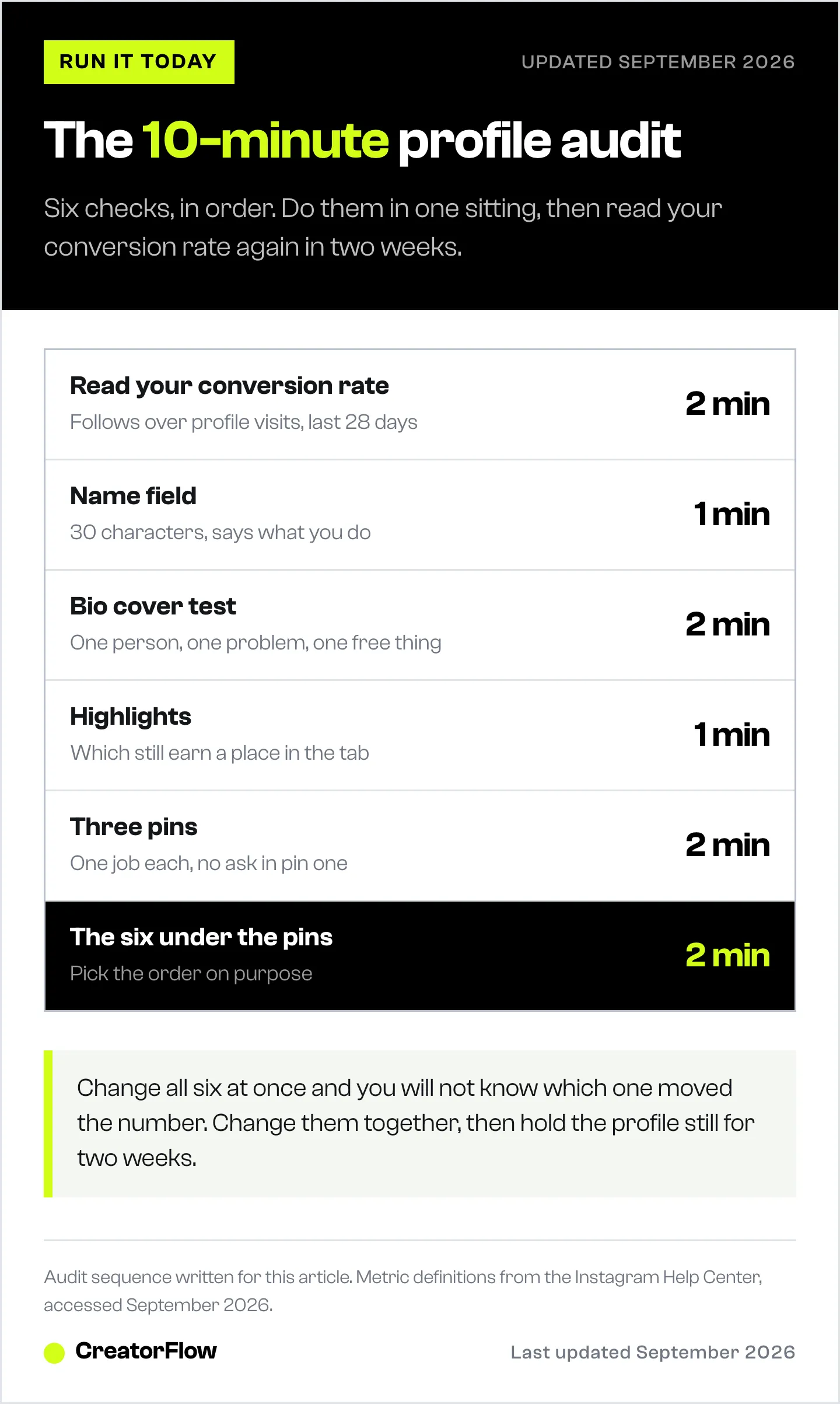
- Read your conversion rate (2 min). Insights, last 28 days. Follows divided by profile visits. Write it down with today’s date.
- Name field (1 min). 30 characters. Does it say what you do, or only who you are?
- Bio cover test (2 min). Could a competitor paste it in unchanged? Does it name one person, one problem and one free thing?
- Highlights (1 min). Which ones still earn a place, and which one deserves to be surfaced into the grid?
- Three pins (2 min). One job each. No ask in pin one.
- Positions four to nine (2 min). Chosen on purpose, matched to what the account needs this month.
Then stop. Leave the profile alone for two weeks, and hold your posting rhythm steady during them, because a change in reach moves your denominator and muddies the reading. At the end, calculate the rate again and compare it against the number you wrote down.
If it moved, keep the arrangement and start testing single elements. If it did not, the problem is upstream: you are attracting the wrong visitors, and that fix belongs in your content. Our guide to increasing Instagram engagement covers that end of it, and if you are starting from a standing start, getting your first 100 followers is the better place to begin.
FAQ
What is a good Instagram profile conversion rate?
There is no published benchmark. Meta removed the profile views metric from its Insights API on January 8, 2025, so third-party analytics platforms cannot measure it across accounts and no major study reports it. Any specific percentage quoted for this is either undated pre-2025 data or invented. Use your own previous 28-day window as the only comparison that means anything.
How many posts can you pin on Instagram?
Three on a standard account. Instagram Plus subscribers can pin six (Instagram, June 2026). You can pin posts or Reels, and pinning a fourth on a standard account prompts you to unpin one of the existing three.
Can you rearrange posts on your Instagram grid?
Yes. Instagram released grid reordering on June 8, 2026 for iPhone and Android. Tap and hold any post on your profile, select “Reorder grid”, then drag posts into position. Changes save immediately and do not affect original posting dates or the engagement each post already earned. The feature is mobile only.
Where do I find profile visits in Instagram Insights?
Open Insights from your professional dashboard, then look under Accounts reached for profile visits and under Accounts engaged for follows. Both appear on Creator and Business accounts. Personal accounts do not get Insights, which is one reason to switch to a professional account.
How many characters is an Instagram bio?
150 characters, including spaces, line breaks and emojis, with some emoji consuming two to four characters each. The Name field above it is a separate 30 characters, and that is a field Instagram search reads alongside your username, so keyword placement belongs there rather than buried in bio text.
Did Instagram remove Story Highlights?
No. Instagram moved Highlights from the row of circles under the bio into a dedicated tab marked with a heart icon, shown as vertical thumbnails, with an option for many accounts to surface selected Highlights in the main grid. The rumour that Highlights were being deleted circulated widely and is not accurate.
Should my Instagram bio have a call to action?
Yes, but make it something the reader receives rather than something they book. A free plan, checklist or guide asks far less of a cold visitor than a discovery call, and it still moves them into a conversation you can continue.
How often should I change my Instagram profile?
Audit quarterly, and hold any change for at least two weeks before judging it. Changing several elements a week makes your conversion rate unreadable, because you can never attribute a movement to a specific edit.
Instagram feature details verified from Instagram’s announcements, the Instagram Help Center and Social Media Today reporting as of September 2026. Benchmark figures from Metricool’s 2026 Instagram Study (June 2026) and Dash Social’s 2026 Social Media Benchmarks (April 2026). CreatorFlow pricing verified at creatorflow.so/pricing, September 2026. Conversion arithmetic in this article is illustrative, not measured. Individual results vary.


