
The Instagram Series feature is a Reels tool Meta began testing in June 2026. It groups related Reels, new or old, into a named series with its own page and a tab on your profile, so viewers can watch episodes in order and pick up where they left off. It is still limited to select creators, so most accounts do not have the option yet.
You have seen creators post “Part 1” through “Part 7” and watched the comments fill up with “where is part 3?”. Series is Meta’s answer: one place for every episode, in order. If a creator showed you their new Series tab and your menu has nothing like it, you are not doing anything wrong. The test is still small.
This guide covers what Series does, how creators with access set one up, why Linked Reels shows up instead, how it compares with TikTok and YouTube, and how to plan episodes now so the series works when it reaches you. Meta has not published a help page for Series yet, so each detail below says whether it comes from Meta or from creators who have the feature.
Key Takeaways
- What it is: a test Meta confirmed on June 2, 2026 that groups Reels into episodes, with a series page and a profile tab, on Instagram and Facebook.
- Who has it: “select creators and content producers who have already shared this type of content”, in Meta’s words. There is no application or waitlist.
- How it works: creators with access make a series with a cover photo, title and description, then add new or old Reels as episodes.
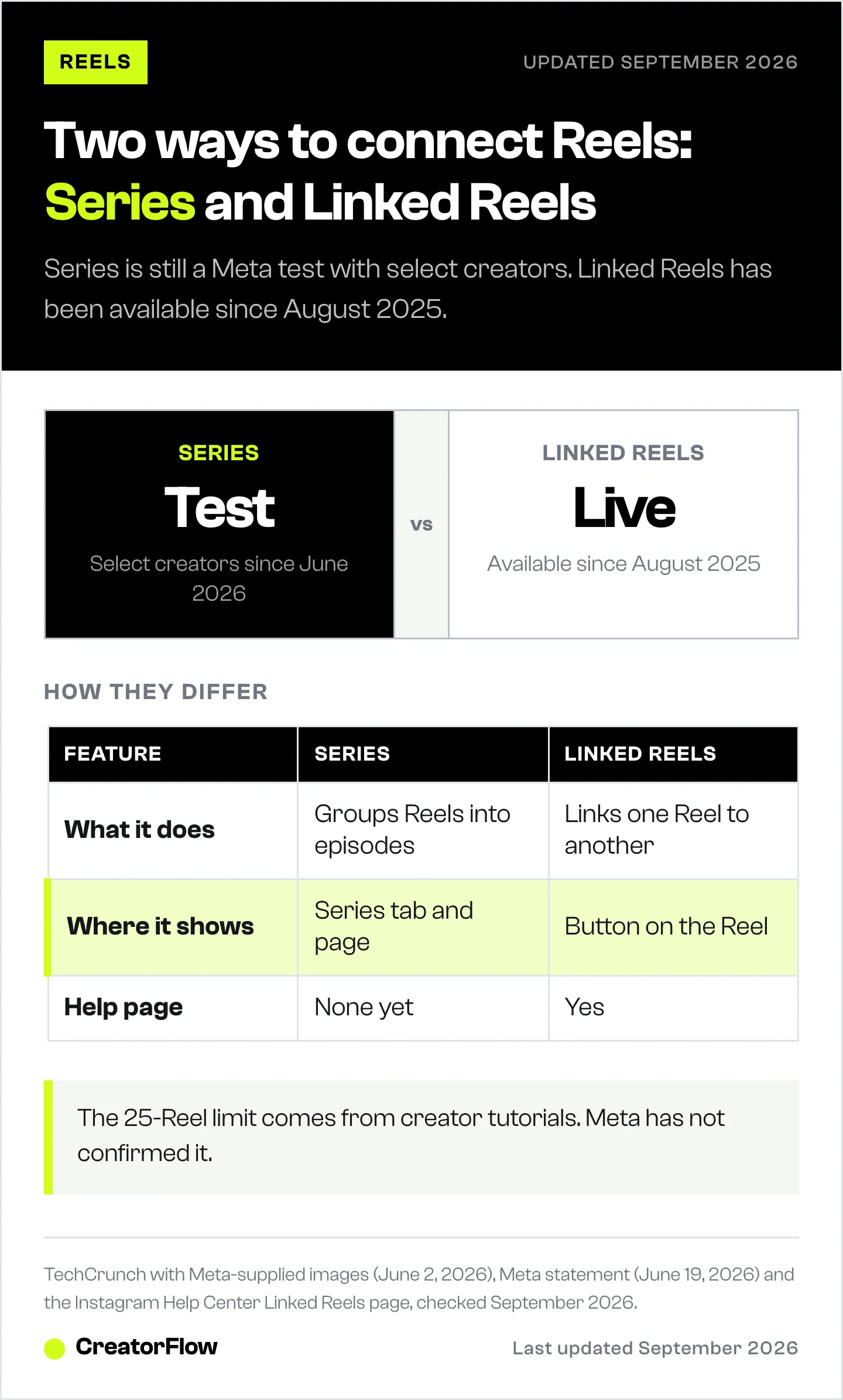
- Linked Reels is a different feature: “Link a reel” joins one Reel to another and has been live since August 2025. Most guides mix the two up.
- Limits are unconfirmed: the widely repeated 25-Reel cap comes from creator tutorials, not from Meta.
- Bottom line: plan episodes that make sense on their own, use Linked Reels today, and group them into a Series when the option reaches your account.
What Is the Instagram Series Feature?
Series lets a creator bundle Reels into episodes of one show. Each series gets its own page with a cover, title, description and the episodes in order, and a new tab on the creator’s profile lists every series. Viewers can watch from the start, pick up where they stopped, and save a series for later. Meta says the goal is to make it “as simple as possible for fans to catch every episode”.
Meta confirmed the test to TechCrunch on June 2, 2026. Its example was a “10 days of healthier baking” series, with all ten videos in one place. Later in June, a Meta spokesperson added: “We’re working with select creators and content producers who have already shared this type of content on our apps, and will continue to evolve the experience based on what we learn” (storyboard18.com, June 2026).
The launch images Meta supplied show how it looks to viewers. A Reel that belongs to a series carries a “Keep watching this series” label with the series name. The series page has a “Watch this series” button, save and share icons, and episodes labelled “Episode 1”, “Episode 2” and so on. Facebook gets the same feature, with a “Series” label and episode count in the Reels viewer. Meta has said it is “considering ways to monetize” Series, with no details yet.
How to Create a Series on Instagram
Meta has not published official steps. The flow below comes from in-app screenshots and creators who have the feature, and Meta says it will keep changing the experience during the test. If your account has access, you create the series first, then add episodes to it. Meta confirmed that older Reels count, so you can build a series from content you already posted.
- Open your profile and tap the + (create) button. Creators with access report a “Series” option in that menu. Some also see a “Create your first series” card in the Professional dashboard.
- Tap Create a series. The intro card reads “Plan your episodes, publish them in order, and offer your community a dedicated series on your profile.”
- Add a cover photo. The screen asks for “an image in 2:4 format”, which is a tall portrait shape, twice as high as it is wide.
- Write a title and a description. Keep the title short enough to read on a profile tab.
- Tap Create, then add episodes. Add Reels in the order you want them watched. The series then appears in the new section on your profile.
Creator tutorials say a series holds up to 25 Reels. Meta has not confirmed that number, and no help page states a limit. It is also unconfirmed whether one Reel fits in two series, or whether episodes can be reordered or removed later. If you have access, test with a short series before moving your best content into one.
Why You Don’t Have the Series Option
You do not have Series because it is still a limited test. Meta is running it with select creators and content producers who already post serialized content, and it has announced no wider rollout as of September 24, 2026. There is no application form or waitlist. Updating the app is worth trying, but it is a creator tip, not a Meta instruction.
The option began appearing for more creators between July 15 and 24, 2026, going by the wave of tutorials posted that week. Meta has not said which countries or account types are in the test. It has not published a follower minimum either.
Two more things explain most of the confusion:
You may be looking at Linked Reels. If you saw a “Watch Part 2” style button under someone’s Reel, that is Linked Reels, a separate and older feature. It has an official help page and no stated eligibility limits.
Some guides describe the wrong feature. Google’s AI summary and several tutorials mix the Linked Reels steps (the caption screen, the three-dot menu, a 15-character title) into answers about Series. Those steps do not create a series.
Series vs Linked Reels and Other Apps’ Versions
Series groups many Reels into a show with its own page. Linked Reels connects one Reel to one other Reel with a button. TikTok’s Series is a paid product, where viewers buy access, while TikTok and YouTube playlists are free collections. The table shows what each one does and how available it is today.
| Feature | What it does | Cost to viewers | Limit | Available |
|---|---|---|---|---|
| Instagram Series | Groups Reels into episodes with a series page and profile tab | Free | 25 Reels, reported by creators, not confirmed | Test, select creators |
| Instagram Linked Reels | Adds a button that sends viewers from one Reel to another | Free | One linked Reel at a time | Live since August 2025 |
| Facebook Reels playlists | Collects Reels into an ordered playlist | Free | 500 Reels per playlist | Live |
| TikTok Series | Paid collection of premium videos | Paid per Series | 80 videos, 30 seconds to 20 minutes each | Eligible creators with 10,000+ followers |
| YouTube series playlists | Official ordered playlist with recommendations inside it | Free | One series playlist per video | Live |
Sources: TechCrunch and Meta (June 2026), Instagram and Meta Business help pages, TikTok Support and YouTube Help, checked September 2026. TikTok also lets creators without 10,000 followers apply with proof of premium content sold elsewhere.
To link Reels today, open a Reel’s caption screen or its three-dot menu and choose “Link a reel”. The link title has a 15-character limit (help.instagram.com, September 2026).
How to Plan an Instagram Series That Holds Viewers
A series only works if a stranger who lands on episode 4 still follows it. Most viewers arrive mid-series from the Reels feed, so write every episode to stand alone, then give them a reason to go back to episode 1. Name the series in two or three words, number every episode on screen, and keep one cover style so the tab looks like a set.
Test the first episode before you commit. A series lives or dies on its opening Reel. Trial Reels show an episode to non-followers first, so you test two hooks before episode 1 goes to your followers.
Publish on a fixed day. “Every Tuesday” gives viewers something to come back for. If views drop mid-run, check the usual reasons Reels stop getting views before blaming the format.
Use Linked Reels until Series arrives. Link each episode to the next one now. When Series reaches your account, add the same Reels as episodes. Nothing you post today is wasted.
Give viewers a way to follow the series outside the feed. Meta has not explained how “stay up-to-date” works for series followers, and a new episode still needs the algorithm to show it. A comment keyword on each episode closes that gap. Ask viewers to comment a word like SERIES, and send them a DM with a link to your full episode list and a place to sign up for the next one. With comment-to-DM automation the reply goes out within seconds, and on CreatorFlow Pro an Email Gate collects an email address before sending the link, so you can tell subscribers when the next episode is live. Our comment keyword templates include series-style prompts.
Meta’s API has no series field, so to automation tools an episode is a Reel like any other. For the strategy behind recurring formats, see our guide to building an Instagram content series.
Does Instagram Series Help Your Reach?
Nobody outside Meta knows yet. Meta has made no statement that Series changes ranking or recommendations, and it has published no data on views. The visible change is the “Keep watching this series” prompt on episodes and a series tab on your profile. Claims that the algorithm “rewards” series creators come from creator videos, not from Meta.
YouTube is a useful contrast, because it does document an effect. Its help page says series playlists allow “other videos in the playlist to be featured and recommended when someone is viewing a video in the series” (support.google.com, September 2026). Instagram has published nothing like that.
Measure it yourself. Compare views and average watch time for Reels before and after you add them to a series, using the same 30-day window in Insights. There is no series-level report yet, so track the episodes one by one.
FAQ
What is the Series feature on Instagram?
A Reels feature Meta began testing in June 2026. It groups Reels into episodes of one show, with a series page, a tab on the creator’s profile, and prompts that help viewers watch in order.
How do I get the Series feature on Instagram?
You cannot request it. Meta is testing it with select creators and content producers who already post serialized content. Keep the app updated and check the + menu on your profile and your Professional dashboard.
Why don’t I have the Series option on Instagram?
Because the test is limited and Meta has not announced a full rollout. If you want to connect Reels today, use Linked Reels, which is live and has its own help page.
How many Reels can an Instagram series have?
Creator tutorials say 25. Meta has not confirmed a limit, and no official help page states one.
Can I add old Reels to an Instagram series?
Yes. Meta confirmed that creators can build a series from new and old Reels.
Is Instagram Series the same as Linked Reels?
No. Linked Reels adds a button from one Reel to another and has been available since August 2025. Series groups many Reels into a show with its own page and profile tab.
Is Instagram Series on Facebook too?
Yes. Meta is testing Series on Instagram and Facebook at the same time. Facebook also has Reels playlists, which hold up to 500 Reels.
Series facts from TechCrunch’s June 2, 2026 report with Meta-supplied images, Meta’s statement published June 19, 2026, and in-app screenshots published by creators in July 2026. Linked Reels and Facebook playlist details from help.instagram.com and Meta Business Help; TikTok Series from TikTok Support; YouTube series playlists from YouTube Help; all checked September 2026. Series is a test and its screens and limits may change.


