

The “comment LINK” strategy works on Instagram because it combines micro-commitment, public accountability, instant gratification, and reciprocity. When followers comment a trigger word like “LINK” or “GUIDE,” DM automation delivers your content within seconds while interest peaks. A comment trigger beats a link in bio on friction: the link arrives in the DM at the moment of interest, with no profile visit and no bio page to search, and it opens a direct conversation.
Key Takeaways
Why it works:
- Micro-commitment: Small action (comment) → bigger action (click, purchase)
- Public signal: Comment visible to others creates social proof
- Instant delivery: DM arrives in seconds while interest is peak
- Reciprocity: Free value creates obligation to reciprocate
Setup in 5 minutes:
- Choose trigger word (LINK, GUIDE, INFO, YES)
- Set up DM automation (CreatorFlow, ManyChat)
- Write conversational DM with link
- Test with your own account
- Post content with CTA
Best practices:
- One clear trigger word per post
- Conversational DM (not robotic)
- Deliver value immediately (no walls of text)
- Follow up only after they reply, inside Meta’s 24-hour window

What Is the “Comment LINK” Strategy on Instagram?
“Comment LINK” is a call to action you put in a Reel, carousel, or Story: followers comment one word, usually LINK or GUIDE, and a DM automation tool watches that post for the word and sends your link straight to their inbox in 2 to 5 seconds. Nobody has to open your profile and hunt through a bio link, which is the step where most people drop off.
How a comment LINK post runs, start to finish:
- You post a Reel, carousel, or Story that ends with one instruction: “Comment LINK”.
- A follower comments the word underneath it, in public, where other followers see it.
- Your automation tool matches the word and sends the link to that person’s inbox in 2 to 5 seconds. Meta allows one private reply per comment, within 7 days of the comment (developers.facebook.com, October 2026).
- They tap the link inside the DM, and the thread stays open for a follow-up.
Why Does the “Comment LINK” Strategy Work So Well?
The “comment LINK for the guide” strategy works because it uses four psychological principles: micro-commitment (commenting is a small action that leads to bigger actions), public accountability (others see the comment), instant gratification (immediate DM delivery), and reciprocity (you gave value, they feel inclined to engage further). Combined with DM automation that responds in 2-5 seconds, the strategy removes the profile visit and bio search that a link in bio needs.
Here’s why it works and exactly how to set it up.
The Psychology Behind “Comment LINK”
1. Micro-Commitment (Foot-in-the-Door)
The principle: People who take a small action are more likely to take larger actions.
In practice:
- Commenting “LINK” = tiny commitment (2 seconds)
- Once they’ve committed publicly, they’re primed for next step
- Each subsequent ask (click, email, purchase) has higher success rate
Research: In Freedman and Fraser’s 1966 doorstep study, 76% of homeowners who first agreed to a small safe-driving sign later accepted a large lawn sign. About 17% of homeowners asked for the large sign directly said yes.
Why it works on Instagram:
- Comment feels effortless
- No form to fill out
- No page to navigate to
- Lowest possible friction
2. Public Accountability
The principle: Public commitments are stronger than private ones.
In practice:
- Their comment is visible to followers
- Creates implicit social proof (others see engagement)
- Harder to back out of public statements
The cascade effect:
Person A comments "LINK"
 ↓
Person B sees comment, thinks "others want this"
 ↓
Person B comments "LINK"
 ↓
Social proof snowballs
Why it works on Instagram:
- Comments are public by default
- High engagement signals value to algorithm
- Others see the demand for your content
3. Instant Gratification
The principle: Immediate rewards are more compelling than delayed rewards.
In practice:
- Traditional funnel: Click bio → Land on page → Find link → Maybe later
- Comment strategy: Comment → DM in 2 seconds → Click now
The timing advantage:
| Method | Time to link |
|---|---|
| Link in bio | 30-60 seconds |
| Comment trigger | 2-5 seconds |
Why it works on Instagram:
- People are in-app, engaged NOW
- DM notification is immediate
- No friction, no waiting
4. Reciprocity
The principle: When someone gives us something, we feel obligated to give back.
In practice:
- You deliver free value (guide, link, resource)
- They feel subtle obligation
- Next ask (email, follow, purchase) has higher success
The value exchange:
You: "Here's the free guide you asked for!"
 ↓
Them: Receives value, feels grateful
 ↓
You: "Want the full toolkit? Drop your email"
 ↓
Them: More likely to comply (reciprocity)
Why it works on Instagram:
- Personal DM feels like gift
- Not a broadcast, feels 1:1
- Creates relationship foundation
5. Curiosity Gap
The principle: We’re driven to close gaps in our knowledge.
In practice:
- “Comment LINK for my secret productivity system”
- Creates curiosity: What’s the system?
- Only way to find out: Comment
Effective curiosity triggers:
- “The tool I use for X”
- “My exact process for Y”
- “The template that got me Z”
- “The mistake most people make with X”
Why it works on Instagram:
- Carousel/Reel hints at value
- Full reveal requires action
- Tension drives behavior
The Math: Why This Outperforms Link-in-Bio
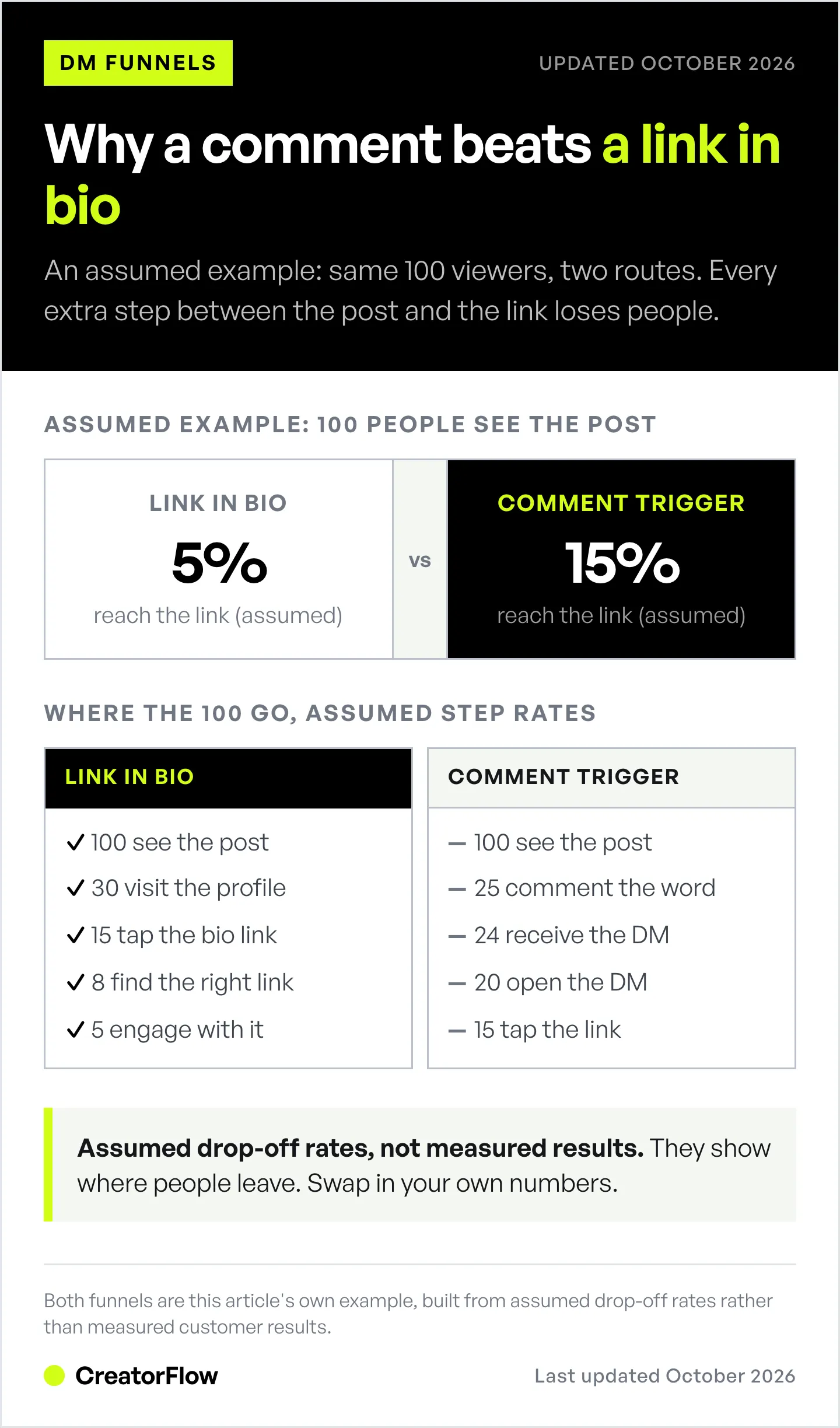
The two funnels below use assumed drop-off rates for 100 viewers. They show where people leave; they are not measured data, so swap in your own numbers.
Traditional Link-in-Bio Flow
See post → Navigate to profile → Click bio link → Land on page → Find content
Drop-off at each step:
- 100 people see post
- 30 visit profile (70% drop)
- 15 click bio (50% drop)
- 8 find specific link (47% drop)
- 5 engage (38% drop)
Result: 5% conversion
Comment Trigger Flow
See post → Comment keyword → Receive DM → Click link
Drop-off at each step:
- 100 people see post
- 25 comment trigger (interest-qualified)
- 24 receive DM (96% delivery)
- 20 open DM (83% open rate)
- 15 click link (75% click rate)
Result: 15% conversion in this example (3x the bio-link example)
Side-by-Side Comparison
| Metric | Link-in-Bio | Comment Trigger | Difference |
|---|---|---|---|
| Profile visits needed | Yes | No | Less friction |
| Steps to link | 4-5 | 2 | 60% fewer |
| Time to link | 30-60 sec | 2-5 sec | 90% faster |
| Interest qualification | Low | High | Pre-qualified |
Choosing the Right Trigger Word
Best Trigger Words (Ranked)
| Word | Best For | Why It Works |
|---|---|---|
| LINK | Product links, affiliates | Universal, obvious intent |
| GUIDE | PDFs, ebooks, tutorials | Implies comprehensive value |
| YES | Simple offers, agreements | Lowest friction, affirmative |
| INFO | Services, programs | Implies learning more |
| SEND | Direct requests | Action-oriented |
| [PRODUCT] | Specific items | ”Comment CAMERA for gear list” |
For a deeper analysis of which words drive the highest click-through and conversion rates, see our research on Instagram comment keywords that convert.
Trigger Word Rules
Do:
- Use ALL CAPS (stands out)
- Keep to one word (simple)
- Match the content (GUIDE for guide, LINK for link)
- Use consistently across posts
Don’t:
- Use common words (THE, AND, I)
- Use sentences (“Send me the link please”)
- Use multiple triggers per post
- Change triggers constantly
Advanced: Segmentation Triggers
Use different triggers to segment your audience:
Post about fitness programs:
- Comment BEGINNER for starter program
- Comment ADVANCED for intense program
- Comment NUTRITION for meal plan

Each trigger → Different DM → Different funnel
Why this works:
- Self-segmentation (they choose their path)
- Personalized follow-up
- Higher relevance = higher conversion
Setting Up Comment-to-DM Automation
Step 1: Choose Your Tool
CreatorFlow is an Instagram comment-to-DM tool: add up to 20 keywords to an automation, write the reply, and it DMs everyone who comments one of them. LINK matches “link please” but not “linked”.
Options (October 2026):
| Tool | Free Tier | Paid | Best For |
|---|---|---|---|
| CreatorFlow | 500 DMs/mo (Free), 5,000 DMs/mo (Pro) | $15/month, or $12/month billed annually | Solo creators |
| ManyChat | 25 active contacts (Free) | $17-199/month across 4 paid tiers, or $14-139/month billed annually | Multi-platform |
| LinkDM | 1,000 DMs/mo | $19/month (Pro) | High volume |
(Prices from creatorflow.so, manychat.com/pricing and linkdm.com/pricing, October 2026.)
For this guide, we’ll use general steps that apply to any tool.
Step 2: Connect Instagram Account
- Log into your DM automation tool
- Click “Connect Instagram” or “Add Account”
- Sign in with Instagram (or with Facebook, if your tool still uses Facebook Login)
- Grant necessary permissions (messages, comments)
Requirements:
- Instagram Business or Creator account
- A Facebook Page only if your tool connects through Facebook Login. Tools on Meta’s Instagram API with Instagram Login do not need one.
- Account in good standing
Step 3: Create the Automation
Basic setup:
- Create new automation
- Name it clearly: “LINK Trigger - Product Recommendations”
- Set trigger condition
- Trigger type: Comment on post
- Keyword: “LINK” (exact match or contains)
- Case-insensitive: Yes
- Set DM response
- Write your message (see templates below)
- Include your link
- Add optional follow-up
- Set timing
- Delay: 0-5 seconds (instant is best)
- Active hours: 24/7 (or specific times)
Step 4: Write Your DM Message
Template 1: Simple Link Delivery
Hey! Here's the link you asked for:

[YOUR LINK]

Let me know if you have any questions!
Template 2: Value + Link
Hey [NAME]! Thanks for commenting.

Here's the [RESOURCE] I mentioned:
[YOUR LINK]

Quick tip: Start with section 2 if you're already
familiar with the basics.

Enjoy!
Template 3: Link + Email Capture (see our full guide on collecting emails through Instagram DMs)
Hey! Here's the quick version:
[YOUR LINK]

Want the full toolkit with all my templates?

Drop your email and I'll send it over
(it's got way more than what's in the post).
Template 4: Qualifying Question
Hey! Before I send the link...

Are you looking for:
A) Beginner tips (just starting out)
B) Advanced strategies (already have basics down)

Reply A or B and I'll send the right resource!
Step 5: Test Before Going Live
Testing checklist:
- Comment trigger word on your own post
- Verify DM arrives within 5 seconds
- Check link works correctly
- Test on mobile (most users are mobile)
- Verify message formatting looks right
- Test edge cases (multiple comments, etc.)
Step 6: Create Content with CTA
Effective CTA formats:
Carousel/Static Post:
- Last slide: “Comment LINK and I’ll DM you the full guide”
- Caption: “…comment LINK below and I’ll send it to your DMs instantly”
Reel:
- On-screen text: “Comment LINK for free template”
- Voiceover: “Comment LINK and I’ll send it right to your DMs”
- Caption: “Comment LINK for the free template I use every day”
Story:
- Text overlay: “Reply LINK for the guide”
- (Story replies also trigger DM automation)
Message Templates That Convert
For Affiliate Links
For more affiliate-specific DM flows, check our Amazon influencer DM automation guide.
Hey! Here's the [PRODUCT] link:

[AFFILIATE LINK]

Full disclosure: I earn a small commission
if you purchase, but I only recommend stuff
I actually use.

Let me know if you have questions about it!
For Lead Magnets (PDFs, Guides)
Hey [NAME]! Here's your free [GUIDE NAME]:

[DOWNLOAD LINK]

It's 12 pages covering [BRIEF DESCRIPTION].

Pro tip: Page 7 has the template I use daily.

Enjoy!
For Course/Product Promotion
Hey! Thanks for your interest in [PRODUCT].

Here's the link to check it out:
[PRODUCT LINK]

Quick overview:
- [BENEFIT 1]
- [BENEFIT 2]
- [BENEFIT 3]

Questions? Just reply here.
For Booking Calls (Coaches)
Coaches and consultants can find a full booking funnel in our DM automation guide for coaches.
Hey! Thanks for reaching out about [SERVICE].

Here's my calendar to book a free discovery call:
[CALENDLY LINK]

Pick any time that works for you (they're
15 minutes, no pressure, just see if we're
a good fit).

Talk soon!
For Email List Building
Hey! Here's the quick cheat sheet:
[LINK]

Want the complete toolkit (50+ templates)?

Drop your email and I'll send the full
thing - it's got everything I use daily.
Common Mistakes and How to Avoid Them
Mistake 1: Robotic Messages
Bad:
Thank you for your comment. Here is the
requested link: [LINK]. Have a nice day.
Good:
Hey! Here's the link you asked for:
[LINK]

Let me know if you have any Qs!
Fix: Write like you’re texting a friend. Use contractions. Keep it casual.
Mistake 2: Walls of Text
Bad:
Hey! Thanks so much for commenting on my post!
I really appreciate your support. I've been
working on this guide for months and I'm so
excited to share it with you. It covers
everything from beginner tips to advanced
strategies. Inside you'll find 10 chapters
covering topics like... [500 more words]
Good:
Hey! Here's the guide:
[LINK]

Start with Chapter 3 for the good stuff.

Enjoy!
Fix: Under 50 words. Link should be visible without scrolling.
Mistake 3: No Clear CTA in Post
Bad:
“Check out my new guide, link in bio or you can DM me or comment if you want it”
Good:
“Comment LINK and I’ll DM it to you instantly”
Fix: One clear action. One trigger word. Explicit instruction.
Mistake 4: Multiple Triggers Per Post
Bad:
“Comment LINK for the guide, INFO for more details, YES if you liked this, or SUBSCRIBE for updates”
Good:
“Comment GUIDE and I’ll send it to your DMs”
Fix: One trigger per post. Different posts for different offers.
Mistake 5: Forgetting Mobile Users
Bad:
- Long URLs that break on mobile
- Messages requiring horizontal scroll
- Buttons/links too small to tap
Good:
- Use link shorteners if needed
- Test message appearance on phone
- Ensure links are easily tappable
Fix: Test every automation on mobile before going live.
Mistake 6: No Follow-Up
Bad:
Send link → Hope they convert → Nothing else
Good:
Send link + one question → They reply → Follow up inside 24 hours
"Here's the guide! Which part do you want to try first?"
Fix: Ask a question in the first DM so the person has a reason to reply. Meta allows a follow-up only after they reply, and only within 24 hours of their last message (developers.facebook.com, October 2026).
Advanced Strategies
Strategy 1: The Conversation Starter
Instead of sending the link immediately, start a conversation:
Trigger: HELP

DM: "Hey! I'd love to help. What's your
biggest challenge with [TOPIC] right now?"

→ They reply
→ Send personalized resource
→ Continue conversation
→ Higher-quality leads
When to use: High-ticket offers, coaching, consulting
Strategy 2: The Quiz Funnel
Segment with questions before sending resource:
Trigger: QUIZ

DM 1: "Quick question: How long have you
been [DOING ACTIVITY]?
A) Less than 6 months
B) 6-12 months
C) More than a year"

→ Based on answer, send different resource
→ Tag for future segmentation
When to use: Different products for different segments
Strategy 3: The Urgency Play
Add time-sensitivity to increase action:
Trigger: DEAL

DM: "Hey! Here's the link:
[LINK]

Heads up: This discount expires at
midnight tonight.

Set a reminder if you need to think about it!"
When to use: Sales, promotions, limited-time offers
Strategy 4: The Social Proof Stack
Reference engagement in your DM:
DM: "Hey! You're one of [REAL NUMBER] people who
asked for this today - clearly this resonated!

Here's your link:
[LINK]

Pro tip: Most people start with page 3."
When to use: High-performing posts with lots of comments
Strategy 5: The Reply-Led Follow-Up
Build a relationship over multiple messages, each one answering a reply:
DM 1 (Immediate): "Here's the free guide: [LINK]
Are you working on [RELATED GOAL] right now?"

They reply: "Yes, starting next week"

DM 2 (within 24 hours of their reply): "Nice.
Chapter 2 covers week one. I also have
something that might help: [LINK]"
When to use: Nurturing leads for bigger conversions
Measuring Success
Key Metrics to Track
| Metric | How to calculate it | What a drop tells you |
|---|---|---|
| Comment-to-DM rate | DMs sent / trigger comments | Keyword not matching, or the automation is paused |
| Click rate | Link clicks / DMs sent | The DM copy or the offer needs work |
| Email capture rate | Emails collected / DMs sent | The ask comes too early or offers too little |
| Conversion rate | Sales or sign-ups / link clicks | The landing page, not the DM, is the problem |
Track your own baseline for four posts, then compare each new post against it.
Tracking Checklist
In your DM tool:
- Total triggers received
- DMs sent successfully
- Open rates (if available)
- Click rates on links
In your analytics:
- UTM parameters on links
- Traffic source: instagram_dm
- Conversion tracking (purchases, signups)
UTM example:
yoursite.com/guide?utm_source=instagram&utm_medium=dm&utm_campaign=link_triggerA/B Testing Ideas
Test these variables:
- Trigger word (LINK vs GUIDE vs YES)
- DM message length (short vs detailed)
- With vs without follow-up
- Immediate vs 30-second delay
- With vs without personalization (name)
- With vs without email ask
FAQ
Does comment LINK work for small Instagram accounts?
Yes. Comment triggers work regardless of follower count. A 1,000-follower account with engaged followers can outperform a 100,000-follower account with passive followers. The strategy works because of psychology, not reach.
Will Instagram ban me for using comment-to-DM automation?
Ban risk is minimal if you use a tool on Meta’s official API and stay inside Meta’s documented limits. CreatorFlow, ManyChat, and LinkDM use Meta’s official Instagram API, which is permitted. Avoid unofficial tools that scrape or use browser automation.
How many comment triggers can I run at once?
You can run as many as your tool allows, so keep them organized by content type. CreatorFlow has unlimited automations on every plan, including Free, and each automation takes up to 20 keywords. One trigger word per post still works best for your followers.
What if someone comments the trigger word sarcastically?
They’ll get the DM. It’s not a problem, if they weren’t interested, they’ll ignore it. The occasional irrelevant DM is worth the efficiency gains.
Can I use comment LINK on Instagram Reels?
Yes. Reels comments trigger the same automation as post comments. Reels often get more reach, so they’re excellent for comment triggers.
What about Story replies?
Most DM automation tools support story reply triggers. When someone replies to your story with the trigger word, they get the DM. Stories are great because replies go directly to DMs.
What happens if a post gets thousands of comments?
Tools like CreatorFlow pace sends at around 200 DMs per hour per account, a tool-side cap that stays well below Meta’s limits and avoids spam triggers. Meta’s own cap for private replies to comments on posts and Reels is 750 per hour (developers.facebook.com, October 2026). For most creators, this is plenty. If you’re hitting the cap, stagger your posts or use tools with queue management.
The Bottom Line
The “comment LINK” strategy works because it combines established psychology (micro-commitment, reciprocity, instant gratification) with modern automation (instant DM delivery). Every step removes one reason for a follower to stop.
Setup takes about 5 minutes. The first DMs go out as soon as someone comments.
Start simple:
- Pick one trigger word (LINK)
- Write one DM message (under 50 words)
- Create one post with clear CTA
- Measure results
- Iterate
The creators crushing it on Instagram aren’t doing anything magical. They’re using systems like this consistently.
Ready to set up your first comment trigger? CreatorFlow makes it easy, connect your Instagram, write your message, and go live in under 5 minutes. Free tier includes 500 DMs/month.
Start free
Related guides:
- What is a DM funnel? Complete guide
- DM funnel examples: 5 flows that convert
- Comment-to-DM not sending? 8 fixes
- Instagram automation ROI: Is it worth it?
Sources:
- ManyChat pricing: manychat.com/pricing (October 2026)
- LinkDM pricing: linkdm.com/pricing (October 2026)
- Meta Developer Documentation: Instagram Platform rate limits, private replies and the 24-hour window (developers.facebook.com, October 2026)
- Freedman, J. L., and Fraser, S. C. (1966), “Compliance without pressure: The foot-in-the-door technique”, Journal of Personality and Social Psychology
- Pricing, Meta rules and keyword-matching facts re-checked October 2026.


