
You turn Instagram comments into subscribers by running a keyword automation that sends a private reply the moment someone comments, then collecting the email address inside that DM thread. The comment is the trigger. The DM is the capture point. Meta allows one automated private reply per comment, sent within seven days of the comment (developers.facebook.com, August 2026).
Every guide on this topic describes the same three-step picture: someone comments, a DM goes out, you gain a subscriber. The third step is where the design decisions live, and it is the step almost nobody writes about. A subscriber is not created by the DM. A subscriber is created at the moment a person hands over an email address, and where you put that moment decides how many people finish.
This guide covers the part that gets skipped. You will get the two opt-in paths and what each one costs you in completed signups, the Meta rules that decide whether your reply lands at all, the wording that gets an address typed, the consent record you need to keep, and the tagging that tells you which post produced which subscriber.
Key Takeaways
- The subscriber is created at the opt-in step, not the DM step. Getting the DM delivered is the easy half. Getting an address typed is the half that varies.
- Two paths exist: send a link to a signup form, or collect the address inside the DM thread. The link path adds a tap, a page load, and a form. The in-thread path keeps the person in the app they are already holding.
- Meta sets the clock. One automated private reply per comment, within seven days of that comment. Standard replies inside an open conversation run on a 24-hour window (developers.facebook.com, August 2026).
- One keyword per post is the attribution trick. Store the trigger word on the contact and every subscriber carries the post that created them.
- Consent is a record, not a checkbox. Keep what they agreed to, when, and where it happened. Marketing texts in the US carry stricter requirements than email.
- Tool options: CreatorFlow ($15/month on Pro, flat), ManyChat ($17-$199/month by contact volume), Klaviyo (rides on standard Klaviyo billing by active profile).
What “Comment to Subscriber” Actually Means
The phrase covers a specific sequence. Someone comments a word you chose on a post you published. Your automation sees the comment through Meta’s Instagram API, matches it against your keyword, and sends that person a direct message. Inside that message you ask for an email address, and once they give it, they enter your list.
Klaviyo describes its version of this as responding to comments “with a DM containing a sign-up link, converting social engagement into email and SMS subscribers you own” (klaviyo.com, August 2026). CreatorFlow’s Email Gate performs the same job by asking for the address in the thread. Both start at the same trigger. They part ways at the opt-in.
The reason this pattern works has nothing to do with automation being clever. It works because the person is already holding their phone, already engaged with the thing you posted, and already in the app where the message arrives. Interest decays fast. A reply that lands in seconds catches a person who still wants the thing they commented for.
The Two Opt-In Paths
Here is the fork. Everything before it is identical, and everything after it is your email platform’s job.
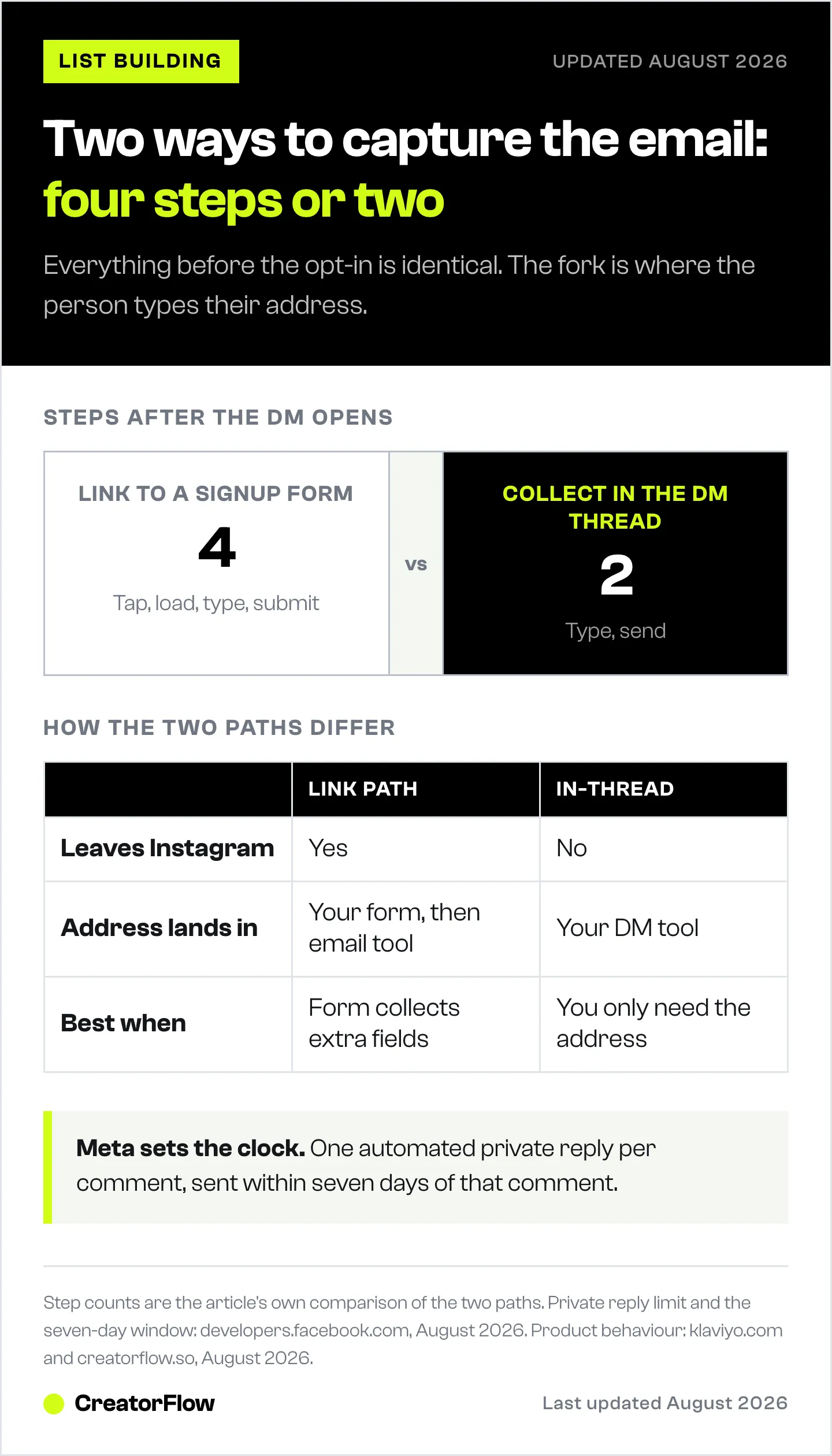
| Link to a signup form | Collect in the DM thread | |
|---|---|---|
| What the person does | Reads DM, taps link, waits for page, types address, submits | Reads DM, types address, sends |
| Steps after the DM opens | Four | Two |
| Leaves Instagram | Yes | No |
| Where the address lands | Your form, then your email platform | Your DM tool, then export or sync |
| Best for | Brands whose CRM owns the form and the profile already | Creators who want the fewest steps between comment and list |
| Example | Klaviyo Social Marketing sends a DM with a subscription link (klaviyo.com, August 2026) | CreatorFlow Email Gate asks for the address inside the thread (creatorflow.so, August 2026) |
Neither path is wrong. They suit different setups, and the choice should follow where your customer record lives.
Pick the link path when the signup form is doing real work: collecting a shipping preference, a birthday, a product category, or anything that has to write into a customer profile you already maintain. A store running on a CRM has a form for good reasons, and routing new subscribers through it keeps one source of truth.
Pick the in-thread path when the only thing you need is the address. Every step you remove is a step nobody abandons. If the job is “get this person on my list and send them the guide,” asking inside the conversation is the shortest distance between the comment and the list.
The mistake worth avoiding is running the link path by default because that is how signups have always worked on the web. A DM is not a webpage. The person is already in a conversation with you, and a link asks them to leave it.
The Meta Rules That Decide Whether Your Reply Lands
Three platform rules govern this whole flow. They are not tool features, and no tool can widen them.
One automated private reply per comment. Meta allows a single automated private message in response to a given comment. You get one shot per comment, so the first message has to carry the ask.
Seven days from the comment. A private reply to a comment must be sent within seven days of that comment (developers.facebook.com, August 2026). In practice automation fires in seconds, so the window matters most for older posts that keep collecting comments. An evergreen Reel picking up comments months later still triggers, because the clock starts at each new comment rather than at the post date.
A 24-hour window on the conversation. Once a conversation is open, standard messaging runs on a 24-hour window, and promotional content is permitted inside it (developers.facebook.com, August 2026). This is the constraint that shapes follow-ups. A reminder sent 20 hours after someone opened your DM and went quiet is inside the rules. The same reminder three days later is not.
Tools also pace their sending. Roughly 200 automated DMs an hour is the common convention across the category, including CreatorFlow. Meta’s published limits for the Instagram Login path are per-second rather than hourly, so treat the hourly figure as a safety habit the tools adopted rather than a number Meta printed. Our guide to what Meta allows and bans in DM automation covers the full rule set.
Setting It Up
The build takes about five minutes on any tool in this category. The thinking takes longer than the clicking.
1. Pick one keyword per post. Not one keyword for your account. One per post. “GUIDE” on the guide post, “SIZING” on the sizing post, “WAITLIST” on the launch teaser. This single habit is what makes reporting work later.
2. Choose a word people will actually type. Short, unambiguous, and easy to spell on a phone. Avoid words that appear naturally in comments, or the automation fires on people who were talking about something else. Our breakdown of Instagram comment keywords that convert covers the selection rules and the words to avoid.
3. Write the DM around one ask. The message has one job. Confirm what they asked for, state what they get, and request the address. Anything else competes with the ask.
4. Decide where the address gets typed. The fork from the previous section. In-thread capture on CreatorFlow runs through the Email Gate, covered step by step in the Email Gate and contacts guide.
5. Say what happens next in the post caption. “Comment GUIDE and I’ll send it over” sets the expectation before anyone comments. People who know a DM is coming open it.
6. Test with your own account first. Comment your own keyword from a second account and walk the whole path. Most broken funnels are broken at a step nobody checked.
What to Write in the DM
Short beats clever. The person commented ten seconds ago and knows exactly why they are hearing from you.
Lead magnet delivery:
Hey! Here’s the 12-recipe PDF you asked for. Drop your email here and it’s on its way.
Launch waitlist:
Thanks for the comment! The collection goes live Friday. Send your email and I’ll make sure you get in before it’s public.
Discount or first order:
Glad you like it. Send your email and I’ll send your code straight back.
Course or programme details:
Hey, thanks for asking about the programme. Send your email and I’ll send the full breakdown plus the start dates.
Three traits are common to all of them. They are under 30 words. They name the exact thing the person gets. They make the ask once, at the end, so the last thing on screen is the instruction.
Two things to leave out. Skip the paragraph about your brand story, because the person did not comment for that. Skip stacking a second ask, like a follow request plus an email plus a link tap, since each additional ask costs completions.
If your ask needs a follow first, use a follow gate rather than a sentence. CreatorFlow’s Follow Gate handles that as a step in the flow, which keeps the message down to one instruction.
Consent, and the Record You Keep
An email address collected in a DM is subject to the same rules as an address collected anywhere else. The DM does not change the obligation.
For email, keep a record of three things: what the person agreed to receive, when they agreed, and where it happened. GDPR requires explicit consent for marketing email to contacts in the EU, and “explicit” means the person took an action for that purpose (gdpr.eu, August 2026). Someone typing their address after you said “send your email and I’ll send the guide” has consented to receiving the guide. Whether they consented to your weekly newsletter depends entirely on whether you said so. Say it in the DM.
In the US, CAN-SPAM does not require opt-in for commercial email, but it does require accurate headers, a working unsubscribe link, and a physical postal address in every message (ftc.gov, August 2026).
Marketing text messages are a different matter. US texts operate under the TCPA, which requires prior express written consent for marketing messages. The rules around that standard have moved more than once through 2025 and 2026, including the Eleventh Circuit vacating the FCC’s one-to-one consent rule in January 2025 (fcc.gov and courts, August 2026). If you plan to collect phone numbers rather than addresses, confirm the current requirements with your SMS provider before you launch, and keep the disclosure visible at the point of capture.
The practical version of all of this: write one clear sentence in the DM that says what you will send, keep the timestamped record your tool stores, and honour unsubscribes fast.
Attribution: Know Which Post Made the Subscriber
This is the part that turns a list into a strategy, and it costs nothing to set up.
When the trigger keyword is stored on the contact record, every subscriber arrives labelled with the post that produced them. Run one keyword per post and your export answers questions you would otherwise be guessing at. Which Reel produced the most subscribers. Which topic produced subscribers who went on to buy. Whether the carousel that got the most likes produced anyone at all.
That last question is the useful one. Engagement and acquisition rarely rank in the same order, and without per-post keywords you cannot see the gap. A post with a third of the likes and triple the signups changes what you make next.
CreatorFlow records the trigger and exports contacts as CSV on Pro, with clicks and geographic data alongside. Klaviyo stores the keyword on the profile inside the same database that holds order history (klaviyo.com, August 2026). Either way, the discipline is yours rather than the tool’s: one keyword, one post, never reused. Our keyword system for multiple offers sets out a naming pattern that stays readable past twenty automations.
Tools That Run This Flow
All three connect through Meta’s official Instagram API. Pricing verified August 2026.
| Tool | Price | Opt-in style | Best for |
|---|---|---|---|
| CreatorFlow | Free (500 DMs/month); Pro $15/month; Growth $30/month | Email Gate collects in the DM thread | Creators, coaches and affiliates who want the address and the click data, at a flat rate |
| ManyChat | Free (25 contacts); $17, $39, $99, $199/month monthly, or $14-$139/month billed annually | Flow builder, configurable | Multi-channel automation across Instagram, Facebook, WhatsApp, SMS, TikTok and email |
| Klaviyo Social Marketing | Rides on standard Klaviyo billing by active profile; free plan covers 250 profiles | DM contains a signup link | Ecommerce brands whose customer database already lives in Klaviyo |
Sources: creatorflow.so, manychat.com/pricing, klaviyo.com, August 2026. ManyChat’s four paid tiers cover 250, 2,500, 7,500 and 25,000 contacts respectively.
Choose on where the subscriber needs to end up. If your customer profile, order history and email sequences already sit in one platform, capturing into that platform keeps one record per person. If the job is capture and delivery for a creator business, a tool scoped to that job is the shorter setup. Our Klaviyo Social Marketing breakdown covers that product in full, and routing DM signups into Klaviyo, Kit or Mailchimp covers the handover when your DM tool and your email platform are separate.
FAQ
How do I turn Instagram comments into email subscribers?
Set a keyword automation on a post, so that when someone comments that word they receive an automatic DM. Inside the DM, ask for their email address in exchange for the thing they commented for. Collect the address either in the thread or through a signup link, then send the promised item. Setup takes about five minutes on tools like CreatorFlow, ManyChat or Klaviyo.
Does Instagram allow auto-replies to comments?
Yes, through Meta’s official Instagram API. Meta permits one automated private reply per comment, sent within seven days of that comment (developers.facebook.com, August 2026). Tools built on the official API stay inside these rules by design. Automation that requires your password or posts comments on other people’s accounts sits outside Meta’s rules.
Is it better to ask for the email in the DM or send a signup link?
It depends on where your customer record lives. Asking in the thread removes a tap, a page load and a form, which suits creators who need the address and nothing else. A signup link suits brands whose form collects extra profile fields that have to write into an existing CRM. Fewer steps generally means more completed signups, so use the link path when the form is earning its place.
How long do I have to reply to a comment?
Seven days from the comment for an automated private reply. Once a conversation is open, standard messaging runs on a 24-hour window, and promotional content is allowed inside it (developers.facebook.com, August 2026). Automations fire within seconds, so the seven-day window matters mainly for older posts still collecting comments.
Do I need consent to email someone who gave me their address in a DM?
You need the same consent you would need anywhere else. For contacts in the EU, GDPR requires explicit consent, so state in the DM what you will send. In the US, CAN-SPAM requires accurate headers, a working unsubscribe link and a postal address rather than prior opt-in. Marketing text messages carry stricter US requirements than email, so confirm those with your SMS provider before collecting phone numbers.
How do I know which post brought in a subscriber?
Use one trigger keyword per post and make sure your tool stores that keyword on the contact record. Every subscriber then carries the post that created them, and your export shows which content produced signups rather than which content produced likes. Never reuse a keyword across posts, because that is what breaks the reporting.
Can I ask people to follow me before sending the link?
Yes. A follow gate adds the follow as a step in the automation flow rather than as another sentence in your message, which keeps the DM down to one instruction. CreatorFlow includes Follow Gate on Pro.
What should I send after someone subscribes?
Send the promised item immediately, then follow with a short sequence that continues the topic they signed up for. Someone who commented on a sizing post wants sizing content next, not a general newsletter. Our guide to building the Instagram to email funnel covers the sequence that follows capture.
The Short Version
The comment is not the hard part, and neither is the DM. Both are solved by every tool in this category, and they have been for years.
The subscriber is created at one specific moment: when a person decides to type their address. Everything that improves this flow happens at that moment. Fewer steps between the DM and the field. One ask rather than three. A sentence that names exactly what they get. A keyword that tells you afterwards which post did the work.
CreatorFlow is a Meta Tech Provider (since December 2025) and runs this flow at $15 a month on Pro, with Email Gate, Follow Gate, click tracking, geographic analytics and CSV export. If you want to see the mechanic before you compare anything, our complete guide to Instagram DM automation builds one in about five minutes, and collecting emails through Instagram DMs covers the capture methods side by side.
Sources
Product details, pricing and platform rules in this article were checked on 2 August 2026. Platforms change these regularly, so verify current details before making a decision.
- Meta, Messenger Platform and Instagram Messaging API policy, private replies and messaging windows (developers.facebook.com)
- Klaviyo, Instagram auto reply product page and Social Auto-replies documentation (klaviyo.com, help.klaviyo.com)
- ManyChat pricing page (manychat.com/pricing)
- CreatorFlow pricing and features (creatorflow.so)
- GDPR consent requirements (gdpr.eu)
- FTC, CAN-SPAM Act compliance guide (ftc.gov)
- FCC, prior express written consent under the TCPA, and Insurance Marketing Coalition v. FCC, Eleventh Circuit, January 2025


