

Running several offers through Instagram DM automation needs one keyword per offer, no generic words, and a written keyword map you check before adding anything new. Collisions happen when two active automations both match the same comment, which is caused by generic triggers like LINK or overlapping scopes, not by the tools. Keep a single source of truth for what is live, and retire keywords by repointing them rather than deleting them, because old posts keep collecting comments for years.
Your first automation was easy. One Reel, keyword LINK, one affiliate product.
Then you added a course. Then a coaching waitlist, a newsletter, a discount code, a second affiliate product, and a freebie. Now you have eleven automations, three of them trigger on some version of the word LINK, you are not certain which one fires when someone comments on a nine-month-old post, and someone messaged you last week to say they got the wrong thing.
That is not a tooling problem. It is a filing problem. This guide covers the system: how to name keywords so they stay unique at twenty automations, what actually happens when two automations match the same comment, and how to retire an offer without breaking every post that ever promoted it.
If you are setting up your first trigger rather than your eleventh, start with Instagram keyword trigger automation instead.
Key Takeaways
- One keyword, one offer, no exceptions. The moment two offers share a trigger word you have lost the ability to predict what a follower receives
- Generic words are the root cause. LINK, INFO, PRICE, and YES cannot scale past a single offer because every future campaign wants them too
- Scope is the hidden collision. An “any post” automation runs across your whole feed, so it can match a comment on a post that a second, post-specific automation also covers
- Keep a keyword map. A table of keyword, offer, destination, scope, and status, checked before every new automation, prevents almost every problem in this guide
- Retire by repointing, not deleting. Old posts keep collecting comments for years; a deleted automation sends those people nothing
- Audit quarterly. Dead links, expired discount codes, and sold-out products sitting inside live automations are the most common silent failure
What an Instagram Keyword System Looks Like
An Instagram keyword system has four parts. One unique keyword per offer, named after the thing rather than the action. A naming convention you apply every time, so words stay distinct at twenty automations. A keyword map listing every trigger with its offer, destination, scope and status. And a retirement rule that repoints old keywords instead of deleting them. Check the map before you create anything new.
Why Generic Keywords Break at Scale
A single-offer account can use LINK and nothing goes wrong. The word is short, memorable, and people type it without prompting.
That same property is what breaks it later. LINK is the word your audience reaches for by default, which means every future campaign attracts it whether you assigned it or not. Someone watching your skincare Reel comments LINK because that is the habit your earlier posts trained. If LINK is currently pointed at your course, they get the course.
There is a second failure that is harder to spot. Generic words show up inside ordinary sentences. A comment reading “love this, where’s the link?” matches a LINK trigger. So does “no link needed, already bought it.” The trigger cannot tell enthusiasm from a request from a refusal, so a person who explicitly said they did not want it receives it anyway.
Specific keywords fix both. GLOWKIT does not appear in casual conversation and nobody types it by accident. The cost is that you have to say it out loud in the Reel and put it in the caption, which is a habit rather than a difficulty.
A Naming Convention That Survives Twenty Automations
The convention matters less than having one. This is the pattern that holds up:
Name after the thing, not the action. RECIPE, not SEND. PILATES, not START. The offer changes URL over its life; its name does not.
One word, six to ten characters. Long enough to be unique, short enough to type on a phone without errors.
No numbers unless the number is the product. BUNDLE2 invites BUNDLE1 to be typed by people who read fast. WINTERBUNDLE is unambiguous.
Avoid words that are also emotions. LOVE, WANT, NEED, and YES all appear in comments constantly and mean nothing about intent.
Add the obvious misspellings as additional triggers, not new automations. If your keyword is PILATES, add PILATIES and PILATE to the same automation. People type what they remember.
Never reuse a retired keyword for a different offer. More on why below.
What Happens When Two Automations Match
This is the part nobody documents, and it is where the “wrong thing sent” reports come from.
Two automations collide when both are active, both match the same comment text, and both cover the same post. Any of those three being false means no collision.
The three real collision patterns:
Substring overlap. An automation on LINK and another on LINKS both match a comment reading “links please”. Fix by making the words genuinely distinct rather than variations of each other.
Scope overlap. This is the common one and the least obvious. Automations can usually be scoped to a specific post, to your next post, or to any post. An “any post” automation covers your entire feed by definition, including the post your new campaign-specific automation is attached to. If both match the keyword, both are candidates.
Zombie automations. An automation from a campaign you stopped thinking about six months ago is still active and still matching. You are not colliding with something you built today; you are colliding with something you forgot.
The fix for all three is the same: keep exactly one active automation matching any given word across any given post. In CreatorFlow, automations are unlimited on every plan, so there is no reason to overload one keyword with several jobs.
Scope discipline that works in practice: use “any post” for your evergreen greeting and your main lead magnet, and use post-specific scope for everything campaign-driven. Evergreen keywords are unique words you never reuse. Campaign keywords are unique words that expire.
The Keyword Map
One table. It is the entire system, and almost every problem above is prevented by keeping it current.
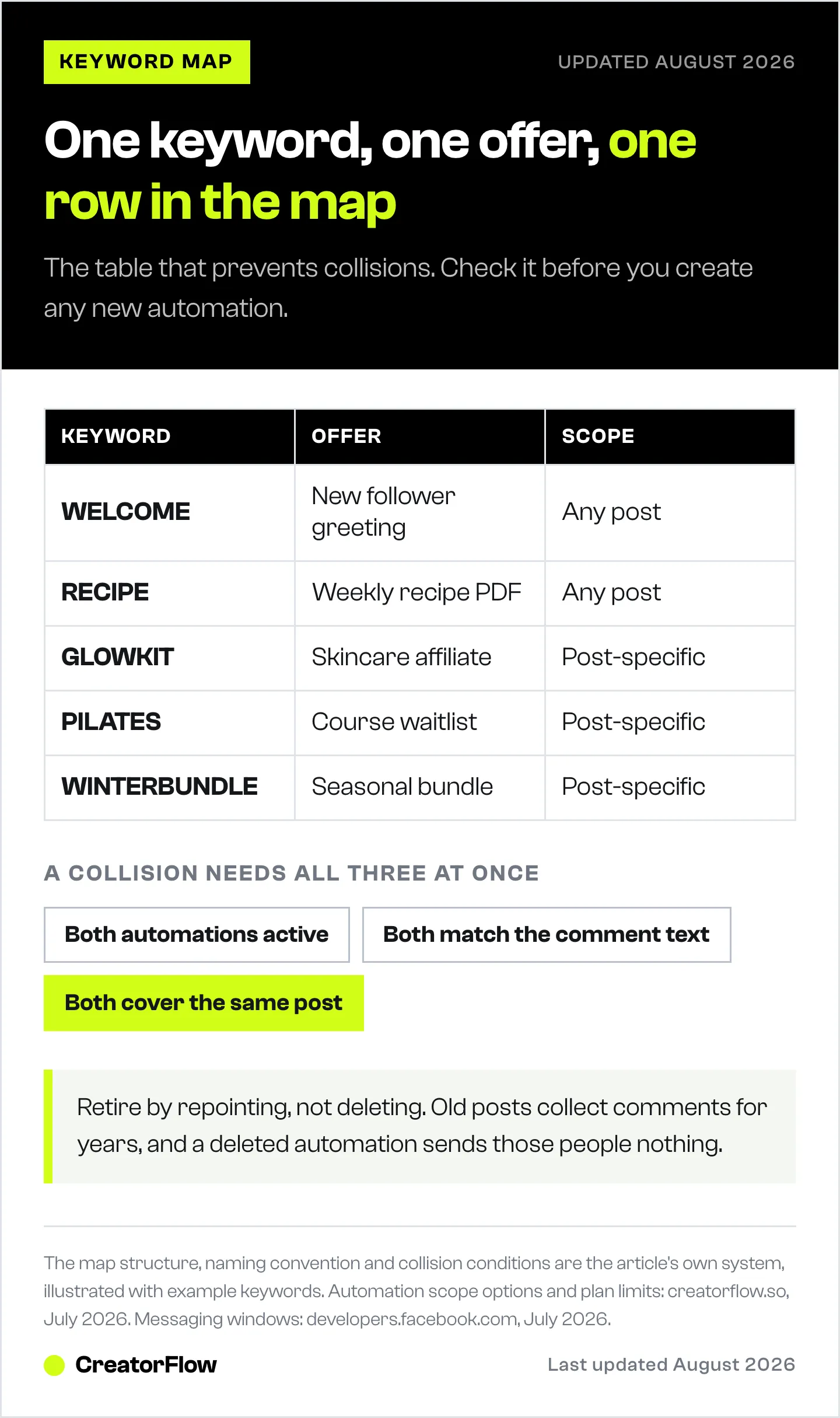
| Keyword | Offer | Destination | Scope | Status | Last checked |
|---|---|---|---|---|---|
| WELCOME | New follower greeting | Starter guide | Any post | Live | Jul 2026 |
| RECIPE | Weekly recipe PDF | Email gate then PDF | Any post | Live | Jul 2026 |
| GLOWKIT | Skincare affiliate | Partner tracking link | Post-specific | Live | Jul 2026 |
| PILATES | Course waitlist | Waitlist page | Post-specific | Live | Jul 2026 |
| WINTERBUNDLE | Seasonal bundle | Shop bundle page | Post-specific | Retired | Jul 2026 |
Rules for the map: check it before creating any new automation, update it the same day you change anything, and keep it in one place rather than in your head. A note file, a spreadsheet, whatever you will actually open.
The last column is what makes the quarterly audit fast. Anything not checked in three months is where your broken link is.
Retiring a Keyword Without Breaking Old Posts
Instagram posts do not expire. A Reel from fourteen months ago still gets comments, and people commenting on it are following instructions from a caption that still says “comment WINTERBUNDLE”.
If you delete that automation, every one of those people gets silence. They asked for something, in public, and got nothing, which reads as being ignored.
Repoint instead:
- Leave the automation active
- Change the destination to something currently useful: the category page, the current season’s equivalent, or your main offer
- Rewrite the message to acknowledge it honestly: “The winter bundle has sold out, here’s what replaced it”
- Mark it Retired in your map, with the date
- Never assign that word to a different offer
Point five is the one people get wrong. Reusing WINTERBUNDLE for next winter’s different bundle means that for a year, people commenting on old posts receive an offer that does not match what the caption promised. Use WINTER26 and leave the original retired and repointed.
For campaigns that are genuinely finished with no successor, repoint to your best evergreen offer. A person who asked for something is worth more than a person who scrolled past, even eighteen months later.
The Quarterly Audit
Twenty minutes, four times a year.
- Open the keyword map and list everything marked Live
- Click every destination URL and confirm it loads the right page. Expired discount codes, sold-out products, and 404s are the usual finds
- Comment your own keyword on a live post from a second account and confirm the right DM arrives
- Check for duplicates: any word appearing twice in the map is a collision waiting to happen
- Review click-through per automation and repoint anything flat. CreatorFlow Insights shows CTR per automation
- Update the Last checked column
Step two finds the most damage. A live automation pointing at a dead link fails silently: the DM sends, the tool reports success, and the follower hits a broken page. Nothing in your dashboard flags it.
When You Genuinely Need Fewer Keywords
Not every offer needs its own trigger. Two cases where consolidating is better:
Variations of one product. Sizes, colours, and flavours belong on one keyword pointing at the collection page, not five keywords pointing at five product pages. Followers do not know your SKU structure.
Offers under about 5% of your revenue. If something generates two requests a month, it does not need a slot in a system you have to maintain. Fold it into a broader keyword and mention it in the DM.
The upper bound in practice is around eight to twelve live keywords. Past that, most creators cannot recall what is live without checking, and the map stops being a reference and becomes the only thing holding the system together.
For which words convert best once you have chosen your structure, see Instagram comment keywords that convert. For message copy per niche, 50+ keyword trigger templates has the starting points.
If you want the click-by-click version, follow the keyword DM reply walkthrough.
What the Heaviest Users Actually Run
This pattern is not theoretical. The most active accounts on CreatorFlow are not the largest ones.
They are small ecommerce affiliates, most under 10,000 followers, running 20 to 30 separate automations, one per product post, each with its own keyword. Someone comments the keyword tied to a specific product and receives the link for that product.
The payoff is attribution without analytics work. The keyword itself records which post earned the click. Accounts above 100,000 followers tend to do the opposite, building one or two broad automations and never developing them, which is why raw audience size is a poor predictor of how much value a person gets out of this.
FAQ
What happens if two Instagram automations use the same keyword?
Both become candidates to fire on the same comment when they also cover the same post, and which one sends is not something you should rely on. Keep exactly one active automation matching any given word on any given post. The common hidden cause is an “any post” automation overlapping a newer post-specific one.
How many keyword automations can I run at once?
Technically unlimited on CreatorFlow’s plans. Practically, eight to twelve live keywords is where most creators stop being able to remember what is live. The constraint is your ability to maintain them, not the tool.
Should I delete automations for offers I no longer sell?
No. Old posts keep collecting comments for years and deleting the automation means those people get nothing. Repoint the destination to a current equivalent, rewrite the message to acknowledge the change, and mark it retired in your map.
Can I reuse a keyword from a finished campaign?
Avoid it. Old posts still carry captions telling people to comment that word, so for as long as those posts exist, reusing the keyword sends people something different from what they were promised. Pick a new word and leave the old one retired and repointed.
What is the best keyword for multiple products?
Product-specific words, one per product, named after the thing rather than the action. Generic words like LINK cannot scale past one offer because every future campaign attracts them regardless of what you assigned them to.
How do I stop people getting the wrong link?
Three checks: no two live automations share a word, no generic words are in use, and no zombie automation from an old campaign is still active. Running the quarterly audit catches all three, and the keyword map prevents them from happening in the first place.
Sources
- CreatorFlow automation types, trigger scope options, and plan limits (creatorflow.so, July 2026)
- Instagram messaging windows by trigger type (developers.facebook.com, July 2026)


