

A swipe file is a private collection of content that worked, saved so you can study it before you make your own. For Instagram, the useful version does not store whole posts. Each entry stores the structure of a post and one line on why you think it worked. That turns every entry into a pattern you can fill with your own proof and your own words.
Most creators build the other kind. They tap Save on hundreds of Reels, carousels and captions, then open the folder on a day when they are stuck. A saved post shows the finished thing, so the easiest move is to remake it with small changes. The audience has seen that post before, and since April 2026 Instagram has said that accounts where a significant share of recent posts is unoriginal can lose their place in recommendations.
This guide covers where the habit came from, what to save, a six-field entry you can copy, how to tag and store entries, how to turn one into an original post, and where borrowing stops being fair under copyright law and Instagram’s own rules.
Key Takeaways
- Origin: Direct-response copywriters kept files of ads and sales letters with known results and studied them before writing new copy.
- Save the structure: An entry describes what a post does, in order, in your own words, plus one line on why it worked. Never paste the caption.
- Treat “why” as a guess: On other people’s posts you see likes, comments and often a view count. You never see their saves or watch time. Your own posts are the only entries with full numbers.
- Fill it with your proof: An entry is ready to use only when you have the proof it needs, such as a result, a screen recording or a number.
- Where borrowing stops: Copyright protects expression, not ideas or methods. Instagram says a border, a watermark, subtitles or a credit do not make a repost original.
- Bottom line: Save fewer posts, write one honest line about each, and borrow only patterns you can fill with something only you can show.
What Is a Swipe File?
A swipe file is a collection of marketing and content examples that worked, kept as a reference for your own work. The name comes from “swipe”, informal English for taking something. Copywriters used these files to study headlines, offers and sales letters before writing. Creators use them for Reel openings, carousel covers, captions and calls to action. The file is for study, and nothing in it gets published as it is.
The habit comes from direct-response advertising, where copy was judged by the orders it brought in. Wikipedia’s entry on the term defines it as a collection of tested and proven advertising and sales letters.
Printed collections did the same job. The Robert Collier Letter Book, first published by McGraw-Hill in 1931, gathered Collier’s own sales letters along with the techniques behind them. Copywriting blogs often say Gary Halbert coined the term. We found no primary source for that, so treat it as lore.
One detail from that history matters for creators. A copywriter’s file held pieces with known results, because direct mail was counted in replies and orders. A creator’s file mostly holds other people’s posts. You see the likes, the comments and often a view count, but never the saves, the sends or how long people watched. You are saving results you can only partly see.
Why Saving Whole Posts Produces Copies
A saved post shows the finished result: the words, the visuals, the edit, the creator’s face and their proof. When you open it on a stuck day, the shortest path is to remake it with small changes. That copies the parts that belonged to the creator and skips the part you could reuse, which is the structure. Writing the pattern down in your own words removes that shortcut before you start.
| Saved post | Pattern entry | |
|---|---|---|
| What you keep | The whole post | One line on the structure, in your words |
| Where it lives | On the creator’s account | In notes you control |
| What you see when stuck | Their words, their face, their result | A sequence of steps you can fill |
| What you need to use it | Nothing, which invites copying | Your own proof for each step |
| What it teaches over time | How one post looked | Which moves work for your audience |
Your own posts belong in the file too. They are the only entries where Insights shows you saves, shares and watch time, so they are the only entries where “why it worked” rests on numbers. Our guide to the Instagram metrics that matter for creators explains which of those numbers to read first.
What to Save in a Content Swipe File
Save the parts of a post that do one job you can name: the first frame or first line, the order of the steps, the way a claim is proven, and the ask at the end. Skip posts you liked only because of the person, the trending audio or lucky timing. Those reasons stay with the original account and cannot move to yours.
Openings. The first frame of a Reel, the cover of a carousel or the first line of a caption. Write down what a viewer sees and reads before any sound plays. For written openings, our Instagram hook templates give you 50 lines to start from.
Order. The sequence of steps inside the post. Does it show the finished result first and the method after? Does it name a mistake before it gives the fix? Order travels well between niches, because it carries no words.
Proof formats. How the creator showed the claim was true: a screen recording, a side-by-side, a timer on screen, a receipt with the private details covered. Save the type of proof, then ask what you have that fits it.
Asks. The call to action and where it sits. A keyword comment, a save prompt and a “send this to a friend” line each ask for a different action, so note which one the post used.
Posts from other niches. A cooking creator’s before-and-after edit can show a fitness coach a structure that no fitness account near them uses yet.
Your own flops. Save your posts that did badly, with the same fields. A pattern that failed twice for your audience is worth knowing before you try it a third time.
How to Write a Swipe File Entry (Template and Examples)
Write each entry in six short fields: the link and date, the format, the move, why you think it worked, the proof it needs, and your version. Keep every field to one line, in your own words. If you can only describe the move by quoting the creator, the entry is still a saved post. Finish it later or delete it.
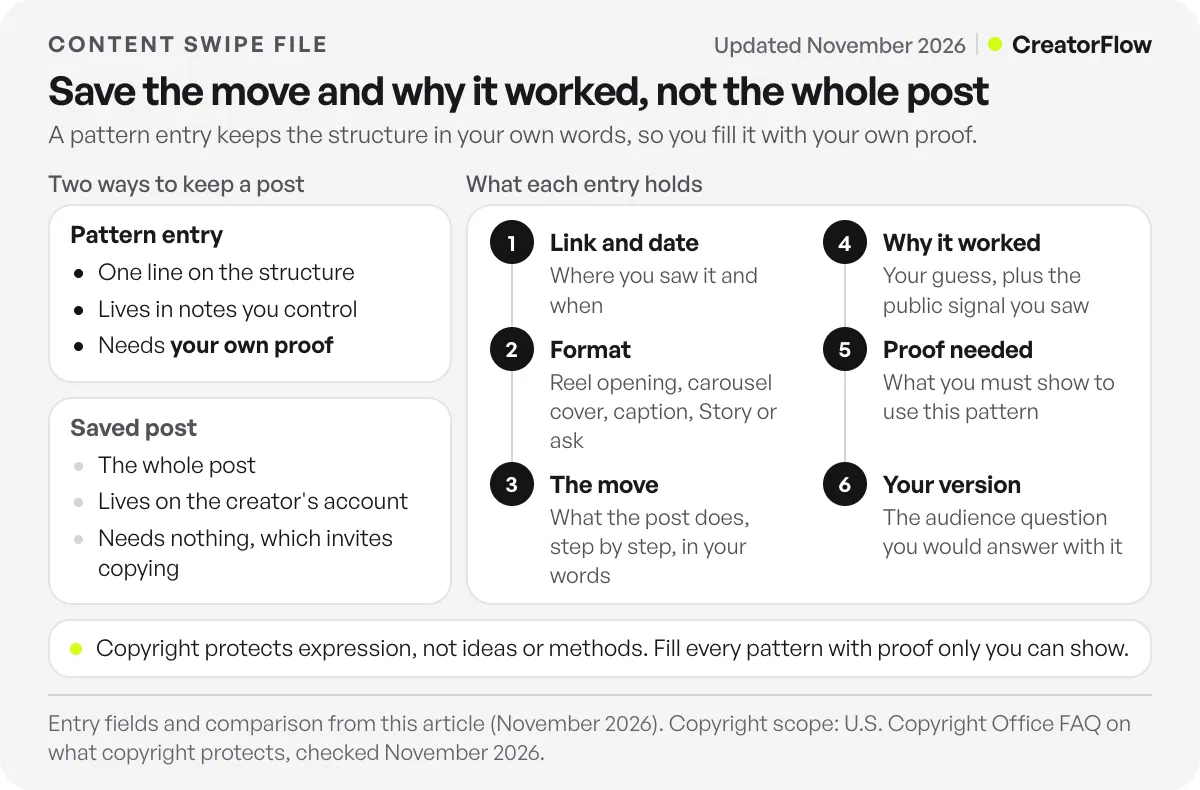
| Field | What to write |
|---|---|
| Link and date | Where you saw it and when |
| Format | Reel opening, carousel cover, caption, Story or ask |
| The move | What the post does, step by step, in your words |
| Why it worked | Your guess, plus the public signal you saw |
| Proof needed | What you must show to use this pattern |
| Your version | The audience question you would answer with it |
The “why it worked” field is a guess, and you should write it as one. Name the signal you saw, such as a comment section full of the same question or a view count far above that account’s usual Reels. Then write what you think caused it. A guess you wrote down can be tested later, while a vague feeling cannot.
The “proof needed” field decides whether an entry is usable. If you do not have the proof yet, film it first or leave the entry for later.
Here are three example entries. They are made up to show the format, and they do not describe real posts or real results.
| Field | Carousel entry | Reel entry | Ask entry |
|---|---|---|---|
| Format | Carousel cover and slide 2 | Reel, first seconds | Caption ask |
| The move | Cover shows the finished thing with no text. Slide 2 names one mistake. Later slides fix it in order. | Opens on hands halfway through the task, cuts back to the start, ends on the finished result. | Caption gives the short answer, then offers a longer checklist to anyone who comments one word. |
| Why it worked (guess) | Many comments asked for the template | Views far above the account’s usual Reels | Many comments used the keyword |
| Proof needed | A finished example of your own | Footage of you doing the task | A checklist worth the comment |
| Your version | A nutrition coach shows a finished week of meals | A hairdresser films a colour correction from the middle | A photographer offers a camera settings checklist |
None of the entries holds caption text, a creator’s name or a number you could not see.
How to Organize and Tag Your Entries
Keep saves and entries in two places. Use Instagram’s Saved collections as an inbox while you scroll. Then move the posts worth keeping into a notes app, a spreadsheet or a database, where you write the six fields. Tag every entry by the job it does, its format and its status, so the right pattern is easy to find when you sit down to write.
Instagram lets you create and name a collection when you save a post. Its announcement of saved collections says collections are private, so only you can see them. A saved post still lives on the creator’s account, which is one more reason your notes should live somewhere you control.
Use three kinds of tags. The job tag says what the pattern does: open, explain, prove or ask. The format tag says where it works: Reel, carousel, Story or caption. The status tag says what happened when you used it: new, used, won or flopped.
The status tag makes the file better over time. A week after you post a piece built from an entry, mark it. After a few months, the “won” tag shows which moves your audience responds to.
Clear the inbox once a week. Write entries for the saves that still make sense, and delete the rest. A file you can read in one sitting gets used.
How to Turn a Swipe Entry Into an Original Post
Start from your audience’s question, not from the file. Pick an entry whose move fits that question, then fill each step with your own proof, your own example and your own words. Change the order if your proof needs it. When the post is finished, the only thing left from the source should be a structure that many posts already share.
Pick the question first. Your comments and DMs hold questions people ask more than once, and our Instagram content ideas guide lists more places to find them. If no entry fits a question, write that post without the file.
Match an entry by its tags. Filter by the job and the format you need.
Fill every step with proof you own. If a step needs proof you do not have, cut the step or film the proof before you write anything.
Write the words last, with the source closed. Reading the original again at this stage pulls its phrases into your draft. Write from your notes and your own experience.
When an entry wins twice, it can become a format you run on a schedule. Our list of repeatable Instagram post ideas shows how creators run the same format with new topics each week.
If the pattern you borrowed ends with a keyword ask, the reply has to arrive while the person still cares. CreatorFlow sends one DM with your link when someone comments the keyword, and this send-link-on-keyword example shows the setup. Give each post its own automation and link. Then link click tracking on the Pro and Growth plans lets you compare clicks between posts built from different entries.
Where Does Copying Stop Being Fair?
Borrowing a structure is normal in every creative field. Copying someone’s expression is where the risk starts. Copyright protects the words, images and footage a person made, not the idea or method behind them. Instagram adds its own rule. Posts that re-upload other people’s work with small edits can cost an account its recommendations. A pattern filled with your own proof stays clear of both.
The U.S. Copyright Office’s FAQ on what copyright protects says copyright does not protect ideas, concepts, systems or methods of doing something. It also says copyright does not protect names, titles, slogans or short phrases, though some of these can be protected as trademarks. So a structure such as “result first, method after” belongs to nobody. Someone’s script, photo or edit is still protected.
In the UK, the government’s guide to how copyright protects your work lists making an adaptation among the things copyright stops others doing without permission. A close rewrite of someone’s script, or a redraw of their carousel slide by slide, can still be a problem. Rules differ by country, and this guide is not legal advice.
Instagram’s post on rewarding original creators, published April 30, 2026, defines original content as work you made entirely or that reflects your own perspective. It says adding a border, a watermark, subtitles or a credit is not enough to make someone else’s work original. Instagram looks at an account’s photos, carousels and Reels from the last 30 days. An account where a significant share of them is unoriginal can stop being recommended (checked November 2026).
If you want to react to one specific Reel, use Instagram’s Remix feature instead of a downloaded copy. It credits the creator and uses a permission they control. Our guide on how to stitch on Instagram covers the steps.
Before you post anything built from an entry, run one check. Remove both account names and put the two posts side by side. If a follower of the original could tell which post you started from, change the proof, the example or the order until they could not. When one specific idea came from one person, credit them in the caption.
FAQ
What is a swipe file in marketing?
It is a collection of ads, emails, posts and pages that worked, kept as a reference for future work. Copywriters started the habit with printed ads and sales letters.
What should a content swipe file include?
Six fields: link and date, format, the move in your own words, your guess about why it worked, the proof it needs, and your version. Leave out caption text and other people’s exact wording.
Is using a swipe file the same as copying?
No, if you use it to study structure and then fill that structure with your own proof and words. It turns into copying when you publish someone’s words, images or edit with small changes.
Where should I keep my entries?
Use Instagram’s private Saved collections as an inbox while you scroll. Keep the entries in a notes app or spreadsheet you control, tagged by job, format and status.
How many entries should the file have?
There is no right number. Keep it small enough to read in one sitting, and keep only entries with all six fields filled in.
Can I save competitors’ posts to study?
Yes. Saving a post to study it is private, and a post’s structure is not protected by copyright. Learn what their audience responds to, then answer your own audience with your own proof. Never post their words, images or footage.
Sources and checks
Checked November 3, 2026: the definition in Wikipedia’s entry; the 1931 McGraw-Hill publication of the Collier letter book, from Robert Collier’s Wikipedia page; what copyright does not protect, from the U.S. Copyright Office FAQ; adaptation rights in the UK, from GOV.UK; private saved collections, from Instagram’s announcement of April 17, 2017; and the originality rules in Instagram’s creators blog post of April 30, 2026. The example entries are illustrations of the format, not real posts or measured results.