

The Edits app is Instagram’s own video editor for iPhone and Android. It records clips up to 10 minutes, edits them frame by frame and exports in 4K with no watermark. The core app is free. A paid plan called Edits Plus adds 200GB of cloud storage and more AI usage, and Meta has not shared its price.
Many how-to guides for Edits still describe the app as it launched in April 2025. Since then it has added carousels, an AI assistant and reusable style kits, and Meta has announced a paid plan. An old guide misses those tools, and it tells you the whole app is free with no caveat.
This guide covers what Edits does, what it costs today, how to make your first Reel in 9 steps, and what changed in 2026, with dates. It also covers a weekly routine, who should use the app, and how to send a link once people start to comment.
Key Takeaways
- What it is: Instagram’s own video editor for iPhone and Android phones. You sign in with your Instagram account.
- Cost: The store listings call it a free editor, with 4K export and no watermark. Both stores now also show in-app purchases.
- Edits Plus: A paid plan with 200GB of cloud storage and more AI usage. Meta has not shared a price and says it will start in limited testing.
- AI assistant: Announced September 30, 2026. It reads your account numbers and answers questions about them. It is free up to a usage limit.
- Carousels: Announced October 7, 2026 for iOS, with Android reported as coming soon.
- Bottom line: Use Edits if you make most of your videos on a phone for Instagram. Leave the paid plan alone until Meta publishes a price.
What Is the Edits App?
Edits is a free mobile video editor made by Instagram. You film or import clips, cut them on a timeline, add captions, audio and effects, then export the video or send it to Instagram. It also shows how your Reels perform and can now build carousels. You need an Instagram account to sign in.
| Question | Answer |
|---|---|
| Made by | Instagram (Meta) |
| iPhone | iOS 16.3 or later |
| Android | Yes, on Google Play |
| iPad | The App Store lists it for iPhone only |
| Clip length | Clips up to 10 minutes |
| Export | Up to 4K, no watermark, share to any platform |
| Google Play downloads | 100M+ |
These details come from the App Store listing and the Google Play listing (checked October 2026).
NapoleonCat’s walkthrough, dated July 2025, describes five areas in the app. Ideas holds notes and saved Reels, Inspiration shows trending audio, Projects holds your work, Create & edit is the camera, and Insights shows your numbers. Labels can change, because the App Store’s version history shows a new version about once a week.
Is the Edits App Free?
Yes, the core editor is free. Both store listings describe Edits as a free video editor with 4K export and no watermark. Both stores also now show in-app purchases, and Meta has announced a paid plan called Edits Plus. The parts that cost money are extra AI usage and extra cloud storage.
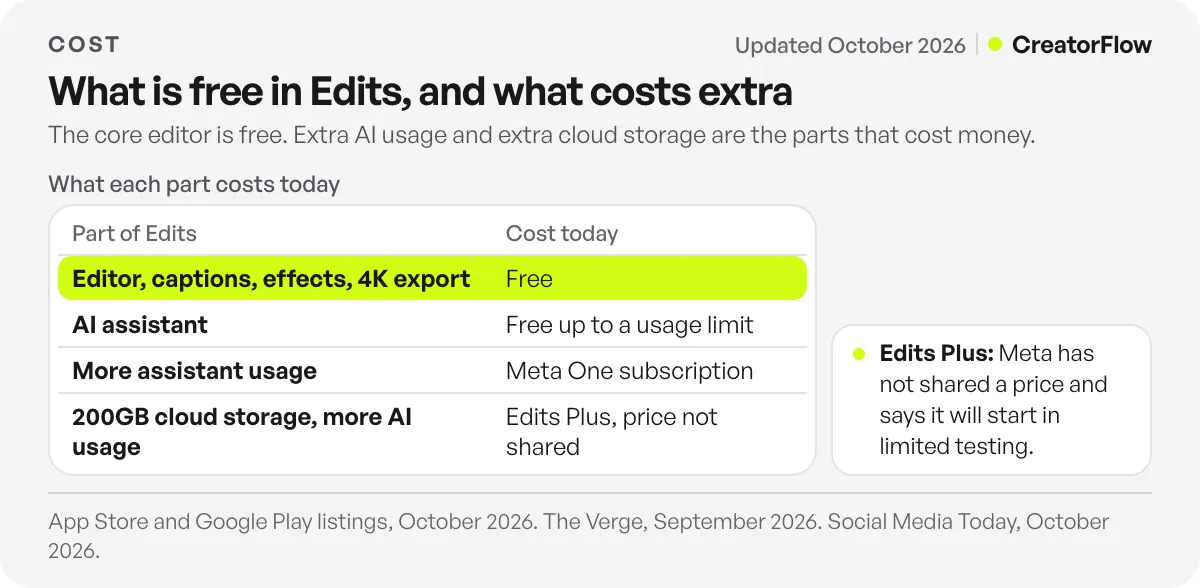
| Part of Edits | Cost today |
|---|---|
| Editor, captions, effects, 4K export | Free |
| AI assistant | Free up to a usage limit |
| More assistant usage | Meta One subscription |
| 200GB cloud storage and more AI usage | Edits Plus, price not shared |
The Verge reports that the assistant is free up to a point, and that heavy users can buy a Meta One subscription for more. Social Media Today reported in September that Meta’s AI features were free with a daily cap, and that Edits Plus would be sold alone or inside Meta One Business packages.
The most detailed report so far is Social Media Today’s October 21 article. It says you buy Edits Plus inside the Edits mobile app, with an Instagram personal or professional creator account. The listed benefit is 200GB of cloud storage, which syncs projects across devices on the same platform, such as two iPhones. Meta has not shared a price, and it says the plan will start in limited testing, with no date. So you may not see the offer yet.
My advice is to wait. You cannot judge a plan with no price, and the free editor does not depend on it. If phone storage is the problem, export finished videos and delete old projects at no cost.
More paid features are likely. In a July Q&A, Instagram head Adam Mosseri said AI models are expensive to run and that paid subscriptions would give more access, according to Social Media Today. So learn the free editing tools well and treat the AI extras as optional.
How to Use the Edits App Step by Step
To use Edits, install it, sign in with Instagram, start a project, and cut your clips on the timeline. Then add captions, audio and effects, check the safe zones and export. After you post, read your numbers in the app. Button names below come from published guides and store notes, so small labels may differ on your version.
Step 1: Install and sign in. Download Edits from the App Store or Google Play. Buffer’s tutorial confirms you log in with your Instagram account, so you do not create a new profile.
Step 2: Start a project. Tap the plus button to add footage from your camera roll, or the record button to film in the app. Set resolution, frame rate and dynamic range in the camera settings before you film. If you still need a plan for what to shoot, read how to make Instagram Reels first.
Step 3: Cut on the timeline. Trim, split and rearrange your clips. The timeline works down to a single frame. The October Android update also lets you trim a clip before it reaches the timeline. For talking clips, NapoleonCat describes a Cut silences tool that removes pauses in voiceovers.
Step 4: Add captions. Generate captions automatically, then read every line and fix the errors. The late October update added a new default style and seven presets, and the Android notes mention easier bulk editing of the transcript.
Step 5: Add audio. Pick a track from the trending audio list, record a voiceover, or add sound effects. The listing also promises clearer voices and background noise removal. NapoleonCat warns against importing copyrighted tracks without a license.
Step 6: Add effects and layers. Green screen, cutout and video overlays all sit in the editor. Use an overlay to place B-roll over your cuts. Since July you can search effects by name and adjust their intensity and timing.
Step 7: Check the safe zones. Instagram’s buttons and caption cover parts of the screen, so text placed too low can disappear. Metricool’s roundup lists safe zones and snap-to-edge guides among the Edits tools. For a second check on a finished frame, use the free Reels safe zone checker.
Step 8: Export and post. Tap Export at the top right. NapoleonCat describes two choices, Save to device or Open in Instagram. The App Store notes added Share to Stories in August, and the listing says you can share to any platform.
Step 9: Read your numbers. Buffer describes Insights as covering the last 7 to 60 days, with a skip rate, like rate, share rate and a retention graph for each Reel. The retention graph is the most useful of these, because it shows the moment viewers left. For a quick read on a public Reel, the free Reel analyzer gives an engagement rate and tips.
What’s New in the Edits App in 2026?
The main 2026 additions are links inside clips, an AI assistant, carousels and reusable style kits, plus a paid plan Meta has announced. The list below comes from Instagram’s App Store and Google Play notes and from reporting on Meta’s announcements. Features can reach iOS and Android at different times, so your app may differ. For the tools inside Instagram itself, see every Instagram feature, sorted by job.
| Date (2026) | What changed |
|---|---|
| Early 2026 | Links to Reels and Instagram accounts inside clips, 10 custom ideas a week, 25 new effects, multiple takes in storyboards |
| July 27 | Effect search, effect customization, more aspect ratios beyond vertical |
| August 3 | Audio search filters, Share to Stories, adjustment layer for effects |
| August 24 | Project folders, saved text styles |
| September 15 | Edits Plus revealed as a paid plan in development |
| September 30 | AI assistant announced |
| October 7 | Carousel editor announced, iOS first |
| October 19 | Carousels in iOS release notes, 50+ new effects, Kits, popular topics, audio links |
| October 26 | Caption styles, auto adjust for brightness and color |
Sources are the App Store version history, Social Media Today on the first 2026 update, and the reports linked in the other sections.
Kits are the addition I would try first. A Kit saves your colors, text styles, caption styles and audio as one set that you can reuse, so your tenth video starts with the same look as your first. Popular topics shows what your followers are interested in, but the notes limit it to accounts with over 10k followers. Audio links send viewers to the track behind your Reel.
What Does the Edits AI Assistant Do?
The Edits assistant is a chatbot that reads your Instagram numbers and answers questions about them. It looks at follows, views, retention, likes, shares and comments, then suggests changes. It analyzes your account and gives advice, and you still make the video yourself. It is free up to a usage limit, and Meta has not stated that limit.
TechCrunch reported the launch on September 30, 2026. Brett Westervelt, who leads Edits, said in that report: “The creative calls are still yours.” The Verge lists the questions it handles, such as why one video worked and another did not, what is trending, how to hook viewers, which captions to use and how to script a video.
Start with the first kind of question, because it can see patterns across your own numbers. Pick two recent Reels, one strong and one weak, and ask what differed. Then check the answer against the retention graph yourself.
Be more careful with its hook and script ideas. The Verge asks whether content becomes more similar when everyone follows the same platform advice. I found no data on this yet. Keep your own opinions and examples in the script.
How Do Carousels Work in Edits?
Carousels in Edits let you mix photos and videos on a multi-slide canvas, then add text and layouts and post to Instagram. Instagram announced the feature on October 7, 2026, for iOS first. Reports said Android was coming soon, so check your own version of the app before you plan around it.
Social Media Today’s report quotes Instagram on the tools you get, which are layouts, Edits fonts and text styles. The Verge’s short report confirms the iOS-first rollout. The App Store notes first list carousels on October 19. The Google Play notes for the October 27 update do not mention them.
The editor handles the design step. What goes on each slide still decides whether people swipe, and our Instagram carousel guide covers slide order, hooks and length.
Who Should Use the Edits App?
Edits fits creators and small brands who make most of their videos on a phone and post mainly to Instagram. It is free to start and shows Reel data next to the editor. If you edit on a laptop, it fits less well, since the store listings cover phones only.
TechCrunch reports that Meta mentioned a future Edits desktop app in June, with no date. Until one ships, plan to do all your editing on the phone.
For how it compares with other editors, read Edits vs CapCut vs Captions.
How to Use Edits Every Week
A weekly routine in Edits starts with your numbers and ends with a post. Read the retention graph for your last few Reels, film a batch of new clips, and apply a saved Kit so each video starts styled. Then export, post and answer comments. This routine is my suggestion. Instagram does not publish one.
In your first week, spend the time on setup. Save a Kit with your fonts and caption style, and create one folder for each series.
By your twentieth video, the useful work moves to the numbers. Compare where viewers leave across a series, and change the first three seconds when they leave early. The September update also keeps video effects in templates made from Reels, so one good format can become your starting point.
How to Send a Link From a Reel Made in Edits
Links inside Edits point only to other Reels and Instagram accounts, so they cannot send viewers to your store or booking page. To deliver an outside link, ask viewers to comment a keyword and send the link by direct message. An automation tool can do this for each comment you get.
Social Media Today’s report on the first 2026 update confirms that clip links stay inside Instagram.
CreatorFlow handles that step. Someone comments your keyword on the Reel, and comment-to-DM automation sends them your link in a DM. It works on any Reel you post, whichever app you edited it in. For the setup and Meta’s messaging rules, read our Instagram DM automation guide.
FAQ
Is the Edits app free?
Yes. The store listings describe Edits as a free video editor, with 4K export and no watermark. Meta has also announced Edits Plus, a paid plan for extra storage and AI usage, and has not shared its price. The AI assistant is free up to a usage limit.
Do I need an Instagram account to use Edits?
Yes. You log in with your Instagram account, and you do not need a new profile. Edits Plus is reported to need an Instagram personal or professional creator account.
Can I use Edits videos on TikTok or YouTube?
Yes. Both store listings say you can share to any platform, and exports carry no watermark. Save the video to your device, then upload it to the other app.
Is there an Edits app for PC or Mac?
The store listings cover phones only as of October 2026. TechCrunch reports that Meta mentioned a desktop app at a creator event in June, but no release date has been reported.
Does Edits work on iPad?
The App Store lists Edits as “Only for iPhone” and requires iOS 16.3 or later (checked October 2026).
What data does Edits collect?
The App Store privacy section lists data that may be linked to you, including contacts, coarse location, photos or videos, audio and search history. It lists uses such as third-party advertising and analytics. Instagram provided these details and Apple has not verified them, so read them before you edit client work in the app.
Sources and checks
Checked in October 2026: the App Store listing and version history, the Google Play listing, TechCrunch on the assistant, and Social Media Today on Edits Plus. Instagram’s own Edits blog did not load without a cookie check, so carousel and assistant details rely on those reports and the store notes. Prices and availability can change, so confirm in the app.