

To make an Instagram Reel, tap the plus icon, choose Reel, then record clips or upload video and photos from your camera roll. Add music, text, and captions, pick a cover, write your caption, and tap Share. Reels can run up to 20 minutes, but keep most under 90 seconds because the algorithm stops recommending Reels over 3 minutes to new viewers.
You film the Reel. You add the audio. You hit Share. Then 60 people comment “link?” and you’re back to copy-pasting the same DM one message at a time. Most Reels guides stop at “post it” and leave you there. That gap between a Reel getting views and those views turning into anything is where creators lose the most.
This guide covers the full loop: how to make a Reel from scratch, the specs that matter in 2026, two features Instagram pushed this year that most tutorials skip, and what to do with the comments once a Reel takes off. It’s written for solo creators, coaches, and small brands who want reach they can act on, not a vanity view count.
Key Takeaways
- Four steps to a Reel: Plan the concept, record or upload your clips, add audio, text, and captions, then pick a cover and share. You can start from the Reels tab, the plus button, or the Stories camera.
- Length rule that matters: Reels upload up to 20 minutes, but Instagram stops recommending anything over 3 minutes to non-followers. Under 90 seconds is the growth sweet spot (swarmify.com, 2026).
- Specs to hit: Vertical 9:16, 1080x1920 pixels, minimum 30 FPS and 720p, cover photo 420x654 (help.instagram.com, July 2026).
- Two 2026 features to use: Trial Reels show a Reel to non-followers first without touching your main feed, and Instagram’s free Edits app adds an Inspiration tab plus advanced analytics (instagram.com/mosseri, 2026).
- Front-load the hook: The first 1 to 3 seconds decide whether someone keeps watching. Open with motion, a question, or a payoff.
- Convert the views: A Reel that earns comments is a lead list. Set a keyword so anyone who comments gets your link or lead magnet in a DM automatically, instead of you replying by hand.
What Is an Instagram Reel?
An Instagram Reel is a short-form vertical video shown in a full-screen, scrollable feed, similar to TikTok. Instagram surfaces Reels to people who don’t follow you based on their interests, which makes the format the platform’s main reach engine. You can film in-app, upload footage, or build a Reel entirely from photos, then set it to music, text, and effects.
Reels sit alongside your other formats but do a different job. For how they stack up against carousels and Stories, see our breakdown of Instagram content formats and when to use each. The short version: Reels win reach, carousels win saves, Stories win with the audience you already have.
How to Make Instagram Reels Step by Step
Here’s the full process in four steps. The whole thing takes minutes once you have a concept.
Step 1: Plan the concept before you film
Decide the single idea the Reel delivers and who it’s for. A tutorial, a before-and-after, a day-in-the-life, or a quick tip all work. Sketch the clips you need so you’re not improvising in front of the camera. Authentic, story-led content tends to hold attention longer than polished-but-empty footage, and holding attention is what the algorithm rewards.
Step 2: Record or upload your clips
Open the Reels camera three ways: tap the Reels tab and press the camera icon, tap the plus button on your home screen and choose Reel, or swipe to the Stories camera and select Reel from the bottom menu.
From there you can:
- Record in-app: Hold the record button to film a clip, release to stop, then film the next. Reels can be a single take or a series of clips.
- Upload from your camera roll: Tap the gallery icon in the bottom-left to add footage you shot elsewhere.
- Adjust speed and timing: Choose playback speed from 0.3x to 4x, set a hands-free timer with a 3-2-1 countdown, and use the align tool for clean transitions between clips.
To trim, reorder, or delete clips, tap Next, then Edit clips. Tap any clip and press Discard to remove it.
Step 3: Add audio, text, and captions
Tap the audio icon to add a track from Instagram’s music library, or tap Import to use your own original audio. When you post with original audio, Instagram attributes it to you, so if you have a public account, others can make Reels with your sound and drive views back to you.
Because a large share of people watch with the sound off, on-screen text and captions are not optional. Add them with:
- Text: Reinforce your point or add context.
- Captions sticker: Auto-generates subtitles from your audio, which you can edit and restyle.
- Stickers, effects, and filters: Tap the three-star icon for the effects gallery, or swipe for Instagram’s built-in photo and video filters.
For hooks that pull people in, our library of Instagram hook templates that stop the scroll gives you openers you can drop straight onto a Reel.
Step 4: Pick a cover and share
Tap Edit cover to choose a frame, or upload a custom cover image. You can’t change the cover after posting, so get it right first (help.instagram.com, July 2026). Write a caption, keep Share to Feed toggled on for the widest reach, tag people or a collaborator, add a location, and choose up to three topics. Tap Share, and the Reel is live.
How to Make a Reel With Photos and Music
Not every Reel needs video. Photo-based Reels turn a set of images into a video set to music, which works well for product showcases, before-and-afters, and slideshow storytelling.
- Open the Reels camera using any of the three methods above.
- Tap the gallery icon and select multiple photos.
- Tap Next to load them onto the timeline.
- Tap a clip and drag its edges to set how long each photo shows.
- Tap the audio icon to add a track, and use the waveform to pick the section that plays.
- Add text or stickers to individual photos, preview, and Share.
Timing the photo changes to the beat of a trending track makes a static set of images feel like a produced video.
Instagram Reels Specs: Length, Size, and Aspect Ratio
Instagram Reels use a 9:16 vertical format at 1080x1920 pixels. Per Instagram’s Help Center, you can upload a Reel with an aspect ratio between 1.91:1 and 9:16, at a minimum 30 FPS frame rate and minimum 720-pixel resolution. The recommended cover photo size is 420x654 pixels, and you can toggle “Upload at highest quality” in your media settings (help.instagram.com, July 2026).
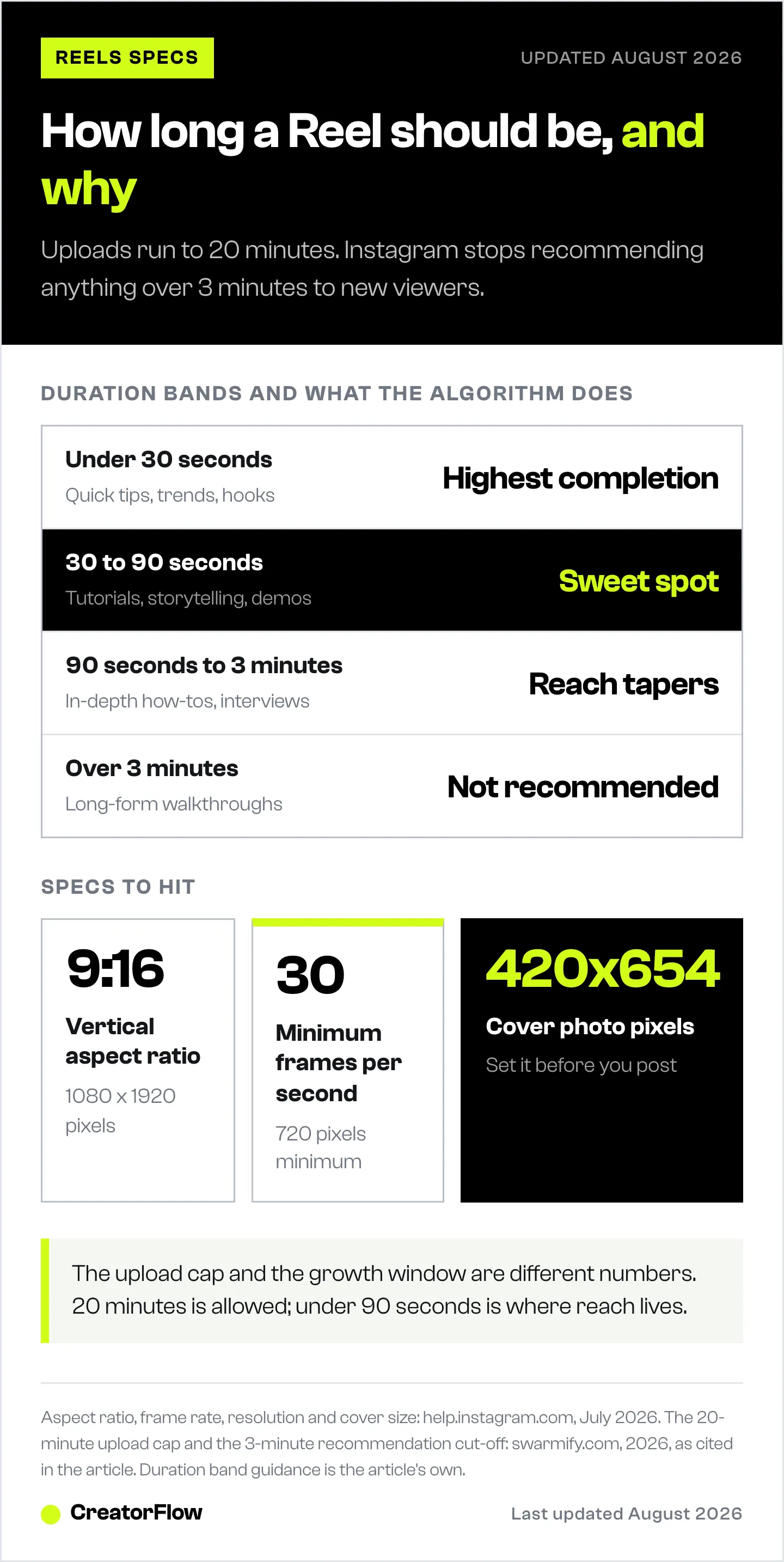
Length is where 2026 gets confusing. Instagram quietly expanded Reels uploads to 20 minutes in late 2025, but the algorithm treats length differently from the upload cap. Reels over 3 minutes stop being recommended to new audiences (swarmify.com, 2026). So the ceiling is 20 minutes, and the growth window is far shorter.
| Duration | Best for | What the algorithm does |
|---|---|---|
| Under 30 seconds | Quick tips, trends, hooks | Highest completion rates, strong for discovery |
| 30 to 90 seconds | Tutorials, storytelling, demos | The sweet spot for watch time and reach |
| 90 seconds to 3 minutes | In-depth how-tos, interviews | Still recommended, with diminishing reach to non-followers |
| Over 3 minutes | Long-form, detailed walkthroughs | Not recommended to new audiences |
For most creators chasing growth, staying under 90 seconds maximizes both completion rate and reach. Save the long stuff for the audience that already follows you.
How to Find Trending Audio for Your Reels
Trending audio boosts discoverability because Instagram favors Reels that use popular sounds. Finding it takes a little intentional browsing rather than guessing.
- Scan the Reels tab: When a song name shows a small upward arrow, that audio is trending right now.
- Save sounds for later: Tap the audio name at the bottom of a Reel, then Save Audio to build a library you can pull from when you create.
- Check the audio page: Tapping a sound shows how many Reels use it. Big numbers signal popular audio, but newer sounds with fast growth are often better bets for discovery.
- Move fast: Trends turn over in days. What’s hot this week feels stale the next, so make browsing a habit.
Trial Reels and Edits: Two 2026 Features Most Guides Skip
Instagram has shipped two things that change how you test and refine Reels, and most step-by-step guides leave them out entirely.
Trial Reels let you publish a Reel to non-followers only, without it landing on your main feed or notifying your existing audience. Instagram head Adam Mosseri introduced them to “depressurize the experience of sharing Reels” (instagram.com/mosseri, December 2024), and they can now be scheduled directly in-app. If a trial performs, you keep it and share it to your followers. If it flops, no one who follows you had to see it. It’s a low-stakes way to test hooks and concepts. We cover the tactic in depth in our guide to using Instagram Trial Reels to grow.
Edits is Instagram’s free standalone video editing app. Mosseri’s own three tips for making Reels in 2026 point to it directly: use the Inspiration tab for ideas, use Trial Reels to test, and study the advanced analytics Edits provides (instagram.com/mosseri, 2026). If you’re deciding what to edit in, compare your options in our review of the best Reels editing apps.
How to Make Reels People Watch to the End
Making a Reel is mechanical. Making one people watch to the end is the real skill. Three things move the needle more than anything else.
- Hook in the first 1 to 3 seconds. Open with motion, an open question, or the payoff up front. If the opening frame looks like every other Reel, people scroll. This is the single biggest lever on watch time.
- Deliver one clear piece of value. Pick a tight, useful idea and land it fast. Reels that teach, solve, or make someone feel something get saved and shared, and both signals push reach.
- Design for sound-off. Add captions and on-screen text so the message works muted, because a large share of viewers never turn the sound on.
If your Reels aren’t getting reach despite doing this, the problem is usually distribution, not content. Our guide to why your Instagram Reels aren’t getting views walks through the common causes, from shadow-banned audio to reused content flags.
What to Do After Your Reel Gets Views
Here’s the step every other guide leaves out. A Reel that earns comments is a lead list you haven’t collected yet. When someone comments “link” or “recipe” or “how much,” they’re raising their hand. Replying by hand means most of them are gone before you get to them.
The fix is comment-to-DM automation. You set a keyword, and anyone who comments it gets your link, lead magnet, or booking page in a DM automatically, in seconds, using Instagram’s official API. Your caption becomes the call to action (“comment GUIDE and I’ll send it”), and the Reel runs as a 24/7 funnel instead of a one-time view spike.
That’s what CreatorFlow does. Flat $15 a month, Instagram-only, with a follow gate, an email gate, and geographic click analytics so you see which Reels drive action. For the full playbook on wiring a Reel to a DM funnel, see how to turn Reels views into DMs. Making the Reel is the work. Converting the views is where the return is.
FAQ
How long can Instagram Reels be?
Instagram Reels can be uploaded up to 20 minutes long, but Reels over 3 minutes stop being recommended to new audiences by the algorithm (swarmify.com, 2026). For reach and completion rate, most creators find the sweet spot is 30 to 90 seconds. Save longer formats for the audience that already follows you.
What’s the best size and aspect ratio for Instagram Reels?
Use a vertical 9:16 aspect ratio at 1080x1920 pixels. Instagram accepts aspect ratios between 1.91:1 and 9:16, with a minimum 30 FPS frame rate and minimum 720-pixel resolution. The recommended cover photo size is 420x654 pixels (help.instagram.com, July 2026). Full-screen vertical looks best because it fills the Reels feed.
How do I make a Reel with photos instead of video?
Open the Reels camera, tap the gallery icon, and select multiple photos. Tap Next to add them to the timeline, then drag each clip’s edges to set how long it shows. Add a music track, time the photo changes to the beat, layer in text or stickers, preview, and Share. Photo Reels work well for product showcases and before-and-afters.
What are Trial Reels and should I use them?
Trial Reels publish a Reel to non-followers only, without posting to your main feed or alerting your current audience. Instagram introduced them so you can test concepts with low stakes (instagram.com/mosseri, December 2024). If a trial performs, you keep it and share it to followers. They’re worth using to test hooks before committing a Reel to your grid.
How do I find trending audio for Reels?
Scroll the Reels tab and look for song names with a small upward arrow, which marks currently trending audio. Tap the audio name and select Save Audio to add it to a library you can reuse. Newer sounds with fast growth often beat already-peaked tracks for discovery, so refresh your saved sounds often.
Do I need a third-party app to make good Reels?
No. Instagram’s native Reels camera gives you trending audio, effects, captions, and publishing in one place. Instagram’s free Edits app adds an Inspiration tab and advanced analytics, and editors like CapCut add polish, but you still publish through Instagram to access platform features. Start native, add tools only when you hit a specific limit.
Why aren’t my Reels getting views?
The most common reasons are a weak opening hook, audio that isn’t trending or is restricted, content flagged as reused, or posting when your audience is offline. Front-load the hook, use fresh trending sounds, upload original footage, and post at your best times, then work through the full diagnostic to isolate the cause.
Instagram Reels specs, length policy, and features verified from help.instagram.com and instagram.com/mosseri as of July 2026. Platform features change often; confirm current behavior in-app. Individual results vary.


