
The best video editing app for Instagram Reels depends on your priority. Edits, Instagram’s free app, wins for native Reels integration and built-in performance insights. CapCut offers the deepest toolkit across mobile, desktop, and web, with 4K export on its paid plan. Captions.ai is built for AI talking-head video and avatars. All three start free, so the real question is which workflow fits how you actually make videos.
You film a Reel, spend 40 minutes cutting it in one app, add captions in another, then realize the export has a watermark. Three tools now dominate that workflow: Edits by Instagram, CapCut, and Captions.ai. Each one is strong at a different job, and picking the wrong one costs you hours every week.
This guide compares all three on price, features, watermarks, platform support, and export quality, then maps each to a specific type of creator. These are editors for footage you already have; if you need to create clips from a prompt instead, that is a separate tool category covered in the best AI video generators for creators. It also covers the one step every editing app skips: what happens after you post, when the comments start rolling in.
Key Takeaways
- Edits (Instagram): Fully free, no watermark, built for Reels. Native safe-zone guides, a performance-insights dashboard, and AI Cutout. Mobile only (iOS and Android), and its in-app links point only to other Instagram content (creators.instagram.com, July 2026)
- CapCut: The most complete all-around editor. Free tier exports 1080p; CapCut Pro (reported around $19.99/month, region-dependent) adds 4K export and the full AI toolkit across mobile, desktop, and web (capcut.com, July 2026)
- Captions.ai: Best for on-camera creators. Free auto-captions in 100+ languages, teleprompter, and eye-contact correction; AI avatars and auto-editing sit on the Max plan at $24.99/month (captions.ai/pricing, July 2026)
- Watermarks: Edits and Captions export your own footage clean. CapCut adds a watermark only when you keep a Pro-locked template or certain AI-generated clips
- The gap all three share: None of them delivers your affiliate link, lead magnet, or booking page when a viewer comments. That step needs comment-to-DM automation on top of whichever editor you choose
- Bottom line: Edit in the app that matches your style, then automate the follow-up so the traffic your Reel earns turns into clicks and emails
Edits vs CapCut vs Captions: Quick Comparison
Here is the fast version. Every figure below is pulled from official product pages or, where a company does not publish a fixed price, from current pricing trackers as of July 2026.
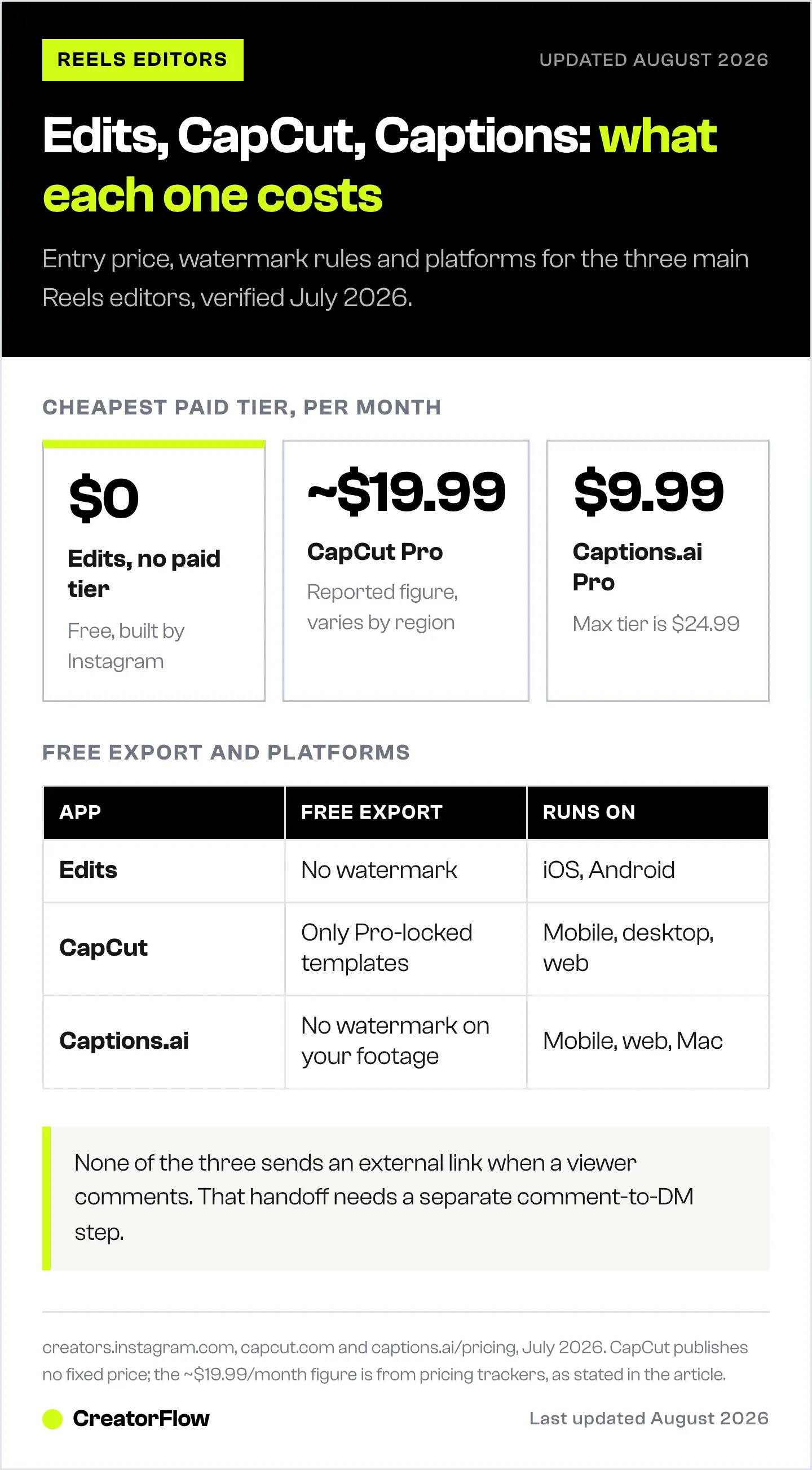
| App | Best for | Platforms | Paid plan (from) | Watermark on free exports |
|---|---|---|---|---|
| Edits (Instagram) | Native Reels editing + insights | iOS, Android | Free, no paid tier | None |
| CapCut | All-around editing, mobile to desktop | iOS, Android, desktop, web | ~$19.99/mo (Pro) | Only on Pro-locked templates or some AI clips |
| Captions.ai | AI talking-head video + avatars | iOS, Android, web, Mac | $9.99/mo (Pro) | None on your own footage |
The short read: Edits is the safest free pick if you post only to Instagram, CapCut is the power tool if you work across platforms, and Captions.ai is the specialist if you talk to camera.
Edits by Instagram: Best for a Native Reels Workflow
Edits launched in April 2025 as Meta’s standalone video app, built by the Instagram team specifically for Reels creators (creators.instagram.com, July 2026). It is free with no subscription and no in-app purchases, and it exports without a watermark.
What sets Edits apart is how tightly it plugs into Instagram. Safe-zone borders show exactly where the caption, username, and interface will cover your text, so nothing important gets hidden behind the Reels UI. The first export option sends your video straight to Instagram. A built-in insights dashboard tracks how your Reels and account perform, which most standalone editors leave out entirely.
Core features:
- Frame-accurate timeline with split, speed, filters, and replace
- AI Cutout (rotoscoping) with Auto or Custom modes, reusable as stickers
- Auto-captions with font styling
- Teleprompter for reading a script while you record
- An Ideas tab with trending audio and Weekly Ideas based on your past Reels
- Export up to 4K with HDR support (creators.instagram.com, July 2026)
Where it fits and where it does not: Edits is mobile only, with no desktop version. Its Links sticker, added in early 2026, points only to another Reel or Instagram profile, not to an external website or store (socialmediatoday.com, January 2026). For affiliates and product sellers, that internal-only limit matters, and it is where a separate link-delivery step earns its place. If you want to test formats before committing, pair Edits with a Reels testing system so you know which cuts actually drive saves.
CapCut: Best All-Around Editor Across Devices
CapCut, made by ByteDance, is the most complete editor of the three. It runs on iOS, Android, Windows, macOS, and in a browser, and one login carries your projects across all of them (capcut.com, July 2026). The desktop builds hold the fullest feature set, including keyframes, chroma key, motion tracking, and picture-in-picture.
The free tier is generous: full timeline editing, auto-captions, text-to-speech, templates, and 1080p export at no cost. CapCut Pro raises the ceiling to 4K, adds cloud storage, and opens the full AI toolkit (script-to-video, one-tap background removal, voice cloning, retouch). CapCut does not publish a fixed public price on its own site, noting that pricing varies by region and device; trackers put CapCut Pro at roughly $19.99/month or $179.99/year as of July 2026 (capcut.com, July 2026).
Two things to know:
- Watermarks are conditional. Editing your own clips exports clean at 1080p. A watermark appears only when you keep a Pro-locked template in the project or export certain AI-generated clips.
- Commercial use on the free plan is restricted under CapCut’s terms of service; monetized content, client work, and paid ads technically require a paid plan (capcut.com, July 2026). CapCut was briefly pulled from US app stores in January 2025 and restored within days; it is fully available in the US again in 2026.
CapCut is the pick when you repurpose one video across TikTok, YouTube Shorts, and Reels, or when you want to finish an edit on a laptop. It sits comfortably inside a broader creator tool stack rather than replacing it.
Captions.ai: Best for AI Talking-Head Video
Captions.ai takes a different approach. Instead of a manual multi-track timeline, it automates the parts of talking-head video that eat the most time. The free plan already covers styled auto-captions in more than 100 languages, an in-app teleprompter, eye-contact correction, and watermark-free exports of your own footage (captions.ai/pricing, July 2026).
The generative features are where it separates from a standard editor. AI avatars and digital twins generate a talking video from a selfie or short clip. AI Edit turns raw footage into a finished cut with B-roll, music, and sound effects. AI Translate dubs your video into another language and lip-syncs the result.
Pricing tiers (captions.ai/pricing, July 2026):
| Plan | Price/month | Monthly credits |
|---|---|---|
| Free | $0 | None |
| Pro | $9.99 | 200 |
| Max (most popular) | $24.99 | 500 |
| Scale | $69.99+ | 1,400+ |
The headline AI tools (avatars, AI Edit, translate with lip-sync) run on the Max plan and up, and each generation draws from a monthly credit pool that resets. If you speak to camera, coach, or build a personal brand, Captions.ai removes the most tedious steps. If you edit b-roll-heavy or faceless content, Edits or CapCut will serve you better. For the shots to capture and how to layer them in, see our guide to B-roll for Instagram Reels.
Pricing Compared: What’s Free and What’s Not
All three apps let you start at zero and export watermark-free (with CapCut’s conditional exceptions). The paid tiers each add different capabilities, so match the spend to what you actually need.
| Need | Cheapest path |
|---|---|
| Edit and post Reels with zero cost | Edits, free forever |
| 4K export and full AI toolkit | CapCut Pro, ~$19.99/mo |
| AI captions + teleprompter only | Captions.ai free, or Pro at $9.99/mo for more credits |
| AI avatars and auto-editing | Captions.ai Max, $24.99/mo |
For most solo creators posting to Instagram, Edits plus a free CapCut account covers everything without paying anything. You upgrade only when 4K or heavy AI generation becomes a real bottleneck.
Which Video Editing App Is Best for Instagram Reels?
The best video editing app for Instagram Reels is the one that matches how you create, not the one with the longest feature list. Use this to decide fast.
| You are a… | Start with | Why |
|---|---|---|
| Faceless or b-roll creator | Edits or CapCut | Strong cutting tools, no need for avatars |
| On-camera creator or coach | Captions.ai | Eye contact, teleprompter, one-tap captions |
| Multi-platform creator (TikTok + YT + IG) | CapCut | Cross-device projects, one login |
| Instagram-only, wants performance data | Edits | Built-in insights dashboard |
| Affiliate or product seller | Edits or CapCut, plus a link-delivery step | Editors do not send external links on their own |
Notice the last row. Whichever editor you choose, it stops at the export button. It does not follow the viewer who comments “where did you get that?” That handoff is the difference between a Reel that gets views and a Reel that gets sales.
The Step Every Editing App Skips: Getting Paid
A great edit earns comments. None of these apps turns those comments into revenue. Edits can only link to other Instagram content, CapCut and Captions.ai have no link tools at all, and typing the same URL into 60 replies by hand is where most creators lose the sale.
CreatorFlow handles the after-post step. Someone comments your keyword, and they get your link, affiliate URL, or lead magnet by DM in seconds, using Meta’s official Instagram API. You can add a follow gate to grow your audience or an email gate to capture the address before you send the link. It runs on every Reel you publish, no matter which app you edited it in. The same flow works for turning an AI-generated video into a DM funnel, and it pairs well once you get your Reels showing up in Google search.
Edit in the app that fits your style. Automate the follow-up so the attention your video earns becomes clicks, emails, and customers.
FAQ
Is the Instagram Edits app free?
Yes. Edits is fully free with no subscription and no in-app purchases, and it exports without a watermark (creators.instagram.com, July 2026). It is available on iOS and Android. There is no desktop version as of July 2026.
Is Edits better than CapCut?
Neither is strictly better; they target different needs. Edits is built for Instagram, with safe-zone guides, a performance dashboard, and one-tap posting to Reels. CapCut is a broader editor that works across mobile, desktop, and web and exports to any platform. Instagram-only creators often prefer Edits, while multi-platform creators lean toward CapCut.
Does CapCut still work in the US in 2026?
Yes. CapCut was briefly removed from US app stores in January 2025 and restored within days. As of July 2026 it is fully available on the US App Store and Google Play (capcut.com, July 2026).
Do these video editing apps add a watermark?
Edits and Captions.ai export your own footage without a watermark. CapCut adds one only when you keep a Pro-locked template in the project or export certain AI-generated clips; editing your own clips exports clean at 1080p.
Which app is best for AI talking-head videos?
Captions.ai. Its free plan includes auto-captions, a teleprompter, and eye-contact correction, and its Max plan ($24.99/month) adds AI avatars, auto-editing, and translation with lip-sync (captions.ai/pricing, July 2026).
Can you add a link to a Reel made in Edits?
Only to other Instagram content. The Edits Links sticker points to another Reel or Instagram profile, not to an external website or store (socialmediatoday.com, January 2026). To send viewers an external link, you need a comment-to-DM tool that delivers the URL by direct message the moment they comment.
Which video editing app is best for beginners?
Edits is the easiest starting point if you post to Instagram, because it is free, watermark-free, and pre-built for Reels. CapCut’s templates also make a first edit fast. Both let you publish something usable within your first session.
App details and pricing verified from creators.instagram.com, the Apple App Store, capcut.com, and captions.ai/pricing as of July 2026. Pricing varies by region and platform; individual results vary.


