

The best Instagram creator tool stack for monetization has 5 layers: DM automation ($15/mo), email marketing (free-$39/mo), link-in-bio (free-$8/mo), content creation (free, or Canva Pro), and scheduling ($25/mo). Total cost: about $40-90/month billed monthly, plus Canva Pro if you upgrade. Start with DM automation, it converts Instagram comments into sales automatically. The other tools support your conversion funnel but won’t generate revenue on their own.
You follow the “Instagram tool stack” guides. They recommend 15+ tools. You install Later, Buffer, Linktree, Canva, and three analytics platforms. Your monthly bill hits $150. Your revenue? Still $0.
Here’s what they don’t tell you: Most tool stack articles optimize for engagement, not revenue. They recommend scheduling tools, analytics dashboards, and hashtag research platforms. But none of those make you money. They help you post content. They don’t help you convert comments into customers.
This guide shows you the only 5 tools Instagram creators actually need to make money: DM automation (converts comments to sales), email marketing (nurtures leads), link-in-bio (centralizes offers), content creation (fuels your funnel), and scheduling (maintains consistency). We’ll cover what each tool does for revenue, what it costs, and which one to buy first. If you want the wider menu first, our roundup of influencer marketing tools for creators compares twelve options grouped by monetization job.
No scheduling dashboards that don’t drive sales. No analytics platforms that track vanity metrics. Just the tools that turn your Instagram following into paying customers.
Related guides:
- New to monetization? Start with our How to Make Money on Instagram guide
- Building a sales funnel? See our Instagram Sales Funnel Complete Guide
- Need DM automation specifically? Check our Best Instagram DM Automation Tools comparison
Key Takeaways
- The essential Instagram creator tool stack for monetization costs about $40-90/month across 5 layers: CreatorFlow ($15/mo) for DM automation, Kit.com (free up to 10,000 subscribers; Creator $39/mo at 1,000 subscribers) for email marketing, Linktree (free, paid from $8/mo) for link-in-bio, Canva (free, or the paid Canva Pro) for content creation, and Later ($25/mo) for scheduling
- Start with DM automation, it has the highest immediate ROI. Add the others as you scale revenue
- Priority order by revenue impact: DM Automation → Link-in-Bio → Email Marketing → Content Creation → Scheduling
- Budget by revenue stage: Starting out ($0-500/mo) = $0-15/mo. Growing ($500-2K/mo) = $40-87/mo plus Canva Pro. Scaling ($2K+/mo) = about $95/mo plus Kit and Canva Pro
- DM automation replies in seconds, while the person is still looking at your post. A manual reply 4+ hours later often arrives after they have moved on. That’s why DM automation comes first

Why Most Tool Stack Articles Get It Wrong
Every “Instagram tool stack” article recommends the same thing: Scheduling first, analytics second, engagement third. They optimize for content production, not revenue generation.
Here’s what happens when you follow that advice:
Month 1: You install Later ($25/mo), Sprout Social Standard ($249/mo per seat, billed monthly), and Linktree Starter ($8/mo). Total: $282/mo. You schedule 30 posts. You track 15 engagement metrics. Your revenue: $0.
Month 2: You add Buffer, Canva Pro, and Planoly. You’re posting 5 times daily. Your engagement is up 20%. Your revenue: Still $0.
Month 3: You realize posting more doesn’t equal making more. You’re spending 2 hours daily responding to “link please?” comments manually. By the time you respond, they’ve moved on.
The problem: You optimized for content creation, not conversion.
Instagram content gets attention. DM automation converts that attention into sales. Email marketing nurtures the leads who don’t buy immediately. Link-in-bio centralizes your offers. Scheduling maintains consistency. Content creation fuels the system.
But if you don’t have the conversion layer (DM automation), the other tools just help you post more content that doesn’t make money.
Most tool stacks miss this: The revenue happens in the DMs, not in the feed.
The Revenue-First Framework: 5 Layers
Here’s how Instagram monetization actually works:
Content (Layer 4) → Engagement (Comments) → DM Automation (Layer 1) → Sales
                                         ↓
No immediate sale? → Email (Layer 2) → Sales later- Layer 1: DM Conversion: Turns comments into customers instantly
- Layer 2: Email Capture: Nurtures leads who don’t buy now
- Layer 3: Link Management: Centralizes all your offers
- Layer 4: Content Creation: Drives engagement that fuels the funnel
- Layer 5: Scheduling: Maintains posting consistency
Notice the order: Conversion first, content last.
Why? Because content without conversion is just noise. You can post 10 times daily. If you’re not converting comments into sales, you’re working for engagement metrics, not revenue.
Let’s break down each layer.
Layer 1: DM Automation (The Money Layer)
What it does: Automatically sends your product link, booking calendar, or lead magnet when someone comments specific keywords.
Why it’s #1: This is where revenue happens. A comment is a buying signal. “Link please?” means they want it right now. Automation replies in seconds, while they are still on your post. A manual reply 4 hours later often finds them gone.
Example (illustrative numbers): You post a Reel about your fitness program. 50 people comment “LINK.” CreatorFlow sends your Calendly booking link in 2 seconds. Say 15 people book discovery calls and 5 become clients at $500/mo. Revenue: $2,500 from one post.
Without DM automation, you respond manually 4 hours later. Say only 3 people book calls and 1 becomes a client. Revenue: $500 from the same post.
In this example, that’s a $2,000 difference per post.
Top 3 DM Automation Tools
| Tool | Price | Best For | Key Feature |
|---|---|---|---|
| CreatorFlow | $15/mo | Solo creators, flat pricing | 5K DMs/mo, simple 5-minute setup |
| ManyChat | $17–$199/mo ($14–$139 billed annually) | Multi-platform needs | Instagram + Facebook + WhatsApp support |
| LinkDM | $19/mo | Established users | Free plan with 1,000 DMs/mo; Pro covers 3 accounts |
CreatorFlow recommendation: Start with CreatorFlow ($15/mo flat rate). You get:
- Comment-to-DM automation (triggers on keywords like “LINK,” “SHOP,” “BOOK”)
- Story reply automation (auto-responds to story replies)
- Email collection within DMs (builds your email list automatically)
- Link click tracking (see which posts drive the most clicks)
- 5-minute setup (no 30-minute onboarding, no workflow builder complexity)
When to choose ManyChat instead: You need multi-platform (Instagram + Facebook Messenger + WhatsApp + SMS). You’re comfortable with per-contact pricing that scales. You have an agency managing 10+ accounts.
When to choose LinkDM instead: You want an established Instagram-first tool with room for several accounts. LinkDM’s pricing page lists 3 accounts and 25,000 DMs a month on its $19/mo Pro plan (checked October 2026).
Setup time: About 5 minutes with CreatorFlow.
ROI example: If you make 10 sales/month at $50/product because of DM automation, that’s $500 revenue. Tool cost: $15. ROI: 3,233%.
Related: Instagram DM Automation Complete Guide | Comment-to-DM Setup Tutorial
Layer 2: Email Marketing (The Nurture Layer)
What it does: Captures email addresses from Instagram followers, then sends automated email sequences to convert leads who didn’t buy immediately.
Why it matters: Many people who engage with your Instagram don’t buy right away. They need time. Email marketing nurtures those leads over weeks or months until they’re ready to buy.
Example: Someone comments “LINK” on your post. CreatorFlow asks for their email, then sends your product link. They give their email but don’t buy. You export your CreatorFlow contacts as a CSV and import the CSV into Kit.com. A Kit.com email sequence then sends them:
- Day 1: Welcome email with customer testimonial
- Day 3: Educational email about the problem your product solves
- Day 7: Case study showing results
- Day 14: Limited-time discount offer
Result: Some subscribers buy later, even if they didn’t buy from the Instagram DM.
Top 3 Email Marketing Tools
| Tool | Price | Best For | Key Feature |
|---|---|---|---|
| Kit.com | Free; Creator $39/mo ($33 billed annually) at 1,000 subscribers | Creators, coaches | Free up to 10,000 subscribers |
| Flodesk | Free; Lite from $25/mo at 1,000 subscribers | Visual-first creators | Beautiful email templates |
| Klaviyo | Free (250 profiles, 500 sends/mo); paid priced by profile count | E-commerce stores | Shopify integration, advanced segmentation |
CreatorFlow recommendation: Start with Kit.com (free tier up to 10,000 subscribers). You get:
- Unlimited email broadcasts on the free tier
- Unlimited landing pages and forms (collect emails)
- Tagging and segmentation (organize subscribers)
- Selling digital products and subscriptions
- Creator-friendly interface (built for course creators, coaches, affiliates)
Automated email sequences (welcome, nurture, sales) start on Kit’s Creator plan. Kit’s pricing page lists Creator at $33/month billed annually for 1,000 subscribers (checked October 2026). Billed monthly, it is $39.
When to choose Flodesk instead: You want visually stunning emails that match your Instagram aesthetic. Flodesk has a free plan, and its paid Lite plan starts at $25/mo for 1,000 subscribers.
When to choose Klaviyo instead: You run a Shopify store and need advanced e-commerce features (abandoned cart emails, product recommendations, SMS).
Integration: CreatorFlow asks for email addresses in DMs (Email Gate, on Pro and Growth) → You export your contacts as a CSV and import the CSV into Kit.com → Kit.com sends the follow-up sequence → Subscribers buy when ready.
Related: Instagram to Email Funnel Guide | Email Collection in Instagram DMs
Layer 3: Link-in-Bio (The Centralization Layer)
What it does: Creates a landing page with all your important links (products, booking, YouTube, podcast, email signup) in one place.
Why it matters: Instagram lets you add up to 5 links in your bio (since April 2023), but each one is a bare link. Link-in-bio tools put all your offers on one page, with images and short descriptions.
Example: Your Instagram bio links to your Linktree. Visitors see:
- Book a free consultation (Calendly link)
- Buy my course ($97)
- Join my email list (free guide)
- Shop my Amazon storefront (affiliate links)
- Watch my YouTube channel
Instead of picking one link, you show all your revenue sources.
Top 3 Link-in-Bio Tools
| Tool | Price | Best For | Key Feature |
|---|---|---|---|
| Linktree | Free, from $8/mo | Most creators | Email and phone collection on every plan, Free included |
| Beacons | Free; Creator from $10/mo | All-in-one needs | Email capture, store, media kit |
| Bio.fm | Free | Musicians, artists | Spotify song embeds |
CreatorFlow recommendation: Start with Linktree (free tier). You get:
- Unlimited links on free plan
- Basic analytics (link clicks)
- Customizable design
- Email and phone number collection (Linktree’s pricing page lists it on every plan, checked October 2026)
Upgrade to Linktree Starter ($8/mo, about $6.42/mo billed annually) if you want:
- Custom link thumbnails
- Link scheduling (turn links on/off at specific times)
- Priority support
When to choose Beacons instead: You want an all-in-one creator platform (link-in-bio + email capture + media kit + store). Beacons’ help center lists the Creator plan at $10/mo, or $100/year (checked October 2026).
When to choose Bio.fm instead: You’re a musician or artist who wants to share Spotify songs on your bio page. Bio.fm’s homepage says your bio is free (checked October 2026).
Integration: Instagram bio → Linktree → Multiple revenue sources (booking, products, affiliates, email).
Related: Link-in-Bio vs DM Automation for Affiliate Clicks · 11 Best Free Link-in-Bio Tools
Layer 4: Content Creation (The Fuel Layer)
What it does: Creates professional-looking posts, Reels, Stories, and graphics that stop the scroll and drive comments.
Why it matters: Content is what gets people to engage. Engagement (comments, DMs, story replies) is what DM automation converts into sales. Bad content = no engagement = no sales to convert.
Example: You create a carousel post in Canva:
- Slide 1: “5 Mistakes Killing Your Instagram Sales”
- Slides 2-6: Each mistake with a quick fix
- Slide 7: “Want my full Instagram sales playbook? Comment LINK”
Result (illustrative numbers): 200 comments saying “LINK.” CreatorFlow sends your $47 playbook link in 2 seconds. If 60 people buy, revenue is $2,820.
The design quality matters. A professional carousel stops the scroll. A blurry iPhone screenshot gets ignored.
Content Creation Tool
| Tool | Price | Best For | Key Feature |
|---|---|---|---|
| Canva | Free; Pro is a paid upgrade | All creators | AI features, brand kit |
CreatorFlow recommendation: Start with Canva Free (forever free). You get:
- Free templates for Instagram posts, Reels, Stories and carousels
- Photo editing and filters
- Text overlays and graphics
- Export as PNG, JPG, MP4
Upgrade to Canva Pro (paid plan; check canva.com/pricing for your country) when you need:
- Brand Kit (save your brand colors, fonts, logos)
- Background remover (AI-powered, one-click)
- Magic Resize (turn Instagram post into Story with one click)
- More cloud storage than the free plan
If you sell a physical product: Templates cannot show your actual item. DesignerBox turns one product photo into packshots, on-model shots, and styled scenes in your brand kit. DesignerBox’s pricing page lists a free plan with 112 AI credits a month, and paid plans from €15/month, or €6/month billed annually (checked October 2026). The free plan’s results are watermarked. DesignerBox is built by the same team as CreatorFlow.
Alternative tools: Adobe Creative Cloud (full professional suite, best for designers), CapCut (free video editing for Reels), VSCO (photo editing, with a free plan).
Integration: Canva creates content → You post to Instagram → Engagement drives comments → DM automation converts comments to sales.
Related: Instagram Content Calendar Guide | Instagram Content Hooks Templates
Layer 5: Scheduling (The Consistency Layer)
What it does: Schedules your Instagram posts, Reels, and Stories in advance so you post consistently without being glued to your phone.
Why it matters: Instagram’s algorithm rewards consistency. Posting 5 times/week beats posting 10 times one week and 0 the next. Scheduling tools let you batch-create content once a week and auto-post on a schedule. You can also schedule Instagram posts for free in the app or through Meta Business Suite before you add a paid layer to the stack.
Example: Every Sunday, you spend 2 hours creating 10 posts in Canva. You upload them to Later and schedule:
- Monday 9am: Carousel post
- Tuesday 6pm: Reel
- Wednesday 9am: Single image post
- Thursday 6pm: Reel
- Friday 9am: Carousel post
Result: You post consistently without opening Instagram daily. Your engagement stays high. Your DM automation converts those comments into sales automatically.
Top 3 Scheduling Tools
| Tool | Price | Best For | Key Feature |
|---|---|---|---|
| Later | $25-110/mo billed monthly ($18.75-82.50 billed annually) | Visual planning | Instagram-first visual planner |
| Buffer | Free for 3 channels; $6/mo per channel ($5 billed yearly) | Multi-platform | Free plan, simple UI |
| Planoly | From $14/mo billed annually | Visual grid planning | Instagram aesthetic preview |
CreatorFlow recommendation: Start with Later ($25/mo for Starter plan). You get:
- Schedule 30 posts/month per profile
- Auto-publish (posts go live automatically, no push notifications)
- Visual Instagram grid preview
- Basic analytics (best time to post)
- Hashtag manager
When to choose Buffer instead: You’re posting to multiple platforms (Instagram + Twitter + LinkedIn + Facebook) and want per-channel pricing. Buffer’s pricing page lists a free plan for 3 channels and Essentials at $5 per channel a month billed yearly (checked October 2026). Billed monthly, Essentials is $6 per channel.
When to choose PostNext instead: You run several accounts across platforms and want one flat price for all of them. PostNext covers 15 connected accounts on Instagram, TikTok, X, LinkedIn, YouTube, Threads, and Bluesky. Its pricing page lists €19/month, or €11/month billed annually, with a free plan for 1 account and 10 posts a month (checked October 2026). It is built by the same team as CreatorFlow.
When to choose Planoly instead: You’re very focused on Instagram aesthetic and want to preview how your grid will look before posting. Planoly’s pricing page lists Starter at $14/mo billed annually (checked October 2026).
Integration: Batch-create content in Canva → Schedule posts in Later → Posts go live automatically → Comments trigger DM automation → Sales happen.
Related: Instagram Content Calendar Guide
Budget Stacks by Revenue Stage
Here’s what to buy based on your current Instagram revenue:
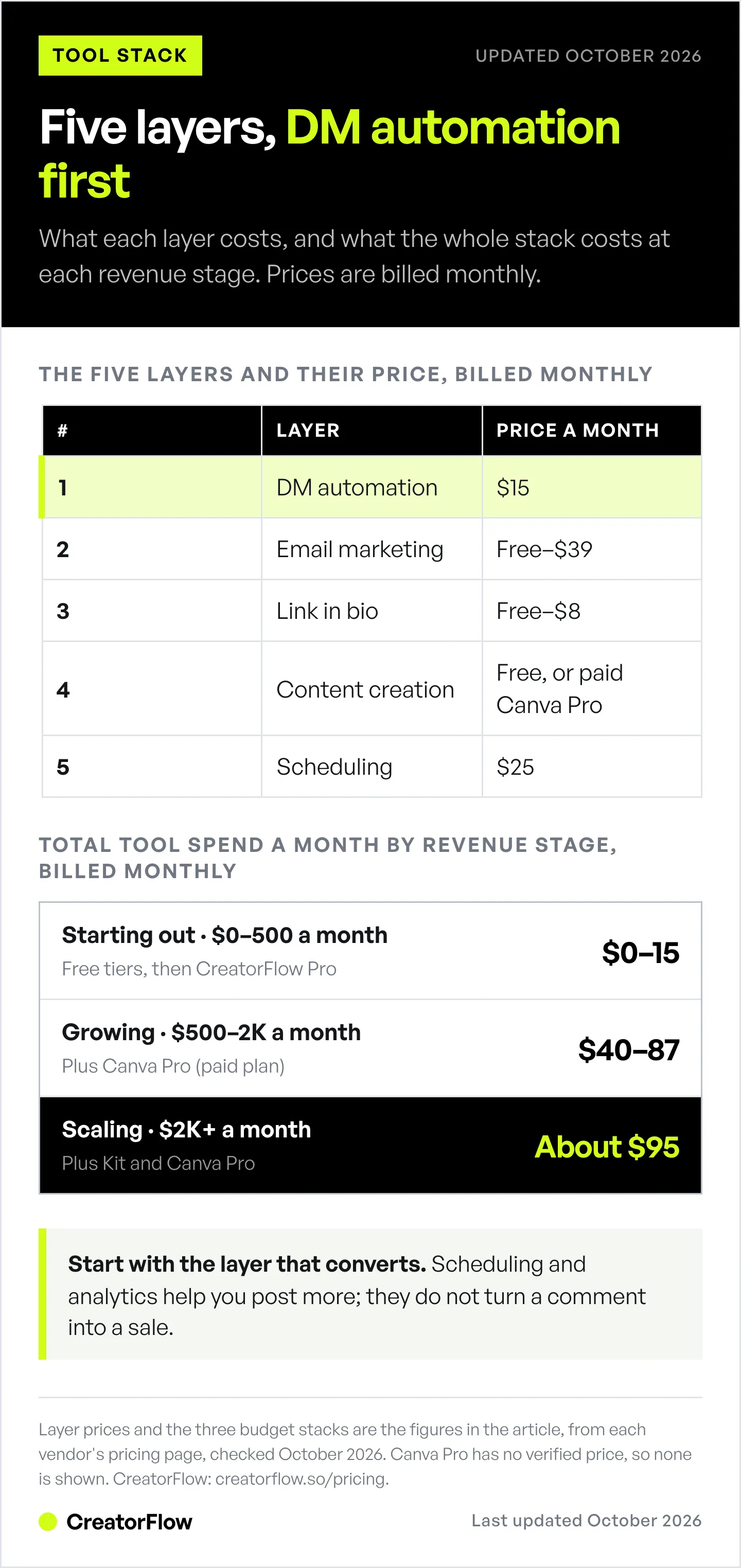
Starting Out ($0-500/mo Revenue)
Free stack = $0/month to start:
- CreatorFlow Free ($0/mo), 500 DMs/month, test DM automation
- Linktree Free ($0/mo), Unlimited links
- Canva Free ($0/mo), Create content
- Kit.com Free ($0/mo), Email up to 10,000 subscribers
Upgrade when ready:
- CreatorFlow Pro ($15/mo) when you hit the 500 DMs/month limit
Total: $0-15/month
Why this stack: You’re testing if Instagram monetization works for you. Start with free tools that deliver core functionality. Upgrade to paid CreatorFlow ($15/mo) once you’re consistently using all 500 free DMs a month (a sign you’re converting).
Growing ($500-2K/mo Revenue)
Growth stack = $40-87/month, plus Canva Pro:
- CreatorFlow Pro ($15/mo), 5,000 DMs/month, email collection, link tracking
- Linktree Free ($0/mo), Unlimited links (or Linktree Starter $8/mo for link scheduling and thumbnails)
- Canva Pro (paid plan), Brand kit, background remover, Magic Resize
- Kit.com (free up to 10,000 subscribers), or Creator at $39/mo ($33 billed annually) for 1,000 subscribers when you want automated sequences
- Later Starter ($25/mo), Schedule 30 posts/month, auto-publish
Total: $40-87/month billed monthly, plus Canva Pro
Why this stack: You’re making $500-2K/month. You can afford to pay for tools that save time. Canva Pro’s brand kit keeps your visuals consistent. Later’s scheduling lets you plan a week of posts in one sitting. Kit.com nurtures the leads who didn’t buy immediately.
Scaling ($2K+/mo Revenue)
Full stack = about $95/month, plus Kit and Canva Pro:
- CreatorFlow Growth ($30/mo), 10,000 DMs/month, 5 Instagram accounts
- Linktree Pro ($15/mo), Custom thumbnails, link scheduling, analytics
- Canva Pro (paid plan), Full brand kit, unlimited designs
- Kit.com Creator (priced by subscriber count; check kit.com/pricing at your list size), Email automation
- Later Growth ($50/mo, or $37.50 billed annually) or Buffer Team ($12/mo per channel, or $10 billed yearly), Advanced scheduling
Total: about $95/month billed monthly with Later Growth, plus Kit and Canva Pro
Why this stack: You’re making $2K+/month. Time is your most valuable asset. You need tools that scale with multiple accounts and advanced features (5 Instagram accounts in CreatorFlow Growth).
When to add analytics: At $5K+/month revenue, consider Iconosquare or Sprout Social (from $99 per seat a month, or $79 billed annually) for deep analytics. Below that, Instagram Insights (free) + CreatorFlow’s link tracking is enough.
The Tools You DON’T Need (Yet)
Skip these until you’re making $5K+/month:
- Advanced analytics tools (Sprout Social from $99 per seat a month, Iconosquare), Instagram Insights (free) is enough until you’re running paid ads or managing multiple brand accounts
- Hashtag research tools (Flick and similar), Instagram allows up to 5 hashtags per post since December 2025, so manual hashtag research works fine for solo creators
- AI caption writers (Jasper, Copy.ai), You should write captions in your own voice until you have a proven system to replicate
- Multiple scheduling tools: Pick one (Later or Buffer), don’t pay for both
- Paid link-in-bio tools: Linktree Free does everything most creators need
Why skip them? They optimize for content production efficiency, not revenue. If you’re not making $5K+/month yet, your bottleneck isn’t production speed, it’s conversion.
Focus on the 5 core tools that drive revenue. Add optimization tools once revenue is consistent.
Common Mistakes (And How to Fix Them)
Mistake 1: Tool Hoarding (More ≠ Better)
Problem: You install 15 tools because every “tool stack” article recommends them. Your monthly bill: $200. Your revenue: $0. You spend more time managing tools than creating content.
Fix: Start with 2 tools (DM automation + link-in-bio). Add tools only when you hit a specific bottleneck. If you’re not overwhelmed by manual DM responses, you don’t need automation yet. If you’re posting consistently, you don’t need scheduling yet.
Rule of thumb: Every tool should solve a problem you currently have, not a problem you might have someday.
Mistake 2: Optimizing for Vanity Metrics (Followers ≠ Revenue)
Problem: You pay for analytics tools that track followers, likes, and engagement rate. You obsess over these metrics. But your revenue doesn’t grow.
Fix: Track revenue metrics only:
- DMs sent per post (from CreatorFlow analytics)
- Click-through rate on links (how many people click your product link)
- Email-to-sale conversion rate (how many email subscribers buy)
- Revenue per Instagram post (dollars earned from each post)
Followers, likes, and engagement rate are nice. But they don’t pay your bills. Track what makes you money.
Mistake 3: Missing the DM Layer (Biggest Revenue Leak)
Problem: You use Later ($25/mo) to schedule posts, Canva Pro to design content, and Linktree Pro ($15/mo) for your bio. You’re posting 5 times/week. Engagement is up. But you’re still responding to “link please?” comments manually 4 hours later, after many people have moved on.
Fix: Add DM automation first. It replies to the same comments in seconds, while people still want the link.
Math example (assumed conversion rates, to show the arithmetic):
- 100 comments saying “LINK” per week
- Manual response (4 hour delay), if 10 buy at $50: $500/week = $2,000/month
- Automated response (2 second delay), if 35 buy at $50: $1,750/week = $7,000/month
In this example, adding DM automation ($15/mo) increases revenue by $5,000/month. That’s a 33,233% ROI.
Mistake 4: Skipping Email Marketing (Lost Retargeting Opportunity)
Problem: You send product links via DMs. Many people click but don’t buy. You have no way to follow up. Those leads are gone forever.
Fix: Collect email addresses in the DM flow (before sending the product link). CreatorFlow asks for their email, then sends the link. Now you have:
- Their email address
- What they were interested in (tracked by automation trigger)
- A follow-up opportunity: export the contacts as a CSV, import the CSV into Kit.com, and add them to an email sequence
Result: People who didn’t buy from the DM get a second chance to buy from your emails. You recapture revenue you were losing.
Mistake 5: Using Free Tools Forever (Penny-Wise, Pound-Foolish)
Problem: You’re making $2,000/month from Instagram. You’re still using Canva Free, Linktree Free, and manually posting (no scheduling). You think you’re saving money by avoiding $15-25/month tools.
Fix: Calculate time cost. If Canva Pro saves you 2 hours/month with Magic Resize and brand kit, that’s worth $100-200 in time (at $50-100/hour value). If Later ($25/mo) saves you 5 hours/month batch-scheduling, that’s worth $250-500 in time.
You’re not saving money by using free tools. You’re trading time for dollars, which is the opposite of scaling.
Rule: Once you’re making $1,000+/month, upgrade to paid versions of the tools you use daily. Run the time-cost math above for each one before you pay.
For the wider context beyond one platform, read the strategy layer in how to monetize content as a creator.
FAQ
What Instagram tools do creators actually need to make money?
You need 5 core tools: DM automation (CreatorFlow $15/mo), link-in-bio (Linktree free, Starter $8/mo), email marketing (Kit.com free up to 10,000 subscribers), content creation (Canva Free or Canva Pro), and scheduling (Later $25/mo). Start with DM automation and link-in-bio. Add the others as revenue grows. Total cost: $0-15/month to start, and about $40-90/month billed monthly for the full stack, plus Canva Pro.
How much does an Instagram creator tool stack cost?
A starter tool stack costs $0-15/month (CreatorFlow Free, Linktree Free, Canva Free, Kit.com Free). A growth stack costs $40-87/month billed monthly (CreatorFlow Pro $15, Later Starter $25, Kit.com free or Creator $39, Linktree free or Starter $8), plus Canva Pro. A scale stack costs about $95/month (CreatorFlow Growth $30, Linktree Pro $15, Later Growth $50), plus Kit and Canva Pro, which are priced by list size and plan.
Can I make money on Instagram with only free tools?
Yes. Start with CreatorFlow Free (500 DMs/month), Linktree Free (unlimited links), Canva Free (content creation), and Kit.com Free (10,000 email subscribers). This covers DM automation, link management, content, and email marketing at $0/month. Upgrade to paid versions once you’re consistently making $500+/month revenue.
Which Instagram tool has the highest ROI?
DM automation has the highest ROI for revenue, because it turns comments you already get into link clicks within seconds. CreatorFlow Pro costs $15/month. Example with an assumed 35% conversion: 100 comments/week at $50/sale = $1,750/week, or $7,000/month. Tool cost: $15/month. ROI: 46,567%. Email marketing is second (Kit.com free tier nurtures leads who didn’t buy immediately).
Do I need scheduling tools if I post manually?
Not if you’re posting 3-5 times/week consistently. Add scheduling (Later $25/mo, or Buffer at $6/mo per channel, $5 billed yearly) when posting becomes inconsistent or when you want to batch-create content once a week and auto-publish. If you’re already making $1,000+/month revenue and scheduling saves you 5 hours a month, that time is worth $250-500 at $50-100 an hour.
Should I use Canva Free or Canva Pro?
Start with Canva Free until you’re making $500+/month from Instagram. Upgrade to Canva Pro (paid plan) when you need Brand Kit (save brand colors, fonts, logos for consistency), Background Remover (AI-powered), or Magic Resize (turn Instagram post into Story with one click). The time savings pays for itself once you’re creating 10+ posts/week.
Is ManyChat better than CreatorFlow for DM automation?
ManyChat ($17–$199/mo billed monthly, or $14–$139 billed annually) is better if you need multi-platform support (Instagram + Facebook Messenger + WhatsApp + SMS) or advanced workflow builder with complex conditional logic. CreatorFlow ($15/mo flat rate) is better for solo creators who want fast 5-minute setup, Instagram-only focus, and predictable flat-rate pricing. Both connect through Meta’s official API: CreatorFlow is a Meta Tech Provider (since December 2025), and ManyChat is a Meta Business Partner.
What’s the difference between link-in-bio tools?
Linktree (free; Starter $8/mo, Pro $15/mo billed monthly) collects emails and phone numbers on every plan, Free included. Beacons (free; Creator $10/mo) is an all-in-one platform (email capture, store, media kit). Bio.fm is free and lets artists share Spotify songs. All three let you showcase multiple links in your Instagram bio. Start with Linktree Free unless you need Beacons’ store features or Bio.fm’s music embeds.
Build Your Revenue-First Tool Stack
Most tool stack guides optimize for content production. This one optimizes for revenue.
Start here:
- CreatorFlow (free plan, or Pro at $15/mo): Automate comment-to-DM responses, convert engagement into sales
- Linktree Free: Centralize all your offers in one bio link
- Canva Free: Create professional content that drives engagement
- Kit.com Free: Nurture email subscribers until they’re ready to buy
Add later (when revenue is consistent):
- Later ($25/mo): Schedule posts in advance, maintain consistency without daily posting
Total starting cost: $0-15/month.
The tools don’t make you money. Your content and your offer make you money. The tools just remove the manual work of converting engagement into sales.
Ready to automate your Instagram DMs? Start CreatorFlow free.
Related guides:
- Instagram DM Automation Complete Guide
- How to Make Money on Instagram
- Instagram Sales Funnel Complete Guide
- Best Instagram DM Automation Tools Compared
- Instagram to Email Funnel Setup
- Comment-to-DM Automation Setup Guide
Sources (checked October 2026): CreatorFlow Pricing (creatorflow.so/pricing), ManyChat Pricing (manychat.com/pricing), LinkDM Pricing (linkdm.com/pricing), Kit Pricing (kit.com/pricing), Flodesk Pricing (flodesk.com/pricing), Klaviyo Pricing (klaviyo.com/pricing), Linktree Pricing (linktr.ee/s/pricing), Beacons Help Center (help.beacons.ai), Bio.fm (bio.fm), Later Pricing (later.com/pricing), Buffer Pricing (buffer.com/pricing), Planoly Pricing (planoly.com/pricing), Sprout Social Pricing (sproutsocial.com/pricing), PostNext Pricing (postnext.io/pricing), DesignerBox Pricing (designerbox.ai/pricing). Canva does not publish a Pro price we could verify, so no Canva Pro price is listed.


