

The best influencer marketing tools for creators fall into six jobs: link-in-bio (Linktree, Beacons), storefronts (Stan, Gumroad, Fourthwall), courses and memberships (Kajabi, Patreon), email (Kit), brand deals (Collabstr), and DM automation that delivers your links (CreatorFlow, ManyChat, LinkDM). Pick one tool per job you actually need, not all twelve. Your money comes from matching the tool to how you already earn.
You film a Reel, it takes off, and fifty people comment “link please.” You paste the same URL fifty times, half of them long after the moment has passed. Then you open your DMs and find twenty more asking about your course, your rates, and your discount code. The scrappy phase works until it starts costing you sales.
This guide covers twelve tools creators use to monetize, grouped by the job each one does instead of a flat ranked list. You get current 2026 pricing for every tool, which ones are genuinely free, and a simple rule for building a stack without paying for software you will never open.
Key Takeaways
- Six jobs, not twelve subscriptions: link-in-bio, storefront, courses and memberships, email, brand deals, and DM automation. Most creators need two or three of these, not all of them.
- The genuinely free starting points: Kit’s pricing page shows a free plan for up to 10,000 email subscribers (checked October 2026), Gumroad and Patreon only charge when you earn, and CreatorFlow’s free plan covers 500 DMs a month.
- Link-in-bio is a directory first: Linktree (paid from $8/month) and Beacons (free, paid from $10/month) organize your links on one page. Linktree now also lists Instagram auto-replies on every plan, from 1,000 sends a month on Free.
- Courses cost the most to run: Kajabi’s pricing page starts at $179/month, or $143/month billed annually (checked October 2026), so it pays off once you are actively selling programs, not before.
- The conversion layer is the gap in most stacks: storefronts and bio links sit still until someone visits them. DM automation (CreatorFlow $15/month flat, ManyChat from $17/month or $14/month billed annually, LinkDM $19/month) sends the link the second a follower comments or replies.
- Bottom line: match each tool to how you already make money, then add a way to deliver links automatically so the audience your content earns turns into clicks and emails.
Influencer Marketing Tools for Creators, Compared
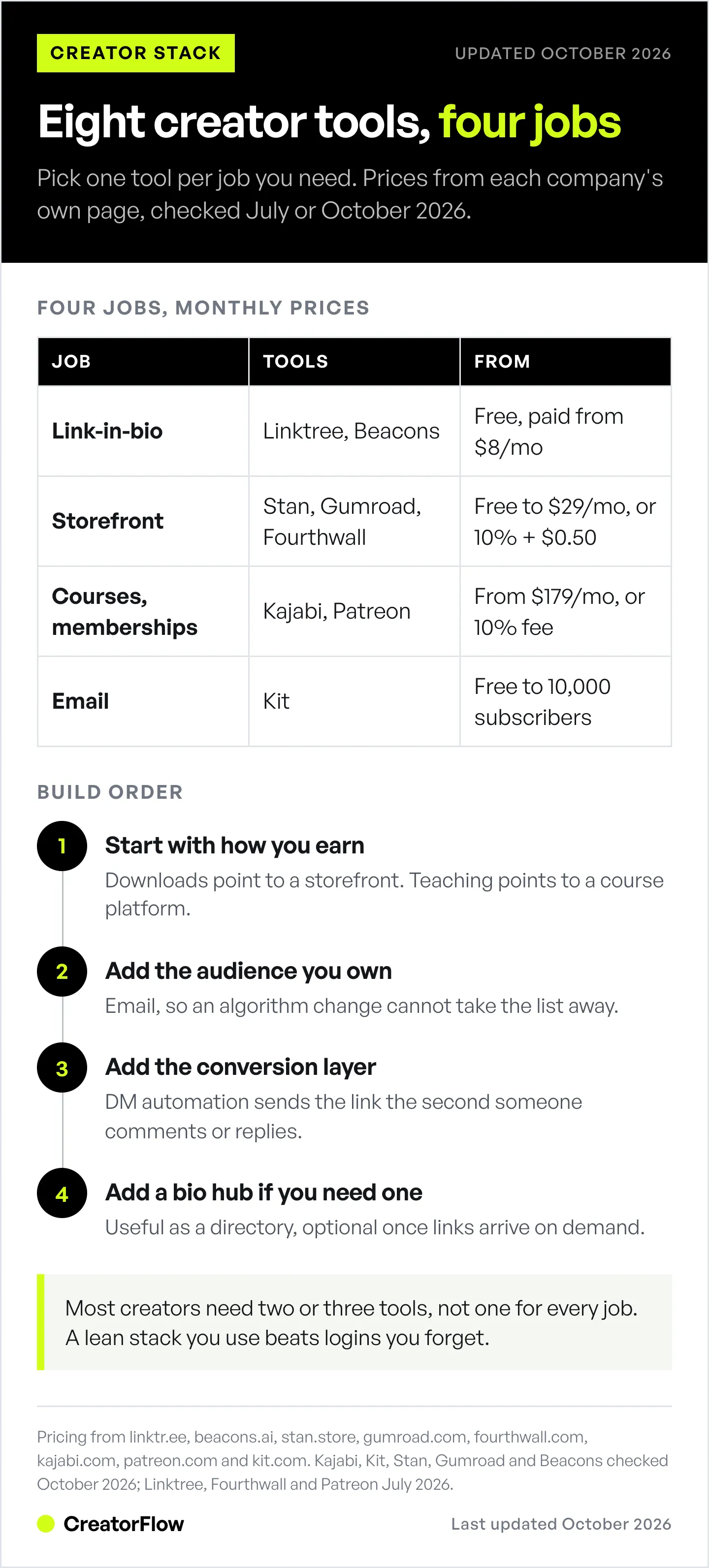
Influencer marketing tools for creators cluster into six jobs. Link-in-bio and storefront tools hold your offers, email and membership tools own your audience, brand-deal marketplaces find sponsorships, and DM automation delivers links inside Instagram. The table below lists all twelve, with pricing first verified in July 2026 and the main plans re-checked in October 2026. Pick by the job you need filled today, then add the next tool when the current setup starts limiting you.
| Tool | Job | Starting price | Best for |
|---|---|---|---|
| Linktree | Link-in-bio | Free, paid from $8/mo | A recognizable one-tap link hub |
| Beacons | Link-in-bio + monetization | Free, paid from $10/mo | Bio page plus a media kit for brand pitches |
| Stan Store | Storefront | $29/mo | Mobile-first storefront for digital products |
| Gumroad | Digital product sales | No monthly fee, 10% + $0.50 per sale | Selling one-off downloads with no subscription |
| Fourthwall | Merch + memberships | Free, Pro $19/mo | Physical merch and print-on-demand |
| Kajabi | Courses + coaching | From $179/mo ($143/mo billed annually) | Course businesses that want one platform |
| Patreon | Memberships | Free, 10% platform fee | Recurring fan subscriptions |
| Kit (ConvertKit) | Email marketing | Free up to 10,000 subscribers | Owning your audience off-platform |
| Collabstr | Brand deals | Free to join, fee per order | Finding sponsorships without pitching |
| CreatorFlow | Instagram DM automation | Free, Pro $15/mo flat | Delivering links the moment someone comments |
| ManyChat | Multi-platform automation | Free (25 contacts), from $17/mo ($14/mo annual) | Automating across Instagram, Messenger, WhatsApp, TikTok |
| LinkDM | Instagram DM automation | Free, Pro $19/mo | High DM volume on Instagram |
Prices below come straight from each company’s own page. Kajabi, Kit, Stan Store, Gumroad, Beacons, ManyChat and LinkDM prices and Linktree’s plan features were re-checked in October 2026.
Link-in-Bio: Linktree and Beacons
Link-in-bio tools give you one tappable page for every link in your bio. They are the easiest first tool for a creator because scrollers already know how they work. A bio page on its own waits for a tap. It does not send a specific link at the moment of intent, which is why most creators pair it with something that does.
Linktree is the original link hub and still the most recognizable. It offers a free plan, with paid plans starting at $8/month, or about $6/month billed annually, adding scheduling, deeper customization, and analytics (linktr.ee, July 2026). If you want one predictable place for your storefront, newsletter, and latest video, Linktree does that job with almost no setup. Its pricing page also lists Instagram auto-replies on every plan, starting at 1,000 sends a month on Free (checked October 2026).
Beacons combines a bio page with monetization and, notably, a media kit builder. The free plan is free forever, with paid plans at $10/month (Creator), $30/month (Creator Plus), and $90/month (Creator Max) (beacons.ai, October 2026). The media kit is the standout: if you plan to pitch brands, Beacons helps you package your audience stats and rates into something you can send.
Both are built around the bio page, and a bio page waits for someone to tap through. When a viewer comments “where did you get that” under a Reel, they are not going to your bio, reading a menu, and hunting for the right link. That specific moment is handled by DM automation, covered further down.
Storefronts and Digital Products: Stan, Gumroad, Fourthwall
Storefront tools handle the actual sale: checkout, delivery, and payment. Which one fits depends on what you sell. Digital downloads, mobile-first product pages, and physical merch each have a different best pick.
Stan Store builds a mobile-optimized storefront for digital products, courses, bookings, and subscriptions, with one-tap checkout and built-in email capture. Stan’s pricing post lists $29/month for the Creator plan and $99/month for Creator Pro, with zero platform transaction fees (checked October 2026). Its appeal is speed: creators launch a clean, phone-friendly store in an afternoon. We compare it directly with a DM-first approach in our breakdown of Stan Store versus CreatorFlow for affiliate creators.
Gumroad sells digital products with no monthly fee at all. It charges 10% plus $0.50 per direct sale, rising to 30% for buyers who discover you through the Gumroad marketplace, and payment processing is separate, according to Gumroad’s pricing page (checked October 2026). For a creator selling an occasional ebook, preset pack, or template, paying only when you sell beats a monthly subscription.
Fourthwall is built for merch and memberships. The free plan carries standard platform fees, and Fourthwall Pro is $19/month or $180/year. Physical products you ship through print-on-demand carry no platform fee, digital products run around 3 to 5%, and memberships are 5%, with payment processing on top (fourthwall.com, July 2026). If your audience wants hoodies and mugs, this is the specialist.
Courses and Memberships: Kajabi and Patreon
Once you sell knowledge or recurring access, you move from selling products to running programs. These two tools cost more, and that is the point: they replace several other subscriptions when you are actively teaching or building a paid community.
Kajabi is an all-in-one platform for course creators, coaches, and educators. It bundles course hosting, a website builder, email marketing, funnels, and communities. Kajabi’s pricing page lists Basic at $179/month, Growth at $249 and Pro at $499 billed monthly, or $143, $199 and $399 a month billed annually (checked October 2026). Higher plans add more products and contacts. It is the priciest tool on this list, so it earns its keep only when courses or coaching are your main revenue, not a side experiment.
Patreon is the best-known membership platform, letting fans subscribe for exclusive content, community access, and perks. There is no flat monthly fee. New creators are on a standard 10% platform fee on earnings, with payment processing separate (support.patreon.com, July 2026). Patreon suits creators with a highly engaged audience who prefer predictable recurring income over chasing sponsorships.
Email That You Actually Own: Kit
Every tool above lives on a platform you do not control. Email is the one audience you keep if an algorithm changes or an account gets locked. That is why email marketing sits at the center of most serious creator stacks.
Kit, formerly ConvertKit, is email marketing built for creators. Its Free plan covers up to 10,000 subscribers with unlimited emails, forms, and landing pages. Automated email sequences start on the paid Creator plan, which Kit’s pricing page lists at $33/month billed yearly for 1,000 subscribers (checked October 2026). It handles newsletters, automated sequences, segmentation, and subscriber tagging.
The catch with any email tool is that a list only grows if people join it. The fastest way to grow one is to collect the address at the moment of interest, which is where an email capture flow inside Instagram DMs moves people from a comment to your list without a landing page in between.
Brand Deals: Collabstr
If your monetization plan is sponsorships rather than selling your own products, a brand-deal marketplace shortcuts the pitching. It puts you in front of companies already looking to pay creators.
Collabstr connects creators with brands for sponsorships and paid collaborations across Instagram, TikTok, and YouTube. It is free for creators to join. Collabstr takes a fee on each order, and the rate depends on the plan, so check its pricing page before you accept a deal. It suits creators moving into user-generated content and paid partnerships who would rather be found than cold-pitch brands.
For the outreach side of landing partnerships, our guide on how to get brand deals on Instagram covers pitching, rate-setting, and media kits in more detail.
DM Automation: The Layer That Turns Audience Into Clicks
Here is the job nearly every tool roundup treats as an afterthought. A storefront, a bio link, and a course all sit still until someone visits them. The one moment a follower is most ready to act is right after they comment on or reply to your post, and that is the moment DM automation captures. It sends your link, lead magnet, or booking page automatically, inside Instagram, in seconds. If you are new to the category, start with our complete guide to Instagram DM automation.
Three tools lead here, and they suit different creators.
CreatorFlow is Instagram-first and priced flat. The free plan covers 500 DMs a month, Pro is $15/month (or $12/month billed annually), and Growth is $30/month, with the price fixed no matter how large your audience grows. Paid plans add a follow gate, an email gate that captures addresses before sending a link, geographic click analytics, and CSV export. It is built by CreatorFlow Labs and connects through Meta’s official API as a Meta Tech Provider (since December 2025), so there is no password sharing. It fits solo creators and affiliates who want simple setup and predictable pricing.
ManyChat is the broadest of the three. It automates across Instagram, Facebook Messenger, WhatsApp, and TikTok, and is a Meta Business Partner. Pricing is contact-based. ManyChat’s pricing page lists Free (25 contacts), Essential $17/month, Pro $39/month, Business $99/month and Advanced $199/month billed monthly, or $14, $29, $69 and $139 per month billed yearly (checked October 2026). If your audience is spread across several platforms and you want one automation tool for all of them, ManyChat covers the most ground. See our side-by-side CreatorFlow versus ManyChat comparison for how the two differ on price and scope.
LinkDM is Instagram-focused like CreatorFlow. It offers a free plan with 1,000 DMs a month. LinkDM Pro is $19/month with 25,000 DMs and up to three Instagram accounts, according to its pricing page (checked October 2026). It is a strong fit for creators who push large DM volume from a small number of Instagram accounts.
The reason this layer matters: most of the other tools assume traffic already arrived. DM automation is what creates that traffic from the engagement your content already earns.
How to Build Your Stack Without Buying All Twelve
The mistake is treating a tools list as a shopping list. The best creator stacks are two or three tools that each do one clear job and work together. Use this order.
- Start with how you earn. Selling downloads points you to Gumroad or Stan. Teaching points you to Kajabi. Sponsorships point you to Collabstr and Beacons. Recurring community points you to Patreon.
- Add the audience layer you own. Kit for email, so you are not renting your entire audience from a platform that can change the rules overnight.
- Add the conversion layer. DM automation to deliver links and capture emails at the moment of intent. This is the piece that feeds everything above it, and it is the one most creators add last when it should often come second.
- Add a bio hub only if you need one. Linktree or Beacons is useful as a static directory, but it is optional if your DM automation is already sending the right link on demand.
Most creators overbuy at step one and skip step three. For a prescriptive version of this build, our Instagram creator tool stack for monetization lays out a five-layer setup with specific picks, and our guide to monetizing your Instagram audience covers the revenue math behind each layer.
The important thing is restraint. A lean stack that you actually use beats twelve logins you forget about.
Scheduling and publishing sit in a separate category with its own pricing quirks, covered in our guide to social media management tools.
FAQ
What are the best influencer marketing tools for creators?
The best tool depends on how you monetize. For selling digital products, Gumroad or Stan Store handle checkout and delivery. For courses and coaching, Kajabi bundles hosting, email, and funnels. For sponsorships, Collabstr and Beacons help you find and pitch brands. For turning Instagram engagement into clicks and emails, DM automation tools like CreatorFlow, ManyChat, and LinkDM deliver links the moment a follower comments or replies.
Which influencer marketing tools are free?
Several offer real free tiers. Kit is free up to 10,000 email subscribers, Gumroad and Patreon charge only when you earn, Collabstr is free for creators to join, and Linktree, Beacons, ManyChat, LinkDM, and CreatorFlow all have free plans. CreatorFlow’s free plan includes 500 DMs a month with comment-to-DM automation, so you can test link delivery before paying for anything.
What is the difference between influencer marketing tools and creator tools?
Influencer marketing tools help you grow, monetize, and convert your audience: storefronts, link-in-bio pages, membership platforms, brand-deal marketplaces, and DM automation. Creator tools is a broader category that also includes the software you use to make content, such as video editors, caption generators, design apps, and scheduling tools. This guide focuses on the monetization side.
Do I need ManyChat, LinkDM, or CreatorFlow if I already have Linktree?
Often yes, because they do different jobs. Linktree’s bio page is a hub someone taps through on their own, and its built-in Instagram auto-reply starts at 1,000 sends a month on Free. A dedicated DM automation tool delivers a specific link automatically the instant a follower comments a keyword or replies to a Story, when their intent is highest. Most creators keep a bio link for browsing and add DM automation for conversion, since a bio page cannot start the conversation for you.
What is the best link-in-bio tool for creators?
Linktree remains the most recognizable and the simplest to set up as a central link hub. Beacons is the stronger pick if you also want a media kit for pitching brands and built-in monetization on the same page. If your main goal is delivering the right link at the moment someone asks, pair the bio page with DM automation.
How many tools do creators actually need to monetize?
Most creators need two or three, not a full dozen. A typical lean stack is one way to sell (a storefront or course platform), one way to own your audience (email), and one way to convert engagement into clicks (DM automation). Add a bio hub or a brand-deal marketplace only when your monetization strategy specifically calls for it.
What tools help creators land brand deals?
Beacons and Collabstr are the two most useful. Beacons builds a professional media kit that showcases your stats and rates, which you can send to brands. Collabstr is a marketplace where brands find and hire creators directly, so you spend less time cold-pitching. Growing an engaged, well-segmented audience first makes both far more effective.
Tool pricing and features first verified from each company’s official pages in July 2026. In October 2026 we re-checked Kajabi, Kit, Stan Store, Gumroad, Beacons, ManyChat and LinkDM pricing and Linktree’s Instagram auto-reply feature. Fourthwall, Patreon and Linktree prices are as of July 2026. Plans and fees change, so confirm current pricing before you buy. Individual results vary.


