
An Instagram creator tool stack is the set of SaaS tools you run alongside Instagram, and the market splits into six categories: scheduling, analytics, DM automation, link-in-bio, growth, and influencer platforms. A minimum viable stack costs $15/month total. DM automation delivers the highest ROI, with 90% open rates on messages versus 20-35% for email, and free native tools handle scheduling and analytics for most solo creators.
You don’t need 12 tools to run your Instagram. You need the right 2-3.
The Instagram SaaS market sits inside a broader social media management software industry valued at $29.93-$33.03 billion in 2025, projected to hit $36.42-$40.24 billion in 2026 (Fortune Business Insights, Grand View Research, April 2026). That market includes thousands of tools, from free schedulers to enterprise platforms costing $500+/month.
The problem isn’t finding tools. It’s knowing which categories matter for your specific situation, what each tool type does, and which ones you can skip entirely. This guide breaks down every type of Instagram SaaS tool, what it costs, who needs it, and how to build a stack that works without bleeding your budget. Coaches running a service business rather than a content business should start with the coaching tech stack audit, which prices each tool per active client.
Key Takeaways
- Minimum viable stack costs $15/month: A DM automation tool plus Instagram’s free native scheduler and Insights covers most solo creators
- DM automation delivers the highest ROI: 90% open rates on DMs vs. 20-35% for email, and instant responses convert 391% better than 30-minute delays (LeadResponse, April 2026)
- 6 tool categories exist: Scheduling, analytics, DM automation, link-in-bio, growth, and influencer marketing platforms, but most creators only need 2-3
- Watch how pricing scales: ManyChat runs $17 to $199/month by contact tier ($14 to $139 billed annually), while flat-rate tools like CreatorFlow ($15/month) and LinkDM ($19/month) keep costs predictable
- Nano-influencer dominance: 75.9% of influencers have 1K-10K followers (Phyllo, April 2026), and they average 5.2-6.23% engagement rates, proving you don’t need 100K followers to generate revenue
- Bottom line: Start with DM automation as your first paid tool, use free scheduling and analytics, and avoid any growth tool that requires your Instagram password

What “SaaS for Instagram” Means
SaaS (Software-as-a-Service) for Instagram refers to cloud-based tools that connect to your Instagram account through Meta’s official APIs. You access them through a browser or app. No software to install. No code to write.
These tools automate tasks you’d otherwise do manually: scheduling posts, replying to DMs, tracking analytics, managing links, and growing your audience. They operate within Instagram’s rules by using Meta’s approved Instagram Graph API and Messaging API.
What the API allows SaaS tools to do (as of May 2026):
- Publish posts, Reels, and Stories on your behalf
- Send and receive DMs automatically
- Read, reply to, and moderate comments
- Access 100+ performance metrics (impressions, reach, saves, etc.)
- Manage hashtag discovery for business intelligence
What the API restricts:
- Per-second rate limits on the Instagram API with Instagram Login path: 100 calls per second for text and links, 10 per second for audio and video, and 750 per hour for private replies to comments
- 24-hour messaging window for new conversations
- Business or creator accounts only (personal accounts have no API access)
- OAuth authentication required (no password sharing)
(Source: developers.facebook.com/docs/instagram-platform, April 2026)
The Basic Display API was fully deprecated in 2025. All Instagram SaaS tools now operate through the Graph API and Messaging API (Storrito, April 2026).
The 6 Types of Instagram Creator Tools
1. Content Scheduling and Publishing Tools
What they do: Plan, schedule, and auto-publish posts, Reels, Stories, and carousels. Most include a visual calendar, drag-and-drop planning, and best-time-to-post suggestions.
Who needs this: Creators posting 4+ times per week who want to batch-create content. If you post 2-3 times a week, Instagram’s native scheduling (available since 2023) handles this fine.
Key players and pricing (as of May 2026):
| Tool | Price | Channels | Notable Feature |
|---|---|---|---|
| Buffer | Free (3 channels, 10 posts) to $10/mo per channel | Instagram, Facebook, Twitter, LinkedIn, Pinterest | Simplest UI, best free plan |
| Later | $25-$80/mo | Instagram, TikTok, Facebook, Pinterest, LinkedIn | Visual planner, link-in-bio included |
| Hootsuite | $199-$399/mo | 10+ platforms | Enterprise-grade, built for large teams |
| Planoly | $16-$43/mo | Instagram, Pinterest, TikTok | Instagram-first design |
(Sources: buffer.com, later.com/pricing, hootsuite.com, April 2026)
The honest take: Scheduling is the most commoditized category. Buffer’s free plan or Instagram’s native scheduler covers most solo creators. You don’t need a $199/month Hootsuite plan unless you’re managing 10+ accounts across platforms.
2. Analytics and Reporting Platforms
What they do: Track engagement rates, follower growth, content performance, competitor benchmarks, and audience demographics. Generate exportable reports.
Who needs this: Agencies reporting to clients, brands tracking campaign ROI, and creators who’ve outgrown Instagram’s native Insights. Most solo creators don’t need a paid analytics tool.
Key players and pricing (as of May 2026):
| Tool | Price | Best For |
|---|---|---|
| Instagram Insights | Free (built-in) | Solo creators, basic metrics |
| Iconosquare | $33-$59/mo | Mid-size creators, competitor tracking |
| Sprout Social | $249-$499/mo per user | Agencies, enterprise teams |
| Social Insider | Custom pricing | Benchmarking, industry comparisons |
(Sources: iconosquare.com, sproutsocial.com, April 2026)
The honest take: Instagram’s native Insights gives you reach, impressions, saves, shares, profile visits, and follower demographics for free. A paid analytics tool makes sense when you need competitor benchmarking, exportable client reports, or historical data beyond 90 days. For most creators under 100K followers, the free option works.
3. DM Automation and Chatbot Tools
What they do: Auto-reply to comments with DMs, respond to story replies, trigger messages based on keywords, capture emails within conversations, and send links instantly.
Who needs this: Any creator monetizing through Instagram. Affiliates sending product links, coaches booking calls, e-commerce sellers driving traffic, and anyone receiving 20+ DMs per day. This is the highest-impact tool category for revenue generation.
Why DM automation is the fastest-growing Instagram SaaS category:
- DM open rates: ~90% vs. 20-35% for email (Unkoa, April 2026)
- DM reply rates: 50-60% vs. 1-5% CTR for email (Unkoa, April 2026)
- Responding within 1 minute: 391% higher conversion than waiting 30 minutes (LeadResponse, April 2026)
- Email capture via DM: 70-80% opt-in rate vs. 10-20% through traditional forms (Stephanie Kase, April 2026)
Key players and pricing (as of May 2026):
| Tool | Free Plan | Pro Price | Pricing Model | Platforms |
|---|---|---|---|---|
| CreatorFlow | 500 DMs/mo | $15/mo (5,000 DMs) | Flat rate | Instagram only |
| ManyChat | 25 contacts | $17-$199/mo ($14-$139 annual) | Per-contact scaling | Instagram, Facebook, WhatsApp, SMS |
| LinkDM | 1,000 DMs/mo | $19/mo | Flat rate | Instagram only |
| Inro | Yes | ~$14/mo | Engagement-based | Instagram only |
| Chatfuel | 7-day trial | $69/mo | Flat rate | Instagram, WhatsApp, TikTok |
(Sources: creatorflow.so/pricing, manychat.com/pricing, linkdm.com/pricing, inro.social, April 2026)
Pricing model to plan for: ManyChat prices by active contact. Billed monthly it runs Essential $17 (250 contacts), Pro $39 (2,500), Business $99 (7,500), and Advanced $199 (25,000); billed annually those are $14/$29/$69/$139 per month (manychat.com/pricing, July 2026). ManyChat AI is a separate add-on, and WhatsApp messaging is charged per conversation on top. Flat-rate tools like CreatorFlow ($15/mo) and LinkDM ($19/mo) hold the same price as your audience grows, so the right pick depends on whether your contact count is stable or climbing.
The honest take: If you’re monetizing Instagram, DM automation gives you the highest ROI per dollar spent. A $15/month tool that sends links instantly when someone comments generates more revenue than a $200/month analytics platform. This should be the first paid tool in your stack. For a side-by-side breakdown of every option, see our best Instagram DM automation tools comparison.
How Instagram DM automation works (full breakdown)
4. Link-in-Bio and Monetization Tools
What they do: Create a landing page from your Instagram bio link. Display multiple links, sell digital products, collect tips, gather email addresses, and showcase your content.
Who needs this: Creators with multiple destinations (website, shop, podcast, YouTube, booking page). If you only need to send people to one place, a direct link works fine.
Key players and pricing (as of May 2026):
| Tool | Free Plan | Pro Price | Notable Feature |
|---|---|---|---|
| Linktree | Yes | $5-$24/mo | Most popular, 50M+ users |
| Beacons | Yes (9% commission on sales) | $10-$25/mo | Built-in digital product sales |
| Stan Store | No | $30/mo | Creator storefront focus |
| Koji | Yes | Free (monetizes through features) | Interactive link experiences |
(Sources: linktree.com, beacons.ai, stanstore.com, April 2026)
The honest take: Link-in-bio tools solve a real problem (Instagram only allows one bio link), but DM automation is replacing them for many use cases. Instead of sending someone to a link-in-bio page where they browse 10 options, a comment-to-DM automation sends the exact link they asked for. Direct path. Higher conversion.
Why DM automation outperforms bio links for affiliate clicks
5. Growth and Engagement Tools
What they do: Hashtag research, auto-liking, auto-following, comment management, engagement pods, follower growth optimization.
Who needs this: Proceed with caution. This is the riskiest category.
The compliance problem: Many growth tools operate in grey areas of Instagram’s Terms of Service. Auto-liking, auto-following, and engagement pods violate Instagram’s rules. Tools that use unofficial APIs or scraping methods risk getting your account suspended.
Instagram’s 2025-2026 enforcement has gotten stricter. The platform prioritizes originality and penalizes recycled content and artificial engagement signals (Hootsuite, April 2026).
Safe alternatives:
- Flick ($14-$67/mo) - Hashtag research and analytics (doesn’t auto-engage)
- Instagram’s native tools - Scheduled posts, Insights, suggested Reels audio
The honest take: Skip tools that promise to “grow your followers automatically.” If a tool needs your password or uses unofficial APIs, it’s a ban risk. Organic growth through quality content + DM automation for conversion is the sustainable path. Nano-influencers (1K-10K followers) already get 5.2-6.23% engagement rates (InfluenceFlow, April 2026). You don’t need 100K followers to generate revenue. You need the right 5K engaging with your content.
6. Influencer Marketing Platforms
What they do: Match brands with creators, manage campaigns, track influencer ROI, handle contracts and payments.
Who needs this: Brands and agencies running influencer campaigns. Not individual creators. These platforms serve the buy side (brands spending money) not the sell side (creators earning money).
Key players and pricing (as of May 2026):
| Tool | Starting Price | Best For |
|---|---|---|
| Aspire | Custom (typically $500+/mo) | Mid-market brands |
| Grin | Custom ($500+/mo) | E-commerce brands |
| CreatorIQ | Enterprise pricing | Large brands, agencies |
| Upfluence | Custom | SMBs to enterprise |
(Sources: aspire.io, grin.co, April 2026)
The honest take: If you’re a creator, you don’t need these platforms. Brands find you through them, not the other way around. Focus on growing your engagement rate and monetizing your existing audience. 73% of brands now favor micro and mid-tier creators over mega-influencers (Influencer Marketing Hub Benchmark Report, April 2026). A strong engagement rate matters more than follower count.
How to Build Your Stack (By Creator Type)
Different creators need different tool combinations. Here’s the minimum viable stack for each:
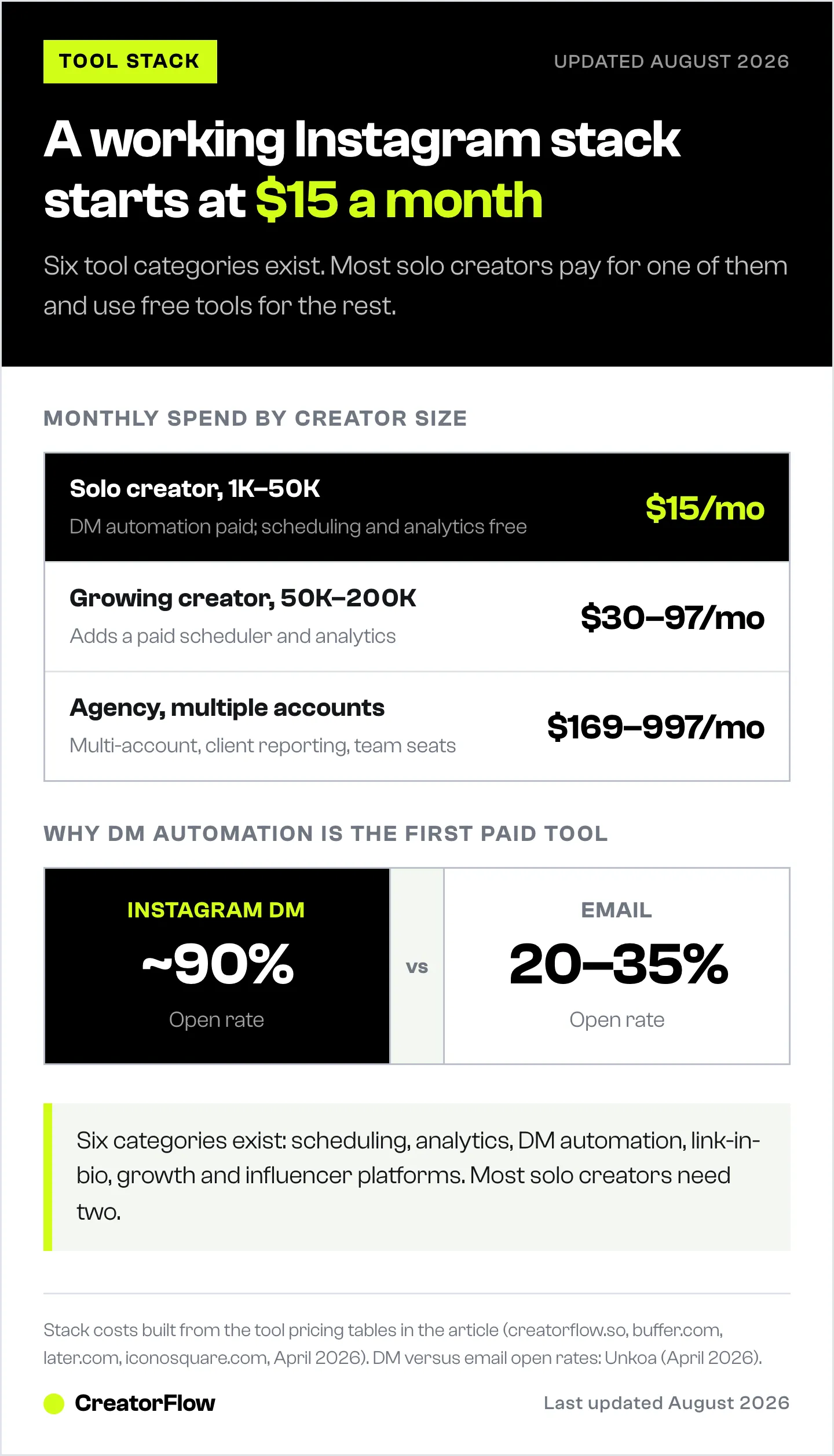
Solo Creator (1K-50K Followers)
| Tool Category | Recommendation | Monthly Cost |
|---|---|---|
| DM Automation | CreatorFlow (Pro) | $15 |
| Scheduling | Instagram native or Buffer (free) | $0 |
| Analytics | Instagram Insights (free) | $0 |
| Link-in-Bio | Optional (Linktree free) | $0 |
| Total | $15/mo |
You’re monetizing through affiliate links, digital products, or coaching. DM automation is the only paid tool you need. Everything else has a free option that works. For a monetization-first version of this stack with exact tools and pricing per layer, see the 5-tool Instagram creator stack for 2026.
Growing Creator (50K-200K Followers)
| Tool Category | Recommendation | Monthly Cost |
|---|---|---|
| DM Automation | CreatorFlow (Growth) or ManyChat Essential | $15-30 |
| Scheduling | Later or Buffer paid | $10-25 |
| Analytics | Instagram Insights + Iconosquare | $0-33 |
| Link-in-Bio | Linktree Pro or Beacons | $5-10 |
| Total | $30-97/mo |
At this level, you’re likely working with brands and need better analytics for reporting. A scheduler helps batch content. DM automation handles the volume of inbound messages.
Agency or Multi-Account Manager
| Tool Category | Recommendation | Monthly Cost |
|---|---|---|
| DM Automation | CreatorFlow (Growth, 5 accounts) or ManyChat (Pro/Business, billed monthly) | $30-99 |
| Scheduling | Later (Agency) or Hootsuite | $80-399 |
| Analytics | Sprout Social or Iconosquare | $59-499 |
| Link-in-Bio | Per client decision | Varies |
| Total | $169-997/mo |
Agencies need multi-account management, client reporting, and team collaboration. This is where enterprise pricing makes sense.
Manual Work vs. SaaS Automation: The Numbers
Here’s what the data shows for creators who switch from manual workflows to SaaS tools:
| Metric | Manual | With SaaS Tools | Source |
|---|---|---|---|
| Weekly time on Instagram tasks | 15-20 hours | 5-10 hours | HypeAuditor, April 2026 |
| DM response time | Hours (when you’re online) | Under 2 seconds (24/7) | LeadResponse, April 2026 |
| DM-to-sale conversion | 7-12% (slow responses) | 15-20% (instant responses) | Napolify, April 2026 |
| Email capture rate | 10-20% (link-in-bio forms) | 70-80% (DM automation) | Stephanie Kase, April 2026 |
| Lead capture volume | Baseline | 3-5x more leads | HypeAuditor, April 2026 |
The ROI calculation is straightforward. A solo creator spending 15 hours/week on Instagram tasks earns roughly $27/hour at the average micro-influencer monthly income of $1,420 (Hopp, April 2026). Saving 10 hours/week through automation = $270/week in reclaimed time. A $15/month tool pays for itself in the first day. For step-by-step setup instructions, see our Instagram DM automation complete guide.
Compliance and Safety: What Matters
Not all Instagram SaaS tools are built the same. The difference between safe and risky tools comes down to one thing: how they connect to Instagram.
Safe tools use Meta’s official APIs:
- Instagram Graph API for content and analytics
- Instagram Messaging API for DMs
- OAuth authentication (no password required)
- Rate limits respected (Meta’s per-second API ceilings, plus tool-side pacing around 200 DMs/hour)
- Meta reviews and approves each app’s permissions individually
Risky tools use unofficial methods:
- Browser automation or scraping
- Require your Instagram password
- Bypass rate limits
- No Meta approval or review
- Can trigger account suspension
How to verify a tool is safe:
- Check if they require your Instagram password (red flag if yes)
- Look for “Meta Business Partner” or “Meta Tech Provider” badge
- Verify they use OAuth login (the “Login with Instagram” popup)
- Check their documentation for API compliance claims
- Search “[tool name] banned” or “[tool name] suspended” for user reports
CreatorFlow is a Meta Tech Provider using the official Instagram Graph API. No password sharing, OAuth authentication, GDPR-compliant data handling (creatorflow.so, April 2026).
Full guide to avoiding Instagram bans with automation
The Instagram Creator Economy Context
Understanding why these tools exist requires understanding the scale of Instagram’s creator economy in 2026:
- 3 billion monthly active users on Instagram (DemandSage, April 2026)
- 350M+ business accounts, 65% of which are small businesses (DemandSage, April 2026)
- 75.9% of influencers are nano-influencers (1K-10K followers) (Phyllo, April 2026)
- $5.78 return per $1 spent on influencer marketing (SociallyIn, April 2026)
- 86% of US marketers plan to work with influencers in 2026 (Charle Agency, April 2026)
- Average creator earnings: $81,700/year, though this is heavily skewed by top earners. Micro-influencers average $1,420/month (Hopp, April 2026)
The money is flowing into Instagram. SaaS tools exist to help creators capture more of it with less manual work. The question isn’t whether to use tools. It’s which ones give you the best return for your specific situation. For a deeper look at how to make money on Instagram across different revenue streams, check our full guide.
FAQ
What is SaaS for Instagram?
SaaS (Software-as-a-Service) for Instagram refers to cloud-based tools that connect to your Instagram account through Meta’s official APIs to automate tasks like scheduling posts, sending DMs, tracking analytics, and managing engagement. You access them through a browser without installing software. The broader social media management software market is valued at $29.93-$33.03 billion in 2025 (Fortune Business Insights, Grand View Research, April 2026).
Which Instagram SaaS tools do I actually need?
Most solo creators need two tools: a DM automation platform ($15-19/month) and either Instagram’s native scheduler (free) or a third-party scheduler ($0-25/month). Analytics are free through Instagram Insights. Link-in-bio tools are optional. Growth tools that promise automatic followers are risky. The minimum viable stack costs $15/month.
Are Instagram automation tools safe to use?
Tools built on Meta’s official Instagram Graph API and Messaging API are safe. They use OAuth authentication (no password sharing), respect Meta’s rate limits and pace sends at around 200 DMs/hour, and are reviewed by Meta. Tools that require your password, use browser automation, or scrape data are risky and can get your account suspended (developers.facebook.com, April 2026).
How much do Instagram SaaS tools cost?
Ranges widely by category. DM automation: $0-65/month. Scheduling: $0-399/month. Analytics: $0-499/month. Link-in-bio: $0-29/month. A solo creator stack runs $15-44/month total. Watch for per-contact pricing models (like ManyChat) that scale costs as your audience grows. Flat-rate tools like CreatorFlow ($15/month) keep costs predictable (creatorflow.so/pricing, April 2026).
What’s the difference between DM automation and a chatbot?
DM automation sends pre-written messages triggered by specific actions (comments, story replies, keywords). A chatbot uses conversational AI to hold multi-step conversations. Most Instagram tools (CreatorFlow, LinkDM, ManyChat) focus on trigger-based automation rather than full chatbot functionality. Trigger-based automation is simpler to set up, more predictable, and works within Instagram’s API limits.
Can I use multiple Instagram SaaS tools at the same time?
Yes. Each tool connects to your account through separate API permissions. A typical multi-tool stack: Later for scheduling + CreatorFlow for DM automation + Linktree for bio link. They don’t conflict because they handle different functions. The only limitation is Instagram’s per-account API rate limits, which apply across all connected apps.
Sources Verified (April 12, 2026):
- Fortune Business Insights - Social Media Management Market (fortunebusinessinsights.com)
- Grand View Research - Social Media Management Market (grandviewresearch.com)
- Meta for Developers - Instagram Platform (developers.facebook.com)
- Storrito - Instagram API 2026 Rules (storrito.com)
- Buffer Pricing (buffer.com)
- Later Pricing (later.com/pricing)
- Hootsuite Pricing (hootsuite.com)
- ManyChat Pricing (manychat.com/pricing)
- Featurebase - ManyChat Pricing Analysis (featurebase.app)
- Dealism - ManyChat Hidden Costs (dealism.ai)
- CreatorFlow Pricing (creatorflow.so/pricing)
- LinkDM Pricing (linkdm.com/pricing)
- Inro (inro.social)
- Iconosquare (iconosquare.com)
- Sprout Social (sproutsocial.com)
- Linktree (linktree.com)
- Beacons (beacons.ai)
- Unkoa - DM vs Email Open Rates (unkoa.com)
- LeadResponse - Instagram DM Statistics (leadresponse.co)
- Stephanie Kase - Email Automation on Instagram (stephaniekase.com)
- Napolify - DM Conversion Rates (napolify.com)
- HypeAuditor - Instagram Automation Tools (hypeauditor.com)
- InfluenceFlow - Engagement Rate Benchmarks (influenceflow.io)
- DemandSage - Instagram Statistics (demandsage.com)
- Phyllo - Instagram Demographics (getphyllo.com)
- Influencer Marketing Hub - Benchmark Report 2026 (influencermarketinghub.com)
- SociallyIn - Influencer Marketing Statistics (sociallyin.com)
- Charle Agency - Influencer Marketing Statistics (charleagency.com)
- Hopp - Creator Economy Statistics (hopp.co)
- Hootsuite - Instagram Algorithm 2026 (blog.hootsuite.com)


