

A coaching tech stack audit is a review of every tool your coaching business pays for, scored on two numbers: what each tool costs per active client, and how many minutes it adds between a lead’s first message and a booked call. Most audits score tools on features and end up cutting the cheap ones. Cost per active client almost always points at a different tool.
Here is what a normal stack looks like after three years of growth. Kajabi holds the program. Calendly holds the calendar. Kit holds the list. Zapier holds it together. Stripe takes the money. Notion holds the notes nobody reads. That is $260 a month before a single client signs, and at eight clients it works out to $32.50 per client per month. The feature score for that stack is excellent. The bill is not. If you would rather retire three of those tools than price them, the platforms that carry courses, coaching and downloads in one account are compared separately.
This guide gives you the audit that produces a dollar figure instead of a feeling. Verified pricing (checked August and October 2026) for the ten tools coaches actually run, the cost-per-client calculation that reorders your cut list, the latency test that finds where leads go cold, and three stage-appropriate stacks with totals you can copy.
Key Takeaways
- Two numbers decide everything: cost per active client and minutes from first message to booked call. Feature scores rank tools; these two rank what to cut.
- Flat pricing and scaling pricing behave differently: a flat $57 tool gets cheaper per client every month you grow, while a per-client or per-subscriber tool gets more expensive at exactly the moment you can least afford it.
- The most expensive line is usually the one you rate highest: at eight clients, a $179/month all-in-one is 69% of a typical stack bill and deserves the most scrutiny, not the least.
- Latency lives in the handoffs, not the tools: every point where you copy something from one app into another is where a lead waits, and waiting is what loses the booking.
- Duplicate jobs are the fastest win: most coaching stacks pay twice for email, twice for scheduling, or twice for payments without noticing.
- Match the stack to the stage: a working stack runs about $15 to $30/month under five clients, $110 to $130 at six to twenty, and $300 or more once a team is involved.
What a Coaching Tech Stack Audit Measures
A coaching tech stack audit measures three things: the total monthly cost of every tool divided by active paying clients, the elapsed time from a lead’s first message to a confirmed booking, and the number of manual handoffs a human performs between apps. Everything else is preference. A tool can be excellent and still fail all three, which is why feature scoring produces audits that change nothing.
The reason to run two numbers instead of one is that they disagree, and the disagreement is the useful part. A scheduling tool at $12 a month has a trivial cost per client and might still be the reason your booking rate is low, because it sits three clicks behind a link nobody sends. An all-in-one at $179 a month can be the biggest line on the bill and still be correct, because it removed four handoffs. You cannot see either of those from a feature list.
What a Coaching Stack Costs in 2026
Kajabi, Kit, Acuity, Calendly, Zapier and CreatorFlow prices below were re-checked in October 2026; Paperbell and CoachAccountable are as of August 2026. Note the right-hand column, because how a tool is priced matters more over three years than what it charges today.
| Tool | Primary job | Monthly | Annual (per month) | Priced by |
|---|---|---|---|---|
| Kajabi Basic | Courses, site, email, funnels | $179 | $143 | Flat, 5 products, 2 admins |
| Kajabi Growth | Same, 50 products | $249 | $199 | Flat, 11 admins |
| Paperbell | Booking, contracts, payments, packages | $57 | $47.50 | Flat, any client count |
| Kit Creator | Email marketing | $39 at 1,000 subs | $33 | Per subscriber |
| Acuity Emerging | Scheduling and payments | $20 | $16 | Flat |
| Acuity Growing | Adds packages, SMS, 6 staff | $34 | $27 | Flat |
| Calendly Standard | Scheduling | $12/seat | $10/seat | Per seat |
| Calendly Teams | Scheduling, routing, round robin | $20/seat | $16/seat | Per seat |
| Zapier Professional | Automation between apps | $29.99 (750 tasks) | $19.99 | Per task |
| CoachAccountable | Client portal and coaching CRM | $20 at 2 clients, $70 at 10 | Varies | Per active client |
| CreatorFlow Pro | Instagram comment and DM to link or booking | $15 | $12 | Flat |
Sources: kajabi.com/pricing, zapier.com/pricing, kit.com/pricing, acuityscheduling.com/pricing, calendly.com/pricing and creatorflow.so/pricing, checked October 2026; paperbell.com and coachaccountable.com published pricing, August 2026.
Three pricing models are hiding in that table. Flat tools charge the same at three clients and three hundred. Per-seat tools charge for every person you add. Per-client and per-subscriber tools charge you more the better your business does. A stack built entirely from the third kind grows a cost line that tracks revenue without tracking margin. If you have not yet set the revenue target the stack has to serve, start with how to make money coaching online.
Step 1: Price Every Tool Per Active Client
Add the monthly cost of every tool, including the ones you forgot. Divide by the number of clients currently paying you. That single number is the one to track month over month, and it is the only fair way to compare a $12 scheduler against a $179 platform.
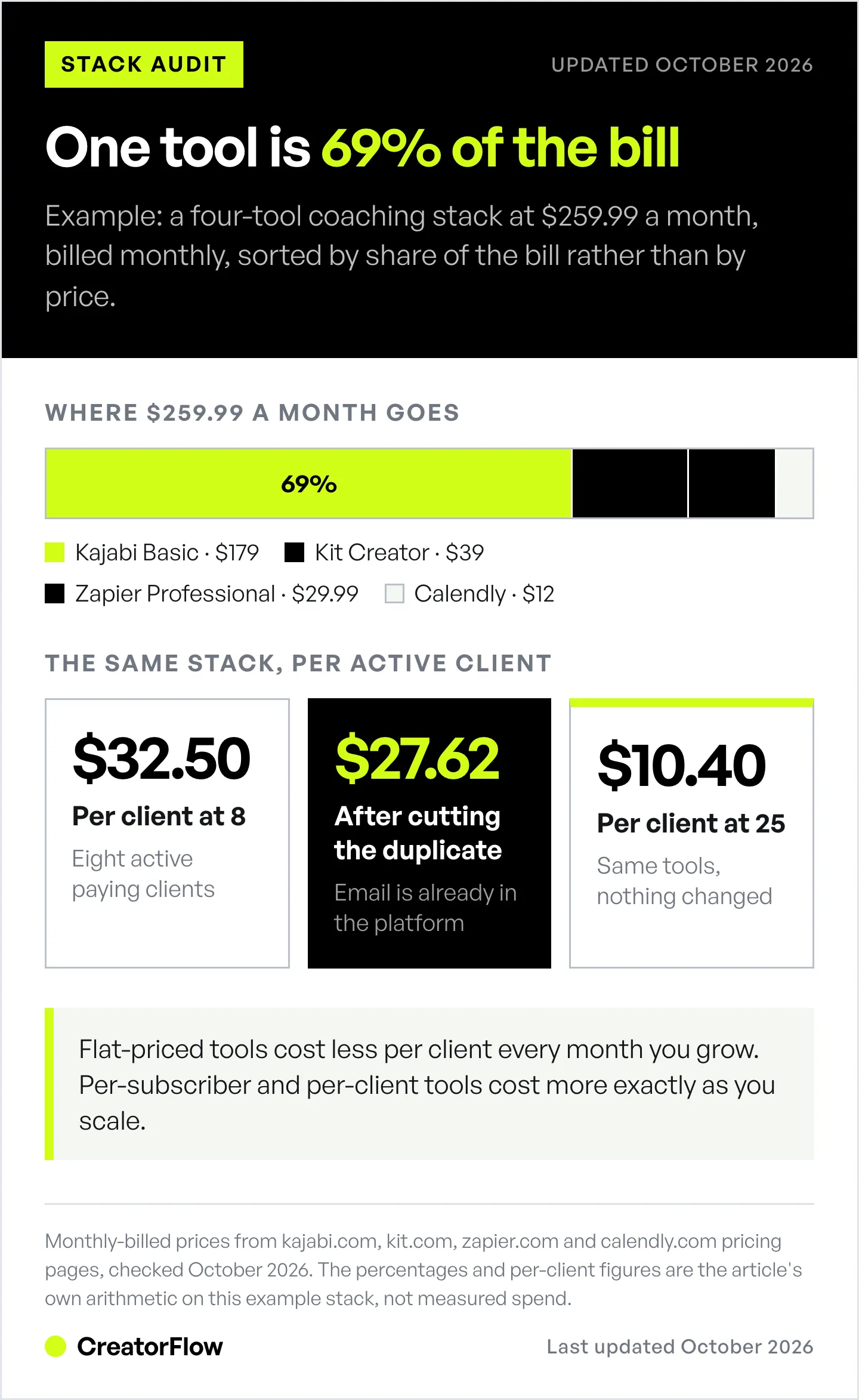
Run it on the stack from the opening. Kajabi Basic at $179, Calendly Standard at $12, Kit Creator at $39, and Zapier Professional at $29.99 comes to $259.99 a month. At eight active clients that is $32.50 per client. At twenty-five clients the same stack is $10.40 per client, and nothing about the tools changed.
Now sort the list by share of the bill rather than by price:
| Tool | Monthly | Share of stack | Per client at 8 |
|---|---|---|---|
| Kajabi Basic | $179 | 68.9% | $22.38 |
| Kit Creator | $39 | 15.0% | $4.88 |
| Zapier Professional | $29.99 | 11.5% | $3.75 |
| Calendly Standard | $12 | 4.6% | $1.50 |
A feature audit rates Kajabi highest, because it does the most. The cost audit says Kajabi is 69% of the bill and every other decision is a rounding error against it. Both readings are correct. Only one of them tells you where to spend your thirty minutes.
Two things fall out of the sort immediately. Kajabi Basic includes email marketing and landing pages, so Kit is a second tool doing a job you already pay for, which is $39 a month for a duplicate. And Kajabi does not carry scheduling, so Calendly is not a duplicate and stays. Cutting the duplicate takes the stack to $220.99, or $27.62 per client, in one decision.
Step 2: Time the Path From First Message to Booked Call
Open your own funnel as a stranger would. Comment on your latest post, or send the DM your content asks for, and start a timer. Stop it when a booking confirmation lands. That elapsed time is your second audit number, and for most coaches it is measured in hours, not minutes.
Speed here is not a preference. The Lead Response Management research, run by James Oldroyd at MIT and published in Harvard Business Review, found that firms contacting a lead within an hour were nearly seven times more likely to qualify that lead than firms that waited even one hour longer, and about sixty times more likely than firms that waited twenty-four hours (Harvard Business Review, 2011). The tools in your stack either shorten that window or they do not.
Break the elapsed time into segments and time each one:
- Message to your eyes. How long before you see it. On Instagram this is usually the largest segment and it is entirely outside your tools.
- Your eyes to your reply. How long before you type something back.
- Reply to booking link. Whether the link arrives in that first reply or in a later one.
- Booking link to confirmed slot. How many screens, questions, and required fields sit between the click and the confirmation.
Segment one is where coaching funnels lose the most and where a CRM cannot help, because the lead is on Instagram and your CRM is not. An automation that sends your booking link the moment someone comments a keyword collapses segments one through three into a single step. That is the job CreatorFlow does for coaches and consultants booking discovery calls, and it is why a $15 line can outperform a $179 one on the number that produces revenue.
For stage-by-stage conversion figures behind each of those segments, the client acquisition benchmarks for coaches piece carries sourced numbers for every step from view to signed client. If your messages arrive but never turn into DMs at all, the failure is upstream, and where the content-to-DM handoff breaks diagnoses which of the four gates is closed.
Step 3: Find the Handoffs a Human Is Carrying
A handoff is any moment you move information between two apps by hand. Copying an email address from a DM into your email tool. Pasting a name into a contract. Retyping a call time into a spreadsheet. Each handoff is a place the process stops when you are asleep, in a session, or on a plane.
List them. For each one, write down what triggers it, how long it takes, and how many times a week it happens. The arithmetic is usually uncomfortable. Four handoffs at three minutes each, twelve times a week, is 2.4 hours a week of typing that a lead is waiting through.
Handoffs are also the reason automation bills grow quietly. Zapier Professional includes 750 tasks a month on its entry tier, and over-limit usage is billed automatically at roughly 1.25 times the base task rate rather than stopping the automation (zapier.com/pricing, August 2026). If a single new lead triggers five tasks across your stack, 750 tasks covers 150 leads a month. A coach running paid traffic can pass that without noticing, and the overage arrives as a surprise line rather than a decision.
Three questions settle each handoff:
- Can the two tools talk to each other natively, without a middle layer?
- If not, is the handoff worth a Zapier task, or is it worth replacing one of the two tools?
- Does the handoff happen before the booking or after it? Handoffs before the booking cost revenue. Handoffs after it cost time, which is cheaper.
Handoffs are easiest to spot once every lead has a named position. If your leads currently live in an inbox rather than on a board, start with the six stages a coaching DM pipeline needs and audit the handoffs stage by stage.
Step 4: Cut, Keep, Fix, or Consolidate
Every tool lands in one of four buckets. The rule is mechanical once you have both numbers, and mechanical is the point, because tools survive audits mainly through sentiment.
| Verdict | Condition | Action |
|---|---|---|
| Cut | Another tool already does its primary job | Cancel at the next renewal, export the data first |
| Keep | Owns a job no other tool covers, and sits on the pre-booking path | Leave alone, do not tinker |
| Fix | Right tool, wrong setup: unused features you pay for, or a manual handoff it could remove | One hour of configuration, re-time the path afterwards |
| Consolidate | Two or three tools each doing part of one job | Move to the one that covers the most, then cut the rest |
Consolidation is the bucket with the money in it and the bucket people get wrong. Moving from three tools at $30 each to one tool at $99 is not consolidation, it is a price increase with fewer options. Test it against both numbers before you move: does cost per client fall, and does the elapsed time from first message to booking fall? If neither improves, the three tools were fine.
Paperbell is the clearest example of the shape to look for, because at $57 a month flat it carries booking, contracts, packages, and payments in one place at any client count (paperbell.com, August 2026). Against separate scheduling, contract, and payment tools, that is a genuine consolidation. Against a platform you already pay for that includes the same jobs, it is a second subscription.
Three Coaching Stacks by Stage, With Totals
Stack cost should track the stage of the business, not the ambition of it. Each of these totals is built from the verified prices above.
Stage one, zero to five clients, about $15 to $30 a month. Calendly Free or Standard at $12 a seat for scheduling. Stripe for payments at transaction cost only. CreatorFlow Pro at $15 flat to send the booking link the moment someone comments or DMs a keyword, with a follow gate and email capture on the same message. Documents and notes in whatever you already have. Nothing here charges you for growing.
Stage two, six to twenty clients, about $110 to $130 a month. Paperbell at $57 flat replaces the separate scheduler, contract tool, and payment page. Kit Creator at $39 at 1,000 subscribers ($33 billed yearly) holds the list; Kit’s free plan covers up to 10,000 subscribers if you can work without the paid features. CreatorFlow Pro at $15 keeps the Instagram path short. Total near $111. Watch the Kit line, since it is priced per subscriber and will move on its own.
Stage three, twenty-plus clients or a team, $300 and up. Kajabi Growth at $249 for programs, community, and email in one place. Calendly Teams at $20 a seat once more than one person takes calls. Zapier Professional at $29.99 for the joins Kajabi does not make natively. CreatorFlow Growth at $30 for up to five workspaces and priority support. Around $329 plus seats, and worth it only if the handoff count went down when you moved.
The trap at every stage is buying the stage-three stack while running a stage-one business. A $249 platform at four clients is $62.25 per client per month, which is more than most coaches charge per hour of admin they were trying to avoid.
When Adding a Tool Is the Right Call
Adding is correct when three conditions hold at once. The job is not covered by anything you already pay for. The tool removes at least one manual handoff that sits before a booking. And the cost per active client after adding it is lower than the revenue the removed handoff was leaking.
Two conditions is not enough. A tool that covers a new job but adds a handoff makes the path longer. A tool that removes a handoff but duplicates a job you already pay for is a consolidation problem wearing a new logo.
Run the same test in reverse before any renewal. If you would not add the tool today at today’s price, that is a cancellation, not a renewal. Coaches who pre-qualify high-ticket leads through Instagram DMs tend to run smaller stacks than coaches who do not, because qualification removes the handoffs rather than automating them.
The 30-Minute Coaching Tech Stack Audit
Set a timer and work through it in order. It fits in one sitting once a quarter.
- Minutes 0 to 5. Open your card statement and bank feed. List every software charge from the last 60 days, including annual charges divided by twelve. Include the ones you forgot you had.
- Minutes 5 to 10. Write one primary job beside each tool. If a tool has no job, or shares a job, mark it.
- Minutes 10 to 15. Total the column. Divide by active paying clients. Write that number somewhere you will see it next quarter.
- Minutes 15 to 25. Time your own funnel end to end as a stranger, in four segments. Write down which segment is longest.
- Minutes 25 to 30. Assign every tool to cut, keep, fix, or consolidate. Book the cancellations now, not later.
If your automation setup itself is the thing that needs checking rather than the bill, the 12-point Instagram automation audit covers broken triggers, expired keywords, and untracked links separately.
Turn Instagram Comments Into Booked Calls
CreatorFlow is the distribution layer for the stack above. When someone comments your keyword or replies to a Story, your booking link goes out on its own, with a follow gate and email capture attached to the same message. Flat $15 a month on Pro, no per-contact pricing, and setup takes under five minutes.
Get started free and shorten the segment that costs you the most.
FAQ
How often should I audit my coaching tech stack?
Once a quarter, and always before an annual renewal. Quarterly matches how fast a coaching roster changes, and the cost-per-client number only means something as a trend. A single audit tells you what you pay. Four audits tell you whether the stack is getting cheaper per client as you grow, which is the behaviour you want.
What does a coaching tech stack cost per month?
A working solo stack runs about $15 to $30 a month under five clients, $110 to $130 at six to twenty clients, and $300 or more once a team takes calls. Those totals assume flat-priced tools where possible. Per-subscriber and per-client pricing raises the ceiling considerably at the same client count.
Should coaches use an all-in-one platform or separate tools?
All-in-one wins when it removes handoffs you currently perform by hand, and loses when you pay for products, admins, or contacts you do not use. Kajabi Basic at $179 a month covers courses, site, email, and funnels for up to five products (kajabi.com/pricing, October 2026). At four clients that is $44.75 per client. At forty it is $4.48. The platform did not change, the arithmetic did.
How do I know if a tool is worth keeping?
Ask whether it owns a job nothing else covers, and whether it sits on the path before a booking. A tool that fails the first test is a duplicate. A tool that passes the first but sits entirely after the booking is a convenience, and convenience is the first thing to cut when cost per client is high.
What is the most common duplicate in a coaching stack?
Email, then scheduling, then payments. Course platforms and coaching CRMs both ship email tools, so a separate email service is often a second subscription for the same job. Scheduling is the next most duplicated, because most coaches add a standalone scheduler before buying a platform that already includes one.
Do I need Zapier for a coaching business?
Only when two tools you are keeping cannot talk to each other natively and the handoff between them happens before a booking. Zapier Professional starts at $29.99 a month for 750 tasks, with over-limit usage billed at roughly 1.25 times the base rate (zapier.com/pricing, August 2026). If five tasks fire per lead, that covers about 150 leads a month before overage.
What should I cut first?
The tool with a duplicate job and the highest monthly price. That is usually a standalone email or scheduling tool sitting next to a platform that already includes both. Cut it, re-time your funnel a week later, and confirm the elapsed time from first message to booked call did not get worse.
Does cutting tools slow my business down?
Only if you cut a tool that sits before a booking. Cutting after-booking tools such as note apps, dashboards, and second project trackers reclaims spend and time with no revenue effect. That is why the audit orders tools by position in the funnel rather than by price alone.
Kajabi, Kit, Acuity Scheduling, Calendly, Zapier and CreatorFlow pricing re-checked on each vendor’s pricing page in October 2026; Paperbell and CoachAccountable pricing as of August 2026. Lead response figures from the Lead Response Management study (Oldroyd, MIT), published in Harvard Business Review, 2011. Prices and plan structures change; re-check before committing. Individual results vary.


