
An Instagram automation audit is a structured 12-point review of your DM automation setup that surfaces silent leaks: broken triggers, rate-limit warnings, follow-gate misconfigurations, expired keywords, and untracked links. Most creators set it up once and never check it. A 30-minute audit usually exposes 3-5 leak points that quietly cost signups, sales, and email captures every week.
You set up your DM automation 4 months ago. The dashboard says it sent 1,200 messages last month. Sales feel flat. Email list grew 40%. But your top Reel from last week pulled 800 comments and only 230 of them got the link. Where did the other 570 go? Most automations don’t fail loudly. They leak.
This guide is the audit you actually run, not another setup tutorial. It groups 12 checks into four diagnostic sections, names the 5 leak points that cause 80% of conversion loss, and tells you when to re-audit. If you already use a comment-to-DM tool and your numbers are softer than they should be, this is the right starting point. For first-time setup instead, start with the Instagram DM automation guide.
Key Takeaways
- Most creators audit zero times after setup. The tool keeps sending messages, so it looks fine, but trigger drift, expired links, and quiet rate-limit throttling steal conversions silently
- The 12-point audit covers four sections: triggers and keywords (3 checks), message delivery and rate limits (3 checks), conversion gates (3 checks), and tracking and analytics (3 checks)
- Five leak points cause 80% of loss: broken trigger keywords, daily-limit throttling on viral posts, follow gate sending to non-followers, link expired or geo-blocked, no UTM tagging on outbound links
- Run it monthly if you post daily, quarterly if you post weekly. Always re-audit within 7 days of a viral post or a Meta API change
- Audit time is 30 minutes. Fix time depends on what’s broken. Keyword and link fixes are 5 minutes each. Gate logic and rate-limit pacing take longer
- CreatorFlow’s analytics dashboard surfaces 7 of these 12 checks automatically. The other 5 require a manual look at your live triggers and gate flows

What Is an Instagram Automation Audit?
An Instagram automation audit is a deliberate, structured review of every component in your comment-to-DM funnel: triggers, message delivery, conversion gates, and tracking. Unlike a “fix” article that addresses one broken thing, an audit assumes nothing is broken and tests each surface anyway. The point is to find what’s broken before it shows up in your revenue.
There are three reasons most automations decay over time:
- Trigger drift. You used “link” as a keyword 6 months ago. Now your audience comments “where,” “details,” “price,” “shop.” Your tool only listens for “link.” Most comments never trigger.
- Platform changes. Meta updates the Instagram API (developers.facebook.com, May 2026). Rate limits shift. Permissions get re-scoped. Tools push silent updates that change how follow gates evaluate.
- Link rot. Affiliate links expire. Stores rebrand URLs. Geo-blocked products quietly stop converting in some regions. Your DM still sends; the click just goes nowhere.
A 30-minute audit catches all three.
The 12-Point Instagram Automation Audit Checklist
The 12 checks are grouped into four sections. Run them in order. Note any check that fails, then fix the priority items first (Section 2 and Section 3 issues hurt conversions immediately; Section 1 and Section 4 issues compound over time).
Section 1: Triggers and Keywords (Checks 1-3)
Check 1: Are your trigger keywords still the words your audience actually uses?
Pull your last 5 high-performing Reels or carousels. Read the top 50 comments on each. Count how many use your registered trigger words exactly. If less than 60% of intent-bearing comments match a trigger, your keyword list is stale. Add the new variants. Common drift: “link” gets replaced by “where,” “info,” “details,” “shop,” “send,” and emoji-only comments.
For more on building complete trigger lists, see our keyword trigger setup guide.
Check 2: Do triggers fire on Reels, Stories, and feed posts independently?
Many tools register a trigger globally but only attach it to one content type. Test by commenting your trigger word from a second account on a Reel, then a Story reply, then a feed post. If any of the three doesn’t reply, that surface is dark and you’re losing every comment from it.
Check 3: Are negative keywords filtering out spam without filtering real intent?
Negative keyword filters exclude messages from sending. If yours blocks “link in bio,” “swipe up,” or other normal phrases, you’re silently dropping real intent. Open your tool’s negative keyword list. Remove anything that overlaps with phrasing your audience uses.
Section 2: Message Delivery and Rate Limits (Checks 4-6)
Check 4: Are you hitting Meta’s per-second messaging limits during viral spikes?
Meta’s Instagram Platform docs (developers.facebook.com, May 2026) publish per-second rate limits, not per-hour ones. The “200 DMs/hour” figure widely cited in tool marketing is a tool-side pacing convention to stay safely below Meta’s per-second caps. When a Reel goes viral and 600 people comment in 10 minutes, your tool throttles to protect your account, and most of those people get the DM minutes (or hours) later. Open your dashboard and look for a “queued” or “pending” message counter. If it’s non-zero, you’re throttled.
Check 5: Is the 24-hour messaging window respected for non-trigger replies?
Meta enforces a 24-hour messaging window: businesses can only message a user within 24 hours of their last interaction (developers.facebook.com, May 2026). The Human Agent tag extends it to 7 days but is for humans, not automation. If you have a follow-up sequence that fires 30 hours later, those messages are silently rejected. Check your dashboard for “outside window” or “delivery failed” errors. Move follow-ups inside 24 hours or use Story-reply triggers to re-open the window.
Check 6: Are your messages being delivered, or just sent?
“Sent” and “delivered” are not the same. A message can be sent to Meta’s API and rejected at the platform layer for permission, window, or content reasons. Your tool’s analytics should distinguish the two. If only “sent” is reported, run a manual end-to-end test from a second account and confirm the DM lands in the inbox, not the message request folder.
If you’re seeing slow delivery specifically, our slow DM response fix guide walks through the underlying causes.
Section 3: Conversion Gates (Checks 7-9)
Check 7: Is the follow gate evaluating correctly?
A follow gate withholds the link until the user follows you. The most common bug: the tool checks follow status at message time, not at click time. If a user followed you in the past 60 seconds, Instagram’s API may not have updated yet, and your link gets sent to a “non-follower” (or vice versa). Test by sending a trigger from a new account that has never followed you, follow during the 8-second window, and see if the link is gated correctly.
Check 8: Is the email gate capturing emails to the right list?
If your email gate sends captured addresses to a list you stopped using 3 months ago, those leads are dead on arrival. Open your email tool, find the destination list, and confirm it’s still active and tied to your nurture sequence. Send a manual test, capture an email, and verify it appears in the right list within 5 minutes.
Check 9: Are gates set on every automation that sends a paid link?
Audit every active automation. For each one that sends an affiliate, product, or paid link, confirm at least one gate is on (follow, email, or both). Ungated automations leak audience to one-time clickers. This is the single most common conversion leak we see in audits.
Section 4: Tracking and Analytics (Checks 10-12)
Check 10: Are all outbound links UTM-tagged?
Every link your automation sends should carry a UTM tag (source: instagram, medium: dm, campaign: the post slug). Without it, your analytics tool reports DM-driven traffic as “direct” or “unknown” and you can’t tell which post or trigger drove which sale. Open your link list and verify each has UTM parameters.
Check 11: Are you tracking click-through rate, not just send rate?
A “1,200 messages sent” number means nothing without “X clicks” next to it. Your tool should report clicks-per-message and clicks-per-trigger. If only sends are reported, you can’t tell whether the message copy or the link itself is the bottleneck. Add a link tracker (most automation tools include one) and re-baseline.
Check 12: Does your geo-analytics show clicks landing on a working page in the user’s region?
A US affiliate link sent to a UK follower lands on Amazon UK’s “not available” page. Your DM was delivered. The click was registered. The follower converted to nothing. Open your geo-analytics (CreatorFlow includes this on Pro and Growth) and check whether your top traffic regions are landing on functional pages. If 30% of clicks come from countries where the product isn’t available, you need region-specific links.
The 5 Leak Points That Cause 80% of Conversion Loss
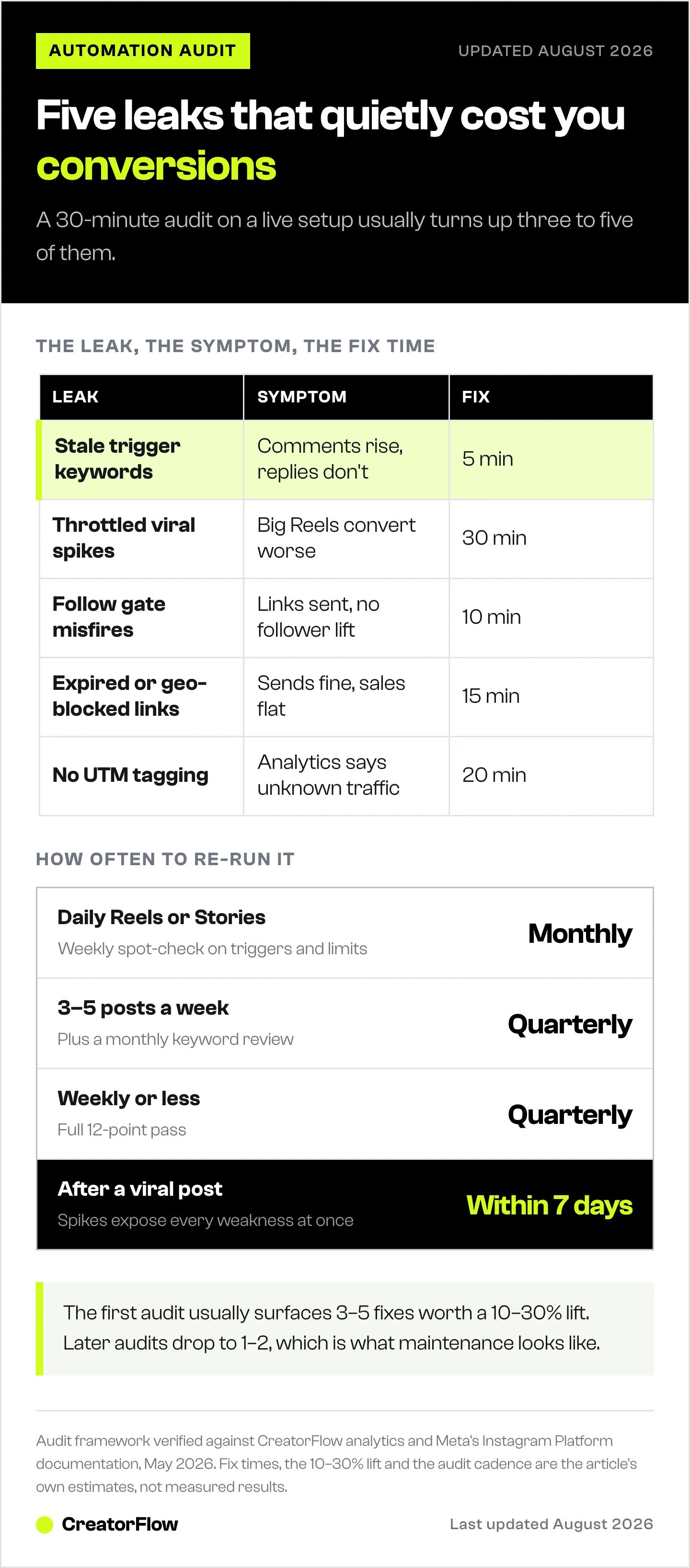
After running the 12-point audit on hundreds of creator setups, five patterns dominate. If you’re short on time, fix these first:
| Leak Point | Symptom | Fix Time |
|---|---|---|
| Stale trigger keywords | Comments rise, replies don’t | 5 min: add 5-8 new keyword variants |
| Throttled viral spikes | Big Reels convert worse than mid-Reels | 30 min: pre-pace, batch, or split triggers |
| Follow gate on non-followers | Links sent freely, no follower lift | 10 min: re-validate gate logic, add 8-second buffer |
| Expired or geo-blocked links | Sends look fine, sales don’t move | 15 min: replace links, add region routing |
| No UTM tagging | Analytics says “unknown traffic” | 20 min: tag all outbound links |
Three of the five are 15-minute fixes. The trigger keyword fix is the single edit that pays back fastest.
If your automation is sending but conversions look soft despite this audit, the issue may be downstream of the DM itself. Our breakdown of why automation isn’t converting covers funnel-side fixes (message copy, link page UX, offer-market fit).
How Often Should You Audit Your Instagram Automation?
| Posting cadence | Audit frequency |
|---|---|
| Daily Reels or Stories | Monthly full audit, weekly Section 1+2 spot-check |
| 3-5 posts/week | Quarterly full audit, monthly trigger keyword review |
| Weekly or less | Quarterly full audit |
| After a viral post (>10x your average) | Within 7 days, full audit |
| After a Meta API or tool platform update | Within 7 days, Section 2 spot-check |
| After adding a new affiliate program | Section 3 + Section 4 spot-check |
The single most important trigger for re-auditing is a viral spike. Viral posts expose every weakness: throttling, gate logic, link rot, and tag gaps all surface at once. Most creators celebrate the spike and never check what slipped through.
Staying within Meta’s safety rules during these spikes is its own topic. See is Instagram automation safe in 2026 for the policy side.
What CreatorFlow Surfaces Automatically
Of the 12 checks, CreatorFlow’s analytics dashboard surfaces 7 without manual work:
- Check 4 (rate limit / queued messages): live throttle indicator on the dashboard
- Check 5 (24-hour window failures): “outside window” error count per automation
- Check 6 (delivered vs sent): split reporting by default
- Check 8 (email gate destination): integration health check on each gate
- Check 10 (UTM tagging): link-level UTM presence flag
- Check 11 (click-through rate): default CTR reporting per trigger
- Check 12 (geo-analytics): country and city click breakdown on Pro and Growth
The other five (trigger keyword drift, multi-surface trigger coverage, negative keyword overreach, follow gate edge cases, and ungated paid-link automations) require a 10-minute manual look at your trigger and gate configuration. CreatorFlow’s flat-rate pricing ($15/month Pro, $30/month Growth, verified at creatorflow.so, May 2026) doesn’t change with audit frequency, so re-running this checklist costs nothing.
Run the Audit, Then Re-Run It
Most automation tools (CreatorFlow, ManyChat at $17-199/month across 5 tiers per manychat.com/pricing, July 2026, and LinkDM at $19/month per linkdm.com/pricing, July 2026) all have the data you need. The audit is platform-agnostic. The only thing that varies is how many of the 12 checks the tool surfaces automatically versus how many require a manual review.
Set a recurring 30-minute calendar block. Once a month if you post daily. Once a quarter if you post weekly. After every viral post within 7 days. The first audit usually surfaces 3-5 fixes worth a 10-30% lift in conversion. Subsequent audits drop to 1-2 fixes, which is what good maintenance looks like.
The Instagram audit tool checks the same ground automatically if you would rather not work through it by hand.
FAQ
How often should I audit my Instagram DM automation?
Run a full audit monthly if you post daily, quarterly if you post weekly or less. Always re-audit within 7 days of a viral post (>10x your average reach), a Meta API or platform announcement, or adding a new affiliate program. Spot-checks of triggers and rate limits can be weekly if your volume is high.
What’s the difference between an automation audit and a fix?
A fix addresses one broken thing you noticed. An audit assumes nothing is broken and checks each surface anyway. Audits catch silent leaks (the kind your dashboard reports as “successful”) that fixes never see, because the user never knew anything was wrong.
Can I audit Instagram automation without a tool?
Most of the 12 checks require some tool data: send counts, throttle indicators, gate evaluations, click analytics. You can run Section 1 (trigger keywords) and parts of Section 3 (manual gate testing) with just Instagram’s native interface and a second test account. Sections 2 and 4 need a tool with delivery and tracking analytics.
How do I know if my automation is rate-limited?
Look for a “queued,” “pending,” or “throttled” counter in your dashboard. Compare your top viral post’s automation send count to the comment count: if the gap is more than 10%, throttling is likely. Meta’s published per-second limits (developers.facebook.com, May 2026) are the underlying constraint; tools pace below them to stay safe.
What’s the most common Instagram automation mistake creators make?
Stale trigger keywords. Audiences shift the words they use over months. A creator registered “link” as a trigger in 2024 and never updated it. By 2026, audiences mostly comment “where,” “info,” “shop,” or emojis. None of which fire the trigger. The DM never sends. The dashboard shows “0 sends,” which looks normal because nothing went wrong, just nothing happened.
Does Instagram tell you when your automation breaks?
No. Instagram only notifies on policy violations or account-level issues, not automation logic. Throttling, expired tokens, gate misfires, and link rot all happen silently. This is the structural reason audits matter: the tool, the platform, and your dashboard all “look fine” while conversions decay.
Should I audit before or after a product launch?
Audit 7-10 days before. A launch is the worst time to find a broken trigger. Run the full 12-point audit, fix everything you find, then re-test from a second account end-to-end. The launch itself becomes the live stress test, and you’ll want to spot-check Sections 2 and 3 the day after.
Audit framework verified against CreatorFlow analytics, Meta Instagram Platform documentation, and competitor pricing pages as of May 2026. Individual results vary by setup, audience size, and content type.


