

Claude video editing means Claude writes and runs commands against your video files. It has no timeline and it does not watch footage. It uses a tool such as ffmpeg, through code execution in the Claude app or through Claude Code on your computer. That makes it good at jobs you can state as a number, like cutting pauses over one second, and weak at jobs you judge by watching.
Many guides on this topic show a finished edit and skip the part that decides whether it works for you. Your file may be too big to upload. The sandbox may not have the program the edit needs. And a cut that looks right in a log file can land in the middle of a sentence. You find these problems after an hour of setup, not before.
This guide explains where Claude can reach a video file, what it can see inside one, and which Reels jobs to hand over. It also covers a setup for Claude Code, a request you can adapt, how to keep captions inside Instagram’s safe area, and the final checks to do yourself before you post.
Key Takeaways
- No timeline: Claude edits video by writing commands for tools like ffmpeg. It never drags clips on a timeline, and it does not play the video.
- Stills only: Claude’s vision input accepts JPEG, PNG, GIF and WebP images, and it reads only the first frame of an animation. To “show” it a video, you export frames.
- Size decides the surface: The Claude app caps uploads at 30MB per file. Claude Code works on files on your own disk, which suits real Reels footage.
- Hand over the measurable jobs: Silence cuts, loudness, burned-in captions, trims to a length, 9:16 reformatting and batch exports all have a number Claude can hit.
- Keep the judged jobs: The first seconds, the choice of take and the pacing need someone watching at phone size with the sound off.
- Bottom line: Use Claude for the repeatable part of an edit, then watch the result yourself before it goes live.
Can Claude Edit Videos?
Yes, but not the way an editing app does. Claude edits a video by writing a command, running it on the file and reading the result. The command usually calls ffmpeg, a free, open-source program that cuts, joins, resizes and encodes video. Where that command runs depends on the Claude product you use, and each one has different limits on file size, installed software and internet access.
There are three places where Claude can work on a video file. The table compares them on the facts that decide whether your edit can run at all.
| Where Claude runs | File size | Is ffmpeg there? | Best for |
|---|---|---|---|
| Claude app (code execution) | 30MB per file, upload and download | Not listed; network access lets it install packages from approved sources | Short clips, a single frame, a caption file |
| Claude API (code execution tool) | 5 GiB workspace, 5 GiB RAM, 1 CPU | Not on the pre-installed list, and the container has no internet | Developers building a pipeline |
| Claude Code on your computer | Your own disk | Yes, once you install it | Real Reels footage and repeat jobs |
Anthropic’s help article on creating and editing files sets the 30MB limit for both uploads and downloads (checked November 2026). The API’s code execution tool documentation lists the container specs, and its pre-installed libraries cover data, charts, documents and images, with no video tool named.
The 30MB cap is the first wall most creators hit. For illustration, a file recorded at 16 megabits per second uses 2MB per second, so 30MB holds about 15 seconds. That is why the rest of this guide uses Claude Code.
Can Claude Watch or Hear a Video?
No. Claude reads text and still images. Anthropic’s vision guide lists four image formats and says that for animations only the first frame is used. So Claude cannot judge motion, timing or sound by itself. It works from what you turn the video into: still frames exported by ffmpeg, and a transcript with timestamps made by a speech-to-text tool.
Anthropic’s vision documentation names JPEG, PNG, GIF and WebP as the supported formats (checked November 2026). No video format is on that list.
This changes how you should brief it. Claude knows where a pause is because ffmpeg reports the timestamps, not because it heard the pause. It knows what a frame looks like because you exported that frame as a PNG. When a request depends on how a moment feels, Claude is guessing from numbers.
For sound, the common free tool is OpenAI’s Whisper, an open-source speech recognition model under the MIT license. It needs ffmpeg installed, and its command-line tool writes subtitle files in SRT and VTT formats, with an experimental option for word-level timestamps. Claude can run Whisper for you in Claude Code and then read the transcript it produces.
Which Video Editing Jobs Suit Claude?
Claude does well on any edit you can describe with a number or a fixed spec. Cut every pause longer than 0.8 seconds. Set loudness to one target. Burn captions in from a file. Trim to under 3 minutes. Export at 1080 by 1920. These jobs have a correct answer that a command can reach and a log can confirm, and Claude is fast at both steps.
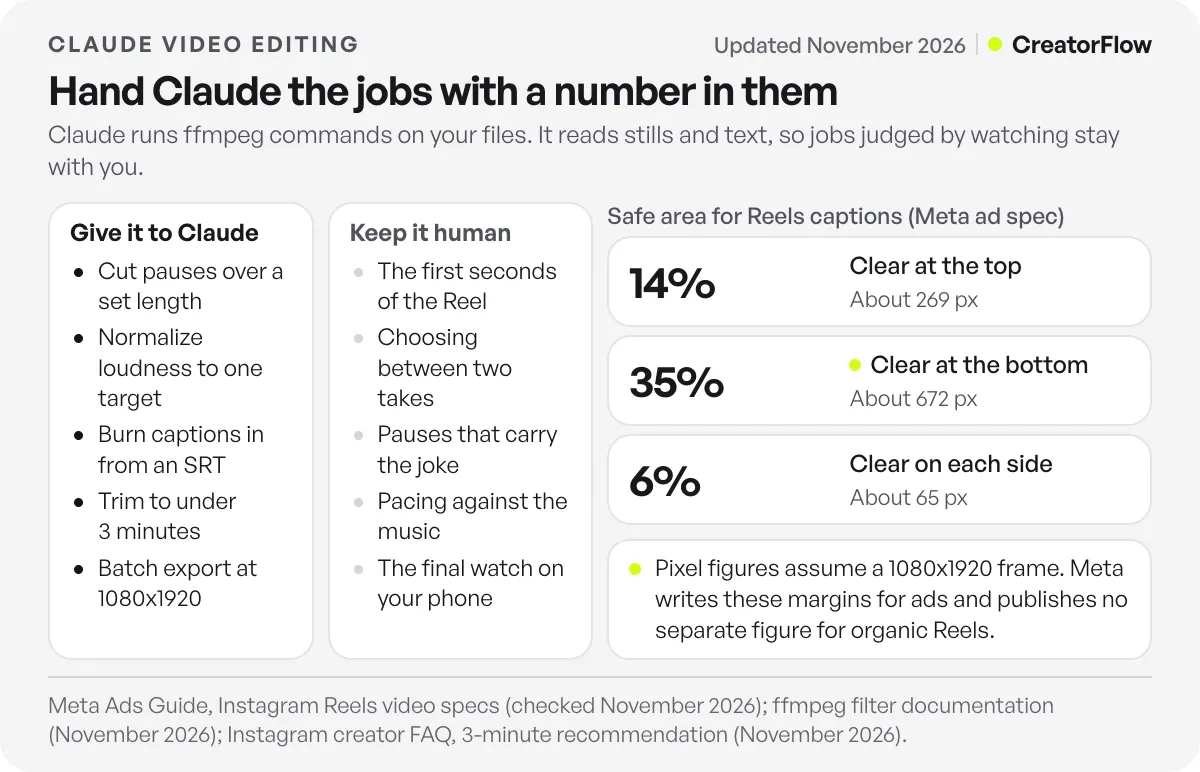
Here are the jobs worth handing over, with the ffmpeg feature that does each one:
- Silence cuts: the silencedetect filter logs every stretch below a volume threshold for longer than a set time, in seconds. Claude reads that log and cuts the gaps.
- Even loudness: the loudnorm filter normalizes audio to the EBU R128 standard. Its default target is -24 LUFS, and you can set your own.
- Burned-in captions: the subtitles filter draws an SRT file onto the video using the libass library. Your ffmpeg build needs libass for this to work.
- Reformatting: crop or pad a horizontal clip to 9:16, scale it, and encode every file the same way.
- Batch jobs: apply one recipe to every file in a folder, then name the exports by date and topic.
The loudness and captions jobs show the pattern well. Both are tedious by hand and both have a spec you can write down once. ffmpeg’s filter documentation describes every option for these filters, and Claude reads it faster than you will.
Length is another number. Instagram’s creator FAQ says it recommends videos to unconnected audiences when they are 3 minutes or less (checked November 2026). A trim to 2 minutes 50 seconds is a job Claude can do and confirm in one step. The full list of limits is in our guide on how long Instagram Reels can be.
Which Video Editing Jobs Should Stay Human?
Keep any job where the right answer depends on watching. That covers the first seconds of the Reel, the choice between two takes, whether a cut lands mid-thought, the rhythm of the music against the picture and the colour of skin. Claude cannot see motion or hear audio, so on these jobs it repeats a pattern it was told about, with no way to check the feeling.
The opening is the clearest case. A viewer decides to stay or scroll based on motion, a face and a promise in the first moments. A silence cut that saves 0.4 seconds there can also remove the breath that made the line land. Choose the first frame and the first cut yourself.
Pauses are a second trap. A gap in the audio log is not always dead air. Sometimes the pause is the joke, or the moment the viewer reads the text on screen. Let Claude make the cuts, then watch the result and put back the pauses that carried meaning.
For these taste jobs, a visual editor is still the right tool. Our comparison of Edits, CapCut and Captions for Reels covers which one fits which kind of creator. Instagram’s free Edits app also has safe-zone guides and a frame-level timeline for the final touch.
How to Set Up Claude Code for Video Editing
Install two programs, make one folder, and write one instruction file. Claude Code runs in your terminal, an IDE, the desktop app or a browser, and it can edit files and run commands in your project. Install ffmpeg on the same computer. Then give the project a file that holds your specs, so you do not type them into every request.
Anthropic’s Claude Code overview lists those surfaces and the install commands for Mac, Linux and Windows (checked November 2026). Most surfaces need a paid Claude plan or an Anthropic Console account. For a creator, the desktop app is the gentlest start because it shows changes visually.
The setup takes four steps:
- Install ffmpeg from ffmpeg.org or a package manager. Ask Claude Code to check that the build includes libass, because burned-in captions need it.
- Make a project folder with three subfolders, one for raw clips, one for exports and one for frames you want Claude to look at.
- Write a CLAUDE.md file in the folder. Claude Code reads this file at the start of every session. Put your canvas size, caption font, caption box, loudness target and file naming in it.
- Start with a dry run. Ask Claude to print the commands it plans to run and wait for your yes. Run them on one clip before you point it at a folder.
The CLAUDE.md file is where the time saving comes from. The first Reel takes a conversation. Later ones can take one sentence, because the specs are already written down. If you want to use Claude for the rest of your account too, our guide to Claude for Instagram creators covers captions, planning and Projects.
How Do You Write a Video Editing Request for Claude?
Name the input, the output and the check. Tell Claude which file to use, what the finished file must measure, and how it should prove the result before it says it is done. A check matters because Claude cannot watch the export. It can measure duration, list the cuts it made and export a frame for you to look at.
Here is a request you can adapt. It assumes your CLAUDE.md already holds the specs.
Use raw/tuesday-tip.mov. Run silencedetect and list every pause longer than 0.8 seconds with its start time. Do not cut anything in the first 3 seconds. Cut the other pauses, keeping 0.15 seconds on each side. Make captions with Whisper, then burn them in using the caption box in CLAUDE.md. Export a 1080x1920 MP4 to exports/. Then report the old and new duration, the number of cuts, and save frames at 1, 5 and 10 seconds to frames/ so I can check the captions.
Three parts of this request do most of the work. The rule about the first 3 seconds keeps the opening in your hands. The 0.15 seconds of padding stops cuts from clipping the first sound of a word. The frame export gives you something to look at, since Claude only reports numbers.
When the result is wrong, change one number and run it again. If cuts feel rushed, raise the pause threshold. If a word gets clipped, raise the padding. Each change is one line, which is why this kind of job suits Claude.
How to Keep Captions Inside the Instagram Safe Area
Tell Claude the safe area as percentages of the frame. Meta’s Ads Guide for Instagram Reels asks for 14% clear at the top, 35% at the bottom and 6% on each side, with no text or logos there. On a 1080 by 1920 frame, that is about 269 pixels at the top, 672 at the bottom and 65 on each side. Put those numbers in your CLAUDE.md file as the caption box.
Meta’s Instagram Reels ad specs give those margins and a recommended size of 1440 by 2560 at 9:16 (checked November 2026). Two cautions apply. The figures are written for ads, and Meta publishes no separate number for organic Reels. The interface over an organic Reel is similar, so the ad margins are a sensible default rather than an official rule.
Ask Claude to prove the box. It can draw the safe area as an outline on one exported frame and save it as a PNG. You look at the image, and Claude reads the same PNG to confirm the captions sit inside the lines. For every other size on the platform, our Instagram post size guide lists the specs.
What to Check Before You Post an Edit Made With Claude
Watch the whole export on your phone, at full size, once with sound and once without. Claude checked the numbers. You are checking what a viewer feels. Look at the first seconds, the captions at each cut, any pause that was removed and should have stayed, and the last frame. Those are the four places where a cut made from numbers can feel wrong.
Read the captions against the audio. Speech-to-text tools can get names, brand terms and slang wrong, and a burned-in error cannot be fixed after posting. Correct the SRT file first, then ask Claude to burn the captions again.
Check the ask at the end. If the Reel tells viewers to comment a word, the word on screen must be the word your DM tool listens for. In CreatorFlow, that word is the keyword on your comment automation, and the person who comments it gets one DM with your link. The CreatorFlow setup for content creators walks through connecting a Reel to that DM.
Last, look at the numbers a week later. Compare the edited Reels against your recent median for watch time and shares. If a pause threshold made Reels feel rushed, change the number in CLAUDE.md, and every future edit changes with it.
FAQ
Can Claude edit videos on the free plan?
Partly. Code execution and file creation are on the free plan, according to Anthropic’s help centre, but each file is capped at 30MB, which fits only short clips. Claude Code is the practical tool for real footage, and most of its surfaces need a paid Claude plan or an Anthropic Console account.
Can Claude watch my video and tell me what to cut?
Not directly. Claude accepts still images and text, and for an animated GIF it reads only the first frame. You can export frames and a transcript, and Claude can suggest cuts from those. It cannot judge motion or sound, so treat its suggestions on pacing as a starting point.
Does Claude Code upload my footage to Anthropic?
ffmpeg runs on your own computer, so the video file is processed locally. Anything Claude reads to do the job, such as a transcript, a log or a frame it opens, goes to the model as part of the conversation. Keep private footage out of the frames folder if that matters to you.
What is ffmpeg and do I need to learn it?
ffmpeg is a free, open-source program that cuts, joins, resizes and encodes audio and video from the command line. You do not need to learn its syntax to use it with Claude. It helps to know the names of the filters you use, such as silencedetect, loudnorm and subtitles, so you can read what Claude plans to run.
Can Claude add captions to an Instagram Reel?
Yes. A speech-to-text tool such as Whisper makes an SRT file, and ffmpeg’s subtitles filter burns it into the video. Fix the SRT text first, because Whisper can get names and slang wrong. Then give Claude the safe-area numbers so the captions stay clear of the Reels interface.
Do videos made with Claude carry a label?
On the Claude API, image, video and audio files that Claude produces in the code execution sandbox carry C2PA Content Credentials when you download them through the Files API, according to Anthropic’s code execution documentation. The docs describe this for the API sandbox. They do not describe it for commands Claude Code runs on your own computer.
Is Claude better than CapCut or Edits for Reels?
They do different jobs. CapCut and Edits are visual editors for the judged parts of a Reel, such as the opening, the takes and the pacing. Claude is fastest at the repeatable parts, such as silence cuts, captions, loudness and batch exports. Many creators will get the most from using Claude for the first pass and a visual editor for the last.
Sources and checks
Verification note: on November 3, 2026 we checked Anthropic’s file creation help article (30MB limit, plans, network access), the code execution tool docs (container specs, pre-installed libraries, C2PA credentials), the vision docs (supported formats) and the Claude Code overview. We also checked ffmpeg’s filter documentation for silencedetect, loudnorm and subtitles, the Whisper repository and its command-line options, Meta’s Instagram Reels ad specs for the safe area, and Instagram’s creator FAQ for the 3-minute recommendation. The 15-second figure for a 30MB file is illustrative arithmetic, not a measurement.