
Claude AI is Anthropic’s AI assistant that helps Instagram creators write captions, plan content calendars, analyze performance data, and build automation workflows. Claude ($20/month Pro plan) includes three products: Claude chat for content creation and strategy, Claude Code for building custom tools and integrations, and Claude Cowork for automating desktop tasks like editing spreadsheets and organizing files. Creators report cutting content planning time from 20 hours/month to 3 hours/month using Claude Projects (Social Media Examiner, April 2026).
You spend 4 hours writing captions. Another 2 hours planning next week’s content calendar. An hour analyzing which Reels performed best. Then someone DMs asking for your link, and you don’t even have time to respond.
AI tools like Claude don’t replace your creativity. They handle the repetitive work so you can focus on what actually grows your account: creating content, engaging with your community, and building relationships with brands. This guide breaks down how to use Claude’s three products (chat, Code, and Cowork) to run your Instagram business faster, with real workflows for solo creators, brands, and agencies.
Key Takeaways
- Claude chat ($20/month Pro) handles caption writing, content calendars, hashtag research, competitor analysis, and brand voice consistency across posts
- Claude Code is a terminal-based coding tool that lets you build custom Instagram analytics dashboards, automate reporting, and create content pipelines
- Claude Cowork (launched January 2026, GA April 2026) automates desktop tasks: organizing content folders, processing receipts, building spreadsheets, and running scheduled workflows
- Projects feature lets you create persistent workspaces per client or brand with saved instructions, tone guides, and content history
- Claude doesn’t post for you. It handles the writing, strategy, and analysis layer. You still need tools like CreatorFlow for DM automation and a scheduling tool for posting
- Best combo: Claude for content creation + CreatorFlow for DM automation + a scheduler for posting = a complete Instagram system

Stay Ahead with AI and Automation
Follow us on Instagram: @creatorflow.so
Join the conversation on Threads: @creatorflow.so
What Is Claude AI? (Quick Overview for Creators)
Claude is an AI assistant built by Anthropic. Think of it as a writing partner that understands context, follows brand guidelines, and produces content that doesn’t sound like a robot wrote it.
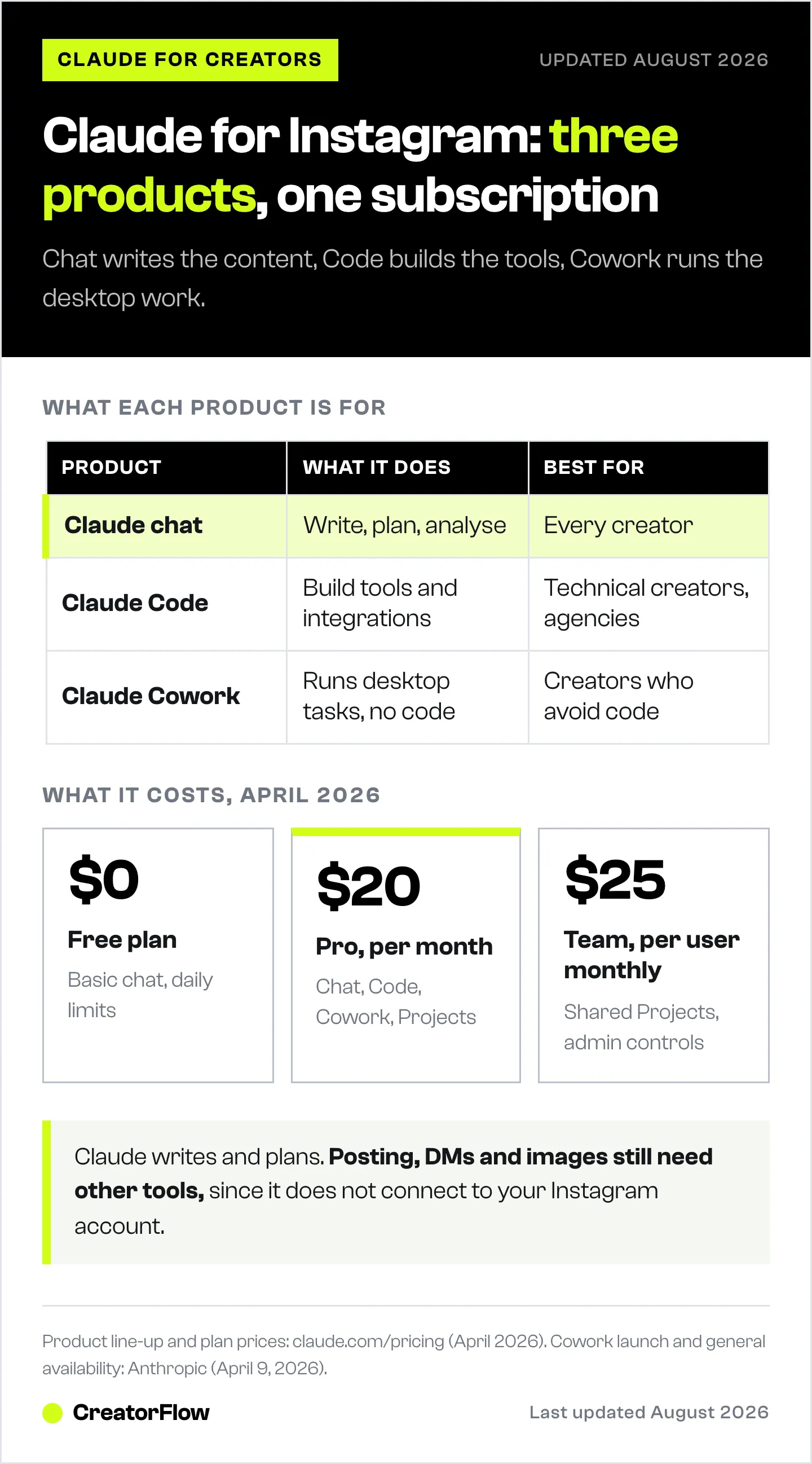
Three products, three use cases:
| Product | What It Does | Best For | Cost |
|---|---|---|---|
| Claude (chat) | Write, brainstorm, analyze, strategize | All creators | Free / $20/mo Pro |
| Claude Code | Build tools, automate dev tasks, create integrations | Tech-savvy creators, agencies | Included in Pro |
| Claude Cowork | Automate desktop tasks (spreadsheets, files, browsers) | All creators (no coding needed) | Included in Pro |
What makes Claude different from ChatGPT for creators:
- 1,000,000-token context window (Opus 4.6 model). Upload an entire year of captions and Claude remembers the full history
- Projects feature: save brand voice, content pillars, and audience data in a persistent workspace
- Stronger at maintaining consistent tone across long content batches
- No built-in image generation (use separate tools for visuals)
Claude doesn’t connect to your Instagram account directly. It won’t post for you, schedule content, or manage DMs. It’s the brain behind your content, not the hands that publish it.
For DM automation, you need a dedicated tool like CreatorFlow that connects to Instagram’s official Graph API.
How Solo Creators Use Claude (Practical Workflows)
1. Batch-Write a Week of Captions in 30 Minutes
Instead of staring at a blank screen for each post, give Claude your content pillars and let it draft a full week.
The workflow:
- Create a Claude Project called “Instagram Content”
- Upload your brand voice guide, past top-performing captions, and content pillars
- Prompt: “Write 7 Instagram captions for this week. Topics: [your pillars]. Use the tone from my uploaded examples. Include a call-to-action for each. Vary the hooks.”
- Review, edit, personalize with your own experiences
- Copy into your scheduling tool
Why Projects matter: Without Projects, you’d re-explain your brand voice every conversation. Projects remember everything. Your audience demographics, your banned words, your preferred CTA style, your content pillars. Claude applies them automatically in every conversation within that Project.
Time savings: Content planning goes from 20 hours/month to roughly 3 hours/month when using Claude Projects with pre-loaded brand context (Social Media Examiner, April 2026).
2. Repurpose One Piece of Content Into 5 Formats
Record a 10-minute video. Transcribe it (use a transcription tool or Claude’s file upload). Then ask Claude to create:
- An Instagram carousel script (10 slides)
- A Reel caption with hooks and hashtags
- A Story series (5-7 story frames)
- An email newsletter version
- A LinkedIn post adaptation
One recording becomes a full week of multi-platform content. Claude adapts the tone, length, and structure for each format without losing your core message.
3. Analyze What’s Working (and What’s Not)
Export your Instagram Insights data (download from the app or use a third-party analytics tool). Upload the CSV to Claude and ask:
- “Which content pillars drive the most saves and shares?”
- “What posting times correlate with highest reach?”
- “Compare my Reels performance this month vs. last month”
- “Which caption hooks get the most comments?”
Claude spots patterns across hundreds of data points that would take you hours to find manually. It won’t just give you numbers. It tells you why something worked and what to try next.
4. Write DM Automation Messages That Sound Human
If you use DM automation tools like CreatorFlow, the quality of your automated messages determines your conversion rate. Generic “Hey! Here’s your link” messages get ignored.
Prompt Claude with:
- Your product/offer details
- Your audience persona
- 3-5 examples of your natural DM style
- The trigger word context (what did they comment to receive this?)
Claude writes messages that match your voice. Test 2-3 variations, plug the best one into your CreatorFlow automation, and track which version gets more clicks.
How Brands Use Claude for Instagram
Brand Voice Consistency Across Team Members
The biggest challenge for brands on Instagram: multiple people writing content that sounds like one voice.
Claude Projects solve this:
- Create a Project called “Brand Instagram”
- Upload: brand guidelines, tone of voice document, approved vocabulary list, 20 example posts that nail your voice
- Set custom instructions: “Always write in our brand voice. Never use emojis except [list]. Our audience is [demographic]. Our tone is [description].”
- Share the Project with your team (Team plan, $25/user/month)
Every team member gets the same brand-consistent output. New hires produce on-brand captions from day one.
Competitor Research and Positioning
Ask Claude to analyze competitor content strategies. Paste in their recent captions, and Claude identifies:
- Their content pillars and posting frequency
- Engagement patterns (what gets comments vs. saves)
- Gaps in their content you can fill
- Their CTA strategies and offer positioning
Pair this with audience data from your own Instagram Insights for a complete competitive picture.
Campaign Planning and Content Calendars
Give Claude your product launch dates, seasonal events, and marketing goals. It builds a content calendar with:
- Daily posting schedule aligned to your goals
- Caption drafts for each post
- Hashtag clusters per content pillar
- Story series tied to each campaign phase
- DM automation messages for each campaign (use with CreatorFlow for execution)
How Agencies Use Claude for Multiple Accounts
One Project Per Client
Agencies managing 5, 10, or 50 Instagram accounts need separation. Claude Projects provide it.
Setup:
- Create a separate Project for each client
- Upload each client’s brand guidelines, voice doc, and content examples
- Set client-specific custom instructions
- No context bleed between clients
On Team Premium ($150/user/month) or Enterprise plans, you get admin controls, usage analytics, and role-based access. Assign copywriters to specific client Projects without exposing other accounts.
Batch Content Production
An agency writing for 10 clients can use Claude to draft all 10 content calendars in a single work session. Because each Project remembers the client’s voice and guidelines, switching between clients takes seconds instead of the mental load of “wait, what does this brand sound like again?”
Realistic output: 10 clients x 7 posts/week = 70 caption drafts. With Claude Projects pre-loaded, an experienced copywriter can review and refine 70 drafts in 3-4 hours. Without AI, that’s 15-20 hours of work.
Reporting and Analytics
Upload each client’s monthly Instagram data to their Project. Ask Claude to generate:
- Month-over-month performance summary
- Top 5 performing posts with analysis of why they worked
- Recommendations for next month’s content strategy
- Client-ready report in your preferred format
Agencies report saving 5-8 hours per client per month on reporting alone.
Claude Code: For Tech-Savvy Creators and Agencies
Claude Code is a terminal-based AI coding tool. It reads your codebase, writes code, runs tests, and manages git workflows through natural language commands. Not everyone needs this. But if you’re building custom tools for your creator business, it’s powerful.
What creators build with Claude Code:
- Custom analytics dashboards that pull Instagram data and visualize trends beyond what the native Instagram analytics dashboard shows
- Automated reporting pipelines that generate client reports on a schedule
- Content management systems tailored to your specific workflow
- Integration scripts that connect your various tools (email platform, DM automation, analytics)
- Custom websites and landing pages for products, courses, or link-in-bio alternatives
Example: An agency building a custom client dashboard that pulls Instagram Insights, Google Analytics, and email metrics into one view. Claude Code writes the code, sets up the API connections, and handles deployment. A project that would take a developer days takes hours with Claude Code pair-programming.
Pricing: Included with Pro ($20/month), Max ($100-200/month), and Team Premium ($150/month) plans. API usage is pay-per-token if you exceed plan limits.
Claude Cowork: AI That Uses Your Computer
Cowork launched in January 2026 (macOS) and reached General Availability in April 2026 on all paid plans (Anthropic, April 9, 2026). It’s the most interesting Claude product for non-technical creators because it doesn’t require any coding knowledge.
How it works: Claude Cowork controls your desktop. It sees your screen, clicks buttons, types text, opens apps, and navigates browsers. You describe what you want done, it plans the steps, shows you the plan, and executes after your approval.
Real use cases for Instagram creators:
- Organize content folders: “Sort all my photos from this shoot into folders by type: Reels, Carousels, Stories”
- Process receipts for tax season: “Go through my Downloads folder, find all receipts from brand deals, and add them to my expense spreadsheet”
- Research synthesis: “Open these 5 competitor Instagram profiles in Chrome, screenshot their bio and recent 9 posts, and create a comparison document”
- Scheduled tasks: Set up recurring workflows. “Every Monday morning, check my Instagram Insights, pull the top metrics, and update my tracking spreadsheet”
For agencies:
- Automate client onboarding: gather assets, create folder structures, set up project management boards
- Run weekly metric pulls across multiple client accounts
- Generate and format client reports from raw data
Availability: All paid Claude plans ($20/month Pro and above) on macOS and Windows.
Claude Pricing for Creators (April 2026)
| Plan | Monthly Cost | What You Get | Best For |
|---|---|---|---|
| Free | $0 | Basic Claude chat, daily limits | Testing Claude for the first time |
| Pro | $20/mo | 5x capacity, Claude Code, Cowork, Projects | Solo creators, coaches |
| Max 5x | $100/mo | 25x capacity, full Claude Code | Power users, small agencies |
| Max 20x | $200/mo | 100x capacity, zero-latency priority | High-volume agencies |
| Team | $25/user/mo | Admin controls, shared Projects | Small teams (5+ people) |
| Team Premium | $150/user/mo | Full Claude Code environment | Agency dev teams |
| Enterprise | Custom | SSO, dedicated support, RBAC | Large organizations |
(claude.com/pricing, April 2026)
For most solo creators: Pro at $20/month covers everything. You get Claude chat, Code, Cowork, and Projects. Which model you run inside those products is a separate decision, covered in which Claude model to use for content creation. That’s less than what many creators spend on a single scheduling tool.
The Complete Instagram Creator Stack (Claude + CreatorFlow)
Claude handles the thinking. CreatorFlow handles the doing. Here’s how they work together:
Content Creation Layer (Claude):
- Write captions, plan calendars, analyze data
- Maintain brand voice consistency
- Research competitors and trends
- Generate DM automation message copy
DM Automation Layer (CreatorFlow):
- Auto-reply to comments with links, offers, booking calendars
- Capture emails inside DMs
- Track link clicks and conversions
- Manage multiple accounts (up to 5 on Growth plan)
The workflow:
- Use Claude to write 7 caption drafts with trigger-word CTAs (“Comment LINK for the full guide”)
- Use Claude to write 3 variations of your DM response message
- Set up the automation in CreatorFlow: trigger word + best DM message
- Post your content (use any scheduling tool)
- CreatorFlow handles the DMs automatically while you create the next week’s content
- Export contacts from CreatorFlow, upload to Claude, analyze patterns
This combo gives you a content brain (Claude) and an engagement engine (CreatorFlow) that work 24/7. The content brings people in. The DM automation converts them.
8 Instagram Accounts to Follow for AI and Automation
These creators teach AI tools, automation workflows, and Instagram growth strategies. Follow them for practical tips you can apply to your own account, and see our longer list of Instagram accounts to follow for AI and business.
@nick_saraev - AI Automation Expert
Nick Saraev runs the largest AI automation education community online. With 400K+ Instagram followers and 313K YouTube subscribers, he teaches how to build automation workflows using tools like n8n and Make.com. He’s an official n8n Creator and founded Maker School, a paid community with 2,800+ members. Follow for deep-dive tutorials on building and selling automation systems.
@jackroberts___ - AI Entrepreneur
Jack Roberts is a UK-based entrepreneur who previously built and sold a tech startup with 60,000+ customers (ranked Top-100 UK Startups). Now he creates content about AI automation for business, co-founded Glaido (an AI dictation tool), and shares practical implementation guides. 38K followers on Instagram, 121K on YouTube.
@aiwmiguel - AI Business Solutions
Miguel Golub creates content about AI and automation for business, with a focus on custom AI solutions including automated DMs for Instagram, Facebook, and WhatsApp. He also runs @techwmiguel (195K followers). His content is bilingual (English and Spanish), covering AI-powered lead generation systems and CRM automation.
@itstylergermain - Creator Business Automation
Tyler Germain founded Automation Unlocked, an agency specializing in automation for creator-backed businesses. He also co-founded Dojo AI for custom model fine-tuning. Follow for practical content on automating operations behind a creator brand, from lead gen to client onboarding.
@hackeatutiempo - AI Sellers on Instagram (Spanish)
“Hackea Tu Tiempo” (Hack Your Time) teaches how to implement AI sellers on Instagram, create AI avatars, and build AI-powered sales agents. 62K followers. Content is in Spanish, covering AI chatbot entrepreneurship, AI setters, and automated sales workflows. Sells courses and resources on Gumroad.
@divyannshisharma - Lead Generation and SaaS Marketing
Divyanshi Sharma shares daily tips on lead generation, outbound sales, and client acquisition. 35K Instagram followers and a 70,000+ LinkedIn community. She collaborates with tools like Smartlead and Apollo. Follow for multi-channel lead gen strategies and cold outreach tactics that work for coaches and service businesses.
@plentydesign - Instagram Design with Canva
Camila Meyer is an official Canva Canvassador (ambassador) who teaches creators how to design professional Instagram content using Canva. 77K followers and 943+ posts. Follow for Canva tips, branding tutorials, design workflows, and how to create scroll-stopping visuals without hiring a designer.
@creatorflow.so - Instagram DM Automation
CreatorFlow’s official account. Follow for DM automation tutorials, Instagram growth strategies tied to automation, product updates, and tips on converting comments into customers. See how other creators use comment-to-DM automation to send links, capture emails, and book calls automatically.
Working with agency owners? We keep a dedicated setup page for exactly that: CreatorFlow for agency owners.
5 Claude Prompts for Instagram Creators (Copy and Use)
Prompt 1: Weekly Content Calendar
I’m a [your niche] creator with [follower count] followers. My content pillars are: [pillar 1], [pillar 2], [pillar 3]. Create a 7-day Instagram content calendar with: post type (Reel, carousel, static), caption draft with hook, 10 relevant hashtags per post, and a call-to-action. My trigger word for DM automation is “[your keyword]” - include it in each CTA.
Prompt 2: DM Automation Message Writer
Write 3 variations of a DM response for my Instagram automation. Context: when someone comments “[trigger word]” on my post about [topic], they receive this DM. My product/offer is [description]. Keep the message under 300 characters. Sound human, not salesy. Include my link: [URL]. End with a soft question to encourage a reply.
Prompt 3: Content Performance Analyst
Here’s my Instagram data for the past 30 days [paste or upload CSV]. Analyze: which content type (Reel, carousel, static) gets the most saves? Which posting times correlate with highest reach? What patterns do you see in my top 5 posts? Give me 3 specific recommendations for next month.
Prompt 4: Caption Hook Generator
Generate 20 caption hooks for a [niche] creator. Mix these styles: curiosity gap (“I stopped doing X and…”), contrarian take (“Unpopular opinion:”), personal story (“3 years ago I…”), listicle (“5 things nobody tells you about…”), and direct value (“Here’s exactly how to…”). Each hook should be under 15 words.
Prompt 5: Competitor Analysis
I’m analyzing these 3 competitor Instagram accounts: [@competitor1], [@competitor2], [@competitor3]. Here are their last 10 captions each [paste]. Identify: their content pillars, posting frequency, CTA strategies, engagement patterns, and gaps I can fill. What are they NOT talking about that my audience would care about?
What Claude Can’t Do (Be Realistic)
No AI tool does everything. Here’s what Claude won’t handle:
- Post to Instagram. Claude writes the caption. You (or a scheduling tool) publish it.
- Send DMs. Claude writes the DM copy. CreatorFlow or another automation tool sends it.
- Generate images. Claude is text-only. Use Canva, Midjourney, or other image tools. The partial exception is MCP: Claude can operate an external image service you connect to it, so it never draws the picture but it can order one. DesignerBox’s MCP server exposes 43 tools to Claude including image generation and product shots (designerbox.ai/mcp, August 2026), which closes the tab-switch between writing the caption and making the visual. Disclosure: DesignerBox is built by the same team as CreatorFlow.
- Access your Instagram account. Claude can’t see your feed, read your DMs, or pull your analytics directly. You export data and upload it.
- Replace your personality. AI-written content without your personal stories, opinions, and experiences sounds generic. Always add your own voice on top of Claude’s drafts.
The bottom line: Claude is the best available AI writing and strategy tool for Instagram creators. But it’s one piece of a larger stack. Pair it with DM automation for engagement, a scheduling tool for posting, and your own creativity for authenticity.
FAQ
Is Claude AI free for Instagram creators?
Claude offers a free tier with daily usage limits. For serious content creation, the Pro plan at $20/month gives you 5x capacity, access to Claude Code, Claude Cowork, and the Projects feature for saving brand voice guidelines. Most solo creators find Pro sufficient (claude.com/pricing, April 2026).
How is Claude different from ChatGPT for Instagram content?
Claude’s Opus 4.6 model has a 1,000,000-token context window, meaning it can hold an entire year of your captions and brand guidelines in a single conversation. Claude Projects create persistent workspaces that remember your brand voice across sessions. ChatGPT has similar features with GPTs and memory (we cover ChatGPT for Instagram content separately), but Claude tends to produce more consistent tone when given detailed brand instructions.
Can Claude post to Instagram automatically?
No. Claude writes content but doesn’t connect to Instagram’s API. For posting, use a scheduling tool (Later, Buffer, Hootsuite). For automated DM responses, use a tool like CreatorFlow that connects through Meta’s official Instagram Graph API.
What is Claude Cowork and do I need it?
Claude Cowork launched in January 2026 and reached General Availability in April 2026 (Anthropic, April 9, 2026). It’s an AI agent that controls your desktop: it clicks buttons, opens apps, fills spreadsheets, and navigates browsers. For creators, it automates repetitive desktop tasks like organizing content folders, processing receipts, and pulling analytics data. It’s included in all paid Claude plans ($20/month+).
Can agencies use Claude for multiple Instagram accounts?
Yes. Create a separate Claude Project per client to prevent context bleed. Each Project stores that client’s brand voice, content pillars, and guidelines. Team plans ($25/user/month) allow multiple team members with admin controls. Team Premium ($150/user/month) adds full Claude Code access for building custom tools.
How do I use Claude with CreatorFlow together?
Use Claude to write caption drafts with trigger-word CTAs (e.g., “Comment LINK for the guide”). Then use Claude to write your automated DM response. Set up the automation in CreatorFlow: connect your trigger keyword to the DM message. Post your content, and CreatorFlow handles the DM responses automatically. Export CreatorFlow contact data and upload to Claude for audience analysis.


