

Claude skills are folders of instructions, examples and optional scripts that Claude loads only when your request matches the Skill’s description. Each one is built around a file called SKILL.md. For social media, a Skill pays off when the output has a fixed shape you can check, such as a caption layout or a brand rule set. Keep taste calls, like which idea to post, in the chat.
Many guides to Skills are lists of “Skills you should build”. The trouble with that approach is simple. A Skill repeats whatever you write into it, in every chat, with less of your attention on the result. Write “make it engaging” into a Skill and you get the same vague output on every post.
This guide explains what a Skill is in Anthropic’s own terms, how it differs from a Project and a saved prompt, which social media jobs suit one, and how to build, test and safely install one. Every product fact comes from Anthropic’s documentation, checked November 2026.
Key Takeaways
- What a Skill is: A folder with a SKILL.md file. Claude reads its name and description all the time and opens the rest only when a request matches.
- Skill, Project or prompt: Use a Skill for a repeatable procedure, a Project for background that grows over time, and a prompt for a one-off ask.
- The test: If you can write a yes-or-no check for the output, the job suits a Skill. If two good editors would disagree, keep it in the chat.
- Good creator Skills: Caption layout, brand rule passes, alt text, carousel word limits and comment-keyword calls to action.
- Safety: Anthropic says to use Skills only from sources you trust and to read every file in one before you install it.
- Bottom line: Build Skills for the rules you already apply by hand, and keep the creative choices for yourself.
What Are Claude Skills?
A Skill is a folder of instructions, scripts and resources that Claude loads when a task needs it. The folder holds a SKILL.md file with a name and a description at the top. Claude keeps only that name and description in view, at about 100 tokens per Skill. When your request matches the description, Claude reads the full instructions and any files they point to.
Anthropic’s Agent Skills overview calls this loading pattern progressive disclosure, and it works in three levels. The name and description are always loaded. The SKILL.md body, which the docs say should stay under 5,000 tokens, loads when the Skill is triggered. Extra files and scripts in the folder load only when the instructions reference them, and a script’s code never enters the conversation, only its output.
Anthropic’s engineers compare building a Skill to “putting together an onboarding guide for a new hire” in their launch post from October 16, 2025. For a creator, the Skill is the page you would hand a new assistant on day one: the format, the rules and one example of work you liked.
You upload Skills as ZIP files in the Claude apps, keep them as folders on your computer in Claude Code, or upload them through the Claude API. The docs say a Skill uploaded in the Claude apps is not available on the API, and the reverse is also true.
Claude Skills vs Projects vs Prompts: Which One to Use
Use a prompt for a one-off request, a Project for background knowledge you want in every chat on one topic, and a Skill for a procedure you repeat with the same rules each time. Anthropic’s help centre puts it the same way: Projects hold static background that is always loaded in that Project, while Skills switch on only when needed and work in any chat.
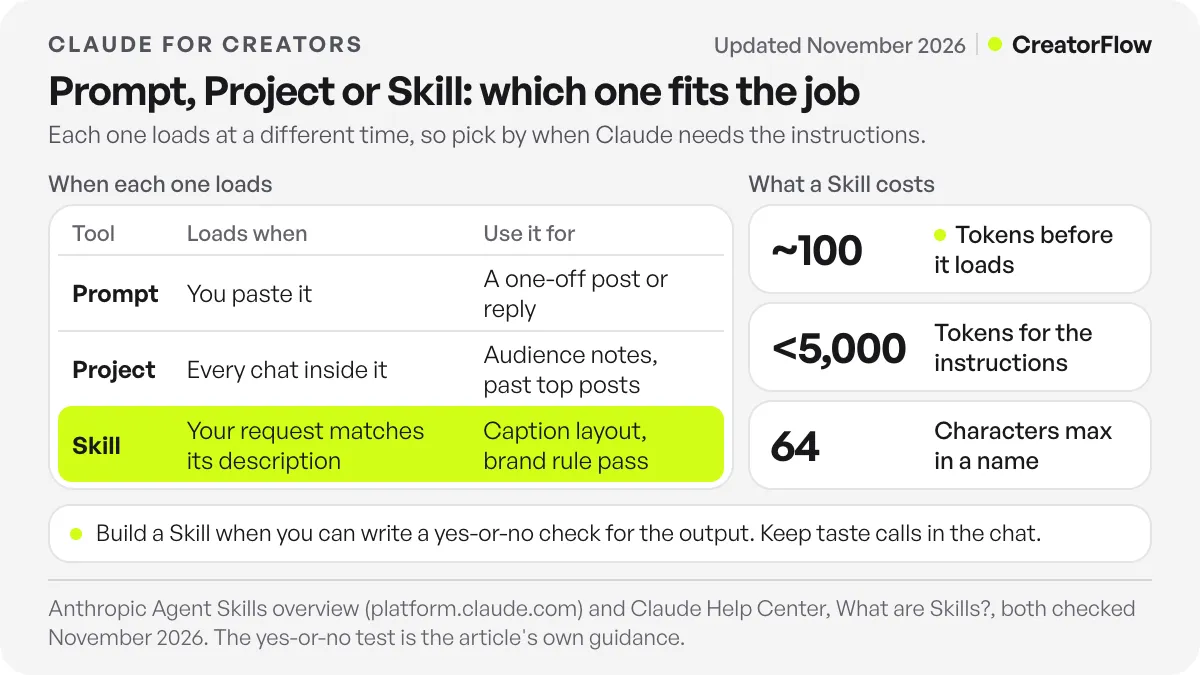
| Prompt | Project | Skill | |
|---|---|---|---|
| What it is | Text you type or paste into one chat | A workspace with files and instructions | A folder with a SKILL.md file and optional extras |
| When it loads | When you paste it | Always, in every chat inside the Project | Only when your request matches the description |
| Where it works | That one chat | Chats inside that Project | Any chat once it is turned on |
| Best social media use | A one-off post or reply | Audience notes, past top posts, a campaign brief | Caption layout, brand rule pass, alt text format |
| What goes wrong | You re-paste it every time | Rules sit next to lots of other context | Vague rules get repeated everywhere |
The What are Skills? article in Anthropic’s help centre also separates Skills from custom instructions, which apply to all your conversations, and from MCP connectors, which give Claude access to outside tools and data.
The three work together. A Project can hold your audience research and last quarter’s best posts. A caption Skill can format whatever you write inside that Project. For a full Project setup for one account, see our guide to Claude for Instagram creators, brands and agencies.
When Is a Claude Skill Worth Building for Social Media?
A Skill is worth building when you can write down a yes-or-no check for the output. “The first line is one sentence of 12 words or fewer” is a check. “The hook is interesting” is not. If a stranger could apply your rule and get the same answer as you, put it in a Skill. If two good editors would argue about it, keep it in the chat.
This line matters because a Skill applies its instructions every time it loads. A format rule stays true for months. A taste rule, such as “use a playful tone”, drifts as your audience and trends move, and a file on your drive does not notice. You end up with captions that follow last spring’s mood.
Size matters too. Anthropic’s Claude Code Skills documentation warns that once a Skill loads, its content stays in context across turns, so “every line is a recurring token cost”. Long lists of style wishes cost you on every message and give Claude more rules to weigh. Short lists of checkable rules cost little and are easy to follow.
Most real content tasks mix both kinds of work. Split them. Ask Claude in the chat for five hook options and pick one yourself. Then let the caption Skill put your chosen hook into your house layout, add the call to action and run the brand rule pass. You make the creative choice once, and the Skill handles the parts that are the same on every post.
Which Social Media Jobs Suit a Skill
The jobs that suit a Skill are the ones where you already correct the same things by hand on every post. Caption layout, brand word lists, alt text, carousel word limits and the comment-keyword call to action all have rules you can write as checks. Choosing ideas, judging hooks, replying to sensitive comments and setting the look of a Reel do not, so they stay with you.
| Job | The check you can write | Where it belongs |
|---|---|---|
| Caption layout | First line length, line breaks, hashtag count, one call to action | Skill |
| Brand rule pass | Banned words, US or UK spelling, product names, emoji policy | Skill |
| Alt text | One or two sentences, names the product, no “image of” | Skill |
| Carousel slide copy | Maximum words per slide, call to action on the last slide | Skill |
| Comment-keyword call to action | One keyword from your list, spelled as in your DM automation | Skill |
| Choosing which idea to post | No fixed check | Chat |
| Picking between two hooks | Taste and timing | Chat |
| Replying to a hard comment | Context and tone | You |
| Visual direction for a Reel | Judged by eye | Chat |
The keyword row is where a Skill saves real mistakes. If you run comment-to-DM automation, the word in your caption has to match a keyword in the automation as a whole word. CreatorFlow matches whole words and ignores capital letters, so “GUIDE” and “guide” both start the DM, while “guides” does not. A Skill rule such as “end with one keyword from this list, as a single word in capitals” stops a typo from breaking a post that is already live. The page on CreatorFlow for content creators shows how the comment, the keyword and the DM with your link fit together.
Skills also work with whichever Claude model you choose, since Anthropic lists Agent Skills as available on every model. If you are deciding where each content job should run, our comparison of which Claude model suits content creation covers that choice. For ready-made Skill files for scripts, captions and repurposing, see our guide to Claude Skills for content creation.
How to Create a Claude Skill in the Claude App
To create a Claude Skill in the Claude app, turn on code execution, write a folder with a SKILL.md file, compress the folder into a ZIP and upload it under Customize, then Skills. Anthropic’s help centre lists Skills on the Free, Pro, Max, Ultra, Team and Enterprise plans, with code execution required (checked November 2026). The whole setup takes one short session.
The steps in Anthropic’s Using Skills in Claude guide are these (checked November 2026):
- Turn on code execution. On Free, Pro, Max and Ultra, open Settings, then Capabilities, and turn on code execution and file creation. The newer layout calls it “Create and edit files”. On Team and Enterprise, an owner turns it on under Organization settings, then Plugins and skills, on the Policy tab.
- Write the folder. Name the folder the same as your Skill, for example caption-format. Put SKILL.md inside it, plus any reference files such as an examples file.
- Make the ZIP. The folder itself must sit at the root of the ZIP. Loose files at the root, or a folder inside another folder, can make the upload fail.
- Upload it. Go to Customize, then Skills, click ”+”, choose “Create skill”, then “Upload a skill”, and select the ZIP.
- Turn it on. Use the toggle next to the Skill in your list.
Anthropic’s developer docs list custom Skill uploads on paid plans, so if you are on Free and the upload option does not appear, that is the likely reason. In the Claude apps, a custom Skill belongs to you alone. On Team and Enterprise, an owner can allow sharing, and a shared Skill appears for teammates under “Shared with you”.
You can also ask Claude to write the Skill for you. Anthropic’s Academy tutorial suggests choosing a task you have explained to Claude more than once, describing it, and pasting an example of output you liked. Read the draft it produces before you upload it, because every vague line in it will repeat on every post.
In Claude Code, a Skill is a folder on your computer: ~/.claude/skills/caption-format/SKILL.md for all your projects, or .claude/skills/caption-format/SKILL.md inside one project. Claude Code loads it when relevant, or you type /caption-format to call it.
What to Write in a Social Media SKILL.md
A social media SKILL.md needs four parts: a short name, a description that says what the Skill does and when to use it, a list of rules you can check, and one example of a finished post you liked. Anthropic’s rules for the top section are strict. The name allows up to 64 characters in lowercase letters, numbers and hyphens, and it cannot contain “anthropic” or “claude”.
The description is the part that decides whether the Skill loads, so it needs both halves: what the Skill does and the requests that should trigger it. The help centre asks for a description of 200 characters or fewer for uploads in the Claude apps, while the developer docs allow up to 1,024. Writing to the shorter limit keeps it focused and works in both places.
Here is a caption Skill written to those rules. Replace the numbers and words with your own.
name: caption-format
description: Formats Instagram captions to our house layout and brand rules. Use when writing, editing or checking any Instagram caption.
Rules: (1) The first line is one sentence of 12 words or fewer. (2) Short paragraphs of one or two sentences, with a blank line between them. (3) No more than 3 hashtags, all at the end. (4) Never use these words: hack, insane, obsessed. (5) US spelling. (6) End with one call to action: “Comment [KEYWORD] and I’ll send it to you”, with the keyword taken from the list below and written in capitals. (7) Before you answer, check every rule and fix any that fail.
Keyword list: GUIDE, PRESET, MENU
Example of a caption we liked: [paste one real caption here]
The rules are numbered checks, the last rule makes Claude review its own output, and the example shows your quality bar better than any adjective, as Anthropic’s Academy tutorial also advises. If you need a starting layout to describe, our Instagram caption templates give you shapes you can turn into rules.
Keep the file short. Anthropic’s Claude Code docs recommend keeping SKILL.md under 500 lines and moving long reference material into separate files. For a caption Skill, a page of rules plus one example file is plenty.
How to Test a Skill and Fix One That Does Not Load
Test a Skill in a new chat with a few requests that should trigger it and one that should not. Then look at Claude’s thinking for a line such as “Reading caption-format”. If that line is missing, the description does not match how you ask. Rewrite the description in the words you type, or name the Skill in your request.
Anthropic’s help centre lists the common upload failures: a missing SKILL.md, a folder name that does not match the Skill name, or a ZIP that is too large. If the upload works but the output still needs edits, compare it with the example you pasted. The Academy tutorial gives a useful rule here. Any edit you still make by hand points to a line in the Skill that needs to be sharper.
Run this check on your first few real posts, not on test topics. Keep a note of each manual fix for a week. If the same fix appears three times, write it into the Skill as a rule. If a fix only appears once, it was probably a taste call, and it belongs in the chat. For prompts you still type each time, our collection of AI prompts for Instagram content covers the one-off asks that do not need a Skill.
Are Third-Party Skills Safe to Install?
Third-party Skills carry real risk, so treat them like software. Anthropic’s documentation says to use Skills only from trusted sources, meaning ones you created yourself or got from Anthropic. A Skill can include scripts, and a harmful one can tell Claude to run code or use tools in ways its description does not mention. Read every file before you install one.
Anthropic’s security section lists what to look for: unexpected network calls, file access that does not match the Skill’s purpose, and instructions to fetch content from outside web addresses. That last one matters even for a Skill you trust, because the outside page can change after you install it.
Anthropic ships its own Skills for PowerPoint, Excel, Word and PDF files and publishes examples in its skills repository on GitHub. For a creator, the safest Skills are the ones you write yourself, because a caption or brand rule file contains no code at all.
FAQ
Are Claude Skills free?
Anthropic’s help centre lists Skills on the Free plan as well as Pro, Max, Ultra, Team and Enterprise, with code execution turned on (checked November 2026). Its developer docs list custom Skill uploads on paid plans. If you are on Free, check your Customize menu to see which options your account shows.
What is the difference between a Skill and a Project in Claude?
A Project holds background files and instructions that load in every chat inside it. A Skill holds a procedure that loads only when your request matches its description, and it works in any chat. Use a Project for what Claude should know about your account and a Skill for how a repeated task should be done.
Can a Skill post to Instagram for me?
Anthropic’s Skills documentation covers instructions, files and scripts, not publishing to social platforms. Treat a Skill as the part that writes and checks your post. You publish it in Instagram or in your scheduling tool.
How many Skills can I install in Claude?
Anthropic’s docs give no fixed number for the Claude apps. They say you can install many Skills without filling the context window, because only each name and description stays loaded, at about 100 tokens per Skill.
Do Claude Skills work in other AI tools?
Anthropic published Agent Skills as an open standard on December 18, 2025, and its Claude Code docs say the format works across multiple AI tools. Support depends on each tool, so check the other tool’s own documentation before you rely on it.
Why does my Skill not load?
Usually the description does not match the words you use when you ask. Rewrite it to include those words, or name the Skill in your request. If the upload itself fails, check that the ZIP has the Skill folder at its root and that the folder name matches the Skill name.
Sources and checks
Sources checked November 3, 2026: Anthropic’s Agent Skills overview for the loading levels, token figures, name and description limits, model availability and security guidance; the Claude Help Center articles What are Skills?, Using Skills in Claude and How to create custom Skills for plans, menu paths, ZIP rules and the 200-character description limit; Anthropic Academy’s Teach Claude your way of working using Skills; the Claude Code Skills documentation for folder paths and the 500-line guidance; and Anthropic’s engineering post Equipping agents for the real world with Agent Skills, October 16, 2025, updated December 18, 2025. Plan names and menu labels change often; check them in your own account.