
Connecting AI agents to your Instagram workflow means routing AI-generated captions, hooks, and DM scripts into the tools that actually publish on Meta’s servers. Agents like Claude Code run locally and cannot hit Instagram’s Graph API without app review and OAuth, so creators bridge them through three hand-off patterns: a shared file drop, a webhook trigger, or an MCP server.
You set up the agents. A content agent that writes captions in your voice. A research agent that scrapes the top hooks in your niche. A designer agent that lays out the carousel. Then the work just sits in a folder. You still copy-paste captions into Buffer. You still write DM templates by hand. The agents do half the job and stop at the moment that actually moves revenue. The wiring is the missing half.
This guide covers why AI agents cannot reach Instagram directly, the four hand-off points in a working creator stack, the three wiring methods (file, webhook, MCP), a concrete example workflow from Claude Code to a sent DM, and the parts that break when the wiring is wrong.
Key Takeaways
- The architecture problem: AI agents run locally and have no access to Meta’s servers. Instagram’s official Graph API requires OAuth, app review, and a “Tech Provider” verified app, none of which a Claude Code agent on your laptop has.
- Four hand-off points: Caption to scheduler, asset to publisher, DM script to inbox tool, and platform data back to your analytics agent. Each gets wired separately.
- Three wiring methods: Shared file drop (simplest), webhook trigger (real-time), MCP server (most flexible). The right one depends on the layer.
- The DM layer is the hardest hand-off: Inbox replies need a Meta-approved provider in front of the API (CreatorFlow, ManyChat, Chatfuel). Your AI agent feeds the script library, the provider sends the message.
- Postiz, Buffer, and similar publishers handle the post layer. Postiz is open-source and self-hostable from $0; cloud plans start at $29/month (postiz.com, May 2026). Buffer’s AI Assistant is included on every plan including the free tier (socialrails.com, 2026).
- The wiring almost always breaks at tokens, not code. Instagram tokens expire on 60-day cycles, app review can reject for missing privacy policies, and webhooks fail silently when payloads change.

How to Connect AI Agents to Instagram
You connect the agent to a tool that is already connected to Instagram, not to Instagram itself. Wire it at four points: captions to your scheduler, image assets to your publisher, DM scripts to your DM tool, and performance exports back to your analytics agent. Three patterns cover all four: a shared file drop, a webhook your own server receives, or an MCP server the agent calls. Start with the file drop.
Why AI Agents Cannot Reach Instagram Directly
Instagram is not a file system. It is Meta’s servers, behind OAuth, app review, and a rate-limited official API. Your AI agent runs on your laptop, in a terminal, with no Instagram session and no permission to call the Graph API as you.
There are three doors into the platform. Two of them are closed to a generic AI agent.
Door 1: The official Instagram Graph API. This is the door CreatorFlow, ManyChat, and other Meta Tech Providers use. To open it, you need a registered Meta Developer App, completed app review (7 to 30 business days, frequently rejected), Tech Provider verification, OAuth flow with refreshable tokens, and webhook subscriptions for comments and DMs (developers.facebook.com, May 2026). A Claude Code agent has none of this. You can build your own door, but the cost is documented in our build vs buy breakdown, and it is rarely worth it.
Door 2: Browser automation (scraping). Tools that log in as you and click through the UI. Meta’s 2026 detection identifies API signatures of unauthorized apps and bans accounts without warning, often permanently (bot.space, 2026). This door is closed for any creator who values their account.
Door 3: A Meta-approved app already running. This is the practical door. Your AI agent does not call Instagram. It hands work to a tool that already passed Meta’s review. CreatorFlow is one such tool. ManyChat is another. Postiz handles the publish side. Your agents feed those tools.
The AI agent is the brain. The Meta Approved tool is the hands. The wiring is the spine. For more on the agent side specifically, see AI agents for content creators: closing the DM gap. For an overview of how Meta-approved DM automation works in the first place, the complete guide to Instagram DM automation covers the foundation.
The Four Hand-Off Points in a Creator Stack
A working AI-plus-Instagram stack has four places where the agent layer hands off to a Meta-connected tool. Wire them in this order; do not try to wire all four on day one.
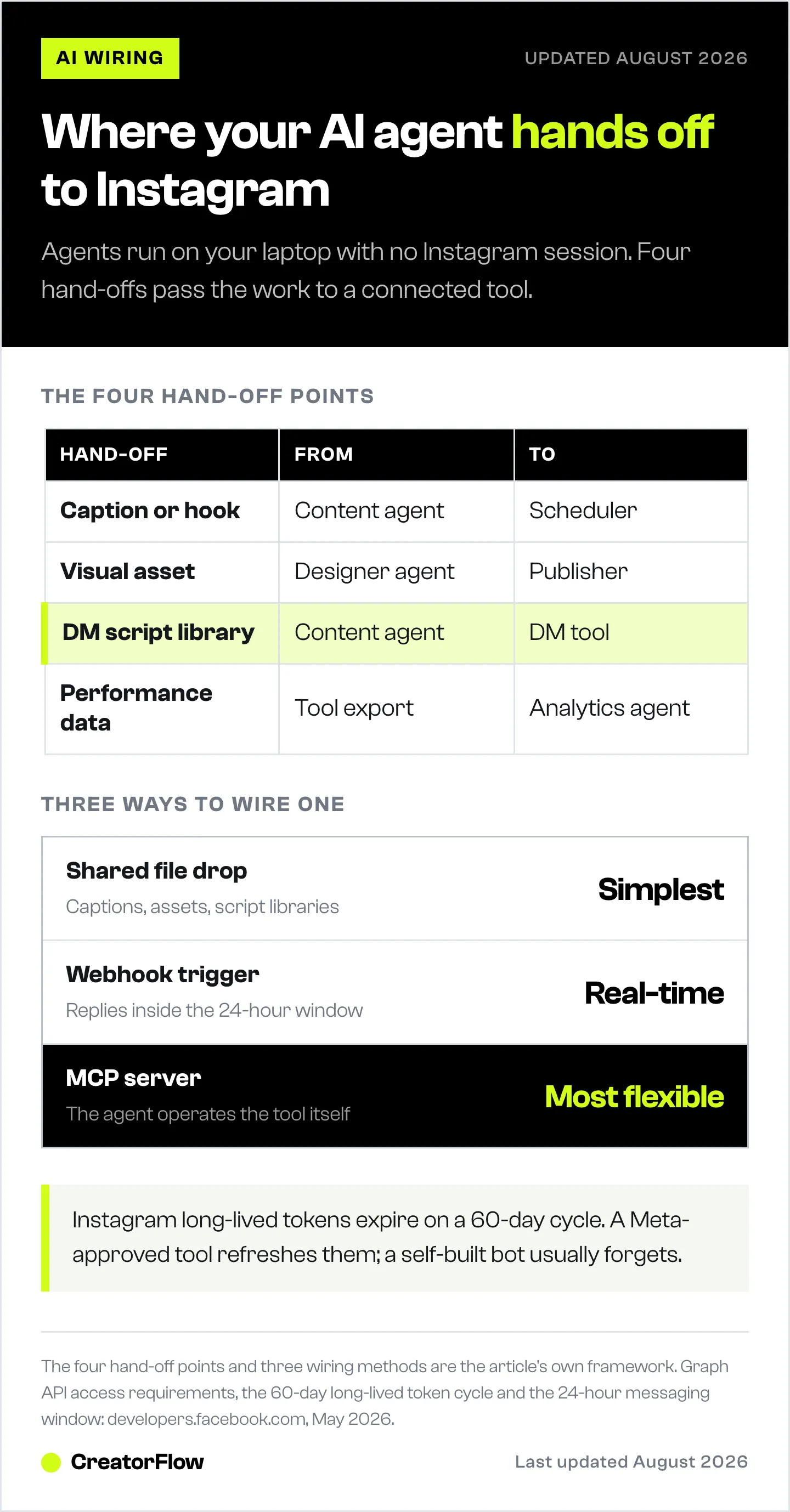
| Hand-off | From (AI agent) | To (Meta-connected tool) | Frequency |
|---|---|---|---|
| Caption / hook | Content agent | Scheduler (Postiz, Buffer) | Daily |
| Visual asset | Designer agent | Publisher / DAM | Daily |
| DM script library | Content agent | DM tool (CreatorFlow, ManyChat) | Weekly |
| Performance data | Analytics agent | Back into the agent | Weekly |
Hand-Off 1: Caption to Scheduler
The content agent drafts a caption. The scheduler posts it. Buffer’s AI Assistant ships free on every plan and integrates caption generation natively (socialrails.com, 2026). Postiz is open-source and has its own agent-style features (postiz.com, May 2026). For these, the hand-off is often “the agent puts a Markdown file in a folder; the scheduler reads from it.”
Hand-Off 2: Visual Asset to Publisher
The designer agent renders carousel slides as PNGs. The publisher uploads them. This is almost always a file-drop hand-off because schedulers expect actual image files, and your agent already produces them.
The file-drop is a workaround, though, and MCP is starting to remove it. If your image tool exposes an MCP server, the agent calls it directly rather than shelling out to a script and writing files to a watched folder. DesignerBox runs an MCP server over Streamable HTTP with OAuth, so Claude, Cursor, ChatGPT, or any MCP-aware client can search your existing designs, read your brand profile, and generate assets on request. Reads are open; writes such as creating an avatar or updating a brand profile require explicit confirmation in the chat (designerbox.ai/mcp, July 2026).
The reason this matters for a brand rather than a hobby account is the brand profile. An agent generating images from a bare prompt re-invents your colors and product every run. An agent calling a tool that already holds your brand kit does not. Disclosure: DesignerBox is built by the same team as CreatorFlow.
Hand-Off 3: DM Script Library to DM Tool
This is the hand-off that closes the revenue loop. Your content agent writes DM scripts (welcome message, FAQ replies, link delivery, qualification questions). Your DM tool stores those scripts and uses them to reply when a follower comments or DMs a trigger. The script library updates weekly; the tool sends thousands of messages per day from it.
Hand-Off 4: Performance Data Back to Your Agents
The platform reports clicks, replies, and DMs through your DM tool’s exports. Your analytics agent reads the export, summarises what worked, and feeds the insight back into the content agent’s next sprint. This loop is what stops the stack from drifting.
The Three Wiring Methods
The hand-off pattern matters more than the tool. There are three patterns; pick by latency and complexity.
Method 1: Shared File Drop (Simplest)
Your AI agent writes to a folder (Markdown for captions, PNG for assets, JSON for DM scripts). Your scheduler or DM tool reads from that folder, either by direct integration or via a sync tool like Dropbox or Google Drive.
When it fits: Captions, carousels, image assets, DM script libraries. Anything where “updated weekly” is fine.
When it does not: Real-time triggers. If a Reel goes viral and you need to switch which DM script CreatorFlow uses based on the comment volume, file drop is too slow.
Friction: Manual review still required before the scheduler picks up the file. Most creators want this anyway. AI captions still need a human eye on tone before they ship.
Method 2: Webhook Trigger (Real-Time)
Your DM tool sends a webhook when an event happens (a comment matches a trigger, a DM arrives, a link is clicked). A small server you control receives the webhook, calls your AI agent or a model API, and returns a response that the DM tool then uses.
When it fits: Personalised replies that need context. The DM tool sends “user X said Y,” your AI generates a response, the DM tool sends it.
When it does not: The 24-hour messaging window still applies (keyapi.ai, 2026). The webhook approach does not bypass any Meta rule. It just lets the AI participate in the reply within the legal window.
Friction: You need to host the webhook receiver. Vercel, Cloudflare Workers, or a $5 VPS is enough. You also need to handle retries and idempotency. This is real engineering, not a weekend.
Method 3: MCP Server (Most Flexible)
The Model Context Protocol lets an AI agent (Claude Code, Cursor, others) call out to external tools through a standard interface. An MCP server in front of your DM tool exposes “send DM,” “list templates,” “fetch click logs” as callable tools your agent can invoke.
When it fits: Power users who actually run agent workflows in Claude Code or similar and want the agent to operate the DM tool as part of a bigger task (“draft this week’s launch DM scripts, push them to CreatorFlow, then check the click rate on last week’s”). The number of MCP servers built on Anthropic’s protocol grew through 2025-2026 and now covers most major SaaS categories.
When it does not: Casual creators. If you do not already use Claude Code or Cursor in a terminal, MCP is overkill. For a creator-focused tour of what Claude can do without going this deep, see Claude AI for Instagram creators.
Friction: Most DM tools do not yet ship official MCP servers. You can wrap a tool’s REST API in a thin MCP server yourself, but this is engineering. Worth it for agencies running ten clients; not worth it for a solo creator.
A Working Example: Claude Code to a Sent DM
Concrete walkthrough. A fitness creator launches a new program every six weeks. The launch DM funnel has three touch points: a welcome reply when someone comments “PROGRAM,” a follow-up sent two hours later if they clicked the link but did not buy, and a final reply that pitches a payment plan.
The agent side. A “launch script” agent in Claude Code owns the writing. It pulls the brand voice from a folder of past launch DMs, the offer details from a launch brief Markdown file, and the past performance from a CSV of last launch’s reply rates. It produces three Markdown files: welcome.md, followup.md, pitch.md.
The hand-off. A small script syncs that folder to a Dropbox the creator already uses. The DM tool (CreatorFlow) imports DM templates from that Dropbox folder weekly. Filenames match template slugs. The creator opens the dashboard, eyeballs the templates, makes any tweaks, and saves.
The send side. The trigger word “PROGRAM” is wired to the welcome template. A two-hour delay rule fires the followup if the click happened without conversion. A click on the followup’s pricing link triggers the pitch. All sending happens through Meta’s Graph API via the DM tool’s verified app (no creator-built integration). The 200 DMs per hour rate limit and 24-hour messaging window are handled by the tool, not the creator’s code (developers.facebook.com, May 2026). For more on how AI is being layered into DM tools themselves (versus the agent layer above them), see AI agents for Instagram DMs: how brands automate.
The feedback loop. Each Sunday, an analytics agent in Claude Code reads the previous week’s export from the DM tool. It writes a one-page “what worked” Markdown that the launch script agent will read before drafting the next launch.
The whole stack uses one wiring method (file drop). No webhook server. No MCP. A solo creator can run it.
Where the Wiring Breaks
Five failure modes account for almost every “my AI Instagram setup stopped working” complaint.
1. Tokens expire. Instagram long-lived tokens last 60 days. If your DM tool is Meta-approved, it handles refresh automatically. If you wired your own bot, you have to handle refresh yourself, and most DIY builds forget. See the build vs buy real-cost breakdown.
2. App review rejects. Meta requires a privacy policy, a terms-of-service URL, a published app icon, screencast demos of the use case, and clean OAuth scopes. Submissions miss at least one of these on the first pass. Budget two to three rounds.
3. Webhook payloads change without notice. Meta updates the comment and message webhook schema periodically. If your wiring assumes a field name that gets renamed, the integration silently fails. Verified providers absorb this; DIY does not.
4. The 24-hour window misunderstanding. The 24-hour rule means you can only message someone within 24 hours of their last interaction with your account. Outside that window, only message tags (utility, post-purchase update) work, and Meta restricts those tightly (keyapi.ai, 2026). AI replies that arrive 30 hours later will fail with no error visible to the creator.
5. AI rate limits hit. Anthropic adjusted Claude Code’s plan structure in April 2026 (claude.com/pricing, May 2026). Heavy agent users on Pro hit limits faster than expected. If your wiring assumes “infinite agent capacity,” a viral post can spike the agent’s usage and break the loop. Build with quotas in mind.
Build vs. Paste vs. Integrate
Three options for closing each hand-off, ranked by effort.
Paste. You manually copy from the agent’s output to the tool. Free. Slow. Fine for the first month while you figure out which hand-offs matter.
Integrate. Use existing connectors (Zapier, Make, Buffer’s AI Assistant, the DM tool’s native template import). Cheap (Zapier Professional starts at $19.99 per month, zapier.com, May 2026). Fast to set up. Works for 80% of creators.
Build. Write your own webhook receivers and MCP servers. Expensive in time. Worth it for agencies, technical creators, or unusual workflows. Most solo creators should not build.
The decision comes down to volume and edge cases. If you ship one launch every six weeks and a hundred DMs a day, paste plus integrate is enough. If you run ten client accounts as an agency, build the MCP layer once and amortise.
FAQ
Can Claude Code post to Instagram directly?
No. Claude Code runs locally and has no Instagram session, OAuth tokens, or Meta app approval. It can write captions, draft DM scripts, and analyse exports, but the actual posting and DM sending happens through a Meta Approved tool the agent feeds into.
What is MCP and does it work with Instagram?
MCP (Model Context Protocol) is a standard way for AI agents to call external tools. There is no native Meta MCP server. You can wrap an Instagram-connected tool’s REST API in your own MCP server, but most creators get more value from a file-drop or webhook hand-off than from MCP.
Do I need n8n or Zapier to connect AI to Instagram?
Not always. For caption hand-offs, a shared folder is enough. For real-time DM responses, you need either a verified DM tool (CreatorFlow, ManyChat) or a webhook server you control. Zapier helps but is rarely the only option.
Can ChatGPT send Instagram DMs?
Not directly. OpenAI does not have a native Instagram integration. Third-party connectors exist (Appy Pie, Zapier), but they all route through the same Meta Graph API, which still requires a verified app. The simpler pattern: ChatGPT writes the script, a DM tool sends it.
How do I hand off content from an AI agent to a scheduler?
Three options, in order of effort. Manually paste the caption into the scheduler (free, slow). Sync a folder to the scheduler (Buffer, Postiz, and similar accept folder-based imports). Build a webhook that pushes new captions on agent completion (most flexible, most setup).
What is the simplest AI-to-Instagram setup?
One content agent in Claude Code that writes captions and DM scripts to a Dropbox folder. Buffer or Postiz pulls captions from the folder for posts. CreatorFlow or ManyChat imports DM templates from the same folder. No webhooks, no MCP. Set up in an afternoon.
Can my AI agent read Instagram analytics?
Yes, indirectly. Your DM tool exports clicks, replies, and conversion data as CSV. Your analytics agent reads the CSV. Direct API access to Instagram Insights is possible but requires the same app review and OAuth dance the DM side does, so most creators rely on tool exports instead.
If you have the agent layer and you are looking for the inbox layer to wire it into, CreatorFlow is one of the Meta-approved DM tools your agents can hand off into. The DM templates, click tracking, and analytics exports all sit in patterns that file-drop, webhook, and MCP wiring can use.
AI agent platforms, Instagram Graph API constraints, and DM tool pricing verified from claude.com, postiz.com, manychat.com, developers.facebook.com, keyapi.ai, bot.space, and zapier.com as of May 2026. Individual results vary.


