
Building an Instagram DM bot from scratch using n8n, Make.com, or the raw Meta Graph API costs between $400 and $1,000 in developer time alone, before you send a single message. That does not include the 7 to 30 days waiting for Meta’s app review, ongoing server costs of $5 to $50 per month, or the 2 to 6 hours of monthly maintenance when tokens expire and webhooks break. A ready-made tool like CreatorFlow ($15/month) or ManyChat ($39/month for Pro, or $29/month billed annually) handles all of this out of the box.
Reddit threads on r/n8n and developer forums show a recurring pattern: builders underestimate the true cost. One commenter put it bluntly: “you’re solving a $15/month problem with $50/hour development time.” The math rarely works out.
This guide breaks down every cost, every hidden gotcha, and the exact scenarios where building makes sense vs when you should buy.
Key Takeaways
- DIY build cost: 16 to 40+ developer hours for initial setup, plus $5 to $50/month in hosting
- Hidden bottleneck: Meta’s app review for messaging permissions takes 7 to 30 business days, with frequent rejections
- Ongoing maintenance: Token refresh, API changes, webhook debugging cost 2 to 6 hours per month
- SaaS alternative: CreatorFlow costs $15/month flat rate with 5-minute setup and zero maintenance
- When DIY wins: Custom workflows that no SaaS tool supports, or when you need to process DMs through your own AI pipeline
- Bottom line: If your hourly rate exceeds $10, building costs more in month one than a full year of SaaS

What Does “Building Your Own Bot” Mean?
Building an Instagram DM bot means connecting directly to Meta’s Instagram Graph API to send and receive direct messages programmatically. You write the logic, host the infrastructure, and maintain everything yourself.
The three common approaches:
1. Raw Meta Graph API You write code (Python, Node.js, PHP) that handles webhooks, processes incoming messages, and sends replies through the API. Full control, full responsibility.
2. n8n (open-source workflow builder) A visual automation tool where you connect nodes to create workflows. n8n handles the logic visually, but you still need to configure the Meta API, host the server, and manage tokens. n8n Cloud starts at EUR 24/month (n8n.io/pricing, April 2026).
3. Make.com or Zapier General-purpose automation platforms. Make.com starts at $9/month for 10,000 operations (make.com/pricing, April 2026). Zapier Professional starts at $19.99/month for 750 tasks (zapier.com/pricing, April 2026). Critical limitation: neither natively supports sending Instagram DMs through the messaging API. Users on the Zapier Community forum have been directed to specialized tools like ManyChat instead (community.zapier.com).
All three approaches require you to pass Meta’s app review process before your bot can message real users.
👉 New to Instagram DM automation? Start with our complete guide to Instagram DM automation for a full overview of how it works.
The Real Cost of Building a DIY Instagram DM Bot
Most developers focus on the code. The code is the easy part. Here is where the real cost hides.
Step 1: Meta Developer App Setup (2 to 4 Hours)
Before writing any automation logic, you need:
- An Instagram Business or Creator account (not Personal)
- A Facebook Page linked to that Instagram account with admin access
- A Meta Developer App configured as “Business” type
- An app icon, privacy policy URL, and app category filled in
- Required permissions: instagram_manage_messages, instagram_basic, pages_show_list, pages_messaging, pages_manage_metadata
Each permission must be individually reviewed by Meta (developers.facebook.com/docs/permissions, April 2026).
Step 2: Meta App Review (7 to 30 Days of Waiting)
This is where most DIY projects stall. Meta requires a screencast video demonstrating how your app uses each requested permission. Common rejection reasons include requesting unnecessary permissions, vague privacy policies, and poor screencast quality.
Timeline reality:
- Standard permissions: 7 to 14 business days
- Messaging permissions (instagram_manage_messages): up to 30 business days
- Each rejection adds 3 to 5 more business days per resubmission
The review process is frustrating enough that developers post $200 fixed-price jobs on Upwork specifically to hire someone to get their instagram_manage_messages permission approved (Upwork listing, September 2025).
Until you pass review for Advanced Access, your webhooks only fire from designated tester accounts, not real users (community.n8n.io thread #176851).
📊 Want the full pricing comparison? See our Instagram automation cost breakdown for a complete comparison.
Step 3: Building the Actual Workflow (4 to 16 Hours)
Once approved, you need to build:
- Webhook listener to receive Instagram events (comments, story replies, DMs)
- Message processing logic to parse incoming data and determine responses
- Reply sender that calls the Graph API to send DMs
- Token refresh system because short-lived tokens expire in 1 hour and long-lived tokens expire in 60 days
- Deduplication logic because the same DM can trigger webhooks multiple times (community.n8n.io thread #127450)
- Rate limit handling for Meta’s published per-second send ceilings and the 750-per-hour cap on private replies to comments
- 24-hour window enforcement because you can only message users who engaged within the last 24 hours
If you are using n8n, the workflow setup itself takes 4 to 8 hours for someone experienced with the platform. Add testing and debugging time, and you are looking at 8 to 16 hours total (flowgent.ai/blog/instagram-dm-automation-with-n8n).
Step 4: Hosting and Infrastructure ($5 to $50/Month)
Self-hosted n8n (Community Edition):
| Component | Monthly Cost |
|---|---|
| Basic VPS (Hetzner, DigitalOcean) | $5 to $20 |
| Production-grade server (4GB+ RAM) | $20 to $50 |
| Managed PostgreSQL database | $10 to $30 (or $0 if self-managed) |
| Typical total | $15 to $50 |
Most production n8n self-hosted deployments run $20 to $150/month in infrastructure (expresstech.io, April 2026).
n8n Cloud (managed):
| Plan | Monthly Cost | Executions |
|---|---|---|
| Starter | EUR 24/month | 2,500 |
| Pro | EUR 60/month | 10,000 |
n8n Cloud eliminated its permanent free plan. 14-day trial only (n8n.io/pricing, April 2026).
Self-hosting means you handle updates, backups, security patches, SSL certificates, and database maintenance. If the server goes down at 2 AM, your automations stop.
Step 5: Ongoing Maintenance (2 to 6 Hours/Month)
This is the cost nobody budgets for:
| Maintenance Task | Time Per Month |
|---|---|
| Token refresh monitoring | ~1 hour |
| Meta API update debugging | 2 to 4 hours per incident |
| Server/hosting maintenance | 1 to 2 hours |
| Debugging failed automations | 1 to 4 hours per incident |
The n8n community forums document these issues consistently:
- Messages not delivering: Webhook receives messages fine, but outbound DMs fail silently through the Graph API (community.n8n.io thread #242053)
- Duplicate webhook fires: Same DM triggers the webhook multiple times despite returning HTTP 200 (community.n8n.io thread #127450)
- Token expiration: Long-lived tokens expire in 60 days with no warning. Need custom refresh logic (community.n8n.io thread #135778)
- API changes: Meta updates its API regularly. Any change can break your automation without warning (eesel.ai/blog, October 2025)
As eesel AI’s guide puts it: n8n is “designed for developers, not for a marketing or support person who just wants to answer DMs faster” (eesel.ai/blog/instagram-integrations-with-n8n).
Total Cost Comparison: Build vs Buy
Here is the full cost picture over 12 months.
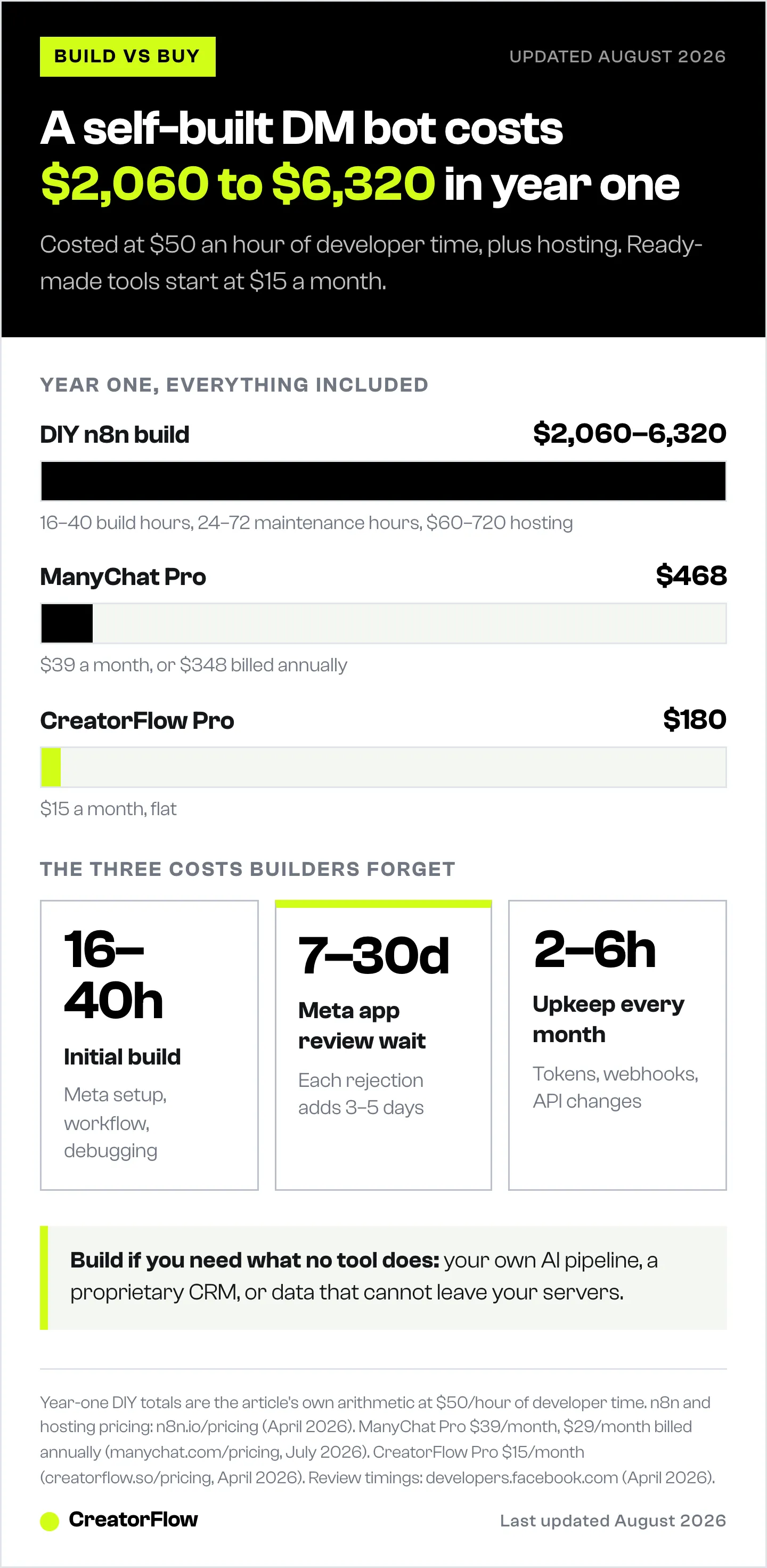
| Cost Category | DIY (n8n Self-Hosted) | DIY (n8n Cloud) | CreatorFlow Pro | ManyChat Pro |
|---|---|---|---|---|
| Platform cost/year | $0 | EUR 288 to 720 | $180 | $468 |
| Hosting/year | $60 to $600 | Included | Included | Included |
| Build time | 16 to 40 hours | 16 to 40 hours | 10 minutes | 30 minutes |
| Maintenance/year | 24 to 72 hours | 24 to 48 hours | 0 hours | 0 hours |
| Meta app review | 1 to 4 weeks wait | 1 to 4 weeks wait | Already approved | Already approved |
| Instagram DM support | Build custom | Build custom | Built-in | Built-in |
| Risk of breakage | High | Medium-High | Low | Low |
The math at $50/hour developer time:
-
DIY build cost: 16 to 40 hours = $800 to $2,000
-
DIY annual maintenance: 24 to 72 hours = $1,200 to $3,600
-
DIY infrastructure: $60 to $720/year
-
DIY Year 1 total: $2,060 to $6,320
-
CreatorFlow Year 1 total: $180
-
ManyChat Pro Year 1 total: $468 ($348 if billed annually)
Even at a conservative $25/hour rate, the 16 to 40 hours of initial build alone costs $400 to $1,000. CreatorFlow Pro costs $180 for the entire year.
👉 Curious about ROI? Read our guide to measuring Instagram DM automation ROI to calculate your actual return.
There is a third path between writing the integration yourself and paying for a SaaS tool: deploying a ready-made open-source project such as OpenReply. The code is free, but the hosting, database, and always-on worker are not, and we costed that whole stack out in open source Instagram DM automation.
When Building Your Own Bot Makes Sense
The DIY route is not always wrong. It wins in specific scenarios:
Build if you need:
- Custom AI processing (running DMs through your own GPT pipeline before responding)
- Integration with proprietary systems (your own CRM, inventory database, or booking system that has no public API)
- Data sovereignty requirements (regulated industries where messages cannot pass through third-party servers)
- Volume beyond SaaS limits (processing 50,000+ DMs/month with custom logic)
- Multi-platform orchestration (combining Instagram DMs with WhatsApp, Telegram, and email in a single custom workflow)
Buy if you need:
- Comment-to-DM automation that works today
- Keyword triggers with template responses
- Email capture within DMs
- Link tracking and analytics
- Zero maintenance burden
- No coding required
For 90%+ of creators, coaches, and small businesses, the “buy” column matches their needs.
🤖 Comparing tools? See our Instagram DM automation tool comparison for a side-by-side breakdown.
The 5 Biggest Mistakes DIY Bot Builders Make
1. Underestimating Meta’s App Review
Most builders assume they can ship in a weekend. Meta’s review process for instagram_manage_messages can take up to 30 business days. Your bot sits idle while you wait, resubmit, and wait again.
2. Ignoring Token Refresh Logic
Long-lived Instagram tokens expire every 60 days. Without automated refresh logic, your bot silently stops working. You will not know until followers start complaining about missing DMs.
3. Not Handling Duplicate Webhooks
Meta’s webhook system can fire multiple times for the same event. Without deduplication, your bot sends the same message 2 to 5 times to the same person. That is a fast way to get reported.
4. Skipping Rate Limit Management
Meta documents per-second send ceilings on the Instagram Login path plus a cap of 750 private replies to comments per hour (developers.facebook.com/docs/instagram-platform, April 2026). A viral Reel generating 1,000 comments in an hour runs past that ceiling. Without queuing logic, messages fail silently.
5. Forgetting About API Deprecation
Meta updates the Graph API on a regular cycle. Endpoints change, permissions shift, and response formats evolve. Each update requires you to test, update, and redeploy your workflows. SaaS tools handle this behind the scenes.
📚 Want to understand the rules? Read our guide on Instagram DM automation rules and safety before building anything.
How a SaaS Tool Handles All of This
When you use a tool like CreatorFlow, here is what you skip:
- Meta app review: CreatorFlow is already a Meta Tech Provider. You connect via OAuth in 2 clicks.
- Token management: Handled automatically. No expiration surprises.
- Webhook processing: Built into the platform. No duplicate message issues.
- Rate limiting: Managed server-side. Messages queue automatically within Instagram’s limits.
- API updates: The CreatorFlow team updates their integration when Meta changes the API. You do nothing.
- Hosting: No servers to maintain. No databases to back up. No SSL certificates to renew.
You can set up auto DM on Instagram in under 5 minutes: connect your Instagram account, create an automation trigger, customize your message template, and activate.
CreatorFlow’s Free plan includes 500 DMs/month at $0. Pro costs $15/month for 5,000 DMs with features like Follow Gate, Email Gate, and geographic analytics (creatorflow.so/pricing, April 2026).
👉 Ready to skip the build phase? See how Instagram DM automation works for a technical walkthrough of the SaaS approach.
What About n8n + CreatorFlow Together?
Here is a middle ground that some technical creators use: pair a SaaS tool for the Instagram DM layer with n8n for custom downstream processing.
Example workflow:
- CreatorFlow handles the Instagram connection, message sending, and rate limiting
- CreatorFlow’s CSV export sends contact data to a shared spreadsheet
- n8n picks up new contacts from the spreadsheet and routes them to your CRM, email platform, or custom AI pipeline
This gives you the reliability of a dedicated tool for the hard parts (Meta API, tokens, webhooks) while keeping full control over what happens after the DM is sent. You get the best of both worlds without the fragile Instagram integration.
Work out the payback for your own volume with the DM ROI calculator.
FAQ
Is it legal to build your own Instagram DM bot?
Yes, as long as you use Meta’s official Instagram Graph API and comply with their Developer Policies. Unofficial methods (browser automation, scraping, unofficial APIs) violate Instagram’s Terms of Service and can result in account bans. The official API requires app review and has rate limits specifically to ensure compliance (developers.facebook.com/docs/instagram-platform, April 2026).
How long does it take to build an Instagram DM bot with n8n?
Expect 16 to 40+ hours of total development time. That breaks down to 2 to 4 hours for Meta Developer setup, 4 to 8 hours for the n8n workflow, 4 to 16 hours for testing and debugging, plus 1 to 4 weeks waiting for Meta’s app review. Experienced developers with prior Meta API experience tend toward the lower end. First-timers often exceed 40 hours (eesel.ai/blog, flowgent.ai/blog, April 2026).
Can I use Make.com or Zapier for Instagram DM automation?
Not directly. Neither platform natively supports sending Instagram DMs through the messaging API endpoint. Their Instagram integrations handle posting, comment monitoring, and lead ads, but not the instagram_manage_messages permission required for DM automation. Users on the Zapier Community forum have been directed to specialized tools for DM automation (community.zapier.com, April 2026).
What is the cheapest way to automate Instagram DMs?
CreatorFlow’s Free plan at $0/month with 500 DMs is the cheapest option that works out of the box. Self-hosting n8n Community Edition is technically $0 for the software, but requires $5 to $50/month in hosting plus significant developer time. When you factor in build and maintenance hours, even a $5/month VPS setup costs more than CreatorFlow Free in the first month (creatorflow.so/pricing, April 2026).
Is building a bot safer than using a SaaS tool?
No. Both approaches use the same Meta Graph API with the same rate limits and rules. CreatorFlow is a Meta Tech Provider, meaning Meta has specifically reviewed and approved its integration. A self-built bot has no such verification, and mistakes in implementation (exceeding rate limits, not respecting the 24-hour window) carry the same consequences. Updated April 2026.
Can I build a bot that does more than SaaS tools offer?
Yes, and this is the one scenario where building makes sense. If you need custom AI processing (running messages through your own LLM before responding), deep integration with proprietary systems, or multi-platform orchestration beyond what any single SaaS covers, a custom build gives you that flexibility. For standard comment-to-DM, keyword triggers, and email capture, SaaS tools already cover these use cases. Updated April 2026.


