
Open source Instagram DM automation tools like OpenReply, ZernFlow, and InstaAuto are free to download and they run on Meta’s official Instagram API. Self-hosting them is not free to operate. A terms-compliant stack costs roughly $26 to $63 per month across hosting, database, Redis, and transactional email, plus the hours you spend building and maintaining your own Meta developer app.
OpenReply landed on GitHub on July 17, 2026 and collected 680 stars in fourteen days (github.com/diwenne/openreply, July 2026). It is a genuinely good piece of software. It also ships with a line in its own README that most write-ups skipped: “the code deploys in minutes, but the Meta app setup is the part that takes real time.”
That line is the whole story. This guide covers what the open-source options actually give you, what the monthly bill looks like once you account for an always-on worker, and the one structural limit that decides whether self-hosting works for you: not the price you avoid, but whose Instagram account connects to your instance.
Key Takeaways
- The code is free, the infrastructure is not. A compliant self-hosted stack runs about $26/month at the floor and $40 to $63/month in practice, because the message worker has to stay running around the clock and cannot live on a serverless host
- Vercel’s free tier is off-limits for this. Vercel’s own terms restrict Hobby to “personal or non-commercial use,” and their fair-use guidelines name affiliate linking and payment processing as commercial usage (vercel.com/legal/terms and vercel.com/docs/limits/fair-use-guidelines, July 2026)
- Running it for your own account needs no Meta App Review. Standard Access covers anyone holding a role on your app, so a solo operator on their own Instagram is clear (developers.facebook.com/docs/app-review, July 2026)
- The moment someone else’s account connects, the rules change. Advanced Access requires Business Verification, which requires documents proving a registered legal entity. That is the cliff, and it is where agency and multi-client plans stop
- The category is young. Every open-source project in this space is under seven months old, and the whole “manychat-alternative” GitHub topic totals roughly 113 stars across 8 repositories (github.com/topics/manychat-alternative, July 2026)
- The official-API projects are the safe ones. The high-star Instagram automation repos are private-API and Selenium tools, and the maintainer of the largest one recommends official APIs for business use
- Bottom line: self-host if you are one operator who enjoys running infrastructure. Use a managed tool if the automation is supposed to make money while you are doing something else
What Is Open Source Instagram DM Automation?
Open source Instagram DM automation is software you download, host yourself, and connect to your own Meta developer app, so that comments containing a keyword trigger an automatic direct message. The code is public and free under licenses like MIT. You supply the servers, the database, the API credentials, and the maintenance.
The functional core is identical to the commercial tools. Someone comments “LINK” on your Reel, Meta fires a webhook at your server, and your server sends that person a private reply through the official messaging endpoint. The difference is not what happens. The difference is who is responsible when it stops happening at 2am.
If you are weighing writing the integration yourself rather than deploying someone else’s, the numbers are different again, and we broke those down in build your own Instagram DM bot vs buy a tool.
OpenReply: What It Does Well
OpenReply is the strongest project in this category right now, and it deserves the attention it got. Credit where it is due, because a lot of open-source releases in this space are thin wrappers and this one is not.
It uses Meta’s official Instagram API with Instagram Login. Its README is explicit that it “does not scrape, it does not automate a browser, and it never asks for an Instagram password” (github.com/diwenne/openreply, July 2026). That puts it on the same sanctioned path as the paid tools, which matters more than any feature on the list.
The feature set is real:
- Keyword matching on comments, whole-word or partial, with an optional public comment reply
- Tracked links with click counts and click-through rate
- Two tappable link buttons per DM
- A follow gate that checks follower status before sending the link
- Username personalization tokens
- Per-account pacing that stays under Meta’s documented cap and queues the overflow instead of dropping it
- Multi-account support with owner, admin, and member workspace roles
- A DM inbox and full send logs
The stack is modern: Next.js 16, React 19, PostgreSQL with Prisma, BullMQ on Redis, and Auth.js for login. It is MIT licensed, written in TypeScript, and had four contributors and four open issues as of July 31, 2026. It is also a disclosed fork of an earlier MIT project, instagram-comment-to-dm by Anish Raj, with the billing layer removed.
Two things the project is honest about, and both are worth reading before you clone it. There is no hosted version. The GitHub description says plainly that the demo link “will not allow you to oauth; you must self-host with your own api keys.” And its follow gate fails open, sending the link anyway when Instagram does not return follow status, so a real follower is never blocked. That is a sensible design choice and worth knowing about.
The Rest of the Open Source Field
Three other projects come up in the same searches, and the differences between them are worth a minute.
ZernFlow (116 stars, MIT, created February 2026) covers more platforms than Instagram alone and has the largest star count in the category. One detail to check before adopting: the project requires an API key from Zernio, a separate service that handles OAuth, token refresh, and rate limiting on its behalf. Zernio’s published rate card is free for the first 2 accounts, then $6/month per account for accounts 3 through 10, and $3/month per account for 11 through 100 (zernio.com/pricing, July 2026). ZernFlow’s own site describes the project as having “no per-account charges,” so read both pages and price your own account count before committing.
InstaAuto (72 stars, MIT, created January 2026) also uses the official Instagram API with Instagram Login and lists the same permission scopes. It offers a hosted app, though access is approval-gated through Meta tester roles rather than open signup.
Botpress shows up in these comparisons and is worth separating out. Its main public repository is the cloud product, not a self-hostable server. The last self-hostable version, v12, was last updated in April 2025 and is over a year stale. Botpress cloud starts at $150/month billed annually for 250 conversations (botpress.com/pricing, July 2026), which puts it in a different bracket entirely.
Now the part that surprised me. The whole “manychat-alternative” topic on GitHub holds 8 repositories totalling roughly 113 stars, five of which have five stars or fewer, and every single one was created in 2026. Meanwhile the adjacent “instagram-automation” topic holds thousands of stars, led by a private-API Python wrapper with 6,548 stars and a Selenium-driven bot last updated in 2023.
Those high-star projects are the ones to be careful with, and the clearest warning comes from the largest one’s own maintainer, whose README states that private API automation “is fragile in production” and that “for account-owned business workflows, prefer official Instagram APIs where they cover your use case.” Star counts in this space measure the unofficial tools. The official-API projects, the ones you would actually want to run, are the small young ones.
What Self-Hosting Actually Costs Per Month
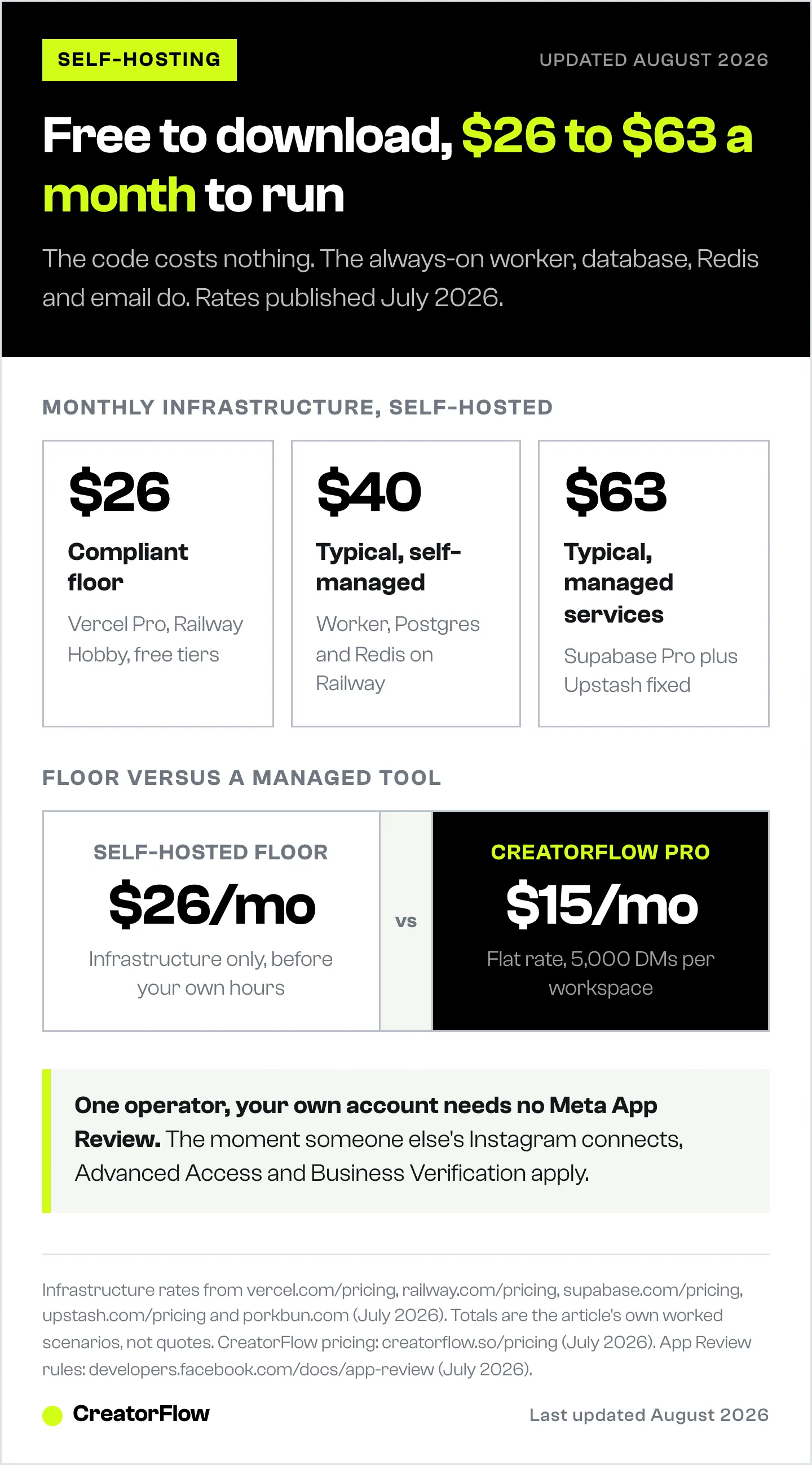
Here is where the free-software story meets the invoice. OpenReply needs two processes running: a web app that receives Meta’s webhooks, and a separate worker that actually sends the messages. The project’s own documentation states the worker “must stay always-on, so it cannot run on Vercel.” That single architectural fact drives most of the cost.
The free tiers do not survive contact with an always-on worker:
| Component | Free tier | Why it breaks |
|---|---|---|
| Vercel Hobby | $0 | Restricted to non-commercial use by Vercel’s terms |
| Railway Free | $0 with $1/mo credit | At the published $10/GB/month, $1 buys 0.1 GB-months of RAM |
| Neon Free | 100 CU-hours | An always-warm database exhausts this in roughly half a month |
| Supabase Free | 500 MB | Projects pause after one week of inactivity |
| Upstash Free | 500K commands/mo | Upstash’s own BullMQ guide recommends a fixed plan instead |
| Resend Free | 3,000 emails/mo, 100/day | Workable for login emails at small scale |
All tiers verified from each vendor’s published pricing page, July 2026.
The Vercel line is the one that catches people. Vercel’s terms of service state: “You shall only use the Services under a Hobby plan for your personal or non-commercial use.” Their fair-use guidelines are more specific still, defining commercial usage to include “any method of requesting or processing payment from visitors of the site” and cases where “affiliate linking is the primary purpose of the site” (vercel.com/legal/terms and vercel.com/docs/limits/fair-use-guidelines, July 2026). An affiliate marketer running DM automation to earn commissions is inside that definition on day one. The pricing page never mentions it, so anyone costing this out from the pricing table alone misses it.
Realistic monthly totals:
| Scenario | Monthly cost | What it includes |
|---|---|---|
| Compliant floor | ~$26 | Vercel Pro $20, Railway Hobby $5, free database and Redis tiers, domain |
| Typical, self-managed | ~$40 | Vercel Pro $20, Railway usage for worker plus Postgres plus Redis, domain |
| Typical, managed services | ~$63 | Vercel Pro $20, worker $7, Supabase Pro $25, Upstash fixed $10, domain |
Rates verified from vercel.com/pricing, railway.com/pricing, supabase.com/pricing, upstash.com/pricing and porkbun.com, July 2026. The Railway subtotals depend on how much RAM and CPU you allocate per service, which is your call, so treat the middle row as a worked example rather than a quote.
Add your own time. The project’s setup documentation says to “budget an afternoon the first time,” and calls the Meta configuration “the slow part.”
The Meta App Review Cliff
This is the section that decides the question, and almost nobody covers it.
If you run your instance for your own Instagram account, you need no App Review and no Business Verification. Meta’s Standard Access covers permissions requested from users who hold a role on your app, and App Review is triggered only when, in Meta’s words, an app “will be used by anyone without a Role on the app or a role in a Business that has claimed the app” (developers.facebook.com/docs/app-review, July 2026). A solo operator adding their own Instagram as a tester is squarely inside that. Self-hosting genuinely works here.
The moment a second person’s Instagram account connects, everything changes. Advanced Access is required to request permissions from any user, Advanced Access requires Business Verification, and Business Verification requires documents proving a registered legal entity. OpenReply’s own setup guide spells out what its authors went through: a one-take screencast of the full flow on real accounts, written justification for each permission, and a business registration, articles of incorporation, a business tax document, or a business bank statement. Their note is worth quoting in full: “Meta scrutinizes automated-DM apps and often rejects the first submission, so budget for a resubmit.”
Meta publishes no turnaround guarantee for App Review. Anyone quoting you a specific number of days is quoting a vendor blog, not Meta.
So the real fork in the road is not price. It is this:
- One person, one or two of your own accounts: self-hosting is viable and needs no Meta approval
- A team, an agency, or clients whose accounts you manage: you now need a registered company, a successful App Review, and ongoing responsibility for other people’s data
The platform rules apply either way. Meta allows 750 private replies per hour per Instagram professional account for comments on posts and reels, 100 API calls per second for messages containing text and links, and 10 per second for audio or video. New conversations run on a 24-hour messaging window, extendable to 7 days with the human agent tag (developers.facebook.com/docs/instagram-platform/overview, July 2026). Those are Meta’s numbers, not any tool’s, and no amount of self-hosting changes them.
When Self-Hosting Is the Right Call
Deploy an open-source instance when most of these are true:
- You are one operator running one or two of your own Instagram accounts
- You are comfortable with Docker, environment variables, database migrations, and reading logs when a webhook stops firing
- You want to modify the behaviour, not just configure it
- Your time is genuinely free at the margin, or you find this work enjoyable rather than costly
- You accept that you are the on-call engineer for your own revenue
That last one deserves emphasis. When a token expires or a webhook subscription silently drops, the DMs stop and nothing tells you. The people who commented still expect their link.
When a Managed Tool Is the Right Call
The alternative is that somebody else runs the infrastructure, holds the Meta approval, and takes the 2am page.
CreatorFlow is a Meta Tech Provider (since December 2025), which means the App Review and Business Verification described above are already done and maintained on our side. You connect your Instagram account through OAuth, with no password sharing, and the automation is live in about five minutes. There is no Meta developer app to create, no permission justification to write, no screencast to record, and no resubmission to budget for.
Pricing is flat rather than per-contact (creatorflow.so/pricing, July 2026):
| Plan | Monthly | Annual | DMs/month | Workspaces |
|---|---|---|---|---|
| Free | $0 | n/a | 500 | 1 |
| Pro | $15 | $12/mo billed annually | 5,000 per workspace | 2 |
| Growth | $30 | $24/mo billed annually | 10,000 per workspace | 5 |
Pro adds the follow gate, the email gate, link click tracking, CSV contact export, and geographic analytics showing which countries and cities your clicks come from. Growth adds 5 team seats per workspace and priority support. Over 20,000 creators and brands use it.
Set against the self-hosted numbers above, Pro at $15/month sits below the roughly $26/month compliant infrastructure floor before a single hour of your own time is counted. That comparison is the honest one to make, and it is not a comparison of software quality. OpenReply’s code is good. The question is whether you want to own a Meta app, a Postgres instance, a Redis queue, and an always-on worker in order to send a link to someone who commented “LINK.”
If cost is the driving concern, the free tiers across the whole category are mapped in free Instagram DM automation tools, and the paid options under $20 are tested in best Instagram DM tools under $20/month. For the mechanics of how comment-to-DM works regardless of which tool sends it, start with the Instagram DM automation guide.
FAQ
Is open source Instagram DM automation safe to use?
The official-API projects are as safe as the commercial tools, because they use the same Meta endpoints under the same rules. OpenReply, InstaAuto, and ZernFlow all connect through Instagram API with Instagram Login and request the standard instagram_business permission scopes. The risk sits in the older, higher-star repositories built on private APIs or Selenium browser automation, which operate outside Meta’s sanctioned path (July 2026).
Is OpenReply actually free?
The software is free and MIT licensed, with no license fee and no seat caps. Running it is not free. You pay for hosting, a PostgreSQL database, a Redis instance, an always-on worker process, transactional email, and a domain. A terms-compliant stack lands around $26/month at minimum and $40 to $63/month in typical use, based on published rates from Vercel, Railway, Supabase, and Upstash as of July 2026.
Do I need Meta App Review to self-host an Instagram DM tool?
Not if you are the only person using it. Meta’s Standard Access covers permissions requested from users who hold a role on your app, so running your own instance for your own Instagram account requires neither App Review nor Business Verification. Review becomes mandatory as soon as someone without a role on your app connects their account (developers.facebook.com/docs/app-review, July 2026).
Can I use an open-source tool to manage client Instagram accounts?
Only after clearing Advanced Access. Client accounts belong to people who do not hold a role on your app, which triggers App Review plus Business Verification, and Business Verification requires documents proving a registered legal entity such as a business registration, articles of incorporation, or a business bank statement. Agencies without a registered company cannot complete this step.
Why can’t the message worker run on Vercel?
Because it has to stay running continuously to process the send queue, and serverless functions are time-limited by design. OpenReply’s documentation states the worker “must stay always-on, so it cannot run on Vercel.” You need a separate always-on host such as a Railway service or a small virtual machine, which is the line item most free-hosting estimates leave out.
How many DMs per hour can any Instagram automation send?
Meta allows 750 private replies per hour per Instagram professional account for comments on posts and reels, plus 100 API calls per second for messages containing text and links and 10 per second for audio or video (developers.facebook.com/docs/instagram-platform/overview, July 2026). Most tools pace well below the ceiling as a safety margin. These are platform limits and apply equally to self-hosted and managed tools.
Is self-hosting cheaper than a paid Instagram DM tool?
Rarely, once the full stack is counted. The compliant infrastructure floor of roughly $26/month already exceeds CreatorFlow Pro at $15/month, before adding setup time, ongoing maintenance, and the value of not being on call. Self-hosting wins on control and modifiability, not on price.
What happens to my automation if a token expires?
Sending stops, and on a self-hosted instance nothing notifies you unless you built the alerting yourself. Meta access tokens expire on a schedule and webhook subscriptions can drop, so a self-hosted deployment needs monitoring you either write or pay for. On a managed platform, token refresh and webhook health are handled for you.
Project data verified from the GitHub API and each project’s public repository, infrastructure pricing from each vendor’s own pricing pages, and platform limits from Meta’s developer documentation, as of July 2026. Open-source projects change quickly; re-check star counts, licenses, and hosting requirements before adopting one. Individual results vary.


