

ChatGPT helps Instagram creators write captions, generate Reels scripts, audit bios, analyze content performance, and identify trends. It works as an on-demand content assistant that cuts drafting time once you give it specific context about your niche, audience, and goals. The key is treating ChatGPT as a collaborator, not a replacement: feed it your brand voice, your analytics, and your content pillars, then edit its output to sound like you.
You know the drill. You sit down to create a week’s worth of Instagram content. Two hours later, you’ve written one caption, scraped together a Reel idea, and given up on the content calendar entirely.
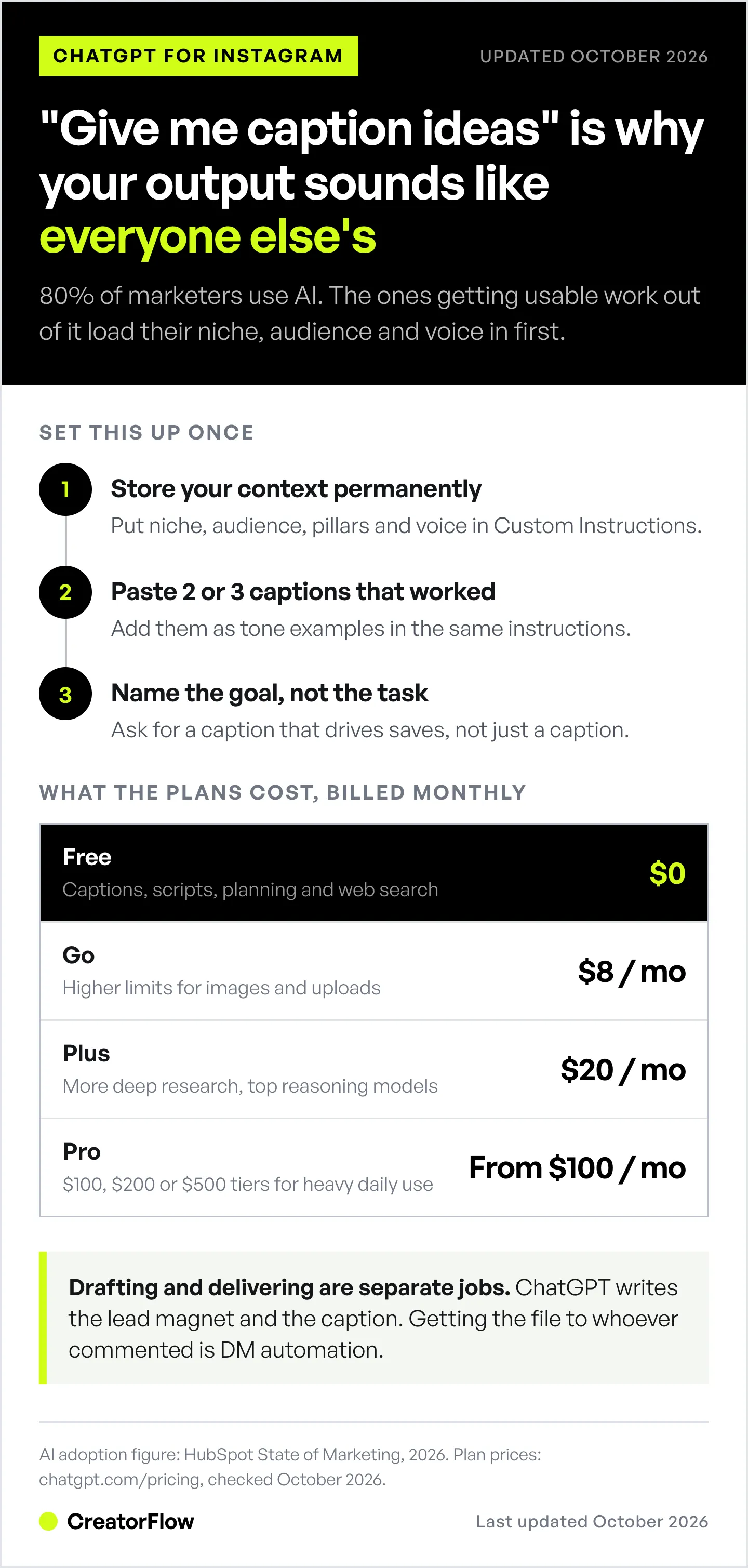
80% of marketers now use AI for content creation (HubSpot State of Marketing, 2026). But most creators still use ChatGPT wrong. They type “give me Instagram caption ideas” and get back generic output that sounds like every other account.
This guide shows you how to use ChatGPT as an Instagram content system, not a one-off idea generator. You’ll learn specific workflows for captions, Reels scripts, bio audits, content analysis, trend spotting, and DM automation integration.
For a broader collection of prompts across ChatGPT, Gemini, Claude, and Perplexity, see our AI prompts for Instagram content creation guide.
Key Takeaways
- ChatGPT (free, or from $8 a month) is the most versatile AI tool for Instagram content creation. The free tier covers most solo creators, with Go ($8), Plus ($20), and Pro (from $100) for heavier use, all billed monthly.
- Set it up right: Use Custom Instructions or memory to store your niche, audience, content pillars, and brand voice. Without context, every output is generic.
- Write captions: Give ChatGPT your content pillar + post format + CTA goal for on-brand captions in seconds.
- Script Reels: Use the hook-body-CTA formula with specific niche context for scripts that convert.
- Audit your bio: Screenshot your profile and ask ChatGPT to evaluate clarity, keywords, and CTA.
- Analyze content: Upload screenshots of your Instagram Insights to get performance analysis and recommendations.
- Spot trends: Use ChatGPT search, which works on every plan including Free, to research current Instagram trends in your niche.
- Automate delivery: Pair ChatGPT-written content with DM automation tools like CreatorFlow to auto-deliver lead magnets when followers comment keywords.

What ChatGPT Can (and Can’t) Do for Instagram
Before you run any workflow, set the right expectations. ChatGPT is powerful for Instagram content, but it has limits. For the broader picture of where tools like this fit in your workflow, see AI marketing for creators.
What ChatGPT does well
| Task | How it helps |
|---|---|
| Caption writing | Generates drafts based on your brand voice and content pillars |
| Reels scripts | Creates hook-body-CTA scripts with timing notes |
| Bio optimization | Analyzes your bio for clarity, keywords, and conversion |
| Content calendars | Plans 30 days of posts based on your pillars and goals |
| Hashtag research | Suggests relevant hashtags (verify popularity manually; Instagram allows up to 5 per post) |
| Repurposing | Transforms one piece of content into 5+ formats |
| Image generation | Creates custom graphics, carousels, and mood boards natively |
| Content analysis | Reviews screenshots of your Insights for patterns |
What ChatGPT can’t do
| Limitation | Workaround |
|---|---|
| No access to your Instagram data | Turn on search for public trends, and screenshot your Insights for account data |
| Can’t post to Instagram | Use scheduling tools (Later, Buffer, Meta Business Suite) |
| Can’t access your account | Screenshot your analytics and upload them |
| Hashtag popularity is estimated | Cross-check with Instagram search or hashtag tools |
| Output sounds generic without context | Use Custom Instructions (see next section) |
| Can’t send DMs automatically | Use DM automation tools like CreatorFlow |
| Invents your product instead of showing it | Generate from a photo of the real item, not a description |
That last row is the one that catches product accounts by surprise. ChatGPT generates images from your words, so it builds something that resembles your product rather than your product. Across ten posts the label, shape, and color all drift, and the grid stops looking like one brand.
Tools built around an uploaded photo avoid the problem by changing only the scene around a fixed item. DesignerBox does this, producing packshots, flat lays, and on-model shots from one source photo. Free tier is 112 credits (watermarked), and the commercial licence starts on the €35/month Pro plan, or €15 per month billed yearly (designerbox.ai/pricing, October 2026). Disclosure: DesignerBox is built by the same team as CreatorFlow.
For anything that is not product-specific, ChatGPT’s native image generation is fine, and our AI stock photo roundup covers the alternatives.
Set Up ChatGPT as Your Instagram Content Assistant
The difference between generic output and content you can post: context. Skip this step and every prompt in this guide will underperform.
Step 1: Configure Custom Instructions
Go to ChatGPT Settings and set up your Custom Instructions (or use the memory feature to teach ChatGPT about your brand over time).
Paste this template and fill in your details:
ABOUT ME:
I'm a [niche] content creator on Instagram with [follower count] followers.
My handle is @[username].
My content pillars are: [pillar 1], [pillar 2], [pillar 3].
My audience is [age range] [demographic] who want to [their primary goal].
My brand voice is [2-3 adjectives, e.g., casual, witty, educational].
I post [frequency]: [X Reels, X carousels, X single images] per week.
I monetize through: [affiliate links/coaching/digital products/brand deals/DM automation].

CONTENT RULES:
- Never use: [words/phrases you avoid]
- Always include: [CTA style, emoji usage, hashtag count]
- Caption length preference: [short/medium/long]
- Tone examples: [paste 2-3 of your best-performing captions]
Why this works: ChatGPT stores this context across conversations. Every prompt you use afterward gets filtered through your brand identity. No more “this doesn’t sound like me” rewrites.
Step 2: Choose your plan
ChatGPT has four consumer plans as of October 2026, all billed monthly (chatgpt.com/pricing, October 2026):
| Plan | Cost | Best for Instagram creators |
|---|---|---|
| Free | $0/mo | Caption writing, scripts, planning, web search. Unlimited text chats; uploads, images and deep research are limited |
| Go | $8/mo | Higher limits for images, uploads and data analysis, plus longer memory, projects and creating custom GPTs. Available worldwide since January 2026 |
| Plus | $20/mo | Higher limits again, more deep research, and the most capable reasoning models |
| Pro | $100, $200 or $500/mo | Three usage levels above Plus; the $500 tier adds Ultrafast mode. Built for heavy daily use |
Most creators start with Free and upgrade when they hit the limits on images, uploads, or deep research. Go at $8/mo raises those limits for less than half the price of Plus. Teams that share one workspace can use ChatGPT Business at $25 per user per month, or $20 billed annually (chatgpt.com, October 2026).
Which plan to pick (decision rule): If you only write captions and scripts, stay on Free. If you hit the image or upload limit more than once a week, move to Go at $8. If you run deep research on trends every week, Plus at $20 is the step that adds it in volume. Pro only makes sense when ChatGPT is your main work tool all day.
Step 3: Turn on search
ChatGPT search works on every plan, including Free (help.openai.com, September 2026). It lets ChatGPT pull current information about Instagram trends, competitor analysis, and hashtag research instead of relying on training data alone.
Search covers public web pages. For your own account data, paste or screenshot your Insights instead.
Step 4: Use writing blocks for content editing
In current ChatGPT models, the old Canvas editor has been replaced by writing blocks (help.openai.com, September 2026). A writing block holds your draft so you and ChatGPT can refine it together.
Writing blocks suit Instagram content because you can:
- Paste a draft caption and ask ChatGPT to adjust the reading level, tone, or length
- Select specific sentences and ask for rewrites without regenerating the whole piece
- Open the draft full screen to read it the way your audience will
- Undo an AI edit you don’t like
This is more precise than chat-based editing, where each regeneration starts from scratch.
How to Get ChatGPT to Analyze Your Instagram
One of the most underused ChatGPT features for creators: visual analysis. ChatGPT can analyze screenshots of your Instagram profile, posts, and Insights to give you actionable feedback.
Analyze your profile
Upload a screenshot of your Instagram profile and use this prompt:
Analyze this Instagram profile screenshot. Evaluate:
1. Bio clarity: Is it immediately clear what this account is about?
2. Bio keywords: Are there searchable terms that help with Instagram SEO?
3. CTA strength: Is there a clear next step for visitors?
4. Profile photo: Does it look professional and on-brand?
5. Highlight covers: Are they consistent and descriptive?
6. Recent grid: Is there visual consistency in the last 9 posts?

Give me specific, actionable changes. Be direct about what's weak.
Analyze your content performance
Screenshot your Instagram Insights (Accounts Reached, Content Interactions, or individual post insights) and upload them:
Here are my Instagram Insights for [time period]. Analyze:
1. Which content type performs best (Reels vs. carousels vs. single images)?
2. What patterns do you see in my top-performing content?
3. When does my audience engage most?
4. What's my engagement rate and how does it compare to [niche] benchmarks?
5. What content should I create more of based on this data?
6. What should I stop creating?

My niche is [niche] and my goal is [goal].
Review your content strategy
For a strategic review, paste your last 10 post captions into ChatGPT:
Here are my last 10 Instagram captions. Review them for:
1. Content pillar balance: Am I covering all my pillars equally?
2. CTA variety: Am I using different CTAs or repeating the same one?
3. Hook effectiveness: Rate each opening line 1-10 for scroll-stopping power.
4. Voice consistency: Do these all sound like the same creator?
5. Engagement drivers: Which captions likely drove the most saves/shares vs. likes?

My content pillars are: [pillar 1], [pillar 2], [pillar 3].
Suggest 5 specific improvements.
This audit tells you what you already published. To decide what comes next, run it against a written Instagram content plan so the review has a target to measure against.
ChatGPT Prompts for Instagram Captions
Caption writing is where most creators start with ChatGPT. These prompts go beyond “write me a caption” and produce output that matches your brand voice. If you want a starting draft without writing a prompt at all, our free Instagram caption generator does the first pass. Output improves when ChatGPT knows which pillar a post belongs to, so define your Instagram content pillars before you start feeding it prompts.
Educational/value post caption
Write an Instagram caption about [specific topic] for my [niche] audience.

Format:
- Hook (first line that stops the scroll, under 10 words)
- 3-5 short paragraphs with actionable tips
- Each tip is 1-2 sentences max
- End with a question CTA that drives comments

Tone: [your brand voice]
Include: [specific details, stats, or personal experience to reference]
Do NOT use: emojis in every line, generic advice, or filler phrases
Caption length: [150-300 words]
Story-based caption
Write an Instagram caption that tells a story about [experience/lesson].

Structure:
- Open with a surprising or relatable moment (first line is the hook)
- Build tension or curiosity in 2-3 short paragraphs
- Deliver the lesson or insight
- Connect it to [your product/service/content pillar]
- End with a CTA: [save this, share with a friend, comment your experience, DM me "keyword"]

Keep paragraphs to 2 sentences max. Total length: 200-400 words.
My brand voice is: [voice description]
Carousel post outline
Create a 10-slide Instagram carousel about [topic].

Slide 1 (Cover): Bold, scroll-stopping headline (5-8 words max)
Slides 2-9: One key point per slide with:
  - A subheadline (3-6 words)
  - 1-2 sentences of supporting detail
  - No filler slides
Slide 10 (CTA): Clear next step [follow for more / save this / DM me "keyword" for the full guide]

Make each slide standalone valuable but sequential.
My audience is: [audience description]
Topic context: [any specific angle or data to include]
For 50 scroll-stopping opening lines, check our Instagram hooks template guide.
Product/affiliate promotion caption
Write an Instagram caption promoting [product/service] to my [niche] audience.

Rules:
- Lead with the problem it solves, not the product name
- Include 1 specific result or benefit (with numbers if possible)
- Mention the product naturally mid-caption, not in the first line
- CTA: "Comment [KEYWORD] and I'll DM you the link"
- Keep it conversational, not salesy
- Under 250 words

Product details: [what it does, price, your experience with it]
That last prompt pairs directly with comment-to-DM automation. CreatorFlow, an Instagram DM automation tool, handles the delivery: a follower comments your keyword on a post or Reel, and CreatorFlow sends the product link to their DMs with no manual work. Story replies and DM keywords work as triggers too.
ChatGPT Prompts for Instagram Reels Scripts
Reels are where most creators aim for new reach. ChatGPT can generate complete scripts with hooks, pacing notes, and CTAs. If you’re still deciding how much of your week goes to Reels versus carousels or static posts, our Instagram content formats guide ranks all five and what each one does best.
Quick-tip Reel (15-30 seconds)
Write a 15-30 second Instagram Reel script about [specific tip].

Format:
HOOK (0-3 sec): [Attention-grabbing opening line spoken directly to camera]
SETUP (3-10 sec): [The problem or context in 1-2 sentences]
TIP (10-20 sec): [The actual tip, broken into 2-3 short steps]
CTA (20-30 sec): [What to do next: follow, save, comment keyword]

Include:
- Text overlay suggestions for each section
- Suggested trending audio style (not specific songs)
- B-roll or visual suggestions

My niche is: [niche]
My audience's biggest struggle with [topic] is: [struggle]
Talking-head Reel (30-60 seconds)
Write a 30-60 second talking-head Reel script about [topic].

Structure:
HOOK (0-3 sec): Start with a bold claim, question, or controversial take
PROBLEM (3-12 sec): Why most [audience] get this wrong
SOLUTION (12-40 sec): Your 3-step method or framework (keep each step to 1-2 sentences)
PROOF (40-50 sec): One specific result or example
CTA (50-60 sec): "Comment [KEYWORD] for [lead magnet/resource]"

Script should sound conversational, not scripted. Use short sentences.
Include [pauses] and [emphasis] markers for delivery.
My speaking style is: [casual/energetic/calm/authoritative]
Trending format adaptation
Here's a trending Reel format I've seen: [describe the format, structure, or paste an example].

Adapt this format for my [niche] account. Keep the structure but replace the content with something relevant to my audience who wants to [audience goal].

Make it:
- Authentic to my brand (not a lazy copy)
- Specific to [niche] with real examples
- Include text overlay suggestions
- 15-30 seconds total
For more on turning Reels views into revenue, see our guide on converting Reels views to sales with DM automation.
How to Use ChatGPT for Instagram Trends
ChatGPT search can research current Instagram trends. Without search, ChatGPT answers from training data with a cutoff date, so turn search on for anything time-sensitive.
Research current trends (turn on search)
Search for current Instagram trends in the [niche] space as of [current month/year].

Find:
1. Top 3 trending Reel formats creators in [niche] are using right now
2. Any new Instagram features being adopted early by [niche] creators
3. Content themes getting high engagement in [niche] this month
4. Audio trends or sounds popular in [niche] Reels
5. Hashtag trends shifting in [niche]

For each trend, explain:
- What it is
- Why it's working
- How I could adapt it for my account (@[handle])
- An example script or caption using this trend
Predict content angles (no search needed)
Based on your knowledge of Instagram content strategy and the [niche] space:

1. What 5 content angles are likely underserved in [niche] right now?
2. What evergreen topics consistently perform well for [niche] creators?
3. What controversial or contrarian takes would spark engagement?
4. What educational content does [niche] audience search for but rarely find on Instagram?

For each, give me a Reel hook and a carousel title.
Seasonal content planning
Create a content calendar for [month] for my [niche] Instagram account.

Include:
- Relevant holidays, awareness days, or cultural moments
- Seasonal topics specific to [niche]
- A mix of: 3 Reels, 2 carousels, 2 single image posts per week
- For each post: format, topic, hook/title, and CTA type
- Balance across my pillars: [pillar 1], [pillar 2], [pillar 3]

My posting schedule: [days and times]
Upcoming promotions or launches: [any planned promotions]
For a full content planning system, see our Instagram content calendar guide.
ChatGPT Prompt for Instagram Bio Audit
Your bio is your Instagram landing page. ChatGPT can evaluate it against what makes profiles convert visitors into followers (and followers into customers).
Full bio audit prompt
Audit my Instagram bio. Here's what I currently have:

Name field: [your name field]
Bio text: [paste your full bio]
Link: [your link]
Profile category: [your category]
Highlights: [list your highlight names]

Evaluate each element:
1. Name field: Does it include a searchable keyword? (Instagram SEO)
2. Line 1: Does it clearly state what I do/who I help?
3. Line 2: Does it include a benefit or proof point?
4. Line 3: Does it have a clear CTA?
5. Link: Is it optimized (link-in-bio tool vs. single URL)?
6. Category: Is it the most relevant option?
7. Highlights: Are they strategically named for new visitors?

Rate each element 1-10 and rewrite anything below 7.
My niche: [niche]
My target audience: [who you want to attract]
My primary conversion goal: [follows/DMs/link clicks/email signups]
Quick bio rewrite prompt
Rewrite my Instagram bio. Current bio: [paste bio]

Requirements:
- Line 1: What I do + who I help (include keyword: [target keyword])
- Line 2: Proof or benefit (specific number or result)
- Line 3: CTA (what to do next)
- Under 150 characters total
- No generic phrases like "living my best life"
- Include 1-2 relevant emojis max (not emoji spam)

My niche: [niche]
I help: [target audience] achieve [specific outcome]
My best proof point: [biggest result, client count, or credential]
How to Integrate ChatGPT with Instagram
ChatGPT isn’t built to post to Instagram, read your DMs, or pull analytics from your account. But you can build indirect workflows.
Manual workflow (free)
- Generate content in ChatGPT (captions, scripts, calendars)
- Copy to your scheduling tool (Later, Buffer, Meta Business Suite)
- Schedule or post manually on Instagram
- Screenshot Insights and upload back to ChatGPT for analysis
This works for most solo creators and costs nothing beyond your ChatGPT plan.
Automated workflow (Zapier/Make)
Tools like Zapier and Make can connect ChatGPT’s API to other tools in your stack:
- ChatGPT API + Google Sheets: Generate a month of captions in a spreadsheet
- ChatGPT API + Notion: Auto-fill content calendar templates
- ChatGPT API + Slack: Generate caption drafts and get team approval before posting
These require the ChatGPT API (pay-per-use pricing) and some technical setup. Best for agencies or creators with a VA (openai.com/api/pricing, February 2026).
ChatGPT + DM automation
The highest-ROI integration: use ChatGPT to write your DM copy, then send the first message automatically with Instagram DM automation.
Workflow:
- Use ChatGPT to write the DM messages for a lead magnet funnel
- Set up the automation in CreatorFlow (comment keyword triggers DM)
- ChatGPT writes the copy, and CreatorFlow sends the first DM automatically when someone comments your keyword
Meta allows one automated private reply to a comment, sent within 7 days of the comment. A further message needs the person to reply first, and it must go out within 24 hours of that reply (developers.facebook.com, October 2026). The prompt below is built around that rule.
Example prompt for DM sequence:
Write a 3-message Instagram DM sequence for [lead magnet].

Message 1 (instant reply when someone comments "[KEYWORD]"):
- Acknowledge their interest
- Deliver the [lead magnet link]
- Keep it under 3 sentences

Message 2 (when they reply):
- Ask if they found it helpful
- Introduce [related product/service]
- Include a soft CTA

Message 3 (after they answer Message 2):
- Share a testimonial or result
- Direct CTA to [booking link/product page]

Each message should feel personal, not automated.
My brand voice is: [voice]
For a complete DM sequence template library, see our Instagram DM automation templates guide.
How to Use ChatGPT to Grow Your Instagram
Growth isn’t about one tactic. It’s a system. Here’s how ChatGPT fits into each part of your Instagram growth strategy.
Content strategy
Build an Instagram growth strategy for my [niche] account.

Current state: [follower count] followers, [avg engagement rate], posting [frequency]
Goal: [target followers or engagement rate] in [timeframe]

Create a strategy covering:
1. Content mix: What % Reels vs. carousels vs. stories?
2. Pillar balance: How to weight [pillar 1], [pillar 2], [pillar 3]
3. Collaboration opportunities: What types of creators should I collab with?
4. Hashtag strategy: 3 tiers (broad, niche, micro) with examples
5. Engagement routine: Daily actions to grow organically
6. Monetization timeline: When and how to start monetizing

Base recommendations on what works for [niche] accounts in 2026.
Competitor analysis
I want to analyze these 3 Instagram accounts in my niche: @[competitor1], @[competitor2], @[competitor3].

For each account, help me analyze:
1. Their apparent content pillars
2. Their posting frequency and format mix
3. Their caption style and CTAs
4. What they do well that I should learn from
5. Gaps in their content that I could fill

I'll provide screenshots of their profiles and recent posts.
Engagement and comment prompts
Write 10 thoughtful comments I can post on other [niche] creators' content to build relationships and visibility.

Requirements:
- Each comment is 2-3 sentences
- Adds value (more than "great post!")
- Shows expertise in [niche]
- Naturally prompts a reply
- Varies in style (question, insight, personal experience, compliment + addition)

My area of expertise: [what you know best]
For organic growth strategies beyond AI, see our guide on Instagram organic reach strategies.
ChatGPT vs Other AI Tools for Instagram
ChatGPT isn’t the only option. Here’s how it compares to other AI tools creators use for Instagram content (as of September 2026).
| Feature | ChatGPT | Gemini | Claude | Canva Magic Write |
|---|---|---|---|---|
| Caption writing | Strong | Good | Strong | Basic |
| Reels scripts | Strong | Good | Strong | N/A |
| Image generation | Native (ChatGPT Images) | Native (Nano Banana 2) | N/A | Strong (templates) |
| Content analysis | Screenshots + vision | Image and file uploads | Image and file uploads | N/A |
| Trend research | Web search (all plans) | Google Search built in | Web search (all plans) | N/A |
| Content calendar | Strong | Good | Best for long docs | Calendar templates |
| Free tier | Unlimited text chats, limited tools | Flash model, limits reset every few hours | Limits reset every 5 hours | Limited AI uses |
| Cheapest paid | $8/mo (Go) | $4.99/mo (Google AI Plus, US) | $20/mo, or $17/mo billed annually (Pro) | Canva Pro (paid plan) |
| Best for | All-around content work | Image generation | Long strategy docs | Visual content design |
(Sources: chatgpt.com/pricing, claude.com/pricing and Google AI plan pages, checked October 2026; Canva’s Pro price changed several times in 2026, so check canva.com/pricing)
Bonus: ChatGPT + Canva. Canva runs as an app inside ChatGPT on the Free, Go, Plus, and Pro plans (openai.com, October 2025). Connect it from ChatGPT’s app directory. Then prompt: “Create an Instagram carousel in Canva from this outline.” It generates editable Canva designs without leaving ChatGPT.
Bottom line: ChatGPT is the best all-around choice for Instagram content creation. Use Gemini for image generation. Use Claude for longer strategic documents, picking the tier with this task-by-task Claude model guide. Use Canva for visual design and templates.
5 Mistakes Creators Make Using ChatGPT for Instagram
1. No context = generic output
Without Custom Instructions or a context prompt, ChatGPT doesn’t know your niche, audience, or voice. Fix: Always set context first (see the setup section above).
2. Posting AI output without editing
ChatGPT drafts need your personality. The AI gets the structure right; you add the stories, opinions, and voice that make followers care. 52% of consumers say they become less engaged when they suspect copy is AI-generated (Bynder, 2024). Edit every output.
3. Ignoring the “why”
Telling ChatGPT “write a caption” gives you a caption. Telling ChatGPT “write a caption that drives saves from fitness beginners who want a home workout plan” gives you a caption that performs. Always include the goal.
4. Asking for real-time data with search turned off
Without search, ChatGPT answers from training data with a cutoff date. Turn search on for trends and competitor research (it works on every plan), and paste your own Insights for account data.
5. One-and-done prompting
Your first prompt rarely produces the best output. Follow up with “make the hook more controversial,” “shorten this by 30%,” or “rewrite in a more casual tone.” ChatGPT improves with iterative feedback.
FAQ
Is ChatGPT good for Instagram content creation?
Yes. ChatGPT handles captions, Reels scripts, content calendars, bio optimization, and content strategy analysis. 80% of marketers use AI for content creation as of 2026 (HubSpot). The key is providing specific context about your niche, audience, and brand voice. Without context, output is generic. With proper setup, it cuts the time you spend drafting captions, scripts, and calendars.
Can ChatGPT analyze my Instagram account?
ChatGPT can’t access your Instagram account directly. But you can upload screenshots of your profile, posts, and Insights, and ChatGPT will analyze them using its vision capabilities. It can evaluate your bio, identify content patterns, assess visual consistency, and recommend strategy changes based on your performance data.
How do I get ChatGPT to write Instagram Reels scripts?
Give ChatGPT a structured prompt with your niche, target audience, the specific topic, and a format (hook-body-CTA). Include timing notes (e.g., 15-30 seconds), specify your speaking style, and mention whether you want text overlay suggestions. The more specific your prompt, the more usable the script. See the Reels script prompts section above for copy-paste templates.
Can ChatGPT identify Instagram trends?
Yes, when search is on. ChatGPT search works on every plan, including Free (help.openai.com, September 2026). Without search, ChatGPT answers from training data with a knowledge cutoff. For trend tracking, run ChatGPT with search on and check the results against Google Trends, Instagram Explore, and Perplexity (which searches the web by default).
How do I integrate ChatGPT with Instagram?
ChatGPT isn’t built to post to Instagram directly. The most common workflow: generate content in ChatGPT, copy to a scheduling tool (Later, Buffer, Meta Business Suite), and post from there. For automation, use Zapier or Make to connect the ChatGPT API with your content calendar tools. For DM automation specifically, use ChatGPT to write the DM copy and send it through an Instagram DM automation tool like CreatorFlow when someone comments your keyword.
Is ChatGPT free for Instagram content creation?
Yes. ChatGPT Free includes unlimited text chats and web search, with limits on uploads, images, and deep research. That handles caption writing, Reels scripts, trend research, and content planning without cost. ChatGPT Go ($8/month) raises the limits on images and uploads and lets you create custom GPTs. ChatGPT Plus ($20/month) raises them again and adds the most capable reasoning models. Most solo creators start on Free and upgrade to Go or Plus when they hit limits (chatgpt.com/pricing, October 2026).
How much does ChatGPT cost for content creators?
ChatGPT Free ($0) covers everyday content creation, including web search. ChatGPT Go ($8/month) raises the limits on images and uploads. ChatGPT Plus ($20/month) adds more deep research and the most capable reasoning models. ChatGPT Pro comes in $100, $200 and $500 monthly tiers built for heavy daily use, more than most creators need. All consumer plans are billed monthly. For comparison, CreatorFlow Pro costs $15/month, or $12/month billed annually, for DM automation that delivers the content ChatGPT helps you create (chatgpt.com/pricing, creatorflow.so/pricing, October 2026).
Will Instagram penalize AI-generated content?
Instagram does not penalize content created with AI assistance. Instagram’s algorithm ranks content based on engagement signals (saves, shares, comments, watch time), not how it was produced. One exception applies to AI-generated people: since August 31, 2026, an account whose main persona is AI-generated needs Instagram’s AI-generated profile label, or it can lose reach in Reels and Explore. Using AI to write captions or edit photos is exempt (creators.instagram.com, September 2026). The bigger risk is audience trust, so use ChatGPT for drafts and edit in your own stories and experiences.


