
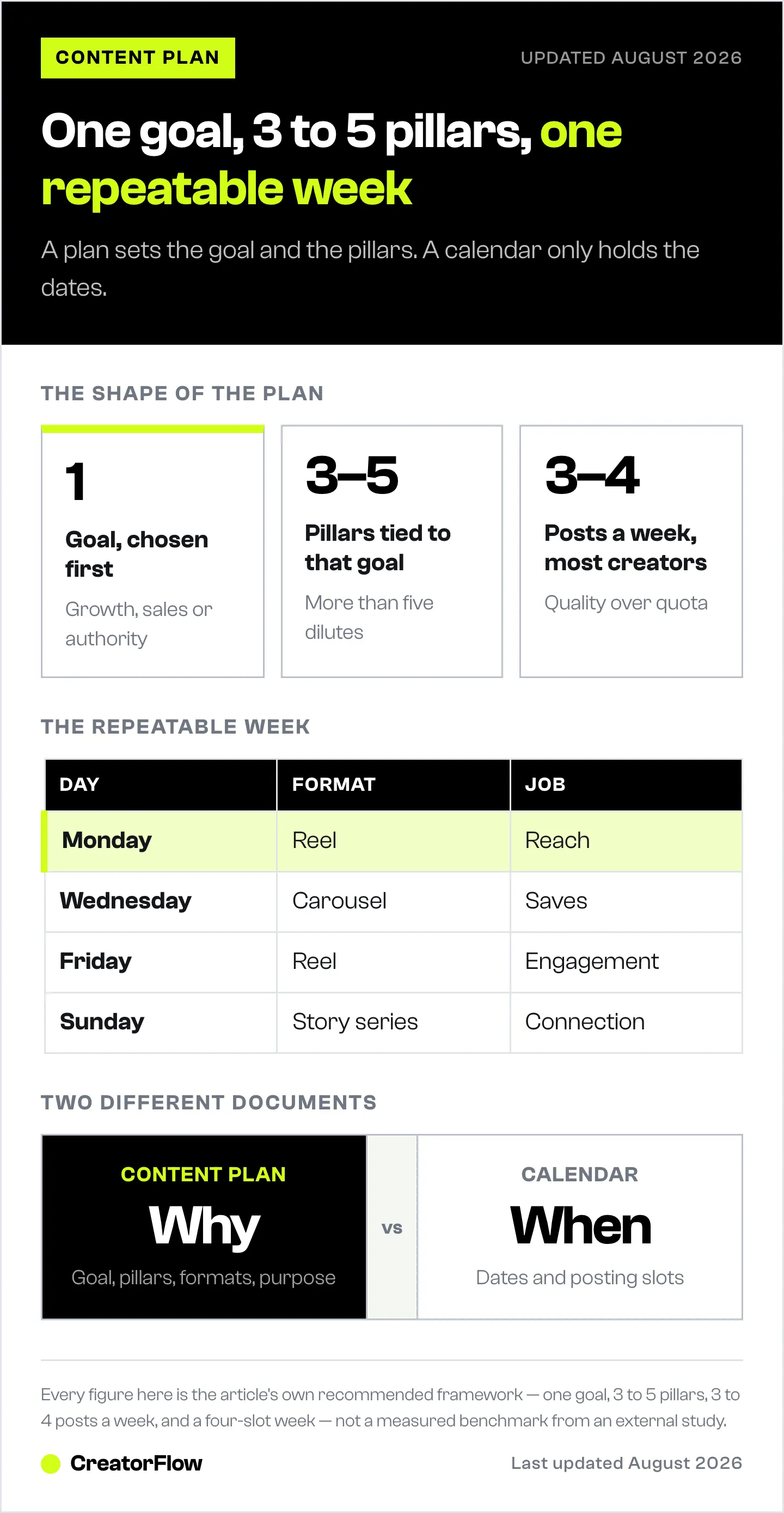
An Instagram content plan is a structured roadmap that starts with one clear goal, builds on 3 to 5 content pillars, pairs each pillar with the right format (Reels for reach, carousels for depth, Stories for trust), and runs on a simple weekly structure you repeat and refine. Plan one week at a time, track what works, and reinforce the patterns. A plan defines why you post; a calendar only tracks when.
Scroll through your last 12 posts. Do they feel connected, or like 12 unrelated decisions? A trend you tried, a Reel that did well, a carousel because everyone else posted one. Individually fine. Together, scattered.
That scattered feeling is where growth stalls. Most creators post consistently and still plateau, because effort without structure produces noise. Instagram rewards patterns, repetition, and recognizable themes. When someone lands on your profile, they should instantly understand what you do, who it’s for, and why to stay.
This guide shows you how to build that structure from scratch: a 7-step framework, the 7 mistakes that quietly break a plan, and a 7-day blueprint to launch your first one this week.
Key Takeaways
- Start with one goal. Growth, sales, or authority. The goal filters every other decision.
- Pick 3 to 5 pillars. Repeatable themes build recognition and authority. More than five dilutes you.
- Pair pillars with formats on purpose. Reels for reach, carousels for saves, Stories for trust.
- Plan weekly, not monthly. A repeatable weekly structure beats a rigid 30-day calendar.
- Track the metrics tied to your goal. Then run a 30-day loop: publish, observe, identify patterns, adjust.
- A plan is not a calendar. The plan defines goal, pillars, and purpose; the calendar schedules the dates.
- Close the loop. If your goal is sales or leads, automate the comment-to-DM step so engagement converts.
What an Instagram Content Plan Includes
An Instagram content plan goes beyond a calendar or a running list of ideas. It is the foundation of your strategy, and it answers five questions:
- What is the goal? Brand deals, product sales, coaching clients, or audience size. Every post serves a larger objective.
- Who is it for? A specific person with specific struggles, not “everyone.”
- What themes will you repeat? Cohesion is how authority builds. Visitors should see patterns.
- What formats will you use, and why? Reels for reach, carousels for depth, Stories for trust. Each plays a defined role.
- How will you measure progress? Your metrics align with your goal. What you track is what you improve.
When these five connect, you stop asking “what should I post today?” and start asking “what does my strategy need this week?”
The 7-Step Framework to Build Your Plan
Each step builds on the last. Follow them in order.
Step 1: Define the Goal
Before pillars or formats, get specific about what the plan should accomplish. Vague goals produce vague content. Pick one measurable outcome:
- Reach 10K followers in your niche
- Drive traffic to a digital product
- Position yourself for brand partnerships
- Build authority on a specific topic
Then finish this sentence: “My Instagram content plan is designed to help me ___ by ___.” The first blank is the outcome; the second is the method. That statement becomes your filter.
Step 2: Choose 3 to 5 Content Pillars
Pillars are 3 to 5 repeatable themes your audience associates with you. They create familiarity, and familiarity builds authority. Pillars are categories, not individual post ideas.
A fitness coach might use: fat-loss education, beginner gym mistakes, client transformations, mindset. A digital-product creator might use: audience growth, monetization breakdowns, behind-the-scenes building, creator mindset.
To build yours: identify the main problem you solve, break it into 3 to 5 subtopics, and confirm each one connects to your Step 1 goal. For a deeper look at theme selection on smaller accounts, see Instagram content strategy under 10K followers.
Step 3: Match Pillars to Formats
Each format has a job:
- Reels drive reach and bring new people in.
- Carousels build depth and earn saves.
- Stories strengthen connection and trust.
- Lives build authority through real-time interaction.
Layer them intentionally. If a pillar is “beginner mistakes,” use a Reel to flag one mistake fast, a carousel to break it down, and Stories to answer follow-up questions. Same pillar, multiple angles. For each pillar, pick one primary format and one secondary format.
Step 4: Build a Repeatable Weekly Structure
You have a goal, pillars, and format pairings. Now turn them into something executable. Most creators overcomplicate this with 30-day spreadsheets that don’t survive contact with reality. What works is a simple, repeatable week:
- Monday: Reel — Pillar 1 — Reach
- Wednesday: Carousel — Pillar 2 — Saves
- Friday: Reel — Pillar 3 — Engagement
- Sunday: Story series — Pillar 1 — Connection
Map each slot to a date, pillar, format, and goal. Weekly beats monthly because Instagram moves fast; weekly planning keeps you structured but flexible. To turn this structure into scheduled posts, see how to create an Instagram content calendar and how to schedule Instagram posts.
Step 5: Build an Endless Idea Engine
Ideas feel scarce only when you rely on inspiration instead of a system. Five reliable sources refill your plan every week:
- Audience questions. Your DMs and comments are direct signals of what to make.
- Past high performers. Review your top posts from the last 90 days and make variations.
- Common niche mistakes. Correcting misconceptions stops the scroll and builds trust.
- Behind-the-scenes process. How you think and build earns connection.
- Trends with context. Filter trends through your pillars instead of copying them.
For a deeper bank, see repeatable Instagram content ideas for creators.
Step 6: Batch Create and Systemize
Posting one day at a time means scripting, filming, editing, and publishing in one mental scramble. Batching removes the friction. Split the work into focused sessions: research and idea refinement, scripting, filming, editing and design, then scheduling. Batching also reduces emotional reactions to performance, because you execute a plan instead of reacting to yesterday’s numbers.
Step 7: Measure and Optimize
Track only the metrics tied to your Step 1 goal:
- Growth: reach, profile visits, follows per post
- Sales: link clicks, DMs, website traffic
- Authority: saves, shares, meaningful comments
Then run a 30-day loop: publish, observe, identify patterns, adjust. Which pillar performed best? Which format earned the most saves? Which hooks stopped the scroll? Optimization is reinforcing what already works, not reinventing the plan each month.
7 Mistakes That Quietly Break a Content Plan
Most creators don’t abandon a plan overnight. They drift.
- Planning without a clear goal. Directionless content sends mixed signals. Your goal is the filter for pillars, formats, and metrics.
- Too many pillars. Eight to ten themes dilute your positioning. Three to five build focus and authority.
- Copying competitors without context. Study their patterns to understand why a format works, then map it to your own pillars. Research, not imitation.
- Ignoring your own data. You don’t need every metric, but you do need your patterns. Review monthly at minimum.
- Planning too far ahead without testing. Rigid 30-day plans lock you into unvalidated ideas. Define the week, leave room to adapt.
- Overposting low-quality content to “stay consistent.” Three intentional posts beat seven rushed ones. Quality builds authority; authority drives growth.
- Never evolving the plan. Your audience and offers change. Revisit goal, pillars, and format mix every quarter.
A 7-Day Blueprint to Launch Your First Plan
Move from scattered posts to a plan you can act on this week.
- Day 1: Define the outcome. One goal, three pillars that support it, a focus for the next seven days.
- Day 2: Map formats and structure. Choose 3 to 4 posts; assign each a pillar, format, and goal.
- Day 3: Generate and refine ideas. For each post, draft 2 to 3 angles, keep the strongest, sharpen the hook.
- Day 4: Script and structure. Write Reel hooks word-for-word; outline carousel slides with a strong slide 1 and a clear final CTA.
- Day 5: Batch create. Film and design the week in one focused session.
- Day 6: Edit and align. Confirm each post supports the goal, the hook stops the scroll, and the CTA is intentional.
- Day 7: Schedule and review. Queue everything, then observe what resonates and refine next week.
One week becomes two. Two becomes a month. That is how random posting turns into compounding growth.
Plan the Goal, Then Build the Engine That Converts It

Here is the step most content plans skip. If your Step 1 goal is sales or leads, your plan generates comments, DMs, and “link?” replies, and then most of that intent evaporates because you reply hours later.
A content plan decides what to post and why. It doesn’t, on its own, capture the demand it creates. That’s the missing layer.
CreatorFlow closes it. Set a trigger word tied to your conversion posts, and every commenter gets an instant DM with your link, lead magnet, or booking page, automatically, 24/7. Your “saves” pillar builds authority; your “sales” pillar drives action; the automation turns that action into leads while attention is hot. It runs on Meta’s official Instagram API at a flat $15/month with no per-contact fees.
Not sure which goal your plan should serve? Start by setting Instagram goals for creators. A plan gives your content direction. DM automation gives your goal a finish line. For the conversion side, see turning Reels views into DM sales.
Start your free trial at creatorflow.so
FAQ
What is an Instagram content plan?
An Instagram content plan is a structured roadmap that defines what you post, why you post it, and how each piece supports your growth or monetization goal. Instead of posting randomly, you operate with clear pillars, intentional formats, and a weekly structure tied to a defined outcome.
How do I build an Instagram content plan from scratch?
Start with one clear goal (audience growth, engagement, or sales). Choose 3 to 5 content pillars aligned with it, match those pillars to specific formats, build a simple repeatable weekly structure, and track the metrics tied to your goal so you can refine over time.
How many posts should be in an Instagram content plan?
For most creators, 3 to 4 high-quality posts per week is enough to drive consistent growth. Alignment and clarity matter more than posting every day.
What is the difference between a content plan and a content calendar?
A content calendar tracks when you post. A content plan defines the goal, pillars, formats, and purpose behind each post. A calendar manages dates; a plan sets direction. Most creators use a calendar without first defining the plan that should drive it.
How often should I update my Instagram content plan?
Review it weekly and refine it monthly. Weekly planning keeps you flexible; monthly analysis surfaces performance patterns. Adjust pillars, formats, or messaging as your brand and offers evolve, and revisit the overall goal each quarter.
Can AI help build an Instagram content plan?
Yes. AI is useful for brainstorming pillar angles, drafting hooks, and turning a weekly structure into post ideas faster. Keep the strategy yours: AI accelerates ideation, but the goal, positioning, and voice still come from you and your audience data.
Disclaimer: Instagram features and best practices mentioned in this article were verified as of May 2026 and may change without notice. Instagram is a trademark of Meta Platforms, Inc. CreatorFlow is not affiliated with, endorsed by, or sponsored by Meta Platforms, Inc. Strategies described are based on aggregate creator data and individual results vary by niche, audience, and execution.


