

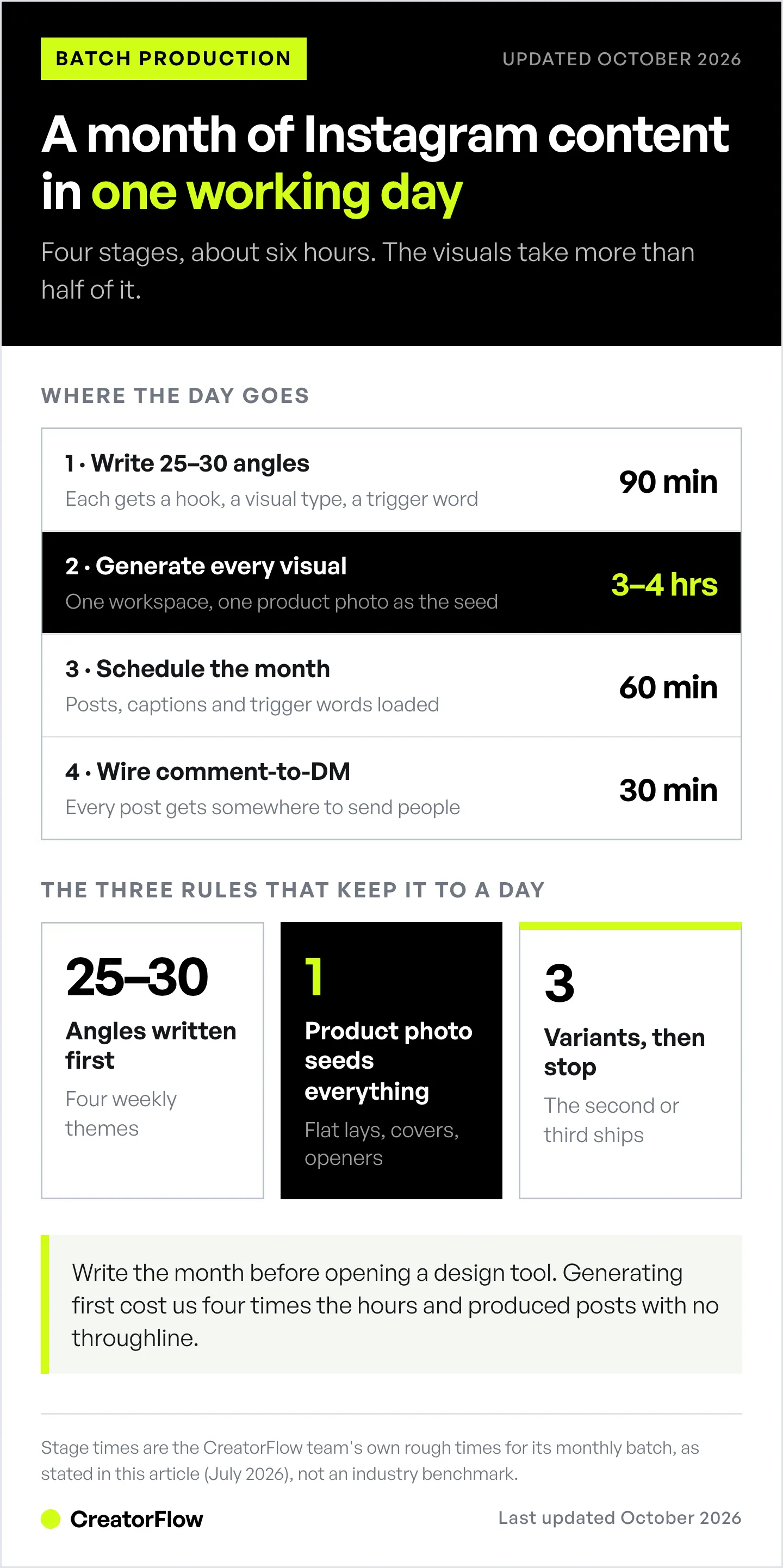
We batch a month of Instagram content in a single working day. The pipeline has four stages: write the month’s angles in one sitting, generate every visual in DesignerBox (built by the same team as CreatorFlow), schedule the posts, then let CreatorFlow turn the comments into DMs. Total time runs about six hours, and the visuals stage takes more than half of it.
The part that used to eat the whole week was never the ideas. It was making 30 images that looked like they came from the same brand.
That’s the honest bottleneck for most small teams. You can write a month of hooks in ninety minutes. Then you sit down to actually make the posts, and you’re three hours into fighting a design tool over one carousel cover that still looks slightly off from the last one.
This is our actual production system, stage by stage, with the tools and the failure points. Steal whatever’s useful. If you are still choosing the tools, 9 AI tools for social media content creation compares them on cost per finished post.
Key Takeaways
- The bottleneck is assets, not ideas. Writing a month of angles takes about ninety minutes. Producing the visuals is what turns content into a full-week job.
- One workspace beats six tools. Every paste between tools is a place your brand drifts. We generate images, video, and ad creative in DesignerBox instead of stitching a stack together.
- One product photo is the seed. A single shot becomes the on-model image, the flat lay, the ad creative, the Reel opener, and the carousel cover.
- Save the pipeline, don’t rebuild it. Anything you’ll repeat next month should be a saved workflow, not a memory of which prompt worked.
- Run it from your AI assistant. The DesignerBox MCP server connects the whole studio to Claude, ChatGPT, or Cursor, so batch generation happens in the same window where you plan the month.
- Content without a delivery path is a hobby. The last stage is comment-to-DM automation, so every post that lands has somewhere to send the people it converts.
How to Batch Create a Month of Instagram Content
Four stages, one working day, about six hours total. Write 25-30 post angles first, each with its hook, its visual, and its trigger word (90 minutes). Generate every image, cover, and clip in one workspace (3-4 hours). Load posts, captions, and trigger words into a scheduler (60 minutes). Wire comment-to-DM automation on each post so every piece has somewhere to send people (30 minutes).
| Stage | What happens | Tool | Rough time |
|---|---|---|---|
| 1. Angles | Write 25-30 post concepts, grouped by theme | Docs + Claude | 90 min |
| 2. Visuals | Generate every image, cover, and clip | DesignerBox | 3-4 hrs |
| 3. Schedule | Load posts, captions, and trigger words | Scheduler | 60 min |
| 4. Delivery | Comment-to-DM automation per post | CreatorFlow | 30 min |
The whole thing fits in a day because no stage waits on another person. That’s the design goal, not speed for its own sake.
Stage 1: Write the Month’s Angles First
Never open a design tool before the month is written. This is the rule that saves the most time, and it’s the one people skip.
We block the month into four themes, one per week, then write 6-8 post angles inside each theme. Every angle gets three things written down before anything visual happens:
- The hook (the first line, which does most of the work)
- The visual it needs (product shot, on-model, screen recording, talking head)
- The trigger word (what someone comments to get the thing)
That third column is the one most teams leave out, and it’s the reason their content doesn’t convert. If you don’t know what the post is asking people to do, you’re making decoration. We cover the writing side of this in more depth in our Instagram content hooks and templates guide.
Now you have a shot list. Stage 2 stops being creative work and becomes production work, which is much faster.
Stage 2: Generate Every Visual in One Workspace
This is the stage DesignerBox replaced for us, and it’s why we’re writing about it.
The pitch is one workspace holding every top image and video model, with your product as the anchor for all of it. Nano Banana Pro, GPT Image 2, Seedream 5, FLUX, Veo 3.1, Kling, and Seedance all sit behind one subscription and one model picker (checked October 2026). You swap models per shot instead of per subscription. Worth checking the pricing table before you commit, though: the plan tiers list different model and quality access, so not every model is on every plan.
The model list matters less than the side effect: the brand stops drifting. When your product photo lives in the same workspace as the generator, every asset is built from the actual product rather than from a description of it.
The three studios we actually use
DesignerBox splits into three studios sharing one library:
- Marketing Studio: ads, UGC, and campaign sets. This is where a product photo becomes a run-ready ad creative. When we need paid social variants, they start here.
- Creative Studio: images, video, avatars, and audio in one place. This is our default for organic feed content and Reel openers.
- Commerce Studio: product visuals, try-on, and PDP imagery. Less relevant to us as a SaaS, but it’s the one our e-commerce users lean on hardest.
For a month of organic Instagram, we live almost entirely in Creative Studio and drop into Marketing Studio when a post is going to get budget behind it.
The one-click apps do most of the work
The apps hub is the part that turned this from “AI image generation” into actual production. Each app does one repeated job, no prompting required. The ones that earn their place in our month:
| App | The job it does |
|---|---|
| Styled Scene Generator | Drops the product into lifestyle scenes without a location shoot |
| Photo Angles | Turns one product photo into every angle the feed needs |
| Background Remover | Clean transparent cutouts for carousel covers and overlays |
| Flat Lay Studio | Styled flat-lay compositions from existing product shots |
| Product Ad Generator | A product photo becomes a finished ad you can run |
| Social Media Ad Studio | Platform-sized ads for Instagram, TikTok, Pinterest, LinkedIn |
| Spotlight | Relights a flat-looking shot to studio standard |
The workflow is boring in the best way: open the app, drop in the product, get the asset. No canvas, no prompt engineering, no reading a model’s documentation to learn which phrasing it likes this week.
Fashion and product brands get more mileage than we do here. If that’s you, DesignerBox’s creator use cases break the apps down by vertical, and our own roundup of AI marketing tools for Instagram creators covers where these fit against the rest of the stack.
Save the pipeline as a workflow
The step people skip: once a sequence works, save it. DesignerBox’s Canvas lets you keep a pipeline as a reusable node graph, so next month’s batch is a rerun rather than a rebuild.
We have one saved for carousel covers and one for Reel openers. Both took an hour to get right and have paid that back every month since. If you find yourself remembering which prompt worked in April, you skipped this step.
Stage 3: Run the Batch From Claude Over MCP
This is the part of our setup that’s least common, and the biggest single time saver.
DesignerBox ships an MCP server that connects the studio to Claude Desktop, Claude.ai, ChatGPT, or Cursor. It exposes 75 tools behind one URL, covering generation, the editing apps, brand profiles, and design search, per the DesignerBox MCP page (checked October 2026). Authentication is OAuth with scoped tokens, so no permanent credentials get pasted into a config file.
Why this matters for a monthly batch: stage 1 already happens in Claude. When the shot list and the generator live in the same window, you stop being a copy-paste layer between your plan and your tools. You hand over the month’s shot list and the assets come back tagged and filed.
Setup is a connector URL (mcp.designerbox.ai/api) in Claude’s settings, or an API key (Ultra plan) for scripts and CI. Reading your workspace costs no credits. Every generation run charges credits, and your AI client asks you to confirm the call first. There’s a Figma plugin too if your team’s design work lives on canvas instead of in chat.
We wrote more about this pattern generally in connecting AI agents to your Instagram workflow. The principle holds regardless of which tools you’re wiring together.
Stage 4: Give Every Post Somewhere to Send People
A month of good-looking content with no delivery path is a month of decoration.
Every post in our batch has a trigger word attached from stage 1. That word gets wired into CreatorFlow before the month goes live, so when someone comments it, they get the link, the guide, or the booking page in a DM within seconds rather than whenever we next open the app.
This is the piece that makes the production effort pay for itself. The visual gets the reach. The DM captures the intent while it still exists. If you haven’t set this side up, our Instagram DM automation guide walks through the first automation in about five minutes.
CreatorFlow runs $15/month flat on Pro, with a free plan covering 500 DMs a month, and connects through Meta’s official Instagram API rather than browser automation.
What It Costs
Two line items, and neither is the expensive part of content production. The expensive part was always the hours.
DesignerBox, per its pricing page (checked October 2026): a free plan with 112 credits and watermarked results. Paid plans are credit-based: Basic is €15/month, or €6/month billed annually, then Pro €35 or €15, Premium €75 or €30, and Ultra €200 or €100. The pricing page shows the annual rate by default. Paid plans start with a 7-day free trial, and you add a card to start it. Check the live page before you budget, because credit allocations move.
CreatorFlow: free for 500 DMs a month, $15/month on Pro for 5,000 DMs per workspace.
The useful comparison is this stack against the version where you pay six subscriptions for six point tools and lose an afternoon a week to the seams between them. That is the argument DesignerBox makes on its own homepage, and having run it both ways, it holds up.
What We Got Wrong
Three mistakes worth saving you from, plus one line we won’t cross.
We generated before we wrote. The first month, we opened the generator with a vague idea and tried to find the post inside the images. Everything took four times longer and the output had no throughline. Write first. Always.
We didn’t save workflows early enough. Two months of rebuilding the same carousel-cover setup from memory before we made it a saved pipeline. An hour of setup would have saved most of that.
We over-generated. Credits are finite and the temptation is to make twelve variants of everything. In practice the second or third option is nearly always the one that ships. Generate three, pick one, move on.
One thing we won’t do: publish anything that misrepresents the product. AI visuals are fine for concept, mood, and composition. They’re not fine for showing a feature that doesn’t exist or a result nobody got. Our AI stock photo guide covers where the line sits on licensing and disclosure.
Steal the Workflow
If you want to run this next month:
- Block one day. Not four afternoons. The batch works because context never gets rebuilt.
- Write 25-30 angles first, each with a hook, a visual type, and a trigger word.
- Get one clean product photo. Everything else generates from it.
- Work app-first, not prompt-first. Pick the app that matches the job instead of describing what you want to a blank box.
- Save anything you’ll repeat as a workflow.
- Wire the trigger words into your DM automation before the month goes live.
- Stop at three variants. Not twelve.
The whole system rests on one idea: separate the thinking from the producing, then make the producing boring. Ideas are the scarce input. Everything downstream should be a pipeline.
FAQ
How long does it actually take to batch a month of Instagram content?
A full working day, roughly 6-7 hours, once the system is set up. The first time you run it, expect closer to two days because you’re building the saved workflows and the brand setup you’ll reuse every month afterward. Writing the angles takes about 90 minutes, visuals take 3-4 hours, and scheduling plus DM setup takes another 90.
What is DesignerBox used for?
DesignerBox is an AI creative studio for on-brand campaign assets. It combines leading image and video models, including Nano Banana Pro, GPT Image 2, Veo 3.1, Seedance, and Kling, in one workspace, with one-click apps for specific jobs like product ads, flat lays, background removal, and relighting. It’s built so a single product photo becomes an entire campaign: ads, on-model shots, product stills, video, and social posts (designerbox.ai, October 2026). DesignerBox is built by the same team as CreatorFlow.
Can I connect DesignerBox to Claude or ChatGPT?
Yes. DesignerBox provides an MCP server at mcp.designerbox.ai/api that works with Claude Desktop, Claude.ai, ChatGPT, and Cursor. It exposes 75 tools for generation, editing, brand management, and design search, and authenticates over OAuth with scoped tokens. Reading your workspace costs no credits, and each generation run charges credits (designerbox.ai/mcp, October 2026).
Do I need design skills to run this workflow?
No, and that’s the point of working app-first. Each app in the apps hub does one job with your product as the input, so you’re choosing an outcome rather than composing a design. Judgment still matters, since knowing which of three options is on-brand is a skill, but the production step doesn’t require design software fluency.
Does batching content hurt engagement?
Not in our experience, as long as you leave room to react. We batch the planned content and keep two or three slots a week open for anything timely. The batch covers the base; the open slots cover whatever’s actually happening that week.
What happens after someone engages with a batched post?
That’s what the DM automation stage handles. Each post carries a trigger word, and when someone comments it, they get the relevant link or resource in a DM within seconds. Without that layer, a batched month generates reach and nothing else. See the creator tool stack breakdown for how the delivery layer fits with the rest.


