
The best Instagram post size in 2026 is 1080 x 1350 px (4:5 portrait) for feed posts, 1080 x 1920 px (9:16) for Stories and Reels, and 1080 x 1080 px (1:1) for square images. Instagram’s profile grid now shows taller rectangular previews (about 3:4), so keep faces, text, and logos inside that safe zone. Upload at 1080 px wide as JPG or PNG, and MP4 (H.264 + AAC) for video.
Your post looked perfect in Canva. Then Instagram cropped the headline off the top, pushed your face behind the caption, and turned your clean grid into a patchwork of mismatched thumbnails.
Wrong dimensions look sloppy. A cropped hook gives people no reason to swipe, a cut-off face weakens the first impression, and an inconsistent grid can make profile visitors leave before they follow.
This guide gives you every Instagram size that matters in 2026: feed posts, the 3:4 grid, Stories, Reels, carousels, and profile photos. Exact pixels, aspect ratios, file limits, and the safe zones that keep your content from getting cut.
Key Takeaways
- Best all-round feed size: 1080 x 1350 px (4:5) for in-feed; 1080 x 1440 px (3:4), the tallest photo Instagram accepts, if you want zero grid cropping (help.instagram.com, September 2026).
- Grid crops to about 3:4: The profile grid has shown tall rectangular previews since January 2025, so square and 4:5 posts lose a strip on each side. Meta has not published the exact ratio; third-party upload tests measure 3:4.
- Stories & Reels: 1080 x 1920 px (9:16), full screen.
- Carousels: Up to 20 slides, and one orientation applies to every slide. After publishing you can reorder or remove slides, but not add new ones.
- Profile photo: Use a square image at least 320 x 320 px; it displays as a small circle.
- Standard width is 1080 px. Instagram sizes wider photos down to 1080 px, and narrower photos look soft on phone screens.
- File specs: JPG/PNG for images, MP4 (H.264 + AAC) for video. Keep images under 10 MB, Reels under 500 MB.
Quick Answer: Instagram Sizes at a Glance (2026)
Every dimension below is width x height in pixels.
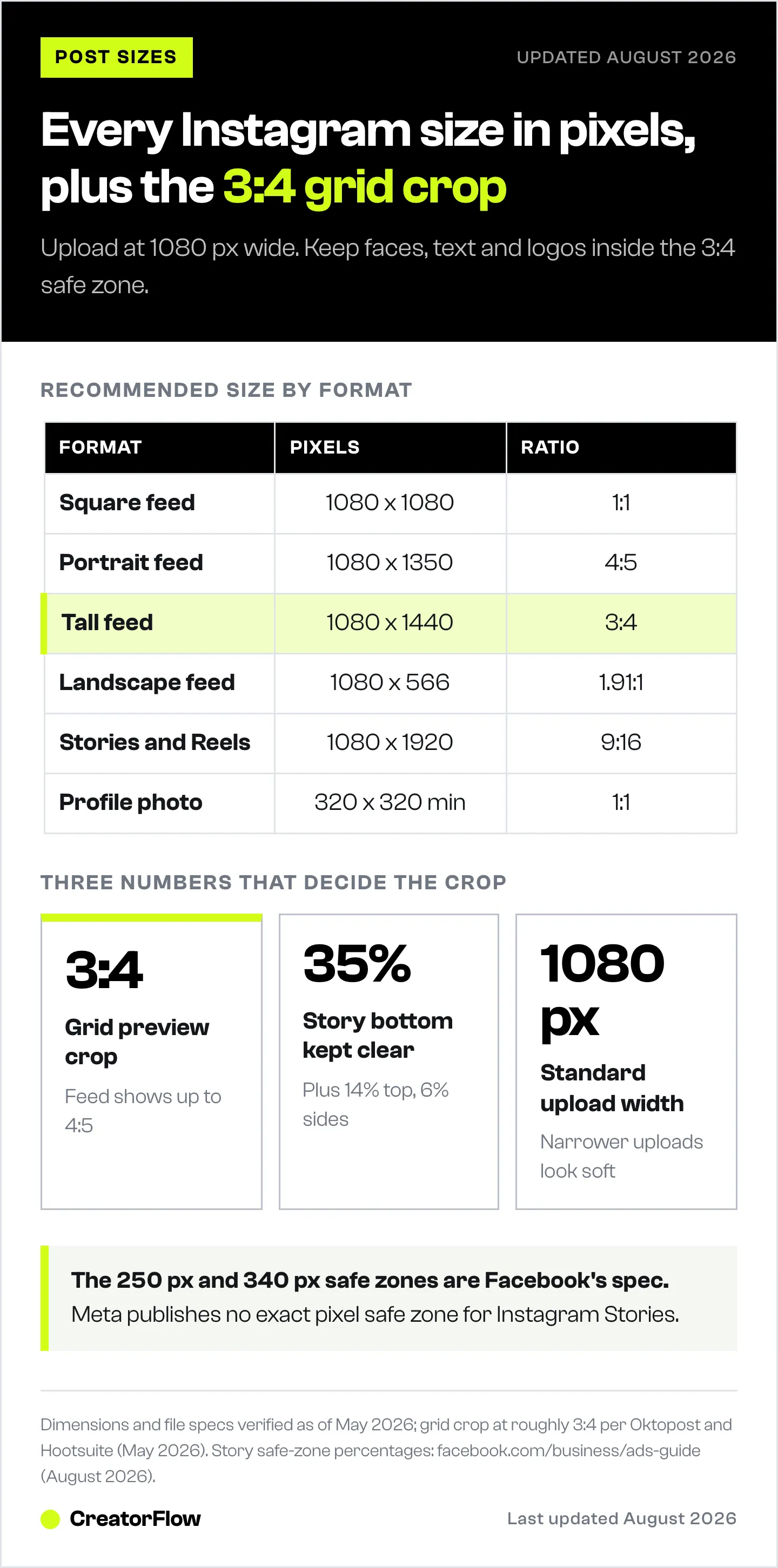
- Square feed post: 1080 x 1080 px (1:1)
- Portrait feed post: 1080 x 1350 px (4:5)
- Tall feed post: 1080 x 1440 px (3:4)
- Landscape feed post: 1080 x 566 px (1.91:1)
- Stories: 1080 x 1920 px (9:16)
- Reels: 1080 x 1920 px (9:16)
- Reel cover: 420 x 654 px (Meta’s recommendation) or a full 1080 x 1920 px frame
- Carousel: 1080 x 1350 px or 1080 x 1440 px (one ratio for every slide)
- Profile photo: 320 x 320 px or larger (1:1)
- Highlight cover: 1080 x 1920 px or 1080 x 1080 px
How Instagram Sizes Work (Aspect Ratio vs Resolution)
Two terms decide whether your content fits: aspect ratio and resolution.
Aspect ratio is the proportion of width to height. A 4:5 ratio means the image is 4 units wide for every 5 units tall. Instagram supports these ratios:
- 1:1 (square) for feed posts
- 4:5 (portrait) for feed posts
- 3:4 (tall portrait) for feed posts
- 1.91:1 (landscape) for feed posts and ads
- 9:16 (vertical) for Stories and Reels
Resolution is the pixel count. An image at 1080 x 1350 is 1080 pixels wide and 1350 pixels tall. The standard upload width across Instagram is 1080 px. Go wider and Instagram sizes it down to 1080 px anyway; go below 320 px and Instagram enlarges it, which looks soft or pixelated on modern phone screens (help.instagram.com, September 2026).
Feed View vs Grid View: The Crop That Catches People Out
What people see in the feed is not always what shows on your profile grid. The feed shows each photo at its own ratio, from 1.91:1 landscape up to 3:4 portrait. The grid shows every post as a tall rectangle, roughly 3:4. Instagram switched the grid from squares to rectangles in January 2025 and has not published the exact ratio; third-party upload tests measure 3:4 (1080 x 1440 px).
At 1080 px wide, a centered 3:4 thumbnail trims:
- A 4:5 post: about 34 px from the left and right edges
- A square post: about 135 px from the left and right edges
- A landscape post: more than half its width
- A 9:16 Reel: about 240 px from the top and bottom
If a face, a headline, or a logo sits near one of those edges, the grid preview cuts it off. Two newer tools help. Since March 2026 you can edit how a post’s thumbnail appears on your profile grid (Social Media Today, March 2026). Since June 2026 you can also reorder the posts on your grid: tap and hold a post, then select “Reorder grid” (Instagram, via Social Media Today, June 2026).
The fix: design inside a 3:4 safe zone, centered in your canvas, and check it with a free Instagram safe zone checker so the post looks intentional in both views.
Master Cheat Sheet: Every Instagram Size (2026)
Save this table. It covers every format and the one tip that matters per type.
Feed & Grid
| Format | Aspect Ratio | Recommended Size | Max File Size | File Type | 2026 Tip |
|---|---|---|---|---|---|
| Square | 1:1 | 1080 x 1080 px | ~30 MB | JPG/PNG | Grid trims about 135 px from each side |
| Portrait | 4:5 | 1080 x 1350 px | ~30 MB | JPG/PNG | Keep key elements in the 3:4 safe zone |
| Tall | 3:4 | 1080 x 1440 px | ~30 MB | JPG/PNG | Matches the grid crop exactly |
| Landscape | 1.91:1 | 1080 x 566 px | ~30 MB | JPG/PNG | Grid shows only the middle 40% of the width |
| Carousel | One ratio for all slides | 1080 x 1350 or 1080 x 1440 px | ~30 MB/slide | JPG/PNG/MP4 | Pick the ratio before you add slides |
Full-Screen Vertical (Stories & Reels)
| Format | Aspect Ratio | Recommended Size | Max File Size | File Type | 2026 Tip |
|---|---|---|---|---|---|
| Stories | 9:16 | 1080 x 1920 px | ~30 MB image / 4 GB video | JPG/PNG/MP4 | Keep clear ~14% top, 35% bottom, 6% sides |
| Reels | 9:16 | 1080 x 1920 px | 4 GB (aim under 500 MB) | MP4 | Center content; grid preview crops to 3:4 |
| Reel cover | 1:1.55 or 9:16 | 420 x 654 px (Meta) or 1080 x 1920 px | ~30 MB | JPG/PNG | Keep the title in the middle 3:4 area |
Profile & Covers
| Format | Aspect Ratio | Upload Size | Display | File Type | 2026 Tip |
|---|---|---|---|---|---|
| Profile photo | 1:1 | 320 x 320 px min | Small circle | PNG/JPG | Center the logo or face |
| Highlight cover | 1:1 or 9:16 | 1080 x 1080 or 1080 x 1920 px | Circular crop | PNG/JPG | Match your brand palette |
File size limits in these tables come from Meta’s Ads Guide (30 MB images, 4 GB video). Meta publishes no separate limit for organic posts. Scheduling tools that post through Meta’s API have tighter limits: 8 MB JPEG images, 300 MB Reels, and 10 slides per carousel (developers.facebook.com, September 2026).

Instagram Feed Post Size (Photos & Single Videos)
Feed photos can be any shape from 1.91:1 landscape to 3:4 portrait. Instagram crops a photo outside that range to fit (help.instagram.com, September 2026). Four ratios cover almost every post: 1:1 square, 4:5 and 3:4 portrait, and 1.91:1 landscape. Portrait fills the most screen space in the feed, so it is the usual choice for creators.
Square Feed Posts (1:1)
The square post is 1080 x 1080 px. It shows in full in the feed, but the 3:4 grid trims about 135 px from its left and right edges.
Square works best for:
- Text-based graphics and quotes
- Centered product shots or headshots
- Logos and symmetrical designs
- Announcements
Keep key content inside the central 810 x 1080 px, so the grid thumbnail shows all of it.
Portrait Feed Posts (4:5)
Portrait is 1080 x 1350 px (4:5). It was the tallest feed photo until 3:4 arrived in May 2025. It is still the safest tall size if you post through a scheduling tool, because Meta’s API accepts 4:5 but not 3:4. A taller post fills more of the screen as people scroll.
The catch: the 3:4 grid trims about 34 px from the left and right edges, so keep faces, text, and key details away from the sides.
Portrait works best for:
- Outfit and fashion photos
- Vertical product shots
- Infographics and step-by-step tutorials
- Portrait photography
The New 3:4 Feed Post (1080 x 1440 px)
Instagram added support for 3:4 photos (1080 x 1440 px) in late May 2025, so a photo shot on a phone’s native 3:4 camera now appears exactly as shot (Adam Mosseri on Threads, May 2025). The Help Center lists it as the tallest feed photo Instagram accepts: “a width of 1080 pixels with a height between 566 and 1440 pixels” (help.instagram.com, September 2026). It is slightly taller than 4:5 and lines up with the grid crop.
One catch: Meta’s API still accepts images only between 4:5 and 1.91:1 (developers.facebook.com, September 2026). If you post through a scheduling tool, a 3:4 image may be rejected or cropped, so upload 3:4 posts in the app.
Use 3:4 when you want to:
- Show the whole photo on your profile grid, with no trim
- Fill the most vertical space a feed photo can take
- Post phone photos as shot, with no crop
Landscape Feed Posts (1.91:1)
Landscape is 1080 x 566 px (1.91:1), mainly used for wide shots and ads.
It suits:
- Cinematic travel and panoramic scenes
- Group photos
- Dashboard or screen recordings
The grid shows only the middle 40% of a landscape photo, so keep the subject and any text in the center. If your source is wider than 1.91:1, crop it yourself before uploading instead of letting Instagram crop it.
Instagram Carousel Size (Multi-Image & Multi-Video)
Carousels hold up to 20 photos and videos in a single post (help.instagram.com, September 2026). They also had the highest average engagement rate of any format in Socialinsider’s Q2 2026 brand benchmarks: 0.50%, against 0.48% for Reels and 0.33% for single images (socialinsider.io, July 2026). The orientation you choose (square, portrait or landscape) applies to every slide, so pick it first and design every slide to match.
Recommended carousel sizes:
- 1080 x 1350 px or 1080 x 1440 px for educational and text-heavy content
- 1080 x 1080 px for product catalogs
You can’t choose a different orientation for each slide: “the orientation you choose … affects all of the photos or videos in your post” (help.instagram.com, September 2026). A photo in a different shape gets cropped to fit that frame, and you drag it to choose which part shows. Export every slide at the same size, and keep margins, type, and color the same across slides so they read as one set.
2026 update: Since March 2026 you can reorder slides after publishing (9to5Mac, March 2026), and you can remove a slide. You still can’t add new slides to a published carousel (help.instagram.com, September 2026).
For slide-by-slide design, hooks, and CTA placement, see our Instagram carousel best practices guide.
Instagram Story Size (9:16)
Instagram Stories are full-screen vertical content at 1080 x 1920 px (9:16). Any resolution with the same ratio works, but 1080 width keeps it sharp on modern phones.
Stories safe zone:
- Meta’s Ads Guide asks you to keep text and logos out of roughly 14% of the top, 35% of the bottom, and 6% of each side for Instagram Stories (facebook.com/business/ads-guide, September 2026). Meta publishes only these percentages. On a 1080 x 1920 canvas they come to about 269 px, 672 px, and 65 px
- That leaves a usable band of roughly 950 x 979 px for core text and faces
- The often-quoted 250 px top and 340 px bottom figures do not appear in Meta’s current Ads Guide for Instagram or Facebook Stories, which now give only the percentages above
- These safe zones are written for ads. Meta publishes no separate safe zone for organic Stories, and its Ads Guide now recommends a 1440 x 2560 canvas for Story ads (the same 9:16 ratio, so the percentages still apply)
- Full workflow for checking this before a client approves a frame: Instagram Story mockup and client sign-off
Instagram Reels Size (Video & Covers)
Reels use a full-screen 9:16 frame at 1080 x 1920 px, but they appear differently depending on where they show up. In the Reels feed and tab they fill the screen; on your profile grid the thumbnail crops to roughly 3:4.
That split is why safe zones matter most for Reels:
- Make the Reel 1080 x 1920 px. Instagram accepts Reels between 1.91:1 and 9:16, at least 720 px wide and 30 frames per second (help.instagram.com, September 2026)
- For the cover, Meta recommends 420 x 654 px (a 1:1.55 ratio); a 1080 x 1920 frame with the title in the center also works
- Meta’s Ads Guide gives Reels the same margins as Stories: keep text and logos out of roughly 14% of the top, 35% of the bottom, and 6% of each side, where the caption, buttons, and profile icon sit (facebook.com/business/ads-guide, September 2026)
- On your profile grid, only the central 1080 x 1440 px (3:4) of the frame shows, so keep the cover title and faces in that middle band
- Use high text-to-background contrast so the cover reads at thumbnail size
Pro tip: Build a reusable Canva or Figma template with guides for the full 9:16 frame plus 4:5 and 3:4 preview crops. You design once and never guess a safe zone again. For the full posting cadence, see how to schedule Instagram posts.
Instagram Profile Photo Size
Instagram’s Help Center gives no size for profile photos. Upload a square image (1:1) of at least 320 x 320 px; larger squares also work. It displays as a small circle, so center the important part.
Profile photo best practices:
- Headshot? Use a solid or on-brand gradient background so it stands out in the feed
- Logo? Upload a PNG for crisp edges
- Photo? Upload a JPG
- Change it rarely, so people keep recognizing you
Highlight Cover Size
Highlight covers appear as circles at the top of your profile and shape first impressions.
- Use 1080 x 1920 px Story slides or dedicated 1080 x 1080 px squares
- Center icons and text with generous padding (the circle crops the edges)
- Keep colors, icon style, and type consistent across the set
- Export PNG for flat graphics, JPG for photos, well under 1 MB
File Formats, Quality & Size Limits (2026)
Images:
- JPG/JPEG for photos and gradients (80-90% quality)
- PNG for logos, flat illustrations, and text-heavy graphics
- Skip GIFs for feed posts; use MP4 for motion
Video:
- MP4 (H.264 + AAC) is the standard for every video format
- MOV also works, in the app and through Meta’s API (developers.facebook.com, September 2026)
Limits:
| Content Type | Hard Limit | Best Practice |
|---|---|---|
| Images | ~30 MB | Under 10 MB |
| Feed video & Reels | 4 GB | Under 500 MB |
| Reel length | Up to 20 min | 3 min or less, since only those are recommended to people who don’t follow you |
| Story clip | 60 seconds | Instagram splits longer videos into 60-second clips |
Safe Zones, Format by Format
A safe zone is the part of the frame that won’t be covered by UI or cropped in previews.
Feed posts: Keep text and logos at least 90 px from every edge. On square posts, keep them 150 px from the left and right edges, because the 3:4 grid trims 135 px from each side.
Reels: The caption, buttons, and profile icon cover the bottom of the screen. Meta’s Ads Guide uses the same margins as Stories (14% top, 35% bottom, 6% sides), so keep subtitles above the bottom 35%.
Stories: The username bar at the top and the reply bar at the bottom cover more of the frame than it seems. Meta’s Ads Guide reserves roughly 14% of the top and 35% of the bottom for Instagram Stories, plus 6% each side.
Profile and highlight covers: Think in circles. Keep everything inside the central 60-70% radius.
Export at the Ratio, Do Not Crop to It
Every number on this page assumes you are producing the asset at the target ratio. Cropping a 1:1 photo down to 9:16 for a Reel cover throws away almost half the frame and usually cuts the subject, and upscaling a small crop back to 1080 px wide is where the soft, blocky look comes from.
Two habits fix most of it. Shoot or generate wider than you need so the crop is a choice rather than a rescue. And produce a separate export per placement instead of reusing one file across feed, Stories, and Reels.
That second habit is the expensive one when a single product needs a 4:5 feed post, a 9:16 Story, and a 1:1 grid tile. Many AI image tools generate one image at one ratio and leave the reframing to you. DesignerBox is built around the multi-output case instead, generating each placement at its native ratio from one uploaded product photo so nothing gets cropped after the fact, and its OG image generator covers the 1200x630 link-preview size that sits outside Instagram entirely. The free plan includes 112 credits, with watermarked results and a personal-use licence. The commercial licence starts on the €35/month Pro plan, or €15 per month billed yearly (designerbox.ai/pricing, September 2026). Disclosure: DesignerBox is built by the same team as CreatorFlow.
The same link-preview size matters for DMs too, which our guide to Instagram DM link previews covers in detail.
Right Size Is Step One. Reach Is Step Two.

Perfect dimensions stop Instagram from cropping your work. They don’t, on their own, turn views into customers.
Here is where revenue leaks: a post lands, people comment “info” or “link,” and the reply comes hours later, after the moment has passed. An automated DM can send the link right away. The attention was there. The follow-through wasn’t.
CreatorFlow closes that gap. Set a trigger word and write your message. Every comment with that word gets a DM with your link, lead magnet, or booking page, day or night. Correctly sized content earns the swipe and the comment; DM automation answers that comment while the person is still interested.
CreatorFlow is a Meta Tech Provider (since December 2025) and runs on Meta’s official Instagram API. Pro costs a flat $15/month with no per-contact fees, and setup takes under 2 minutes. Pair it with a clean grid and you have the full loop: content that gets seen, and a system that follows up with the people who engage.
Start your free trial at creatorflow.so
FAQ
What is the best Instagram post size in 2026?
1080 x 1350 px (4:5) for in-feed impact, or 1080 x 1440 px (3:4) if you want the post to match the grid crop with zero cropping. Both fill most of the screen while keeping key content inside the 3:4 safe zone. If you post through a scheduling tool, use 4:5, since Meta’s API does not accept 3:4 images.
Is the Instagram grid 4:5 or 3:4?
The grid previews thumbnails at roughly 3:4, while the feed displays full posts at their own ratio, from 1.91:1 up to 3:4. In the grid, a 4:5 post loses about 34 px from each side and a square post about 135 px. Post at 4:5 or 3:4, but keep faces, text, and logos inside the central 3:4 area so nothing gets cut in the grid. Meta has not published the grid ratio; third-party upload tests measure 3:4.
What size should Instagram Stories be?
1080 x 1920 px (9:16). This fills the screen with no borders. Meta’s Ads Guide asks you to keep text and logos out of roughly 14% of the top, 35% of the bottom, and 6% of each side, which is about 269 px, 672 px, and 65 px on a 1080 x 1920 canvas (facebook.com/business/ads-guide, September 2026).
What size should Instagram Reels be?
1080 x 1920 px (9:16) for the video. Meta recommends 420 x 654 px for the cover (help.instagram.com, September 2026). Keep text out of the bottom 35% of the frame, where the caption and buttons sit, and keep the cover title centered, since the grid thumbnail crops to roughly 3:4.
What dimensions should my Instagram profile picture be?
Instagram’s Help Center gives no official size. Upload a square image of at least 320 x 320 px (1:1). It displays as a small circle, so center key elements within the inner 60-70%.
How many slides can an Instagram carousel have?
Up to 20 in the Instagram app (help.instagram.com, September 2026). One orientation applies to every slide. After publishing you can reorder or remove slides, but not add new ones. Scheduling tools that post through Meta’s API are limited to 10 slides.
What is the maximum file size for Instagram posts?
Meta’s Ads Guide caps images at 30 MB and videos at 4 GB, and Meta publishes no separate limit for organic posts. Tools that post through Meta’s API are limited to 8 MB JPEG images and 300 MB Reels. As a best practice, keep images under 10 MB and Reels under 500 MB to avoid heavy compression and slow uploads.
Why does Instagram crop or blur my posts?
Blur usually means the photo was narrower than 1080 px, so it has fewer pixels than a phone screen shows. Instagram keeps photos between 320 and 1080 px wide at their original size and enlarges anything narrower to 320 px (help.instagram.com, September 2026). Cropping happens when your aspect ratio falls outside the supported range (1.91:1 to 3:4 for feed) or when key content sits outside the 3:4 grid safe zone. Export at 1080 px wide in a supported ratio to fix both.
Sources:
- Instagram Help Center pages on photo resolution, carousels, Reels sizes, and Story length, checked September 2026
- Meta Ads Guide for Instagram Feed, Stories, and Reels, checked September 2026
- Meta developer documentation for content publishing (page updated August 2026, checked September 2026)
- Adam Mosseri on Threads (January 2025 and May 2025), via Social Media Today
- Social Media Today on grid thumbnail editing (March 2026) and grid reordering (June 2026); 9to5Mac on carousel reordering (March 2026)
- Socialinsider Instagram benchmarks, Q2 2026 (updated July 2026)
- designerbox.ai/pricing, checked September 2026
Disclaimer: Instagram dimensions, file limits, and features mentioned in this article were verified as of September 2026 and may change without notice. Instagram is a trademark of Meta Platforms, Inc. CreatorFlow is not affiliated with, endorsed by, or sponsored by Meta Platforms, Inc. Canva, Figma, and Socialinsider are trademarks of their respective owners. Recommended sizes are based on aggregate platform guidance; individual results vary by device and content type.


