
An Instagram Story mockup is a 1080 x 1920 preview of the exact frame you plan to publish, marked with the areas Instagram’s interface covers. Meta’s Ads Guide asks you to keep text and logos out of roughly the top 14%, the bottom 35%, and 6% of each side. Approve the frame, the tap destination, and the go-live date in one pass.
Most Story approvals fail twice. The client approves a clean rectangle in a slide deck, the Story goes live, and the headline sits under the username bar. Then the client asks where the link went, because nobody wrote down what happens after the tap. Both problems come from the same gap: the mockup showed the artwork, not the frame.
This guide covers what a Story mockup has to display before it means anything, the safe-zone numbers Meta actually publishes for Instagram (they are not the ones circulating in most spec posts), a sign-off packet template, and the free preview tools that let you build the whole thing without design software.
Key Takeaways
- The 250 px safe zone is the wrong spec. Meta publishes 250 px top and 340 px bottom for Facebook Stories. For Instagram Stories its Ads Guide gives percentages: roughly 14% top, 35% bottom, 6% each side (facebook.com/business/ads-guide, August 2026)
- Meta publishes no pixel safe zone for Instagram Stories at all. Its safe-zone help page is qualitative and points to an Ads Manager guardrail toggle instead (facebook.com/business/help/980593475366490, August 2026)
- A CTA link sticker changes the numbers. Instagram’s Help Center lists roughly 14% top and 20% bottom for Stories ads carrying a CTA sticker (help.instagram.com, August 2026)
- A mockup is a frame, not an image. Show the artwork inside the 9:16 canvas with the covered bands drawn on, or the client approves pixels nobody will see
- Sign off on the destination, not just the design. Link stickers work on organic Stories only, and Stories disappear after 24 hours unless saved as a Highlight (help.instagram.com, August 2026)
- Five rounds is the benchmark to beat. The BetterIdeas Project (BetterBriefs with the WFA and the IPA, 1,034 respondents across 54 countries) found creative work averages five rounds of rework (betterbriefs.com, August 2026)
- One packet, one decision. Frame, copy, destination, and go-live date in a single submission removes the revision loop that eats agency margin
What an Instagram Story mockup needs to show
A Story mockup earns approval when the client can see everything that will be on screen at the moment the Story plays. That means four things, and skipping any of them creates a revision round later.
The full 9:16 canvas. Meta recommends a 1080 x 1920 resolution at a 9:16 aspect ratio for Instagram Stories, with a 600 x 1067 minimum (facebook.com/business/help/2222978001316177, August 2026). Present the artwork at that ratio, not cropped into a slide.
The interface bands. The profile row, timestamp and menu sit across the top. The reply bar and reaction row sit across the bottom. Draw those bands on the mockup so the client sees the real usable area.
The interactive elements. If a poll, question box, countdown or link sticker is planned, it goes on the mockup in position. A sticker added after approval covers artwork that was approved without it.
The destination. Where the tap goes, and what the person receives. This is the part that gets skipped and the part clients care about most.
The safe zone most Story mockups get wrong
Search for Instagram Story safe zones and the same numbers come back: 250 pixels clear at the top, 340 at the bottom, design inside a central 1080 x 1420 band. Those numbers are real and Meta-published. They are the specification for Facebook Stories, listed on the Facebook Story page of Meta’s Ads Guide (facebook.com/business/ads-guide, August 2026).
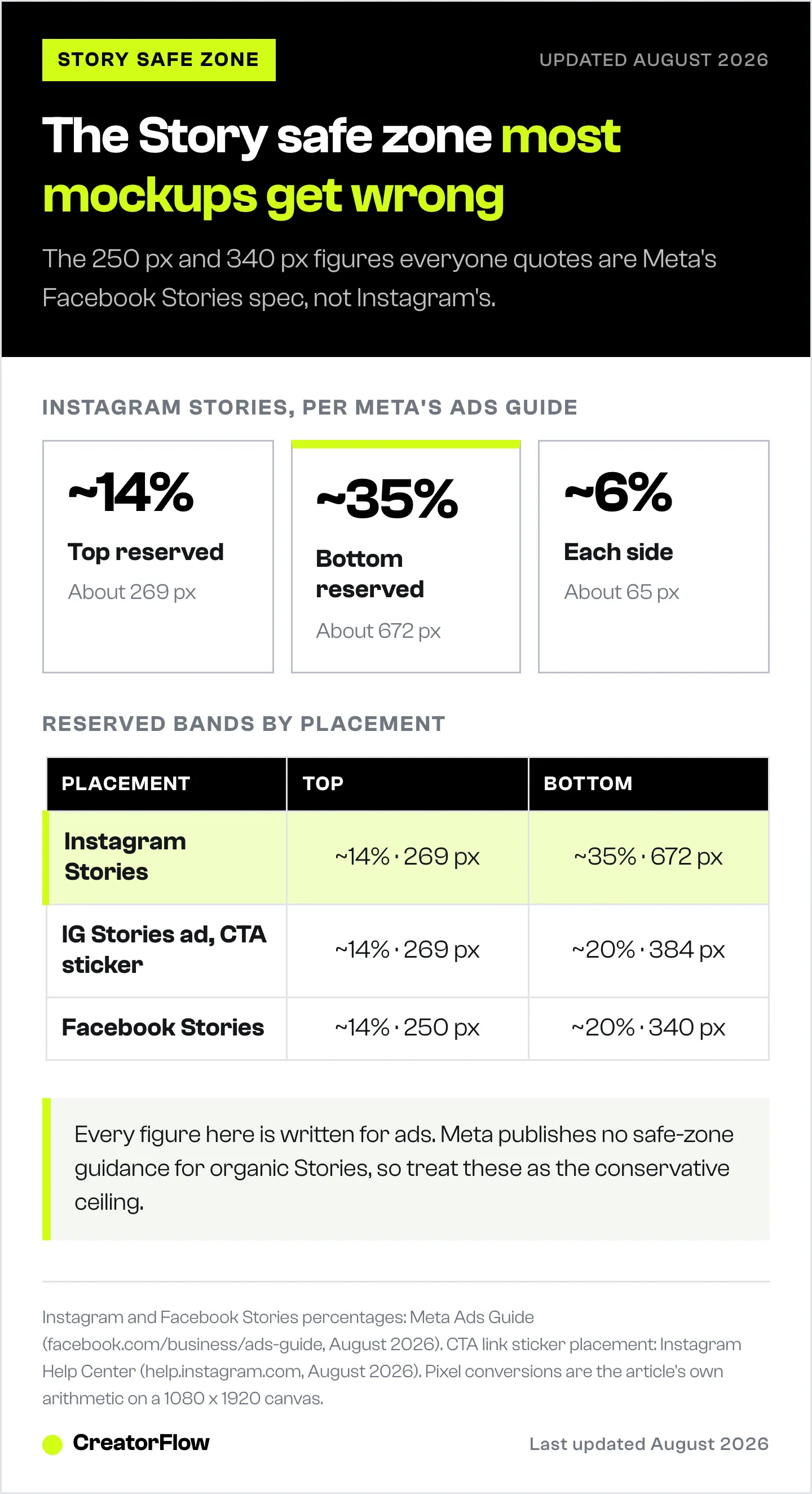
For Instagram Stories, Meta’s Ads Guide gives percentages instead: keep text and logos out of roughly 14% of the top, 35% of the bottom, and 6% of each side. On a 1080 x 1920 canvas that works out to about 269 px top, 672 px bottom, and 65 px per side, leaving a usable band of roughly 950 x 979.
The bottom reservation is more than double what most spec posts claim. A headline placed at 1080 x 1420 passes the widely-quoted rule and still lands inside Meta’s stated Instagram exclusion zone.
| Placement | Top reserved | Bottom reserved | Sides | Published by |
|---|---|---|---|---|
| Instagram Stories | ~14% (269 px) | ~35% (672 px) | ~6% (65 px) | Meta Ads Guide |
| Instagram Stories ad with CTA link sticker | ~14% (269 px) | ~20% (384 px) | Not specified | Instagram Help Center |
| Facebook Stories | ~14% (250 px) | ~20% (340 px) | Not specified | Meta Ads Guide |
Two caveats belong in every agency’s internal spec sheet. Every one of these figures is written for ads; Meta publishes no equivalent guidance for organic Stories, so treat the ad numbers as the conservative ceiling. And Meta warns that on screens taller than 9:16 it may zoom the creative, which can crop areas that sat outside the safe zone in your mockup.
Run the finished frame through the free Instagram safe zone checker, which overlays Stories, Reels and post safe areas on your own image so you can see what the interface eats before the client does. For every other format, the Instagram post size guide has the full pixel cheat sheet.
How to build a Story mockup without design software
Design software is not the requirement. A finished asset placed in a realistic frame is. Three routes, all free.
Route 1: overlay the safe zones on the asset. Drop your 1080 x 1920 export into the safe zone checker, screenshot the overlay, and send that. This is the fastest option and the one that prevents the most rework, because the client is looking at exclusion bands rather than a clean rectangle.
Route 2: build a device-framed preview. The Instagram post generator produces a realistic mockup with your image, caption, likes and verified badge, exports a watermark-free PNG, and needs no signup. Pair it with the Instagram profile generator when the client wants to see the Story ring and bio in context, or the post modal generator for the desktop view.
Route 3: present it as a deck asset. Put the framed preview on a clean background using the screenshot background tool so the mockup reads as a deliverable rather than a raw file.
Draft the on-frame copy and the caption with the Instagram caption generator, and check the frame size against the social media image sizes sheet before export. The full set is in the free Instagram tools library.
What to include in the client sign-off packet
One submission, one decision. Copy this structure into your project template.
- The framed mockup with safe-zone bands visible
- The on-frame copy as text, so the client can edit words without a redesign
- The sticker plan: which interactive element, in which position, doing what
- The destination: the exact URL, or the keyword and the reply the person receives
- The go-live window: date, time, time zone
- The decision request, stated plainly: “Approve as-is, or reply with changes by Thursday 5pm”
One caution on benchmarking this. Nearly every organisation publishing approval-cycle data has a commercial interest in the number looking large, so read all of it with that in mind. The strongest available figure comes from the BetterIdeas Project, run by BetterBriefs with the World Federation of Advertisers and the IPA: 1,034 marketers and agency staff across 54 countries, reporting an average of five rounds of rework on creative work (betterbriefs.com, August 2026). For elapsed time, Filestage’s 2023 report put general creative review at eight days and more than three versions across 366 respondents (filestage.io, August 2026). Treat both as direction of travel and measure your own accounts.
Point 6 is the one that shortens cycles. A packet that ends without an explicit ask gets read, not answered. Agencies running this at volume usually pair it with a standing rule that silence past the deadline counts as approval, documented in the statement of work rather than announced mid-project. The agency content planning workflow covers how that fits a batch production calendar.
Signing off on what happens after the tap
The design is half the deliverable. The other half is where the Story sends people, and it needs approving in the same pass.
Link stickers are available regardless of account size. Instagram removed the follower threshold in October 2021, though new accounts and accounts that repeatedly violate Community Guidelines do not get access (about.instagram.com, August 2026). Swipe up is retired; the Help Center now states plainly that you add a link sticker instead (help.instagram.com, August 2026). Link stickers also work on organic Stories only (help.instagram.com, August 2026). Setup and the four common failure symptoms are in the Story link sticker guide.
A reply-based destination is the other option, and it needs its own line in the packet. When someone replies to a Story, that reply arrives in the DM thread, and Meta’s messaging webhook fires for Story replies and mentions (developers.facebook.com, August 2026). Meta gives an app 24 hours to respond to a message a person sends, extendable to seven days with the human agent tag (developers.facebook.com, August 2026). So the client is approving a reply message, not only a sticker. Story reply automation walks through the setup, and the seven Story-to-DM plays show what the reply usually contains.
Write the destination into the packet as a sentence the client can approve: “Taps the sticker, lands on the June offer page” or “Replies OFFER, receives the booking link within seconds.”
Story mockup or live draft: which to send
| Situation | Send a mockup | Send a live draft |
|---|---|---|
| New client, first Story of an engagement | Yes | No |
| Legal or compliance review needed | Yes | No |
| Sticker position is the open question | Yes | No |
| Client wants to feel the tap and the animation | No | Yes |
| Copy is settled and only motion is in doubt | No | Yes |
Mockups win when the decision is about layout, message or approval trail, because they leave a timestamped artifact. Live drafts win when the decision is about how something feels in motion. Stories disappear after 24 hours unless added as a Highlight, and Instagram saves them to your Stories Archive (help.instagram.com, August 2026), so a live draft used for approval is a same-day exercise with nothing to file afterward.
For the content itself, 50+ Story ideas and templates covers formats worth mocking up. Agencies running this across many accounts should read the multi-client automation workflow.
New to any of the terms here? The Instagram glossary defines Story, link sticker, Story reply and CTA in plain language.
Turn approved Stories into tracked conversations
Once a Story is signed off and live, CreatorFlow handles the destination side. Story replies trigger an automatic DM with the approved link, the follow gate and email gate qualify people before the link goes out, and geographic click analytics show the client which regions the Story reached. Flat pricing at $15/month covers it regardless of audience size.
Start free with CreatorFlow and connect the Story you just got approved.
FAQ
What is an Instagram Story mockup?
An Instagram Story mockup is a 1080 x 1920 preview of a Story frame shown at a 9:16 aspect ratio with the interface areas marked. It lets a client approve the layout, copy and sticker placement before anything publishes, and it leaves a timestamped record of what was approved.
What are the Instagram Story safe zone dimensions?
Meta’s Ads Guide asks you to keep text and logos out of roughly 14% of the top, 35% of the bottom and 6% of each side for Instagram Stories, which is about 269 px, 672 px and 65 px on a 1080 x 1920 canvas (facebook.com/business/ads-guide, August 2026). Meta publishes no exact pixel safe zone for Instagram Stories, and the widely-quoted 250 px and 340 px figures come from its Facebook Stories specification.
Do I need design software to make a Story mockup?
No. A finished 1080 x 1920 export placed in a realistic frame is enough. Free browser tools such as a safe zone overlay checker and a post mockup generator produce a client-ready preview without Photoshop, Figma or Canva.
How many Story versions should I show a client?
One, in most cases. A single recommended frame with a clear approval request produces a decision. Multiple options invite comparison and add a round. Show two only when the brief genuinely has two valid directions and you need the client to pick a lane.
What should be in a client review packet?
The framed mockup with safe zones visible, the on-frame copy as editable text, the sticker plan, the exact destination URL or keyword reply, the go-live date and time zone, and an explicit decision request with a deadline.
When is a live draft better than a mockup?
When the decision is about motion, timing or how the tap feels. Send a mockup when the decision is about layout, wording or anything needing an approval record, since Stories disappear after 24 hours unless saved as a Highlight.
Can clients approve the link destination separately?
They can, though separating it is what creates a second round. Put the destination in the same packet as the frame, written as a plain sentence describing where the tap lands or what the reply sends.
Instagram Story specifications, safe-zone guidance, link sticker availability and messaging window rules verified from Meta’s Ads Guide, Instagram Help Center and Meta developer documentation as of August 2026. Review-cycle figures from the BetterIdeas Project (2025) and Filestage’s creative collaboration report (2023). Meta publishes safe-zone guidance for ad placements; no equivalent figures exist for organic Stories. Individual results vary.


