

Content repurposing means turning one long piece, such as a video, podcast, talk or newsletter, into several shorter posts in other formats. It works best when you split the source by the questions it answers. Give each post one answer and one job, publish it in the format that suits that answer, and then make more of the answers that earn saves, shares and comments.
Most repurposing advice starts with the source file. You scrub the video, mark timestamps and export the best minute. The clip often opens in the middle of a thought, depends on context the viewer never saw, and stops before the point lands. To a stranger in the feed it looks like a trailer for something they did not ask to watch.
This guide gives you a different method. You will see where the idea came from, how to pull a question list out of any long piece, which format carries which kind of answer, and what Instagram’s April 2026 originality rules mean for reused material. You will also learn how to read your numbers so each new round of posts beats the last.
Key Takeaways
- Definition: Content repurposing turns one long piece into several posts in other formats, each one rebuilt for the place it appears.
- Split by question: List the questions your source answers, in the words a viewer would type. Each question becomes one post.
- One format, one job: A Reel reaches new people, a carousel holds steps people save, a Story asks your followers, a newsletter carries the full reasoning.
- Instagram’s rules: Reworking your own material is fine. Since April 30, 2026, accounts that mostly re-upload other people’s work lose recommendations.
- Measure by answer: Compare saves, shares and keyword comments for each question, then rebuild the winning answers in a second format.
- Bottom line: One long piece holds several answers. Find them, give each its own post, and let your audience’s actions tell you which ones to make again.
What Is Content Repurposing?
Content repurposing is taking an idea you already published in one format and rebuilding it for another format or channel. A 40-minute podcast can become a Reel, a carousel, a Story poll and a newsletter section. Each version is made for the place it appears. That separates repurposing from reposting the same file, or from crossposting one post to several apps without changes.
The idea is older than social media. NPR’s Daniel Jacobson described the principle as COPE, short for Create Once, Publish Everywhere, in a 2009 post on ProgrammableWeb. NPR stored each story once, separate from how it was displayed, so the same content could feed its website, apps and partner feeds.
Creators do the same work by hand. The thinking happens once, in the long piece. The outputs are many, and each one has to fit its screen.
Three terms get mixed up, and the difference matters on Instagram:
- Reposting puts the same post up again on the same platform.
- Crossposting puts the same file on several platforms unchanged.
- Repurposing keeps the idea and rebuilds the post: new first line, new length, new format.
Why Cutting Clips by Timestamp Makes Weak Posts
A timestamp tells you where something was said. It tells you nothing about what a viewer wanted to know. Clips cut by time often open mid-sentence, lean on context from earlier in the source, and end before the point lands. A person scrolling past has no reason to stop, because the clip does not answer a question they already have.
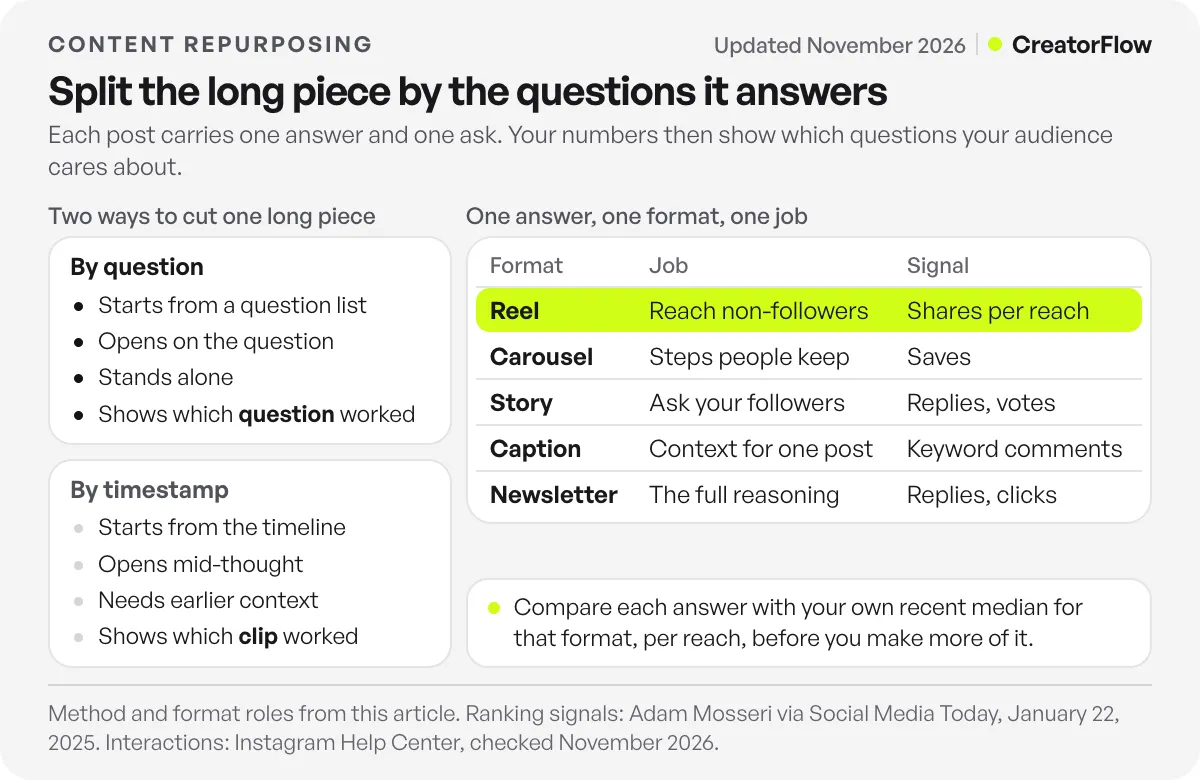
Here is how the two approaches differ in practice:
| Cutting by timestamp | Splitting by question | |
|---|---|---|
| Starting point | The source file and its timeline | A list of questions the source answers |
| First line of the post | Whatever was said at that second | The question, or the answer to it |
| Context the viewer needs | Often the minutes before the clip | None, the post stands alone |
| Ending | Where the next topic started | Where the answer is complete |
| One post can carry | Parts of two or three ideas | One answer and one ask |
| What your numbers tell you | Which clip did well | Which question your audience cares about |
The last row is the reason to switch. When a clip cut by time does well, you learn that one minute worked. When a post built on a question does well, you learn what your audience wants to know, and you can answer it again in another format.
How to Repurpose Content by the Questions It Answers
Read or listen to the source and write down every question it answers, in the words a viewer would use. Merge the repeats, drop questions nobody in your audience asks, and rank the rest by how often people raise them in your comments and DMs. Each question that survives becomes one post, with one answer, one piece of proof and one ask.
Get a transcript you can search
Most video, podcast and meeting tools can export a transcript. A text version lets you scan 40 minutes in a few minutes and mark every place you answered something. You do not need it to be perfect. You need it to show where each answer starts and ends.
Write each question the way your audience would
Experts phrase things in their own terms. Viewers ask in plain words. “Macro distribution across meals” is your phrase. “Do I need protein at breakfast?” is theirs. Write the second version, because it becomes your first line, your cover text and the words people search for.
Check the list against what people already ask you
Open your last 50 comments and your DM requests. Put a mark next to every question on your list that someone has asked you in their own words. Questions with marks go first. Questions with none can still work, but treat them as tests.
Pick the proof for each answer
Every answer needs something the viewer can see or check: a screenshot, a before and after, a number from your own work, a worked example. If an answer in your source has no proof, either find some or leave that question for later. A claim with nothing behind it makes a weak post in any format.
Which Format Fits Each Answer?
Match the shape of the answer to the format. A quick fix or a visible result suits a Reel. Steps, lists and comparisons suit a carousel, because people save them to use later. A question you want your followers to answer suits a Story. The full reasoning, with nuance and links, suits a newsletter or a long caption.
| Format | Answer shape it carries | Its job | Signal to watch |
|---|---|---|---|
| Reel | One fix or one result shown on screen | Reach people who do not follow you yet | Shares per reach, watch time |
| Carousel | Steps, a checklist, a comparison | Give followers something to keep | Saves |
| Story | A question or poll back to your followers | Learn which answer they want next | Replies, poll votes |
| Caption | The context behind one post | Explain why the answer matters | Comments, keyword comments |
| Newsletter or email | The full answer with the reasoning | Go deep with people who opted in | Replies, link clicks |
Two Instagram limits shape these choices. Instagram’s Help Center on Reels length says Reels can run up to 20 minutes, but Reels over 3 minutes are not recommended to new audiences (checked November 2026). Keep any Reel meant for reach under that line. A carousel can hold up to 20 photos or videos, per Instagram’s help page on multiple photos, which gives a step-by-step answer room to breathe.

A good carousel answer has a cover that states the question and slides that each carry one step. Our guide to carousel post templates and sizes covers dimensions and cover design.
Do not force every question into every format. One answer may only work as a carousel. Another may only work as a 30-second Reel. Five formats is a menu, and you order what the answer needs.
How to Repurpose Content for Instagram Without Losing Reach
Reworking your own material is safe on Instagram. On April 30, 2026, Instagram said accounts that mostly re-upload other people’s work in photos, carousels or Reels will no longer appear where it recommends content. Your own long video cut into a Reel is your work. The risk starts when your repurposing includes other people’s clips or posts.
Instagram’s announcement on rewarding original creators spells out what does and does not count. Adding a border, a watermark, subtitles or a credit to someone else’s content does not make it original. Adding new information, context or your own point of view can.
The same post explains how an account gets back into recommendations. Once a significant share of the photos, carousels and Reels it posted recently are original, measured over a 30-day period, it becomes eligible again. You can see whether your account has reach limits under Account Status in your settings, and you can appeal from there.
For your own material, three habits keep repurposed posts from looking like leftovers:
- Re-record or rewrite the first line. The opening of a long talk was written for people who already chose to listen. A post needs an opening written for a stranger.
- Rebuild the frame. A horizontal podcast frame cropped to vertical often cuts off faces or text. Shoot or design the key frame for the feed it will appear in.
- Test the recut on new people first. Trial Reels are shown to non-followers first, before your followers see them. Our guide on how to use Trial Reels to test new versions shows how to read the result.
How to Measure Which Repurposed Posts Work
Compare results by question, not by format or by source. For each answer, check its saves, shares and comments against your own recent median for that format. Answers that beat the median deserve a second version in a different format. Answers that fall short get one rewrite of the first line, and if they still fall short, you move on.
Instagram’s head, Adam Mosseri, has named the numbers to watch. “The top three signals that matter most for ranking are watch time, likes and sends,” he said, and told creators to look at average watch time, likes per reach and sends per reach in their insights, as Social Media Today reported on January 22, 2025. Saves and shares sit alongside likes and comments in each post’s insights, which Instagram’s Help Center calls content interactions.
Divide by reach before you compare. For example, a post shown to 20,000 people will collect more saves than one shown to 2,000, even if fewer people per thousand cared. Saves per reach and shares per reach let you compare a Reel with a carousel fairly.
Keyword comments give you a third signal that maps straight onto a question. End each post with one ask, such as “Comment TIMELINE and I’ll send you the full checklist”, and use a different keyword for each answer. A comment-to-DM tool such as CreatorFlow’s comment-to-DM automation sends the link by DM when someone comments that keyword. Meta lets a private reply go out within 7 days of the comment, and only one message until the person replies.
Because each keyword belongs to one answer, the comment count tells you which question pulled the most demand. On Pro and Growth, CreatorFlow’s link click tracking shows how many people opened each link, with clicks by country and city. That tells you whether the interest held after the DM arrived.
Our guide to the Instagram metrics that matter for creators explains how to set your own baseline for each format.
Example: Mapping a 40-Minute Client Q&A
This example is illustrative. Picture a wedding photographer who hosts a 40-minute Instagram Live where couples ask questions. She exports the transcript, lists the questions she answered, and checks them against her DMs. Five questions show up there often. Each gets one format, one piece of proof and one ask, chosen by the shape of the answer.
| Question in the couple’s words | Format | Proof on screen | The ask |
|---|---|---|---|
| ”How far ahead should we book you?” | Reel | Her calendar with booked dates blurred | Comment DATES for her availability page |
| ”What does the day look like hour by hour?” | Carousel | A sample timeline, one block per slide | Save it for planning |
| ”Do we need a second shooter?” | Story poll | Two photos of the same moment from two angles | Vote, then she answers in the next Story |
| ”What is in each package?” | Caption on a portfolio post | The photos from one full package | Comment PRICES for the price guide |
| ”How do we pick a portrait location?” | Newsletter | Five locations with notes on light and timing | Reply with your venue |
After two weeks she compares the posts. Suppose the Reel on booking dates earns far more shares per reach than her median, and the carousel earns saves near her median. The booking question gets a second version, perhaps a carousel listing what to book in which order. The package question, which drew few comments, gets a new first line once.
Look at what she did not do. She never asked which minute of the Live was best. She asked which question her audience cared about, and her numbers answered.
Can AI Repurpose Content for You?
AI chat tools are good at the mechanical half of repurposing. Give one a transcript and it can list the questions the source answers, rewrite them in plain words and draft carousel text. The choices stay with you: which questions your audience asks, which proof is real, and which first line sounds like you.
A useful prompt is narrow. Paste the transcript and ask for every question the speaker answered, each with the line where the answer starts and the line where it ends. Then compare that list with your DMs yourself. The AI cannot see who asked you what last week.
Use the same tool for drafts after you have chosen the questions. Ask for a carousel outline for one question, or three possible first lines for a Reel. Our guide on using ChatGPT for Instagram content creation has prompts for captions and carousels. Check every fact in an AI draft against your source before you post it.
FAQ
What is an example of content repurposing?
A coach records a 30-minute podcast episode on client onboarding. She turns one answer into a Reel, a checklist from the episode into a carousel, and a question from the end into a Story poll. The full reasoning goes into her newsletter. Each post answers one question and stands alone.
Is repurposing content the same as reposting?
No. Reposting puts the same post up again, usually on the same platform. Repurposing keeps the idea and rebuilds the post for a new format: a new first line, a new length and a frame made for where it appears. On Instagram the difference matters, because the originality rules look at what you changed.
Does Instagram penalize repurposed content?
Instagram does not penalize you for reworking your own material. Its April 30, 2026 update targets accounts that mostly re-upload other people’s photos, carousels or Reels without meaningful changes. Those accounts lose recommendations. If you use other people’s content, add new information, context or your own view, because a watermark or credit alone does not count.
How many posts can I get from one long video?
As many as the distinct questions it answers well. Count the questions, drop the ones your audience never asks, and drop the ones with no proof. A short, focused talk may give you two strong posts. A long Q&A may give you ten. The number comes from the source, not from a target.
What should I repurpose first?
Start with the long piece that drew the most questions from your audience, in comments, DMs or a live chat. Those questions are already written in your audience’s words, and you know someone wants the answer. Your most-viewed piece is a second choice, because views alone do not tell you which part people valued.
Can I repurpose someone else’s content?
Only if you add something of your own. Instagram’s originality guidance says adding a border, watermark, subtitles or credit to another person’s work does not make it original. Adding new information, context or a point of view can. Ask for permission where you can, and credit the creator either way.
Sources and checks
Sources checked in November 2026: Instagram’s April 30, 2026 post on rewarding original creators; Instagram’s Help Center pages on Reels length, carousel posts and content interactions; Adam Mosseri’s ranking-signals statement as reported by Social Media Today on January 22, 2025; Meta’s private replies documentation for the 7-day rule; and the archived 2009 COPE post on ProgrammableWeb. The wedding photographer example is illustrative.