

Instagram Reels testing is a repeatable system for growing your account without guessing. You pick one problem your audience cares about, explain it in three batch-friendly Reel formats, and post them at a fixed time each day. After a few days of data, you use AI to spot which format earned the most saves and shares, then make one small tweak for the next batch.
Most growth advice tells you to post on a strict calendar with a documented system. Plenty of creators have grown by doing the exact opposite, posting more Reels with no plan at all. Both can work for a stretch. Neither tells you why a Reel worked, which means neither is repeatable. You end up rebuilding your strategy every time the algorithm shifts.
This guide covers how to build an Instagram Reels testing system that does the opposite: a small, controlled loop you can run in a few days, where the data tells you what to do next. It is written for solo creators who want to grow without burning out, and who are tired of treating every post as a coin flip.
Key Takeaways
- Testing beats guessing: A Reels testing system means running small controlled experiments instead of posting random content and hoping. You learn from the algorithm rather than chasing it
- One problem, three formats: Each batch explains the same audience problem in three different Reel formats, posted at a fixed time so format is the only variable you are measuring
- AI plans, you create: Use AI to spot patterns and shape the starting point, never to write your hooks or scripts. Instagram now rewards original, human content and buries generic AI output
- Goal controls format: Brand awareness, lead generation, sales, and nurture each demand a different kind of Reel. Pick one goal per batch before you film anything
- Small signals are still signals: Even a few hundred views per Reel produce readable patterns in saves, shares, and sends. You do not need viral numbers to learn
- The win compounds: Same problem, same goal, one small tweak per batch. Each cycle makes the next one smarter, so your strategy survives algorithm changes

What Is Instagram Reels Testing?
Instagram Reels testing is the practice of treating your content like a series of small experiments instead of one-off posts. Rather than asking “what should I post today,” you ask “what format earns the most engagement for this exact message,” then run a controlled batch to find out.
The structure is simple. You isolate one problem your audience has. You explain it three ways. You publish those Reels at the same time on consecutive days. You collect a few days of performance data. Then you decide on one change for the next batch.
The goal is not to win with a single Reel. It is to build signal, so the next round performs better than the last. High-performing content teams work this way already. They do not guess what their audience wants. They run small tests and learn fast.
Why Guessing Fails and a System Compounds
When you post without a system, every result is noise. A Reel does 8,000 views, the next does 300, and you have no idea which variable caused the gap. The topic? The hook? The time of day? You cannot separate them, so you cannot repeat the win.
A testing system fixes this by changing one thing at a time. If you hold the topic and the goal steady and only vary the format, then a difference in saves or shares can be traced to the format. That is a lesson you can act on. If you have not tried the yap format yet, it is a strong candidate for one of your three.
This matters more than ever because the rules keep moving. Instagram head Adam Mosseri has confirmed that watch time, likes per reach, and sends per reach are the signals Instagram weighs most for Reels, with DM sends carrying the most weight for reaching people who do not follow you (buffer.com, May 2026). A system built on learning adapts when those weightings shift. A system built on copying last month’s viral format does not. For the full picture of why copied content stops traveling, see why the algorithm now rewards original, human content.
Fix Your Profile Before You Run a Single Test
A testing system fails if your profile cannot convert the attention it earns. When a Reel works, people rarely binge five more. They click your profile and, within seconds, ask three silent questions: What is this? Who is it for? What do I do next?
If your profile does not answer those instantly, every test is leaking. Run this quick audit before batch one:
- Use a professional account. You cannot measure what you cannot see. A creator or business account gives you the insights you need to test anything. If you are still on a personal account, switch to a professional account first
- Rewrite your bio to be obvious. One line on who you help and what they should do next. No clever wordplay. Clarity wins
- Make the next step unmissable. A single, clear action, not five competing links
- Pin two posts. One that introduces you, one that delivers real value. New visitors land on proof, not a random Reel
Once the profile supports the system, you can start figuring out what to actually post.
Pick One Problem and One Goal
Most businesses solve more than one problem. For a test to produce a clean signal, you have to narrow to a single one.
If your business solves a problem, and it should, those recurring problems are your content bank. You are not inventing new topics every week. You are reframing the same solution in different ways. Find the question you get asked most, and the answer you give most often. That one problem and that one solution drive every Reel in the experiment.
Then pick the goal. This is where most creators lose the plot, because the goal controls how you build the content. Most goals fall into one of four buckets:
| Goal | What it does | Reel example |
|---|---|---|
| Brand awareness | Earns attention | A relatable or funny take on a problem your audience recognizes |
| Lead generation | Starts a conversation | A Reel that asks viewers to comment a keyword for a resource |
| Sales | Drives action | A direct demo of an offer with a clear call to act |
| Nurture | Builds trust | A teaching or storytelling Reel that makes people want to follow |
A Reel built for awareness looks nothing like one built for sales. Decide the goal before you film. If your long-term aim is leads but you are still small, nurture first. Earn trust now so lead generation gets easier later.
Build the Batch: One Problem, Three Formats
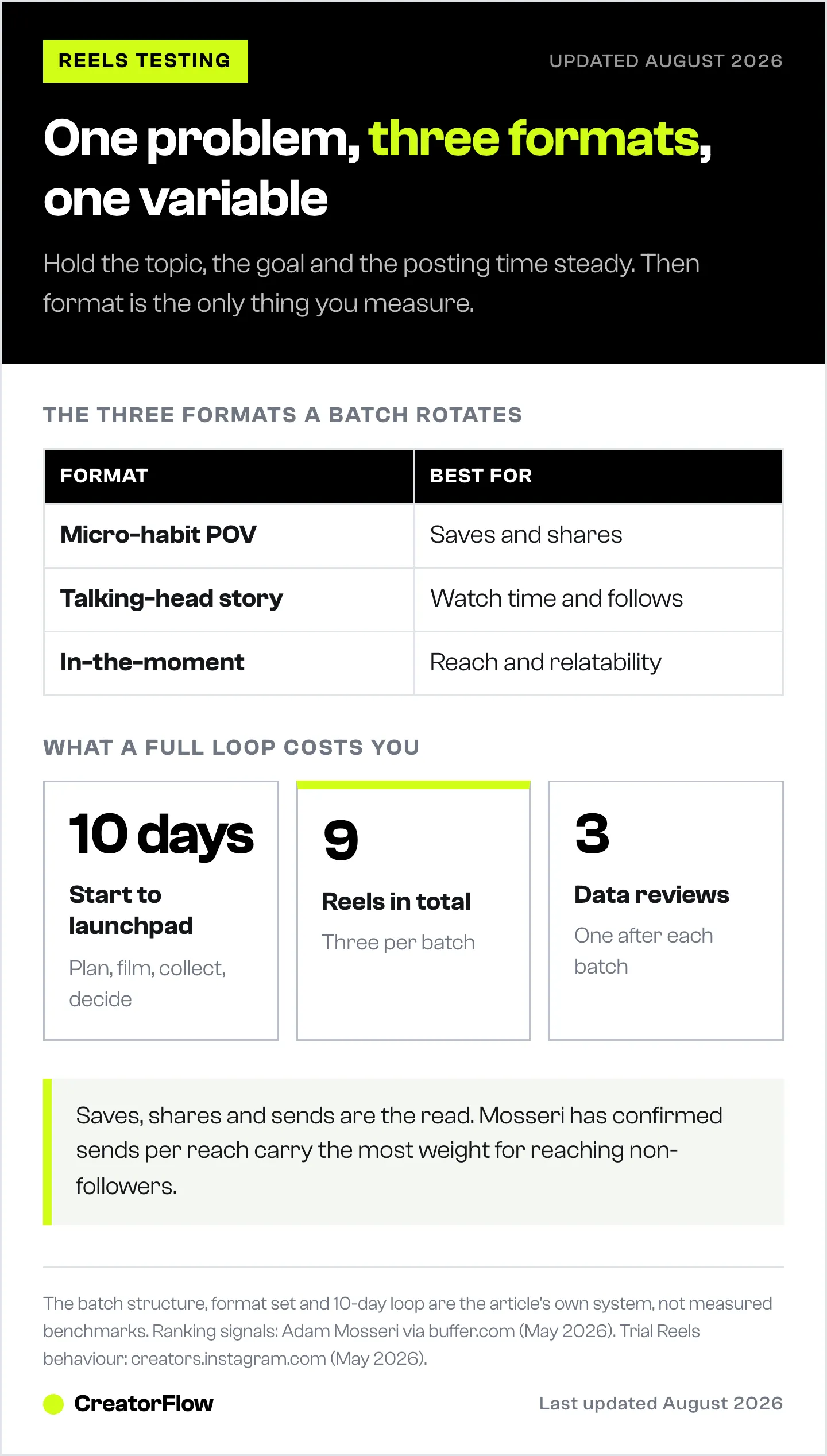
With one problem and one goal locked, build the batch. The system is one problem explained in three batch-friendly formats, published daily at a fixed time.
Three formats worth rotating:
| Format | What it is | Best for |
|---|---|---|
| Micro-habit POV | Short, one specific habit, framed as a point of view | Saves and shares |
| Talking-head story | You on camera telling a story with a clear payoff | Watch time and follows |
| In-the-moment | Filmed casually through your day, conversational delivery | Reach and relatability |
Before you film, lock two things into the content itself:
- The profile pitch. A short line stating who you are and who you help. If it is not spoken in the Reel, it has to live in the caption. A stranger should finish the Reel knowing what you do.
- The call to action. One clear next step. If your goal is leads, “comment a keyword” is a strong CTA, because commenting one word is the lowest-effort action a scrolling viewer can take, and comments increase distribution. Those keyword replies are usually handled by comment-to-DM automation so the link arrives in seconds instead of hours.
Your content has to guide behavior. A great topic with no clear next step still teaches you nothing.
Use AI to Plan, Not to Create
AI is what makes this system sustainable. It is also the part most creators get wrong.
Use AI to reach a strong starting point faster and to spot patterns in your data. Do not use it to write your hooks, your scripts, or your point of view. According to HubSpot’s 2026 State of Marketing report, 42.5% of marketers use AI extensively for content creation and another 38% use it occasionally (hubspot.com, May 2026). That volume is exactly why generic AI output blends in. Instagram is steering hard toward content that proves a real human made it, so AI-written scripts tend to flatten your reach.
The fix is to keep AI on the thinking, not the talking. A useful planning prompt needs five things:
- What you are trying to do (test three formats for one problem)
- What success looks like (more saves and shares than the last batch)
- Your constraints (under one hour to create a batch, content stays human)
- How you want AI to help (draft format angles, not finished scripts)
- Context that makes the output smarter (your past performance data and inspiration you have collected)
Feed it your last six months of Instagram data and a handful of inspiration Reels you have saved. After you tweak the output into your own voice, paste your edits back into the chat. The AI learns your preferences over time, so each batch starts stronger than the last. For more on prompting AI without losing your voice, see how to use ChatGPT for Instagram content.
To gather that context, export your account data from Meta Business Suite. On an Instagram professional account, you can export content and account insights as a CSV or XLSX file from the Insights section. For full Business Suite access, your professional account needs to be connected to a Facebook Page, which takes about 30 seconds to set up (facebook.com, May 2026).
Film and Publish in Under an Hour
The system only holds if a batch takes under an hour to create. That means killing perfectionism.
A phone camera, a tripod, and the Instagram Edits app are enough. Film in one outfit, in a couple of spots, back to back. Your job is not to make perfect Reels. It is to make clear ones. If you stumble, restart the sentence and move on. Do not reshoot 47 times.
Editing is where momentum dies, so keep it ruthless:
- Cut dead space, especially the pause at the very start before you begin talking. Hesitation is where viewers scroll away
- Add a visual text hook for the first five seconds that implies what the Reel is about (pull from these scroll-stopping hook templates if you need a starting point)
- Add captions. Many people watch on mute, and captions keep the message intact
- Be careful with Instagram music. If a trending song gets pulled from the library later, your whole Reel goes silent, including your original audio. If a Reel would not make sense muted, skip the music
- Layer B-roll over your cuts to hide jumps and keep the video moving. See how to use B-roll in Reels
Before you hit share, run a five-point pre-publish audit. Do not publish unless the Reel passes all five:
- Does the hook match the cover, and can you read it at grid size? Make the text large enough to read in a tiny feed thumbnail
- Does the caption reinforce the problem and solution, with searchable keywords so the algorithm knows who to show it to?
- If a complete stranger watches this, do they know who you are and who you help?
- Is the next step clear? Every Reel should point somewhere intentional, usually your pinned value post
- Would this confuse your current audience? If so, publish it as a Trial Reel
Then schedule every post in the batch for the same time daily. When you analyze results, you want format to be the only variable, not timing. Your professional dashboard will show your strongest posting window, so pick one hour and hold it.
Read the Data and Make One Tweak
After three to four days of data, run the analysis. Download your recent performance data, screenshot the insights for each Reel, and capture any proof of resonance: comments asking you to send something, people tagging friends, replies that show the message landed.
Feed all of it to AI with one question: based on this data and these screenshots, what patterns are forming, and what is the smallest change I should test in the next batch?
The answer is usually specific. One format pulls more saves and shares than the others. The tweak might be to lead with a more precise feeling people recognize, then give one tiny action they can do today. That single change becomes the variable for the next batch.
Then run the original planning prompt again. Keep everything the same except the context section. Add the tweak you want to test and any new inspiration you have collected. That is how the system compounds: same problem, same goal, one small adjustment at a time, with AI getting smarter about your style every week. To know which numbers to actually weigh, see the analytics that actually matter for creators.
If a format risks confusing your existing followers, test it with Instagram’s Trial Reels feature. Trial Reels are shown first only to people who do not follow you. Your followers will not see the Reel in Feed or your profile grid unless you choose to share it. After 24 hours you get engagement metrics to decide (creators.instagram.com, May 2026).
What Realistic Results Look Like
Set the expectation now: this system does not manufacture a viral spike. If you go in expecting a dramatic graph, the data will look underwhelming.
That is fine, because the point is not one big number. Even at a few hundred views per Reel, clear patterns show up in saves, shares, and sends. You learn which format your audience rewards and which one they scroll past. Reach often expands before engagement does, especially when your content gets more natural and less scripted. The next job is then tightening the value so engagement catches up with the larger audience.
Run two or three cycles and you have something most creators never build: a repeatable system instead of a guess. Roughly 10 days, around nine Reels, and three data reviews is enough to build a launchpad. The real shift is not virality. It is that you stop chasing the algorithm and start learning from it, and every batch makes the signal clearer.
FAQ
How long does it take to test Instagram Reels?
One full cycle takes about 10 days: three to four days to plan and film a batch, three to four days to collect performance data, and a day to analyze and decide the next tweak. Run two or three cycles to see compounding results.
How many Reels do I need to test a format?
Three per batch is enough, one for each format, posted on consecutive days at the same time. You are not trying to reach statistical certainty. You are looking for a directional signal in saves, shares, and sends that tells you which format to lean into next.
Can I use AI to write my Reels scripts?
Use AI to plan, not to write. It is strong at spotting patterns in your data and shaping a starting point, but Instagram now favors raw, human content and tends to bury generic AI output. Keep your hooks, scripts, and point of view your own.
What metrics matter most when testing Reels?
Saves, shares, and sends. Adam Mosseri has confirmed that sends per reach carry the most weight for reaching non-followers, with watch time and likes per reach close behind (buffer.com, May 2026). Raw view count tells you the least about whether a format is working.
What are Trial Reels and should I use them?
Trial Reels are shown first only to people who do not follow you, so your existing audience does not see them unless you choose to share. They are useful for testing a format you worry might not fit your current followers (creators.instagram.com, May 2026).
Do I need a professional Instagram account to test Reels?
Yes. A creator or business account turns on the insights and data exports the system depends on. To export your data through Meta Business Suite, your professional account also needs to be connected to a Facebook Page.
How is this different from a content calendar?
A content calendar tells you when to post. A testing system tells you what works and why. The two pair well: use the testing loop to find your winning formats, then build a calendar around what the data proved.
Instagram algorithm signals, Trial Reels behavior, analytics export details, and AI adoption data verified from buffer.com, creators.instagram.com, facebook.com, and hubspot.com as of May 2026. Individual results vary.


