

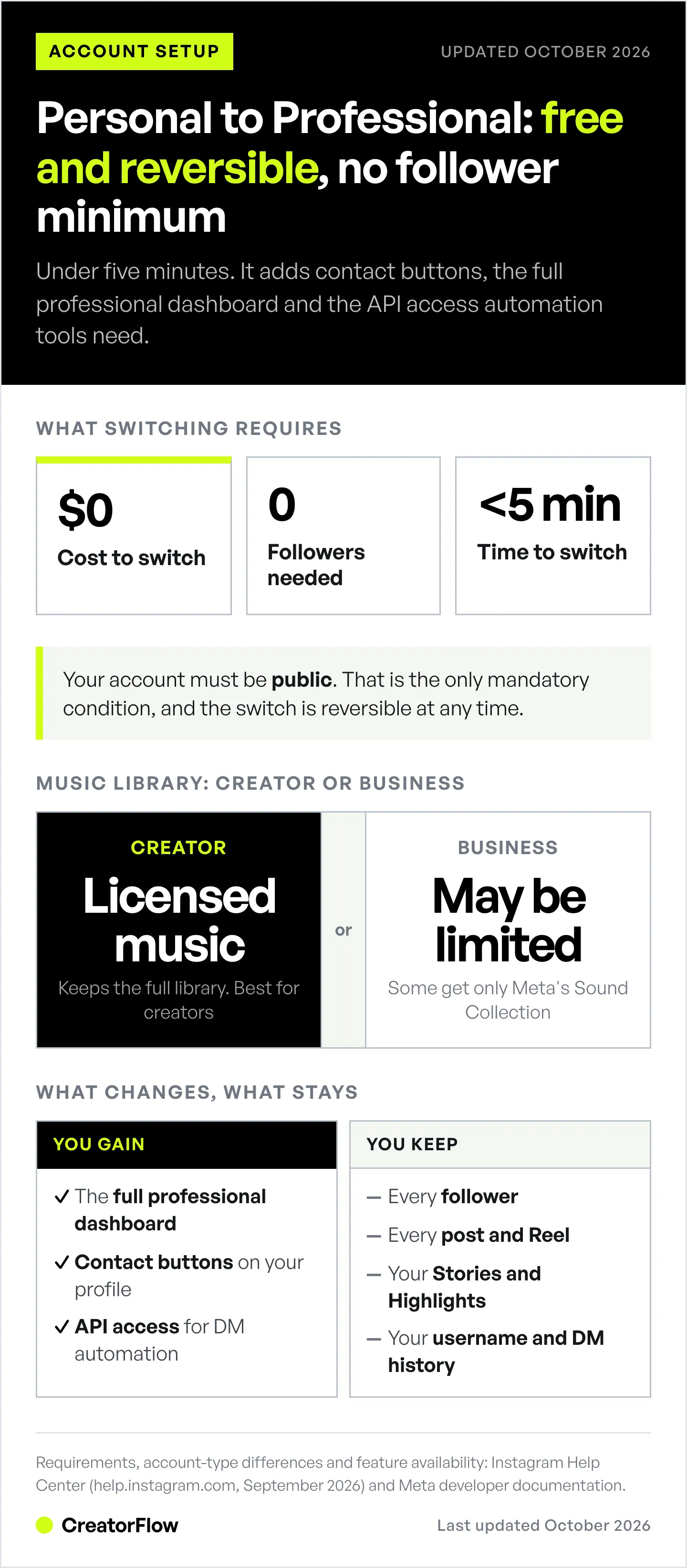
Switching from a Personal to a Professional Instagram account adds contact buttons, ads, monetization tools, the full professional dashboard, and API access for automation tools. The process takes under 5 minutes, requires no minimum followers, and is free and reversible. Your account must be public (the only mandatory requirement), and you keep all your followers, posts, and content.
Professional accounts come in two types: Business (for brands and retailers) and Creator (for influencers and content producers). The main difference is music: some Business accounts get only Meta’s royalty-free Sound Collection, while Creator accounts keep Instagram’s licensed music library (help.instagram.com, September 2026).
In this guide, you’ll learn the exact steps to switch, what changes when you upgrade, how to choose between Business and Creator, and how to troubleshoot common issues.
Key Takeaways
Switching from Personal to Professional Instagram takes under 5 minutes:
- No requirements: Zero followers needed, completely free, fully reversible.
- Only restriction: Your account must be public (private accounts are automatically made public).
- Choose wisely: Creator accounts keep the licensed music library; Business accounts get action buttons such as Book now and Order food.
- What you gain: The full professional dashboard, contact buttons, ads, monetization tools, and API access for automation tools like CreatorFlow.
- What you keep: All followers, posts, stories, and content remain unchanged.
- Troubleshooting: Update the app, clear cache, ensure stable internet connection.
Bottom line: Creator accounts are best for content creators and influencers. Business accounts are best for retailers, service providers, and brands that don’t rely on trending audio.
Why Switch to a Professional Instagram Account?
What You Gain with Professional Accounts
Switching from Personal to Professional gives you features that help you grow, analyze, and monetize your Instagram presence.
1. Instagram Insights (Analytics)
Track what’s working and what’s not:
- Post performance metrics (views, reach, interactions)
- Audience demographics (age, gender, location, active times)
- Story and Reel analytics
- Follower growth trends
Access via the “Professional dashboard” or “Insights” tab on your profile. Since February 2026, public personal accounts also get a basic dashboard and insights (help.instagram.com, September 2026), so the professional switch matters most for the tools below.
2. Contact Buttons
Make it easy for followers to reach you:
- A Contact button with email, phone, and directions (every professional account)
- Action buttons such as Book now, Reserve and Order food (business accounts, through partner providers)
3. Instagram DM Automation API Access
Professional accounts can connect to Meta’s official Instagram API, which powers automation tools like CreatorFlow. CreatorFlow sends automatic Instagram DMs from Creator and Business accounts. It is a Meta Tech Provider (since December 2025) and connects through Instagram’s own login, with no Facebook Page needed. Once connected, it can:
- Auto-reply to comments with DMs
- Send booking links automatically
- Distribute affiliate links when followers ask
- Capture emails within Instagram DMs
Personal accounts cannot use automation tools, because Meta’s Instagram API serves professional accounts only (developers.facebook.com, September 2026).
4. Advertising Capabilities
Run Instagram ads and promote posts:
- Create and manage ad campaigns
- Target specific audiences
- Track ad performance
- Boost posts directly from your profile
5. Instagram Shopping
Tag products in posts and Reels. Shops with a product catalog are built for business accounts, and creators can tag a brand’s products as an approved partner. Since 2025, buyers finish the purchase on the seller’s own website, not inside Instagram.
6. Meta Business Suite Access
Manage Facebook and Instagram from one dashboard:
- Schedule posts in advance
- Respond to comments and messages
- View cross-platform analytics
- Manage multiple accounts
Professional Account Requirements (2026)
Here’s what you need to switch.
Basic Requirements (Everyone Can Switch)
- Follower count: Zero followers required (Instagram Help Center, February 2026)
- Age requirement: No minimum age for switching itself, but teens under 16 need a parent’s permission to make an account public, which switching requires
- Cost: Completely free
- Account visibility: Must be public (only mandatory requirement)
If your account is currently private, switching to Professional makes it public. Professional accounts, Creator or Business, can’t be set to private (help.instagram.com/138925576505882, September 2026).
Optional Requirements (For Specific Features)
Some monetization features have additional eligibility.
Instagram Subscriptions:
- 10,000+ followers required
- Must be 18+ years old
- Professional account (Business or Creator)
- Reside in eligible country
Instagram Shopping:
- Comply with Instagram’s Commerce Policies
- Sell physical goods, not services
Running Ads:
- A payment method, plus a connected Facebook Page or ad account if Meta asks for one
- Comply with Meta’s Advertising Policies
Using DM Automation (CreatorFlow):
- Professional account (Business or Creator)
- Account must be public
- Respect Meta’s published rate limits and tool-side pacing (~200 DMs/hour as a behavioral safety cap)
How to Switch from Personal to Professional (Step-by-Step)
Time required: Under 5 minutes Location: Instagram mobile app (iOS or Android) Reversibility: Fully reversible anytime
Step 1: Open Your Profile
Tap your profile picture in the bottom-right corner of the Instagram app.
Step 2: Access Settings
Tap the three horizontal lines (hamburger menu) in the top-right corner to open Settings and activity.
Step 3: Navigate to Account Type
Below For professionals, tap Account type and tools, then tap Switch to professional account.
Step 4: Choose a Category
Instagram will prompt you to choose a category that best describes what you do, for example:
- Artist
- Blogger
- Chef
- Entrepreneur
- Fitness Coach
- Photographer
The category can show under your name, so choose something relevant. It “does not determine whether you’ll set up a business or creator account”, and you can hide the label from your profile (help.instagram.com/502981923235522, September 2026).
Step 5: Select Account Type
Choose between Business or Creator.
Business accounts are best for:
- Retailers and e-commerce stores
- Local businesses (restaurants, salons, gyms)
- Service providers (agencies, consultants)
- Brands and organizations
Creator accounts are best for:
- Content creators and influencers
- Artists and musicians
- Public figures and celebrities
- Coaches and educators
Not sure which to choose? Read our detailed comparison: Instagram Creator vs Business Account: Which is Better?
Step 6: Review Contact Information
Add or confirm your contact details:
- Email address
- Phone number
- Business address (Business accounts only)
These details appear on your profile, making it easy for followers to contact you.
Step 7: Email Preferences
Decide whether to receive promotional emails from Instagram. Default is opted-in, toggle off if you prefer not to receive marketing content.
Step 8: Connect Facebook Page (Optional)
You’ll have the option to connect a Facebook Page. Basic Professional account features don’t need one. Meta may ask for a Page later when you set up ads or a Shop, and DM tools built on Meta’s older Facebook Login path ask for one. Tools on Instagram Login, such as CreatorFlow, connect with no Page (developers.facebook.com, September 2026).
You can skip this step and connect a Facebook Page later if needed.
Step 9: Complete Setup
Tap Done or Finish to complete the switch. Your account is now a Professional account with access to Insights, contact buttons, and API integrations.
(help.instagram.com/502981923235522, September 2026)
Business vs Creator: Which Should You Choose?
Both account types offer nearly identical features, but there are a few critical differences. Neither choice affects whether third-party tools can connect, since Meta treats both as professional accounts, which our guide on whether you need a Business account for Instagram tools explains in full.
Key Differences
| Feature | Business Account | Creator Account |
|---|---|---|
| Music library | Some business accounts get only Meta’s Sound Collection | Licensed library with trending songs |
| Contact button (email, phone, directions) | Available | Available |
| Action buttons (Book now, Reserve, Order food) | Available through partner providers | Not listed for creators |
| Shops with a product catalog | Built for business accounts | Tag products as a brand’s approved partner |
| Subscriptions, Gifts, badges, Creator Marketplace | Available | Available |
| DM automation through Meta’s API | Available | Available |
| Best For | Brands, retailers, service businesses | Influencers, content creators, public figures |
Sources: Instagram Help Center pages on professional accounts, music, action buttons and monetization tools (help.instagram.com, September 2026).
The Music Library Issue (Critical Decision Factor)
Some Business accounts lose the licensed music library.
Instagram’s licensed music library is meant for personal, non-commercial use, so “certain business accounts and certain types of posts do not have access to the library” (help.instagram.com/402084904469945, September 2026). Those accounts get Meta’s Sound Collection instead: royalty-free songs and sounds that are also cleared for ads.
Creator accounts keep the licensed library, with the songs people already know from trending Reels.
This is the biggest differentiator. If you create Reels with trending audio, choose a Creator account. If you prioritize commerce features over content trends, choose a Business account.
Recommendation by Use Case
Choose Creator Account if you:
- Post Reels with trending audio regularly
- Are a content creator, influencer, or artist
- Plan to offer Instagram Subscriptions or badges (both account types qualify, so music decides it)
- Prioritize content discoverability over commerce features
Choose Business Account if you:
- Run a retail store, restaurant, or service business
- Need an action button such as Book now, Reserve or Order food
- Sell from a product catalog with a Shop
- Don’t rely on trending audio for content strategy
For most content creators and influencers, Creator accounts offer the best balance of professional tools and content flexibility.
What Changes When You Switch
What You Gain
- ✓ Instagram Insights – Analytics dashboard with performance metrics
- ✓ Contact buttons – Email, phone, booking options on profile
- ✓ API access – Connect to automation tools like CreatorFlow
- ✓ Advertising – Run Instagram ads and boost posts
- ✓ Shopping features – Tag products in posts and Reels
- ✓ Meta Business Suite – Schedule posts, manage multiple accounts
What You Keep
- ✓ All followers – No followers lost when switching
- ✓ All content – Posts, Reels, Stories, Highlights preserved
- ✓ Username – Your handle stays the same
- ✓ Engagement history – Likes, comments, DMs remain unchanged
What You Lose (Only If You Switch Back to Personal Later)
- Contact buttons – Personal accounts don’t support CTA buttons
- API access – Can’t use automation tools on Personal accounts
- Ads and Meta Business Suite – Can’t run ads or promote posts
- The Facebook Page connection – Instagram disconnects it
Insights stay if the account stays public: since February 2026, a public personal account keeps “Your dashboard and insights” (help.instagram.com/1717693135113805, September 2026). The switch is fully reversible.
Can You Switch Back to Personal?
Yes, switching is fully reversible.

How to Switch Back
- Go to Settings and activity → Account type and tools
- Select Switch to personal account
- Confirm the switch
What Happens When You Switch Back
- ✓ All followers remain
- ✓ All posts, Stories, and Highlights preserved
- ✓ No content lost
- ✓ Insights stay if the account stays public
- Lose contact buttons and CTAs
- Can’t run ads, use business tools, or connect DM automation
If you make the account private, you lose insights as well. Instagram restores past data only if you make it public again within 90 days (help.instagram.com/1533933820244654, September 2026).
Can You Switch Again?
Yes. You can switch back to Professional later from the same menu, and the switch takes effect right away.
Common Problems and Troubleshooting
Why Can’t I Switch to Professional?
Common blocking issues:
1. Private Account
- Problem: Your account is currently private
- Fix: Accept that the switch makes your account public. Professional accounts can’t be private
2. New Account
- Problem: Account is too new or has Community Guidelines violations
- Fix: Ensure your account complies with Instagram’s Terms of Use; there’s no official minimum age requirement
3. App Version
- Problem: Running an outdated version of Instagram
- Fix: Update the Instagram app to the latest version (iOS App Store or Google Play)
4. Regional Restrictions (Monetization Only)
- Problem: Some monetization features unavailable in certain countries
- Workaround: Basic Professional account is still available; check country eligibility for specific features like Subscriptions
Troubleshooting Steps
If you encounter errors when switching:
- Update the Instagram app to the latest version
- Clear app cache:
- iOS: Delete and reinstall the app
- Android: Settings → Apps → Instagram → Clear Cache
- Check internet connection (stable Wi-Fi or cellular required)
- Log out and log back in to refresh session tokens
- Wait and retry if Instagram is experiencing temporary outages
Check for a Platform Outage
Instagram’s business tools and Professional account features occasionally go down for a few hours at a time, and the switch will fail while they are out. If none of the steps above work, check Instagram’s official status channels or DownDetector before troubleshooting your own device, then retry.
What to Do After Switching
1. Complete Your Profile
Add missing information to make your profile discoverable:
- Profile photo (high-quality, recognizable)
- Bio (150 characters, include keywords) - our free Instagram profile generator drafts a keyword-bearing bio and Name field
- Contact information (email, phone)
- Website link
2. Explore Instagram Insights
Tap the Insights button on your profile to view:
- Which posts perform best
- When your audience is most active
- Demographics of your followers
Use this data to optimize your posting schedule and content strategy.
3. Set Up Contact Buttons
Add a Contact button (email, phone, directions). Business accounts can also add one action button through a partner provider you already use, for example:
- Book (Calendly, Acuity)
- Reserve (OpenTable, Resy)
- Get Tickets (Eventbrite)
- Order Food (DoorDash, Uber Eats)
4. Connect to Meta Business Suite
Link your Instagram account to Meta Business Suite to:
- Schedule posts in advance
- Respond to comments and DMs from desktop
- View cross-platform analytics (Instagram + Facebook)
5. Set Up Instagram DM Automation
Now that you have API access, automate your Instagram DMs with CreatorFlow or one of the other free DM automation tools for Instagram:
- Auto-reply to comments with booking links
- Send affiliate links when followers ask
- Capture emails within Instagram DMs
- Track click-through rates on links
Setup takes under 5 minutes. Local businesses can run the entire customer pipeline this way without ad spend; the $0-budget Instagram DM marketing guide for local businesses shows how.
FAQ
Is switching to a Professional account free?
Yes, switching from Personal to Professional Instagram is free, and so are Insights, contact buttons and API access. Since September 15, 2026, Meta also sells optional Meta One creator plans, from $14.99/month (Essential) to $499/month (Max) per profile, with prices varying by region (creators.instagram.com, October 2026). You don’t need one to switch. See whether Meta Verified is worth it.
Do I need a minimum number of followers to switch?
No. You can switch from Personal to Professional with zero followers. Instagram does not require a minimum follower count for basic Professional account features. Specific monetization features have their own thresholds: Subscriptions need 10,000 followers and Creator Marketplace needs 1,000 (help.instagram.com, September 2026).
Will I lose followers when I switch?
No. All your followers automatically remain your followers when you switch to a Professional account. No followers are lost, and your posts, Reels, Stories and Highlights stay exactly as they were. Only your profile features and the tools you can use change.
Do I need a Facebook Page to switch to Professional?
No. A Facebook Page is optional for basic Professional account features. Meta may ask for one later when you set up ads or a Shop. For DM automation it depends on the tool’s login path: tools on Instagram Login, such as CreatorFlow, connect with no Page, while tools on Facebook Login ask you to link one.
Can I switch between Business and Creator accounts?
Yes. Go to Settings and activity > Account type and tools > Switch account type, pick Business or Creator, and tap Switch. The change is instant and free, and you keep your followers, posts and insights. Compare the two first in our Creator vs Business account guide.
Which is better: Business or Creator account?
Creator accounts are better for content creators, influencers, and anyone who uses trending audio in Reels, because they keep the licensed music library. Business accounts are better for retailers, service providers, and brands that need a Shop with a product catalog or an action button such as Book now. Monetization tools such as Subscriptions accept both types.
Can I automate Instagram DMs with a Personal account?
No. Instagram DM automation requires API access, which is only available for Professional accounts (Business or Creator). Personal accounts cannot connect to automation tools like CreatorFlow, ManyChat, or other Instagram DM automation platforms because they lack API access. Switch to Creator or Business first, which takes under 5 minutes.
What happens to my private account when I switch?
It becomes public. Professional accounts, Creator or Business, can’t be set to private, so switching makes a private account public (help.instagram.com, September 2026). If you need a private profile, stay on a Personal account, and keep in mind that a private Personal account has no insights and can’t connect DM automation tools.
Sources:
- Instagram Help Center pages on professional accounts, switching, music, action buttons, monetization and insights (help.instagram.com, September 2026)
- Meta Developer Documentation on the Instagram API and its login paths (developers.facebook.com, September 2026)
- Meta One creator plans (creators.instagram.com, October 2026)
Related reading:


