

Instagram Creator accounts work with third-party tools. Meta’s Instagram Platform supports both Business and Creator profiles, and only personal accounts are excluded. When a tool refuses a Creator account, the cause is usually the login path the tool uses, or a missing Facebook Page on that path, rather than the account type setting on your profile.
The error that sends people here reads something like “this account cannot be connected through the Business API.” The word business appears twice in that sentence, so switching the profile from Creator to Business feels like the obvious fix. People switch, lose their music library access, and get the same error.
This guide covers what Meta requires, why the permission names say business when Creator accounts are fully supported, and the one thing that genuinely changes what a tool can do with your account.
Key Takeaways
- Meta supports both professional account types. The Instagram Platform documentation describes it as a collection of APIs “that allows your app to access data for Instagram professional accounts including both businesses and creators” (developers.facebook.com, August 2026)
- Only personal accounts are excluded. The Personal versus Professional line is the one that decides API eligibility. Creator versus Business does not
- The word business in a permission name is not the account setting. Scopes such as instagram_business_basic apply to Creator accounts too, on an API path Meta documents for businesses and creators alike
- The real variable is your tool’s login path. Instagram Login needs no Facebook Page. Facebook Login does, and it also reaches capabilities Instagram Login cannot (developers.facebook.com, August 2026)
- Account type appears nowhere in Meta’s capability table. Product tagging, hashtag search and partnership ads are gated by login path, not by whether your profile says Creator or Business
- Rate limits are identical. Meta publishes its messaging limits per Instagram professional account, with no separate figures by account type
- Switching to Business will not repair a connection error caused by Page access, the wrong browser session, or a declined permission
Do Instagram Tools Need a Business Account, or Does Creator Work?
Yes. Meta’s Instagram Platform documentation states that the APIs allow apps “to access data for Instagram professional accounts including both businesses and creators” (developers.facebook.com, August 2026). Both Creator and Business profiles are professional accounts. Personal accounts are the type that cannot connect. If a tool rejects your Creator account, that is a signal about the tool or the login path, not a statement of Meta policy.
That distinction matters because switching costs you something. Creator accounts carry the full music library, Creator Marketplace eligibility and Subscriptions. Trading those away to fix an error that was never about your account type is a bad deal.
Why the Permission Says Business When Your Account Is Creator
Meta named its current Instagram Login scopes with a business prefix:
- instagram_business_basic
- instagram_business_manage_messages
- instagram_business_manage_comments
- instagram_business_content_publish
Every one of those applies to Creator accounts. They are the permission names for the professional Instagram platform, and Meta documents that same platform as serving businesses and creators together. The prefix describes the API family, not a required profile setting.
This is the single most common source of the confusion. A creator sees the word business on a consent screen, assumes a mismatch with their Creator profile, and goes looking for a settings change that was never needed. The scope names were renamed in January 2025, and the business prefix arrived with that rename.
The same applies to vendor wording. A tool that says “connect your Instagram Business account” is usually using business as shorthand for professional. Read it as a category, then check what the tool rejects.
The Two Ways a Tool Can Connect to Instagram
Meta offers two documented setups, and almost every contradictory tutorial you have read is describing one of them without naming it.
Instagram API with Instagram Login. Authorisation happens through the Instagram account directly. Meta’s documentation states this setup “does not require a Facebook Page to be linked to the Instagram professional account” (developers.facebook.com, August 2026). This is the path most Instagram-first tools use, CreatorFlow included.
Instagram API with Facebook Login. Authorisation runs through a Facebook identity, and the professional Instagram account must be connected to a Facebook Page. Three separate things have to line up: the profile is professional, the correct Page is connected to it, and the Facebook account doing the authorising has access to that Page.
Both paths support Business and Creator accounts. Neither supports personal accounts. What separates them is the Page requirement and the capability set.
What Each Login Path Can and Cannot Do
This is the table almost nobody publishes, and it is the one that answers the underlying question. These are Meta’s own values for the two setups (developers.facebook.com, August 2026):
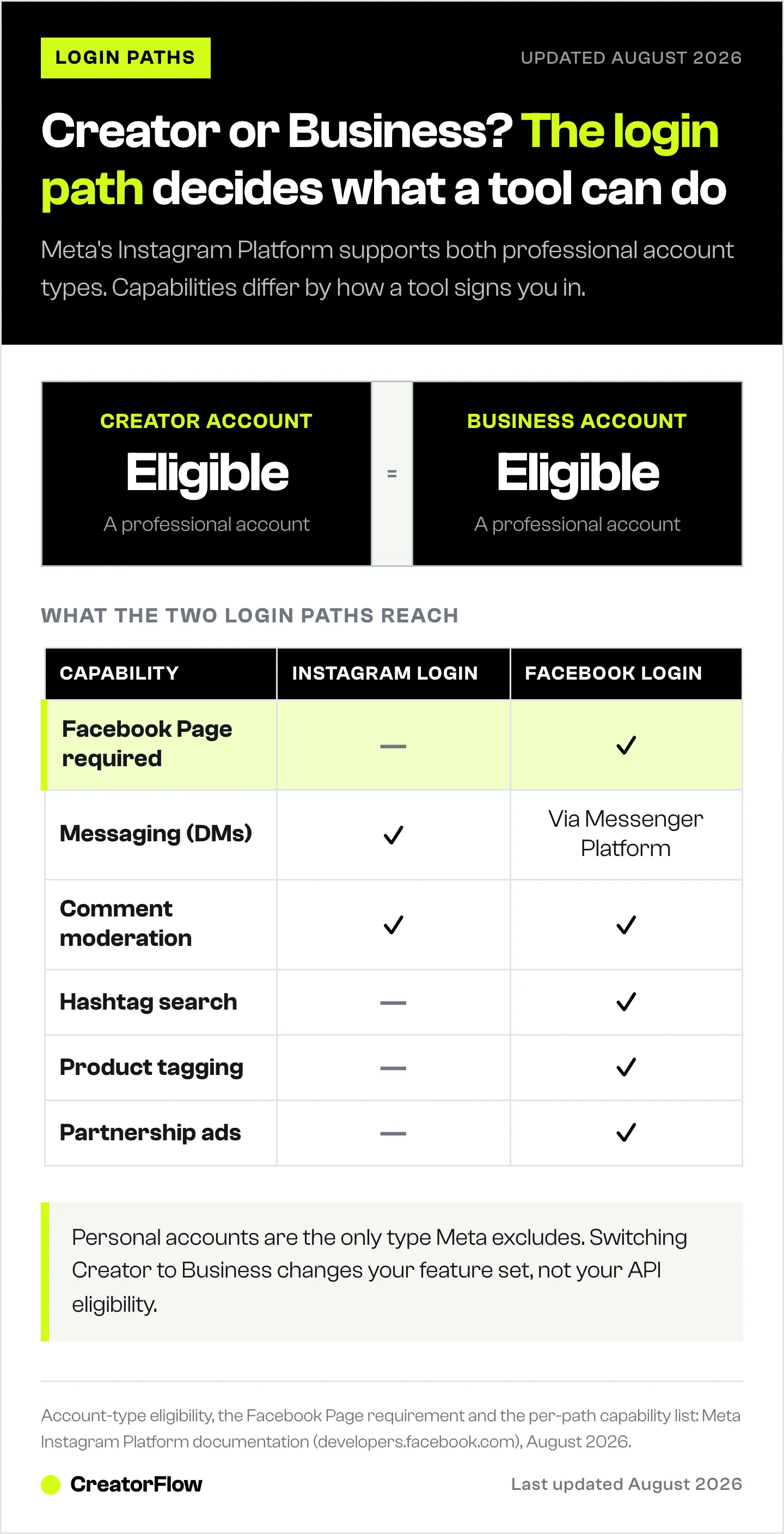
| Capability | Instagram Login | Facebook Login |
|---|---|---|
| Facebook Page required | No | Yes |
| Messaging (DMs) | Yes | Via Messenger Platform |
| Comment moderation | Yes | Yes |
| Content publishing | Yes | Yes |
| Insights | Yes | Yes |
| Mentions | Yes | Yes |
| Hashtag search | No | Yes |
| Product tagging | No | Yes |
| Partnership ads | No | Yes |
Read the row headings again. Account type is not one of them.
The three capabilities a creator is most likely to find missing, product tagging, hashtag search and partnership ads, are gated by the login path their tool chose. None of them turn on because a profile switches from Creator to Business. A creator who switches account types hoping to turn on product tagging inside a scheduling tool has changed the wrong variable.
That also explains why two tools behave differently with the same profile. A scheduler that needs product tagging has to run on Facebook Login, so it will ask for a Page. A DM automation tool needs messaging and comment access, both available on Instagram Login, so it will not.
How to Tell Which Login Path Your Tool Uses
Start the connection and read the screen before you click anything. The test takes about five seconds.
- Look at the domain in the address bar. A screen served from instagram.com is the Instagram Login path. A screen served from facebook.com is the Facebook Login path
- Look at what the picker offers. Instagram Login shows Instagram accounts. Facebook Login shows Facebook Pages, and your Instagram account appears through the Page it is linked to
- Look at whether a Page is mentioned at all. If no step in the flow asks about a Facebook Page, the tool is not using the Page-based path, and creating a Page will not help
Once you know the path, the requirement follows from it. On Instagram Login, stop troubleshooting Facebook Pages. On Facebook Login, the Page and your access to it are the first things worth checking.
What Switching Creator to Business Changes
Switching account types changes your Instagram feature set. It does not change your API eligibility, because both types were already eligible.
What changes: contact buttons with a physical address and phone number, Instagram Shopping setup, business category labels, and a reduced music library for commercial use.
What you give up going the other way: full music library access, Creator Marketplace eligibility, Subscriptions and Live Badges.
What does not change: whether Meta’s API accepts the account, which scopes a tool requests, whether a Facebook Page is required, and the rate limits your messages run under. The full Creator vs Business account comparison covers the feature-by-feature detail if you are making the choice on its merits.
Meta publishes its messaging rate limits per Instagram professional account, not per account type. On the Instagram Login path that is 100 calls per second for messages containing text, links, reactions and stickers, 10 per second for messages containing audio or video, and 750 per hour for private replies to comments on posts and reels (developers.facebook.com, August 2026). Those figures are the same whether your profile says Creator or Business. Our guide to Instagram API rate limits covers how tools pace sends underneath them.
When Switching to Business Is the Right Call
Switching is worth doing when you want a Business feature, not when you want an API to behave differently. Good reasons:
- You sell physical products and want to set up your own Instagram Shop and tag your own catalogue
- You want a physical address, directions, or a phone contact button on the profile
- The profile represents a company rather than a person, and several people need formal ownership and Page access
- A specific vendor documents a Business-only requirement for a feature you use
Weak reasons, all of which point at a different cause:
- A connection error mentioning the Business API
- A permission screen showing a scope that starts with instagram_business
- A tool asking for a Facebook Page, which is a login path requirement
- General advice that Business accounts are safer, which Meta does not state anywhere
Account type has no bearing on whether automated activity is allowed. What you send and how fast you send it determine that, which our guide on staying inside Meta’s automation rules covers in detail.
Before You Switch: Four Things to Check
Work through these before changing anything on your profile. Most rejected connections resolve here.
- Confirm the profile is professional at all. Open Instagram, go to Settings and privacy, then Account type and tools. If it says Personal, that is your answer, and you can switch from Personal to Professional in about thirty seconds
- Confirm which account the browser is logged into. Authorisation applies to whichever Instagram account is signed in on that browser, which is not always the one you meant. This and the rest of the mechanical causes are covered in our guide for when an Instagram account will not connect
- Confirm you accepted every permission. Declining one during authorisation often produces a connection that completes and then fails silently later
- Confirm the tool is not already connected elsewhere. An account linked to another workspace, or to a second tool receiving the same events, produces errors that look like eligibility problems
If the account connects and then nothing sends, the cause has moved past eligibility into permissions. The Instagram DM automation permissions checklist picks up from there.
FAQ
Do I need a Business account for Instagram DM automation?
No. Meta’s Instagram Platform supports both Business and Creator professional accounts, and DM automation works on either (developers.facebook.com, August 2026). The requirement is a professional account of some kind. Personal accounts cannot connect. Individual tools can add their own narrower requirements, so confirm with the tool if a Creator account is refused.
Why does my Creator account get rejected by an Instagram tool?
Usually one of four causes, none of them the account type: the tool uses the Facebook Login path and no Facebook Page is connected, the browser is signed into a different Instagram account, a permission was declined during authorisation, or the account is already connected to another workspace. Identify the login path first, because it decides whether a Page matters at all.
Does a Creator account need a Facebook Page?
Only on the Facebook Login path. Meta’s documentation for the Instagram API with Instagram Login states this setup “does not require a Facebook Page to be linked to the Instagram professional account” (developers.facebook.com, August 2026). If your tool never mentions a Page during the connection flow, creating one will not change anything.
Will switching to a Business account fix a connection error?
Rarely. Switching changes your Instagram feature set, not your API eligibility, because Creator accounts were already eligible. If the error came from Page access, the wrong browser session, or a declined permission, it will reappear after the switch with the account type question now permanently answered and the actual cause untouched.
Are Instagram API rate limits different for Creator and Business accounts?
No. Meta publishes messaging limits per Instagram professional account with no split by type. On the Instagram Login path that is 100 calls per second for text and links, 10 per second for audio or video, and 750 per hour for private replies to comments on posts and reels (developers.facebook.com, August 2026).
Can I switch back to Creator after switching to Business?
Yes. Switching between the two professional types is free, takes about thirty seconds, and does not affect your followers, posts or reach. Switching to Personal is the change worth thinking about first, because it removes API access entirely and any connected tool stops working.
Does my account type affect whether Instagram automation is allowed?
No. Meta applies the same platform rules to both professional types. What determines whether automated activity stays in good standing is the message volume, the send pacing, and whether recipients opted in by commenting or messaging first, not the label on the profile.
Connecting Without the Guesswork
The account type question costs people more time than it should, because the error messages point at the wrong variable. The order that resolves it: confirm the profile is professional, identify the login path, then check the requirement that path imposes.
CreatorFlow is a Meta Tech Provider (since December 2025) and connects through Instagram Login with OAuth, so no password is shared and no Facebook Page is needed. Creator and Business accounts both connect the same way. Once the account is linked, the complete guide to Instagram DM automation covers building the first working automation.
Account type eligibility, login path requirements, scope names, capability differences and messaging rate limits verified against Meta’s Instagram Platform documentation (developers.facebook.com) as of August 2026. Meta changes API names, permissions and account controls periodically, so follow the current authorisation screen and your tool’s current documentation. Individual results vary.


