

Edits for desktop is the Mac version of Instagram’s free video editor, released on November 5, 2026. It adds a multi-track timeline, keyframes, audio waveforms, color wheels and curves, and LUT and font imports. You can publish straight to Instagram or export in 4K with no watermark. It needs an Apple silicon Mac (M1 or later), and there is no Windows version.
Before November 5, a creator who edited on a laptop had two options. Use a desktop editor, then move the file to the phone, fix it in a second app and post. Or squeeze a twelve-clip project onto a 6-inch screen. Meta’s own launch post describes the moment when “a project gets too big for your phone.”
This guide covers what Edits on Mac does, what you need to run it, how to start, and which jobs still belong on your phone. It is for creators who post Reels and already edit, or want to edit, on a Mac.
Key Takeaways
- What it is: a free Mac app from Instagram, announced on November 5, 2026. You sign in with your Instagram account.
- What you need: a Mac with Apple silicon (M1 or later). Windows PCs and Intel Macs are not supported, and there is no browser version.
- What it adds: a multi-track timeline, keyframes, audio waveforms, color wheels, log conversions and curves, plus LUT and font imports and custom keyboard shortcuts.
- Posting: publish to Instagram from the Mac, with tags, location and trial reels. Or export in 4K with no watermark, in vertical or horizontal formats.
- Sync: your saved audio and text styles move from the phone app. One project shared across phone and Mac is still in the works.
- AI agents: you can connect AI agents to the editor through MCP (Model Context Protocol).
What Is Edits for Desktop?
Edits for desktop is a free video editor for Mac, made by Instagram. It uses the same interface as the Edits phone app, with more room for long and layered projects. You sign in with Instagram, edit on a multi-track timeline, then publish to Instagram or export the file. Meta says it will update the desktop app every week.
Brett Westervelt, who leads Edits, announced the app in Meta’s Edits on desktop launch post on November 5, 2026. The same post says 50 million people have used Edits in a little over a year. The download sits on the official Edits for Mac page.
Instagram head Adam Mosseri announced the Mac app in the Reel below. He calls desktop “the number one thing you all have asked for.”
| Question | Answer (checked November 2026) |
|---|---|
| Made by | Instagram (Meta) |
| Price | Free to download |
| Computer | Mac with Apple silicon, M1 or later |
| Windows | Not available |
| Account | Instagram sign-in required |
| Export | Up to 4K, no watermark |
| Formats | Vertical and horizontal |
| Updates | Weekly, according to Meta |
If you have not used the phone app yet, our Edits app guide covers the mobile version, its costs and the 2026 updates.
Is Edits on Desktop Free?
Yes. The FAQ on the official desktop page says Edits is free to download on macOS, and exported videos carry no watermark. Meta’s launch post calls the editor “free and customizable by you.” Unlimited automatic captions in multiple languages are part of the free app.
Edits Plus, the paid plan Meta announced for the phone app, does not appear in the desktop launch materials. Meta has not said whether any desktop feature will need it. The phone app guide linked above covers what we know about Edits Plus so far.
What You Need to Run Edits on a Mac
You need a Mac with Apple silicon (M1 or later) and an Instagram account. The official FAQ states both. Meta does not list a minimum macOS version. John Gruber of Daring Fireball notes that the app supports macOS 15 Sequoia.
Signing in with Instagram keeps your projects with you and lets you share without leaving the app, according to the FAQ. It also brings over the audio and text styles you saved in the phone app.
Older Macs. Intel-based Macs fall outside the stated requirement. If your Mac is from before late 2020, check “About This Mac” for the chip name before you download.
What Does Edits on Mac Add Over the Phone App?
Edits on Mac adds the tools that need a big screen, a mouse and a keyboard. The official page lists a multi-track timeline, keyframes, waveforms and color tools. The launch post adds log conversions, LUT and font imports, custom shortcuts and MCP support for AI agents.
Timeline and cuts
- A multi-track timeline for layered clips, audio and text
- Keyframes for moving transitions
- Audio waveforms, so you can cut on the beat
- Easier splitting, cutting and trimming with a mouse
Color and style
- Color wheels, log conversions and curves for grading
- Import your own LUTs (color presets) and font files
- Your saved audio and text styles from the phone app
Audio and captions
- Instagram’s licensed and royalty-free audio libraries
- Hundreds of sound and video effects
- Unlimited automatic captions in multiple languages
Workflow
- Keyboard shortcuts you set yourself, or carry over from another editor
- AI agents connect through MCP to help with projects
Meta has not yet published details on what an agent can change inside a project. If you already use an AI assistant for video jobs, our guide to Claude video editing for Reels shows which tasks agents handle well today.
How to Post to Instagram From Edits on Mac
Edits on Mac publishes straight to Instagram, so you no longer move the file to your phone first. When you post, you can tag people, add a location and post the video as a trial reel. If you post somewhere else too, export the video in 4K with no watermark and upload it there.
Here is the order to follow the first time:
- Download. Go to the Edits for Mac page and click “Get Edits for Mac”. The app comes as a .dmg file. Open it and install the app like any other Mac download.
- Sign in. Log in with your Instagram account. Your saved audio and text styles appear in the desktop app.
- Set your shortcuts. Choose your own keys, or bring over the shortcuts from the editor you used before.
- Import. Add your clips, plus any LUTs and font files that belong to your brand.
- Edit. Build the video on the multi-track timeline. Use the waveforms for cuts on the beat, then grade it.
- Post or export. Publish to Instagram with tags, location or a trial reel. Or export in 4K, vertical or horizontal.
To see these steps on screen, watch Aurelius Tjin’s beginner tutorial for Edits on desktop.
Trial reels go first to people who do not follow you, so you can test a cut before your followers see it. Our trial reels guide explains how to read the results.
Mac or Phone: Which Edits Jobs Belong Where?
Use the Mac for long, layered edits and the phone for filming and quick posts. The desktop app is made for projects with many clips, cuts on the beat and a color grade. The phone app still holds the camera tools and the features Meta has not announced for desktop. This split is our suggestion. Meta does not publish one.
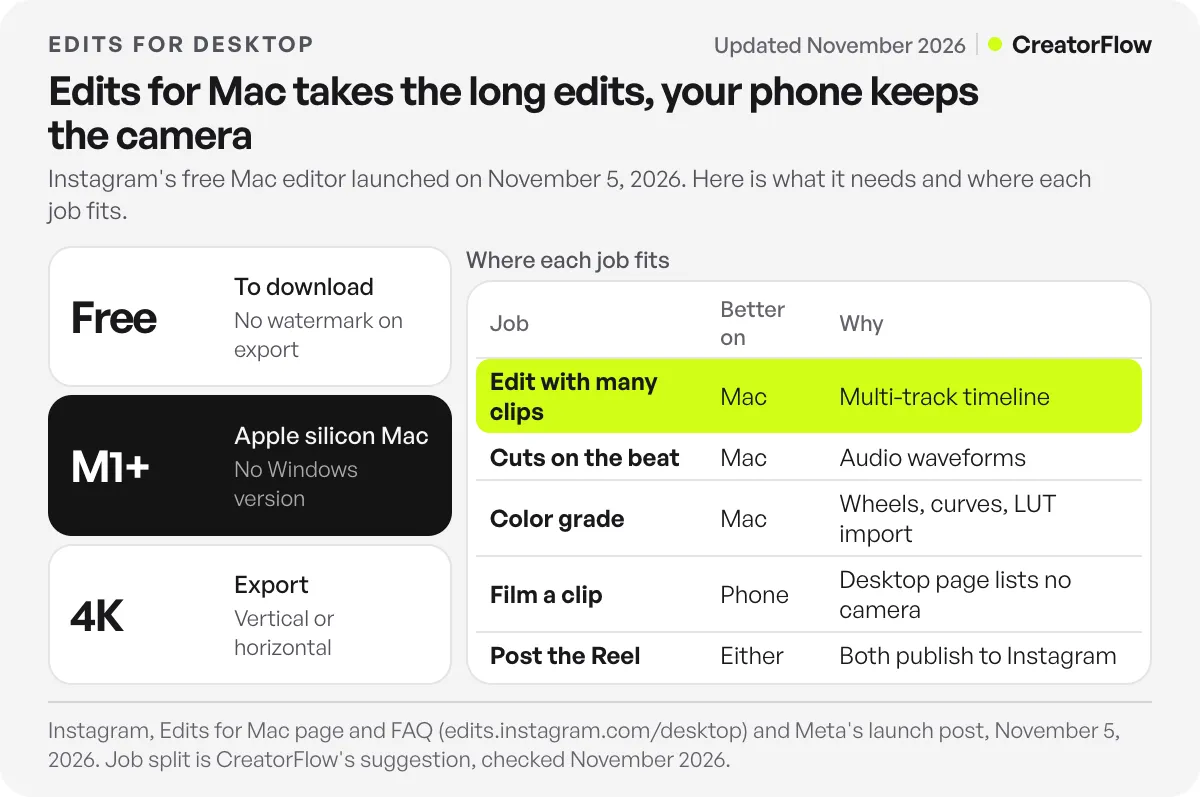
| Job | Better on | Why |
|---|---|---|
| Edit with a dozen or more clips | Mac | Multi-track timeline, mouse and keyboard |
| Cuts on the beat | Mac | Audio waveforms on a big screen |
| Color grade with your LUTs | Mac | Color wheels, curves and LUT import |
| Film a clip or use the teleprompter | Phone | The desktop page lists no camera tools |
| Read Reel performance or ask the AI assistant | Phone | The desktop launch does not mention them |
| Post the finished Reel | Either | Both publish to Instagram |
The second week. Until one project works on both devices, finish each video on one device. Meta says creators asked for one project across desktop and mobile, and that it is working on it. A workable routine today: film on the phone, send the clips to the Mac, edit and post from the Mac. Keep quick single-clip posts on the phone.
Is There Edits for Windows or a Browser Version?
No. The official FAQ says Edits on desktop is only available on macOS, and the download is a Mac app, not a web editor. Meta has not announced a Windows version or a date for one. On a Windows PC, keep using Edits on your phone or pick a desktop editor that runs on Windows.
TechCrunch reports that the launch puts Edits in closer competition with CapCut, which has run on Windows and Mac since 2021. For a side-by-side look at the main Reels editors, read Edits vs CapCut vs Captions.
How to Send a Link From a Reel You Edited on Mac
A better edit gets more people to ask for the thing in your video. Reel captions do not hold a clickable link, so ask viewers to comment a word and send the link by direct message. Everyone who comments LINK gets your page in their DMs.
CreatorFlow does that step for you. Set up comment-to-DM automation, choose the word people comment, such as LINK or GUIDE, and add the page to send. CreatorFlow sends it in seconds, on every plan including Free. It works on any Reel you post, whether you edited it on a Mac or on a phone. For the full setup, follow our comment-to-DM setup guide.
FAQ
Is Edits for desktop free?
Yes. Meta’s FAQ for the desktop app says Edits is free to download on macOS. Exports have no watermark, and automatic captions are unlimited. Meta has not said whether its paid Edits Plus plan will cover any desktop features.
Is there an Edits app for Windows PC?
No. Edits on desktop is only available on macOS, according to the official FAQ (checked November 2026). Meta has not announced a Windows version or a release date for one.
Can I use Edits in a web browser?
No. Edits for desktop is a Mac app that you download and install. There is no browser version listed on the official Edits site.
Does Edits for Mac work on Intel Macs?
The official requirement is a Mac with Apple silicon, M1 or later. Intel-based Macs are not listed. Check “About This Mac” to see which chip your Mac has.
Do my Edits projects sync between my phone and Mac?
Partly. The audio and text styles you saved on your phone appear on the Mac. Editing one project on both devices is not available yet. Meta says it is working on it.
Can I post trial reels from Edits on Mac?
Yes. Meta’s launch post says you can publish from the desktop editor straight to Instagram, with tagging, location and trial reels built in.
Can I export horizontal videos for YouTube from Edits on Mac?
Yes. The desktop app supports vertical and horizontal formats and exports in 4K with no watermark. Save the file, then upload it to any platform.
Sources and checks
Edits for desktop details checked on November 9, 2026 against Instagram’s Edits for Mac page and FAQ and Meta’s launch post of November 5, 2026, with launch coverage from TechCrunch and Daring Fireball. Meta updates the app weekly, so features may change.