

Instagram features are the tools inside the app for posting, getting found, talking to people and selling. The core set is Reels, Stories, posts, Live, DMs, Notes, broadcast channels, collab posts, reposts, product tags and Insights. In 2026 Instagram added Instants, Your Algorithm across the whole app, tagged posts on your grid, and paid links in posts through Meta One.
Instagram announces changes most weeks, and many of them start as tests in a few countries. A list of 40 features tells you what exists. It leaves you to work out which ones bring you followers, which ones bring you customers, and which ones you can ignore.
This guide sorts every feature by the job it does for your account: get seen, keep followers coming back, start a conversation, sell, and measure. It also marks which features can open a private conversation, because a DM is where a viewer becomes a lead. Every date and limit below comes from Instagram’s own pages or from reporting we checked on November 4, 2026.
Key Takeaways
- Newest features: Instants (May 13, 2026), Your Algorithm across Feed, Reels and Explore (June 10, 2026), Replace Audio (July 21, 2026), tagged posts on your grid (September 10, 2026) and Meta One plans (September 15, 2026)
- Still a test: Features, a video format up to 90 minutes, is open only to selected creators in Brazil and a small group in the US
- Free scheduling: Public accounts can schedule up to 25 posts a day, up to 30 days ahead, inside the app
- Paid links: Clickable links in posts and Reels need Meta One Advanced ($49.99/month) or higher, with 4 links for posts and 4 for Reels each month on Advanced
- DM openers: Story replies, Note replies, Instant replies, and comments on posts, Reels and Live can all turn into a private conversation
- One reply rule: Meta lets a business send one private reply per comment, within 7 days, so the first message has to carry the link or a question
What are the newest Instagram features in 2026?
The biggest additions of 2026 are Instants, launched May 13, and Your Algorithm, which reached Feed, Reels and Explore on June 10. Replace Audio for published posts arrived July 21. Tagged posts on your grid came September 10, and Meta One plans with clickable links in posts and Reels came September 15. Features, a format for videos up to 90 minutes, is still a test.
| Date | Feature | What it does | Status |
|---|---|---|---|
| Dec 10, 2025 | Your Algorithm (Reels) | Shows the topics behind your recommendations and lets you change them | Expanded to Explore April 15, 2026 and to all of Instagram June 10, 2026 |
| Apr 26, 2026 | New Insights layout | Adds share rate, skip rate and views over time for posts and Reels | Live |
| May 13, 2026 | Instants | Casual photos for close friends or mutuals that disappear after viewing | Live globally; separate app in select countries |
| May 27, 2026 | Instagram Plus | $3.99/month extras for Stories and profiles | Live globally |
| June 2026 | Reorder your grid | Move posts anywhere on your profile grid | Live |
| July 14, 2026 | More AI translations | Translates and lip-syncs Reels into more languages | Live for creators with more than 1,000 followers |
| July 21, 2026 | Replace Audio | Swap the music on a published post and keep its likes and comments | Live |
| Aug 31, 2026 | ”AI-generated profile” label | Replaces the “AI creator” label; undisclosed AI profiles can lose reach | Live |
| Sept 10, 2026 | Tagged posts on your grid | Show a post you were tagged in on your own grid | Rolling out |
| Sept 15, 2026 | Meta One creator plans | Paid plans with links in posts, longer scheduling and more insights | Rolling out globally |
| Sept 30, 2026 | Edits assistant | AI chat in the Edits app that reads your account numbers | Live, with usage limits |
| Oct 26, 2026 | Features | Horizontal videos up to 90 minutes | Test |
Sources for each row: Instagram’s Your Algorithm announcement and Instants announcement, Social Media Today on the Insights update and AI translations, TechCrunch on Instagram Plus, Replace Audio, the AI profile label, tagged posts and grid reordering, the Edits assistant and Features, and Instagram’s Meta One creator plans page.
Two 2025 updates still shape how the app works. Instagram released its free video editor, Edits, in April 2025. In August 2025 it added reposts, the Instagram map and a Friends tab in Reels, according to Instagram’s announcement. For what Edits does today, see our guide to Instagram’s Edits app.
What is Instagram still testing?
Features is the largest test. TechCrunch reports that Instagram is testing Features, which allows videos up to 90 minutes, and Clips as Reels, which turns parts of a long video into Reels that link back to it. Both started in Brazil and are now in a small US test. If you plan video length today, our breakdown of how long Instagram Reels can be covers every limit.
Social Media Today reported on October 6, 2026 that Meta is experimenting with an option to make the Reels feed the default home screen on Instagram. Instagram for TV is live on Google TV, Fire TV and Samsung TVs in the US, and Instagram says it is “exploring” longer, episodic and live formats there, per its TV announcement. Treat all of these as tests until they reach your own app.
Instagram features list, sorted by job
Instagram’s features do five jobs. Reels, Trial Reels, reposts and collab posts get your content in front of new people. Stories, Notes, Instants, broadcast channels and Live keep followers coming back. DMs turn interest into a conversation. Product tags and paid links sell. Insights show what worked. Stories, Notes and Instants send replies to your DMs, and comments on Reels, posts and Live can get a private reply.
| Feature | Job | Who can use it | Can it open a DM? |
|---|---|---|---|
| Reels | Get seen | Most accounts | Yes, through a private reply to a comment |
| Trial Reels | Get seen | Public accounts: 200+ followers (professional) or 1,000+ (personal) | Yes, through a private reply to a comment |
| Reposts | Get seen | Anyone, for public posts and Reels | No |
| Collab posts | Get seen | A public account invites a co-author | Yes, through a private reply to a comment |
| AI translations | Get seen | Creators with more than 1,000 followers | No |
| Stories and Highlights | Keep followers | Everyone | Yes, replies arrive in DMs |
| Notes | Keep followers | Everyone | Yes, a reply starts a private chat |
| Instants | Keep followers | Shared with Close Friends or mutuals | Yes, replies go to DMs |
| Broadcast channels | Keep followers | Public accounts with more than 1,000 followers | No, members reply inside the channel |
| Live | Keep followers | Most accounts | Yes, private replies to comments during the broadcast |
| FAQ and saved replies | Start conversations | Professional accounts | Already inside DMs |
| Product tags | Sell | Accounts with a Meta catalog or affiliate products | No |
| Links in posts and Reels | Sell | Meta One Advanced and higher | No, it sends people to a website |
| Insights | Measure | Professional accounts | No |
Eligibility comes from Instagram’s Help Center pages on Trial Reels, collab posts, Notes and channels, checked November 4, 2026. Several professional tools differ between the two professional account types, so check our comparison of a creator or business account before you switch.
The last column matters more than it looks. When TechCrunch reported on the Features test, Adam Mosseri, the head of Instagram, said he had long been against long-form video on Instagram. TechCrunch adds that he pointed to shorter content like Reels driving more shares and DMs among users. Reach starts the job. The conversation finishes it.
Features that get your content seen
Four tools put your content in front of people who do not follow you yet. Reels are the main one. Trial Reels show a Reel only to non-followers first. Reposts let other people share your post with their followers. Collab posts appear on two profiles at once. Tagged posts on your grid and AI translations add smaller gains.
Reels. You can record clips that add up to 20 minutes, but Instagram’s Help Center says Reels over 3 minutes won’t be recommended to new audiences. For reach, 3 minutes is the limit that counts.
Trial Reels. A Trial Reel goes to people who don’t follow you. You see views, likes, comments and shares within 24 hours, then decide whether to share it with everyone. Turn on “Share to everyone automatically” and Instagram shares a trial that performs well soon after you publish it. Instagram says Trial Reels are ranked on their own and don’t affect your standard Reels. Our guide to Instagram Trial Reels covers the test cycle step by step.
Reposts. Anyone can repost a public post or Reel, and reposts are credited to the original poster. Instagram says a repost may be recommended to the reposter’s followers, even if they don’t follow you.
Collab posts. The original author invites a co-author. If the other account accepts, the post shows on both profiles and goes to both sets of followers. The original author owns the post, so deleting it removes it from both profiles.
Tagged posts on your grid. Since September 10, 2026, you can add a post you were tagged in to your own grid without posting it again. The original stays where it is, and you can remove it from your grid at any time.
AI translations. The Reels composer can translate your voice into another language and match your lip movements. Social Media Today reports it is available to creators with more than 1,000 followers, and you can review or switch off lip-sync before posting.
Your Algorithm. This is a viewer tool, and it still affects creators. Since June 10, 2026, it works across Feed, Reels and Explore. People can see the topics Instagram thinks they like, add topics or remove them. Posts shown because of a chosen topic carry a label like “From Running”, so viewers can now ask for more or less of a topic by name.
Features that keep followers coming back
Reach brings people in once. Five features give followers a reason to return: Stories and Highlights, Notes, Instants, broadcast channels and Live. Three of them, Stories, Notes and Instants, send replies straight into your DMs. Live lets a business reply privately to comments while the broadcast runs. Channels keep replies inside the channel.
Stories and Highlights. Stories last 24 hours, and Highlights keep chosen Stories on your profile. Replies to a Story arrive in your DMs, which makes Stories the easiest place to ask a question.
Notes. A Note is up to 60 characters and stays at the top of the inbox and your profile for up to 24 hours. Instagram’s Help Center says a reply to your Note starts a conversation between you and that person only.
Instants. Launched May 13, 2026, Instants are casual photos you share with Close Friends or with mutuals, meaning followers you follow back. They disappear after viewing. They stay in a private archive for up to a year, and you can turn them into a recap for your Stories. Instagram says replies go straight to DMs.
Broadcast channels. A public account with more than 1,000 followers can start a channel. Members can react, reply and vote in polls, but they can’t send messages, and channels are discoverable by anyone on Instagram. For how creators run them, read our broadcast channels guide.
Live. Live lets viewers watch you in real time and comment as you talk. In 2026 Instagram added an option to pay to promote a livestream as an ad, set up from the Live composer, as Social Media Today reported. Meta’s developer documentation says private replies to Live comments can only be sent during the broadcast.
Features that start a conversation in DMs
A DM conversation can start in six places: a Story reply, a Note reply, an Instant reply, a comment on a post or Reel, a Live comment, or a message someone sends you. Inside DMs, professional accounts get frequently asked questions, saved replies and sorted folders. Meta allows one private reply per comment, so the first message has to do the work.
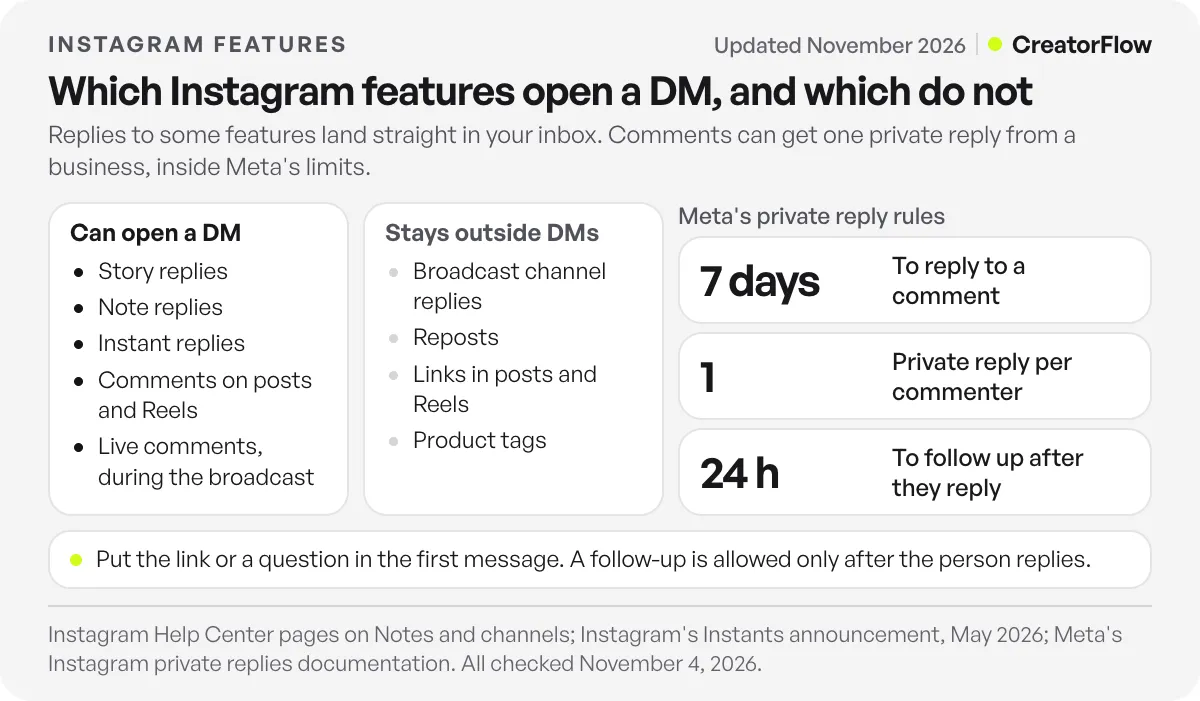
The private reply rule. Meta’s private replies documentation says a business can send a private reply within 7 days of a comment. Only one message can be sent to the commenter. Follow-up messages are allowed only if the person responds, and must be sent within 24 hours of that response. In practice, put the link in the first message, or ask a question so the reply opens the conversation.
Frequently asked questions. You can add up to four questions, each with an optional automated response, under Messages, then Tools, according to Instagram’s Help Center. People see them when they start a chat with you.
The professional inbox. Professional accounts sort messages into Primary, General and Requests. Saved replies turn a message you send often into a keyboard shortcut, as Instagram’s professional inbox page describes.
Creator AI. Where Meta’s AI Studio is available, a creator can set up an AI that answers common DM questions and story replies. Its replies are labelled as AI, and you can turn it off or choose who it replies to.
CreatorFlow covers the comment and Story side of this job. When someone comments a keyword on a post or Reel, replies to a Story, or sends a keyword in DMs, CreatorFlow sends your message through Meta’s official API, and it is a Meta Tech Provider (since December 2025). You write one message per trigger, so the link or the question goes in first, which matches Meta’s one-reply rule. See how comment-to-DM works on the main site.
Features that help you sell and see what worked
Instagram’s selling features are product tags, clickable links in posts and Reels on paid Meta One plans, partnership ads and creator programs like Subscriptions and Gifts. Its measuring features are Insights, Trial Reel results and the Edits assistant. The April 2026 Insights update added share rate, skip rate and views over time for posts and Reels.
Product tags. “Add products” lets you tag shopping products or affiliate products from a catalog on Meta. Meta’s help page says those product and affiliate links don’t count toward the Meta One link limit.
Links in posts and Reels. Meta One Advanced allows clickable links on 4 posts and 4 Reels a month. Expert allows 8 of each, and Max allows 12 of each. The allowance resets on your renewal date, unused links don’t carry over, and you can’t edit a link after you share the post.
Creator programs. Subscriptions, Gifts, Creator Marketplace and partnership ads each have their own entry rules. Our guide to Instagram monetization requirements lists the requirements for each program.
Insights. Social Media Today reports that the April 2026 redesign added share rate, skip rate and views over time to individual posts and Reels. Skip rate is the percentage of views where people skip a Reel within its first 3 seconds, so it tells you whether your opening works. Collab posts, Trial Reels, cross-posted content and paid promotions are left out of the new layout.
The Edits assistant. Announced September 30, 2026, it reads your follows, views, retention, likes and shares, and answers questions about them. TechCrunch reports it has a usage limit, with more use on a Meta One plan.
A sale on Instagram usually needs two things. One feature gets the click or the reply, and one number tells you which post produced it.
Which Instagram features cost money?
Most of the app is free. The paid features sit in two places. Instagram Plus costs $3.99 a month and adds extras for Stories. Meta One plans for creators and businesses cost $14.99 to $499 a month and add a verified badge, clickable links in posts, longer scheduling, deeper insights and shared account access. Prices can vary by region. To apply for the badge on its own, follow the guide to getting verified on Instagram.
| Plan | Price per month | What it adds on Instagram |
|---|---|---|
| Free | $0 | Every feature in this guide outside this table; scheduling up to 25 posts a day, 30 days ahead |
| Instagram Plus | $3.99 | Spotlight a Story once a week, keep a Story up for 24 extra hours, preview a Story without appearing as a viewer |
| Meta One Essential | $14.99 | Link page with up to 20 links, verified badge, impersonation protection, Instagram Plus |
| Meta One Advanced | $49.99 | Links on 4 posts and 4 Reels a month, scheduling posts and Reels up to a year ahead and Stories a month ahead, competitive insights, insights past 90 days with CSV export, shared access for 4 people, one human support case a month |
| Meta One Expert | $149 | Links on 8 posts and 8 Reels a month, more shared access, option to request a support call |
| Meta One Max | $499 | Links on 12 posts and 12 Reels a month, the highest limits |
Plan details come from Instagram’s Meta One creator plans page and Meta’s link allowance help page, checked November 4, 2026. Instagram Plus extras come from The Verge. Free scheduling limits come from Instagram’s scheduling help page.
Plans are priced per profile, so an Instagram account and a Facebook Page need a plan each. Meta says current Meta Verified subscribers see no change for now while it works on moving them to Meta One. If you are weighing the badge alone, read our breakdown of whether Meta Verified is worth paying for.
Hidden Instagram features worth turning on
Some of the most useful tools sit behind a long press or a settings menu. These eight save time every week, and all of them are free.
Schedule a DM. Type a message, hold the send button and pick a date and time. Instagram’s February 2025 DM update covers scheduling, message translation and pinning up to three messages in a chat.
Edit a sent message. You have 15 minutes to fix a typo, per Instagram’s 2024 messaging update. Press and hold the message, then tap Edit.
Pin chats. Swipe left or press and hold a chat, then tap Pin to keep up to three chats at the top of your inbox.
Reorder your grid. Press and hold any post on your profile, pick “Reorder grid”, then drag posts where you want them. Changes save at once and every visitor sees them, as Instagram explained to Social Media Today.
Replace the music on an old post. Replace Audio swaps the track on a published feed post or carousel and keeps its likes, comments, shares and reach.
Tune Your Algorithm. Tap the icon with two lines and hearts at the top right of Reels or Explore. You can see your top topics and add or remove them.
Share Trial Reels automatically. In Trial settings, turn on “Share to everyone automatically” so a strong test goes to your followers without a second step.
Use saved replies. On a professional account, press and hold a message you sent, tap More, then Save, and give it a shortcut. Typing the shortcut fills in the full reply.
FAQ
What are the newest Instagram features?
The newest additions are Features, a 90-minute video test that expanded to a small group of US creators on October 26, 2026, and the Edits assistant from September 30, 2026. Before those came Meta One plans on September 15, tagged posts on your grid on September 10, Replace Audio on July 21 and Instants on May 13.
What are the main features of Instagram?
The main features of Instagram are Reels, Stories, feed posts and carousels, Live, DMs, Notes, broadcast channels, collab posts, reposts, product tags and Insights. All of them are free. Insights and some messaging tools need a professional account.
Which Instagram features need a professional account?
Insights, frequently asked questions in DMs, saved replies and the Primary and General inbox folders need a professional account. Trial Reels work on personal accounts too, but a personal account needs 1,000 followers against 200 for a professional one. Broadcast channels need a public account with more than 1,000 followers.
Can you add clickable links to Instagram posts?
Yes, on a paid plan. Meta One Advanced at $49.99 a month allows links on 4 posts and 4 Reels each month, and higher plans allow more. On a free account, put links in your bio, in a Story link sticker or in a DM.
Can you schedule Instagram posts without another app?
Yes. Public accounts can schedule up to 25 posts a day, up to 30 days ahead, from the Instagram app. Meta One Advanced extends this to a year for posts and Reels and a month for Stories. Product tags and collab posts can’t be scheduled yet.
What is Instagram Instants?
Instants is a way to share casual photos with Close Friends or mutuals. You add a caption first, can’t edit the photo, and it disappears after your friends view it. Replies go to your DMs. It launched globally on May 13, 2026, with a separate Instants app in select countries.
Does Meta One increase your reach on Instagram?
Meta’s plan page lists “appear ahead in search results” for Meta One Advanced and higher. It does not promise more reach for your posts or Reels. Treat search placement as the benefit you are paying for.
Sources and checks
Features and limits checked on November 4, 2026 on Instagram’s Help Center (Reels, Trial Reels, scheduling, Notes, channels, collab posts, frequently asked questions, professional inbox), Instagram’s announcements on Instants (May 2026), Your Algorithm (updated June 10, 2026), reposts and the map (August 2025), DMs (February 2025) and Instagram for TV, the Meta One creator plans page (September 15, 2026), Meta’s link allowance help page, private replies documentation and AI Studio announcement (July 2024, updated August 2026). Reporting from TechCrunch, Social Media Today and The Verge is linked where it is used, all 2026. Meta says plans, pricing and availability vary by region, app and account, and features in testing may change.